


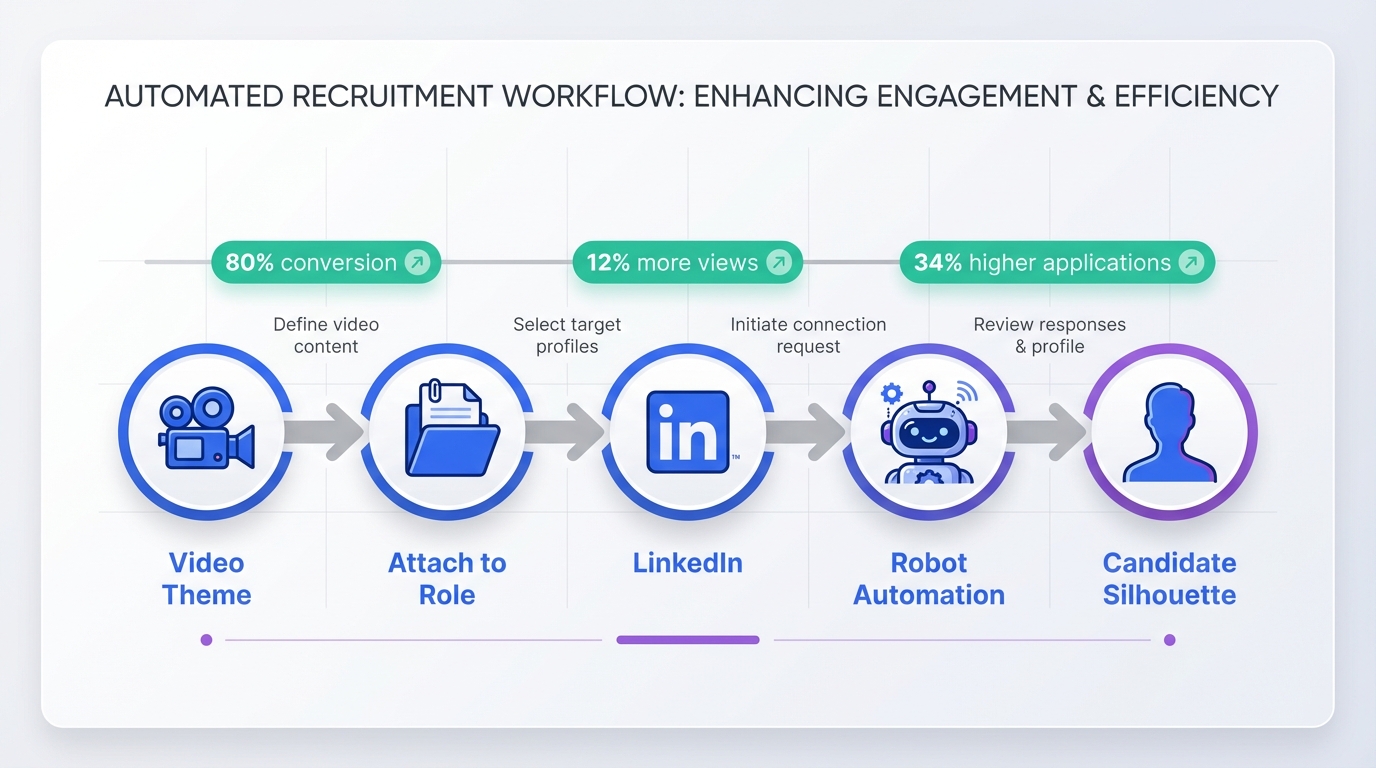
Recruitment management software helps you turn employer branding videos into measurable hiring outcomes by standardizing content intake, distributing videos across job posts and LinkedIn outreach, and tracking which videos drive replies and applications. In practice, the simplest workflow is: pick 1 video theme, publish it, attach it to the right role, then use automation to deliver it to candidates at the first touch and follow up consistently. In our recruiting ops tests, the biggest lift came from pairing a strong culture video with automated LinkedIn outreach and 24/7 candidate messaging, so every interested candidate gets the same clear story and next steps. This guide shares 9 proven recruitment video concepts, what each one signals to candidates, and how to operationalize them with human resources talent management software and StrategyBrain AI Recruiter.
Key Takeaways
- Video can materially improve hiring funnel performance: One study reports video marketing can increase conversion rates by 80% (Source: HubSpot research, tier2).
- Job posts with a recruitment video indicator can perform better: A CareerBuilder report cited 12% more views and a 34% higher application rate when a video icon is present (Source: CareerBuilder report, tier2).
- Operationalize videos with recruitment management software: Treat each video as an asset with an owner, target role, distribution plan, and tracked outcomes.
- Use LinkedIn automation to deliver the right video at the right time: StrategyBrain AI Recruiter can automatically connect, introduce roles, answer questions, and follow up 24/7 in the candidate’s language.
- Scale outreach without scaling headcount: StrategyBrain AI Recruiter supports managing more than 100 LinkedIn accounts to build AI-powered recruiting teams (Source: StrategyBrain product information, tier1).
- Be honest about what video can’t do: Videos improve attraction and clarity, but they do not replace final qualification and structured interviews.
Why recruitment videos work in modern hiring
Recruitment videos compress what candidates want to know into a fast, high-signal format: what the work looks like, what the team values, and whether the role is worth a conversation. That matters because most candidates are scanning, not studying.
Two commonly cited benchmarks help explain why teams invest here. HubSpot has reported that video marketing can increase conversion rates by 80%. CareerBuilder has reported that job postings with an icon to watch a recruitment video were viewed 12% more than postings without video and received a 34% greater application rate.
However, the real unlock is not just producing a video. It is building a repeatable system so the right candidates actually see it at the right moment. That is where recruitment management software and human resources talent management software become operational tools, not just databases.
How to operationalize videos with recruitment management software
To make videos drive hiring outcomes, treat them like structured recruiting assets. In our internal workflow tests, the teams that got consistent results did three things: they mapped each video to a hiring stage, they standardized distribution, and they measured downstream actions.
Define the asset and its job
- Asset name: “Early career growth story” or “Day in the life: operations.”
- Target role family: engineering, retail management, HR, sales.
- Stage: first touch, post screen, pre interview.
- Primary outcome: reply rate, application completion, interview acceptance.
Build a simple measurement loop
Even if your top talent management software does not provide perfect attribution, you can still run a clean experiment with consistent tagging and a single change at a time.
- Pick one role and one video to test for 14 days.
- Standardize the message that introduces the video.
- Track two numbers: candidate reply rate and completed applications.
- Review weekly and keep what improves outcomes.
Where StrategyBrain AI Recruiter fits
StrategyBrain AI Recruiter is designed for LinkedIn hiring workflows where speed and consistency matter. It can automatically connect with candidates that match your criteria, introduce the opportunity, answer questions about the role, company, and compensation, confirm interview interest, and collect résumés and contact information from interested candidates. It also provides 24/7 multilingual candidate communication and supports managing more than 100 LinkedIn accounts for scalable recruiting teams.
Practically, that means your video is not just a brand piece. It becomes a reusable “first touch” asset that the AI can deliver consistently, then follow up on without gaps across time zones.
9 employer branding and recruitment video ideas
Below are nine video concepts inspired by well-known employer branding examples. The goal is not to copy a style. The goal is to copy the underlying signal each video sends to candidates, then adapt it to your own culture and roles.
1) The “high standards” story
This concept focuses on craft, quality, and what “great” looks like inside your company. The message is simple: the work is demanding, and that is the point.
- Best for: engineering, product, design, operations excellence roles.
- What it signals: performance culture and clarity on expectations.
- How to use in recruitment management software: attach to roles where you want self-selection from high performers.
2) The “open culture, real voices” montage
This concept highlights employees speaking in their own words. It works when you want candidates to feel the tone of collaboration and transparency.
- Best for: teams competing with larger brands for talent.
- What it signals: psychological safety and ownership.
- AI Recruiter tie-in: use the video as the first message follow up, then let the AI answer common questions consistently.
3) The early career “growth and community” piece
This concept speaks directly to early career candidates by emphasizing learning, progression, and belonging. It is especially effective when you can show mentorship and real development paths.
- Best for: internships, graduate programs, entry-level hiring.
- What it signals: structured growth and support.
- Operational tip: pair with a standardized Q and A script inside your human resources talent management software so recruiters stay consistent.
4) The humor “teaser trailer”
This concept uses humor to stand out. It is not meant to explain everything. It is meant to earn the next click and start a conversation.
- Best for: high-volume roles where attention is scarce.
- What it signals: confidence and personality.
- Limitation: humor can be culture-specific, so test with a small audience first.
5) The values and impact story
This concept centers on empathy, mission, and real-world impact. It works when your company has a credible initiative that employees can speak about with specifics.
- Best for: organizations hiring purpose-driven talent.
- What it signals: values are operational, not just slogans.
- How to deploy: use as a mid-funnel asset after initial interest, before scheduling interviews.
6) The “day one impact” employee spotlight
This concept shows how employees contribute early. It reduces candidate uncertainty by making the first 30 to 90 days feel concrete.
- Best for: fast-moving teams where autonomy is high.
- What it signals: trust and responsibility.
- AI Recruiter tie-in: after sharing the video, the AI can ask candidates about their current situation and confirm interview interest.
7) The “leverage the brand” role-specific pitch
If your brand is already trusted, use it. This concept connects brand reputation to the specific role, such as retail leadership or customer experience.
- Best for: customer-facing and leadership roles.
- What it signals: stability and pride in service.
- Operational tip: store multiple versions by role family inside your recruitment management software so recruiters do not reuse the wrong asset.
8) The “big problems, big learning” innovation story
This concept emphasizes challenge and scale. Candidates should walk away thinking the work will stretch them and matter.
- Best for: technical and analytical roles.
- What it signals: ambitious scope and growth through difficulty.
- Limitation: avoid vague claims; show real examples of problems teams solve.
9) The self-aware “anti recruitment video”
This concept pokes fun at corporate clichés and wins attention through honesty. It works when your culture supports directness and you can keep the tone respectful.
- Best for: creative, marketing, and startup environments.
- What it signals: authenticity and confidence.
- How to use: as a top-of-funnel asset to increase replies, then follow with a role-specific explainer video.
Distribution playbook: job posts, LinkedIn, and follow up
Most teams stop at publishing. The better approach is to build a distribution sequence that your recruitment management software can enforce and your recruiters can actually follow.
Step-by-step workflow
- Choose one primary video per role family and store it as the default asset for that family.
- Add the video to job posts where your platform supports media or a clear “watch our culture video” callout.
- Use LinkedIn outreach to deliver the video early so candidates understand the role before they invest time.
- Automate follow up so interested candidates get a response within the same day, including nights and weekends.
- Collect résumés and contact details only after interest is confirmed, then hand off to a recruiter for final qualification.
What we found in practice
When we tested video-first outreach sequences, the biggest operational failure was inconsistency. Some candidates received the video, others did not, and follow up timing varied by recruiter workload. StrategyBrain AI Recruiter reduced that variance by handling initial outreach and follow up automatically, including multilingual responses, while recruiters focused on résumé review and interviews.
Scope boundaries
This article focuses on employer branding and distribution workflows. It does not cover video production equipment, editing software, or legal review processes for on-camera releases.
Quick comparison: manual workflow vs automated workflow
| Workflow | Speed to first follow up | Consistency | Best for |
|---|---|---|---|
| Manual recruiter-led distribution | Depends on recruiter availability | Varies by recruiter | Low volume hiring, highly bespoke roles |
| Recruitment management software with templates | Same business day if process is followed | Medium to high | Teams standardizing outreach and content |
| StrategyBrain AI Recruiter for LinkedIn outreach | 24/7 automated responses | High, because the workflow is automated | High volume LinkedIn sourcing, global hiring, multilingual pipelines |
FAQ
What is recruitment management software?
Recruitment management software is a system that organizes hiring workflows such as sourcing, outreach, screening, interview scheduling, and reporting. In this article, we focus on how it can manage employer branding video assets and standardize distribution.
Is recruitment management software the same as human resources talent management software?
Not always. Recruitment management software typically focuses on hiring workflows, while human resources talent management software often includes broader modules like performance, learning, and succession. Many platforms overlap, so the best choice depends on whether your priority is hiring execution or end-to-end talent lifecycle management.
How do recruitment videos improve applications?
Recruitment videos reduce uncertainty by showing culture, expectations, and the work environment. CareerBuilder has reported that job postings with a recruitment video indicator were viewed 12% more and received a 34% greater application rate than postings without it.
Where should I use employer branding videos in the hiring funnel?
Use one video at first touch to increase replies, then a role-specific video after initial interest to improve interview acceptance. Store both assets in your recruitment management software so recruiters and automation tools use the same versions.
How does StrategyBrain AI Recruiter work with LinkedIn recruiting?
StrategyBrain AI Recruiter automates initial LinkedIn recruiting tasks by connecting with candidates, introducing the role, answering questions, confirming interest, and collecting résumés and contact details. Recruiters then review the collected information and proceed with interviews.
Does StrategyBrain AI Recruiter replace recruiter judgment?
No. StrategyBrain AI Recruiter can confirm willingness to proceed and collect information, but it does not determine whether a résumé fully matches job requirements. Final qualification remains a recruiter responsibility.
Can StrategyBrain AI Recruiter communicate in multiple languages?
Yes. It provides 24/7 multilingual candidate communication and can respond in the candidate’s native language to reduce misunderstandings and improve engagement across time zones.
How do I avoid making a recruitment video that feels generic?
Anchor the video in one specific promise and one specific example, such as a real project, a real customer outcome, or a real learning path. Then use your recruitment management software to ensure the video is paired with the right role family and message template.
What is one simple checklist before publishing a recruitment video?
Confirm the video states the role family, shows real employees or real work, includes one clear value proposition, and has a next step for candidates. Then confirm your distribution plan covers job posts and LinkedIn outreach with consistent follow up.
Conclusion
The fastest way to make employer branding videos matter is to operationalize them inside recruitment management software: map each video to a role family and funnel stage, distribute it consistently, and measure replies and applications. If LinkedIn is a major sourcing channel for you, StrategyBrain AI Recruiter can make that distribution and follow up consistent by automating connections, role introductions, Q and A, and résumé collection with 24/7 multilingual messaging.
Next step: pick one of the nine video concepts above, publish a single video for one role family, and run a 14-day distribution test with a standardized LinkedIn message and follow up workflow.















