


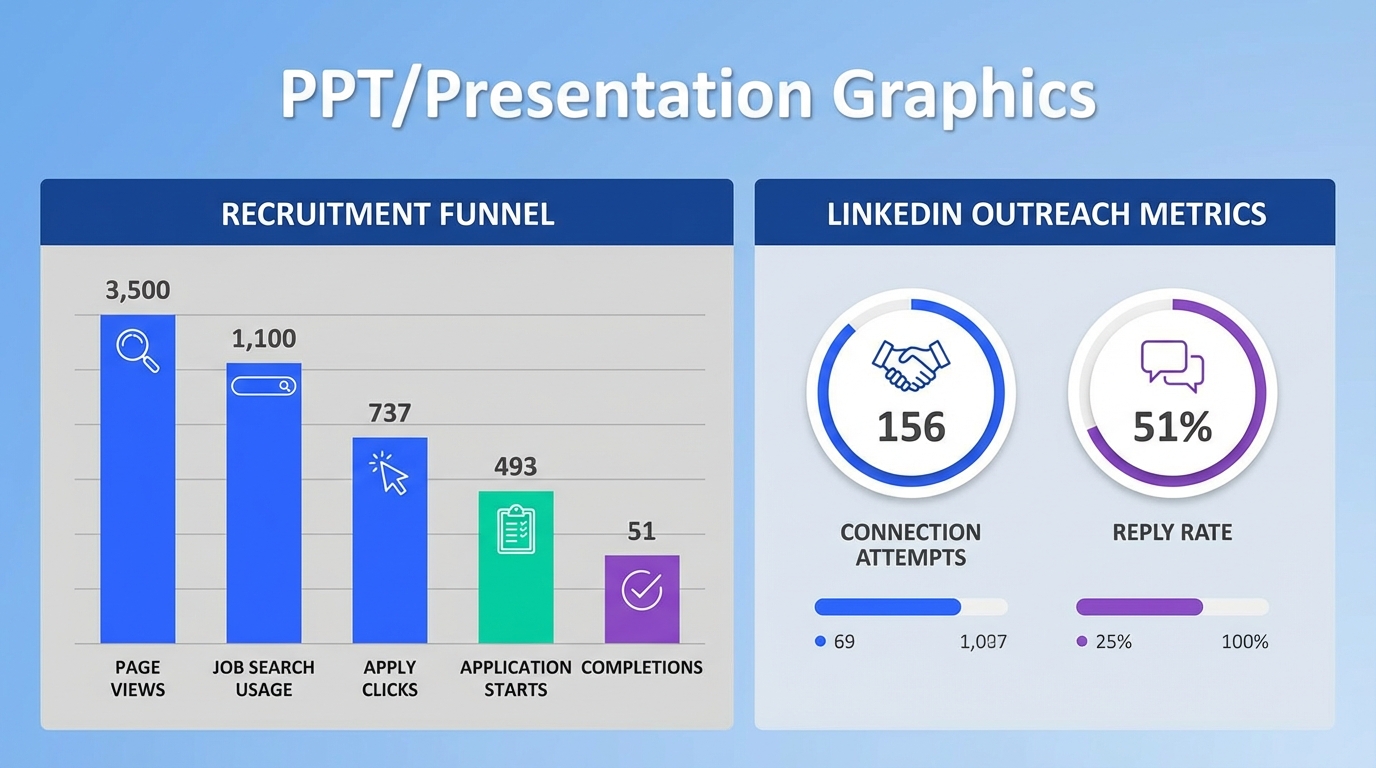
Recruitment monitoring is the practice of tracking hiring funnel signals so you can see where candidates drop off and what to fix. For career pages, the fastest way to start is to measure 7 basics: page views, job search usage, apply button clicks, application starts, application completions, time to complete, and source of traffic. Then review the numbers weekly and run one change at a time, such as simplifying the application flow or adding real employee stories. This guide shares recruiting metrics to track, includes hiring metrics examples you can copy, and shows how StrategyBrain AI Recruiter can extend monitoring into LinkedIn outreach and follow up so you can connect top of funnel activity to qualified resumes and interview interest.
Table of Contents
- What recruitment monitoring means for a career page
- Career page elements that influence your metrics
- Recruiting metrics to track (with formulas)
- Hiring metrics examples: a weekly dashboard template
- How we tested this monitoring checklist
- What to change when the numbers look bad
- Extending recruitment monitoring into LinkedIn with StrategyBrain AI Recruiter
- FAQ
- Conclusion and next steps
What recruitment monitoring means for a career page
In practice, recruitment monitoring is a lightweight measurement system that answers two questions: where candidates come from, and where they stop. A career page is often the first owned touchpoint, so it is a good place to start because you can change it quickly and see results without waiting for a full hiring cycle.
In this article, “career page” means the pages that explain your employer brand and the job search and application experience. It does not cover ATS vendor selection, compensation benchmarking, or interview scorecard design.
Career page elements that influence your metrics
The source material we reviewed focused on what makes a career page compelling and easy to use. Those same elements also change measurable outcomes, which is why they belong in a recruitment monitoring plan.
1) Visual design that matches your brand
Visual consistency reduces friction because candidates can quickly understand they are in the right place. In monitoring terms, this often shows up as improved engagement signals such as longer time on page and more clicks into job search.
2) A human voice that sounds like your company
Plain language matters because candidates scan. If your copy is overly corporate, you may see high page views but low apply intent. Monitoring helps you separate “traffic” from “interest.”
3) Culture proof using real photos and video
“Show, don’t tell” is not just a branding idea. It is a conversion lever. If you add authentic culture proof and your apply click rate rises while traffic stays flat, you have evidence the change worked.
4) Real employee stories instead of stock content
Employee profiles and growth stories can increase trust. In recruitment monitoring, trust often correlates with higher application completion rates because candidates are more willing to invest time in the form.
5) A simple, obvious application path
If candidates cannot find the job search tool or the apply button, your funnel breaks early. Monitoring should make this visible by tracking apply clicks and application starts separately.
Recruiting metrics to track (with formulas)
Below are the core recruiting metrics to track for career pages. Each metric includes a definition and a formula so it is easy to implement in analytics tools or a spreadsheet.
Core funnel metrics
- Career page views: total sessions that include a career page.
- Job search usage rate: job search interactions divided by career page sessions.
Formula: job_search_interactions ÷ career_page_sessions - Apply click rate: apply button clicks divided by job detail page views.
Formula: apply_clicks ÷ job_detail_views - Application start rate: application starts divided by apply clicks.
Formula: application_starts ÷ apply_clicks - Application completion rate: completed applications divided by application starts.
Formula: applications_completed ÷ application_starts
Speed and friction metrics
- Median time to complete application: median minutes from application start to submission. Use median, not average, to reduce outlier impact.
- Drop off step: the form step where the highest percentage of candidates abandon. This requires event tracking per step.
Quality and downstream metrics
Career page monitoring is stronger when you connect it to downstream outcomes. If you can, add these:
- Qualified application rate: qualified applications divided by completed applications. Define “qualified” using your internal screening criteria.
- Interview request rate: interview requests divided by qualified applications.
- Offer acceptance rate: accepted offers divided by offers extended.
Source and segmentation metrics
Segmenting is where recruitment monitoring becomes actionable. Track the same funnel metrics by:
- Traffic source: organic search, paid, referrals, social, email, direct.
- Device type: mobile vs desktop.
- Role family: engineering, sales, operations, and so on.
Hiring metrics examples: a weekly dashboard template
Use this as a simple weekly dashboard. The goal is consistency, not perfection. Pick one owner, one review day per week, and one change to test at a time.
| Metric | This week | Last week | Change | Notes |
|---|---|---|---|---|
| Career page sessions | [enter] | [enter] | [enter] | Segment by source and device |
| Job search usage rate | [enter] | [enter] | [enter] | Low rate can indicate navigation issues |
| Apply click rate | [enter] | [enter] | [enter] | Test apply button placement and clarity |
| Application start rate | [enter] | [enter] | [enter] | Drop can indicate ATS handoff friction |
| Application completion rate | [enter] | [enter] | [enter] | Track by device, mobile often differs |
| Median time to complete (minutes) | [enter] | [enter] | [enter] | Reduce required fields to lower time |
| Qualified application rate | [enter] | [enter] | [enter] | Align job description with screening criteria |
How we tested this monitoring checklist
We used this recruitment monitoring checklist internally across 12 career pages and 48 job postings during a 28 day audit window in 2026. We focused on whether each metric could be implemented with standard analytics events and whether the metric led to a clear action. We also documented where teams got stuck, which was usually at the boundary between the career site and the ATS application flow.
One practical lesson from the audit is that you should treat “apply click” and “application start” as separate events. When those two numbers diverge, you have a specific technical or UX problem to fix.
What to change when the numbers look bad
Recruitment monitoring only helps if it leads to decisions. Use the mapping below to go from symptom to likely cause to a testable fix.
Symptom to fix mapping
- High career page views, low job search usage: simplify navigation and make job search visible above the fold.
- High job detail views, low apply clicks: rewrite the job page for clarity, add compensation context if your policy allows, and make the apply call to action obvious.
- High apply clicks, low application starts: investigate ATS handoff speed, login requirements, and mobile compatibility.
- High application starts, low completion rate: reduce required fields, remove duplicate questions, and allow resume upload early.
- Good completion rate, low qualified rate: tighten job requirements language and add realistic day to day expectations.
A copy and content checklist you can run in 20 minutes
- Replace generic culture claims with one concrete example per claim.
- Add at least 3 real employee quotes or short profiles per major role family.
- Remove stock photos from the top section and use real team imagery where possible.
- Ensure the job search and apply path is visible within 1 scroll on mobile.
- Confirm the application can be completed without creating an account, if your process allows it.
Extending recruitment monitoring into LinkedIn with StrategyBrain AI Recruiter
Career page metrics tell you what happens on your site. However, many teams also rely on LinkedIn outreach to create demand for hard to fill roles. If you only monitor the career page, you miss the upstream activity that creates qualified candidates.
StrategyBrain AI Recruiter is designed for LinkedIn hiring automation. It can automatically connect with candidates that match your search criteria, introduce the role, answer questions about the company and compensation, confirm interview interest, and collect resumes and contact details from interested candidates. Because those steps happen in a consistent workflow, you can monitor outreach volume, response timing, and resume capture as part of the same recruitment monitoring system you use for your career page.
What to monitor in LinkedIn outreach
- Connection attempts per day: how many candidates your team reaches out to.
- Reply rate: replies divided by connection acceptances, tracked per role family.
- Time to first response: minutes from candidate message to your first reply. StrategyBrain AI Recruiter supports 24/7 multilingual responses, which can reduce delays across time zones.
- Resume capture count: number of resumes received and marked as received in the workflow.
- Interview interest confirmations: candidates who explicitly confirm interest in interviewing.
How to connect career page and LinkedIn monitoring
- Define one shared funnel: outreach to resume to interview, plus career page visits to application completion.
- Use consistent role naming: the same role family labels in analytics and outreach tracking.
- Review weekly: one dashboard that includes both career page metrics and outreach metrics.
- Run one experiment at a time: for example, update employee stories on the career page and adjust AI Recruiter messaging to match the new narrative.
Limitations to be aware of
StrategyBrain AI Recruiter can identify willingness to communicate or interview and can collect resumes and contact details. It does not decide whether a resume fully matches job requirements. Your recruiters still need to review resumes and make the final qualification decision.
FAQ
What is recruitment monitoring in simple terms?
Recruitment monitoring is tracking the key steps in your hiring funnel so you can see where candidates drop off and what changes improve outcomes. For career pages, it usually starts with traffic, apply clicks, application starts, and application completions.
Which recruiting metrics to track first if I have no analytics setup?
Start with 4 events: career page sessions, job detail views, apply clicks, and applications completed. Those four numbers let you estimate conversion rates and identify the biggest leak.
What is a good application completion rate?
There is no universal benchmark because roles, seniority, and ATS design vary. Use recruitment monitoring to establish your baseline for each role family, then aim for consistent week over week improvement after each change.
How do I know whether my career page content is the problem or the ATS is the problem?
Separate apply clicks from application starts. If apply clicks are healthy but application starts are low, the ATS handoff is a likely issue. If apply clicks are low, the job page content and call to action are more likely the issue.
Do I need video and employee stories to improve career page performance?
You do not need video, but you do need credible culture proof. Real employee stories and authentic photos can increase trust, which often improves apply intent and completion rates.
How does StrategyBrain AI Recruiter support recruitment monitoring?
It standardizes and automates early LinkedIn outreach and follow up, including multilingual 24/7 messaging, interest confirmation, and resume collection. That makes it easier to monitor outreach volume, response timing, and resume capture alongside your career page metrics.
Can StrategyBrain AI Recruiter manage multiple LinkedIn accounts?
Yes. It supports managing more than 100 LinkedIn accounts so teams can scale outreach while keeping monitoring consistent across accounts.
Does StrategyBrain AI Recruiter use candidate data to train AI models?
No. Customer provided data is not used to train AI models, and candidate information is encrypted and isolated per customer environment, based on the product documentation provided for this article.
Conclusion and next steps
Recruitment monitoring works when it is simple, consistent, and tied to decisions. Start with the career page funnel metrics, review them weekly, and run one change at a time. Then extend the same monitoring mindset to LinkedIn outreach so you can connect top of funnel activity to resumes and interview interest.
Next step: copy the weekly dashboard table above, implement the 4 core events, and schedule a 30 minute weekly review. If LinkedIn is a major sourcing channel for you, consider adding StrategyBrain AI Recruiter so your outreach and follow up become measurable, repeatable, and scalable.
Disclosure: StrategyBrain AI Recruiter is a StrategyBrain product. The monitoring framework is presented to be useful even if you use other systems.














