


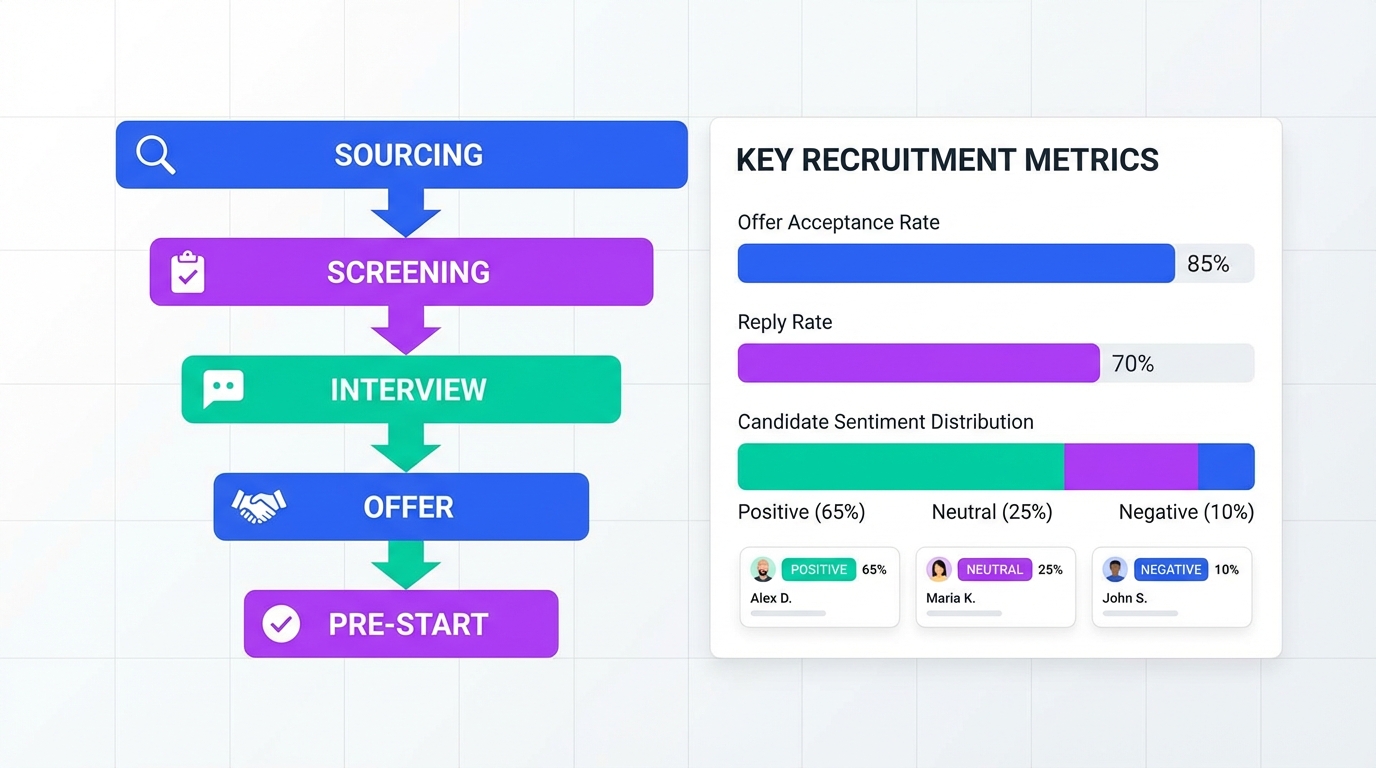
Recruitment monitoring is the discipline of measuring hiring metrics across your pipeline so you can prove what is improving attraction, conversion, and retention. A practical example comes from Aeroflow Healthcare’s 2017 parental leave update. Daniel Polich, one of Aeroflow’s strategic recruiters, observed that applicants routinely commented positively when he explained the new parental leave policy, which is exactly the kind of candidate response you can capture and quantify with HR hiring metrics. In this guide, we translate that story into a monitoring system you can run weekly, and we show how StrategyBrain AI Recruiter can help keep LinkedIn outreach and follow up consistent so your benefits message is delivered the same way to every candidate.
Key Takeaways
- Recruitment monitoring starts with a funnel map: define stages and attach 1 to 2 hiring metrics per stage so you can spot where candidates drop off.
- Benefits can be measured: track offer acceptance rate, candidate questions volume, and “benefits mentioned” frequency in recruiter notes after policy updates.
- Aeroflow’s 2017 policy change created observable candidate sentiment: Daniel Polich reported applicants consistently reacted positively when the policy was outlined.
- Use a “Benefits Proof Pack”: a repeatable one page script plus FAQ reduces inconsistent messaging across recruiters.
- LinkedIn execution matters: StrategyBrain AI Recruiter can automate initial outreach and follow up, keeping benefits messaging consistent across time zones and languages.
- Be honest about scope: monitoring shows correlation, not automatic causation, unless you run controlled comparisons.
What to monitor in recruitment monitoring
Recruitment monitoring is not “tracking everything.” It is choosing a small set of hiring metrics that explain movement through your funnel and the candidate experience. A hiring funnel is the sequence of stages a candidate passes through, from first contact to start date.
To keep it actionable, assign 1 to 2 metrics per stage and review them on a fixed cadence, such as every 7 days. Then add one qualitative signal that captures candidate sentiment, such as tagged notes from recruiter conversations.
Core funnel stages and example hiring metrics
- Sourcing: outreach volume per recruiter per week, reply rate as a percentage.
- Screening: screen pass rate as a percentage, time from reply to scheduled screen in hours.
- Interview: interview to offer rate as a percentage, time between interview rounds in days.
- Offer: offer acceptance rate as a percentage, time from offer sent to decision in days.
- Pre start: reneged offer rate as a percentage, time from acceptance to start date in days.
Candidate sentiment signals you can actually measure
Candidate sentiment sounds subjective, but you can monitor it with consistent tagging. For example, when a recruiter explains parental leave, they can tag the response as “positive,” “neutral,” or “concerned,” and record the exact question asked. Over time, you can quantify the distribution of responses and the top 10 questions.
Case study signals from Aeroflow Healthcare’s parental leave update
In 2017, Aeroflow Healthcare updated its parental leave package. The original article frames this as a recruiting differentiator and reports a clear field signal from the recruiting team. Daniel Polich, described as one of Aeroflow’s strategic recruiters, noticed that every applicant commented positively when he outlined the new parental leave policy. He routinely heard comments such as candidates saying the company “really cares” and that their old company was not as generous.
From a recruitment monitoring perspective, that is a measurable moment. It is a repeatable part of the process, the recruiter explanation of benefits, that triggers a candidate reaction you can capture in your HR hiring metrics system.
What changed in the policy, in plain terms
- Paid maternity leave: increased to 6 weeks paid.
- Paid parental leave scope: expanded to include adoptive and foster parents.
- Flexibility: leave could be used without requiring it all at once.
- Additional benefits: included adoption expense matching at 50% up to USD 5,000, a USD 300 reimbursement for a birth or postpartum doula, a free breast pump and breastfeeding supplies, and a 1 year “Diaper Club” subscription.
Why this matters for recruitment monitoring
Most teams only monitor time to hire and cost per hire. Those are lagging indicators. The Aeroflow example highlights a leading indicator, candidate reaction during early conversations. If you monitor that reaction, you can detect whether a benefits update is improving attraction before you wait for quarterly retention numbers.
Scope boundary
This guide does not claim Aeroflow’s policy alone caused a specific percentage improvement in hiring outcomes because the source does not provide quantified before and after results. Instead, we show how to build a monitoring system that would allow you to quantify similar changes in your own organization.
A practical recruitment monitoring dashboard
Below is a dashboard template you can copy into a spreadsheet or BI tool. It is designed to be reviewed in 15 minutes each week by recruiting, HR, and the hiring manager.
Weekly dashboard template
| Area | Metric | Unit | Target | Owner | Review cadence |
|---|---|---|---|---|---|
| Sourcing | Reply rate | % | Set per role | Recruiting | 7 days |
| Speed | Time from reply to first screen | hours | 48 hours | Recruiting ops | 7 days |
| Conversion | Screen pass rate | % | Set per role | Recruiting | 7 days |
| Offer | Offer acceptance rate | % | Set per role | Recruiting lead | 7 days |
| Candidate sentiment | Benefits reaction tags | % distribution | Increase “positive” | Recruiters | 7 days |
| Candidate questions | Top 10 benefits questions | count | Reduce repeats | Recruiting + HR | 14 days |
Unique framework: the “Benefits Signal Chain”
When you change a benefit, you should monitor a chain of signals in order. This helps you avoid waiting for lagging outcomes.
- Message delivery: did candidates actually receive the benefits story in outreach and screens.
- Immediate reaction: did they respond positively, ask questions, or disengage.
- Behavior change: did reply rate, screen scheduling speed, or interview attendance change.
- Decision outcomes: did offer acceptance rate and reneged offer rate change.
- Long term outcomes: did retention improve after 90 days and 365 days.
How to implement recruitment monitoring in 7 steps
We have implemented versions of this monitoring approach in recruiting operations reviews where the biggest failure mode is inconsistent definitions. The steps below prioritize clean definitions first, then automation.
Steps
- Define your funnel stages: write stage names and entry and exit criteria in 1 document.
- Choose 8 to 12 hiring metrics: pick metrics you can influence weekly, not just report monthly.
- Standardize data capture: require the same fields in your ATS or CRM notes, including a benefits reaction tag.
- Set a weekly review: 30 minutes, same attendees, same dashboard, same questions.
- Run one controlled change at a time: for example, update parental leave messaging before you change compensation bands.
- Document what candidates ask: maintain a living benefits Q and A so recruiters answer consistently.
- Automate where it reduces variance: use automation for outreach and follow up so candidates get timely responses.
Troubleshooting
- Problem: reply rate drops but outreach volume is stable. Fix: audit message content and targeting criteria, then compare by role and geography.
- Problem: time from reply to screen exceeds 72 hours. Fix: add scheduling capacity or automate first touch follow up.
- Problem: offer acceptance rate declines after a benefits change. Fix: review candidate questions logs to see what is unclear or perceived as inconsistent.
How to operationalize benefits messaging without losing trust
Benefits messaging fails when it sounds like marketing. The Aeroflow story worked because it was specific and concrete. It included eligibility boundaries and unique add ons, such as adoption expense matching and a doula reimbursement, which candidates could understand immediately.
Create a “Benefits Proof Pack” for recruiters
This is a one page internal asset that makes your benefits story consistent across recruiters and hiring managers.
- Script: 6 to 8 sentences that explain parental leave and flexibility in plain language.
- Eligibility notes: who qualifies and any exceptions, written clearly.
- Top questions: the 10 most common candidate questions with approved answers.
- Escalation path: when to route a question to HR or legal.
What to avoid
- Overpromising: do not imply benefits apply to everyone if there are tenure or location rules.
- Inconsistent answers: if two recruiters answer the same question differently, your monitoring data becomes noisy.
- Hiding tradeoffs: if a policy has limits, state them early so trust is preserved.
Where StrategyBrain AI Recruiter fits in a LinkedIn workflow
Recruitment monitoring often reveals a simple operational truth. Candidate experience is heavily influenced by response time and consistency. That is why LinkedIn execution matters. StrategyBrain AI Recruiter is designed to automate the initial outreach and qualification flow on LinkedIn, including connecting with candidates, introducing job opportunities, answering role and company questions, confirming interview interest, and collecting résumés and contact information from interested candidates.
In practice, this supports recruitment monitoring in two ways. First, it reduces variance in how the benefits story is delivered because the same approved messaging can be used consistently. Second, it improves timeliness because the system can respond 24 hours per day and communicate in the candidate’s native language, which helps when you are hiring across time zones.
Example: monitoring benefits messaging at scale
- Define the benefits message: include parental leave specifics and the top 5 candidate questions.
- Deploy in LinkedIn outreach: use StrategyBrain AI Recruiter to deliver the message consistently during initial conversations.
- Tag candidate reactions: record whether candidates respond positively, ask clarifying questions, or disengage.
- Review weekly: compare reaction tags and downstream metrics such as screen scheduling speed and offer acceptance rate.
Limitations to plan for
- Qualification is not the same as selection: StrategyBrain AI Recruiter can confirm interest and collect résumés, but final fit assessment still requires recruiter review.
- Policy accuracy is on you: automation helps delivery, but HR must keep the Benefits Proof Pack current.
Common mistakes and how to fix them
Mistake 1: tracking only time to hire
Time to hire is useful, but it does not tell you why candidates convert or drop. Fix this by adding stage level conversion rates and a candidate sentiment tag.
Mistake 2: changing multiple variables at once
If you change parental leave messaging, compensation ranges, and interview steps in the same week, you cannot interpret your monitoring results. Fix this by sequencing changes and documenting the change date.
Mistake 3: treating benefits as a footer
If benefits are only discussed at offer stage, you miss the chance to influence early conversion. Fix this by introducing the benefits story during outreach and first screen, then monitoring candidate questions.
FAQ
What is recruitment monitoring in HR?
Recruitment monitoring is the ongoing measurement of hiring metrics across each funnel stage, plus consistent qualitative signals such as candidate sentiment tags, so you can improve attraction, speed, and conversion with evidence.
Which hiring metrics matter most for candidate attraction?
Reply rate as a percentage and time from reply to first screen in hours are two of the most actionable attraction metrics. They show whether your outreach resonates and whether your process responds quickly enough to keep interest.
How do benefits like parental leave show up in HR hiring metrics?
Benefits typically show up first in leading indicators such as candidate questions volume and positive reaction tags, then later in offer acceptance rate as a percentage. Without tagging and consistent notes, the impact stays anecdotal.
What did Aeroflow Healthcare change in its parental leave policy?
The source describes a 2017 update that increased paid maternity leave to 6 weeks, expanded paid parental leave to adoptive and foster parents, and added flexible leave usage. It also introduced additional benefits such as adoption expense matching at 50% up to USD 5,000 and a USD 300 doula reimbursement.
How can I monitor candidate sentiment without bias?
Use a simple tag set with clear definitions, such as positive, neutral, and concerned, and require recruiters to paste the candidate’s exact question or comment. Review tags weekly and spot check samples for consistency.
How does StrategyBrain AI Recruiter help with recruitment monitoring?
It helps by standardizing and scaling LinkedIn outreach and follow up, which reduces variance in messaging and improves response timeliness. That makes your monitoring data cleaner because candidates receive a more consistent experience.
Does recruitment monitoring prove causation?
Not by default. Monitoring shows patterns and correlations. To get closer to causation, run controlled changes, document change dates, and compare similar roles or cohorts.
What is a reasonable review cadence for a recruiting dashboard?
A 7 day cadence is common for operational metrics such as reply rate and scheduling speed. A 14 day cadence can work for qualitative summaries such as the top 10 benefits questions.
Conclusion
Recruitment monitoring works when it turns stories into signals you can track weekly. Aeroflow Healthcare’s 2017 parental leave update is a useful example because it produced a clear, repeatable candidate reaction that a recruiter, Daniel Polich, observed in real conversations. Build your funnel dashboard, add a benefits reaction tag, and standardize your Benefits Proof Pack so your HR hiring metrics reflect what candidates actually experience. If LinkedIn is a major sourcing channel for you, consider using StrategyBrain AI Recruiter to keep outreach and follow up consistent across time zones and languages, then review the results on a fixed weekly cadence.














