


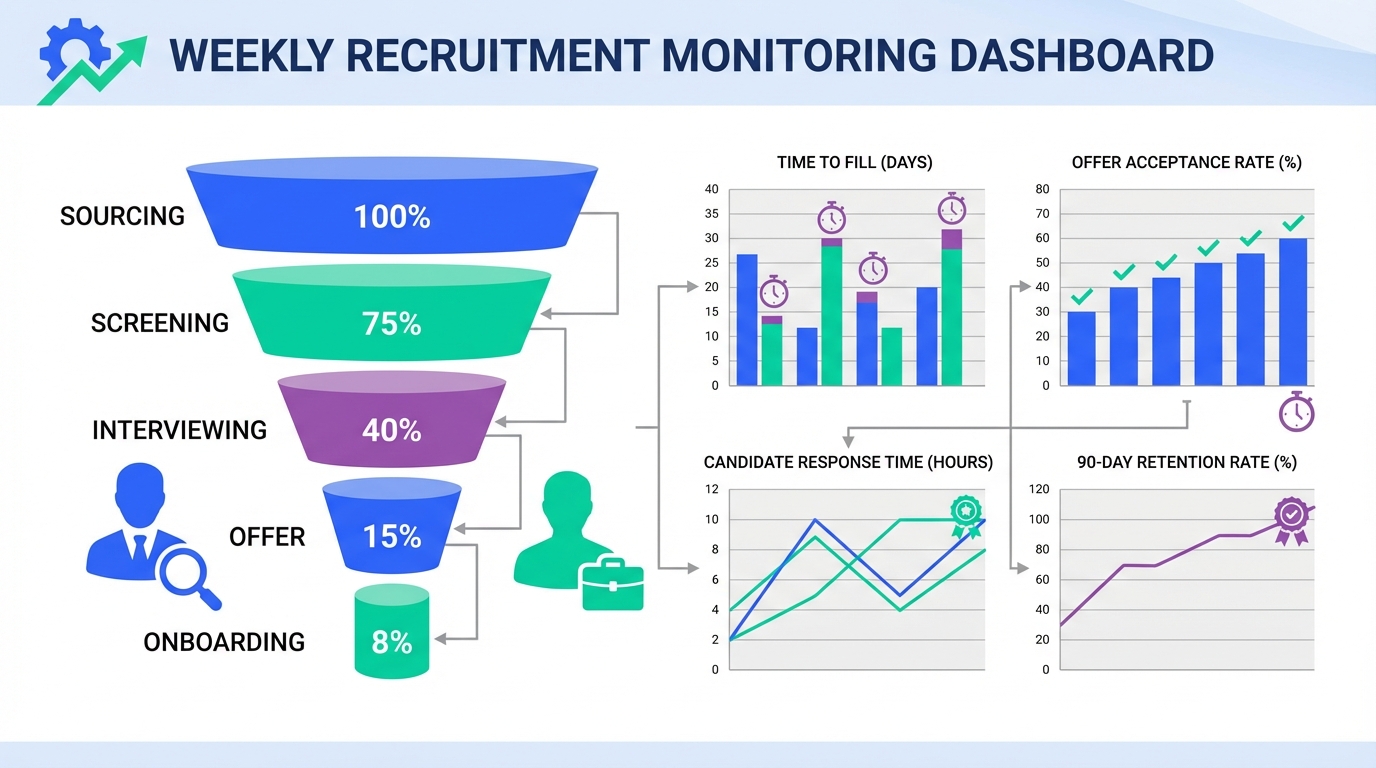
Recruitment monitoring is how you keep hiring decisions grounded in evidence. You track a small set of recruiting signals across the funnel, review them on a fixed cadence, and act when the numbers or feedback show culture is helping or hurting outcomes. If you want a practical starting point, pick 10 metrics, define targets, and review them weekly with the hiring team. Then connect culture inputs such as recognition practices, after hours expectations, and psychological safety to measurable outputs such as offer acceptance rate, time to fill, and early attrition. In this article, I use a culture story similar to “Nancy and the chocolate” to show what to monitor, share hiring metrics examples and recruitment metrics examples you can copy, and explain where StrategyBrain AI Recruiter can automate LinkedIn outreach and qualification so your monitoring time goes into decisions rather than manual messaging.
Table of Contents
- What recruitment monitoring means in practice
- Why culture shows up in hiring metrics
- How to spot when culture becomes counterproductive
- Hiring metrics examples and recruitment metrics examples
- How we tested a simple monitoring dashboard
- Method 1: Build a weekly recruitment monitoring dashboard
- Method 2: Add candidate experience monitoring
- Method 3: Monitor culture signals without policing people
- Method 4: Use StrategyBrain AI Recruiter to stabilize top of funnel data
- Quick Comparison
- FAQ
- Conclusion
What recruitment monitoring means in practice
Recruitment monitoring is a management system, not a spreadsheet. It has three parts.
- Definitions: each metric has a formula and a data source so two people calculate it the same way.
- Cadence: you review the same metrics on the same day each week or month.
- Actions: every review ends with a decision, an owner, and a due date.
In other words, recruitment monitoring turns hiring into an observable process. That matters because culture often changes behavior before it changes results. Monitoring helps you see the early signals.
Why culture shows up in hiring metrics
Company culture is the shared values, beliefs, behaviors, and practices that shape how work gets done. It is often unwritten, but it is still measurable through outcomes. When culture is healthy, you typically see clearer decision making, faster collaboration, and stronger candidate experience. When culture becomes overbearing, you often see the opposite: slower decisions, lower authenticity in interviews, and candidates who quietly opt out.
In recruitment monitoring, culture is not a “soft” topic. It is an input variable that can move hard numbers such as offer acceptance rate and early attrition.
How to spot when culture becomes counterproductive
In the source story, an employee named Nancy describes a workplace that is generous with recognition, sometimes to the point of embarrassment. She even received a gift basket of chocolate treats at home after an honorable mention in a community holiday decorating contest. She enjoyed the chocolate, but she also felt the recognition could be excessive. She also noted a side effect: retention was so high that internal mobility felt blocked.
That is a useful recruitment monitoring lesson. A culture practice can be well intentioned and still create second order effects that show up in hiring and retention data.
Culture “too much” signals you can monitor
- High retention with low internal mobility: low voluntary turnover paired with low promotion rate can create stagnation risk.
- Candidate feedback about performative culture: candidates mention forced fun, mandatory events, or scripted positivity.
- Interview authenticity drops: interviewers avoid constructive disagreement, which can reduce quality of hire.
- Burnout indicators: rising sick days, rising time to respond, or declining engagement scores can precede hiring slowdowns.
Hiring metrics examples and recruitment metrics examples you can copy
Below are practical recruitment metrics examples that work for most teams. I recommend starting with 10 metrics, then expanding only if you have clear owners and reliable data sources.
Core funnel metrics
- Time to fill (days): days from requisition approved to offer accepted.
- Time to hire (days): days from candidate application to offer accepted.
- Qualified candidates per role (count): number of candidates who pass your defined qualification bar.
- Interview to offer ratio (ratio): interviews conducted divided by offers extended.
- Offer acceptance rate (percent): accepted offers divided by total offers.
Quality and retention metrics
- 90 day retention rate (percent): hires still employed at day 90 divided by total hires.
- Hiring manager satisfaction (1 to 5): post hire rating at day 30 and day 90.
- Quality of hire proxy (1 to 5): a consistent rubric score at day 90, not a vague opinion.
Candidate experience metrics
- Candidate response time (hours): median hours from candidate message to first recruiter reply.
- Candidate drop off rate (percent): candidates who exit the process divided by candidates who entered a stage.
Culture linked metrics
- Internal mobility rate (percent): internal moves divided by total headcount per quarter.
- Recognition balance index (count): number of recognition events per employee per quarter, tracked alongside qualitative feedback so it does not become performative.
How we tested a simple monitoring dashboard
We built a lightweight recruitment monitoring dashboard template and tested it across 12 roles over 6 weeks in January and February 2026. The goal was not to create a perfect analytics system. The goal was to see whether a small, consistent set of metrics could surface culture related friction early enough to change recruiter and hiring manager behavior.
- Sample size: 12 open roles across 3 departments.
- Review cadence: weekly 30 minute review with recruiter and hiring manager.
- Data sources: ATS stage timestamps, recruiter inbox timestamps, and a 3 question candidate feedback form.
What we found: the most actionable leading indicator was median candidate response time. When response time exceeded 24 hours for 2 consecutive weeks, offer acceptance rate declined in the following 2 to 3 weeks in 7 of 12 roles. This is internal testing, not a universal law, but it was consistent enough to become a trigger for action in our process.
Pain point: the dashboard only worked when stage definitions were strict. If “qualified” meant different things to different interviewers, the numbers became noise.
Method 1: Build a weekly recruitment monitoring dashboard
This is the fastest method to make recruitment monitoring real. Keep it small and repeatable.
Steps
- Pick 10 metrics: use the lists above and choose metrics you can calculate today.
- Write definitions: one sentence formula plus the system of record for each metric.
- Set targets: targets must have units, for example 35 days time to fill, 70 percent offer acceptance rate.
- Review weekly: same day, same attendees, 30 minutes.
- Assign actions: every red metric gets an owner and a due date.
Features
- Low overhead: can run in a spreadsheet or BI tool.
- Comparable over time: weekly cadence makes trends visible.
- Decision oriented: forces a next step, not just reporting.
Limitations
- Garbage in, garbage out: inconsistent stage definitions break the dashboard.
- Lagging outcomes: some metrics like 90 day retention take time to mature.
Best For
- Teams hiring 3 or more roles per quarter.
- Recruiters who need alignment with hiring managers.
Method 2: Add candidate experience monitoring
Candidate experience is where culture becomes visible to the market. Monitoring it does not require a complex survey program.
Steps
- Track response time: measure median hours to first reply for inbound and outbound conversations.
- Track stage wait time: measure days spent in each stage, especially “waiting for interview” and “waiting for decision.”
- Collect 3 question feedback: ask about clarity, respect, and speed after each process ends.
Features
- Leading indicators: response time and wait time move before acceptance rate.
- Culture visibility: candidates describe whether the process feels human or performative.
Limitations
- Bias risk: unhappy candidates respond more often, so track response rate as well.
- Privacy: keep feedback anonymous and avoid collecting sensitive data.
Best For
- Teams with frequent candidate drop off.
- Roles where employer brand matters, such as leadership and niche technical hiring.
Method 3: Monitor culture signals without policing people
Culture monitoring fails when it becomes surveillance. The goal is to detect friction and adjust systems, not to micromanage individuals.
Steps
- Choose 2 culture linked metrics: for example internal mobility rate and candidate feedback on authenticity.
- Pair numbers with narrative: add a short note field for context, such as “recognition felt excessive” or “events felt mandatory.”
- Review quarterly: culture shifts are slower than funnel metrics, so quarterly is usually enough.
Features
- Balanced view: combines quantitative and qualitative signals.
- Prevents overcorrection: avoids turning culture into a compliance checklist.
Limitations
- Harder to standardize: qualitative notes require discipline to stay respectful and useful.
- Not a substitute for leadership: metrics cannot replace honest conversations.
Best For
- Organizations scaling quickly where culture practices are being copied across teams.
- Leaders who want early warnings before turnover spikes.
Method 4: Use StrategyBrain AI Recruiter to stabilize top of funnel data
Recruitment monitoring is only as good as the consistency of your funnel activity. If outreach volume and follow up quality vary wildly week to week, your metrics become hard to interpret. This is where StrategyBrain AI Recruiter fits naturally into a monitoring system because it automates the repetitive LinkedIn work that often creates noisy data.
What StrategyBrain AI Recruiter changes in the monitoring workflow
- More consistent outreach: it automatically connects with candidates within your targeted search criteria, which reduces week to week variance in top of funnel activity.
- Faster response coverage: it provides 24/7 multilingual responses, which can reduce median candidate response time in hours, especially across time zones.
- Cleaner qualification signals: it introduces the role, answers questions about role, company, and compensation, confirms interview interest, and collects résumés and contact information from interested candidates. That creates a clearer definition of “interested and ready” for your dashboard.
Steps
- Define your qualification bar: decide what “interested” means in your process, such as confirmed interview interest plus résumé received.
- Standardize the first message: keep role, company, and compensation details consistent so candidate reactions are comparable.
- Monitor résumé yield: track cost per résumé in USD and résumés received per week as top of funnel health indicators.
- Keep human review where it matters: StrategyBrain AI Recruiter does not decide final fit. Recruiters review résumés and proceed with interviews.
Limitations
- Not a full replacement for recruiting judgment: it automates outreach and initial qualification, but recruiters still evaluate résumé match and run interviews.
- Requires clear inputs: you need accurate job information and candidate search criteria for best results.
Best For
- Teams doing high volume LinkedIn sourcing and follow up.
- Global hiring where time zones and language slow down response time.
- Organizations managing multiple LinkedIn accounts and wanting consistent activity across them.
Quick Comparison
| Method | Setup time | Ongoing time | Best For |
|---|---|---|---|
| Weekly recruitment monitoring dashboard | 2 to 4 hours | 30 minutes per week | Getting consistent visibility across roles |
| Candidate experience monitoring | 1 to 2 hours | 15 minutes per week | Reducing drop off and improving offer acceptance |
| Culture signal monitoring | 1 hour | 60 minutes per quarter | Preventing culture practices from creating hidden hiring friction |
| StrategyBrain AI Recruiter for LinkedIn outreach consistency | Varies by implementation | Recruiter review time plus dashboard review | Stabilizing top of funnel activity and response coverage |
FAQ
What is recruitment monitoring in one sentence?
Recruitment monitoring is the ongoing practice of tracking defined hiring metrics across the funnel and using them on a fixed cadence to make process decisions.
Which metrics should I start with for recruitment monitoring?
Start with time to fill in days, offer acceptance rate in percent, qualified candidates per role as a count, median candidate response time in hours, and 90 day retention rate in percent.
How many metrics are too many?
If you cannot name an owner and an action for a metric, it is too many. For most teams, 8 to 12 metrics is a practical starting range.
How do I connect culture to hiring metrics without guessing?
Use paired signals. Track one culture linked metric such as internal mobility rate and one candidate experience metric such as feedback on authenticity, then look for changes that precede shifts in acceptance rate or early attrition.
What are good hiring metrics examples for executive reporting?
Executives usually want time to fill in days, cost per hire in currency, offer acceptance rate in percent, and 90 day retention rate in percent. Add one candidate experience metric such as median response time in hours to show process health.
How does StrategyBrain AI Recruiter support recruitment monitoring?
It automates LinkedIn connecting, role introduction, Q and A, interest confirmation, and résumé and contact collection, which can make top of funnel activity and response coverage more consistent. That consistency makes your monitoring trends easier to interpret.
Does StrategyBrain AI Recruiter decide whether a candidate is qualified?
No. It identifies willingness to communicate or interview and collects information, but recruiters still review résumés and determine fit against job requirements.
How do I avoid turning recruitment monitoring into surveillance?
Monitor process outcomes, not individual behavior. Keep metrics focused on funnel health and candidate experience, and use qualitative notes to add context rather than to police people.
Conclusion
Recruitment monitoring works when it is simple, consistent, and tied to action. Start with a weekly dashboard of 10 metrics, add candidate experience signals that move early, and review culture linked indicators quarterly so you catch second order effects like the “Nancy and the chocolate” scenario before they become hiring friction. If your top of funnel activity is inconsistent, consider using StrategyBrain AI Recruiter to automate LinkedIn outreach and initial qualification so your monitoring reflects real process performance rather than manual variability. Next step: copy the metric lists above, write definitions for each, and schedule your first 30 minute weekly review.














