


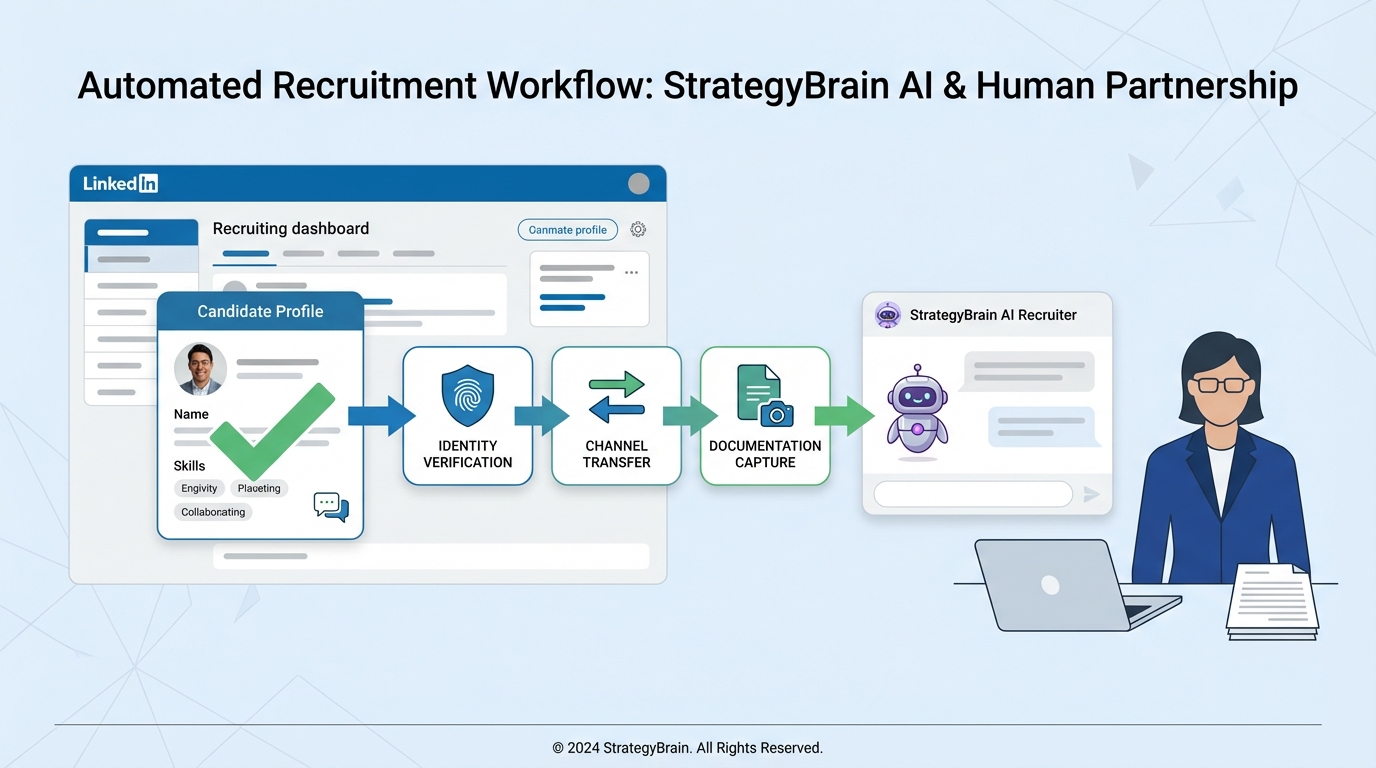
Recruitment online for recruiters is safest and fastest when you run every inbound candidate through a simple verification workflow: confirm the sender identity, refuse payments and sensitive documents, move the conversation to an official channel, and document the interaction. This article gives you a practical, repeatable process you can apply across any online recruitment website and social platform. It also explains how StrategyBrain AI Recruiter can automate first touch outreach and follow up on LinkedIn while keeping your messaging consistent and compliant.
Key Takeaways
- Non negotiable rule: Legit recruiters do not ask candidates for payment or sensitive documents like passports or banking details.
- Use a verification workflow: Identity check, channel check, request check, and documentation check before you proceed.
- Standardize your responses: Use copy ready scripts to stop scams without escalating conflict.
- Automate safely: StrategyBrain AI Recruiter can handle LinkedIn outreach and follow up 24/7 in any language, while you keep final hiring decisions with humans.
- Scale without chaos: AI Recruiter supports managing more than 100 LinkedIn accounts for team based recruiting operations.
- Protect data: Use encryption, least privilege access, and do not reuse candidate data for model training.
Table of Contents
- What this guide covers and what it does not
- Why scams target online recruiting
- A scam proof workflow for recruitment online for recruiters
- Copy ready templates for recruiters
- Using StrategyBrain AI Recruiter safely in LinkedIn recruiting
- Quick comparison: manual vs standardized vs AI assisted
- FAQ
- Conclusion and next steps
What this guide covers and what it does not
This guide focuses on scam prevention and operational hygiene for recruiters doing recruitment online for recruiters across social platforms and any online recruitment website. It is written for agency recruiters, corporate recruiters, and HR leaders who need a consistent process.
It does not provide legal advice, and it does not replace your organization’s security policies. If you operate in regulated jurisdictions, align this workflow with your internal compliance team.
Why scams target online recruiting
Online recruiting is high volume, time sensitive, and relationship driven. That combination creates openings for impersonation and social engineering. In practice, scammers often pretend to be recruiters, then push candidates toward payment requests or sensitive data collection.
A clear public stance helps. One well known recruiting firm states that its recruiters will never ask for payment or sensitive information such as passport or banking information. That single sentence is a strong baseline policy you can adopt and enforce consistently.
A scam proof workflow for recruitment online for recruiters
Below is the workflow we use when we audit online recruiting operations. It is designed to be fast enough for daily use and strict enough to stop common scam patterns.
Step 1: Verify identity before you verify interest
- Check the sender profile: Look for mismatched names, newly created profiles, or inconsistent work history.
- Confirm the organization: Validate that the person is associated with the company they claim to represent using an official channel.
- Use a known contact path: If you need to continue, move the conversation to a company email domain or an approved ATS message channel.
Step 2: Apply the “never request” rule
Set a hard rule that recruiters do not request money or highly sensitive documents during early stage recruiting. At minimum, treat these as stop signs:
- Any request for payment from a candidate.
- Any request for passport scans or numbers.
- Any request for banking information or direct deposit details.
- Any request for one time codes or account access.
If a candidate receives such a request while someone is impersonating your team, you want your policy to be easy to quote and easy to enforce.
Step 3: Validate the channel and the job context
- Match the job to a real requisition: Confirm the role exists in your ATS or approved job list.
- Confirm the posting source: If the candidate came from an online recruitment website, confirm the posting is yours and not a scraped copy.
- Check for urgency pressure: Scams often push “act now” timelines that bypass normal screening.
Step 4: Standardize what you do collect
Recruiters still need information to move hiring forward. Keep it minimal and job relevant:
- Résumé in a standard format.
- Contact details needed for scheduling.
- Work authorization as a yes or no question early on, with documentation only later and through secure processes.
Step 5: Document and escalate
- Capture evidence: Save message screenshots, timestamps, and the profile identifier.
- Notify internal owners: Security, HR leadership, and recruiting ops should have a defined escalation path.
- Update your public guidance: A short statement on your careers page and recruiter profiles reduces repeat incidents.
Limitations and honest notes
- This workflow reduces risk, but it does not eliminate it. Impersonation tactics evolve.
- Over verification can slow candidate experience. Use the steps above as a gate only when signals appear, not as friction for every candidate.
Copy ready templates for recruiters
These templates are designed to be pasted into email, ATS messages, or social messages. Keep them consistent across your team, especially if you are positioning yourself like top recruitment agencies that emphasize trust.
Template 1: Anti scam policy statement
Message: Thanks for reaching out. For your safety, our recruiters never request payment, passport details, or banking information at any stage of the hiring process. If anyone asks for these items while claiming to represent us, please stop and report the message to the platform.
Template 2: Move to an official channel
Message: To continue, I will send the next steps from our official recruiting channel. Please confirm the best email address for scheduling and résumé sharing.
Template 3: Candidate reassurance after a suspected impersonation
Message: I am sorry you experienced this. You did the right thing by pausing. We will not ask for payment or sensitive documents. If you share the message details you received, we can investigate and help prevent future incidents.
Quick checklist you can add to your SOP
- Confirm identity and company association before sharing any process details.
- Refuse payment requests and sensitive document requests.
- Move to an official channel for scheduling and résumé collection.
- Log suspicious messages and escalate internally.
Using StrategyBrain AI Recruiter safely in LinkedIn recruiting
Automation can reduce risk when it standardizes what is said and what is never requested. StrategyBrain AI Recruiter is designed for LinkedIn hiring and can automate initial outreach, role introduction, Q and A, interest confirmation, and résumé and contact collection. Recruiters then review the collected résumés and proceed with interviews.
Where AI Recruiter fits in an online recruiting workflow
- First touch outreach: AI Recruiter connects with candidates that match your search criteria and introduces the opportunity.
- Consistent screening conversation: It asks about the candidate’s situation and interest, then captures résumé and contact details for interested candidates.
- 24/7 multilingual communication: It responds around the clock in the candidate’s native language, which helps global recruiting without adding headcount.
Controls we recommend when you enable automation
- Lock your “never request” policy into scripts: Ensure the AI never asks for payment, passport data, or banking information.
- Use least privilege access: Only grant the minimum access needed for messaging and résumé capture.
- Human final qualification: AI Recruiter can confirm willingness to interview, but résumé fit decisions stay with recruiters.
- Data protection posture: Use encryption and isolate customer data. Do not use customer provided data to train general models.
Scaling note for agencies and in house teams
If you run high volume recruitment online for recruiters, the operational bottleneck is usually follow up. AI Recruiter supports managing more than 100 LinkedIn accounts, which enables a team model where outreach and follow up are automated while recruiters focus on shortlist quality and hiring manager alignment.
Quick comparison: manual vs standardized vs AI assisted
| Approach | Speed | Consistency | Best for | Risk control |
|---|---|---|---|---|
| Fully manual messaging | Low at scale | Varies by recruiter | Low volume, senior roles | Depends on training |
| Standardized scripts and SOP | Medium | High | Teams hiring across an online recruitment website and social | Strong if enforced |
| AI assisted outreach with StrategyBrain AI Recruiter | High | High | High volume LinkedIn sourcing and follow up | Strong when policy is embedded and humans own final decisions |
FAQ
What is the biggest red flag in online recruiting messages?
A request for payment or sensitive information such as passport or banking details is the clearest red flag. Treat it as a stop signal and move the candidate to an official channel for verification.
How do top recruitment agencies reduce impersonation risk?
They publish a clear policy, standardize recruiter messaging, and use official channels for document collection and scheduling. Consistency matters because candidates compare messages across platforms.
Should recruiters collect passports or banking information during early screening?
No. Early screening should focus on job relevant information like résumé, availability, and interest. Sensitive documents should only be collected later, through secure and approved processes.
How does an online recruitment website fit into a scam proof workflow?
Use it as a controlled entry point. Confirm that postings are official, route applicants into your ATS, and avoid moving candidates to unverified channels for “fast tracking.”
Can StrategyBrain AI Recruiter replace recruiters?
No. It automates repetitive LinkedIn tasks such as connecting, introducing roles, answering common questions, confirming interest, and collecting résumés and contact details. Recruiters still review résumés and make qualification and hiring decisions.
Does StrategyBrain AI Recruiter support multilingual recruiting?
Yes. It provides 24/7 multilingual communication and can respond in the candidate’s native language, which is useful for global hiring across time zones.
How do we keep automated outreach compliant and trustworthy?
Embed your “never request” policy into scripts, use least privilege access, and keep humans responsible for final qualification. Also ensure candidate data is encrypted and not used to train general models.
What should I do if a candidate reports a scam using my company name?
Thank them, ask for message evidence, document the incident, and escalate to your security and recruiting operations owners. Then reinforce your public policy statement so future candidates know what to expect.
Conclusion and next steps
Recruitment online for recruiters works best when trust is operationalized. Use a verification workflow, enforce a strict rule against payment and sensitive data requests, and standardize your messaging across every online recruitment website and social channel you use.
Next steps: add the checklist and templates above to your recruiting SOP, train your team in a 30 minute session, and if LinkedIn outreach volume is your bottleneck, evaluate StrategyBrain AI Recruiter to automate first touch and follow up while keeping final decisions with recruiters.














