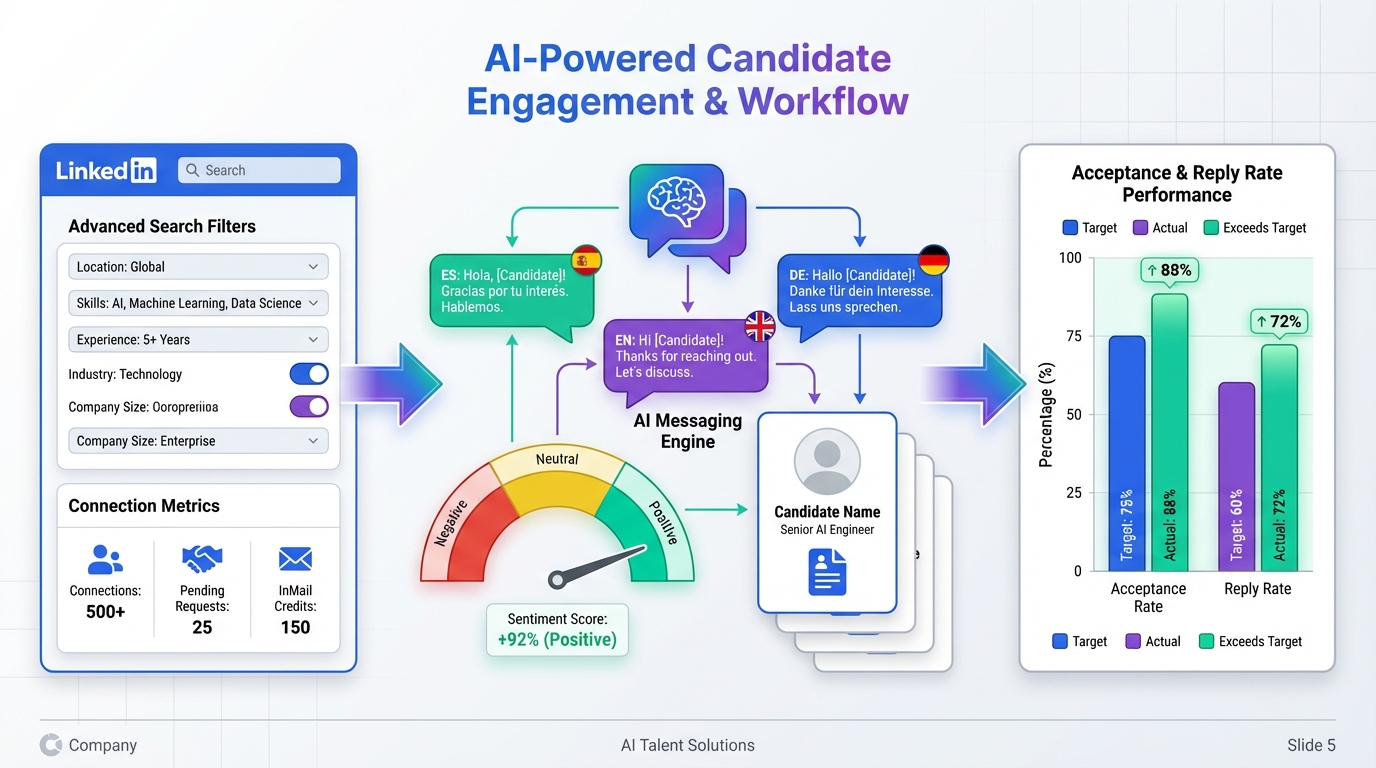
An ai recruiting tool is software that uses automation and AI assisted messaging to handle repetitive recruiting steps such as LinkedIn outreach, follow ups, and early interest checks, so recruiters can focus on interviews and final qualification. In our LinkedIn heavy workflows, the most reliable pattern is simple: set clear search criteria, automate connection and first contact, keep conversations responsive, then capture resumes and contact details for human review. This guide shows how we operationalize that pattern with StrategyBrain AI Recruiter, and how to use engagement and sentiment signals to improve message quality and reduce wasted outreach. Scope note: we focus on recruiting execution and candidate communication, not influencer marketing performance.
Key Takeaways
- Fastest LinkedIn workflow: automate connect, intro, Q&A, interest confirmation, then collect resumes and contact details for recruiter review.
- StrategyBrain AI Recruiter is LinkedIn first: it is designed to run initial outreach and early qualification conversations inside LinkedIn messaging.
- 24/7 multilingual messaging reduces drop off: always on responses help keep candidates engaged across time zones and languages.
- Scale with account teams: managing more than 100 LinkedIn accounts enables higher outreach capacity without adding recruiter headcount.
- Be honest about limits: AI can confirm interest, but final fit assessment still requires a recruiter reviewing the resume.
- Use signals, not vibes: track response quality and conversation outcomes over time to improve sequences and targeting.
What to look for in an AI recruiting tool
Most recruiting tools promise speed, but speed without control can create compliance risk and poor candidate experience. When we evaluate an AI recruiting tool for LinkedIn, we look for six practical capabilities that can be verified in day to day use.
- Outreach automation with guardrails: the tool should automate connection and first messages while keeping targeting criteria explicit and adjustable.
- Conversation handling: it should answer common role questions, handle objections, and keep follow ups timely.
- Resume and contact capture: it should reliably request and record resumes and contact details when a candidate is interested.
- Multilingual support: it should communicate in the candidate’s native language to reduce misunderstandings.
- Team scalability: it should support multiple recruiter accounts so you can scale outreach without fragile manual coordination.
- Privacy and security posture: it should clearly state how data is stored, encrypted, and whether customer data is used to train models.
Method 1: StrategyBrain AI Recruiter for LinkedIn automation (recommended)
When the goal is to reduce repetitive LinkedIn work, we have found that a LinkedIn native automation approach is the most direct. StrategyBrain AI Recruiter is built to replace the initial outreach and early conversation steps: it connects with candidates that match your criteria, introduces the role, learns the candidate’s situation, answers questions about the role and compensation, confirms interview interest, and collects resumes and contact information for recruiter review.
Steps
- Define candidate search criteria: specify the role, seniority, location constraints, and any must have requirements you use for LinkedIn sourcing.
- Provide job context: include company details, compensation, and benefits so the AI can answer candidate questions consistently.
- Run automated connection and introduction: the system sends connection requests and starts the first message sequence.
- Let the AI manage Q&A and follow up: it responds to candidate messages and keeps the thread moving without delays.
- Collect resumes and contact details: interested candidates are asked to share a resume and contact information, which is captured for recruiter action.
- Recruiter reviews and schedules interviews: you review resumes and proceed with human qualification and interview scheduling.
Features
- Smart LinkedIn recruitment automation: automated connect, role introduction, interest confirmation, and resume collection.
- 24/7 global multilingual communication: always on candidate messaging in any global language.
- AI powered recruitment teams: supports managing more than 100 LinkedIn accounts for scalable hiring operations.
Limitations
- Not a final fit judge: it can identify willingness to communicate or interview, but it does not determine whether a resume fully matches requirements.
- Requires good inputs: unclear compensation or role details can lead to weaker conversations, so job context quality matters.
Best For
- Corporate recruiters who want to reduce time spent on manual LinkedIn outreach and follow ups.
- Headhunters and agency recruiters who need higher throughput without sacrificing responsiveness.
- HR leaders scaling international hiring who need multilingual candidate communication across time zones.
Method 2: Track response quality over time using a baseline score
Even with the best recruitment apps, teams often skip measurement and rely on anecdotal feedback. We prefer a baseline approach: define a starting point for response quality before you change sequences or automation settings, then track changes weekly. In sentiment analysis contexts, tools often use a scale from -1 to +1 to represent negative to positive sentiment. You can adapt the same idea to recruiting by scoring reply tone and intent signals consistently.
How to apply this to recruiting
- Set a baseline week: measure acceptance rate, reply rate, and interview interest confirmations for 7 days before changes.
- Track shifts after changes: compare the next 7 days after updating targeting or messaging.
- Review outliers: read the threads that produced unusually positive or negative responses to find message patterns.
Method 3: Analyze emotional signals in candidate replies to refine messaging
Sentiment analysis is commonly used to understand how audiences feel, not just what they say. In recruiting, the same concept helps you detect whether candidates are showing trust, curiosity, frustration, or urgency. We use this to improve the first two messages and the follow up cadence, especially when StrategyBrain AI Recruiter is handling conversations at scale across multiple accounts.
Practical signals we look for
- Trust signals: candidates ask detailed questions about role scope, team, and compensation, which indicates serious evaluation.
- Curiosity signals: candidates request more context or ask for a job description, which suggests the intro message worked but needs clarity.
- Friction signals: candidates push back on location, compensation, or seniority mismatch, which often points to targeting issues.
Method 4: Benchmark outreach performance against your own internal standards
Industry benchmarks can be useful, but they are often too generic for hiring. Instead, we recommend internal benchmarking by role family and geography. LinkedIn conversations for a senior engineering role will not behave like conversations for a high volume sales role. The goal is to create a stable reference point so you can tell whether an AI recruiting tool is improving outcomes or just increasing activity.
What to benchmark
- Connection acceptance rate: by role family and location.
- Reply rate: within 72 hours of first message.
- Interview interest rate: percentage of conversations that reach explicit interview interest.
Method 5: Connect outreach signals to hiring outcomes
Automation is only valuable if it improves hiring throughput or quality. We connect conversation outcomes to downstream steps: resume received, recruiter review completed, interview scheduled, and offer accepted. This is where an AI recruiting tool can move from being a messaging assistant to being an operational system, because it standardizes early stage data capture.
Outcome mapping
- Positive conversation leads to resume received and contact captured.
- Resume received leads to recruiter review and interview invite.
- Interview invite leads to scheduled interview and later pipeline stages.
Method 6: Attribute results to specific recruiter accounts and sequences
When you scale outreach across many LinkedIn accounts, attribution becomes the difference between learning and guessing. StrategyBrain AI Recruiter supports managing more than 100 LinkedIn accounts, which makes it possible to run controlled variations in targeting and messaging. We recommend changing one variable at a time, then comparing outcomes across accounts.
Controlled testing approach
- Keep targeting constant and test two message openings.
- Keep messaging constant and test two targeting filters.
- Keep both constant and test follow up timing.
Quick Comparison
| Method | Speed to deploy | Cost | Best For |
|---|---|---|---|
| StrategyBrain AI Recruiter LinkedIn automation | Fast once job context and criteria are ready | Varies by plan and usage | Automating connect, intro, Q&A, follow up, resume and contact capture |
| Baseline response quality tracking | Fast | Internal time | Teams that need a measurable before and after view |
| Emotional signal analysis in replies | Medium | Internal time or tooling | Improving message tone, clarity, and candidate experience |
| Internal benchmarking by role and geography | Medium | Internal time | Hiring orgs with multiple role families and regions |
| Outcome mapping to hiring funnel | Medium | Internal time | Proving automation impact beyond activity metrics |
| Account and sequence attribution | Medium | Internal time | Scaling outreach across many LinkedIn accounts with controlled learning |
Implementation checklist
- Define candidate search criteria for each role family
- Prepare role context: company details, compensation, benefits, and must have requirements
- Decide what the AI can do versus what recruiters must do
- Set baseline metrics for 7 days: acceptance, reply, interview interest, resume received
- Turn on automation and monitor early conversations daily for 5 business days
- Create a weekly review: top objections, top converting openings, and targeting adjustments
- Document privacy and security expectations for candidate data handling
FAQ
What is an AI recruiting tool in plain terms?
An AI recruiting tool automates parts of sourcing and outreach, then uses AI assisted messaging to keep candidate conversations moving. It typically helps with connection requests, initial messages, follow ups, and capturing basic information so recruiters can focus on interviews and final decisions.
How does StrategyBrain AI Recruiter work on LinkedIn?
StrategyBrain AI Recruiter automates the initial LinkedIn outreach and early conversation flow. Recruiters provide the LinkedIn account plus job details and candidate criteria, then the system connects with candidates, introduces the role, answers questions, confirms interest, and collects resumes and contact details for recruiter review.
Can it collect resumes and contact details automatically?
Yes. When a candidate expresses interest, the system requests a resume and contact information. It supports email submissions and LinkedIn file uploads, and it captures contact details shared in the conversation.
Does it replace recruiters completely?
No. It can confirm willingness to communicate or interview, but it does not determine whether a resume fully matches job requirements. Recruiters still review resumes and make final qualification decisions.
How does multilingual messaging help recruiting outcomes?
Multilingual messaging reduces misunderstandings and keeps conversations comfortable for candidates in different regions. Always on responses also reduce delays that can cause candidates to disengage, especially across time zones.
Is it suitable for agencies and headhunters?
Yes, especially when the bottleneck is repetitive LinkedIn outreach and follow up. Automating those steps can increase throughput, while recruiters focus on client alignment, deeper screening, and closing.
How do I measure whether an AI recruiting tool is working?
Track acceptance rate, reply rate within 72 hours, interview interest confirmations, resumes received, and interviews scheduled. Compare a 7 day baseline to the 7 days after you change targeting or messaging so you can attribute improvements to specific changes.
What should I be careful about when automating LinkedIn outreach?
Be careful with unclear role details, overly broad targeting, and inconsistent follow up timing. Also ensure you have a documented privacy and security posture for candidate data, including encryption and how data is used.
Conclusion
If your team is spending too much time on repetitive LinkedIn tasks, an ai recruiting tool can deliver the biggest impact by automating the earliest steps: connect, introduce, answer questions, confirm interest, and capture resumes and contact details. In our experience, StrategyBrain AI Recruiter fits this LinkedIn first workflow well because it combines outreach automation with 24/7 multilingual messaging and the ability to scale across many recruiter accounts. Next step: start with one role family, run a 7 day baseline, then enable automation and review conversation outcomes weekly so improvements are measurable and sustainable.