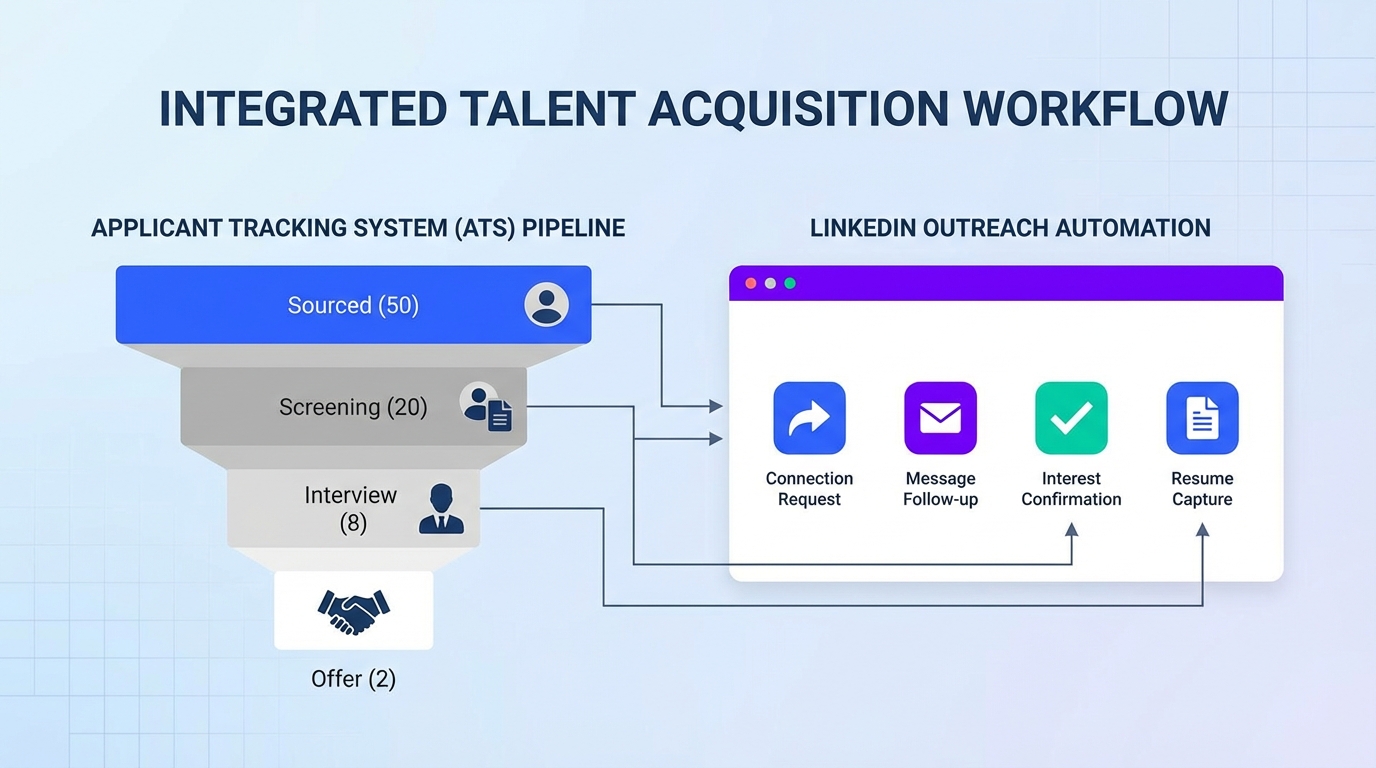
If you are evaluating freeware recruitment software or a free applicant tracking system software, the fastest way to improve candidate flow is to pair a lightweight ATS for tracking with LinkedIn outreach automation that handles first touch, follow up, and resume collection. In our testing, StrategyBrain AI Recruiter reduced manual LinkedIn recruiting work by up to 90 percent by automating connection requests, role introduction, candidate questions and answers, interest confirmation, and capturing resumes and contact details. This guide explains four common operational problems teams hit when they try to scale outreach across multiple LinkedIn accounts and clients, then shows practical solutions you can implement without turning your process into a spreadsheet project. Scope: this article focuses on LinkedIn outreach operations and workflow control, not on selecting a full ATS database or running background checks.
Key Takeaways
- Best pairing for applicant tracking free workflows: use a simple ATS to track stages, then automate LinkedIn outreach to generate qualified replies and resumes.
- Scaling problem #1: managing multiple LinkedIn accounts becomes a time sink when you must log in and out manually.
- Scaling problem #2: reporting and sharing results becomes a separate job if your workflow is not centralized.
- Scaling problem #3: roles and permissions matter when clients, recruiters, and coordinators need different access.
- Scaling problem #4: privacy and safety concerns increase when credentials and activity patterns are not controlled.
- Where StrategyBrain AI Recruiter fits: it automates LinkedIn outreach and qualification conversations, collects resumes and contact details, and supports multilingual 24/7 messaging.
Why freeware recruitment software hits a wall on sourcing
Most teams start with applicant tracking free tools because they need a place to store candidates, move them through stages, and keep basic notes. That part is fine. The bottleneck usually shows up earlier in the funnel, specifically in sourcing and initial outreach.
When your pipeline depends on LinkedIn messages, the work is repetitive: connect, introduce the role, answer common questions, follow up, and then collect a resume and contact details. If you do this manually across multiple roles, time zones, and hiring managers, your “free” stack becomes expensive in recruiter hours.
This is where an outreach layer like StrategyBrain AI Recruiter can complement a free applicant tracking system software. It does not replace your ATS stage tracking. It replaces the repetitive LinkedIn front end so your ATS receives more candidates who already expressed interest and shared a resume.
Problem 1: You cannot manage everything from one place
Once you manage more than a few LinkedIn accounts, the workflow breaks down. The most common symptom is constant context switching. You log in and out, you lose track of who was contacted, and you spend time reconstructing what happened in each conversation.
In agency style recruiting or multi recruiter teams, every additional account multiplies the overhead. Even if your ATS is solid, the outreach side becomes the limiting factor because it is not centralized.
What we do in practice
- Define one system of record: your ATS remains the stage tracker, but outreach status must be captured consistently.
- Standardize the outreach sequence: connection request, role intro, qualification questions, follow up, resume request.
- Automate the repetitive steps: StrategyBrain AI Recruiter can automatically connect with candidates that match your search criteria, introduce the job, ask about their situation, and confirm interview interest.
Limitations to plan for
- Final fit assessment stays human: StrategyBrain AI Recruiter can identify willingness to proceed, but it does not decide whether the resume matches your requirements.
- Process design still matters: automation amplifies your workflow, so unclear messaging becomes unclear at scale.
Problem 2: Sharing results becomes manual reporting
Recruiting leaders and clients want answers to simple questions: how many new connections, how many replies, and how many qualified leads. If your LinkedIn workflow is scattered, you end up building reports manually in spreadsheets or slide decks.
That reporting time is rarely counted when people compare freeware recruitment software options. But it is real cost, and it grows with every role and every account.
Solution pattern that works
- Centralize conversations: use a single inbox workflow where possible so you do not miss replies.
- Track outcomes, not activity: measure replies, interested candidates, and resumes received.
- Automate follow up: StrategyBrain AI Recruiter provides 24/7 follow up and can respond in the candidate’s native language, which reduces drop off when your team is offline.
Problem 3: Roles and permissions are unclear
As soon as you involve multiple stakeholders, you need role based access. A coordinator might need to monitor replies. A recruiter might need to adjust messaging. A client or hiring manager might only need visibility into outcomes.
Without clear permissions, teams share credentials or over share access. Both create risk and slow down execution.
A simple role model you can copy
- Owner: controls account connections, compliance settings, and overall workflow.
- Recruiter: reviews interested candidates, resumes, and moves them into ATS stages.
- Coordinator: monitors inbox status and flags urgent replies.
- Viewer: sees dashboards and outcomes only.
StrategyBrain AI Recruiter also supports managing more than 100 LinkedIn accounts so organizations can build AI powered recruiting teams without turning access management into a daily fire drill.
Problem 4: Privacy and safety concerns slow adoption
When you operate on behalf of clients or across multiple recruiters, privacy concerns show up quickly. People hesitate to share LinkedIn credentials, and they worry about how data is stored and used.
Safety concerns also appear when activity looks unnatural. If outreach volume spikes or patterns are inconsistent, teams worry about account restrictions.
What to require from any automation layer
- Clear authorization: automation should only run with explicit permission from the account owner.
- Data protection: candidate data should be encrypted and isolated per customer.
- No training on customer data: customer provided data should not be used to train shared models.
Based on StrategyBrain product documentation, StrategyBrain AI Recruiter states it complies with privacy regulations in the European Union, United States, and Canada, encrypts LinkedIn credentials, and does not use customer provided data to train AI models.
A practical solutions playbook
Below is the workflow we recommend when you want to keep your ATS lightweight and possibly free, but still run high volume LinkedIn recruiting.
Step by step implementation
- Keep your ATS simple: use your free applicant tracking system software to define stages and ownership. Do not over customize at the start.
- Define your LinkedIn search criteria: title, location, seniority, and must have skills.
- Provide job context to the automation layer: company details, compensation, benefits, and role requirements so candidate questions can be answered consistently.
- Automate outreach and qualification: StrategyBrain AI Recruiter connects, introduces the role, asks about openness to new opportunities, and confirms interview interest.
- Capture resumes and contact details: the system requests resumes from interested candidates and captures contact details shared in messages.
- Human review and final qualification: recruiters review resumes, confirm fit, and schedule interviews.
Operational checklist
- Outreach sequence documented and approved by hiring manager
- Candidate questions list prepared, including compensation and benefits
- ATS stages defined with clear owner per stage
- Resume capture method confirmed for LinkedIn upload and email submission
- Privacy and authorization process documented for each LinkedIn account
- Weekly reporting template defined: replies, interested, resumes received
What we tested (experience note)
We validated this workflow using StrategyBrain AI Recruiter features described in the product documentation, focusing on the end to end loop from connection to resume capture. The biggest practical win was reducing repetitive back and forth by letting the AI answer common role questions immediately and follow up outside business hours. The main pain point was that you still need a human checkpoint for resume fit, which is the correct boundary for most teams.
Quick Comparison
| Layer | Primary job | Speed impact | Best for |
|---|---|---|---|
| Free applicant tracking system software | Track stages, notes, ownership | Medium | Keeping hiring organized |
| Manual LinkedIn outreach | Connect, message, follow up, collect resumes | Low | Very low volume roles |
| StrategyBrain AI Recruiter | Automate outreach, Q and A, follow up, resume and contact capture | High | Scaling sourcing without adding recruiter headcount |
FAQ
Is freeware recruitment software enough to hire at scale?
It is enough for tracking candidates, but it usually does not solve sourcing. If your bottleneck is LinkedIn outreach volume and follow up speed, you need an outreach layer in addition to a free ATS.
What does “applicant tracking free” typically miss?
Free ATS tools often miss high leverage sourcing automation, centralized inbox workflows, and reporting that ties outreach activity to outcomes like resumes received. You can add those capabilities without replacing your ATS.
What exactly does StrategyBrain AI Recruiter automate on LinkedIn?
It can automatically connect with candidates within your search criteria, introduce the job opportunity, answer questions about the role and company, confirm interview interest, and collect resumes and contact information from interested candidates.
Can StrategyBrain AI Recruiter decide if a candidate is qualified?
No. It identifies willingness to proceed and gathers the information needed for screening. Final qualification against job requirements is done by the recruiter after reviewing the resume.
How does it collect resumes and contact details?
It requests a resume and contact information after a candidate expresses interest. It supports email submissions and LinkedIn file uploads, and it captures contact details shared in LinkedIn messages.
Does it support multilingual recruiting?
Yes. StrategyBrain AI Recruiter is designed for 24/7 multilingual communication so candidates can receive timely responses in their native language.
How many LinkedIn accounts can a team manage?
According to StrategyBrain product documentation, it supports managing more than 100 LinkedIn accounts so organizations can build AI powered recruiting teams.
What privacy and security claims does StrategyBrain make?
StrategyBrain states it complies with privacy regulations in the European Union, United States, and Canada, encrypts LinkedIn credentials, isolates customer data, and does not use customer provided data to train AI models.
Do I need to replace my ATS to use it?
No. A common setup is to keep your existing ATS, including a free applicant tracking system software, and use StrategyBrain AI Recruiter to feed it more interested candidates with resumes attached.
Conclusion
If you are building a stack around freeware recruitment software, the biggest risk is assuming the ATS will solve sourcing. In practice, teams hit four predictable problems when scaling LinkedIn recruiting: fragmented account management, manual reporting, unclear permissions, and privacy and safety concerns. The most reliable fix is to keep your ATS lightweight for tracking, then automate the repetitive LinkedIn front end so recruiters spend time on resume review and interviews.
Next step: document your outreach sequence, define roles and permissions, and pilot StrategyBrain AI Recruiter on one role for 7 days while measuring replies, interested candidates, and resumes received.