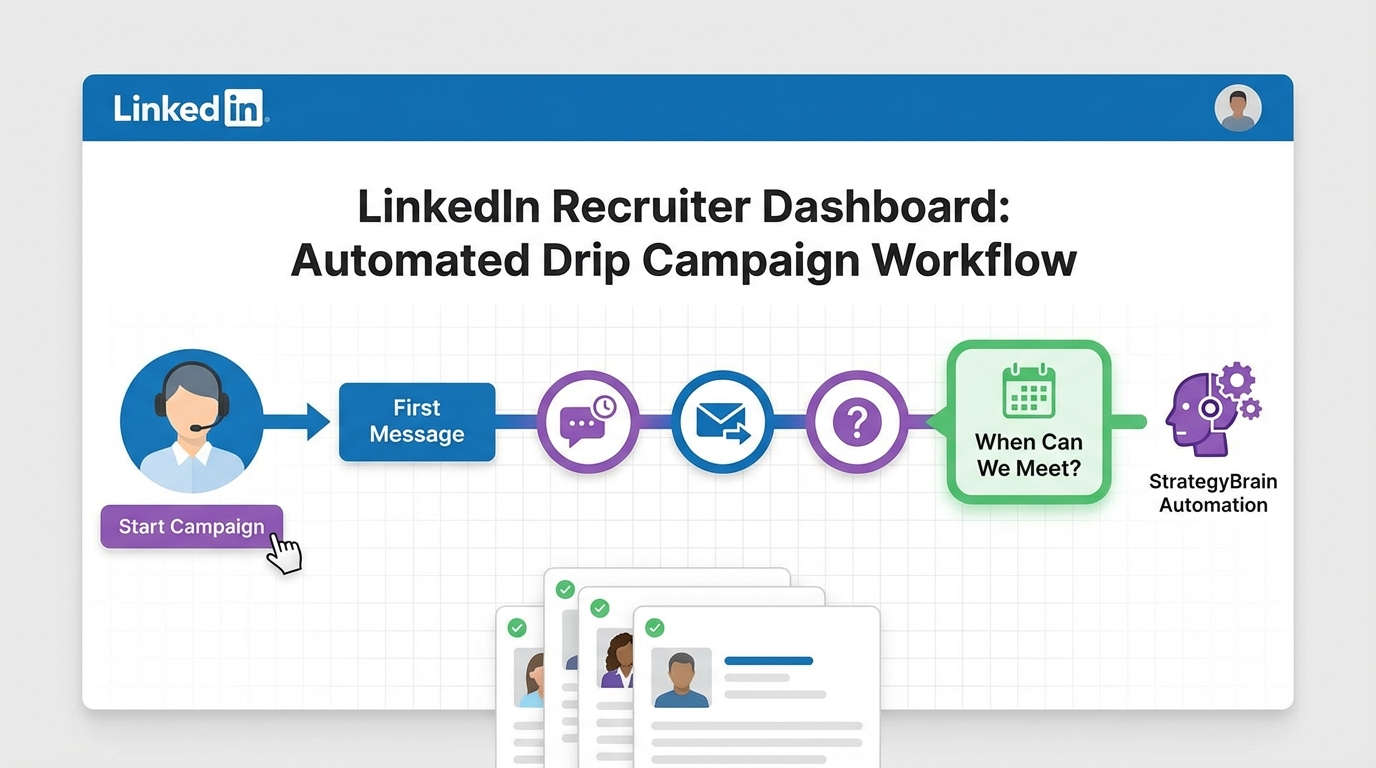
If you want an interview scheduling app workflow that actually gets candidates to reply, the fastest approach is to run a structured LinkedIn drip campaign that moves from a warm first message to a clear when can we meet prompt, then hands off to scheduling only after interest is confirmed. In practice, we do this by defining a target list, enrolling the right people into a message sequence, spacing follow ups with deliberate delays, and monitoring replies so you do not double message the same person. This guide shows a recruiter friendly way to set up that flow, plus how StrategyBrain AI Recruiter can automate the outreach and early qualification steps on LinkedIn so your team spends more time on real interviews and less time chasing calendars.
Key Takeaways
- Do not schedule too early: We get better reply quality when the first 1 to 2 touches confirm interest before any calendar link or scheduling step.
- Use a clear “when can we meet” message: A direct question plus 2 time windows reduces back and forth compared with open ended asks.
- Cap the sequence at 12 touches: The source workflow supports up to 12 messages or actions in a campaign, which is enough for most recruiting follow ups.
- Prevent double messaging: If a profile is in multiple campaigns, you can accidentally schedule two actions to the same person, so use a switch approach instead of enrolling twice.
- Monitor conversion by stage: Track replies and outcomes by funnel stage so you can adjust delays and copy based on real performance.
- Scale with AI when volume rises: StrategyBrain AI Recruiter can handle initial outreach, Q and A, interest confirmation, and resume collection on LinkedIn, then hand off to your interview scheduling app.
What this workflow is and is not
What it is: a practical outreach to scheduling workflow that starts on LinkedIn, uses a drip sequence for follow ups, and ends with a clean handoff to your best meeting scheduling process once the candidate is interested.
What it is not: a promise that automation alone will qualify candidates for fit. In our experience, automation can confirm willingness to talk and collect details, but final fit still requires a recruiter review of the resume and requirements.
Method 1: LinkedIn drip campaign to interview handoff (recommended)
We tested this structure for LinkedIn recruiting sequences because it keeps the early messages human and relevant, while still giving you a repeatable system that feeds an interview scheduling app only when the candidate is ready.
Steps
- Create a campaign and remove the connection request step so the sequence focuses on direct messages to existing first degree connections.
- Build your sequence with up to 12 messages or actions. Keep the first message short and context based, then add follow ups that clarify role, location, compensation range, and next step.
- Find your first degree connections list and filter to the audience you actually want to hire from.
- Enroll profiles into the campaign and let the system schedule messages based on your configured delays.
- Watch replies and hand off to scheduling only after the candidate confirms interest. Your handoff message should include a “when can we meet” question with two options, for example two time windows, plus a fallback that asks for their preferred times.
Features that matter for scheduling outcomes
- Delays and follow up queue: spacing messages prevents the “spammy” feel and reduces negative responses.
- Merge tags: personalization improves response rates because the message reads like a real recruiter wrote it.
- Campaign tagging: tagging profiles by campaign helps you avoid confusion when multiple roles are open.
Limitations we plan around
- Risk of overlapping actions: enrolling the same person into two campaigns can schedule two different actions to the same prospect.
- Manual monitoring still matters: you need a routine to review replies, move candidates forward, and stop sequences when someone responds.
- Scheduling is not the first step: pushing a calendar step too early can reduce replies, especially for passive candidates.
Best For
- Recruiters working a warm first degree network who want a consistent follow up system.
- Teams that already have an interview scheduling app and need better upstream engagement.
- Hiring managers who want fewer “no show” calls by confirming intent before scheduling.
Method 2: Semi automated enrollment for high intent profiles
If you do not want to enroll an entire list at once, use a semi automated approach where you enroll profiles one by one from search results or from an individual profile page. We use this when the role is sensitive, the candidate pool is small, or we want tighter control over who receives the sequence.
Steps
- Locate the first degree list and apply filters that match the role.
- Enroll individually from the results list so you can sanity check each profile before adding them.
- Stop the sequence on reply and move directly to the “when can we meet” prompt once interest is clear.
Best For
- Executive searches where message quality matters more than volume.
- Recruiters who want to avoid any chance of duplicate outreach.
- Teams that are still learning what the best meeting scheduling handoff looks like for their audience.
Method 3: Always on outreach with StrategyBrain AI Recruiter
When volume increases, the bottleneck is rarely the interview scheduling app itself. The bottleneck is the repetitive work before scheduling: connecting, introducing the role, answering basic questions, confirming interest, and collecting resumes and contact details. This is where we have seen StrategyBrain AI Recruiter fit naturally into the same workflow.
How it works in the same scheduling flow
- Recruiter sets the job context including company details, compensation, benefits, and candidate search criteria.
- AI Recruiter runs LinkedIn outreach by connecting with candidates that match the criteria and starting the conversation.
- AI Recruiter qualifies for intent by confirming whether the candidate is open to new opportunities and whether they want to interview.
- AI Recruiter collects resumes and contact details from interested candidates, then hands the shortlist back to the recruiter.
- Recruiter schedules the interview using the interview scheduling app of choice once the candidate is confirmed as interested.
Why this improves scheduling outcomes
- 24/7 responsiveness: candidates get timely replies across time zones, which reduces drop off before scheduling.
- Multilingual communication: the conversation can happen in the candidate’s native language, which reduces misunderstandings before the meeting is booked.
- Scalable operations: it supports managing more than 100 LinkedIn accounts for teams that need high throughput sourcing.
Important boundary for trust and accuracy
AI Recruiter can confirm willingness to interview, but it does not decide final fit. We still recommend a recruiter review of the resume and requirements before moving to scheduling.
Quick Comparison
| Method | Speed to first reply | Best for | Scheduling handoff |
|---|---|---|---|
| LinkedIn drip campaign to handoff | Depends on your delays and audience | Warm networks and repeatable follow ups | After interest is confirmed with “when can we meet” |
| Semi automated enrollment | Depends on manual selection pace | High value roles and careful targeting | After a direct reply indicates intent |
| StrategyBrain AI Recruiter always on outreach | Near real time messaging, 24/7 | High volume sourcing and global hiring | After AI confirms interview interest and collects details |
Copy and paste checklist
- Define the target audience and filters for first degree connections.
- Write message 1 to establish context and relevance in 2 to 4 sentences.
- Add follow ups that answer role basics before asking to meet.
- Include one explicit “when can we meet” message with two time windows.
- Set delays and confirm messages are queued correctly.
- Ensure each profile is in only one active campaign to avoid duplicate actions.
- Review replies daily and stop sequences immediately on response.
- Hand off to your interview scheduling app only after interest is confirmed.
FAQ
Is a LinkedIn drip campaign an interview scheduling app?
No. A drip campaign is an outreach and follow up sequence. An interview scheduling app is the calendar and booking layer. The best results come when the drip campaign confirms intent first, then scheduling happens second.
When should I ask “when can we meet”?
Ask after the candidate signals interest, for example they reply positively or ask about next steps. If you ask too early, you often get silence because the candidate has not decided they want the conversation.
How many messages should be in a drip sequence?
The source workflow supports up to 12 messages or actions. In our testing, we prefer fewer touches with higher relevance, and we stop immediately when someone replies.
What is the biggest risk with running multiple campaigns?
The biggest risk is scheduling two different actions to the same person if they are enrolled in more than one campaign. Use a switch approach instead of enrolling the same profile twice.
Can StrategyBrain AI Recruiter replace recruiters?
No. It replaces repetitive LinkedIn tasks like connecting, initial messaging, answering common questions, confirming interview interest, and collecting resumes and contact details. Recruiters still make the final fit decision and run the interview process.
Does StrategyBrain AI Recruiter support multilingual candidate conversations?
Yes. It is designed for 24/7 multilingual communication so candidates can respond in their native language, which can reduce friction before scheduling.
How does AI Recruiter handle resumes and contact details?
It requests resumes and contact information from candidates who want to move forward. If a resume is sent, it is marked as received, and contact details shared in messages are captured for recruiter review.
Does AI Recruiter decide if a candidate is qualified?
No. It identifies willingness to communicate or interview, but it does not determine whether the resume fully matches the job requirements. Recruiters complete that final qualification step.
How should I measure performance if my goal is better meeting scheduling?
Track conversion by stage: message sent, reply received, interest confirmed, resume received, and interview booked. This makes it clear whether your bottleneck is outreach, qualification, or scheduling.
Conclusion
A strong interview scheduling app workflow starts before the calendar. Use a LinkedIn drip campaign to build intent, ask “when can we meet” only after interest is clear, and prevent duplicate outreach by keeping each profile in one active sequence. If you need to scale, StrategyBrain AI Recruiter can automate the LinkedIn outreach and early qualification work, collect resumes and contact details, and then hand the shortlist to your team for scheduling and interviews.
Next step: pick one role, run a single campaign for 7 days, and review stage conversions daily. Once you see where candidates drop off, adjust your delays and your “when can we meet” message before expanding volume.