


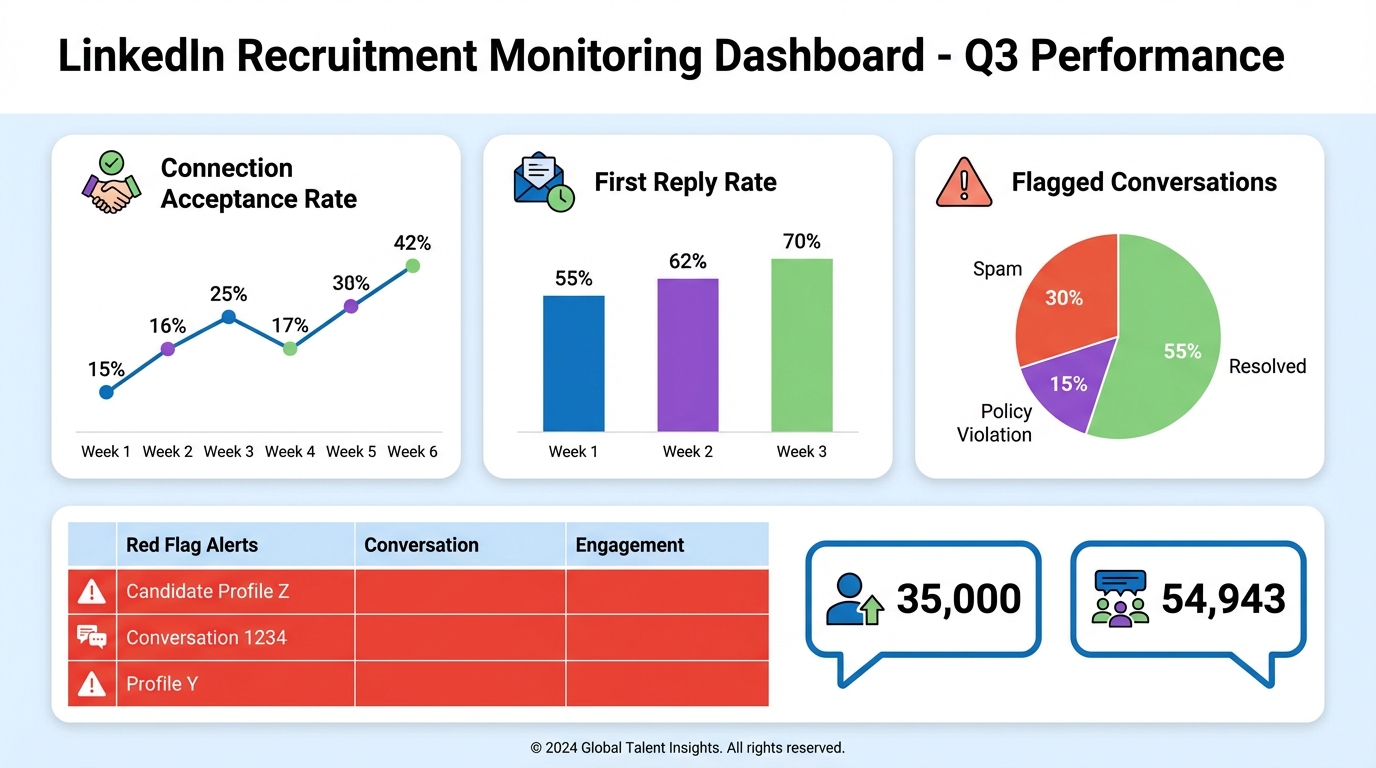
Recruitment monitoring is the discipline of tracking recruiting activity, candidate interactions, and hiring outcomes so you can improve performance and detect risk early. If you recruit on LinkedIn, monitoring should include fraud detection signals, because the social feed can amplify fake job offers at scale. In a documented 2016 case, a so called “Recruitment Agency” repeatedly posted vague overseas job claims and asked people to type “Yes” in comments, generating 35,000 responses on one post and 54,943 responses on another. This guide shows how to monitor for these patterns, which key recruitment metrics to record, and provides recruitment data examples you can copy into your own tracker. It also explains how StrategyBrain AI Recruiter can support safer, more consistent LinkedIn outreach by automating initial conversations, collecting resumes and contact details from interested candidates, and keeping an auditable record of interactions.
What recruitment monitoring means in practice
Recruitment monitoring is not only a dashboard for time to hire. It is a repeatable system for observing what your recruiting process is doing, then using evidence to adjust it. In operational terms, it means you log outreach volume, response quality, funnel conversion, and candidate experience signals, and you review them on a fixed cadence.
For LinkedIn recruiting, monitoring also includes trust and safety checks. The platform’s feed can spread content through likes and comments, so a fraudulent post can reach people who never searched for a job ad. That makes monitoring a risk control, not just a performance activity.
Scope boundary: This article focuses on monitoring LinkedIn outreach and social feed risk signals. It does not cover background checks, identity verification vendors, or legal advice for trafficking investigations.
Case study: how LinkedIn social posts can scale a scam
Recruiters have long dealt with fake recruiter profiles, but the larger risk described in the 2016 write up was the social feed itself. Fraudulent job offers can be promoted to large audiences without paid advertising, simply because engagement pushes posts into more feeds.
One example described a United Kingdom “Recruitment Agency” posting about vacancies in the United States, Canada, and Australia, and asking job seekers to type “Yes” in the comments. The post attracted 35,000 responses in one instance, and a separate post for “jobs in Canada” that did not exist received 54,943 responses. The author reported the post to LinkedIn, but noted the posts continued at the time of writing.
The same write up also referenced forced labor risk and cited an International Labour Organization estimate of 20.9 million victims of forced labour, trafficking, and slavery worldwide. The point was not that every suspicious post is trafficking, but that high scale deception can create real harm when desperate job seekers are targeted.
Red flags to monitor on LinkedIn
When you build a recruitment monitoring routine, you want signals that are observable, recordable, and actionable. Below are practical LinkedIn red flags that can be reviewed by a recruiter, a recruiting operations lead, or a trust and safety partner.
Content and job detail red flags
- Vague job details such as missing employer identity, missing location specifics, or unclear role requirements.
- Unverifiable claims like “hiring in multiple countries” without any concrete employer context.
- Engagement bait such as “type Yes to apply” or “comment YES for details,” which is designed to maximize reach rather than qualify candidates.
Engagement and distribution red flags
- Unusually high comment volume relative to the specificity of the role. In the case described above, the counts were 35,000 and 54,943 responses.
- Rapid spread through second degree networks where people see the post only because a connection liked or commented.
- Repeated reposting of similar “vacancies” across countries and industries with minimal changes.
Candidate safety red flags
- Requests for money for visas, processing, training, or “guaranteed placement.”
- Pressure to move off platform quickly before basic verification steps are completed.
- Requests for sensitive personal data early in the conversation, before a legitimate employer identity is established.
A monitoring note for recruiters using automation
Automation can reduce risk when it standardizes what is asked and what is collected. For example, StrategyBrain AI Recruiter can be configured to introduce the role, answer common questions about compensation and benefits, confirm interview interest, and collect resumes and contact details only after the candidate expresses interest. That structure makes it easier to audit conversations and spot anomalies.
Key recruitment metrics to track
Key recruitment metrics should map to decisions you actually make. If a metric does not change behavior, it becomes noise. Below is a compact set that works for LinkedIn sourcing and outreach, and supports both performance and risk monitoring.
Outreach and engagement metrics
- Connection requests sent per day and per role.
- Connection acceptance rate as a percentage.
- First reply rate as a percentage.
- Median time to first reply in hours.
Qualification and funnel metrics
- Interested candidates count per role.
- Resume received rate as a percentage of interested candidates.
- Interview scheduled rate as a percentage of resumes received.
- Offer rate as a percentage of interviews.
Safety and compliance metrics
- Flagged conversations count, with a reason code such as “money request” or “identity unclear.”
- Report to platform submitted yes or no, with date.
- Data handling confirmation yes or no, indicating whether candidate data is stored and processed under your policy.
Why these metrics work together
Outreach metrics tell you whether your targeting and messaging are landing. Funnel metrics tell you whether interest turns into qualified next steps. Safety metrics tell you whether the process is being abused or whether candidates are being exposed to suspicious patterns. Together, they form a recruitment monitoring loop that is both operational and protective.
Recruitment data examples you can copy
Below are recruitment data examples in a simple table format. You can copy the columns into a spreadsheet or your recruiting operations system. The values shown are illustrative, except where explicitly tied to the 2016 case counts.
Monitoring sheet: outreach and funnel
| Role | Week (YYYY-MM-DD) | Requests Sent | Acceptances | Acceptance Rate (%) | First Replies | Reply Rate (%) | Interested | Resumes Received | Interviews Scheduled | Notes |
|---|---|---|---|---|---|---|---|---|---|---|
| Example: Sales Manager | 2026-02-10 | 120 | 48 | 40 | 22 | 18.33 | 9 | 6 | 3 | Message variant B improved replies |
| Example: Engineering Manager | 2026-02-10 | 80 | 28 | 35 | 10 | 12.5 | 4 | 3 | 1 | Targeting too broad, refine search criteria |
Monitoring sheet: social feed risk log
| Date Observed | Where Seen | Claim Summary | Engagement Signal | Risk Reason Code | Action Taken | Outcome |
|---|---|---|---|---|---|---|
| 2016-04-26 | LinkedIn social feed | Overseas vacancies across multiple countries, asked users to comment “Yes” | 35,000 responses on one post; 54,943 responses on another post | Engagement bait; vague job details | Reported to LinkedIn; planned letter to UK governing body | Posts continued at time of writing |
Copyable checklist: recruitment monitoring review (15 minutes)
- Check outreach volume by role and confirm it matches hiring priority.
- Review acceptance rate and identify the lowest performing message variant.
- Review reply rate and sample 10 conversations for quality.
- Confirm resume capture is happening only after explicit candidate interest.
- Scan for safety flags including money requests, identity ambiguity, and pressure tactics.
- Log incidents with a reason code and an action taken.
- Decide one change for next week, such as tighter search criteria or a revised intro message.
How StrategyBrain AI Recruiter supports monitoring
In our experience, recruitment monitoring fails when data is scattered across inboxes and individual recruiter habits. A monitoring system works best when the outreach flow is consistent and the data capture is automatic.
Where AI Recruiter fits in a monitored LinkedIn workflow
- Define search criteria and role details including company context, compensation, and benefits so candidate questions can be answered consistently.
- Automate initial outreach and follow up so response timing is reliable and measurable across time zones.
- Confirm interest before collecting data so resumes and contact details are requested at the right moment.
- Review the shortlist by reading captured resumes and conversation context, then schedule interviews.
Monitoring advantages you can measure
- Auditability: conversations and outcomes are easier to review when the flow is standardized.
- Coverage: 24/7 multilingual messaging reduces delays and improves the consistency of follow up.
- Scale: the system supports managing more than 100 LinkedIn accounts for organizations building AI powered recruiting teams.
Limitations to be honest about
AI Recruiter can identify willingness to communicate or interview, and it can collect resumes and contact details from interested candidates. It does not decide whether a resume fully matches job requirements. Recruiters still need to perform final qualification and selection.
Data protection and trust controls
According to the product information provided, AI Recruiter is designed to comply with privacy regulations in the European Union, United States, and Canada. Customer provided data is not used to train AI models, and candidate information is encrypted and isolated per customer. For recruitment monitoring, that matters because you can track outcomes without turning candidate data into a training dataset.
Incident response: what to do when you see a scam
Monitoring only helps if it triggers action. The original author’s advice to job seekers can be adapted into an internal response playbook for recruiting teams and HR leaders.
Steps for individuals and recruiting teams
- Ask more questions and treat evasive answers as a stop signal.
- Verify identity before sharing personal or employment information.
- Request references and independently check them by searching for former employees.
- Never send money and never travel until legitimacy is confirmed.
- Report suspicious activity to the platform and, when appropriate, to relevant authorities in the originating country.
How recruitment monitoring makes this easier
If you log incidents with reason codes and outcomes, you can see patterns. For example, if multiple recruiters flag the same “comment YES” style posts, you can issue a team wide warning and update your candidate safety messaging. If you use a standardized outreach system, you can also reduce the chance that a candidate confuses your legitimate process with a scam.
FAQ
What is recruitment monitoring?
Recruitment monitoring is the ongoing tracking of recruiting activity, funnel outcomes, and risk signals so you can improve hiring performance and protect candidates. It combines key recruitment metrics with a review routine and clear actions when something looks wrong.
Which LinkedIn signals are most useful for fraud monitoring?
The most actionable signals are engagement bait patterns, vague job details, and abnormal engagement volume. In the 2016 example, posts asking people to comment “Yes” generated 35,000 and 54,943 responses, which is a strong signal to investigate legitimacy.
What key recruitment metrics should I track weekly?
Track connection requests sent, acceptance rate, reply rate, interested candidates, resumes received, and interviews scheduled. Add a safety log for flagged conversations and reports submitted, because performance without safety can create reputational risk.
Can recruitment monitoring be done without an ATS?
Yes. A spreadsheet can work if you keep consistent columns and review it weekly. The main requirement is that your recruitment data examples are structured enough to compare weeks and roles.
How does StrategyBrain AI Recruiter help with LinkedIn recruitment monitoring?
It helps by standardizing initial outreach and follow up, capturing candidate interest signals, and collecting resumes and contact details from interested candidates. That consistency makes monitoring easier because you can audit conversations and outcomes in one workflow.
Does AI Recruiter replace recruiter judgment?
No. It can automate connecting, introducing roles, answering common questions, confirming interest, and collecting resumes. Recruiters still review resumes and decide whether candidates match job requirements and should move forward.
What should I tell candidates to reduce scam risk?
Tell candidates to verify employer identity, avoid paying money for job access, and be cautious with sensitive personal data. Encourage them to ask questions and to stop if answers are evasive.
Should I report suspicious posts to LinkedIn?
Yes. Reporting creates a record and can help platform enforcement. In the 2016 case, the author reported the post to LinkedIn and planned to contact a UK governing body, which is a reasonable escalation path when risk appears persistent.
Conclusion
Recruitment monitoring is how you keep LinkedIn recruiting both effective and safe. The fastest way to start is to track a small set of key recruitment metrics, add a simple risk log, and review it weekly. The 2016 example of posts drawing 35,000 and 54,943 responses shows why social feed amplification can turn vague job claims into large scale harm.
Next steps: copy the recruitment data examples into your tracker, run the 15 minute monitoring checklist for one week, and then standardize your outreach flow. If you want tighter consistency and better auditability, consider using StrategyBrain AI Recruiter to automate initial LinkedIn conversations, maintain 24/7 multilingual follow up, and capture resumes and contact details only after candidates confirm interest.














