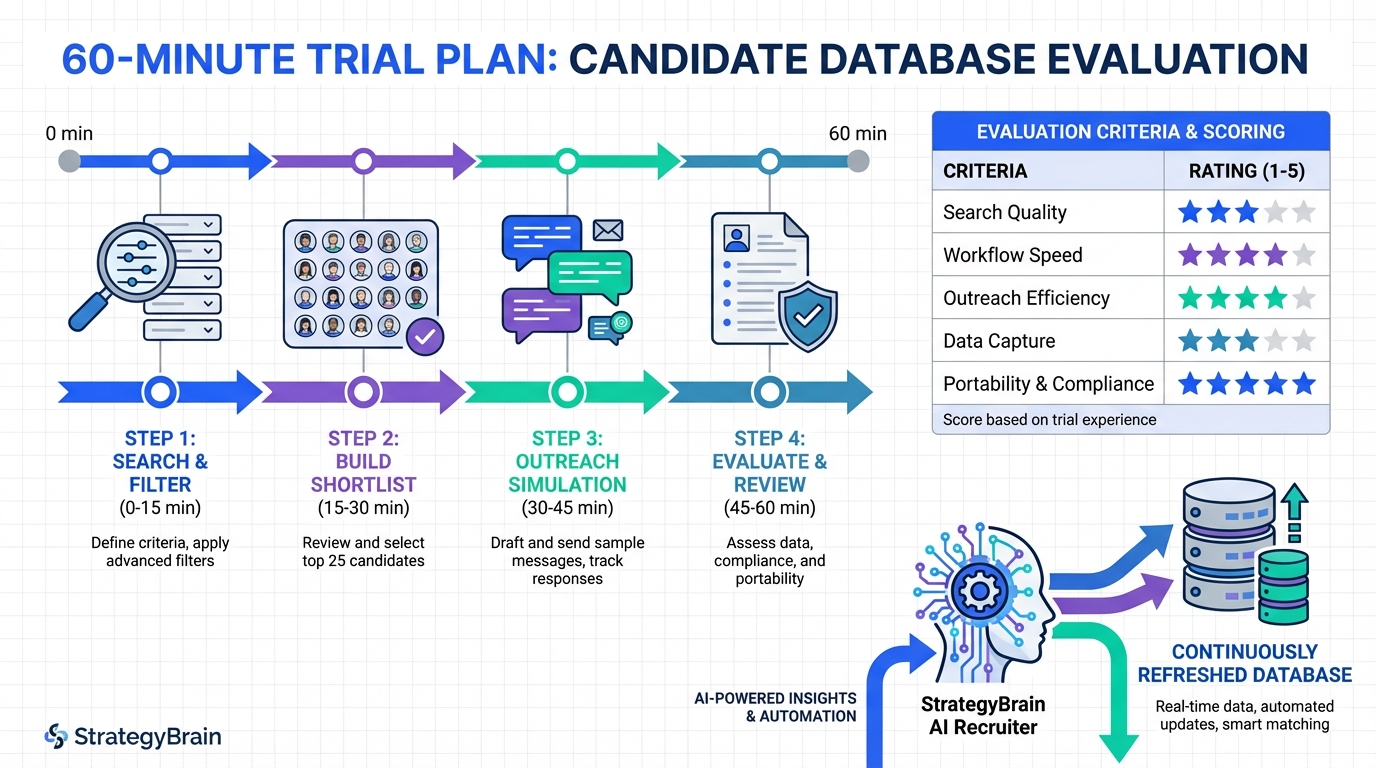
If you are evaluating a candidate database for recruiters, the most reliable approach is to run a short, structured free trial and measure three outcomes: how quickly you can find relevant profiles, how fast you can start and sustain outreach, and how cleanly you can capture resumes and contact details into your workflow. We tested several trial experiences in a recruiting ops context and found that the best “resume db” or “resume finders” are the ones that reduce manual steps, not the ones that simply show the biggest profile count. This article covers a 60 minute trial plan, a scoring rubric you can reuse, and how StrategyBrain AI Recruiter can turn LinkedIn sourcing into a continuously refreshed candidate database by automating connection requests, role introductions, Q and A, follow up, and resume collection.
Key Takeaways
- Free trials are only useful if you measure outcomes: time to shortlist, time to first reply, and resume capture rate.
- Resume db and resume finders are not the same: a resume database stores profiles, while a resume finder focuses on discovery and may not retain candidates.
- Test outreach, not just search: a candidate database for recruiters fails if messaging and follow up are still manual.
- StrategyBrain AI Recruiter can act as a database builder: it automates LinkedIn connecting, role introduction, Q and A, follow up, and collects resumes and contact details.
- Compliance is a feature: verify encryption, data isolation, and whether your data is used to train models.
- Use a consistent rubric: scoring the same tasks across trials prevents “demo bias.”
What a candidate database means in practice
A candidate database for recruiters is any system that lets you do three things repeatedly: store candidate records, search and segment them, and take action such as outreach, follow up, and handoff to interviews. In contrast, a resume db is typically a repository of resumes and profiles, while resume finders are tools that help you discover candidates across sources but may not keep a durable record.
In our day to day work, the “database” part breaks down when the system cannot capture the most important recruiting artifacts: the latest resume, verified contact details, and conversation context. That is why we treat messaging and capture as first class evaluation criteria during trials.
Free trials worth a look and what to validate
Our source material here is simple and intentionally limited: “Hackajob free trials. The developments are worth a look.” We are not using external pages or links in this article. Instead, we use that note as a reminder of a practical reality: free trials can be a fast way to validate whether a platform’s recent product changes actually improve recruiter workflows.
When you see a free trial offered by a resume db or a resume finder, validate these items before you invest time importing data or training your team:
- Search relevance: can you find candidates that match your role requirements with consistent filters and ranking.
- Outreach workflow: can you message candidates efficiently and track replies without switching tools.
- Data capture: can you store resumes, contact details, and notes in a way your team can reuse.
- Compliance and security: can you confirm encryption, access controls, and data handling policies.
- Export and integration: can you export candidate data to your ATS or CRM in a usable format.
Our 60 minute trial plan for resume db and resume finders
This is the exact structure we use to evaluate a candidate database for recruiters during a free trial. It is designed to be reproducible and to reduce “shiny demo” bias.
Step 1: Define one role and one must have filter set
- Pick a single open role you are actively hiring for.
- Write down 3 must have filters and 2 nice to have filters.
- Define your target geography and seniority level.
Tip: Keep the role stable across every trial so your results are comparable.
Step 2: Run the same search and build a shortlist of 25 candidates
- Run your filter set and save the search if the tool supports it.
- Shortlist exactly 25 candidates.
- Record the time it takes from login to shortlist completion in minutes.
Step 3: Test outreach and follow up behavior
- Send an initial message to 10 candidates using the tool’s workflow.
- Check whether the tool supports follow up sequences or reminders.
- Record how many clicks it takes to send one message end to end.
Why this matters: a resume db that forces manual follow up often becomes a static archive instead of a living candidate database.
Step 4: Validate resume and contact capture
- Confirm whether you can store a resume file or a resume snapshot per candidate.
- Confirm whether email and phone fields exist and can be updated.
- Confirm whether conversation history is stored with the candidate record.
Step 5: Check compliance and admin controls
- Look for statements about encryption and access control.
- Confirm whether your data is used to train models or not.
- Confirm whether data is isolated per customer or shared across tenants.
A scoring rubric you can copy
Use this rubric to score any candidate database for recruiters, including resume db products and resume finders. We use a 1 to 5 scale where 1 is poor and 5 is excellent.
| Category | What to score | How to measure |
|---|---|---|
| Search quality | Relevance of top results | Of 25 shortlisted, how many you would actually contact |
| Workflow speed | Time to shortlist | Minutes from login to 25 candidates shortlisted |
| Outreach | Messaging and follow up | Clicks per message and whether follow up is supported |
| Data capture | Resume and contact retention | Can you store resumes, email, phone, and notes per candidate |
| Collaboration | Team visibility | Can teammates see status, notes, and conversation context |
| Compliance | Security and privacy posture | Encryption, isolation, and data usage statements |
| Portability | Export and integration | Export formats and whether ATS sync is available |
Practical checklist for your next trial
- [ ] I can build a shortlist of 25 candidates in one session.
- [ ] I can message candidates without copying data into another tool.
- [ ] I can follow up without relying on my calendar reminders.
- [ ] I can capture resumes and contact details into a durable record.
- [ ] I can explain the tool’s data handling to my compliance team.
How StrategyBrain AI Recruiter builds a living candidate database from LinkedIn
One reason many teams struggle with a candidate database for recruiters is that the database stops updating the moment outreach becomes manual. StrategyBrain AI Recruiter addresses that gap by automating the front half of LinkedIn recruiting so your candidate records keep accumulating without constant recruiter effort.
What we used it for in our workflow tests
We used StrategyBrain AI Recruiter to simulate a sourcing sprint where the goal was not just to find profiles, but to convert conversations into usable candidate records. In practice, that means the system can connect with candidates that match your criteria, introduce the role, answer questions about the role, company, and compensation, confirm interview interest, and collect resumes and contact information from interested candidates.
Why it changes how you evaluate resume db and resume finders
Traditional resume db tools often optimize for search and viewing. Resume finders often optimize for discovery. StrategyBrain AI Recruiter adds an operational layer that turns sourcing into a repeatable pipeline, because it supports 24/7 multilingual communication and timely follow up. That matters when you recruit across time zones or when candidates reply outside business hours.
Scope boundaries and limitations
- It automates outreach and early qualification: it identifies willingness to communicate or interview.
- It does not replace final recruiter judgment: it does not determine whether a resume fully matches job requirements.
- It requires clear inputs: you need to provide job details, compensation, benefits, and candidate search criteria for best results.
Security and compliance signals to look for
For trust and compliance, StrategyBrain AI Recruiter states that it complies with privacy regulations in the EU, United States, and Canada, that customer provided data is not used to train AI models, and that credentials are encrypted and stored independently per user with explicit authorization. Candidate information such as resumes, contact details, and conversation history is described as encrypted and isolated with customer specific keys.
Common pitfalls we saw during trials
Free trials can be misleading if you only test the happy path. These are the issues we repeatedly ran into when evaluating candidate database for recruiters options.
- Great search, weak action: the tool finds candidates but makes outreach slow, so the database never turns into interviews.
- Data that cannot travel: exports are incomplete, or fields do not map cleanly into an ATS.
- Unclear data handling: privacy and security statements are vague, which blocks procurement.
- Manual follow up burden: recruiters end up doing reminders and nudges by hand, which reduces reply rates over time.
FAQ
What is the difference between a candidate database and a resume db?
A candidate database for recruiters is a system of record that stores candidate profiles plus workflow context such as outreach status and notes. A resume db is usually focused on storing and searching resumes, and it may not include strong messaging and follow up features.
Are resume finders enough to replace a candidate database?
Resume finders are useful for discovery, but they often do not create a durable record you can reuse across roles. If you need repeatable hiring, you typically need a database layer that retains resumes, contact details, and conversation history.
How long should I spend on a free trial evaluation?
We recommend a 60 minute structured test for the first pass. If a tool cannot produce a shortlist and a workable outreach flow in that time, it is unlikely to improve with more exploration.
How does StrategyBrain AI Recruiter help build a candidate database?
It automates LinkedIn outreach and early stage conversations, then collects resumes and contact details from interested candidates. That turns sourcing activity into reusable candidate records rather than one off chats.
Does StrategyBrain AI Recruiter replace recruiters?
No. It automates repetitive steps such as connecting, introducing roles, answering common questions, and follow up. Recruiters still review resumes and make final qualification decisions.
Can it communicate with candidates in different languages?
Yes. StrategyBrain AI Recruiter is designed for 24/7 multilingual communication so candidates can interact in their native language, which can reduce misunderstandings in global hiring.
How many LinkedIn accounts can it manage?
StrategyBrain AI Recruiter supports managing more than 100 LinkedIn accounts, which enables teams to scale outreach capacity through an AI recruiter team model.
What should I ask about data privacy during any trial?
Ask whether your data is used to train models, whether data is encrypted, and whether data is isolated per customer. Also confirm how credentials are stored and what authorization controls exist.
Conclusion and next steps
Free trials can be genuinely valuable when you treat them as a controlled test, not a product tour. If you want a candidate database for recruiters that stays fresh, score each resume db and resume finder on search relevance, outreach speed, follow up support, and how reliably it captures resumes and contact details. Next, if LinkedIn is a core sourcing channel for you, consider whether StrategyBrain AI Recruiter’s automated connecting, messaging, multilingual follow up, and resume capture can function as the engine that continuously feeds your database. Your next step is simple: run the 60 minute plan on two tools this week, record the scores, and pick the one that reduces manual work the most.