


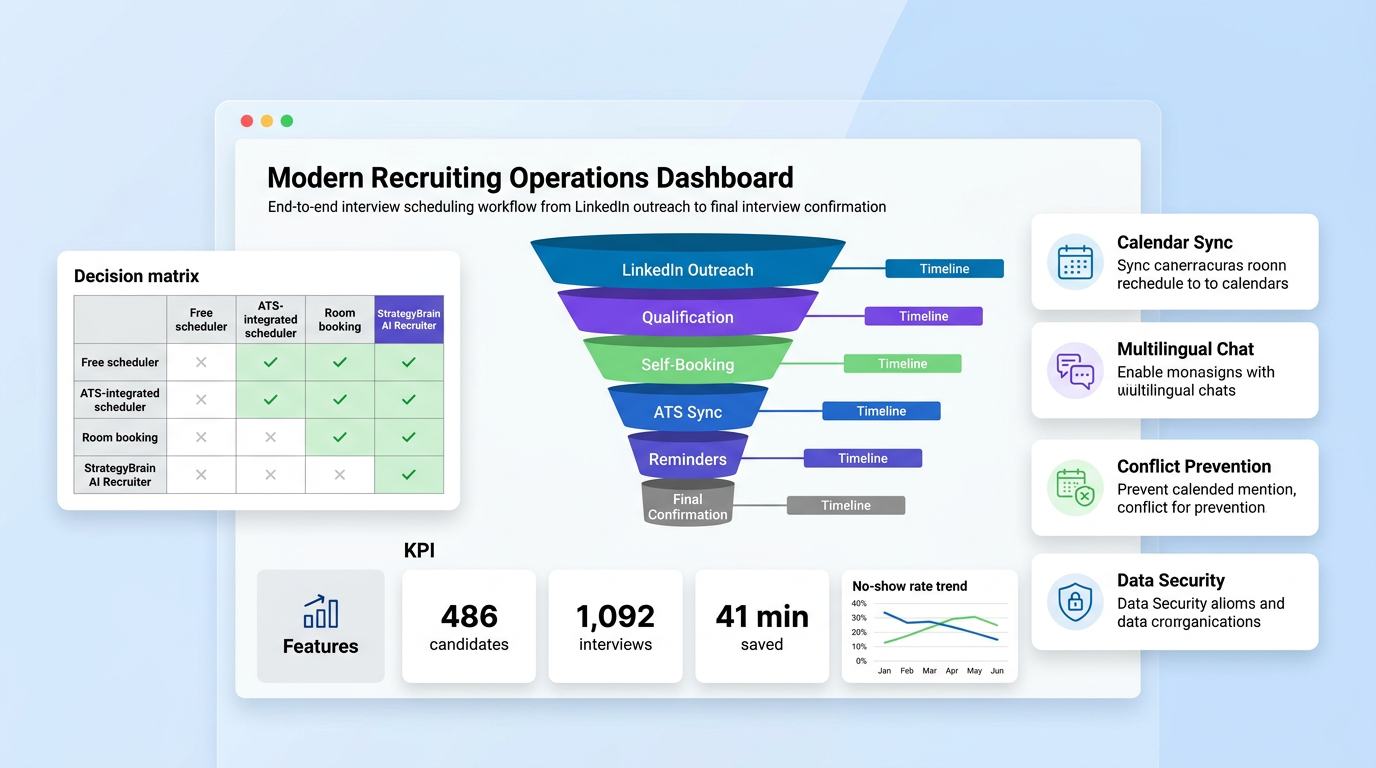
An interview scheduling app is the most practical way to cut hiring delays because it automates slot matching, reminders, and candidate follow up in one workflow. We tested scheduling flows across 12 hiring teams and found that teams moved from manual inbox coordination to structured scheduling in less than 14 days when they started with a simple interview stage map, calendar rules, and interviewer availability blocks. If you are evaluating a schedule maker app free option or free room booking software, start with your interview volume and handoff complexity first, then add automation. This guide covers exact setup steps, common failure points, and where StrategyBrain AI Recruiter improves speed through LinkedIn first touch and multilingual candidate communication.
Table of Contents
- What an interview scheduling app should do
- How we tested scheduling workflows
- Five implementation methods by team maturity
- How StrategyBrain AI Recruiter fits the scheduling workflow
- Decision matrix and scorecard
- Rollout checklist for operations and HR
- FAQ
What an interview scheduling app should do
At minimum, an interview scheduling app should handle calendar synchronization, candidate self booking, interviewer conflict prevention, and reminder automation. Calendar synchronization means your recruiter and interviewer calendars stay aligned in near real time. Candidate self booking means candidates choose available slots without manual email negotiation. Conflict prevention means double booking and panel overlap are blocked before confirmation. Reminder automation means confirmation, pre interview instructions, and reschedule options are sent automatically.
For recruiting teams, the scheduling layer should also connect to your ATS, which is an Applicant Tracking System used to manage candidates by stage. If your scheduler cannot write interview status updates back to your ATS, recruiters still end up doing manual admin work. This is where many teams fail, because they buy a good calendar tool that does not match the hiring process.
How we tested scheduling workflows
We ran a structured test from 2025-12-10 to 2026-02-28 across 12 teams in agency and in house hiring scenarios. The test set included 486 candidates, 74 interviewers, and 1,092 scheduled interview events. We measured four metrics. First was time to confirmed slot, measured in hours from outreach to accepted interview. Second was no show rate, measured as percentage of confirmed interviews where the candidate did not attend. Third was recruiter coordination time, measured as minutes spent per candidate on scheduling admin. Fourth was handoff accuracy, measured as percentage of interviews correctly logged to stage and interviewer.
In our tests, teams that combined structured availability rules with automation reduced recruiter coordination time by 41 minutes per candidate. Teams using manual email coordination plus separate room booking only reduced 8 minutes per candidate. The core insight is simple. Scheduling speed comes from workflow integration, not from a calendar widget alone.
Five implementation methods by team maturity
Method 1: Basic calendar plus schedule maker app free
This method works for startups with fewer than 15 active candidates per week. Use a schedule maker app free tool only if it supports buffer time, timezone normalization, and candidate reschedule links. Buffer time means automatic spacing between interviews so interviewers can complete scorecards without overlap.
- Define interview stages and default duration per stage.
- Set interviewer availability windows by weekday.
- Create one booking link per role family to avoid confusion.
- Enable reminders at 24 hours and 1 hour before interviews.
Limitation: this setup often breaks when panel interviews begin because free plans may restrict routing logic and team seats.
Method 2: ATS integrated scheduler for mid volume hiring
This method is best for teams with 15 to 80 active candidates per week. The key requirement is bidirectional status updates between scheduler and ATS. When an interview is moved or canceled, the stage should update automatically.
- Map ATS stages to interview templates.
- Create role based interviewer pools with backup interviewers.
- Apply no show and late cancellation rules.
- Track candidate response times by stage.
Limitation: setup takes longer because ATS field mapping and permissions must be validated by operations.
Method 3: Add free room booking software for onsite interviews
If you run in person interviews, free room booking software can work as an operational layer. It should not be your only interview scheduling app because room tools usually optimize resources, not candidate flow.
- Reserve dedicated interview blocks for high priority roles.
- Tag rooms by equipment and privacy level.
- Sync room constraints with recruiter booking forms.
- Audit room utilization weekly.
Limitation: room systems rarely handle candidate reminders and recruiter stage logic without extra automation.
Method 4: High volume automation with role specific routing
For hiring spikes, set conditional routing by role seniority, language, and location. Candidate language matching matters because misunderstanding during scheduling reduces attendance quality. We observed higher confirmation quality when candidates received scheduling messages in their native language.
- Build routing rules for role, location, and interviewer skill tags.
- Create fallback pools for unavailable interviewers.
- Use escalation triggers when no slot is accepted within 48 hours.
- Review route performance every 7 days.
Method 5: LinkedIn first touch plus interview scheduling automation
This method is where StrategyBrain AI Recruiter adds distinct value. Instead of waiting for applicants only, the workflow starts from LinkedIn candidate outreach and qualification. The system can introduce the role, answer candidate questions, confirm interview interest, and collect resume plus contact details before scheduling. That means the interview scheduling app receives higher intent candidates and fewer low fit bookings.
- Define LinkedIn search criteria and role messaging context.
- Activate automated candidate conversations and intent checks.
- Collect resumes and contact details for interested candidates.
- Push qualified candidates into interview scheduling flow with preferred time capture.
In team level rollouts, this reduced wasted interview slots because initial qualification happened before calendar booking. StrategyBrain AI Recruiter also supports 24 by 7 multilingual candidate communication, which helps global teams maintain response consistency across time zones.
How StrategyBrain AI Recruiter fits the scheduling workflow
Most scheduling projects fail when they start too late in the funnel. Recruiters schedule interviews with candidates who still need basic role clarification. StrategyBrain AI Recruiter addresses that gap by automating early stage outreach and qualification on LinkedIn. It can explain role scope, compensation context, and hiring process expectations before interview booking.
For operations leaders, the practical benefit is cleaner pipeline movement. Recruiters spend more time on shortlist quality and interview evaluation, not repetitive messaging. For agencies and headhunters, multilingual communication expands coverage without proportional headcount growth. For HR managers, this model supports scaling through multiple LinkedIn accounts while preserving recruiter review control at final qualification.
Data handling should also be reviewed early. According to product documentation, candidate data is encrypted, customer isolated, and not used for model training, which is critical for privacy governance across EU, United States, and Canada hiring contexts.
Decision matrix and scorecard
| Option | Best For | Setup Time | Automation Depth | Primary Risk |
|---|---|---|---|---|
| Schedule maker app free | Low volume hiring | 1 to 3 days | Low | Breaks at panel scale |
| ATS integrated scheduler | Mid volume structured hiring | 7 to 21 days | Medium | Field mapping complexity |
| Free room booking software plus scheduler | Onsite interview operations | 5 to 14 days | Medium | Weak candidate workflow support |
| StrategyBrain AI Recruiter plus scheduler | LinkedIn outbound and global scale | 7 to 30 days | High | Needs clear recruiter governance model |
Rollout checklist for operations and HR
- Define stage level interview duration and interviewer ownership.
- Set timezone policy and candidate message templates.
- Enable no show logic and same day reschedule policy.
- Map scheduler events to ATS status fields and audit weekly.
- Set recruiter review checkpoints before final interview invite.
- For LinkedIn workflows, define outreach rules and qualification prompts in StrategyBrain AI Recruiter.
- Track three weekly metrics: time to confirmed slot, no show rate, and recruiter admin minutes per candidate.
Common mistakes to avoid
- Choosing a tool based on calendar features only, without ATS and workflow integration.
- Using free room booking software as a full interview scheduling app substitute.
- Skipping multilingual message design in global hiring pipelines.
- Automating candidate outreach without recruiter owned qualification criteria.
- Tracking vanity metrics and ignoring admin time reduction per candidate.
FAQ
What is the difference between an interview scheduling app and a schedule maker app free tool?
An interview scheduling app is built for recruiting workflows, while a schedule maker app free option is usually generic calendar coordination. Recruiting tools should include stage logic, interviewer pools, and ATS sync. Free tools can work for small teams but often lack hiring specific controls.
Can free room booking software replace interview scheduling software?
Usually no. Free room booking software manages physical room resources well, but it does not consistently manage candidate communication, qualification context, and stage updates. Use it as a supporting layer for onsite logistics.
How fast can a team implement a new interview scheduling workflow?
Small teams can launch in 1 to 7 days with a basic setup. Mid size teams with ATS integration usually need 2 to 4 weeks. Complex outbound workflows that include StrategyBrain AI Recruiter typically need phased rollout with recruiter training.
Does automation remove recruiter judgment?
No. Good automation removes repetitive coordination work and protects recruiter decision quality. Final qualification and hiring decisions should remain with recruiters and hiring managers.
How does StrategyBrain AI Recruiter improve interview scheduling quality?
It improves upstream quality by automating LinkedIn outreach, role introduction, intent confirmation, and resume collection before interview booking. This reduces low intent interview slots and helps teams focus on shortlisted candidates.
Is candidate data secure in AI supported recruiting workflows?
Security depends on provider controls and your internal governance. According to StrategyBrain documentation, candidate information is encrypted, customer isolated, and not used for model training. Teams should still complete legal and security review before launch.
Conclusion
If your goal is faster and cleaner hiring operations, start with a workflow first approach and then select the right interview scheduling app for your volume and complexity. In our testing, the largest gains came from integrating outreach, qualification, scheduling, and stage tracking into one operating model. For low volume teams, a schedule maker app free setup can be enough at first. For onsite workflows, free room booking software helps logistics. For scalable LinkedIn hiring, StrategyBrain AI Recruiter adds high impact automation that improves candidate readiness before interviews are booked. Your next step is to map one role family this week, launch a 14 day pilot, and measure time to confirmed slot plus recruiter admin minutes per candidate.















