


This article helps recruiters automatiser LinkedIn by choosing safer workflows that avoid missed replies, duplicates, and lost context.
That distinction matters more than most teams admit. When outreach, follow-ups, reply handling, and candidate records live across browser tabs, inboxes, and personal spreadsheets, recruiters do not just lose time. They lose context, send duplicate messages, miss strong prospects after business hours, and create the kind of inconsistent candidate experience that quietly damages future response rates. For a solo recruiter, that means wasted hours and weaker placements. For a small agency owner, it means uneven delivery across consultants. For an in-house talent team, it means slower pipelines and hiring manager frustration.
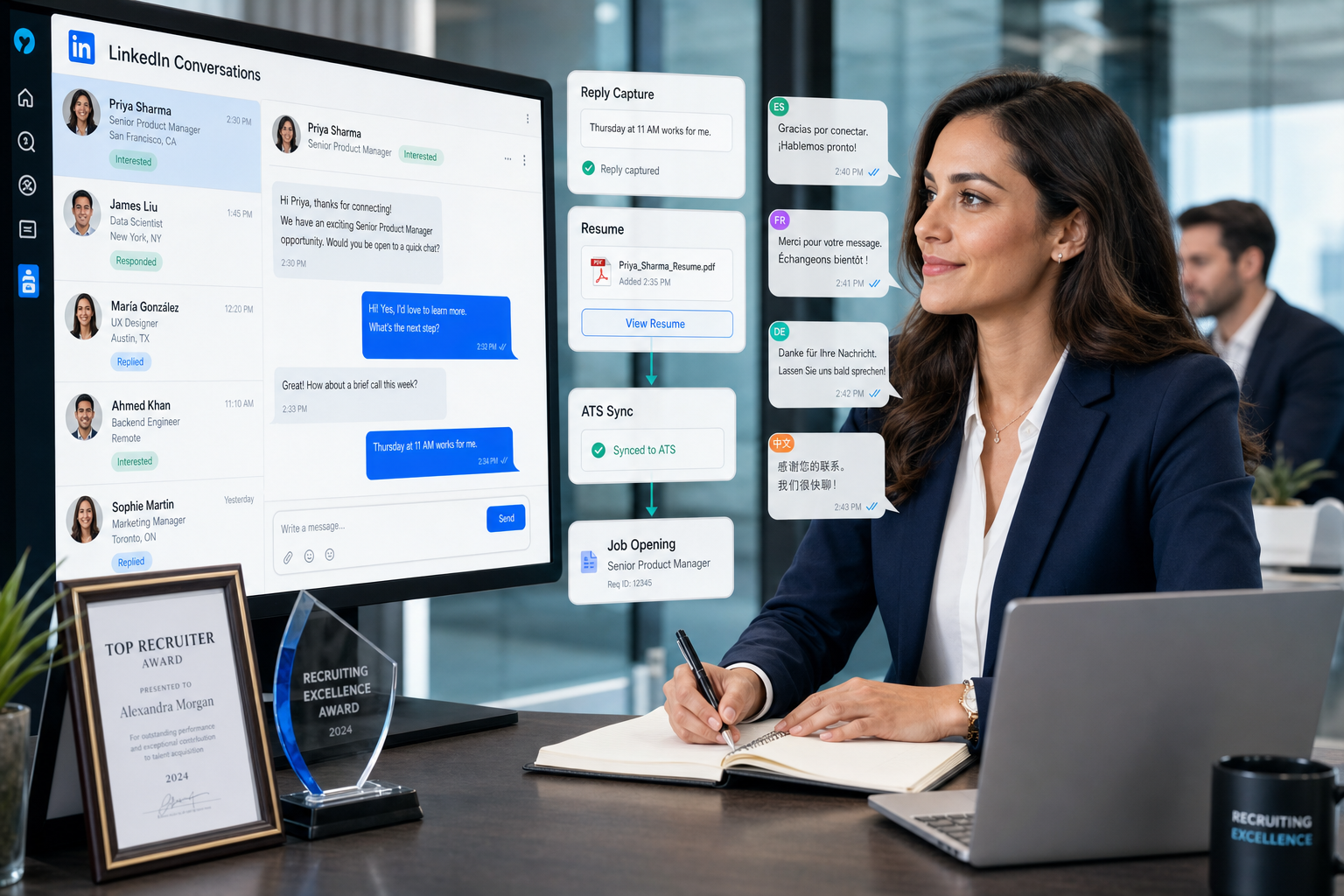
One way I have seen teams reduce that friction is by using StrategyBrain AI Recruiter as a workflow support layer around LinkedIn activity rather than as a substitute for recruiter judgment. In practice, the most relevant capabilities are always-on candidate messaging, multilingual communication when searches cross borders, and automatic collection of resumes or contact details from interested prospects. The recruiter still decides who is worth pursuing, reviews the resume, and makes the next-step call; the system mainly removes repetitive message handling and follow-up lag.
That planner-versus-reality tension is not unique to recruiting software. In a career interview with finance leader Jim Caltabiano, one idea stood out: he was someone who thought several steps ahead, chose education and early roles carefully, and still found his path disrupted when a new position changed shortly after he joined. He regrouped, delivered on the work in front of him, and left well enough that the relationship stayed open. Recruiters know that pattern well. You can build a sourcing plan, map target companies, line up title variations, and script outreach stages, then watch the market shift, a requisition change, or candidate replies arrive in a burst after hours.
The operational lesson is the same. Planning still matters, but rigid plans break when recruiters cannot adapt quickly without losing control of follow-up, ownership, and candidate history. That is where automated prospecting and a disciplined automated prospecting system actually earn their value. If you want to automatiser LinkedIn responsibly, the real question is not how to automate everything. It is how to build a workflow that stays structured when the search takes an unexpected turn.
Table of Contents
- Why recruiting plans break even when the process looks solid
- What recruitment automation tools should actually do
- How to automatiser LinkedIn without creating risk
- What a practical automated prospecting workflow looks like
- Where StrategyBrain AI Recruiter fits in real recruiter flow
- What features matter most
- How leading recruiting platforms compare
- Why ATS and CRM integration matters
- Common mistakes to avoid
- FAQ
Why recruiting plans break even when the process looks solid
Experienced recruiters are usually planners by necessity. We think one or two steps ahead because every search depends on sequencing: define the role, map the market, contact likely candidates, qualify interest, collect information, and keep the hiring team aligned. But as the career story above suggests, well-built plans can still become unexpectedly circuitous. A role changes. A hiring manager reopens the brief. A candidate who looked passive suddenly engages at 10 p.m. local time. A sourcer leaves partial notes that nobody else can decode.
That is why the strongest automation setups are not designed for perfect conditions. They are designed for interruption. They help recruiters regroup quickly, keep delivering on the task at hand, and leave every interaction properly recorded. In recruiting terms, that means preserving candidate context, keeping ownership clear, and making sure the next recruiter can pick up the thread without guessing.
Recruiter insight: The real productivity gain is not sending more LinkedIn messages. It is staying organized when your original sourcing plan stops behaving the way you expected.
What recruitment automation tools should actually do
Recruitment automation tools automate repeatable recruiting tasks such as candidate search alerts, outreach sequencing, reply tracking, resume capture, pipeline movement, and ATS or CRM synchronization. In a good setup, they shorten the time between recruiter intent and recruiter action without removing human review from targeting or qualification.
For teams trying to automatiser LinkedIn, that distinction is critical. Useful automation usually sits around the recruiter workflow: identifying prospects, prompting outreach, capturing responses, updating records, and keeping ownership visible. Risky automation tries to imitate the recruiter entirely, often at scale, with little quality control.
That is why automated prospecting in recruiting should mean disciplined candidate discovery and follow-up management, not bulk messaging without context. A credible automated prospecting system should help you answer simple but important questions: Who was contacted? Who replied? What did they share? Who owns the next step? Which candidates need human review now?
How to automatiser LinkedIn without creating risk
If your goal is to automatiser LinkedIn, the safest approach is to automate around the conversation rather than pretending the conversation does not need a recruiter. In practical terms, that means supporting discovery, timing, record-keeping, and after-hours responsiveness while keeping shortlist decisions and final evaluation in human hands.
Safer workflow support can include:
- Saved searches and alerts for new profiles
- Structured follow-up timing and reminder logic
- Reply detection and pause rules
- Resume and contact detail collection from interested candidates
- Centralized ownership and candidate record updates
- Multilingual communication support for international searches
Higher-risk behavior usually includes mass, non-authentic outreach with little oversight, low-context message blasting, or systems designed to mimic manual engagement too aggressively. Even when those setups appear efficient, they often damage response quality long before a recruiter notices the problem in reporting.
I have found that the better standard is simple: automate the admin burden, not the recruiter's accountability. That keeps messaging more relevant and makes the process easier to defend internally if a hiring manager asks why a prospect was contacted or where a candidate conversation currently stands.
What a practical automated prospecting workflow looks like
A strong automated prospecting system should feel like a structured operating model, especially when plans change mid-search. The following workflow reflects how many recruiters already work when they are at their best.
1. Define the long-term goal before you automate the next step
One useful lesson from the reference story is that planning ahead still matters even when reality changes. In recruiting, that means looking beyond the immediate outreach batch. Clarify where the search is heading: the role level, likely title variants, must-have experience, market constraints, and the broader business context behind the hire.
- Role title and title variants
- Core skills and non-negotiables
- Location or time-zone requirements
- Business reason for the hire
- What success looks like after placement
If that groundwork is weak, automation simply helps you move faster in the wrong direction.
2. Build sourcing inputs that survive change
When a search becomes more complicated than expected, recruiters need search structures they can adjust quickly. Save searches, organize lists by segment, and keep notes on why a prospect belongs in a given pool. This is one of the most useful ways to automatiser LinkedIn because it improves consistency without forcing impersonal outreach.
Good recruitment automation tools help recruiters avoid rebuilding lists from scratch every time a brief changes. That matters when the role becomes more senior, geography broadens, or the hiring manager suddenly wants adjacent industry backgrounds.
3. Prioritize before outreach starts
Not every sourced profile deserves the same treatment. Segment candidates into high, medium, and low priority before any sequence begins. Review the top tier manually. This turns automated prospecting into a quality control process instead of a volume exercise.
4. Use controlled outreach, not blind autopilot
A practical sequence might include a first note, a timed follow-up, and a final reminder or pause rule if there is no response. The sequence should support manual edits and stop automatically when a candidate replies or shares interest.
This layer should ideally handle:
- Follow-up scheduling
- Reply-based pauses
- Resume request handling
- Ownership visibility across recruiters
- Administrative stage updates
5. Capture every candidate touchpoint centrally
Recruiters often discover the weakness of their process only when someone leaves, switches desks, or hands over a search. Notes buried in personal inboxes are the recruiting version of leaving a role badly: the door does not stay open for the next person. A workable automated prospecting system should keep candidate history visible in the ATS or CRM so that any handoff is clean.
6. Regroup quickly when the search changes
This is the most overlooked step. Searches rarely fail because there was no initial plan. They fail because teams do not adapt fast enough after the plan changes. When response quality drops or the brief shifts, review the targeting, message angle, timing, and source mix. Good automation supports quick recalibration.
| Workflow Area | What to Automate | What Stays Human |
|---|---|---|
| Search setup | Alerts, list building, tagging | Role framing and shortlist review |
| Outreach timing | Sequences, reminders, pauses | Personalization and tone |
| Candidate responses | Reply capture, resume collection | Qualification judgment |
| Record keeping | ATS/CRM sync, status logging | Interpretation and stakeholder updates |
| Course correction | Reporting and trend visibility | Strategy changes |
Where StrategyBrain AI Recruiter fits in real recruiter flow
When I have tested AI-supported LinkedIn workflows, the most practical use case has not been replacing the recruiter's voice entirely. It has been reducing the dead time between candidate interest and recruiter visibility. That is where AI Recruiter is easiest to place inside a sourcing process.
For example, if a recruiter is covering multiple searches or working across time zones, candidates often reply when nobody on the team is available. A system that can continue the conversation, answer basic role questions, ask whether the prospect is open to discussing the opportunity, and collect a resume or contact details gives the recruiter a cleaner queue to review the next day. In that setup, the recruiter still owns the final call on fit and whether the candidate should move forward.
What stood out to me from using this style of workflow is that it is most useful in three situations:
- After-hours responsiveness: candidates do not wait for recruiter office hours
- Cross-border sourcing: multilingual communication reduces friction in global searches
- Admin-heavy outreach: resume and contact collection happen without manual chasing
Teams that want to explore how these conversations work in practice can review the vendor's public explanation of how AI Recruiter supports LinkedIn automation or browse additional workflow examples on the conversation cases page. The important operating principle remains the same: AI handles repetitive communication tasks, while the recruiter evaluates the resume, judges alignment, and decides whether to interview.
What features matter most
When recruiters compare recruitment automation tools, the best checklist is not based on flashy claims. It is based on whether the system keeps the process stable when plans shift. That is the real operating test.
- Candidate sourcing support: saved searches, alerts, tags, and organized prospect pools
- Outreach automation: timed sequences, reminder logic, pause rules, and room for manual edits
- Reply handling: quick visibility into interest, resume submission, and next actions
- Multilingual capability: useful for international sourcing and after-hours candidate engagement
- ATS/CRM integration: clean record sync and duplicate prevention
- Collaboration controls: clear ownership, handoff support, and shared notes
- Compliance and security: permissioning, audit trail, and data handling standards
- Reporting: response quality, stage movement, and speed to recruiter follow-up
If you want to automatiser LinkedIn, lean toward tools that strengthen internal workflow rather than tools that promise hands-off scale with little recruiter involvement. The former tends to preserve reputation and response quality. The latter often creates hidden cleanup work.
How leading recruiting platforms compare
Because this topic is software-driven, recruiters usually evaluate automation as part of a wider stack. Below is a practical comparison of three widely known platforms in the U.S. recruiting market alongside StrategyBrain AI Recruiter as a LinkedIn-focused workflow layer. The point is not that one platform does everything. It is understanding which system fits which part of the process.
| Platform | Best Use Case | Strengths | Limits | How it can work with StrategyBrain AI Recruiter |
|---|---|---|---|---|
| LinkedIn Recruiter | Native sourcing and search | Strong talent search, familiar recruiter workflow, built for direct candidate discovery | Manual follow-up load can remain high; workflow consistency depends on recruiter discipline | Can pair well when recruiters want AI-supported messaging, after-hours handling, and resume capture around LinkedIn outreach |
| Greenhouse | Structured in-house hiring process | Widely used ATS, strong interview workflow, solid hiring team coordination | Not built primarily as a LinkedIn outreach engine; sourcing activity may need outside workflow support | Useful as the system of record while StrategyBrain AI Recruiter supports top-of-funnel LinkedIn conversations |
| Bullhorn | Agency recruiting and CRM-heavy environments | Common in staffing, strong relationship management, broad agency workflow coverage | User experience can depend on implementation quality; recruiters may still need better messaging automation | Useful for storing candidate and client history while StrategyBrain AI Recruiter reduces repetitive LinkedIn contact work |
From a recruiter experience standpoint, the decision often comes down to where the current bottleneck sits. If search is fine but message handling is slow, a LinkedIn-focused layer matters more. If outreach is working but the hiring process is messy, the ATS deserves more attention. If the agency already has a CRM but consultants are drowning in repetitive outreach, adding a tool like StrategyBrain AI Recruiter may be more relevant than replacing the whole stack.
On cost and business fit, broad ATS platforms usually make sense for established in-house teams or agencies that need deeper process control across the entire funnel. A narrower LinkedIn automation layer can be more appropriate when the immediate problem is sourcing productivity, after-hours responsiveness, or multilingual outreach. The best setup depends on whether the business is trying to improve recruiter capacity, candidate engagement speed, or full-funnel governance.
Why ATS and CRM integration matters
An automated prospecting system only becomes operationally useful when candidate history ends up in the system your team actually works from. Sourcing may begin in LinkedIn, but ownership, notes, and progression should not stay trapped there.
At minimum, recruiters should expect:
- Candidate creation: prospects can be added with source and role context
- Status visibility: interest, reply state, and stage remain trackable
- Activity capture: notes, resumes, and contact details do not disappear into private inboxes
- Duplicate control: the same prospect is not re-contacted by multiple recruiters unknowingly
- Reporting continuity: source quality and stage movement can be reviewed later
This is where planning and graceful handoff meet. In the same way a professional leaves a role on good terms to keep future options open, a good recruiter leaves a clean candidate trail so the next team member can continue the conversation without friction.
| Area | Disconnected Process | Integrated Process |
|---|---|---|
| Candidate history | Split across inboxes and tabs | Shared in ATS/CRM |
| Ownership | Easy to lose | Visible and assigned |
| Resume handling | Manual chasing | Centralized capture and logging |
| Reporting | Partial and manual | More reliable and complete |
| Handoff quality | Depends on memory | Depends on records |
Common mistakes to avoid
Most teams do not fail with automation because they chose the wrong buzzword. They fail because they automate the wrong layer of the process.
- Starting with volume instead of role clarity: bad targeting at scale is still bad targeting
- Treating automated prospecting as autopilot: recruiters still need to review fit and message quality
- Ignoring candidate timing: after-hours replies often carry the strongest intent
- Letting data sit outside the ATS or CRM: handoffs become unreliable
- Using generic templates everywhere: response quality drops quickly
- Tracking only send counts: qualified conversations matter more
- Failing to regroup after the brief changes: the plan should adapt without the process collapsing
The last point deserves emphasis. The recruiting teams that get the most from automation are usually not the most aggressive. They are the most disciplined when the search becomes less predictable than expected.
FAQ
What does automatiser LinkedIn mean in recruiting?
In recruiting, automatiser LinkedIn usually means automating parts of the sourcing workflow around LinkedIn, such as saved searches, follow-up timing, response handling, resume collection, and record updates. It should not mean removing recruiter judgment from candidate targeting and qualification.
What is automated prospecting?
Automated prospecting is the use of workflow automation to support candidate discovery, prioritization, follow-up, and response tracking. The best version keeps the recruiter in charge of fit assessment and next-step decisions.
What is an automated prospecting system?
An automated prospecting system is a structured setup that helps recruiters manage sourcing lists, outreach timing, candidate replies, resume capture, and ATS or CRM synchronization in one controlled process.
Can AI handle LinkedIn candidate conversations?
It can support them, especially for repetitive initial communication, after-hours follow-up, and collecting resumes or contact details from interested candidates. Recruiters should still review candidate information and decide whether to move the person forward.
Is multilingual outreach useful for recruiting automation?
Yes, especially for international searches. Multilingual communication can reduce friction when candidates are more comfortable replying in their native language or when time-zone differences make real-time recruiter replies difficult.
What KPIs matter most for recruitment automation tools?
Look at response rate, qualified conversation rate, time to first recruiter visibility, stage conversion, and follow-up consistency. Raw send volume is much less useful on its own.
Final thoughts
The most useful lesson from the opening career story is not just that plans can go wrong. It is that professionals still succeed when they can regroup quickly, stay deliberate, and leave clean paths for the next move. That applies directly to recruiting operations.
If your team wants to automatiser LinkedIn, focus on workflow quality first. Use automated prospecting to strengthen timing, visibility, and follow-up discipline. Choose an automated prospecting system that helps recruiters adapt when the search changes rather than one that simply increases message volume.
That is what good recruitment automation tools are for: not replacing the recruiter, but making good recruiter judgment easier to deliver consistently.















