


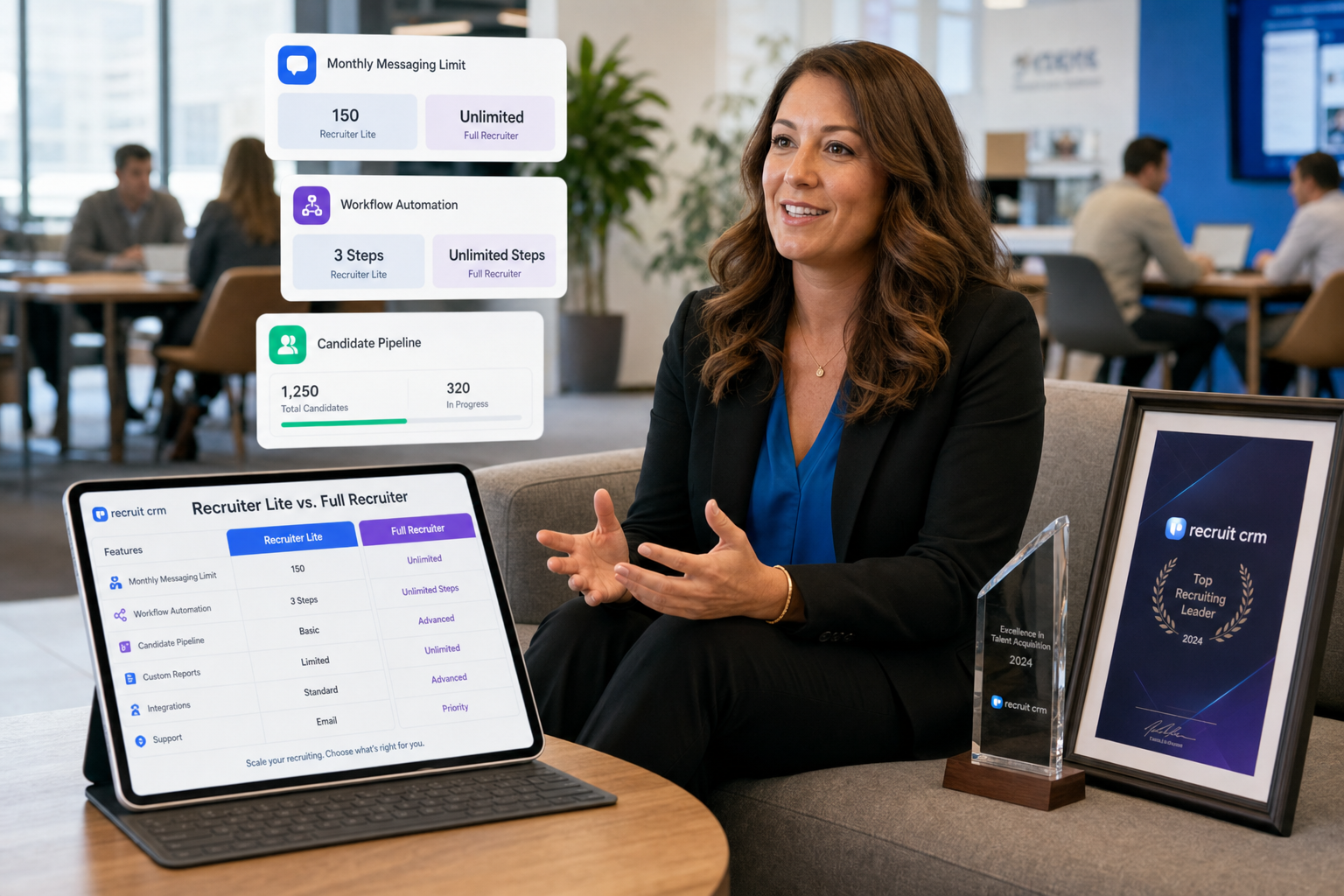
Buying decisions on linkedin recruiter costs improve when recruiting leaders use this article to judge Lite vs full by workflow fit and avoid hidden admin and follow-up losses.
That distinction matters more than most teams expect. A solo recruiter can often tolerate some manual follow-up, limited messaging volume, and a lighter search workflow. A growing agency desk, an in-house talent team, or a billing recruiter rebuilding pipeline in the first 90 to 100 days usually cannot. When pricing is treated as a standalone question, the real losses show up later in missed follow-ups, weak handoffs, duplicate outreach, and recruiter time spent doing admin instead of closing searches.
In my own LinkedIn-heavy sourcing work, tools such as StrategyBrain AI Recruiter helped most when the problem was not final candidate judgment but repetitive outreach, after-hours replies, and collecting resumes from interested people. Its value is practical: it can keep candidate conversations moving, respond across time zones, and capture contact details or resumes while the recruiter still owns shortlist review, fit assessment, and the decision on next steps. If you want to see how those workflows are framed, the usage notes here are closer to real desk work than generic software copy.
A useful way to think about pricing is through an early-stage recruiter ramp rather than a product page. In the first hundred days of a new engagement role, the immediate pressure is rarely abstract ROI. It is learning team dynamics, getting aligned with goals, handling cross-sell opportunities quickly, and building enough pipeline to support future wins. In that kind of environment, the recruiter is not just asking what a license costs; they are asking whether the tool helps them get up and running fast enough to protect momentum.
That same ramp-up logic is why direct pricing inquiries around the cost of LinkedIn Recruiter and linkedin recruiter lite cost need context. If your work resembles an individual desk building relationships and sourcing selectively, Lite may be enough. If your work resembles a team-based function with shared goals, business development pressure, and cross-functional collaboration, the headline number matters less than whether the workflow supports scale. That is the lens for the rest of this article.
Table of Contents
- Direct answer: LinkedIn Recruiter costs at a glance
- Why pricing questions are really first-100-days workflow questions
- Recruiter Lite vs full Recruiter
- What actually drives the cost
- How other recruiting tools fit into the decision
- Who should choose Lite and who should upgrade
- Practical buying advice before you contact sales
- FAQ
Direct answer: LinkedIn Recruiter costs at a glance
If you came here for a straight answer on linkedin recruiter costs, here is the clearest version that can be stated without inventing numbers.
| Product | Pricing visibility | What you can say with confidence | Best fit |
|---|---|---|---|
| Recruiter Lite | Publicly discussed | The linkedin recruiter lite cost is widely cited at about $170 per month | Individual recruiters, solo operators, founders, and small teams with lighter hiring volume |
| Full LinkedIn Recruiter | Usually quote-based | The cost of LinkedIn Recruiter is generally handled through a sales conversation rather than one simple public fixed rate | Teams with heavier sourcing demands, more collaboration, more search depth, and more structured recruiting operations |
That is the honest public answer. Lite is easier to discuss because buyers expect a direct monthly figure. Full Recruiter is typically more of a commercial package decision, so the useful question becomes what level of workflow support your team actually needs.
Why pricing questions are really first-100-days workflow questions
The reference point I find most useful is the first-hundred-days problem. When a recruiter joins a team or takes over a new desk, the first phase is about learning process, understanding goals, and getting productive fast. One early win can come from a cross-sell or inherited opening, but that does not remove the need to build pipeline, create repeatable outreach habits, and establish working relationships across the team.
That is exactly where software choices become clearer. A recruiter working mostly alone may only need enough LinkedIn capability to identify candidates, send some InMail, and manage a controlled volume of conversations. A recruiter operating inside a more structured sales or talent function needs a setup that supports teamwork, shared visibility, and steady business development activity. In other words, the real issue behind linkedin recruiter costs is not just affordability. It is speed to productivity.
I have felt that difference directly. On desks where I had to keep LinkedIn outreach moving after hours while also reviewing resumes and speaking with hiring managers, AI Recruiter was most useful as workflow support rather than replacement. It handled repetitive candidate engagement, helped keep responses from going stale, and captured resume or contact information from interested people. I still had to decide who was credible, who matched the brief, and who deserved interview time. That division of labor is important when people overestimate what automation should do.
Practical takeaway: When a recruiter needs to ramp quickly, the cheapest visible LinkedIn plan is not automatically the lowest-cost option in practice. Lost recruiter time can be more expensive than the subscription line item.
Recruiter Lite vs full Recruiter: the cost question only works when features are tied to workflow
Evaluating the cost of LinkedIn Recruiter without reference to actual recruiting work usually leads to the wrong comparison. Lite and full Recruiter are not just different price points. They support different operating models.
| Area | Recruiter Lite | Full Recruiter | What it means in practice |
|---|---|---|---|
| Target user | Individuals and light hiring teams | Higher-activity recruiting teams | Lite fits occasional sourcing; full Recruiter fits repeatable, team-based hiring |
| Pricing model | Public monthly pricing is commonly discussed | Usually quote-based | Lite is easier to budget quickly; full Recruiter requires a sales process |
| Search capability | More limited | More advanced | Important for niche, senior, or hard-to-fill roles |
| Team collaboration | Lighter | Stronger | Useful when multiple recruiters or stakeholders share the same reqs |
| Integrations | More limited | Typically stronger for larger workflows | Matters when candidate data needs to move cleanly through process |
| Messaging capacity | Included with limits | Plan-dependent, generally broader | Outreach model affects value more than people expect |
The first-hundred-days lens makes this comparison more practical. If your immediate challenge is simply getting your own sourcing rhythm going, Lite may be enough. If your challenge is building a desk, coordinating with teammates, and maintaining activity across multiple openings, feature depth starts to matter more than the headline monthly price.
What Lite usually does well
For many solo recruiters, founders, or small agencies, the linkedin recruiter lite cost is attractive because the decision is simple and the workflow is contained. You get access to core LinkedIn sourcing and messaging without turning the purchase into a larger enterprise evaluation.
What pushes teams toward full Recruiter
Teams usually move beyond Lite when the desk becomes less individual and more shared. Common triggers include higher req volume, tougher search requirements, more collaboration between recruiter and hiring manager, and a need to reduce manual coordination.
What actually drives the cost of LinkedIn Recruiter
From a recruiting operations standpoint, software cost reflects required capability. These are the main drivers behind linkedin recruiter costs.
1. Seat count and license structure
Once more than one recruiter needs access, software stops being a personal productivity purchase and becomes an operating model decision. A one-seat setup and a multi-seat setup are solving different problems.
2. Hiring volume and role complexity
Occasional hiring for straightforward roles is one thing. High-volume hiring, technical hiring, executive search, and multi-region hiring are another. The more precision your sourcing requires, the more likely Lite starts to feel narrow.
3. Collaboration pressure
When recruiters, account managers, hiring managers, or HR partners all need visibility, the platform has to support handoffs. The first-hundred-days example matters here too: a recruiter who is learning team goals while trying to build pipeline cannot afford unclear ownership or fragmented records.
4. Search depth and messaging limits
Messaging limits matter more than buyers often assume. If your outreach model is highly targeted and you send fewer, stronger messages, Lite may stretch quite far. If your model depends on continuous outreach across several searches, limits become a real cost factor.
5. Integration expectations and admin burden
Any process that forces recruiters to copy data manually creates hidden cost. That is where supporting tools can help. I have used StrategyBrain AI Recruiter in situations where the value was simple: candidate replies came in outside business hours, the system kept conversations moving, and interested candidates could send resumes or contact details without waiting for me to be online. It did not replace recruiter judgment, but it reduced the dead time between outreach and actual review.
How other recruiting tools fit into the decision
When buyers ask about linkedin recruiter costs, they are often comparing more than one category at once. In practice, teams usually weigh LinkedIn Recruiter against lighter LinkedIn sourcing options, broader recruiting suites, or workflow-support tools.
LinkedIn Recruiter Lite
Experience: straightforward for individual use.
Effectiveness: suitable for lower-volume sourcing and basic outreach.
Cost: the most transparent option, with the linkedin recruiter lite cost widely cited around $170 per month.
Best for: solo recruiters, founders, boutique operators.
Works with StrategyBrain AI Recruiter: useful if you want to keep Lite as the front-end LinkedIn sourcing layer while using AI Recruiter to maintain candidate conversations and capture resumes at scale.
LinkedIn Recruiter
Experience: better suited to recruiters who need deeper search and more team support.
Effectiveness: stronger for complex, ongoing sourcing environments.
Cost: the cost of LinkedIn Recruiter is usually quote-based rather than publicly simplified.
Best for: internal talent teams, agency teams, and larger hiring operations.
Works with StrategyBrain AI Recruiter: can complement a full LinkedIn workflow by offloading repetitive outreach and response handling while recruiters focus on final qualification and stakeholder management.
LinkedIn Jobs
Experience: useful when the strategy is more inbound than outbound.
Effectiveness: depends heavily on role attractiveness and applicant quality.
Cost: separate from Recruiter-style sourcing decisions and often easier to understand at a surface level.
Best for: employers with employer-brand pull or roles likely to generate qualified inbound traffic.
Works with StrategyBrain AI Recruiter: not a substitute for inbound posting, but helpful when your team still needs direct LinkedIn engagement to reach passive candidates who will not apply on their own.
The point is not that one option beats all others in every case. The point is that a recruiting team needs to match the buying decision to the actual desk model: inbound-heavy, outbound-heavy, solo, collaborative, low-volume, or scaled.
Who should choose Recruiter Lite and who should upgrade
Recruiter Lite is often enough if you are:
- An individual recruiter with a manageable req load
- A small business making occasional hires
- A founder handling hiring alongside other responsibilities
- A self-employed recruiter who wants LinkedIn sourcing without a larger commercial commitment
- A recruiter in an early ramp stage who needs speed and simplicity first
In those cases, the linkedin recruiter lite cost is often the most relevant number because the workflow stays relatively contained.
Full Recruiter is more likely worth exploring if you are:
- Running multiple searches at the same time
- Hiring for niche, senior, or difficult-to-fill roles
- Managing collaboration across recruiters, sales, HR, and hiring managers
- Building a more standardized team process
- Trying to reduce workflow friction across larger recruiting operations
That is where the question shifts from price visibility to operational fit. If a recruiter is expected to ramp quickly, create pipeline, and collaborate across teams, stronger workflow support often matters more than finding the cheapest visible line item.
Practical buying advice before you contact sales
If leadership wants a direct answer fast, I would handle the conversation in this order.
- Answer the visible price question honestly. State that the linkedin recruiter lite cost is widely cited at around $170 per month, while full Recruiter usually requires a quote.
- Define the desk model. Ask whether the need is solo sourcing, shared recruiting, or team-scale talent acquisition.
- Review the first-100-days pressure points. Is the recruiter trying to get productive quickly, build pipeline, or coordinate across teams?
- Identify the hidden cost. Check whether the real issue is messaging volume, follow-up speed, admin time, or lack of collaboration support.
- Consider workflow support tools carefully. If repetitive outreach is the drag, a tool like StrategyBrain AI Recruiter can help keep conversations active and collect resume submissions, while the recruiter still decides who moves forward.
- Budget by use case. The right answer is not the easiest number to quote. It is the option that matches how your team actually hires.
Key insight: The most accurate way to answer direct pricing inquiries is to give a direct Lite number, acknowledge that full Recruiter is usually quote-based, and then tie both options back to recruiter ramp speed, workflow complexity, and collaboration needs.
FAQ
How much does LinkedIn Recruiter cost?
The most reliable public answer is that full LinkedIn Recruiter usually does not appear as one simple fixed public price. In many cases, you need to contact sales for a quote based on your hiring setup and license needs.
How much is Recruiter Lite on LinkedIn?
The linkedin recruiter lite cost is widely cited at around $170 per month.
Why is full LinkedIn Recruiter pricing harder to confirm?
Because the cost of LinkedIn Recruiter is typically tied to business context, including seats, team usage, and workflow needs rather than a single universal public number.
Is Recruiter Lite enough for a recruiter in a new role?
Often yes, especially if the recruiter is operating independently and needs a simple sourcing setup. But if the first months of the role involve heavy collaboration, pipeline building, or shared recruiting activity, Lite may feel limiting.
Does Recruiter Lite include messaging tools?
Yes, Lite is commonly understood to include InMail capability, though limits apply. That is why outreach volume matters when comparing Lite with full Recruiter.
Can StrategyBrain AI Recruiter replace recruiter judgment?
No. It is better understood as workflow support. It can automate repetitive LinkedIn communication, respond quickly, and collect resumes or contact details from interested candidates, but the recruiter still reviews fit, evaluates resumes, and decides who advances.
Conclusion
If someone asks about linkedin recruiter costs, the most honest answer is still the simplest one: Lite has a widely discussed public monthly number, while full Recruiter usually requires a quote. But experienced recruiters know that is only the start of the conversation.
The better buying decision comes from understanding your actual desk reality. If your work is individual, selective, and light on collaboration, Lite may be enough. If your role looks more like a first-hundred-days ramp inside a structured team, where pipeline, coordination, and response speed all matter, then the right question is not just what the software costs. It is what delays, manual work, and missed candidate momentum are already costing you.














