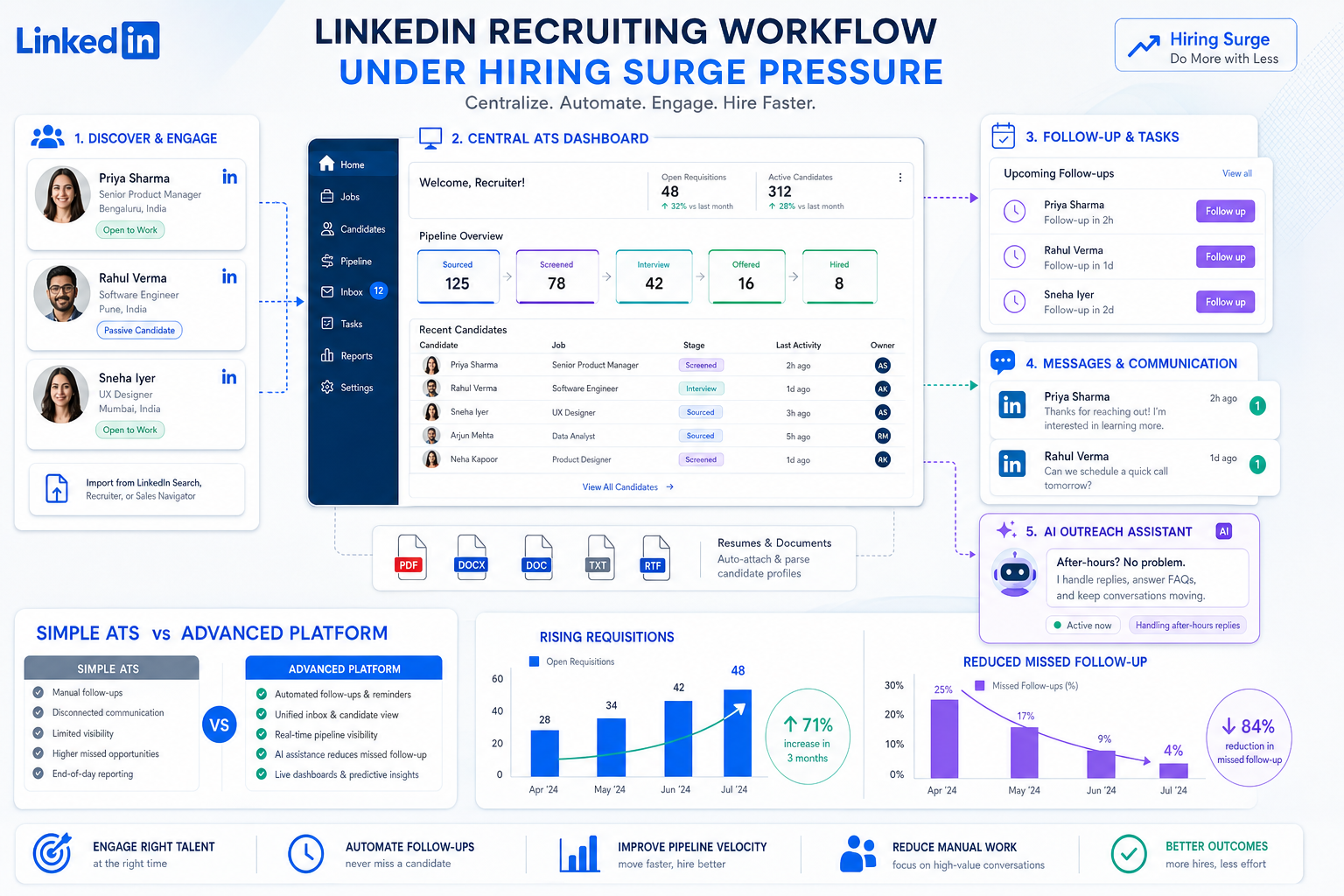
When hiring spikes hit, this article helps recruiters judge which ATS recruitment tool prevents missed follow-up and lost candidates.
That matters most when the market tightens before your process is ready. When employers start adding full-time roles quickly, recruiters feel the strain first: more requisitions open at once, more hiring managers want updates, and more candidates reply outside working hours. For a solo recruiter, a small search firm, or an in-house talent team, the cost is not just slower hiring. It shows up in missed follow-up, inconsistent candidate records, weaker manager trust, and avoidable revenue leakage when good applicants drift away.
In my own sourcing workflow, I have found that StrategyBrain AI Recruiter is most useful when that pressure comes from volume rather than from a lack of recruiter judgment. It can handle repetitive LinkedIn outreach, keep candidate conversations moving after hours, and collect resumes or contact details from interested people, while the recruiter still makes the final call on fit, resume quality, and next-step decisions. Used that way, it supports the front end of hiring without replacing the part of the process that requires experience.
A useful way to understand this is to look at a real hiring backdrop. In one labor-market snapshot from British Columbia, employers added 20,000 full-time jobs in a single month while the United States added 222,000. Most of that Canadian growth came from private-sector demand, led by agriculture, professional services, and health care, with additional gains in utilities, construction, and manufacturing. Recruiters in those sectors were not debating theory; they were opening role lists, sorting resumes for skilled trades and engineering-adjacent work, replying to candidate messages, and trying to keep moving before summer availability made scheduling harder.
What made that moment difficult was not only the number of openings. Employers were already reporting hiring difficulty before school break began, and some hot markets were seeing entry-level construction wages rise into the 18 to 20 dollar an hour range. In practice, that means the recruiter has to confirm role priority, chase the last LinkedIn reply, update candidate stage, remind the hiring manager about shortlist feedback, and document who is still interested before another employer gets there first. That is exactly where a fragmented process fails and where the best recruiting software, the right applicant tracking system features and benefits, or even a simple ATS become a real operating decision rather than a software shopping exercise.
If you are comparing recruiting systems, the right question is not which platform looks best in a demo. The better question is which one helps your team hold up when hiring demand rises quickly, communication volume spreads across channels, and every missed update has a cost. This article uses that reality to evaluate the best recruiting software, what an ATS recruitment tool should actually do, and when a lighter system is smarter than a heavier one.
- Why hiring spikes expose recruiting system weaknesses
- What an ATS recruitment tool actually does
- How to evaluate the best recruiting software by use case
- Applicant tracking system features and benefits that matter most
- When a simple ATS is the better choice
- Where AI-assisted outreach fits into the workflow
- A practical checklist for choosing recruiting software
- Common buying mistakes recruiting teams make
- FAQ
Why hiring spikes expose recruiting system weaknesses
Recruiting teams often realize they need better systems only when the market accelerates. A steady hiring environment can hide weak process design for months. Recruiters remember conversations from memory, hiring managers send feedback by email, and spreadsheets seem good enough until demand picks up. Then the same setup starts breaking in predictable places: duplicate outreach, lost resumes, unclear ownership, stale shortlists, and candidates who go cold while the team is still aligning internally.
The British Columbia hiring snapshot is a good example of the underlying pattern. When private-sector growth is spread across agriculture, professional services, health care, utilities, construction, and manufacturing, the challenge is not just volume. It is mixed hiring velocity across very different role types. One team may be managing skilled trades urgency, another may be handling professional roles that require more coordination, while wages in hot markets push candidates to make faster decisions. The software problem in that environment is visibility and control.
That is why experienced recruiters tend to evaluate recruiting software operationally. They ask whether the system helps them move faster without losing context, whether hiring managers will actually use it, and whether candidate communication stays organized when the day gets busy. The best recruiting software is not the one with the biggest promise. It is the one that prevents avoidable process failure when the market stops being forgiving.
What an ATS recruitment tool actually does
An ATS recruitment tool is centralized recruiting software that helps teams manage hiring work in one place. That usually includes job posting, application intake, resume parsing, candidate stage tracking, interview scheduling, hiring-team collaboration, offer workflows, and reporting.
For recruiters, that centralization matters because hiring work is full of handoffs. A recruiter may source or screen, a hiring manager may review, a coordinator may schedule, and HR may need the final documentation. Without a shared system, each handoff becomes a potential delay or data gap. With a usable ATS, the process becomes easier to follow and harder to lose.
The biggest day-to-day gains are practical. Teams reduce manual admin, improve pipeline visibility, keep communication tied to the right candidate record, and make more consistent hiring decisions. Those are the core applicant tracking system benefits that matter in both high-volume and selective hiring environments.
How to evaluate the best recruiting software by use case
The phrase best recruiting software sounds universal, but fit depends on hiring complexity. A small team hiring occasionally needs something very different from an enterprise operation managing approvals and cross-functional workflows.
| Use Case | What Matters Most | Practical Advice |
|---|---|---|
| Small business | Fast setup, ease of use, core pipeline tracking, templates | Choose a simple ATS if you want structure without heavy administration. |
| Mid-market | Automation, collaboration, analytics, integrations | Prioritize systems that improve recruiter and hiring manager coordination. |
| Enterprise | Governance, permissions, reporting depth, workflow control | Focus on consistency, auditability, and adoption by occasional users. |
| Staffing and search firms | Speed, searchable pipelines, outreach support, CRM-style follow-up | Look for systems that help recruiters move candidates quickly and repeatedly. |
| High-volume hiring | Automation, scheduling help, bulk actions, screening support | Test whether repetitive admin actually drops under real load. |
| Simple ATS needs | Lightweight workflow, minimal training, core visibility | Avoid buying complexity your team will never maintain. |
Small business hiring teams
For smaller employers, the best recruiting software is often the one people will use without resistance. A simple ATS can outperform a more configurable system if the team mainly needs job posting, applicant review, interview coordination, and a clear candidate pipeline.
Smaller teams should be especially careful during busy local labor conditions. If wages are moving up and candidates have options, speed matters more than software depth. A simple, well-used process beats a sophisticated setup that no one updates.
Mid-market recruiting teams
Mid-sized organizations usually need a balance between structure and usability. Multiple stakeholders may be involved in each hire, so the system should make scorecards, feedback, approvals, and pipeline ownership easy to follow.
In this range, an ATS recruitment tool should support automation, consistent workflow, and meaningful reporting. The right system keeps recruiter effort focused on decision-making rather than on chasing information across inboxes and side notes.
Enterprise environments
Enterprise hiring often adds role-based permissions, process controls, broader integrations, and stronger reporting requirements. These teams are not just filling roles; they are running a governed operating model across departments or geographies.
Even here, the core test remains familiar: can the system support structured hiring at scale without frustrating managers who only log in occasionally? Complex software that slows the field is still a bad fit, even when the requirements are more demanding.
Staffing, search, and high-volume recruiting
Agency recruiters, headhunters, and high-volume teams care deeply about throughput. When the market is active, they need searchable talent pools, fast stage movement, reliable follow-up, and less repetitive outreach work.
That is also where workflow support outside the ATS becomes relevant. Many recruiters combine a core ATS with sourcing or messaging tools so they can keep the top of funnel moving while the ATS remains the system of record.
Applicant tracking system features and benefits that matter most
When buyers search for applicant tracking system features and benefits, they are usually trying to separate what is operationally useful from what merely sounds advanced. The simplest way to evaluate features is to connect each one to a real hiring pressure point.
1. Multi-board job distribution
This reduces repetitive posting work and helps maintain consistency across channels. It is especially useful when multiple roles open at once and recruiters cannot afford manual duplication.
2. Resume parsing and applicant intake
Clean intake supports faster review and better prioritization. If resumes enter the process inconsistently, the rest of the workflow gets reactive very quickly.
3. Candidate pipeline tracking
Pipeline tracking is one of the most important applicant tracking system benefits. It shows where each candidate stands, which roles are stuck, and what action needs to happen next.
4. Interview scheduling and coordination
Scheduling can quietly consume a large part of recruiter time. Good software reduces back-and-forth and helps teams keep momentum while candidate interest is still warm.
5. Collaboration and feedback workflows
Structured feedback replaces scattered opinions with a documented process. That becomes even more valuable when hiring managers are busy and recruiters need timely decisions.
6. Templates and communication automation
Templates, reminders, and stage-based communication reduce admin and improve consistency. They also make it easier to protect the candidate experience when the recruiter is juggling multiple priorities.
7. Analytics and reporting
Reporting should help answer live operating questions: where is the bottleneck, which manager is slow to respond, and which stage needs redesign? Useful analytics are specific, not decorative.
8. Integrations
An ATS should connect cleanly with the broader hiring and people stack. Poor integration usually means duplicate entry, lower confidence in reporting, and more work for everyone.
9. AI-assisted workflow support
AI can be helpful when it handles repetitive front-end tasks without pretending to replace recruiter judgment. In practice, support with sourcing outreach, candidate replies, interest checks, and admin follow-up is often more valuable than broad claims about automation.
Key insight: The best ATS recruitment tool is the one that helps your team keep decisions, communication, and stage movement visible when hiring pressure increases.
When a simple ATS is the better choice
A simple ATS is often the right fit for smaller teams, occasional hiring, or organizations that need order more than they need advanced control. These systems usually focus on opening roles, collecting applicants, reviewing resumes, moving candidates through stages, and documenting decisions clearly.
The benefit of a lighter system is faster adoption. If your hiring managers dislike complicated tools, simplicity is not a compromise; it is often the reason the process works at all. In active labor markets, speed and clean execution matter more than owning features no one touches.
Signs a simple ATS may be the best fit
- Your team hires in bursts rather than continuously.
- You need quick implementation and low admin overhead.
- You care most about candidate visibility and stage discipline.
- Your hiring managers will only use the system if it feels intuitive.
- You want core applicant tracking system features and benefits without a long setup project.
Signs you may need more than a simple ATS
- You manage multiple departments with different approval paths.
- You require deeper analytics and process controls.
- You rely on several connected HR systems.
- You hire at high volume and need stronger automation.
- You have talent operations ownership and want standardization at scale.
Where AI-assisted outreach fits into the workflow
One of the most practical lessons from modern recruiting is that the ATS does not have to do everything by itself. A strong workflow often combines a central system of record with focused tools for top-of-funnel activity, especially when LinkedIn outreach is a major sourcing channel.
In my own process, I have used AI Recruiter to reduce the part of sourcing work that is repetitive but still time-sensitive. It can automatically connect with candidates within defined criteria, introduce roles, respond in the candidate’s language, and continue conversations after hours when recruiters would otherwise lose momentum. When someone shows real interest, it can request a resume or capture contact details so the recruiter can step in at the right moment. That is useful when hiring demand spikes and every delayed response makes the shortlist weaker.
What I would not delegate is final qualification. Resume review, role-fit judgment, and interview decisions still belong with the recruiter or hiring team. That division of labor is why this kind of support works best alongside an ATS recruitment tool rather than as a replacement for one.
If your team depends heavily on LinkedIn, reviewing the LinkedIn recruiting workflow notes here can help clarify whether always-on messaging and resume capture would solve a real bottleneck in your process.
A practical checklist for choosing recruiting software
If you are selecting the best recruiting software, test it against a live hiring scenario rather than a polished demo. The opening market example in this article is a good stress test: imagine several full-time roles opening across different functions while candidate response speed becomes critical. Then ask whether the system still feels usable.
- Map your current process. Identify how jobs open, who approves them, where candidate records live, and where follow-up gets lost.
- Define must-have workflows. Separate essential needs from nice-to-have features so you can tell whether you need a simple ATS or a broader platform.
- Test recruiter actions. Build a real requisition, review resumes, move candidates through stages, send communication, and schedule interviews.
- Test hiring manager actions. Ask managers to review profiles and leave feedback. If they resist the workflow, adoption risk is high.
- Review top-of-funnel support. If LinkedIn sourcing drives your pipeline, decide whether the ATS needs a companion workflow such as StrategyBrain AI Recruiter to keep outreach and follow-up moving.
- Check integrations early. Confirm how the ATS connects to HRIS, onboarding, payroll, communication tools, and job distribution channels.
- Assess reporting usefulness. Dashboards should answer operational questions, not just count activity.
- Evaluate implementation effort. Make sure your team can realistically configure, train, and maintain the system.
Common buying mistakes recruiting teams make
Choosing by feature volume instead of workflow fit
Long feature lists are easy to admire and hard to use. Workflow fit is what matters when the market gets busy.
Ignoring hiring manager adoption
An ATS that recruiters like but managers avoid will create partial visibility, not shared process discipline.
Underestimating communication load
When candidates reply across channels and time zones, the problem is no longer just tracking applicants. It becomes response management, follow-up discipline, and handoff timing.
Buying enterprise complexity for a simple process
Smaller teams often overbuy. A simple ATS may deliver more value if the hiring reality is straightforward.
Expecting AI to replace recruiter judgment
AI-supported sourcing and communication can save time, but final qualification still depends on recruiter expertise, resume review, and stakeholder judgment.
FAQ
What is an ATS recruitment tool?
An ATS recruitment tool is software that centralizes hiring tasks such as job posting, applicant intake, candidate tracking, interview coordination, hiring-team feedback, and reporting.
What applicant tracking system features and benefits matter most?
The most important features usually include job distribution, resume intake, pipeline tracking, scheduling, collaboration, templates, analytics, and integrations. The biggest benefits are visibility, consistency, reduced admin, and faster execution.
When is a simple ATS enough?
A simple ATS is often enough for small or mid-sized teams with moderate hiring complexity that mainly need structure, basic automation, and an easy-to-use candidate pipeline.
How does AI-assisted outreach fit with an ATS?
AI-assisted outreach can support sourcing, candidate messaging, and resume collection at the top of funnel, while the ATS remains the central record for stages, feedback, and hiring decisions.
Do recruiters still need to qualify candidates manually?
Yes. Even when automation helps with outreach or interest checks, recruiters still need to review resumes, assess fit, and decide who moves forward.
How do you choose the best recruiting software?
Start with your actual hiring workflow, especially under periods of high demand. Then evaluate each system for usability, collaboration, reporting, integration fit, and how well it supports your recruiting pace without adding friction.
Conclusion
The search for the best recruiting software gets clearer when you evaluate systems under real hiring pressure rather than in abstract comparison charts. The labor-market example at the start of this article shows why: when full-time roles rise quickly, sectors compete for talent, and employer urgency increases before availability gets tighter, process quality matters immediately.
The right ATS recruitment tool should help your team keep candidate movement visible, communication organized, and manager collaboration consistent. For some organizations, that means a robust platform with broader controls. For others, a simple ATS with strong core workflows is the smarter answer. And for teams that rely heavily on LinkedIn sourcing, pairing the ATS with focused workflow support such as AI Recruiter can reduce repetitive front-end work while preserving recruiter judgment where it counts most.