


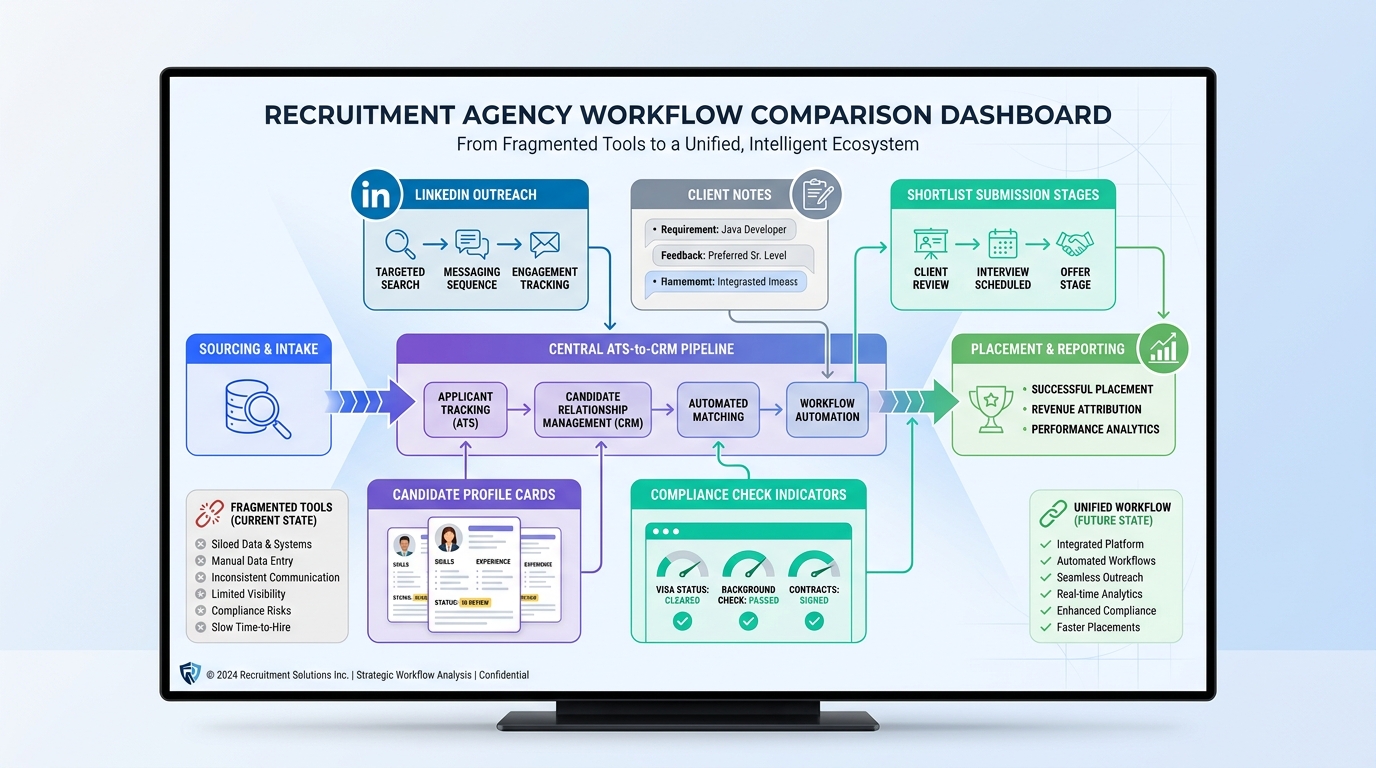
When fragmented tools slow submissions and weaken client trust, this article helps agency leaders judge recruitment agency software by workflow fit and avoid buying the wrong system.
That matters because agency hiring rarely breaks down at the obvious point. The real losses show up when candidate outreach lives in one tool, client notes in another, compliance status in someone’s inbox, and the final shortlist depends on memory rather than a shared workflow. For a small or mid-sized agency, that means slower submissions, missed follow-up, weaker client trust, and more time spent stitching together updates than moving searches forward.
One way I have reduced that drag is by using StrategyBrain AI Recruiter alongside the core recruiting stack for the front end of sourcing and response handling. It is most useful when a desk is juggling outbound outreach, after-hours replies, and early candidate interest checks across LinkedIn. The value is not that it replaces recruiter judgment. It does not. What it can do is keep candidate conversations moving, collect resumes and contact details from interested people, and support multilingual follow-up so the recruiter can spend more time on qualification, shortlist quality, and client advice.
You can see why this matters in specialist operations hiring. When a manufacturer or logistics business needs a plant leader, maintenance head, quality lead, or another operations-critical hire, the recruiter is not just filling a vacancy. They have to understand whether the site is unionized, whether the environment is tightly regulated, what production pressures exist, and whether the role requires a collaborative operator or a more directive turnaround leader. In that kind of search, a general process and a loose ATS record are not enough.
The pressure usually grows once real market friction appears. In the reference scenario behind this article, qualified candidates were found for a hard-to-fill operational leadership role, yet location and compensation alignment became the real barrier to closing. Recruiters had to assess the employer context, build the right candidate profile, actively source beyond applicants, evaluate beyond the resume, and help close the search with practical market feedback. That sequence exposes the software question at the heart of this article: the best recruiting software is not the platform with the biggest feature list, but the one that supports the full agency workflow from search strategy to final placement.
If you are comparing the best recruiting software, start there. Good recruitment agency software should help recruiters manage candidate pipelines, client communication, role context, submissions, and decision history in one operating flow rather than scattering the search across separate systems. For specialist firms, including those evaluating care agency recruitment software and healthcare recruitment software, the need is even more acute because recruiter speed has to sit alongside documentation control, readiness checks, and service continuity.
- Why agency recruiting needs more than a basic ATS
- From role context to placement: the workflow software must support
- ATS vs CRM for agencies
- What good recruitment agency software improves
- Comparison framework for the best recruiting software
- Best recruiting software by agency model
- What care and healthcare agencies should look for
- AI features that actually help recruiters
- Why integrations matter more than buyers expect
- How to choose by size, desk type, and growth stage
- Common buying mistakes
- FAQ
Why agency recruiting needs more than a basic ATS
Agency recruiters do not work in a straight line. A search often begins with business context, not with an application. Before a recruiter can judge fit, they need to know what kind of environment the hire is entering, what constraints shape the role, and what success looks like after placement. That is one of the clearest lessons from specialist operations recruitment, where recruiters must understand plant realities, regulatory pressure, leadership style, and talent-market limits before they even build a shortlist.
That is why the best recruitment agency software is different from a basic ATS. A basic system may track applicants and interview stages, but agencies also need:
- Client and vacancy context so recruiters can capture how the role actually works in the field
- Sales and account visibility to connect business development with delivery
- Search workflow structure for sourcing, outreach, submissions, and feedback
- Candidate relationship management beyond live applications
- Offer and close support when location, compensation, or stakeholder alignment becomes the real issue
In my experience, agencies start feeling the limits of a basic ATS when a search gets nuanced. The software may show who applied, but not why the role is hard, what the hiring manager is reacting to, which candidates are hesitating, or what feedback should reshape the search. Those are not side details. They are the core of agency delivery.
From role context to placement: the workflow software must support
One useful way to judge the best recruiting software is to map it against the actual sequence strong recruiters follow in difficult searches. The operations recruitment reference material behind this article is valuable because it highlights a process many agency leaders recognize immediately.
1. Understanding the environment
Before sourcing starts, recruiters need to understand the employer setting. In operations hiring, that can mean unionization, regulatory exposure, production methods, site leadership pressures, or continuous improvement frameworks. In agency software terms, that means the system should let teams store structured intake notes, stakeholder context, and searchable role history rather than burying that information in email threads.
2. Building a real candidate profile
Good recruiters do not search from a job title alone. They build a profile around technical requirements, leadership traits, and practical fit. That is just as true in permanent placement as it is in temp and contract work. Software should support detailed search criteria, tags, notes, and recruiter commentary so the desk can refine the profile as market feedback comes in.
3. Sourcing actively, not passively
Specialist searches are rarely solved by waiting for inbound applicants. Recruiters need sourcing tools, outreach workflows, and candidate engagement support. This is where I have found StrategyBrain AI Recruiter useful in practice. On searches where I knew the talent pool would be narrow, it helped keep LinkedIn outreach moving, answered candidate questions after hours, and collected resumes from interested prospects while I focused on reviewing fit and preparing client-facing recommendations.
That kind of support is especially helpful when candidates reply outside office hours or when the role reaches across regions and languages. But the important line is this: AI can help advance the conversation, while the recruiter still owns screening, calibration, and the decision on who makes the shortlist.
4. Evaluating beyond the resume
Searches fail when software encourages teams to treat matching like a document exercise. In reality, agencies need to assess communication style, leadership fit, stakeholder handling, and readiness to operate in a specific environment. Strong systems make room for structured feedback, scorecards, and shared notes without turning the process into admin-heavy bureaucracy.
5. Closing with market realism
The reference article made an important point: sometimes the obstacle is not sourcing at all, but compensation, relocation, or expectations that no longer match the market. That means software should help recruiters retain negotiation history, market feedback, and stakeholder decisions. Otherwise the same objections get rediscovered repeatedly instead of managed deliberately.
ATS vs CRM for agencies
A lot of software comparisons go wrong because buyers use ATS as a catch-all term. In practice, an applicant tracking system for recruiters and a recruiting CRM support different parts of the agency workflow.
What the ATS handles
An ATS is the control layer for candidate records, applications, pipeline stages, interviews, notes, submissions, and reporting on in-process work.
What the CRM adds
A CRM tracks client relationships, contacts, vacancy history, business development activity, account strategy, and candidates who are not yet attached to a live role.
Why agencies usually need both
The operations-hiring example is a good illustration. If a recruiter must understand the employer environment, advise on market conditions, revise a brief, and help close the search, then candidate tracking alone is not enough. The agency also needs a record of account conversations, compensation feedback, and search strategy evolution.
Practical takeaway: if your consultants are expected to source talent, manage clients, and influence search direction, evaluate software as an agency operating system rather than a standalone ATS.
What good recruitment agency software improves
When agencies ask whether changing systems is worth it, I usually bring the conversation back to operating outcomes. The main applicant tracking system benefits in an agency setting tend to appear in five areas.
1. Better search control
Recruiters can see where each role stands, which candidates are warming up, and where momentum is slipping. That matters most in searches with many moving parts and stakeholder feedback loops.
2. Faster shortlist building
Search, parsing, tagging, and matching speed up the path from intake to credible submission. For busy desks, this is one of the most visible advantages of applicant tracking system adoption.
3. Stronger follow-up discipline
Automation, reminders, and communication tracking reduce the number of conversations that disappear into inboxes. On LinkedIn-heavy workflows, that is also where tools like AI Recruiter can complement the main system by handling repetitive outreach and keeping responses moving until the recruiter is ready to step in.
4. Cleaner collaboration
Managers, resourcers, consultants, and compliance staff can work from the same information instead of creating private versions of the truth in spreadsheets and messages.
5. Better forecasting and market feedback
Leaders need visibility into submissions, interviews, placements, drop-off points, and account concentration. They also need to see when the market is pushing back on salary, location, or role design. Good software makes those patterns visible earlier.
For care agency recruitment software and healthcare recruitment software, these gains extend beyond productivity. The system also has to protect document control, onboarding readiness, and deployment reliability.
Comparison framework for the best recruiting software
Before demos begin, agree on a scorecard that reflects how your agency actually works. The table below is a practical framework I would use with owners, desk leaders, and operations teams.
| Decision Area | What to Check | Why It Matters |
|---|---|---|
| Workflow fit | Perm, temp, contract, executive, healthcare, care, or mixed desk support | Feature depth only matters if it matches your delivery model |
| ATS depth | Search, parsing, stages, submissions, interview tracking, notes | Controls day-to-day recruiter execution |
| CRM capability | Client records, contacts, sales activity, vacancy history, account notes | Essential when recruiters manage both clients and candidates |
| Context capture | Intake forms, stakeholder notes, search strategy updates, market feedback | Helps teams handle nuanced roles, not just process applicants |
| Outreach support | Email sequencing, sourcing workflow, LinkedIn support, automation | Important when active search drives results |
| Compliance features | Credentials, document expiry alerts, onboarding checkpoints, audit trails | Critical in care and healthcare staffing |
| Temp operations | Availability, scheduling, shifts, timesheets, pay-and-bill support | Non-negotiable for temp-heavy models |
| Reporting | Pipeline, activity, submissions, placements, bottlenecks, team views | Supports coaching and forecasting |
| Integrations | Job boards, email, calendars, assessments, onboarding, VMS, LinkedIn | Prevents duplicate work and weak data quality |
| Adoption risk | Ease of use, training needs, admin burden, workflow friction | A system no one uses well is still the wrong system |
Best recruiting software by agency model
The most useful way to judge the best recruiting software is by operating model rather than by generic popularity.
Best for small agencies
Small teams usually need speed, clean search, practical pipeline visibility, and enough CRM functionality to avoid bolting on too many extra tools too early. Usability matters more than theoretical depth.
Advice: choose software your consultants will actually open and update without prompting.
Best for larger staffing firms
Larger firms need stronger governance: permissions, multi-desk reporting, structured workflows, integrations, and consistency across teams. Leadership often wants one view of sales, delivery, and productivity.
Advice: test admin controls, reporting layers, and cross-team visibility before signing.
Best for temporary staffing
Temp agencies need more than ATS and CRM capability. They need availability tracking, scheduling, redeployment support, timesheets, and pay-and-bill logic. Without these, the platform supports the search but not the operation.
Advice: if redeployment speed drives revenue, treat scheduling and timesheets as core selection criteria.
Best for specialist search and operational hiring
When roles depend heavily on business context, stakeholder nuance, or market calibration, the software must help recruiters capture more than a candidate record. It should support intake depth, search notes, market feedback, and close-stage activity. The operations recruitment example shows why: a strong search depends on understanding environment, profile, sourcing method, assessment logic, and candidate-close realities.
Advice: ask vendors to show how a recruiter would revise a brief and manage stakeholder feedback after the market pushes back.
Best for healthcare staffing
For healthcare recruitment software, compliance cannot sit at the edge of the product. Credential tracking, provider documents, onboarding visibility, and deployment readiness all need to be close to the center.
Advice: ask how the system flags expiring licenses, incomplete files, and placeable candidates.
Best for care staffing
Care agency recruitment software often needs to support high-volume hiring, rapid redeployment, document control, availability visibility, and scheduling continuity. In this market, recruiting speed without readiness control creates downstream service risk.
Advice: look closely at shift coordination, training records, right-to-work checks, and timesheets.
What care and healthcare agencies should look for
In care and medical staffing, software decisions affect compliance and continuity as much as recruiter productivity. A platform may look capable in a generic ATS demo but still create daily friction if middle-office processes are weak.
Core areas to evaluate include:
- Credential tracking for licenses, certificates, checks, and expiry dates
- Document management with clear readiness status
- Compliance workflows that stop incomplete candidates moving forward unnoticed
- Availability and shift management for fast deployment
- Timesheets linked to placement activity
- Pay-and-bill support where temp staffing is central
- VMS support where client environments require it
These features matter for the same reason role context mattered in the operations example earlier: specialist recruitment succeeds when the system supports the realities of the environment, not just the opening of a vacancy.
AI features that actually help recruiters
AI is now part of most software conversations, but recruiters should evaluate it by one standard only: does it improve execution without weakening judgment?
The most useful AI-supported capabilities usually include:
- Resume parsing to reduce manual entry
- Candidate matching to surface relevant profiles faster
- Outreach automation to maintain candidate momentum
- Workflow automation for repetitive steps and reminders
- Communication support across time zones and languages
I am careful with AI claims, but I can say from workflow experience that the best use cases are usually narrow and practical. For example, on LinkedIn-heavy searches, StrategyBrain AI Recruiter can keep first-contact messaging active, reply after hours, and gather resumes from interested candidates while the recruiter remains responsible for the actual assessment. That is a meaningful distinction. AI should support recruiter throughput, not pretend to replace recruiter judgment.
Practical advice: ask any supplier to show how AI supports a real desk workflow from outreach to shortlist, including where the recruiter takes over for fit, judgment, and client advice.
Why integrations matter more than buyers expect
One of the biggest lessons from fragmented agency workflows is that no single feature saves you if data has to be re-entered constantly. Recruiters move across sourcing tools, ATS stages, CRM activity, email, calendars, assessments, onboarding systems, scheduling, and reporting.
At a minimum, buyers should check integrations with:
- Job boards
- LinkedIn or related sourcing environments
- Email and calendar tools
- Assessment and screening systems
- Onboarding and document collection tools
- Communication platforms used by recruiters and coordinators
If integrations are weak, the same search starts to splinter. The recruiter has one version of candidate status, the manager has another, and finance or compliance often has a third. In care agency recruitment software and healthcare recruitment software, that fragmentation can quickly affect placement readiness and service continuity.
How to choose by size, desk type, and growth stage
Choosing the right recruitment agency software is usually easier when you organize the decision around workflow questions rather than product hype.
- Map your desk model. Are you perm, temp, contract, care, healthcare, or mixed?
- List your non-negotiables. CRM depth, scheduling, compliance, outreach support, or reporting may matter differently by desk.
- Review the full journey. Intake, sourcing, outreach, ATS workflow, client communication, onboarding, and billing all matter.
- Test role-context handling. Can the system store the business realities that shape the search, not just the job title?
- Check integration needs early. Do not leave LinkedIn, email, assessments, onboarding, or VMS questions until late.
- Evaluate manager reporting. Leaders need to see activity, bottlenecks, and market feedback, not just candidate counts.
- Run realistic demos. Ask vendors to walk through a real search from intake to placement, including changes triggered by market pushback.
If you are an owner or desk manager, a simple test helps: ask what improves in the first 30 days after launch. If the answer is unclear, the fit probably is too.
Common buying mistakes
Even experienced agencies make the same software mistakes repeatedly.
- Buying an employer-style ATS for agency work. It may track applicants but fail on client and sales workflow.
- Ignoring search context. Roles are shaped by environment, not titles alone.
- Overvaluing feature count. Adoption matters more than slide-deck breadth.
- Underestimating close-stage complexity. Compensation, relocation, and stakeholder alignment often decide the outcome.
- Skipping compliance depth. A major risk in care and healthcare recruitment.
- Leaving integrations for later. Fragmented workflows usually become visible only after rollout.
- Treating AI as the strategy. AI should support execution, not replace process design or recruiter accountability.
FAQ
What is recruitment agency software?
Recruitment agency software is a system built to help staffing and search firms manage candidates, clients, jobs, submissions, placements, and recruiter activity. It often combines ATS, CRM, automation, reporting, and in some cases temp staffing or compliance tools.
What makes the best recruiting software different from a basic ATS?
The best recruiting software supports the full agency workflow, including candidate tracking, client management, search context, outreach, collaboration, and placement management. A basic ATS usually focuses mainly on applicant workflow.
What is the difference between an ATS and a CRM in recruiting?
An ATS manages candidate and hiring workflow. A CRM manages client relationships, business development, vacancy history, and talent engagement outside live applications. Most agencies need both.
What should healthcare recruitment software include?
Healthcare recruitment software should include credentialing, compliance tracking, document management, onboarding visibility, and often scheduling, timesheets, pay-and-bill, and VMS support when relevant.
What should care agency recruitment software do well?
Care agency recruitment software should support high-volume hiring, document control, availability tracking, shift coordination, timesheets, and redeployment. In care settings, speed and compliance have to work together.
Which applicant tracking system benefits matter most to agencies?
The most important applicant tracking system benefits for agencies are stronger pipeline control, faster shortlist production, better follow-up discipline, cleaner collaboration, and clearer reporting.
Can AI help agency recruiters without replacing recruiter judgment?
Yes. AI can help with resume parsing, candidate matching, outreach automation, and message handling. Used well, it reduces repetitive admin while leaving qualification, judgment, and shortlist decisions with the recruiter.
Conclusion
The best recruiting software is the platform that supports how agency recruiters actually work under pressure. The operations-hiring perspective is useful because it reminds us that strong recruitment depends on understanding the environment, shaping the brief, sourcing actively, evaluating beyond the resume, and closing with market realism.
That is why good recruitment agency software has to do more than track applicants. It should connect ATS control, CRM visibility, communication workflow, reporting, and where needed, compliance and temp operations. For specialist sectors, especially care agency recruitment software and healthcare recruitment software, that fit matters even more because the cost of weak process is felt after the shortlist, not just before it.
In practice, the best buying decisions come from agencies that treat software selection as a workflow decision first and a technology decision second.














