


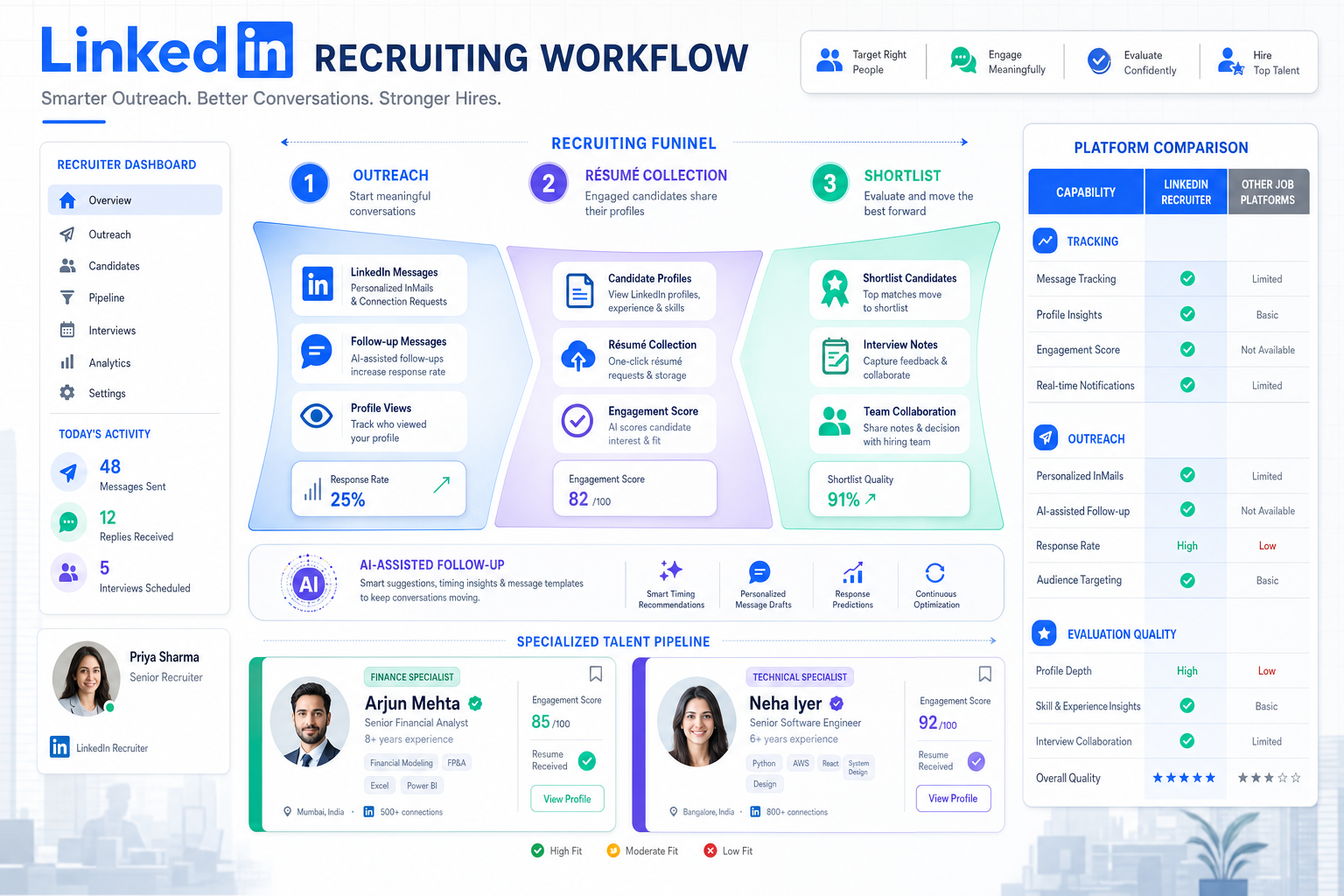
When specialized hiring gets chaotic, this article helps headhunters judge which ai recruiting tool improves outreach, tracking, and shortlist quality.
That matters because most recruiting trouble does not start with a lack of features. It starts when a recruiter has to assess a specialized role quickly, sound credible with candidates and hiring managers, keep follow-up moving, and still avoid losing track of résumés, interview notes, and next steps. For a solo recruiter, that means wasted hours and missed placements. For a small agency owner, it means lower team output and strained client confidence. For an in-house talent lead, it means slow shortlists, inconsistent evaluation, and a hiring process that feels harder than it should.
In that kind of workflow, I have found that an AI-supported layer can help most when it removes the repetitive front-end work without pretending to replace recruiter judgment. A tool like StrategyBrain AI Recruiter is useful here because it can automate candidate outreach on LinkedIn, keep conversations moving after hours, and collect résumés and contact details from interested people while the recruiter still owns final review, fit assessment, and interview decisions. In my experience, that is the right balance: automation handles the repetitive contact work, while the recruiter remains responsible for qualification.
The clearest example is specialized hiring. Think about the recruiter who suddenly has to interview accountants and present accounting talent well, even if finance is not their home territory. Before the first serious interview happens, that recruiter has to understand the function of the accounting team, know which questions will separate a capable candidate from a weak one, and communicate with enough confidence that both client and candidate trust the process. That is not just an interviewing problem. It is a workflow problem.
If the recruiter is also juggling sourcing messages, waiting on résumé replies, chasing contact details, and trying to remember which prospects showed genuine interest, the quality of the assessment drops fast. The lesson from that kind of boot-camp scenario is simple: strong hiring depends on more than interview skill. It depends on software that supports context, communication, tracking, and consistent handoffs. That is why choosing the best recruiting software means looking at how an ai recruiting tool, candidate tracking software, and broader talent acquisition tools work together across the whole funnel.
Key takeaway: The right recruiting stack does not just add AI features. It helps recruiters understand the role, manage candidate flow, document decisions, and keep specialized hiring from becoming chaotic.
Table of Contents
- Why best recruiting software is really about hiring clarity
- How an AI recruiting tool supports specialized roles
- What candidate tracking software must do well
- How to evaluate talent acquisition tools like a practitioner
- Best recruiting software by team type
- Comparison table: what to check before you buy
- Common mistakes when buying recruiting software
- Implementation advice for recruiting teams
- FAQ
Why best recruiting software is really about hiring clarity
When recruiters search for the best recruiting software, they often start with feature lists. In practice, the better starting point is clarity. Can the system help your team understand the role, attract the right people, keep candidate movement visible, and make evaluation easier when the job is specialized or the hiring volume is high?
That is the hidden lesson in any hiring boot camp. Whether you are interviewing accountants, engineers, sales leaders, or operations managers, the recruiter needs enough structure to speak intelligently about the role and enough process support to keep candidate flow under control. Software matters because it becomes the operating environment for that work.
This is also where terminology gets blurred. An ATS is usually the process core. Candidate tracking software emphasizes visibility across stages and handoffs. Broader talent acquisition tools may extend into sourcing, CRM, scheduling, assessments, analytics, and internal mobility. Buyers use these terms loosely, but the practical question is the same: does the software make recruiting judgment easier to apply, or does it just add another dashboard?
From an operator’s view, the strongest systems reduce the scramble between role understanding and process execution. They keep jobs, applicants, outreach, stage history, interview notes, and reporting in one dependable workflow instead of scattering them across inboxes, spreadsheets, and messaging tools.
How an AI recruiting tool supports specialized roles
An ai recruiting tool is most useful when it supports the front end of recruiting without taking over the final judgment call. Specialized hiring is a good example. Recruiters often need to build credibility fast in markets where candidates expect informed conversation and quick follow-up. If communication is slow or generic, strong people disengage early.
That is where AI can be genuinely practical. The best use cases today include outreach support, résumé collection, conversational screening, interview scheduling assistance, resume summarization, and candidate matching. But these capabilities only help if recruiters can still review the output, understand why a candidate was surfaced, and decide who should move forward.
I have seen the biggest value in using AI Recruiter for repetitive LinkedIn work that normally eats the first few hours of a recruiter’s day. When outreach is continuous, candidates can get responses in their own language and on their own time, and interested people can send a résumé without waiting for a recruiter to be online. That does not replace qualification. It simply means the recruiter starts the day with live conversations and collected documents instead of a backlog of manual messaging.
For headhunters and agency recruiters, that workflow matters because outreach consistency directly affects pipeline health. For corporate talent teams, it matters because specialized and hard-to-fill roles often stall before the formal interview even begins. In both cases, AI works best as a support layer on top of disciplined recruiting process, not as a substitute for it.
Questions recruiters should ask about AI support
- Does the tool help start and maintain candidate conversations, or does it only automate search?
- Can interested candidates share résumés and contact details without unnecessary friction?
- Does the recruiter retain control over final qualification and next-step decisions?
- Can the team understand how matching, summaries, or rankings are produced?
- Are privacy, data handling, and audit controls clear enough for your hiring environment?
What candidate tracking software must do well
If the opening case teaches anything, it is that role understanding and candidate movement cannot be managed separately for long. Once a recruiter starts sourcing, screening, interviewing, and presenting candidates, weak tracking creates weak hiring. That is why candidate tracking software still matters even in a market full of AI claims.
At a minimum, strong recruiting software should support these practical needs:
- Job and requisition control: Open roles should be easy to create, approve, publish, and monitor.
- Pipeline visibility: Every candidate should have a clear stage, owner, and status history.
- Communication capture: Recruiters need a record of outreach, replies, and follow-up timing.
- Résumé and profile organization: Documents, contact details, and candidate context should stay attached to the record.
- Structured feedback: Hiring teams need scorecards or note capture that goes beyond scattered impressions.
- Scheduling support: Interview coordination should not become a second job.
- Reporting: Funnel conversion, bottlenecks, source quality, and recruiter activity should be visible.
- Integrations: HRIS, email, calendar, and collaboration tools should connect cleanly.
These are not abstract requirements. In specialized hiring, recruiters often need to compare several promising candidates, remember who asked what, revisit prior conversations, and explain why someone advanced or was declined. Without dependable tracking, that becomes guesswork.
The best systems also support both application-based and relationship-based recruiting. That is especially important if your team uses LinkedIn heavily, builds talent pools over time, or recruits into niche functions where candidates are not applying in volume.
How to evaluate talent acquisition tools like a practitioner
Most software evaluations go wrong because buyers watch the demo from the vendor’s perspective instead of the recruiter’s. A more practical approach is to score talent acquisition tools against the real sequence of work your team performs. The old boot-camp logic still applies: first understand the role, then ask the right questions, then separate the strong from the weak. Your software should support all three steps.
1. Check whether the system helps recruiters understand the hiring context
Good recruiting software should make the bigger picture easier to see. That means role details, hiring goals, team structure, and process ownership should be visible early, not buried across separate records. If a recruiter cannot quickly understand what success looks like in the role, the platform is not helping enough.
2. Test whether it improves the quality of questions and assessment
Software should support structured screening, interview planning, and note capture. Recruiters need a place to record what they learned, what still needs validation, and which stakeholder concerns matter most. This is especially useful in specialized hiring, where missing one qualification point can waste a full round of interviews.
3. Measure whether it helps you separate strong candidates from weak ones faster
This is where AI, pipeline design, and recruiter usability all meet. The system should make it easier to review résumés, compare candidates, move the right people forward, and document those decisions. If every shortlist still depends on manual inbox searching and memory, the platform is not doing enough.
| Evaluation Area | What Good Looks Like | Why It Matters |
|---|---|---|
| Role context | Clear job details, hiring goals, and ownership | Helps recruiters speak credibly and screen accurately |
| Outreach workflow | Fast messaging, follow-up support, and response capture | Keeps pipeline creation from stalling |
| Candidate review | Clean résumé access, summaries, and structured comparison | Improves first-pass screening quality |
| Tracking discipline | Visible stages, notes, and disposition history | Prevents candidate loss and confusion |
| Hiring manager collaboration | Easy feedback and scheduling coordination | Shortens decision cycles |
| Analytics | Reliable funnel and source reporting | Supports accountability and planning |
| Compliance | Audit trails and explainable decision support | Reduces process risk |
Best recruiting software by team type
The best recruiting software depends heavily on who is using it and how hiring work is organized. Team size matters, but workflow shape matters more.
Solo recruiters and independent headhunters
Independent recruiters need speed, low admin overhead, and a way to keep outreach active even when they are not online. An ai recruiting tool can be particularly useful here when it supports LinkedIn messaging, collects candidate information, and reduces repetitive front-end work. The software should also act as dependable candidate tracking software, because solo recruiters cannot afford to lose context between conversations.
Small agency teams
Smaller agencies usually need shared visibility, easy adoption, and strong relationship management. They benefit from software that combines ATS discipline with CRM-style candidate engagement. In this segment, talent acquisition tools should help recruiters maintain momentum across multiple open searches without drowning in admin tasks.
Corporate talent acquisition teams
In-house teams need recruiter usability, hiring manager collaboration, approvals, reporting, and compliance controls. For these teams, AI should be explainable and easy to govern. The best fit often comes from a strong ATS foundation with selective automation layered on top.
High-volume hiring teams
These teams need workflow control more than anything else. Screening support, scheduling automation, bulk actions, and clear disposition tracking matter most. If recruiters are forced to touch every candidate manually at every stage, throughput suffers quickly.
Specialized search teams
For niche functions like finance, legal, technical, or executive hiring, software needs to support knowledge capture and precision. Recruiters in these markets benefit from systems that help them document role nuance, compare candidates thoughtfully, and sustain high-quality communication over time.
Comparison table: what to check before you buy
Before selecting an ai recruiting tool or wider recruiting platform, use a structured comparison grounded in real workflows.
| Buying Criterion | Why It Deserves Attention | What Recruiters Should Ask |
|---|---|---|
| Implementation effort | Slow setup delays adoption | How quickly can we run a live search well? |
| Recruiter usability | Clunky systems reduce consistency | Can core tasks be completed without workaround habits? |
| Outreach support | Pipeline creation often fails first | How does the tool help with messaging, response handling, and follow-up? |
| Tracking quality | Lost context damages hiring decisions | Can we see stage history, notes, and communications in one place? |
| AI practicality | Not all AI improves real work | Does it help with sourcing, screening, summaries, or scheduling in a usable way? |
| Candidate experience | Friction reduces response and completion rates | How easy is it for interested candidates to reply, share details, and move forward? |
| Integrations | Disconnected systems create extra admin | Which calendar, email, HRIS, and collaboration tools connect well? |
| Governance | Important in regulated or enterprise settings | Can we review data handling, permissions, and decision explainability? |
Common mistakes when buying recruiting software
Recruiting teams often miss the mark for predictable reasons.
- Buying for the demo instead of the workflow: A polished feature tour does not prove the system will support real recruiter habits.
- Overestimating AI and underestimating process: AI cannot rescue poor tracking, weak stage design, or scattered collaboration.
- Ignoring specialized hiring needs: If your team recruits into niche functions, role context and structured evaluation matter more than generic automation.
- Neglecting communication flow: Many hiring slowdowns begin with late replies, missed interest signals, or manual outreach bottlenecks.
- Forgetting who owns final judgment: Software can support screening, but recruiters still need to assess fit, credibility, and next steps.
That last point matters most. The strongest systems do not pretend to “decide” hiring. They help recruiters do better deciding.
Implementation advice for recruiting teams
Even excellent software underperforms when implementation is treated as a settings exercise instead of a workflow design exercise. Before launch, define what good recruiting looks like in your environment.
- Document your current bottlenecks, especially in outreach, tracking, and stakeholder follow-up.
- Map how recruiters, hiring managers, coordinators, and HR each use candidate information.
- Standardize stage definitions and note-taking expectations early.
- Decide where AI can support work and where human review remains mandatory.
- Test the candidate experience from first message to résumé submission to interview scheduling.
- Train users on process discipline, not just navigation.
When I have used LinkedIn-heavy workflows, the biggest improvement came from separating repetitive communication from final evaluation. With StrategyBrain AI Recruiter, the useful part was not some abstract promise of automation. It was that outreach could continue, candidate intent could be clarified, and résumé collection could happen while I stayed focused on assessing whether the person actually fit the search. That is a practical gain, especially for agency recruiters and lean internal teams.
For teams that want to explore workflow fit in more detail, the conversation examples and the main StrategyBrain site are useful for understanding how AI-assisted communication can sit beside recruiter-led qualification rather than replace it.
FAQ
What is the difference between recruiting software and candidate tracking software?
Recruiting software is the broader category. Candidate tracking software focuses more specifically on organizing applicants and prospects through the hiring pipeline, including stages, status history, notes, and collaboration.
How does an AI recruiting tool help recruiters in practice?
An ai recruiting tool can help with sourcing outreach, résumé collection, candidate matching, summaries, scheduling support, and communication follow-up. The best tools reduce repetitive work while leaving final qualification and hiring decisions to the recruiter.
Are talent acquisition tools the same as an ATS?
Not exactly. An ATS is usually the operational core for managing jobs and applicants. Talent acquisition tools may include ATS capabilities but often expand into CRM, sourcing, events, analytics, assessments, and internal mobility.
What matters most when choosing the best recruiting software?
Look at workflow fit first: recruiter usability, pipeline visibility, communication support, structured evaluation, reporting, and integrations. AI matters, but only if it improves actual recruiting work.
Can AI replace recruiter screening?
No responsible team should treat AI as a full replacement for screening judgment. AI can support prioritization and early communication, but recruiters still need to review résumés, assess fit, and decide who moves forward.
What should agency recruiters prioritize?
Agency teams should prioritize relationship management, sourcing efficiency, communication continuity, and strong tracking. If LinkedIn is a major channel, tools that support outreach and résumé capture can be especially valuable.
Conclusion
The best recruiting software is not simply the system with the most AI. It is the system that helps recruiters understand the role, ask better questions, keep candidate movement visible, and make sound decisions under real hiring pressure.
That is why the most useful buying lens combines three ideas: an ai recruiting tool for practical communication and screening support, candidate tracking software for process control, and broader talent acquisition tools for collaboration and reporting. When those pieces work together, specialized hiring gets clearer, faster, and easier to manage.















