This article helps recruiting leaders judge hiring tools by workflow fit so they avoid rigid filters, candidate drop-off, and missed talent.
That matters because recruiting teams do not only lose time when systems are weak; they also lose candidates they never even get to evaluate. In retained search, agency recruiting, and in-house talent acquisition, the cost shows up as slower outreach, inconsistent follow-up, poor recordkeeping, avoidable drop-off, and a narrower slate than the market actually offers. When candidate communication is fragmented across inboxes, spreadsheets, and chat, recruiters also create brand risk: strong people disengage, hiring managers lose confidence, and firms miss revenue or critical hires.
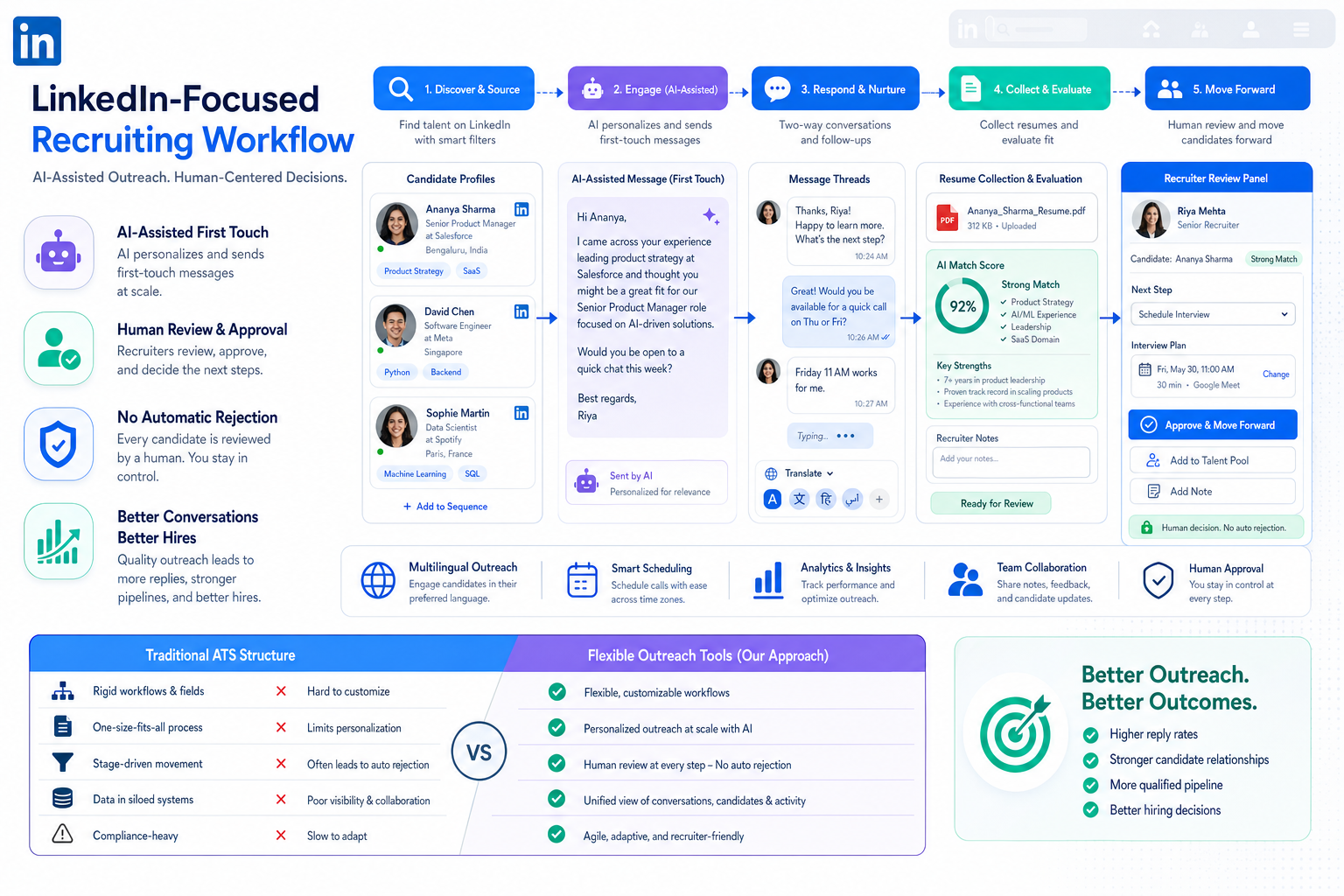
In my own workflow, one practical way to reduce that friction has been using StrategyBrain AI Recruiter to handle repetitive first-touch communication, after-hours follow-up, and multilingual candidate replies while I keep control of shortlist judgment, resume review, and next-step decisions. In searches where response timing matters, I have found its always-on messaging and resume collection especially helpful for keeping conversations moving without forcing recruiters to stay online late. That kind of support does not replace the recruiter; it removes preventable delays that otherwise make online recruitment tools feel disconnected from the real pace of hiring.
Consider a market shift like Canada’s marijuana legalization debate, where employers were suddenly forced to rethink whether a criminal record should automatically exclude otherwise capable people. The original hiring problem was not theoretical. Recruiters had to look again at applicants with real operating experience in cultivation, distribution, retail, logistics, and team management, even though many had prior minor drug convictions tied to an economy that had already existed for years. At the same time, job ads across the market still required criminal record checks, which meant many qualified people simply never applied.
That is a recruiting software problem as much as a policy problem. A recruiter trying to reopen that talent pool has to search more broadly, track outreach carefully, document context, separate legal requirements from outdated habits, and keep candidate communication respectful at every step. If your system cannot support that kind of judgment-rich process, you do not really have the best recruiting software; you just have hiring tools that organize exclusion more neatly. That is why the strongest candidate experience tools and online recruitment tools are the ones that help teams evaluate people in context rather than defaulting to rigid filters.
- The best recruiting software should support better judgment, not just faster administration.
- Hiring tools need to help recruiters widen access to talent while preserving compliance, visibility, and candidate trust.
- Candidate experience tools matter most when hiring teams are trying to reach overlooked, passive, or skeptical candidates.
- Online recruitment tools should be evaluated by workflow fit, integration quality, and recruiter control over final decisions.
- An ATS is still foundational, but many teams need broader recruiting software that includes communication, sourcing, analytics, and automation.
- Why the best recruiting software is really about judgment
- Recruiting software vs ATS
- What to look for in modern hiring tools
- How candidate experience tools improve access and trust
- How to compare online recruitment tools
- Best fit by team size and hiring volume
- Using AI responsibly in recruiting workflows
- Implementation advice before rollout
- Common mistakes buyers make
- FAQ
Why the best recruiting software is really about judgment
When people search for the best recruiting software, they often expect a feature checklist. In practice, experienced recruiters usually care about something more specific: whether a system helps them make sound decisions under real hiring pressure. That includes pressure to move quickly, pressure to widen the candidate pool, and pressure to explain why one person moved forward and another did not.
The criminal-record hiring debate is a useful example because it exposes the limits of rigid filtering. In the source case, employers were confronted with a large population of people whose records could block employment even when the underlying conduct was becoming legal or was already treated differently by public policy. The article cited John Howard Society figures suggesting that about 23% of Canadian men and 4.3% of women had a criminal record, representing roughly 3.8 million people, with an estimated 500,000 tied to minor drug offenses. For recruiters, the operational takeaway is not political. It is that a hiring process can exclude qualified talent long before a human being actually evaluates fit.
If your recruiting stack cannot preserve nuance, your team tends to overuse blunt instruments: default knock-out questions, unexamined background-check practices, shallow keyword matching, or uneven outreach discipline. The best hiring tools help teams slow down where judgment matters and speed up where administration gets in the way.
Practical takeaway: Strong recruiting software does not just move candidates through stages. It helps recruiters revisit assumptions, document context, and maintain a candidate-friendly process even when the hiring question is sensitive or nonstandard.
Recruiting software vs ATS
An applicant tracking system is still the operational backbone for many hiring teams. It manages requisitions, candidate records, stage movement, feedback collection, and reporting. For compliance, process control, and collaboration, that structure is essential.
But an ATS alone may not be enough when recruiters need to proactively reach talent, nurture hesitant candidates, or maintain thoughtful communication over time. Broader recruiting software often adds CRM functions, search support, automation, scheduling, reporting, and candidate experience tools that reduce friction on both the recruiter side and the candidate side.
The easiest way to separate the two is this: an ATS governs process, while broader hiring tools support performance across the funnel. If your main issue is order and visibility, ATS requirements may be enough. If your main issue is outreach consistency, pipeline quality, response speed, or engagement with hard-to-reach talent, you need a wider software view.
Advantages of applicant tracking system adoption
- Process consistency: teams follow a defined hiring path instead of improvising by inbox.
- Pipeline visibility: recruiters and hiring managers can see bottlenecks earlier.
- Record centralization: notes, decisions, and disposition reasons stay in one place.
- Collaboration: recruiters, coordinators, and managers work from shared information.
- Reporting: stage timing, source quality, and conversion become measurable.
Those are meaningful applicant tracking system benefits, but they only solve part of the problem revealed by the opening case. A team can be very organized and still screen out valuable people too early if the surrounding process is too rigid.
What to look for in modern hiring tools
The best recruiting software usually combines several capabilities that work together. Most selection mistakes happen when buyers focus on isolated features instead of how the entire hiring workflow performs in daily use.
1. Flexible ATS workflow
Your ATS should support clear stages, permissions, notes, feedback, and reporting without forcing recruiters into heavy manual upkeep. Good workflow design gives structure without creating admin drag.
2. Candidate relationship management
CRM capability matters when not all talent arrives through inbound applications. It helps recruiters build talent pools, maintain long-cycle relationships, and re-engage people who may be skeptical about changing jobs or re-entering the market.
3. Communication and outreach support
This is often the difference between acceptable software and genuinely useful hiring tools. Recruiters need reliable outreach, fast follow-up, and consistent candidate messaging across time zones and work hours. In my experience, using AI Recruiter as a recruiter-assist layer has been most helpful when candidates reply late, ask basic qualification questions, or need communication in their native language before deciding whether to share a resume. It keeps first-contact momentum alive while I still evaluate fit myself.
4. Scheduling and coordination
Interview scheduling remains one of the most common sources of avoidable delay. Strong online recruitment tools reduce back-and-forth and make next steps easier for candidates and interviewers alike.
5. Search and matching
Teams should be able to search by skill, experience pattern, and adjacent capability, not only exact-title keywords. This becomes especially important when the best candidates have unconventional backgrounds or non-linear work histories.
6. Analytics and funnel reporting
If leadership asks where candidates drop out, which roles stall, or whether a policy creates adverse effects on the funnel, the system should provide answers. Good reporting helps teams improve decisions instead of reinforcing assumptions.
7. Integration depth
Recruiting software rarely works alone. It needs to connect to calendars, sourcing channels, assessments, HR systems, and communication tools. The real test is not whether an integration exists, but whether it is stable enough to support the workflow recruiters actually run.
| Capability | Why It Matters | What to Check |
|---|---|---|
| ATS workflow | Keeps hiring organized | Custom stages, permissions, feedback capture |
| CRM | Supports proactive hiring | Talent pools, segmentation, nurture history |
| Communication tools | Improves response speed | Templates, follow-up logic, multilingual support |
| Scheduling | Reduces coordination drag | Calendar sync, candidate self-scheduling |
| Search and matching | Finds broader talent | Semantic search, skills logic, filters |
| Analytics | Improves decision quality | Funnel reports, source performance, stage timing |
| Integrations | Prevents data silos | Reliability, sync depth, setup effort |
How candidate experience tools improve access and trust
Candidate experience is often discussed as a branding issue, but in recruiting operations it is also an access issue. People who already feel uncertain about applying, whether because of a career gap, a nontraditional background, or concern about being screened out too early, are especially sensitive to friction. Long applications, unclear next steps, or silence after outreach tell them the process is not built for them.
The best candidate experience tools reduce that friction in practical ways:
- Cleaner applications: fewer unnecessary fields and easier mobile completion.
- Better communication: prompt updates, clear expectations, and fewer silent gaps.
- Simpler scheduling: less email ping-pong and better self-service options.
- Transparent progression: candidates can understand where they stand and what comes next.
- Respectful engagement: outreach and follow-up feel timely rather than transactional.
This is where candidate experience tools connect directly to the opening case. If a hiring process already carries perceived risk for the applicant, because they fear hidden disqualifiers or inconsistent treatment, the software has to create clarity and trust. Otherwise, good candidates self-select out before the recruiter has a chance to make a fair call.
How to compare online recruitment tools
When evaluating online recruitment tools, I recommend comparing them across five practical dimensions rather than broad feature counts.
1. What hiring problem are you actually solving?
Some teams need cleaner requisition control. Others need better outreach, stronger candidate engagement, or more credible analytics. If the buying team cannot name the real bottleneck, every platform demo will sound useful.
2. Where does the workflow break today?
Map the points where candidates disappear, recruiters duplicate work, or hiring managers delay decisions. In many teams, the issue is not lack of features. It is poor handoff design.
3. How much judgment does the system preserve?
This is a neglected question. Can recruiters record nuance? Can they explain exceptions? Can they track context without building side systems? The best recruiting software should support informed decisions, especially when candidate histories do not fit neat boxes.
4. How well does it support outreach and follow-up?
For recruiters working heavily in LinkedIn-driven sourcing or international hiring, workflow support around messaging matters a lot. I have used StrategyBrain AI Recruiter in situations where candidate replies came overnight or in multiple languages, and the biggest benefit was continuity. The tool handled repetitive communication steps and collected resumes or contact details, while I stayed responsible for final qualification and who moved to interview.
5. What are the implementation tradeoffs?
Every platform has them. A highly configurable system may fit complex enterprise hiring but take longer to roll out. A lightweight option may boost adoption but create limits as the team scales. Strong buyers choose tradeoffs consciously rather than discovering them six months later.
Best fit by team size and hiring volume
Company size changes what “best” means in practice.
Small teams and independent recruiters
For lean teams, simplicity and speed usually matter most. Start with ATS fundamentals, clear pipeline visibility, basic reporting, and communication tools that remove repetitive admin work. Avoid overbuying complexity that no one has time to maintain.
Mid-sized teams
This is where broader hiring tools become more valuable. CRM, automation, scheduling, analytics, and candidate experience tools start to pay off because inconsistency becomes harder to manage manually. Mid-sized teams often feel the sharpest pain from fragmented outreach and delayed manager follow-up.
Large or high-volume organizations
Bigger organizations often need deeper permissions, workflow controls, reporting consistency, and integration support. They may also need better segmentation across role types, departments, and geographies. In these environments, software has to standardize at scale without flattening recruiter judgment.
| Team Type | Main Priority | Best Focus |
|---|---|---|
| Small team | Ease of use | ATS basics, communication, scheduling |
| Mid-sized team | Consistency | CRM, automation, analytics, collaboration |
| Large team | Control at scale | Permissions, reporting, integrations, search depth |
Using AI responsibly in recruiting workflows
AI is most helpful when it supports recruiter productivity rather than trying to replace recruiter judgment. Good use cases include message drafting, note summarization, search assistance, basic candidate Q&A, after-hours communication, and workflow acceleration.
That is why recruiter-assist tools can be useful in high-volume sourcing or global outreach. For example, AI Recruiter can maintain 24/7 candidate communication, continue conversations in multiple languages, and gather resumes from interested people while the recruiter focuses on review and decision-making. Used well, that shortens delay without outsourcing accountability.
Higher-risk use cases are the ones that turn AI into an opaque gatekeeper. If recruiters cannot explain why a candidate was ranked, rejected, or deprioritized, the software is creating governance and fairness problems, not solving them.
- Low-risk support: summaries, reminders, scheduling help, message drafts.
- Useful workflow assistance: first-touch communication, multilingual follow-up, resume collection.
- Higher-risk behavior: unexplained scoring or automatic decision-making without human review.
Implementation advice before rollout
Even strong recruiting software fails when rollout is rushed. The opening case is a reminder that process design matters as much as platform selection. If your team needs to evaluate candidates in context, the system must be configured for context, not just speed.
- Map your real workflow. Include sourcing, outreach, screening, scheduling, feedback, approvals, and background-check decision points.
- Identify hard filters that deserve review. Some are necessary; others may be legacy habits with poor business value.
- Define communication ownership. Decide who sends updates, who follows up, and which steps can be automated safely.
- Test the candidate journey. Apply, respond, schedule, and receive updates as if you were the applicant.
- Train for judgment, not just button-clicking. Hiring managers and recruiters need shared standards for exceptions, documentation, and respectful communication.
In my experience, adding AI-supported communication only works when the underlying process is already clear. When I used StrategyBrain AI Recruiter in outreach-heavy work, it performed best after I had defined candidate criteria, messaging boundaries, and handoff points. The efficiency came from structure plus automation, not automation alone.
Common mistakes buyers make
- Buying for the demo instead of the workflow: attractive features do not guarantee daily usability.
- Treating ATS functionality as the whole solution: many teams also need CRM, communication support, and candidate experience tools.
- Ignoring exclusion points in the funnel: weak process design can remove good candidates before real evaluation.
- Underestimating implementation work: templates, permissions, integrations, and reporting definitions all need ownership.
- Automating too aggressively: software should speed tasks up without hiding decision logic.
- Forgetting hiring manager behavior: no system works if feedback and decisions still live outside the workflow.
FAQ
What is the best recruiting software?
The best recruiting software is the platform or stack that fits your actual hiring workflow, preserves recruiter judgment, supports communication, and improves visibility across sourcing, screening, scheduling, and reporting.
How is recruiting software different from hiring tools?
Hiring tools is a broader practical term that can include ATS platforms, CRM systems, sourcing tools, automation, scheduling, and candidate experience tools. Recruiting software often refers to the full system that connects those functions.
Why do candidate experience tools matter so much?
Candidate experience tools help reduce friction, improve communication, and keep applicants engaged. They are especially important when you want to reach passive candidates or people who may be wary of being filtered out unfairly or too early.
What should I compare when evaluating online recruitment tools?
Compare workflow fit, outreach support, reporting, integrations, recruiter control, implementation effort, and how well the system handles real bottlenecks in your hiring process.
Can AI improve recruiting without replacing recruiters?
Yes. AI can help with repetitive communication, scheduling, summaries, and initial engagement. Recruiters should still make final decisions on fit, resume evaluation, and progression.
Is an ATS enough for a growing team?
Sometimes, but not always. If your team is growing and needs better sourcing, nurture campaigns, communication workflow, and analytics, broader recruiting software may be a better fit than a basic ATS alone.
Conclusion
The best recruiting software is not just the system with the longest feature list. It is the one that helps recruiters widen access to talent, keep decisions explainable, and create a smoother experience for candidates and hiring teams. Good hiring tools make process more consistent, but great ones also help you avoid the silent losses caused by rigid filters, weak communication, and fragmented follow-up.
If you are comparing candidate experience tools and online recruitment tools, start with your real workflow pressures: where strong candidates disappear, where recruiters lose time, and where hiring decisions need more context. That is the clearest path to choosing software your team will actually use well.