


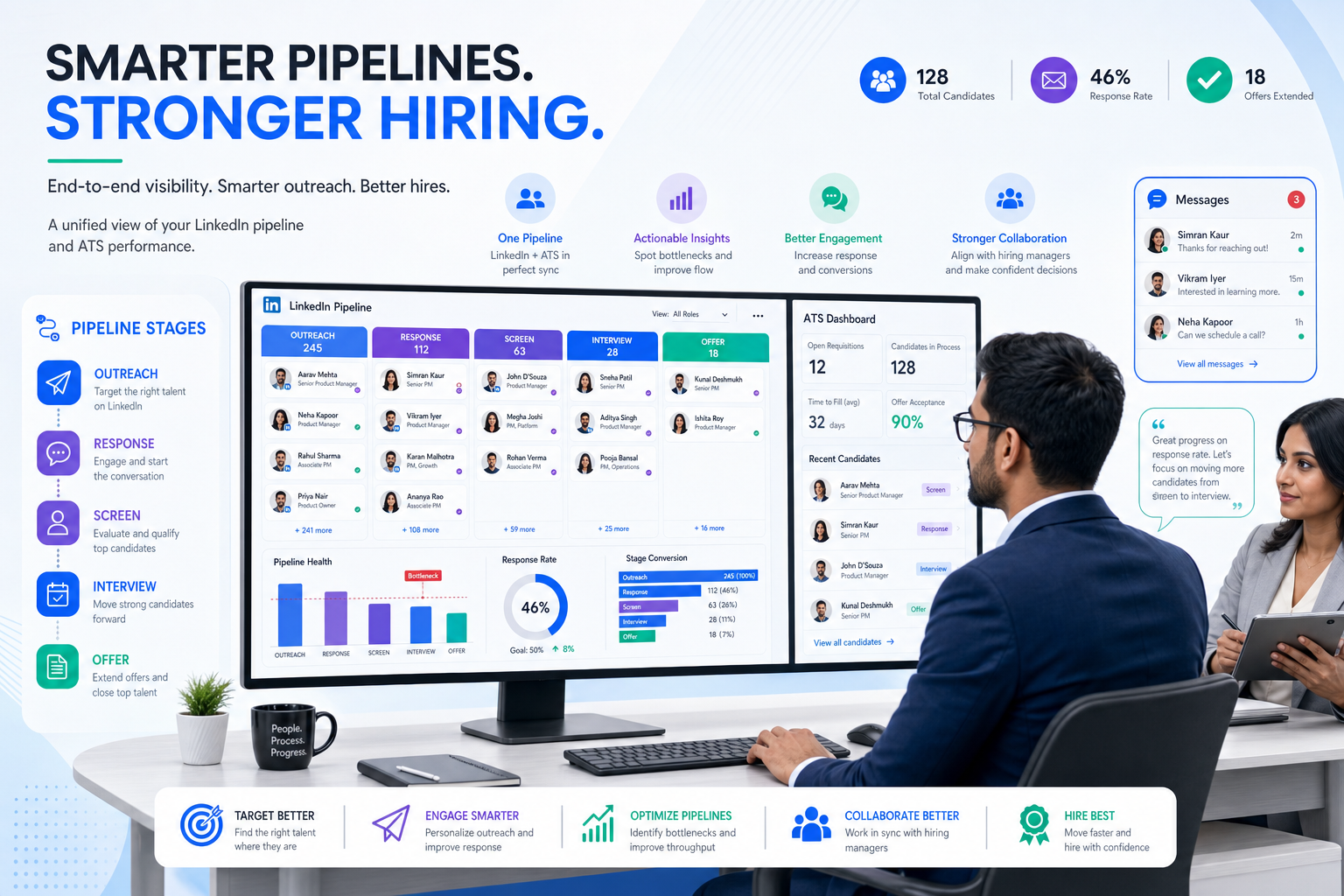
A candidate tracking tool becomes easier to choose when recruiting leaders use this article to spot process gaps that cause delays, weak shortlists, and candidate drop-off.
That matters more than most software lists admit. When a search firm owner, solo recruiter, or in-house talent lead lacks a clear method for moving people from first outreach to offer, the damage spreads fast: delayed replies, weak shortlists, confused hiring managers, duplicated effort, and a candidate experience that makes strong people disengage before the process is even fully shaped.
In my own workflow, tools that reduce this friction are the ones that support the recruiter without pretending to replace them. I have found that StrategyBrain AI Recruiter is most useful when the problem is early-stage outreach and response handling, especially on LinkedIn. Its always-on candidate messaging, multilingual communication, and automated collection of resumes and contact details help keep momentum moving, while the recruiter still makes the final call on fit, resume review, and next steps.
A familiar version of this problem shows up when a company needs help hiring a financial professional, a contract specialist, or another hard-to-reach role and turns to an outside recruiter for support. The real question is rarely just whether the recruiter can send resumes. It is whether that recruiter has enough tenure, network depth, and process discipline to understand the role quickly, compare candidates well, and keep the search moving with clear milestones instead of vague updates.
Once you look at recruiting through that lens, software selection becomes easier to evaluate. The best recruiting software is not the one with the loudest feature list. It is the candidate tracking tool or applicant tracking system for small business that helps recruiters apply the same strengths clients expect from a strong search partner: proven workflow, fast engagement, better candidate tracking, and visibility into what happens next.
Table of Contents
- Why Software Choice Starts With Recruiter Method
- What Is a Candidate Tracking Tool?
- Three Buying Tests for the Best Recruiting Software
- Quick Comparison of Recruiting Software Types
- What Makes an Applicant Tracking System for Small Business Work
- What Changes in High-Volume Hiring
- Why Candidate Experience Depends on Process Quality
- Features That Matter Most in Practice
- How to Choose the Right Recruiting Software
- Common Buying Mistakes
- FAQ
Why Software Choice Starts With Recruiter Method
One of the most useful lessons from retained and contingent search work is that clients do not benefit equally from every recruiter. The difference often comes down to three things: the recruiter’s tenure, the consistency of their methodology, and the quality of interaction they bring to the search from the start.
Those same three criteria are surprisingly effective when you evaluate recruiting software.
- Tenure equivalent: Does the tool help an experienced recruiter apply their pattern recognition faster, or does it flatten everything into admin work?
- Methodology equivalent: Can the system support a defined sequence for outreach, review, interview coordination, and offer management?
- Interaction equivalent: Does it help your team respond quickly, set expectations clearly, and prevent candidates from going quiet due to internal delay?
That is why I do not treat software as a standalone purchase. I treat it as an operating layer for recruiter judgment. If the platform cannot support how your team finds, compares, and advances talent, it will not matter how polished the demo looks.
Practical takeaway: The best recruiting software should make your process more disciplined and more responsive, not just more digital.
What Is a Candidate Tracking Tool?
A candidate tracking tool is software that helps hiring teams organize applicants, track status changes, manage communication, collect feedback, and maintain a usable record of hiring decisions. In most organizations, this function sits inside an applicant tracking system, or ATS.
In daily recruiting work, candidate tracking covers much more than storing resumes. It includes posting jobs, capturing inbound applicants, tracking sourcing outreach, scheduling interviews, logging communication, recording feedback, and keeping everyone aligned on where a person stands in the process.
That matters because hiring problems are usually process problems before they become talent problems. Good candidates are often lost not because the team misread a resume, but because follow-up was late, ownership was unclear, or multiple stakeholders worked from different versions of the truth.
Three Buying Tests for the Best Recruiting Software
If you want a grounded way to compare systems, start with the same logic many companies use when choosing a recruiter.
1. Does the software support experienced judgment?
A tenured recruiter usually brings a stronger network, better market read, and faster pattern recognition. Your software should support that advantage, not bury it. Look for tools that make it easy to search candidate history, compare records, review conversations, and move quickly from response to decision.
2. Does it enforce a usable methodology?
One reason employers hire external recruiters is that they want structure: clear milestones, shortlist expectations, and a process that does not drift. The same applies internally. The best recruiting software should support a repeatable path from intake to close, including stage definitions, reminders, communication templates, and reporting.
3. Does it improve the quality of interaction?
Strong recruiters stand out by engaging fast and setting realistic expectations. Great software should help your team do the same. That means better candidate communication, cleaner hiring manager collaboration, and fewer delays between steps.
These tests are especially helpful if you are trying to avoid overbuying. A platform can look sophisticated and still fail at the basics that matter most in real recruiting work.
Quick Comparison of Recruiting Software Types
| Software Type | Best For | Main Strengths | Main Trade-Offs |
|---|---|---|---|
| Dedicated ATS | Teams with recurring hiring and multiple stakeholders | Structured workflows, reporting, collaboration, stronger candidate tracking | Can feel heavier for occasional hiring |
| Simple pipeline tool | Very small teams with low hiring complexity | Fast setup, visual workflow, easy adoption | Limited automation, analytics, and compliance controls |
| HR suite with hiring module | Businesses wanting one system across HR and recruiting | Shared employee data, easier handoff to onboarding | Recruiting depth may be lighter than a specialist ATS |
| Sourcing and outreach support tools | Recruiters who rely heavily on active outreach | Faster top-of-funnel communication and candidate response handling | Usually needs to work alongside a stronger ATS or pipeline record |
In practice, many teams need more than one layer. A sourcing support tool can help generate and qualify early interest, while a dedicated ATS handles structured review, coordination, and decision tracking.
That is where I have seen StrategyBrain AI Recruiter fit most naturally. I would not treat it as a replacement for a full ATS if your process includes multiple interview rounds, approvals, and reporting needs. But I have found it valuable for keeping LinkedIn outreach active after hours, answering candidate questions promptly, and collecting resumes so the recruiter can spend more time on actual evaluation.
What Makes an Applicant Tracking System for Small Business Work
For smaller employers, the biggest risk is buying software that feels enterprise-ready but day-to-day unusable. A good applicant tracking system for small business should create order without requiring a dedicated operations team to maintain it.
What smaller teams usually need first
- Simple setup so hiring can start without a long implementation cycle
- Visible pipeline stages so everyone knows what happens next
- Job posting support to reduce repetitive admin
- Basic automation for acknowledgements, reminders, and follow-up
- Easy hiring manager input without extra training burden
- Clear candidate history so no one repeats outreach or loses context
The best systems for smaller businesses also help leaders refine expectations. That point mirrors what strong recruiters do well. If the hiring team wants one profile but the market supports another, the process should surface that mismatch quickly instead of letting it drag through weeks of interviews.
In my experience, small teams benefit most when the software creates consistency. Once each opening follows the same basic path, candidate communication improves, handoffs become cleaner, and reporting starts to mean something.
What Changes in High-Volume Hiring
High-volume hiring exposes process weaknesses fast. If your team is managing many openings, multiple locations, or large frontline applicant pools, the software has to do more than store records. It has to keep the operation moving.
Capabilities that matter more at scale
- Bulk stage updates so recruiters are not buried in manual clicks
- Automated communication to keep candidates informed
- Scheduling coordination across many stakeholders
- Reporting dashboards for bottlenecks and conversion rates
- Screening workflows that reduce avoidable delays
- Compliance support for documentation and consistency
This is also where top-of-funnel speed starts to matter more. If candidates reply outside business hours or across multiple time zones, outreach momentum can disappear before a recruiter logs back in. For LinkedIn-heavy sourcing, that is one of the reasons I have used AI Recruiter as a support layer. It can keep candidate conversations active, answer role-level questions, and capture resume submissions while the recruiter retains control over qualification and shortlist decisions.
Used this way, it helps with velocity, not final judgment. That distinction matters. The best recruiting software stack usually separates communication efficiency from hiring authority.
Why Candidate Experience Depends on Process Quality
Candidate experience is often discussed as branding, but in recruiting operations it is mostly a process outcome. People judge your company by how clearly you communicate, how consistently you move, and whether each handoff feels deliberate.
When software is weak, candidate experience breaks in predictable ways:
- Applications disappear into a black box
- Interview scheduling takes too long
- Hiring managers ask duplicate questions
- Feedback arrives too late to be useful
- Strong candidates stop responding because momentum drops
A reliable candidate tracking tool improves candidate experience by making ownership visible. The recruiter knows who replied. The hiring manager knows which profiles need review. The coordinator knows what is pending. That level of visibility is often more important than any polished front-end feature.
The reference scenario from specialist recruiting is useful here too. When companies choose a recruiter, they expect responsiveness, realistic guidance, and a clear timeline. Candidates expect the same from your internal process. Your system should help deliver it.
Features That Matter Most in Practice
When recruiters ask what to prioritize, I suggest judging features by whether they support network quality, methodology, and interaction quality, the same standards used to judge strong recruiters.
| Feature Area | Why It Matters | Best For |
|---|---|---|
| Pipeline visibility | Keeps every applicant tied to a clear next step | All hiring teams |
| Communication history | Prevents repeated outreach and lost context | Recruiters, sourcers, agencies |
| Automation | Reduces manual follow-up and status chasing | Lean teams, high-volume environments |
| Reporting | Shows bottlenecks, conversion issues, and workload trends | HR leaders, recruiting managers |
| Collaborative feedback | Makes hiring manager input usable instead of chaotic | Cross-functional teams |
| Integrations | Connects calendars, HR systems, and communication tools | Growing organizations |
| Sourcing support | Helps organize outreach and early interest signals | Search firms, active sourcing teams |
| Compliance controls | Improves documentation and consistency | Regulated or scaling employers |
I would add one practical note from experience: if your recruiters spend a large part of the week inside LinkedIn, do not evaluate ATS features in isolation. Pair your ATS review with a sourcing workflow review. In my own process, using StrategyBrain AI Recruiter for repetitive outreach steps worked best when the ATS remained the source of truth for stage management and decision records.
What to prioritize first
If you are a small team, start with usability, pipeline clarity, and communication tools. If you are handling higher volume, prioritize automation, reporting, and handoff discipline. If your bottleneck is active sourcing, review how outreach tools and ATS records work together instead of treating them as separate purchases.
How to Choose the Right Recruiting Software
The strongest buying process usually looks a lot like the way a company chooses a recruiter: judge the team’s depth, understand the process they will run, and test the quality of the interaction early.
- Map your current hiring workflow. List the stages, owners, approval points, and common delays.
- Identify where your process breaks first. Is it candidate sourcing, response handling, interview coordination, manager feedback, or reporting?
- Decide whether you need one system or a stack. Some teams need only a straightforward ATS. Others need an ATS plus sourcing support.
- Test the workflow with real scenarios. Open a role, review applicants, move candidates, collect feedback, and send updates.
- Check how the system handles recruiter judgment. It should accelerate decisions, not create more admin around them.
- Evaluate growth fit. Make sure the process still works if hiring volume doubles or the team structure changes.
If you actively source on LinkedIn, include one more step: test how your recruiters handle after-hours replies, multilingual conversations, and resume capture. That was the point in my own process where AI Recruiter proved useful. It did not replace recruiter assessment, but it helped me avoid losing responsive candidates simply because the initial exchange happened outside normal working hours.
Common Buying Mistakes
Choosing software by reputation instead of workflow fit
A widely known platform can still be the wrong choice if your team finds it too heavy or too rigid.
Buying for features you will not operationalize
If your team has no defined process, extra features do not create discipline by themselves. They often just add complexity.
Ignoring the early outreach bottleneck
Many teams focus on interview workflow and forget that candidate loss often starts much earlier, during outreach and first response handling.
Confusing communication automation with hiring automation
Tools can help keep conversations moving, but recruiters still need to judge fit, challenge expectations, and make final decisions.
Underestimating manager usability
If hiring managers cannot review candidates and give timely input, your ATS will become a recruiter-only database instead of a shared hiring system.
FAQ
What is candidate tracking?
Candidate tracking is the process of monitoring applicants from first contact through final decision. It usually includes stage movement, communication history, interview coordination, feedback, and recordkeeping inside a candidate tracking tool or ATS.
What is the difference between a candidate tracking tool and an ATS?
A candidate tracking tool refers to the core function of organizing and moving candidates through the hiring process. An ATS usually includes that function along with job posting, reporting, collaboration, and compliance features.
Does a small company need an applicant tracking system for small business?
If hiring happens often enough that email threads, spreadsheets, and inbox memory start causing delays or missed follow-up, then yes. An applicant tracking system for small business is usually worth it once multiple people are involved or hiring becomes recurring.
Can outreach automation replace recruiters?
No. It can help with repetitive communication, first response handling, and resume collection, but recruiters still need to assess fit, review resumes, align stakeholders, and make final hiring recommendations.
What should recruiters look for first in the best recruiting software?
Start with workflow support: pipeline visibility, communication tracking, collaboration, and a process your team will actually use. If your sourcing relies heavily on LinkedIn, also evaluate how outreach support tools work alongside the ATS.
Conclusion
The best recruiting software is not just a database. It is a system that helps recruiters apply experience with more consistency, keeps stakeholders aligned, and improves candidate movement from first touch to final decision.
If you use the same standards companies use when choosing a recruiter, tenure-like depth, clear methodology, and strong interaction quality, it becomes much easier to evaluate a candidate tracking tool honestly. That is true whether you need a lightweight setup, a stronger applicant tracking system for small business, or a broader workflow that includes sourcing support.
In the end, better candidate tracking is not about having more software. It is about making sure the right people, decisions, and next steps stay visible throughout the search.















