


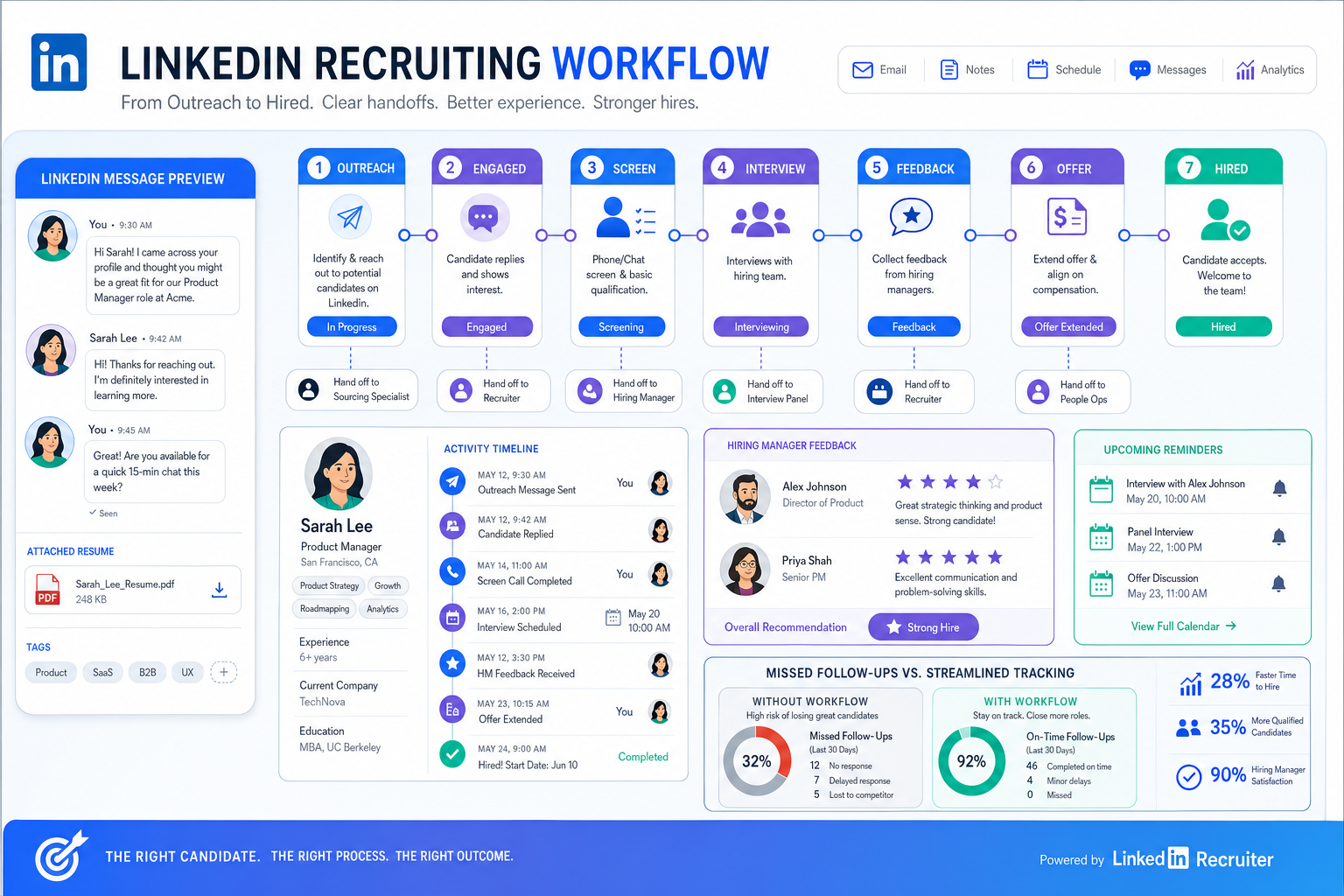
This article helps recruiting leaders judge a candidate tracking tool by the handoff failures that cause missed follow-ups, lost resumes, and slower hires.
That standard matters because recruiting rarely breaks at the strategy level first; it breaks in the handoff between outreach and action. A recruiter sends messages, a prospect replies after hours, a hiring manager asks for updates, a resume arrives in a different channel, and suddenly candidate tracking is spread across inboxes, notes, calendars, and memory. For a solo recruiter, that means missed momentum. For a small agency owner, it means weaker delivery and harder client retention. For an internal talent lead, it can mean a slower process, inconsistent candidate experience, and less confidence from hiring teams.
In my own workflow, this is where StrategyBrain AI Recruiter became useful as a support layer rather than a replacement for recruiter judgment. It helped keep outreach moving through automated LinkedIn conversations, collected resumes and contact details from interested candidates, and handled replies outside normal work hours. The recruiter still has to review the resume, decide who is actually qualified, and choose the next step, but reducing the manual back-and-forth made the candidate tracking tool side of the process much cleaner.
That pattern is easy to recognize if you think about how job seekers are often told to run a disciplined search. They are advised to build a plan, keep a schedule for follow-ups, check in with their network, personalize cold outreach, and stay informed about the market. In accounting hiring especially, a candidate might update a resume, message a contact for insight into a target company, customize a LinkedIn note, and then wait for someone to respond before deciding whether to push further.
From the recruiting side, those same actions create a mirror-image operational challenge. If candidates are networking, sending cold messages, replying at odd hours, and sharing resumes through different channels, your recruiting software has to capture all of that without losing context. That is why the best recruiting software is usually judged first as a candidate tracking tool, and why teams comparing ats systems for small business should start with process discipline before they get distracted by bigger feature lists.
Table of Contents
- Why Candidate Tracking Comes First
- Five Signals of Better Recruiting Software
- Candidate Tracking Tool vs ATS
- What Small Businesses Actually Need
- Must-Have Features in Daily Recruiting
- Shortlist Comparison Checklist
- How to Evaluate the Best Recruiting Software
- Common Buying Mistakes
- Benefits of Strong ATS Adoption
- FAQ
Why Candidate Tracking Comes First
When people search for the best recruiting software, they often think they are comparing broad platforms. In practice, most decisions come down to one narrower question: can the system keep candidate tracking organized from first touch to final decision?
That is the real operational center of recruiting. Job posting matters. Reporting matters. Scheduling matters. But when a recruiter cannot quickly see who replied, what was promised, which resume was received, who needs a follow-up, and where each person sits in the pipeline, the rest of the stack becomes harder to use well.
The candidate-side planning logic from a job search applies here too. Good candidates create a strategy, work their network, send targeted outreach, and continue learning about their market. Good recruiting teams need software that can absorb those same behaviors on the employer side: structured follow-up, searchable records, communication continuity, and enough visibility to avoid dropping promising people between stages.
That is why I usually tell teams to begin with the candidate tracking tool layer, even if they are technically buying an ATS. If candidate tracking is weak, recruiter effort leaks out everywhere else.
Five Signals of Better Recruiting Software
The five-step logic from a disciplined job search also works surprisingly well as a hiring software evaluation framework. Not because recruiting software and job hunting are the same, but because both depend on planning, communication, follow-up, expert input, and staying informed.
1. It supports a real recruiting strategy
Software should make your process more intentional, not just more digital. If your team cannot set clear stages, assign ownership, schedule reminders, and manage next steps reliably, the tool is not supporting strategy. It is just storing data.
2. It helps you act on network-driven hiring
Many strong hires begin with referrals, passive outreach, or warm introductions rather than direct application flow. A good platform should make it easy to log conversations, attach resumes, preserve outreach history, and continue candidate tracking even when the process started outside a job board.
3. It handles personalized outreach without creating chaos
Cold outreach still matters in recruiting, especially on LinkedIn. But personalized messaging creates fragmented records unless the software captures replies, files, and contact details in one place. That is one area where I found AI Recruiter helpful in practice: it kept initial LinkedIn communication moving and surfaced interested candidates back to the recruiter, who could then handle qualification and pipeline decisions inside the broader workflow.
4. It leaves room for expert judgment
No serious recruiter wants software that pretends to replace hiring judgment. The best systems reduce repetitive coordination but still make it easy for recruiters and hiring managers to review resumes, discuss fit, compare feedback, and decide what happens next.
5. It helps the team stay informed and improve
Strong software gives you enough reporting to see where delays happen, which sources are producing candidates, and whether follow-up patterns are helping or hurting results. The goal is not analytics for its own sake. The goal is operational learning.
Candidate Tracking Tool vs ATS
A candidate tracking tool is focused on monitoring applicants and prospects through hiring stages. A full ATS usually adds job posting, resume parsing, workflow automation, interview coordination, and reporting on top of that foundation.
In other words, candidate tracking is the core function, while the ATS is the larger operating environment around it. For many recruiters, that distinction matters because some teams only need stronger tracking and communication discipline at first, while others need a system that runs nearly the entire hiring process.
If you are evaluating options, ask whether the software handles the messy middle of candidate tracking well. That includes central profiles, status history, notes, communication records, file capture, reminders, interview coordination, and collaboration with hiring managers. Those basics matter more than a long list of advanced settings.
From a practical standpoint, the best ATS still wins or loses on whether recruiters trust it enough to use it as the single source of truth.
What Small Businesses Actually Need
Teams searching for ats systems for small business usually do not need enterprise layers first. They need software that is easy to launch, easy to teach, and capable of bringing order to hiring without requiring a full operations project.
For small agencies and lean internal teams, the priorities are usually straightforward:
- Fast setup so open roles can move quickly into a usable workflow
- Clear candidate tracking so nobody gets lost between outreach, screening, and interview
- Reliable communication history so recruiters do not chase context across multiple tools
- Simple scheduling and feedback collection so hiring teams can keep pace
- Practical automation to reduce manual follow-up and after-hours message gaps
- Budget discipline so the software fits current hiring volume
Small businesses often overbuy because they confuse feature depth with process maturity. In reality, a well-structured workflow with strong candidate tracking usually delivers more value than a bigger platform that the team only partially adopts.
That is also why AI-supported outreach can be useful in a narrow, controlled way. If your team depends heavily on LinkedIn sourcing, tools such as StrategyBrain AI Recruiter can keep candidate conversations moving across time zones and after work hours, while the recruiter remains responsible for qualification, shortlist decisions, and client or hiring manager advice.
Must-Have Features in Daily Recruiting
If you are comparing the best recruiting software, these are the features that matter most in day-to-day execution.
1. Stage-based pipeline visibility
You should be able to move people through defined steps such as sourced, applied, reviewed, screened, interviewed, shortlisted, offer, hired, or closed. This creates the same kind of disciplined schedule that successful candidates use in their own search.
2. Centralized candidate profiles
Each person should have one record that holds resume data, outreach history, contact details, notes, attachments, and current stage. If messages, files, and recruiter comments live in different places, candidate tracking weakens fast.
3. Resume capture and parsing
Many sourcing workflows still involve resumes arriving by email, uploads, or direct message. Good recruiting software should turn that into usable records quickly instead of forcing manual re-entry.
4. Search and rediscovery
Recruiters often come back to past candidates when a similar role opens. Search, filters, and tagging make that realistic. Without them, old network value gets buried.
5. Communication continuity
Whether outreach starts through LinkedIn, email, referral, or inbound application, the history should be visible in one place. This is especially important when prospects respond late, switch channels, or need multiple follow-ups before engaging.
6. Interview coordination support
Scheduling is one of the easiest places for momentum to die. The software should reduce back-and-forth and keep the recruiter, candidate, and hiring team aligned.
7. Structured collaboration
Notes, scorecards, and feedback fields matter because recruiting is rarely a solo decision. Hiring managers need fast context, and recruiters need a clean way to gather reactions without relying on memory or side conversations.
8. Practical reporting
You do not need advanced analytics on day one, but you do need enough reporting to identify stalled stages, weak source performance, and recurring follow-up gaps.
Practical takeaway: If software cannot capture outreach, follow-up, resumes, and stage changes in one place, it will struggle as a candidate tracking tool no matter how polished the demo looks.
Shortlist Comparison Checklist
Use this table to keep your evaluation grounded in workflow reality.
| Evaluation Area | What Good Looks Like | Why It Matters |
|---|---|---|
| Candidate tracking | Clear stages, status history, filters, ownership | Prevents applicants and sourced prospects from being lost |
| Ease of use | Recruiters and hiring managers learn it quickly | Adoption determines whether data stays current |
| Resume handling | Fast capture, parsing, and attachment to profiles | Reduces intake friction |
| Communication records | Visible outreach and follow-up history | Protects context across channels |
| Interview scheduling | Simple coordination and reminders | Keeps pipeline movement steady |
| Collaboration | Shared notes and structured feedback | Improves decision quality |
| Reporting | Usable pipeline and source insights | Shows where process discipline is breaking down |
| Integrations | Works with your existing systems | Avoids disconnected recruiting operations |
| Support for sourcing workflows | Can accommodate LinkedIn-led outreach processes | Important for agency and search-heavy teams |
| Budget fit | Matches hiring volume and team size | Prevents overspending on unused complexity |
How to Evaluate the Best Recruiting Software
The cleanest buying process usually follows a sequence similar to a strong job-search plan: define the goal, map the steps, test the communication flow, get expert input, and keep learning as you go.
- Map your actual workflow. Start with how candidates enter your process, where conversations happen, who reviews resumes, and where delays usually appear.
- Identify your tracking failures. Are you losing resumes, missing replies, duplicating outreach, or struggling to get hiring manager feedback? Those failures should shape your shortlist.
- Test real scenarios. Ask vendors to show inbound applicant handling, passive candidate tracking, interview coordination, and reporting using realistic examples rather than generic demos.
- Check hiring manager behavior. If they will not use the system, recruiters end up maintaining parallel processes. That creates data drift and weakens the value of the ATS.
- Review growth fit without overbuying. Make sure the tool can support more volume later, but do not sacrifice usability now for complexity you may never need.
When I test systems for sourcing-heavy teams, I also pay attention to how they work alongside outreach automation. In my experience, using AI Recruiter worked best when I treated it as the top-of-funnel support layer for LinkedIn communication and then moved serious qualification into the main recruiting workflow. That division kept things practical: the system maintained conversation momentum, while I retained control over fit assessment and shortlist quality.
Common Buying Mistakes
Most recruiting teams repeat the same mistakes when choosing software.
Buying for complexity you do not yet have
This is common with ats systems for small business. Teams buy enterprise-style functionality when their real issue is simply weak candidate tracking and poor follow-up discipline.
Ignoring the sourcing-to-tracking handoff
If your recruiters source on LinkedIn but manage candidates elsewhere, the handoff matters. Weak handoff design creates duplicate records, lost resumes, and incomplete context.
Assuming all ATS products handle candidate tracking equally well
They do not. Some are good at posting jobs but awkward in day-to-day pipeline management. Others store data well but make collaboration clumsy.
Underestimating hiring manager experience
If managers cannot quickly review profiles, leave feedback, and understand next steps, the recruiter ends up carrying too much process weight alone.
Treating reporting as optional
Even basic reporting shows whether your process is failing at outreach, screening, interview scheduling, or approvals. Without that visibility, improvement becomes guesswork.
Benefits of Strong ATS Adoption
For teams still using spreadsheets, email folders, and scattered notes, the benefits of a good ATS are operationally straightforward.
- Better visibility: everyone can see current candidate status
- Faster follow-up: recruiters know who needs a response and when
- Stronger collaboration: hiring managers work from the same record
- Less admin friction: repetitive actions are reduced or automated
- Improved candidate experience: fewer applicants disappear into process gaps
- Cleaner learning loops: teams can identify bottlenecks and improve
These gains become even more visible when the recruiting team handles a mix of inbound and sourced talent. Candidate tracking stops being a clerical task and becomes a quality-control system for the whole hiring function.
That is also the broader lesson from the candidate-side planning model used in job search advice: disciplined preparation and follow-up drive better outcomes. Recruiting software should help your team do the employer-side version of that work consistently.
FAQ
What is candidate tracking?
Candidate tracking is the process of monitoring applicants and sourced prospects through each hiring stage, including communication history, resume records, feedback, and next steps.
What is the difference between a candidate tracking tool and an ATS?
A candidate tracking tool focuses mainly on pipeline visibility and applicant status. An ATS usually includes candidate tracking plus job posting, resume parsing, automation, collaboration features, scheduling, and reporting.
What should small businesses look for in recruiting software?
Most small teams need ease of use, centralized profiles, reliable candidate tracking, communication history, scheduling support, basic reporting, and practical automation. Those needs usually matter more than advanced enterprise configuration.
Why does LinkedIn sourcing create extra tracking challenges?
Because outreach, replies, resumes, and contact details can arrive across multiple channels and at different times. Without a structured workflow, context gets lost easily.
Can outreach automation replace the recruiter?
No. It can reduce repetitive messaging and improve responsiveness, but recruiters still need to review resumes, assess fit, manage stakeholders, and make final pipeline decisions.
How do I know if recruiting software is the right fit?
Test it against your real workflow. If it helps your team capture conversations, move candidates, collect feedback, and maintain visibility without adding friction, it is probably a stronger fit than a feature-rich tool that people avoid using.
Conclusion
The best recruiting software is not simply the platform with the biggest feature list. It is the one that handles the real rhythm of recruiting: outreach, replies, resumes, follow-up, collaboration, and decisions.
If you start with the strength of the candidate tracking tool, you make the rest of the buying decision easier. For teams comparing ats systems for small business, that usually means choosing software that keeps candidate tracking clean, supports the sourcing channels you actually use, and helps recruiters stay responsive without losing judgment or control.















