


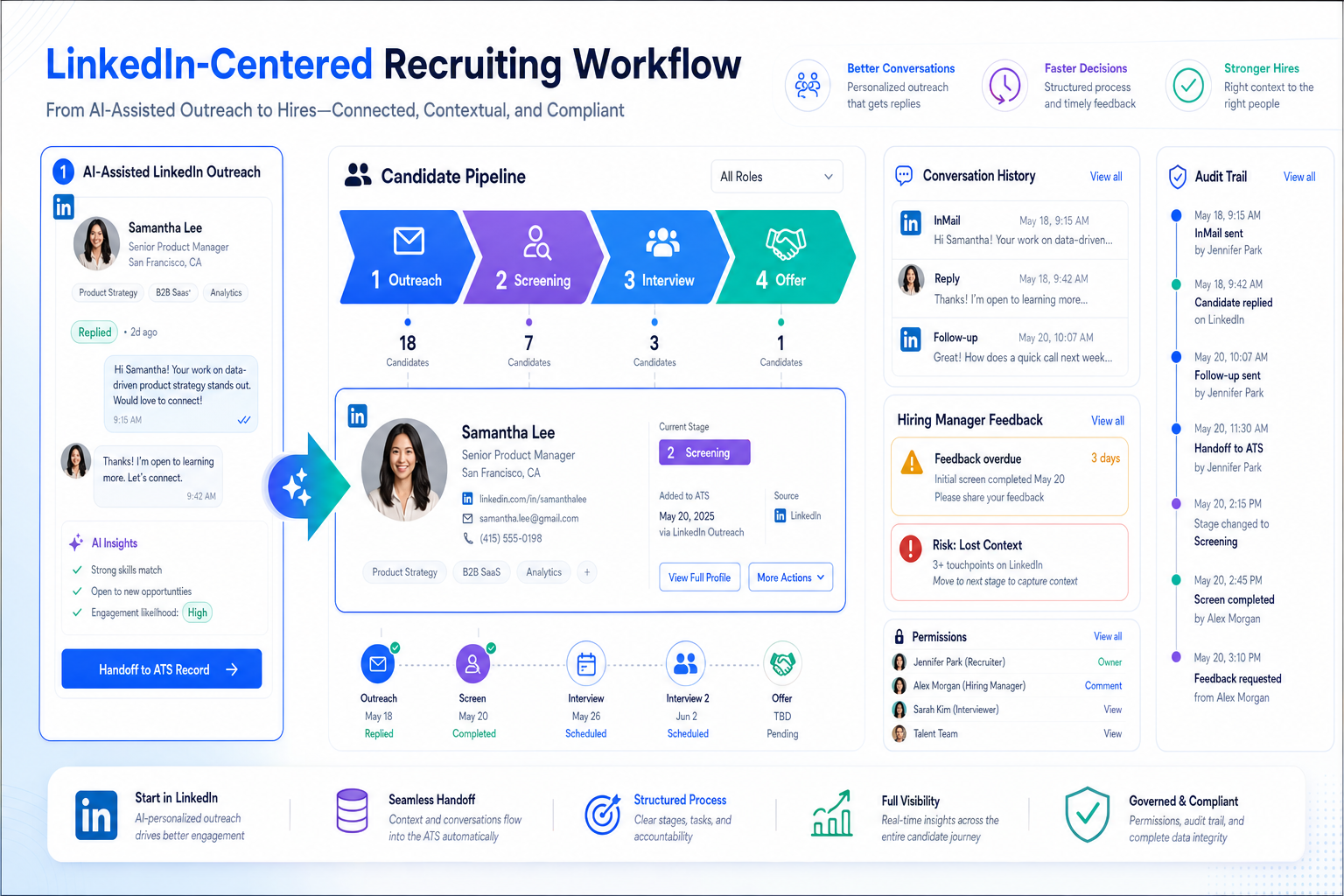
This article shows recruiting leaders how to choose a candidate tracking tool that prevents lost context and delayed feedback.
That sounds simple until recruiting pressure changes underneath the process. A team that was coping with spreadsheets, inbox folders, and side notes can suddenly face new absence rules, more sensitive workplace complaints, return-to-office disputes, or rising stakeholder scrutiny. Then the damage shows up fast: delayed feedback, missing candidate context, inconsistent documentation, frustrated hiring managers, and recruiters spending their best hours chasing updates instead of moving searches forward.
In my own workflow, tools that reduce this chaos are the ones that support outreach, preserve conversation history, and keep handoff decisions clear. I have found that StrategyBrain AI Recruiter can help most when recruiters are juggling after-hours candidate replies, multilingual communication, and repetitive first-touch outreach on LinkedIn. It does not replace recruiter judgment; I still review resumes, decide who advances, and control the next step. What it does well is keep the top of funnel active while the core candidate tracking tool remains the system where hiring decisions are organized.
A useful example comes from the employer-side pressure now showing up across Western Canada. In one legal update discussed in November 2025, employers were warned that workplace safety authorities were taking a more interventionist approach, especially around bullying and harassment, while return-to-office disputes and short-term absence rules were also getting more complicated. In practice, that changes recruiting operations too. When a recruiter opens a requisition for a manager replacement or a sensitive team hire, they are not just posting a role and sorting resumes. They are checking which stakeholders need visibility, confirming who can see candidate notes, logging prior conversations, and making sure the hiring process will stand up if the role touches employee relations risk.
The friction becomes obvious in the next few actions. A recruiter replies to a candidate who asks whether the role is hybrid, updates the stage after a screening call, chases a hiring manager for written feedback, and then realizes a separate conversation about leave patterns or workplace conduct is sitting in email rather than in the recruiting record. That is the moment when software choice stops being abstract. The best recruiting software is the platform that can function as a serious recruitment tracker, preserve clean process history, and help teams judge options by workflow fit rather than by an applicant tracking system logo they happen to recognize from a vendor page.
Table of Contents
- What the best recruiting software really means
- Why policy and workplace risk now affect software choice
- Best recruiting software by use case
- Quick comparison table
- What matters most in a candidate tracking tool
- ATS vs CRM-style recruiting tools
- How to choose by team size
- Common buying mistakes
- FAQ
- Final verdict
What the best recruiting software really means
In most buying conversations, best recruiting software is a category label, not a precise definition. One buyer may mean an ATS. Another may mean a sourcing-plus-pipeline platform. A third may just want a reliable recruitment tracker that stops hiring from falling back into spreadsheets. From an operator's perspective, the most useful lens is still the simplest one: can this system serve as the team’s everyday candidate tracking tool?
That question is more practical than feature marketing. Recruiters need one place to post jobs, collect applications, move people through stages, gather feedback, schedule interviews, preserve communication context, and report on bottlenecks. If the tool cannot support those actions without creating extra admin work, it is not the best fit, no matter how polished the demo looks.
Experienced teams usually separate the terms like this:
- Applicant tracking system: the formal system of record for applicants, stages, notes, permissions, and compliance-sensitive workflow.
- Candidate tracking tool: the recruiter-friendly way to describe software that tracks people cleanly through the pipeline.
- Recruitment tracker: a broader phrase that may refer to a lightweight tracker or a full recruiting suite.
- Recruiting software: the umbrella category that can include sourcing, CRM functions, interview scheduling, reporting, and integrations.
One search pattern worth noting is applicant tracking system logo. People use that query to identify a platform from a screenshot or to orient themselves in the market. That is understandable, but it is weak buying logic. Familiar branding is not evidence that a platform can handle your hiring approvals, feedback discipline, or documentation standards.
Why policy and workplace risk now affect software choice
The reference point from recent employer-side legal updates is useful because it shows why recruiting systems are no longer just about convenience. In British Columbia and across Western Canada, employers are dealing with a more active workplace safety posture, especially around bullying and harassment. At the same time, short-term sick note rules have shifted, and return-to-office disputes are creating new accommodation and human-rights complexity.
Recruiters may not own those legal questions directly, but they are often the first people asked to operationalize them. They need to record candidate expectations around hybrid work, route sensitive notes carefully, maintain process consistency, and make sure hiring managers follow a documented workflow. If that information lives partly in email, partly in chat, and partly in memory, the recruiting process becomes harder to defend and harder to improve.
That is why one of the real advantages of applicant tracking system adoption is governance, not just organization. A mature system creates clearer ownership, cleaner notes, better role-based visibility, and more reliable stage movement. Those are also durable applicant tracking system benefits when hiring conditions become more sensitive or more regulated.
Practical takeaway: The more your hiring process touches hybrid expectations, employee-relations sensitivity, or multi-stakeholder approvals, the more your software needs to act like infrastructure rather than a simple database.
I have seen this firsthand in searches where the recruiting challenge starts on LinkedIn but quickly turns operational. Using AI Recruiter for initial outreach and after-hours replies helped keep candidate conversations from going stale, especially when people asked practical questions about work arrangement or timing. But that only worked because the actual decision trail still lived in the main ATS. The AI-supported layer kept top-of-funnel momentum; the candidate tracking tool kept process control.
Best recruiting software by use case
There is no universal winner. The best recruiting software depends on hiring volume, process discipline, and how much operational risk your team carries.
1. Best for small teams that need immediate structure
Choose a simple system with clear stages, easy setup, and low admin burden. Small firms and boutique search teams need a recruitment tracker that busy hiring managers or clients can actually use. If adoption is poor, recruiters end up rebuilding the process in spreadsheets.
2. Best for high-volume recruiting
Prioritize automation, templates, reminders, bulk actions, and fast filtering. In high-volume environments, the candidate tracking tool must reduce repetitive work without losing auditability.
3. Best for stakeholder-heavy hiring
When searches involve legal, operations, HR, and department leaders, focus on permissions, scorecards, feedback collection, and visible accountability. This is where the strongest applicant tracking system benefits often show up.
4. Best for recruiting teams with LinkedIn-heavy sourcing
If sourcing starts on LinkedIn, your recruiting stack needs a clean handoff from outreach into tracking. This is where a platform may work well alongside StrategyBrain AI Recruiter. I would use the AI layer for repetitive first contact, multilingual replies, and resume capture from interested prospects, then move qualified conversations into the ATS for review, stage progression, and hiring-manager coordination.
5. Best for recruiting operations and reporting maturity
If your team manages funnel health, source quality, stage aging, or interviewer responsiveness, analytics matter as much as usability. In that environment, the best recruiting software becomes an operating system for process decisions, not just a storage tool.
6. Best for growing companies that need clean HR handoff
Pick a platform with dependable downstream sync and candidate-to-employee workflow support. One of the biggest advantages of applicant tracking system use is avoiding duplicate records and messy post-offer re-entry.
Quick comparison table
Use this framework to compare options based on workflow reality rather than surface recognition.
| Evaluation Area | What to Check | Why It Matters | Best Fit For |
|---|---|---|---|
| Pipeline management | Custom stages, bulk movement, ownership visibility | Keeps the candidate tracking tool usable day to day | All teams |
| Documentation control | Notes, permissions, audit trail, rejection reasons | Important when hiring touches policy or employee-relations sensitivity | Mid-sized and large teams |
| Automation | Templates, reminders, scheduling support, triggers | Reduces repetitive recruiter admin | High-volume hiring |
| Candidate experience | Application flow, communication speed, clarity on next steps | Improves conversion and employer perception | Competitive markets |
| Collaboration | Scorecards, hiring manager access, feedback completion | Prevents delays and scattered evaluations | Cross-functional teams |
| Integrations | HRIS, calendar, email, sourcing tools, assessments | Limits duplicate work and broken handoffs | Ops-focused teams |
| Reporting | Stage aging, source performance, conversion, bottlenecks | Turns a recruitment tracker into a management tool | Mature TA functions |
| Usability | Ease of training, interface clarity, manager adoption | Software only helps if people actually use it | Lean teams |
If your shortlisting process starts with screenshots, review sites, or searches like applicant tracking system logo, treat that only as orientation. The real comparison starts once you test stage movement, note discipline, handoffs, and reporting against your actual workflow.
What matters most in a candidate tracking tool
Pipeline visibility
Recruiters should be able to see where every candidate stands, who owns the next step, and how long each person has been sitting in stage. When legal or policy conditions are changing around the business, ambiguity becomes more expensive.
Documentation and context retention
This matters more than many buyers expect. If candidates ask about remote expectations, accommodations, reporting lines, or sensitive workplace issues, the conversation should not disappear into individual inboxes. A strong candidate tracking tool preserves context in a way the team can use responsibly.
Automation that supports, not obscures
Automation should save recruiter time on reminders, scheduling, and standard communication. It should not hide decision logic or create a black box. Recruiters still need control over who advances and why.
Integration with sourcing workflow
For LinkedIn-heavy teams, the handoff from outreach into tracking is a real operational point. In my own process, this is where StrategyBrain AI Recruiter helped most. It kept first-touch messaging active across time zones and captured interested candidates' resumes or contact details, while the ATS remained the source of truth for screening judgment and next-step decisions.
Reporting that changes behavior
Good reporting should tell you which roles are stuck, where hiring managers slow the process, whether hybrid-location concerns are affecting candidate drop-off, and how long people remain between review points. These are practical operating questions, not vanity metrics.
Usability for non-recruiters
If hiring managers avoid the system, the process weakens immediately. The best recruiting software makes occasional users effective without forcing recruiters to become full-time system coaches.
ATS vs CRM-style recruiting tools
An ATS is built to manage active applicants through a defined selection process. A CRM-style recruiting system is built more for relationship-building, talent pooling, and future outreach. Some platforms combine both, but the distinction still matters.
If your main pain point is keeping active hiring disciplined, start with a strong candidate tracking tool. If your pain point is building interest before roles open, CRM capabilities matter more. For many teams, especially those under operational pressure, ATS discipline should come first. Otherwise, you create more conversations than the team can evaluate properly.
- Choose ATS-first if active roles, approvals, feedback, and reporting are your main challenge.
- Choose CRM-first or blended if long-term relationship nurturing drives your hiring model.
- Choose carefully if a vendor promises both but demonstrates neither deeply.
How to choose by team size
Small businesses and boutique firms
Smaller teams need consistency more than complexity. A lightweight recruitment tracker can prevent dropped follow-up, duplicate candidate review, and informal decision drift. For them, the best applicant tracking system benefits are visibility and speed.
Mid-sized companies
At this stage, automation, reporting, and manager accountability become much more important. Mid-sized teams often hit the exact problems reflected in the legal update context: more stakeholders, more policy sensitivity, and less tolerance for undocumented process shortcuts.
Large or distributed organizations
Larger teams need governance: permissions, auditability, regional workflow variation, and standardized reporting definitions. Here, your candidate tracking tool is part of business infrastructure. Weak configuration creates process risk very quickly.
Common buying mistakes
- Buying off the demo instead of the workflow.
Test real actions: posting a job, reviewing applicants, logging candidate concerns, moving stages, collecting feedback, and closing a role.
- Ignoring process sensitivity.
If your business is dealing with hybrid disputes, attendance rules, or employee-relations pressure, software discipline matters more than usual.
- Overvaluing brand recognition.
A search like applicant tracking system logo may help identify market players, but it tells you nothing about actual fit.
- Separating sourcing from tracking too completely.
If LinkedIn outreach lives in one world and your ATS in another, handoff quality suffers. Pairing sourcing support such as AI Recruiter conversation workflow with a disciplined ATS can work well, but only if ownership and stage movement are clear.
- Underestimating reporting needs.
Teams often buy for organization and later discover they need bottleneck reporting, aging views, and source analysis.
- Buying for current volume only.
Your recruitment tracker should fit today and still function if approvals, locations, or stakeholders expand.
FAQ
What is a candidate tracking tool?
A candidate tracking tool is software that helps recruiters organize applicants, move them through hiring stages, coordinate interviews, collect feedback, and monitor pipeline status. In practice, this often overlaps with an applicant tracking system.
What is the difference between a candidate tracking tool and an applicant tracking system?
The first is a plain-language description of the function. The second is the formal category term. Most buyers are referring to similar core capabilities.
Why does legal or policy change affect recruiting software selection?
Because recruiters often need to document candidate expectations, preserve process consistency, and coordinate multiple stakeholders when workplace policies change. Better systems make that easier and more defensible.
Do small teams need recruiting software?
Yes, if hiring volume is high enough to create delays, confusion, or inconsistent follow-up. Even a simple recruitment tracker can improve visibility and reduce process drift.
What are the main advantages of applicant tracking system adoption?
The biggest advantages of applicant tracking system use are centralized data, clearer stage visibility, cleaner collaboration, less manual work, and more reliable reporting.
What applicant tracking system benefits matter most for recruiters?
Recruiters usually feel the biggest gains in stage clarity, easier scheduling, better feedback capture, stronger manager follow-through, and cleaner reporting on where searches stall.
Why do people search for applicant tracking system logo?
Usually to identify a vendor from a screenshot, compare known category players, or navigate the market visually. It is useful for orientation but weak for evaluation.
Can AI tools support a candidate tracking workflow?
Yes, especially in sourcing and early communication. For example, AI-supported outreach can help maintain response speed and collect initial interest, while recruiters keep final screening and advancement decisions inside the main ATS.
Final verdict
The best recruiting software is not the one with the loudest positioning or the most recognizable applicant tracking system logo. It is the candidate tracking tool that helps your team run a cleaner, faster, better-documented hiring process under real operating conditions.
If recent workplace complexity has taught recruiting teams anything, it is that process quality matters when the environment gets harder. Hiring does not become simpler when return-to-office expectations shift, documentation rules change, or more stakeholders want visibility. Your software has to absorb that pressure.
For most teams, the right path is straightforward: map your real workflow, identify where candidate context gets lost, test how each platform handles approvals and reporting, and decide whether your sourcing motion needs AI-assisted support alongside the ATS. That is how a recruitment tracker becomes a true operating system for recruiting rather than another tool your team works around.















