


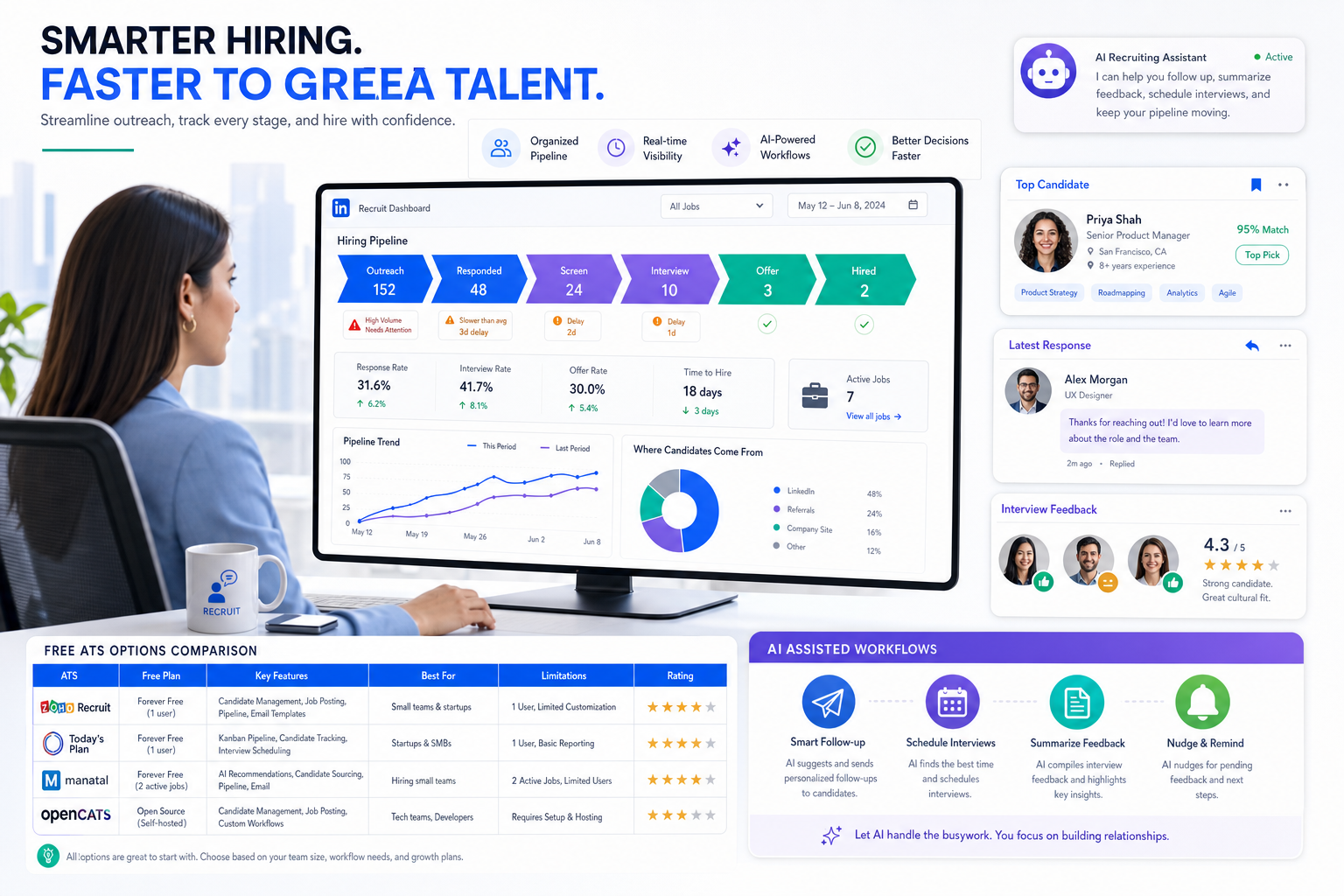
When time to fill keeps stretching, this article helps recruiters judge freeware recruitment software by the delays it removes before stronger candidates go cold.
That distinction matters more than most free-software roundups admit. When a role stays open too long, the cost is not just administrative drag. Agency recruiters lose momentum with clients, internal talent teams absorb more follow-up work, hiring managers start chasing updates outside the system, and strong candidates are more likely to accept another offer before your process reaches a decision. Widely cited market data has shown average time to fill stretching into the mid-60-day range, which is exactly when weak workflow design starts hurting both speed and quality.
In my own workflow, one useful pressure-release valve has been using StrategyBrain AI Recruiter alongside the ATS rather than expecting the ATS to do everything. It helps most when LinkedIn outreach, after-hours candidate replies, and initial interest checks begin to pile up. The practical advantage is not that it replaces recruiter judgment; it does not. I still review resumes, decide who is actually qualified, and control next steps. But when repetitive outreach and candidate follow-up are handled more consistently, the ATS becomes easier to keep clean and current.
The real pressure usually shows up at the moment a team is trying to move fast without losing standards. A recruiter opens a live requisition, sees applicants arriving from several channels, checks which hiring managers still owe feedback, and notices that one of the strongest prospects has gone quiet after a delayed interview sequence. At the same time, the team is trying to keep employer messaging consistent, revive earlier silver-medalist candidates, and avoid starting every search from zero. None of those actions are complicated on their own, but they break down quickly when they live across inboxes, spreadsheets, and disconnected notes.
That is why the best recruiting software conversation is not really about dashboards first. It is about whether your system supports a faster, cleaner hiring motion: building a hiring culture, managing applicant volume, protecting candidate experience, tightening interviews, and moving offers without delay. If you are evaluating freeware recruitment software, free ats systems, or free applicant tracking system software, those are the standards that matter.
In this article, you will find:
- A practical definition of what counts as free recruiting software
- A hiring-speed framework for comparing free ATS models
- A shortlist of software types worth evaluating by use case
- The features that matter most when time to fill starts slipping
- How to tell when a free tool is helping versus creating hidden delay
- Why faster hiring should shape your ATS choice
- The main types of freeware recruitment software
- Best recruiting software categories to evaluate
- Features that reduce delay without lowering quality
- Where free ATS systems usually fall short
- How recruiters should choose the right free ATS
- Using AI support with your ATS in real recruiting workflows
- When to upgrade from free recruiting software
- FAQ
Why faster hiring should shape your ATS choice
When recruiters search for the best recruiting software, they often begin with features and price. In practice, the better starting point is process speed. If your hiring cycle is stretching, your ATS should help you reduce delay at each handoff without lowering candidate quality.
That is where the recent hiring conversation around time to fill is useful. One of the clearest reminders from broader recruiting commentary is that vacancies are taking longer to close than many teams expect, and every extra step increases the risk of losing top people to faster competitors. For recruiters, that changes how freeware recruitment software should be judged. A free tool is not valuable just because it stores applicants. It is valuable if it helps your team move from application to decision with less confusion.
Key insight: The best recruiting software for a lean team is the option that shortens handoffs, clarifies ownership, and keeps candidate momentum alive.
From a day-to-day recruiting perspective, five workflow themes matter most:
- Hiring culture: Can the system make it easier for recruiters, hiring managers, and stakeholders to collaborate in one process?
- Employer brand support: Does it help present jobs clearly and give candidates a cleaner application path?
- Pipeline continuity: Can you revisit previous candidates instead of restarting every search?
- Applicant volume control: Does it help your team screen consistently when response volume spikes?
- Interview and offer speed: Can it reduce delay between review, interview, feedback, and decision?
Those ideas are more useful than a generic feature list because they connect software selection to the operational reasons hiring gets stuck.
The main types of freeware recruitment software
Before comparing products, separate the different meanings of “free.” Too many teams mix these categories together and then wonder why the shortlist feels misleading.
| Model | What it usually means | Best for | Main caution |
|---|---|---|---|
| True free plan | Ongoing no-cost access with core ATS features | Small teams with light but recurring hiring | Usually limited by jobs, seats, or feature depth |
| Free trial | Time-limited access to paid functionality | Teams validating a future purchase | Not a permanent free operating model |
| Open-source or self-hosted | Software without a standard subscription model | Organizations with technical support | Maintenance effort often replaces license cost |
If you are looking for free ats systems because leadership wants a lasting no-cost setup, a trial is not the same thing. If you want to benchmark workflow depth before making a budget case, a trial may be more useful than a permanently limited free plan. And if your security or hosting requirements are strict, self-hosting may be appropriate, but recruiters should be honest about the operational burden.
What an ATS actually does
An applicant tracking system organizes the recruiting workflow in one place. At minimum, it should support candidate intake, stage tracking, interview coordination, notes, and visibility across the hiring team. Broader recruiting software may also include sourcing, communication, automation, analytics, or talent pooling.
A free applicant tracking system software option becomes valuable when it replaces fragmented admin work with a repeatable hiring process. That is where the advantages of applicant tracking system adoption become real: fewer lost resumes, clearer ownership, faster follow-up, and better discipline around candidate movement.
Best recruiting software categories to evaluate
Rather than force a branded top-10 list, I prefer to rank software categories by recruiting situation. That approach is usually more useful for buyers comparing freeware recruitment software in the real world.
1. Best for small in-house teams: true free ATS with shared visibility
If your company hires steadily but not at high volume, a genuine free ATS plan can be enough. The key is basic collaboration. Recruiters and hiring managers should be able to see candidate stage, leave notes, and keep the requisition moving without exporting everything into email.
This is where the best recruiting software often looks simple rather than impressive. If the free plan handles candidate movement clearly and supports light teamwork, it may solve more than a feature-heavy system with sharp usage caps.
2. Best for agencies and desk recruiters: pipeline-first ATS
Agency-style recruiting usually lives or dies on speed of movement. A useful free system in that environment should make it easy to review resumes, assign ownership, move candidates between stages, and resurface prior talent pools when a new job opens. If the interface is attractive but the workflow is slow, it will not hold up under live desk pressure.
3. Best for teams planning to scale: trial-based evaluation of deeper workflow tools
If you expect hiring volume to increase, a trial of a stronger platform may be smarter than forcing a forever-free plan to do more than it can. In that case, you are testing long-term fit: can the product eventually support interview structure, reporting, integrations, and hiring-manager adoption at a larger scale?
4. Best for technical organizations: self-hosted recruiting software
Some teams want control over data handling and configuration. Self-hosted systems can work well when there is internal ownership for setup, permissions, security, and updates. Without that support, however, the “free” label can become expensive in recruiter time.
5. Best for high-volume top-of-funnel work: ATS plus outreach support
Some workflows break not because the ATS is weak, but because recruiters cannot keep up with early-stage communication. That is where I have found value in pairing the ATS with AI Recruiter. For LinkedIn-heavy sourcing, it can take over repetitive first-touch communication, candidate interest checks, and off-hours responses while the ATS remains the source of truth for pipeline decisions. The recruiter still qualifies the resume and decides who progresses, which is exactly how it should be.
Features that reduce delay without lowering quality
The strongest test for any ATS is simple: does it help you hire faster while preserving judgment? The following features usually matter most when time to fill is starting to stretch.
| Feature | Why it matters | What to verify in free plans |
|---|---|---|
| Custom pipeline stages | Lets teams reflect their real hiring process | Can stages be edited or are they fixed? |
| Candidate search and rediscovery | Supports stronger talent pipeline reuse | Can you easily revisit prior applicants? |
| Screening workflows | Helps manage applicant volume consistently | Are filters or knockout questions available? |
| Interview coordination | Reduces scheduling and feedback delay | Is calendar visibility or reminder support included? |
| Team notes and scorecards | Improves collaboration and decision speed | How many users can contribute feedback? |
| Career page or application flow | Supports employer brand and candidate experience | Is the application path clean and usable? |
| Automation | Limits manual admin and follow-up lag | Are reminders or stage actions restricted? |
| Reporting | Shows where hiring gets stuck | Can you see bottlenecks beyond simple counts? |
These are not just convenience features. They map directly to the common causes of delay: weak coordination, poor pipeline reuse, inconsistent screening, and slow interview feedback.
How I pressure-test candidate quality inside a faster workflow
One mistake I see often is treating speed and quality as opposites. They are not. The real issue is whether the system supports structured judgment. In my own process, I want the software to accelerate administration, not final evaluation. That means I am comfortable using tools that help with outreach, reminders, and response capture, but I still want recruiters and hiring managers to own resume review, interview decisions, and trade-off calls.
That is why support tools like StrategyBrain AI Recruiter are most useful at the top of the funnel. When candidate replies arrive after hours or across time zones, timely follow-up keeps momentum alive. But qualification still happens when the recruiter reviews the collected information and decides whether the candidate truly matches the role.
Where free ATS systems usually fall short
Most free ats systems are helpful, but very few are complete. That is not a deal-breaker if your limitations match the reality of your hiring volume.
Common restrictions
- Active job caps: Fine for occasional hiring, frustrating for agencies or fast-growth teams.
- User seat limits: Collaboration breaks when managers cannot access the system.
- Limited reporting: Hard to identify bottlenecks in long hiring cycles.
- Weak automation: More reminders and follow-up still happen manually.
- Basic career site options: Employer brand presentation may be minimal.
- Restricted integrations: Duplicate entry becomes more likely.
The risk is not just inconvenience. It is hidden delay. If recruiters need side spreadsheets to track interview status, or if hiring managers default back to email because the free plan is too restrictive, your process becomes slower than it looks on paper.
That returns us to the opening case: long hiring cycles are rarely caused by one dramatic problem. They are usually caused by a chain of small delays, weak visibility, and repeated restarts. Software should shorten that chain.
How recruiters should choose the right free ATS
If you are selecting the best recruiting software for a real hiring team, I recommend evaluating it against the same pressure points that lengthen time to fill.
1. Start with collaboration, not features
If your managers will not use the system, the workflow will split. Check whether reviewing candidates, leaving feedback, and seeing next steps feels easy enough for non-recruiters.
2. Check how the tool supports employer brand and candidate experience
A clean job page, clear communication, and simple application flow matter more than many buyers expect. They affect response quality and dropout risk.
3. Test whether it helps you reuse prior candidates
One of the most practical ways to reduce time to fill is to avoid rebuilding the pipeline from scratch. Searchability and talent-pool rediscovery matter.
4. Run one live requisition through it
Nothing exposes weak software faster than a live role. Track applications, manager feedback, stage changes, and scheduling in real use.
5. Review what happens when volume spikes
If your team receives a sudden surge of applicants, can the system help you screen quickly and consistently? This is where many free plans reveal their limits.
6. Understand the exit and upgrade path
Even if you begin with free applicant tracking system software, check export options, paid-tier logic, and whether your data can move cleanly later.
Using AI support with your ATS in real recruiting workflows
Used carefully, AI support can make a free ATS more workable without turning recruiting into autopilot. My own view is simple: let the ATS manage process truth, let AI handle repetitive communication where appropriate, and keep hiring decisions with the recruiter.
In LinkedIn-heavy recruiting, I have seen the biggest benefit when StrategyBrain AI Recruiter is used for three narrow jobs: reaching out to targeted candidates, handling initial back-and-forth across time zones, and collecting resumes or contact details from interested people. That takes pressure off the early funnel and helps keep the ATS updated with actual next-step candidates rather than loose message threads.
What I would not do is let any automation tool make the final qualification call. Resume fit, role nuance, and stakeholder judgment still belong to the recruiter. Used that way, AI does not replace the ATS; it protects it from becoming a dumping ground for half-finished outreach activity.
For solo recruiters and small agencies, this pairing can be especially practical. A free ATS can hold the pipeline structure, while an outreach layer handles the repetitive front-end communication that usually spills into evenings and follow-up gaps.
When to upgrade from free recruiting software
Free recruiting software is often a sensible starting point. The right time to upgrade is when staying free creates more process drag than financial savings.
Typical signals include:
- Your average hiring cycle keeps stretching despite strong candidate supply.
- Managers need access beyond the free seat limit.
- You are losing track of previous candidates you should be re-engaging.
- Scheduling and feedback delays are creating candidate drop-off.
- Manual outreach and follow-up are overwhelming recruiter capacity.
- You need better reporting to understand where vacancies stall.
In other words, upgrade when the software no longer supports the speed, consistency, and visibility that your hiring process now requires.
FAQ
What is freeware recruitment software?
Freeware recruitment software is recruiting software available at no direct software cost under a specific model. That may mean a permanent free plan, a limited free version, a trial, or self-hosted software that shifts technical ownership to your team.
Are free ATS systems good enough for real recruiting teams?
They can be, especially for small businesses, early-stage internal hiring teams, and solo recruiters. The key question is whether the limits on jobs, users, automation, and reporting still allow your process to move quickly and clearly.
What is the difference between free ATS systems and free applicant tracking system software?
In practice, they usually refer to the same category. Both describe no-cost ATS tools that help manage applicants, stages, and hiring workflows, though product scope and limits vary widely.
How can an ATS help reduce time to fill?
An ATS reduces time to fill by centralizing candidate information, improving hiring-team visibility, speeding stage movement, supporting applicant screening, and reducing avoidable follow-up delays.
Can recruiters use AI with a free ATS?
Yes, if the workflow is designed carefully. Many recruiters use an ATS as the system of record and pair it with tools like AI Recruiter for repetitive outreach and response handling, while keeping qualification and selection decisions under human control.
When should I stop using free applicant tracking system software?
Move on when the limits begin to slow hiring: too many manual workarounds, weak collaboration, lack of reporting, or repeated delays in candidate movement and stakeholder feedback.
Conclusion
The search for the best recruiting software is really a search for cleaner hiring motion. The most useful freeware recruitment software is not the one that looks best in a comparison chart. It is the one that helps your team maintain candidate quality while reducing the delays that stretch time to fill.
If you are comparing free ats systems or free applicant tracking system software, judge them by collaboration, pipeline reuse, screening discipline, interview speed, and candidate communication. Those are the pressure points that decide whether a free tool becomes a genuine recruiting asset or just another place where hiring work gets stuck.















