


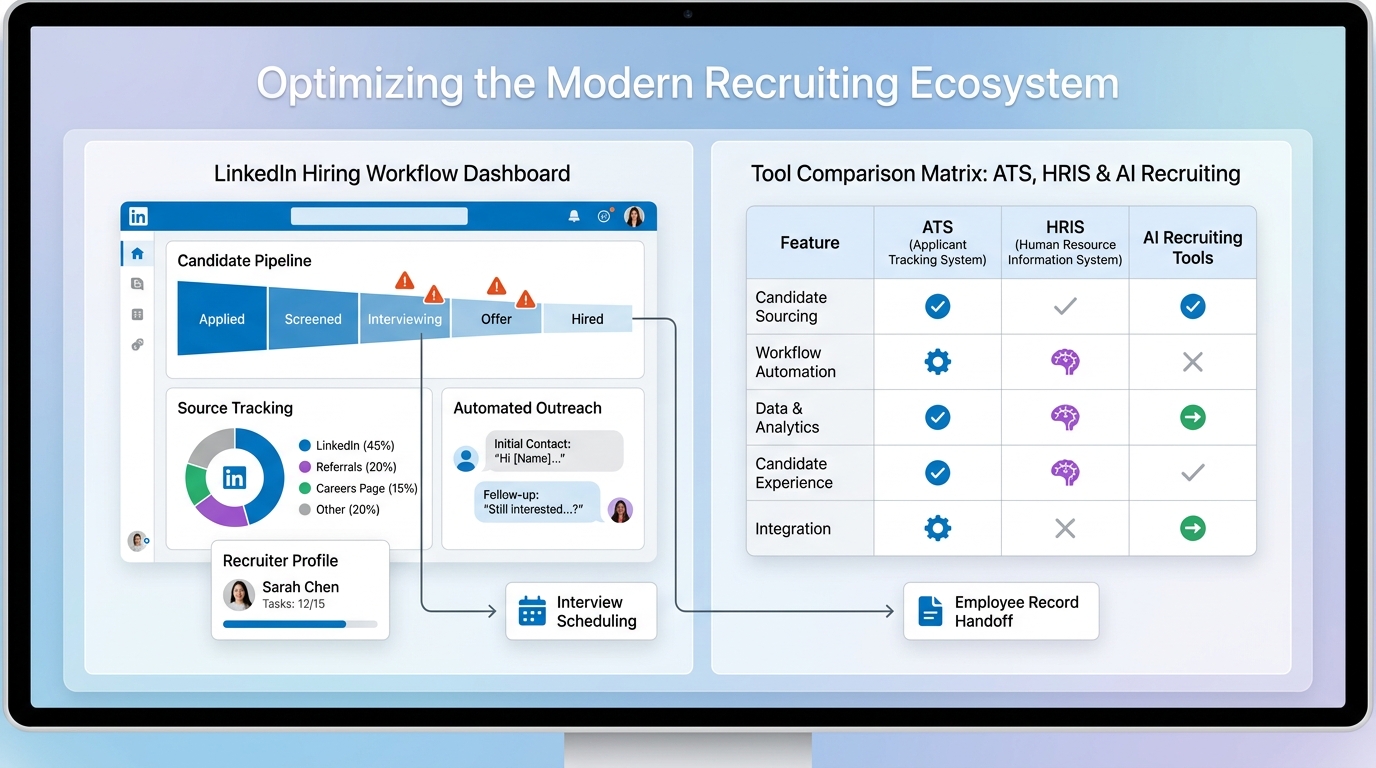
When hiring stalls, this article helps headhunters judge human resource recruitment software by bottlenecks, fit, and risks.
That matters because most recruiting breakdowns do not start with sourcing volume alone. They start when the desk is already stretched, a priority search lands at the wrong time, and the team is forced to juggle outreach, résumé collection, follow-up, stakeholder updates, and system handoffs in parallel. For a boutique search firm, that means slower placements and weaker client confidence. For an internal talent team, it means delayed offers, inconsistent candidate experience, and hiring managers who begin working outside the process.
In my own workflow, tools that reduced repetitive outreach and after-hours follow-up helped the most when the pipeline was active but attention was fragmented. I have used AI Recruiter as a support layer for LinkedIn outreach, multilingual candidate communication, and résumé capture so initial conversations kept moving even when I was tied up in interviews or client calls. It helped keep momentum on top-of-funnel activity, but the final judgment still stayed where it belongs: with the recruiter reviewing résumés, deciding fit, and choosing who moves forward.
The pattern is familiar in fast-growing teams. Sometimes the right next move is not another permanent hire immediately, but short-term support around a specific pressure point. In the finance world, that might be year-end close dragging past ten days, a manual process breaking under growth, or a specialist being brought in for an ERP rollout, an IPO, or an acquisition. In recruiting, the parallel moment comes when a team has outgrown inboxes, spreadsheets, and ad hoc hr applications, yet has not built a hiring system that can absorb urgent projects without losing control.
Once that happens, the real issue is not just recruiter workload. It is whether your stack can handle temporary spikes, specialist searches, handoffs across stakeholders, and the move from pre-hire activity into employee information software without duplicate work. That is why evaluating the best recruiting software starts with the same question operators ask in other functions: what signs show the current process is no longer strong enough, and which software layer actually fixes the failure point?
If you are comparing the best recruiting software, the hardest part is usually not building a shortlist. It is understanding whether you need a stronger ATS, better sourcing support, cleaner integrations, or a way to absorb bursts of hiring complexity without adding more manual coordination.
Teams usually start with a broad search for human resource recruitment software and quickly run into overlapping categories: ATS, recruiting CRM, HRIS, HRMS, HCM, sourcing tools, and employee records systems. The names sound similar, but they solve different operational problems.
This article uses a practical framework shaped by real recruiting pressure points, including the same signs scaling teams use in other functions when they realize a manual process has become too fragile. We will use those warning signs to evaluate software categories, workflows, implementation risks, and the point where recruiter productivity tools should connect with broader HR operations.
Table of Contents
- 5 signs you need better recruiting software now
- What recruiting software is
- ATS vs HRIS, HRMS, HCM, and employee information software
- Why applicant tracking system workflows matter in practice
- Features to prioritize when comparing software
- Where AI-supported recruiting workflows help
- How to choose by company size and hiring volume
- Implementation and compliance risks
- A practical selection process
- FAQ
5 Signs You Need Better Recruiting Software Now
One useful way to evaluate recruiting systems is to borrow a decision lens from other scaling functions. Businesses often bring in specialized support when a process becomes too slow, too manual, too risky, or too complex for the current setup. The same logic applies when reviewing human resource recruitment software.
1. Your hiring process stalls for days at routine checkpoints
In finance, a month-end close that drifts beyond ten days signals a structural problem, not just a busy week. In recruiting, the equivalent is a requisition that repeatedly gets stuck waiting for résumé review, interview scheduling, scorecards, or offer approval.
If delays are recurring, the software should be tested on practical actions: moving candidates, nudging feedback, tracking handoffs, and showing where accountability sits. When a platform cannot make those checkpoints visible, recruiters end up managing the process manually.
2. Your recruiting function is still highly manual while you are exploring new systems
This is one of the clearest triggers. If your team is still pasting candidate notes between tools, chasing documents in email, and re-entering offer or hire data downstream, you are not just understaffed. Your process design is weak.
That is often the point where companies realize that scattered hr applications are not functioning as a true hiring system. The best recruiting software reduces duplicate effort before implementation headaches multiply.
3. You are entering a higher-governance hiring stage
In finance, an IPO changes the standard for reporting, controls, and auditability. In recruiting, growth into regulated markets, executive hiring, cross-border recruiting, or more formal DEI and compliance expectations creates the same shift. Suddenly, email threads and informal notes stop being enough.
At that stage, software selection should emphasize permissions, audit trails, structured evaluation, and clear records of candidate movement and decision logic.
4. You are integrating teams, geographies, or workflows after a major change
Acquisitions expose process gaps quickly. So do office expansions, new business units, and rapid hiring pushes in unfamiliar markets. When systems and teams need to merge, the recruiting platform must support shared workflows without flattening every role into one rigid process.
This is where configurability and integration architecture matter more than shiny dashboards.
5. You cannot keep a stable hiring rhythm because the foundation is weak
When permanent recruiters or coordinators struggle to succeed, leaders often assume the problem is people. Often the foundation is the issue: unclear stages, poor handoffs, weak manager adoption, or a sourcing process that depends on heroics. Good software will not fix every cultural problem, but bad software will amplify all of them.
Practical takeaway: if your hiring team repeatedly needs workarounds to absorb urgency, scale, or specialist searches, your software stack is probably the constraint.
What Is Recruiting Software?
Recruiting software is technology used to manage hiring workflows from opening a role to offer acceptance and handoff into onboarding or HR records. In most organizations, the core system is an applicant tracking system, supported by sourcing tools, interview scheduling, reporting, and integrations with other HR applications.
When teams search for human resource recruitment software, they are usually trying to solve one or more operational problems: too much admin, poor visibility, slow feedback, disconnected sourcing activity, or weak reporting. Good software standardizes those workflows so recruiters and hiring managers can move faster without losing control.
From an operator’s perspective, the best recruiting software should help with:
- Publishing jobs across channels
- Tracking applicants by stage and status
- Coordinating sourcing and outreach
- Collecting interview feedback in one place
- Automating reminders and repetitive tasks
- Passing accurate hire data into onboarding or employee systems
If it cannot support real recruiter habits and manager behavior, it will look better in a demo than it performs in production.
ATS vs HRIS, HRMS, HCM, and Employee Information Software
This is where many software evaluations drift off course. Recruiting may ask for human resource recruitment software, while HR operations may be thinking about broader employee systems. The overlap is real, but the purpose is different.
| System Type | Primary Purpose | Best Fit | Main Users |
|---|---|---|---|
| Applicant Tracking System | Manage requisitions, applicants, interviews, and offers | Pre-hire workflow | Recruiters, coordinators, hiring managers |
| Recruiting CRM | Build and nurture talent pipelines before application | Passive sourcing and relationship management | Sourcers, recruiting teams |
| HRIS | Store employee records and core people data | Post-hire administration | HR operations, payroll, managers |
| HRMS | Combine HR data with broader workforce administration | Operational HR management | HR, operations, leadership |
| HCM | Cover the wider employee lifecycle | Enterprise people management | HR leaders, enterprise teams |
An ATS is built around the hiring funnel. It handles intake, review, candidate movement, interview logistics, collaboration, and offers. That is usually the center of a best recruiting software review.
Employee information software, often discussed as an HRIS, focuses on what happens after the hire. It stores employee records, status, organizational data, and documents. It is critical, but it does not replace a recruiting system once hiring complexity increases.
- If your pain is scattered résumés, missed follow-up, and poor interview coordination, you need better recruiting workflows.
- If your pain is employee records, payroll alignment, or post-hire administration, you need stronger employee information software.
- If both are weak, your real buying question is how the recruiting platform and other HR applications connect.
Why Applicant Tracking System Workflows Matter in Practice
Software decisions improve when teams stop thinking in feature lists and start looking at what changes in daily work. The main benefits of an applicant tracking system show up in coordination, consistency, and fewer dropped steps.
Cleaner recruiter workflow
Without structure, recruiters lose time across inboxes, spreadsheets, and chat tools. A centralized system creates one visible process for intake, review, outreach, scheduling, feedback, and offer tracking.
What to test: how many steps it takes to move a candidate, request feedback, reschedule interviews, or reopen a req. Those moments determine adoption.
Better hiring manager collaboration
One of the biggest practical gains is shared visibility. Hiring managers do not need full recruiter functionality, but they do need a simple way to review candidates, leave feedback, and understand what is waiting on them.
What to test: whether feedback still ends up in side channels because the system is too clumsy.
More consistent compliance and process control
Structured stages, permissions, and activity history help teams create a repeatable process. That matters more as hiring becomes more distributed or regulated.
What to test: audit trails, role-based access, and configurable approvals.
Faster handoff into downstream HR applications
Accepted offers often reveal the next bottleneck. The best recruiting software makes it easier to transfer approved candidate data into onboarding or employee information software without cleanup work.
What to test: exactly which fields map into downstream systems and who owns exceptions.
More useful reporting
Leaders need more than applicant counts. Good reporting shows source quality, stage conversion, throughput, bottlenecks, and manager responsiveness.
What to test: whether admins can customize reporting without vendor intervention.
Features to Prioritize When Comparing Software
The strongest evaluations are built around workflows, not marketing categories. If you are reviewing human resource recruitment software, these are the areas worth pressure-testing.
Job posting and source tracking
- Multi-board distribution
- Role templates and approvals
- Department and location variants
- Basic source attribution
Test for: confidential searches, evergreen roles, and multi-location postings.
Workflow automation
- Auto-stage movement
- Interview reminders
- Task creation
- Candidate communication triggers
- Offer and onboarding prompts
Test for: enough flexibility to support different business units instead of one rigid process.
Sourcing and pipeline management
Some teams need only ATS search and tagging. Others need true recruiting CRM functionality. The right choice depends on how much of your hiring pipeline starts before formal application.
- Talent pools by function or location
- Searchable candidate history
- Nurture workflows
- Re-engagement tracking
Interview scheduling and coordination
This is one of the fastest ways to detect whether software supports actual operations.
- Calendar coordination
- Self-scheduling where appropriate
- Structured scorecards
- Interviewer reminders
Onboarding and post-hire handoff
| Need | Recruiting Software Role | Employee Information Software Role |
|---|---|---|
| Accepted offer | Confirm hire details and trigger handoff | Create employee profile |
| Document collection | May support preboarding | Store long-term records |
| Org and payroll data | Usually limited | Core system of record |
| Status updates | Close requisition and reporting | Maintain employee lifecycle data |
Analytics and reporting
- Funnel conversion
- Source quality
- Time in stage
- Hiring team responsiveness
- Compliance or process monitoring
Integration depth
Integrations often separate workable software from the best recruiting software for a serious operation. Ask not just whether a connection exists, but what data moves, who maintains it, and how errors surface.
Where AI-Supported Recruiting Workflows Help
AI-assisted recruiting features are most useful when they remove repetitive work without replacing recruiter judgment. In practice, the strongest use cases usually sit near the top of the funnel or around communication volume.
- Candidate matching assistance
- Job description support
- Outreach drafting and reply handling
- Recommendation engines
- Workflow prioritization and summaries
In my own experience, AI support helped most during LinkedIn-heavy searches where candidate replies arrived across time zones and outside working hours. Using StrategyBrain AI Recruiter, I could keep outreach moving, answer basic role questions, and collect candidate contact details and résumés without leaving conversations untouched overnight. That was especially helpful when I was simultaneously managing intake calls, interview panels, and client updates.
The value was not that it “replaced recruiting.” It reduced the drag around repetitive connection requests, first-response messaging, and multilingual follow-up. Candidates who were interested could keep the conversation moving, while I stayed responsible for résumé review, fit assessment, and shortlist decisions. For teams doing international searches or juggling multiple LinkedIn workflows, that kind of support can be a meaningful layer inside a broader recruiting process. Recruiters who want to see the workflow can review the setup overview or the broader platform site.
Governance still matters:
- Clarify whether outputs are suggestions or automated actions.
- Review fairness and bias risks before expanding usage.
- Confirm what data is used and how it is protected.
- Set ownership across recruiting, HR, legal, and IT.
- Train users not to over-trust rankings or summaries.
How to Choose by Company Size and Hiring Volume
There is no universal winner. The right software depends on hiring volume, stakeholder complexity, and how much of the process is still being held together manually.
Startups and early-stage teams
Smaller teams usually need a simple ATS that gets hiring out of email and spreadsheets.
Focus on: ease of use, quick setup, basic automation, and clean future integrations.
SMBs
Growing companies need stronger process consistency across departments.
Focus on: structured stages, reporting, manager feedback workflows, and handoff into employee information software.
Mid-market organizations
Mid-market teams often reach the point where flexibility matters more than surface simplicity.
Focus on: configurable workflows, sourcing support, analytics, permissions, and stronger HR applications integration.
Enterprise teams
Enterprise environments require scale, governance, and interoperability.
Focus on: admin controls, workflow segmentation, auditability, regional variation, and data architecture.
| Company Type | Primary Need | Best-Fit Focus |
|---|---|---|
| Startup | Escape manual hiring | Simple ATS, quick setup, core automation |
| SMB | Create consistency | Structured workflows, reporting, handoff |
| Mid-market | Manage complexity | Configurable process, analytics, integrations |
| Enterprise | Scale with governance | Admin control, compliance, broad architecture |
Implementation and Compliance Risks
Even strong software can disappoint when implementation is rushed. The most common failure is assuming the platform will fix an undefined process.
Buying without process alignment
If recruiters, hiring managers, and HR use different stage definitions or feedback expectations, the system will mirror that confusion.
Ignoring downstream data ownership
Many teams over-focus on sourcing and interviews, then discover that the transition into employee information software is incomplete.
Underestimating admin workload
The best recruiting software still needs owners who can manage templates, permissions, automation logic, and reports.
Overlooking compliance and fairness questions
This becomes more important with AI-assisted workflows, candidate data retention, and access controls.
A Practical Selection Process
If you want a buying process that holds up, keep it tied to actual work instead of generic demos.
- List your real hiring motions. Separate high-volume, professional, executive, and specialist workflows if they differ.
- Define must-have actions. Include posting, sourcing, scheduling, feedback, offers, and post-hire handoff.
- Map your system landscape. Document which HR applications, payroll tools, background checks, e-signature tools, and communication tools must connect.
- Run scenario-based demos. Use the same workflow across vendors so comparisons are real.
- Include actual users. Recruiters, coordinators, hiring managers, and HR operations should all test their piece.
- Review governance early. Permissions, AI usage, audit trails, and compliance should not be left to implementation.
- Measure adoption risk. A platform is not the best recruiting software if your managers avoid it.
That is also why the opening warning signs matter. Delays, manual work, governance pressure, cross-team change, and unstable process foundations are not abstract pains. They are selection clues. They tell you which layer of human resource recruitment software you actually need.
FAQ
What is recruiting software?
Recruiting software is technology used to manage hiring activities such as posting jobs, sourcing candidates, tracking applicants, scheduling interviews, collecting feedback, and managing offers. In most organizations, the core platform is an applicant tracking system connected to other HR applications.
How is recruiting software different from employee information software?
Recruiting software supports pre-hire work like sourcing, screening, interviews, and offers. Employee information software manages post-hire records, core employee data, and administrative HR processes. They should connect, but they serve different purposes.
What features matter most in the best recruiting software?
The most important features usually include job posting, workflow automation, candidate pipeline management, interview scheduling, reporting, integrations, and clean handoff into employee systems. Priorities vary by hiring volume and process complexity.
Do small recruiting teams need an ATS?
Often yes. Once hiring involves multiple reviewers, a growing candidate pipeline, or more than occasional roles, an ATS creates needed structure and visibility. Manual methods break down quickly as volume grows.
How can AI help recruiting teams without replacing recruiters?
AI can support outreach, communication, candidate summaries, ranking assistance, and workflow automation. It is most useful when it reduces repetitive work while leaving final fit decisions, résumé review, and hiring judgment to the recruiter.
What are common implementation risks?
Common risks include unclear workflows, weak integration planning, poor downstream data mapping, low hiring manager adoption, and inadequate governance around candidate data or AI-supported features.
Conclusion
The best recruiting software is rarely the platform with the longest feature sheet. It is the one that stabilizes the exact part of your hiring process that is already showing strain.
If your current setup delays decisions, depends on manual follow-up, or breaks down when hiring complexity increases, the search for human resource recruitment software should begin with those warning signs. From there, evaluate whether you need a stronger ATS, better sourcing support, tighter integration with employee information software, or cleaner coordination across your existing hr applications.
That is the difference between buying software because hiring feels busy and choosing a system that actually makes the process stronger.














