


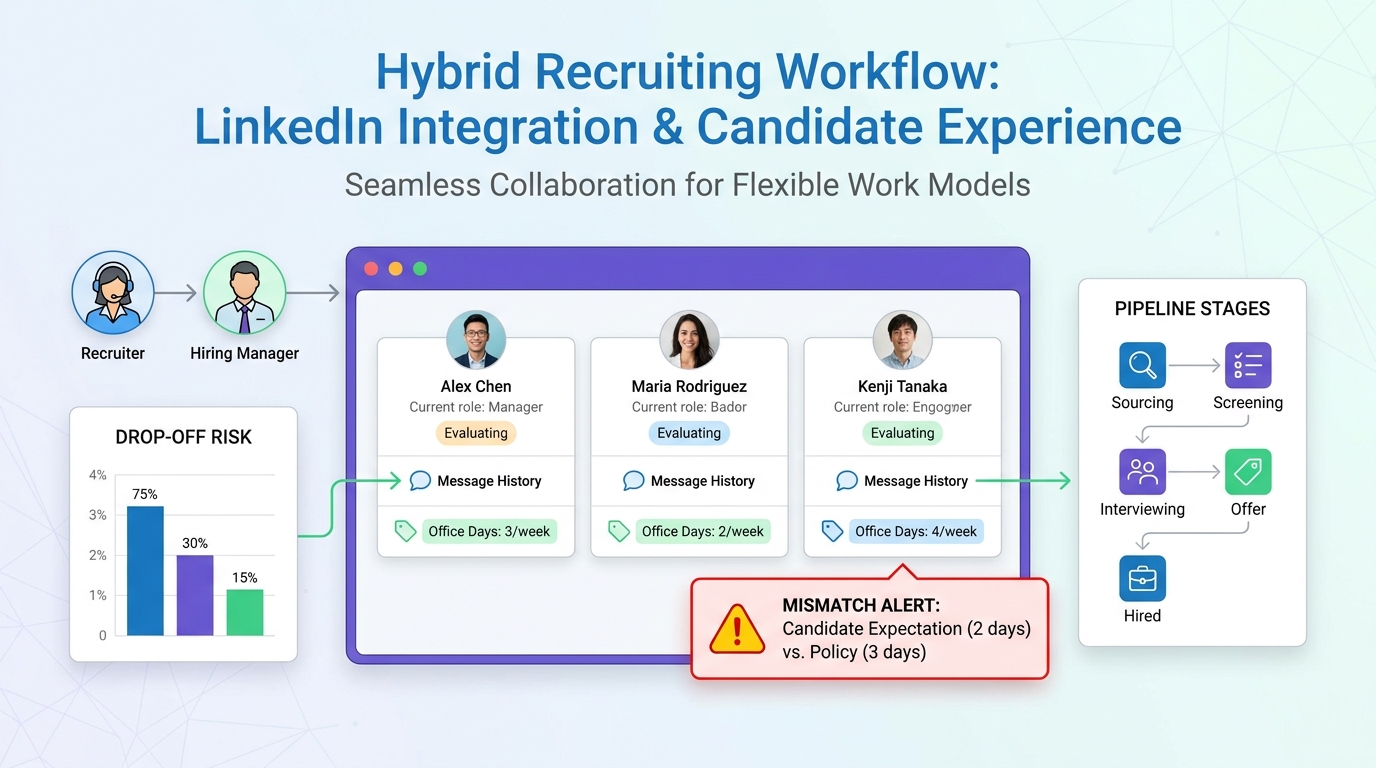
This article helps recruiters judge free recruiting software by how well it catches hybrid-role gaps before candidates drop out.
That sounds narrow until you have lived through a stalled search: a strong candidate drops out because "hybrid" meant two office days to them and five to the employer, a hiring manager insists the role is flexible but never defines the boundary, and the recruiter is left piecing together email threads, call notes, and spreadsheet updates after momentum is already gone. For small agencies, solo recruiters, and lean internal talent teams, that kind of misalignment costs time, trust, and placement odds.
In that gap between candidate expectation and employer reality, workflow support matters more than buzzwords. I have found that StrategyBrain AI Recruiter is most useful when it handles the repetitive front-end communication that often breaks first: consistent outreach, after-hours replies, and multilingual candidate conversations that clarify interest early. It can collect resumes and contact details while recruiters stay responsible for the real judgment calls, including resume review, fit assessment, and whether the process should move forward.
That pressure is showing up most clearly in hybrid hiring. The reference case behind this discussion describes a market where more searches slow down because candidates will not accept vague or rigid in-office requirements, while employers still believe face-to-face work protects culture, mentorship, and speed. In practical recruiting terms, the problem begins when a recruiter opens a requisition list, messages shortlisted candidates, and logs replies that all use the same word differently. One candidate hears "hybrid" and assumes planned collaboration days. Another expects manager discretion. The employer means four or five days on site.
By the time follow-up calls happen, the damage is already visible. The recruiter is updating candidate stages, chasing a hiring manager for a clearer office policy, and trying to rescue interest before an offer is even drafted. That is exactly why the best recruiting software is not just a database. Whether you start with free hiring software or free recruitment software, you need a system that captures expectation-setting, preserves communication history, and makes policy clarity part of the workflow instead of an afterthought.
Why Hybrid Hiring Changes What Recruiters Need From Software
Hybrid work is not just a policy question. It changes candidate behavior, offer acceptance risk, and how early recruiters need to surface non-negotiables. The useful lesson from the remote-versus-office debate is simple: vague expectations quietly shrink the qualified pipeline. If top candidates now weigh office time as part of role quality, then recruiting systems need to help teams capture and communicate that detail earlier.
That is why many searches that look straightforward on paper become messy in execution. A role can be well scoped on compensation, title, and reporting line, yet still stall because no one documented what "flexible" means. In my experience, recruiters usually feel this first in operational terms: repeated clarification messages, inconsistent screening notes, duplicated candidate questions, and late-stage fallout.
Key insight: In hybrid hiring, the best recruiting software is the system that makes expectation alignment visible early, not the one with the longest feature sheet.
For agency recruiters, this matters because credibility is tied to clarity. For internal talent teams, it matters because ambiguity creates avoidable drop-off. For both groups, even free recruiting software should support structured note-taking, pipeline visibility, and communication consistency around schedule, location, and attendance expectations.
What Free Recruiting Software Really Covers
Free recruiting software usually means one of several different access models, not one consistent standard. Some tools provide a true forever-free applicant tracking workflow. Others offer trial access, freemium functionality, or a stripped-down entry tier with sharp limits on users, jobs, or reporting.
That distinction matters more when hiring conditions are sensitive. A platform may look usable until you need to track location preferences, compare candidate responses across multiple hybrid roles, or give hiring managers enough visibility to stop repeating the same questions. In other words, a tool may be called free recruitment software but still leave the recruiter doing crucial coordination manually.
The practical definition I use is narrower and more useful: if a system can move a candidate from application or outreach into a trackable hiring process with searchable records, stage history, and shared visibility, it is functioning as an ATS. That ATS core is what makes free hiring software genuinely helpful rather than temporarily convenient.
What Makes the Best Recruiting Software
The best recruiting software supports the real points where searches succeed or fail. In the current market, that includes more than posting jobs and moving resumes between columns. It includes capturing candidate intent, preserving employer requirements accurately, and giving recruiters a reliable system for follow-up when expectations need refining.
| Evaluation Area | Why It Matters | What to Check on a Free Plan |
|---|---|---|
| Applicant tracking | Prevents candidate confusion and lost context | Stage history, searchable records, note visibility |
| Job posting | Supports consistent role messaging | Active job caps, career page support, posting controls |
| Recruiter seats | Matters when recruiters and managers both shape role expectations | User limits, permissions, hiring manager access |
| Communication tracking | Keeps policy clarification in one place | Email logging, message history, outreach templates |
| Resume capture | Reduces admin during active searches | Parsing quality, storage limits, file handling |
| Interview scheduling | Improves speed once candidate interest is confirmed | Calendar sync, reminders, self-scheduling options |
| Automation | Helps recruiters follow up consistently | Triggered emails, task prompts, stage updates |
| Integrations | Cuts duplicate entry across tools | Native integrations vs manual export |
| Reporting | Shows where searches are breaking down | Source tracking, stage conversion, drop-off visibility |
If a system performs well in those areas, it delivers the applicant tracking system benefits that actually matter: fewer missed handoffs, clearer ownership, better communication discipline, and a stronger chance of catching expectation mismatches before final interviews or offers.
The Main Free Plan Models
1. Forever-free plans
These are the most appealing when teams search for free recruiting software. They usually provide a usable ATS with practical limits. For occasional hiring or a solo recruiter desk, that may be enough.
Best for: small businesses, independent recruiters, and early-stage hiring teams.
Watch for: one-user restrictions, low active job limits, and minimal reporting.
2. Free trials
Some products described as free hiring software are really evaluation environments. That can still be useful if your team is making a near-term buying decision and can test with live hiring volume.
Best for: teams selecting an ATS soon.
Watch for: short trial windows and workflows that are hard to unwind later.
3. Freemium tiers
Freemium tools usually keep the ATS core but charge for automation, collaboration, or analytics. For recruiters trying to create process discipline first, this can be a sensible starting point.
Best for: teams that expect complexity to grow over time.
Watch for: limited exports, shallow workflow customization, and missing approvals.
4. Feature-capped entry plans
Some options market low-barrier access but limit the very functions that matter once multiple roles open. That can still work for narrow use cases, but teams should not confuse it with broad free recruitment software coverage.
Best for: low-volume hiring with one clear owner.
Watch for: upgrade pressure as soon as collaboration begins.
How to Evaluate Free Recruiting Software for Hybrid Searches
When the role itself includes a judgment call about office presence, recruiters need software that helps surface alignment early. I would evaluate systems in this order.
Start with expectation capture
Can the recruiter record office requirements, candidate preferences, and manager exceptions in a structured way? If not, the process depends too heavily on memory and inbox history.
Then test communication consistency
Hybrid hiring breaks down when every recruiter or manager explains the role slightly differently. Good free hiring software should make it easier to standardize messaging without sounding robotic.
Check how collaboration actually works
If hiring managers review candidates but cannot easily see the context around hybrid expectations, they will repeat questions or create contradictions. The strongest systems keep the conversation visible to the full hiring loop.
Review candidate flow under real volume
A tool may feel fine with one role and ten applicants. It may fail when you are juggling several searches where location flexibility is a make-or-break variable. This is often where free recruiting software reveals its limits.
Assess whether outreach can scale without losing judgment
On this point, I have personally found value in pairing ATS discipline with focused outreach support. When I tested AI Recruiter for LinkedIn-heavy searches, the biggest gain was not replacing recruiter judgment. It was reducing the lag between candidate response and recruiter action. The system handled initial connection, role introduction, and ongoing replies across time zones, which helped keep candidate intent warm while I still reviewed resumes, checked fit, and decided who should advance. For recruiters working hybrid roles where clarification matters, that kind of support is practical because it keeps the conversation moving without pretending automation can evaluate final suitability.
I also appreciated that it could gather resumes and contact details without forcing candidates into a clumsy handoff. For sourcing-led searches, especially when candidates reply after work hours, that continuity matters. If you rely heavily on LinkedIn, the product details at this LinkedIn workflow page and the broader overview on the official site are worth reviewing alongside ATS comparisons.
ATS Benefits That Matter in Daily Recruiting
Recruiters often talk about ATS value in generic terms. In practice, the benefits are operational and specific.
- Clear pipeline ownership: every candidate has a current stage, owner, and next step.
- Better expectation alignment: office requirements, flexibility limits, and candidate preferences are visible before final interviews.
- Faster review cycles: hiring managers can review candidates and context in one place.
- More reliable follow-up: reminders and templates reduce candidate drift.
- Useful source insight: recruiters can see which channels produce candidates who are actually aligned on working model expectations.
- Cleaner search recovery: when a role changes from three office days to five, the team can adjust communication and re-prioritize the pipeline quickly.
Those are the applicant tracking system benefits that matter most when market expectations are shifting. The more disagreement there is around role structure, the more valuable process visibility becomes.
When Free Recruiting Software Stops Being Enough
Starting free is often sensible. Staying free too long is where problems begin. These are the clearest signals that a team has outgrown basic free recruiting software.
- You need shared ownership across recruiters and managers.
Seat limits and weak permissions create confusion once multiple stakeholders shape candidate communication.
- You are running several active roles with different work-model requirements.
At that point, simple boards and spreadsheets stop preserving enough context.
- Your team is repeating the same clarification messages manually.
When recruiters spend too much time explaining schedule expectations one candidate at a time, automation and message tracking become worth paying for.
- Late-stage drop-off is increasing.
If candidates are backing out after interviews because role expectations were not made concrete early, your system is not supporting the process well enough.
- You need analytics to understand where alignment breaks.
Many free recruitment software plans do not show enough detail to diagnose whether the problem is sourcing, screening, manager delay, or expectation mismatch.
Common Mistakes Teams Make When Comparing Free Hiring Software
Focusing on features before process risk
The right first question is not "What can this tool do?" It is "Where does our hiring process usually break?" In hybrid searches, the answer is often misalignment, not job posting volume.
Assuming "hybrid" is a policy issue, not a system issue
When expectations are unclear, the damage shows up in candidate tracking, message history, and hiring manager coordination. That makes it a software evaluation issue too.
Choosing for recruiter convenience only
The best recruiting software also works for hiring managers, coordinators, and anyone who needs to see the real context around a search.
Ignoring message continuity in sourcing-led searches
If your workflow depends on LinkedIn outreach or after-hours candidate response, front-end communication handling matters. Recruiters should evaluate how software and outreach tools work together rather than treating them as separate decisions.
Waiting too long to define upgrade triggers
Even if you begin with free hiring software, decide in advance when you will upgrade: more active roles, more users, heavier scheduling needs, or rising candidate drop-off are common thresholds.
FAQ
Is free recruiting software enough for a small recruiting team?
Yes, if your hiring volume is modest and the system covers applicant tracking, message history, and basic collaboration. It becomes less reliable when multiple stakeholders or several open roles require clear coordination.
What is the difference between free recruiting software, free hiring software, and free recruitment software?
In most searches, the terms overlap. They generally refer to no-cost or low-barrier tools for applicant tracking, job posting, candidate communication, and hiring workflow management.
Why does hybrid hiring make ATS selection more important?
Because hybrid roles often fail on expectation mismatch rather than candidate quality alone. A better system helps recruiters document requirements, standardize communication, and catch confusion earlier.
Can recruiters combine an ATS with LinkedIn automation support?
Yes. Many recruiters use an ATS for pipeline control and a separate tool for outreach continuity. The key is making sure the recruiter still owns final screening, fit evaluation, and process decisions.
When should I upgrade from free recruiting software?
Upgrade when free-plan limits start affecting throughput, collaboration, or candidate experience. Common signs include more open roles, additional recruiter seats, repeated manual follow-up, and weak reporting.
Conclusion
The best recruiting software is the one that helps your team preserve clarity when the role itself is open to interpretation. That is why the current hybrid work debate matters here. When candidates and employers hear the same words differently, recruiting software stops being a back-office tool and becomes part of the hiring outcome.
If you are comparing free recruiting software, free hiring software, or free recruitment software, look beyond cost and feature count. Ask whether the system helps you capture expectations early, track real communication, and keep recruiters and hiring managers aligned. That is the difference between a free tool that supports growth and one that gets outgrown the moment a search becomes complicated.














