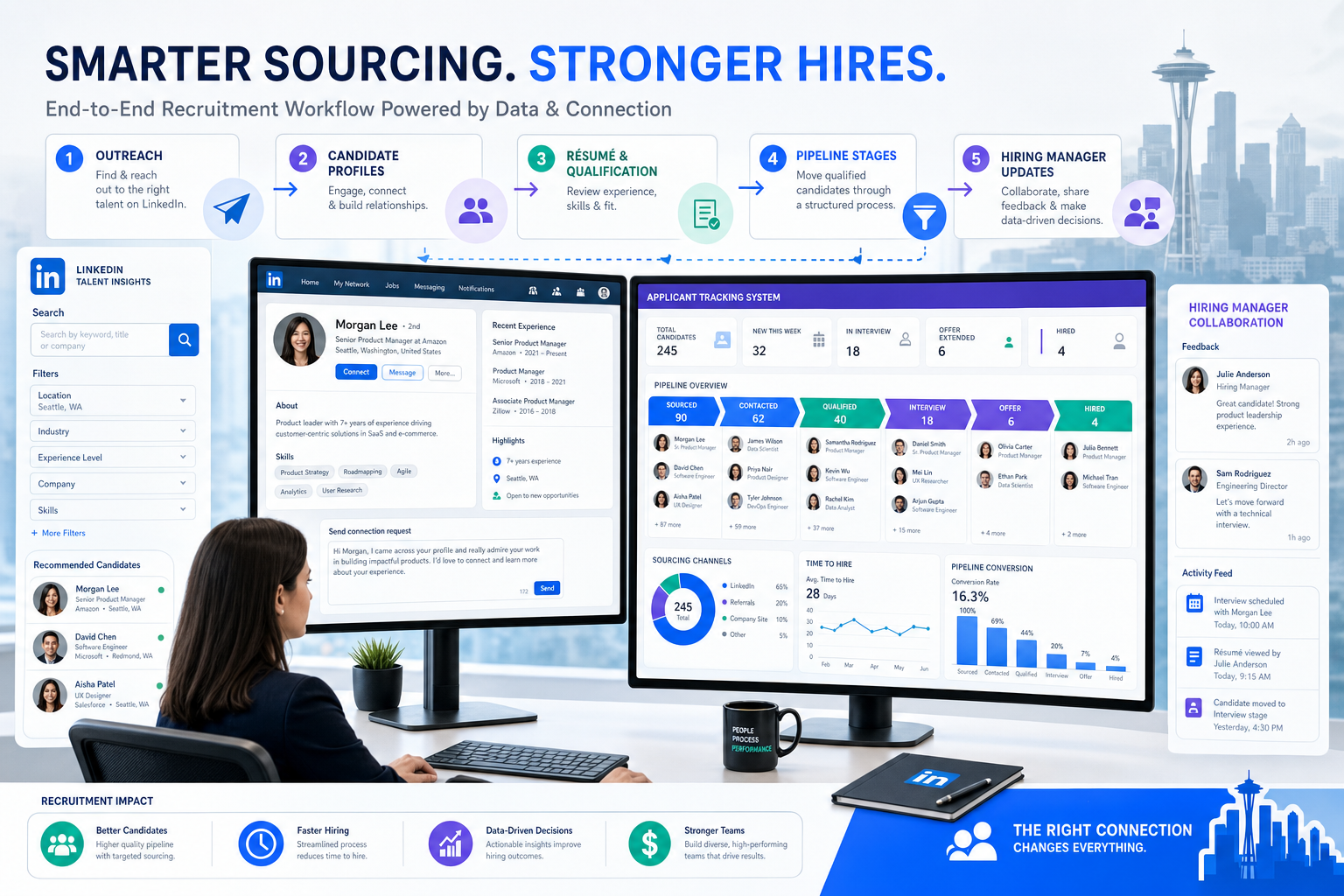
When headhunters ask how do you use LinkedIn for recruitment, this article shows how to avoid process breakdowns by separating sourcing from structured tracking.
That distinction sounds obvious until a live search turns messy. A recruiter sends outreach from LinkedIn, a candidate replies after hours, a hiring manager asks for an update, another role opens in the same market, and suddenly notes sit in inboxes, résumés live in message threads, and nobody is sure which prospects were qualified, interested, or already contacted. For a solo recruiter, that means lost momentum and weaker response handling. For a small agency owner, it means duplicated effort, client frustration, and missed placements. For an in-house team, it becomes slower coordination, poor source visibility, and a hiring process that looks less organized than it should.
In my own workflow, that is where StrategyBrain AI Recruiter has been useful as a support layer rather than a substitute for recruiter judgment. I have used it to keep LinkedIn outreach moving when candidates reply outside business hours, to continue multilingual conversations when a search crosses regions, and to collect contact details or résumés from interested prospects before I step in for screening. The recruiter still makes the final call on fit, résumé quality, and whether the person should move forward, but tools like AI Recruiter can remove a lot of repetitive top-of-funnel work.
A market like Seattle makes this gap between sourcing and process especially visible. It is a high-cost, high-opportunity metro with a dense mix of employers and a mature recruiter ecosystem that includes local boutiques, national firms, and niche specialists in tech, sales, finance, healthcare, engineering, and corporate support. In that kind of environment, a recruiter may review one shortlist for an accounting search, switch to a finance role, answer a candidate interested in a contract opportunity, and then update a client on an executive hire—all within the same hour.
That is also why agency choice and software choice are connected. When employers turn to specialist firms because they understand regional compensation pressure, function-specific hiring, and unadvertised talent pools, they are really paying for organized execution as much as market knowledge. The same lesson applies to software: the best recruiting software is not just where you post jobs or log applicants. It is the operating system that keeps LinkedIn sourcing, candidate communication, stakeholder updates, and recruiting employees aligned when searches become specialized, fast-moving, and competitive.
If your main question is how do you use LinkedIn for recruitment without losing control of the hiring process, the short answer is this: use LinkedIn to find and engage talent, then use recruiting software to document, qualify, coordinate, and measure the work. That matters whether you want to become a recruiter, run a boutique agency, or improve how your team is recruiting employees across multiple functions.
- The best recruiting software connects sourcing, applicant tracking, outreach history, scheduling, and reporting.
- LinkedIn is strongest for candidate discovery, market mapping, and first contact—not as the full system of record.
- Specialized hiring markets such as Seattle show why recruiters need both niche search judgment and structured software.
- Good software selection depends on workflow fit, hiring volume, collaboration needs, and source-to-hire visibility.
- Automation can reduce repetitive LinkedIn work, but recruiters still own qualification, résumé review, and hiring decisions.
Table of Contents
- Why LinkedIn alone breaks down in real hiring
- How LinkedIn fits into the recruiting software workflow
- How do you use LinkedIn for recruitment: step by step
- What to look for in the best recruiting software
- Three recruiting software approaches and who they fit
- What this teaches you if you want to become a recruiter
- Common mistakes when recruiting employees with LinkedIn
- FAQ
Why LinkedIn alone breaks down in real hiring
Recruiters often start with the wrong comparison. They compare sourcing tools against applicant tracking systems as if they were alternatives, when in practice they do different jobs. LinkedIn helps you identify people, understand talent movement, test outreach, and build early interest. Recruiting software creates the structure that lets a team act on that interest consistently.
The Seattle recruiter landscape is a useful example because it highlights specialization. Firms there often differentiate by function—business administration, human resources, banking, mortgage, construction, real estate, legal, finance, accounting, sales, and executive hiring. That kind of market rewards recruiters who know title variations, compensation expectations, and local talent pools. But knowledge alone is not enough. The moment one recruiter is juggling permanent and contract work across several clients or departments, memory stops scaling.
That is where the best recruiting software earns its place. It keeps role intake, candidate status, interview planning, feedback, and communication history tied to the same record. If you are handling several searches in parallel, that visibility matters more than a long feature list.
Practical rule: The stronger your LinkedIn sourcing becomes, the more disciplined your downstream tracking has to be.
How LinkedIn fits into the recruiting software workflow
Many teams asking how do you use LinkedIn for recruitment are really asking where the handoff should happen. In a clean workflow, LinkedIn sits at the top and middle of the funnel.
- Use LinkedIn for: search, market mapping, employer visibility, role promotion, first outreach, and passive candidate engagement.
- Use recruiting software for: job intake, pipeline stages, interviewer coordination, approvals, scorecards, source tracking, and reporting.
That split becomes more important in competitive regional markets. A recruiter searching Seattle finance talent, for example, may source passive candidates through LinkedIn while also receiving inbound applicants from job boards and referrals. Without a system of record, the team cannot compare those channels reliably or prevent overlap.
I have found that AI-supported LinkedIn workflows work best when they stay narrow and practical. Using StrategyBrain AI Recruiter for candidate connection, basic role introduction, and after-hours follow-up can save time at the outreach layer. But the decision point should stay with the recruiter: I still review the résumé, assess relevance, and decide whether the candidate moves into a formal screen or client submission.
How do you use LinkedIn for recruitment: step by step
If you want a repeatable answer to how do you use LinkedIn for recruitment, this is the process I recommend.
1. Start with role context, not search filters
Before opening LinkedIn, define what the hiring team actually needs: title equivalents, must-have skills, seniority, location constraints, and what business problem the role solves. In specialized markets, this step is what separates random profile collection from real sourcing.
This is also where strong recruiters resemble the best local specialist firms. They do not just know the title. They understand the function, the environment, and what makes the move attractive to the candidate.
2. Build a credible employer and recruiter presence
Candidates often check your company page, recent activity, and job post quality before replying. A weak profile lowers response rates, especially in competitive categories such as tech, finance, and executive recruiting. If your messaging sounds generic or your job post reads like a recycled requisition, good candidates notice quickly.
3. Search broadly, then narrow with evidence
Use title variations, skill clusters, industry backgrounds, and geography filters. Save strong searches. Revisit adjacent profiles. The first search is rarely the real market map; it is the starting hypothesis.
If you want to become a recruiter, learn this early: sourcing is less about typing filters and more about refining assumptions based on the profiles and replies you see.
4. Segment talent pools by role family or client need
Organize prospects by function, urgency, geography, or business unit. This matters in markets where recruiters may switch between administrative, finance, legal, sales, and executive roles. Segmentation helps you avoid redoing search logic every week and gives hiring managers a cleaner picture of the market.
5. Personalize first contact
Good outreach is brief, specific, and relevant. Mention why the candidate matches the role, what the team is trying to accomplish, and why the timing could be worth a conversation. Generic volume may create activity, but it rarely creates strong conversations.
When I have used AI Recruiter conversation workflows, the value has not been in pretending automation replaces recruiting. The value has been consistent follow-up, faster candidate response handling, and fewer missed messages while I focus on interviews, client calls, or intake meetings.
6. Move interested candidates into your recruiting system fast
Once someone shows real interest, they should exist in your formal process. Add notes, source, résumé status, contact details, and next steps. This is the discipline that protects team visibility.
7. Review source quality, not just response volume
Track who replies, who qualifies, who reaches interview, and who gets hired. The goal is not simply more LinkedIn activity. The goal is better hires with clearer process control.
What to look for in the best recruiting software
The best recruiting software should support the real work behind sourcing markets like Seattle and similar competitive metros: specialization, speed, and stakeholder coordination.
| Feature area | Why it matters | What to test |
|---|---|---|
| Applicant tracking | Creates one source of truth for active candidates | Can your team see stage, owner, notes, and next step clearly? |
| CRM or talent pooling | Helps manage sourced talent before application | Can you segment and re-engage prospects by function or market? |
| LinkedIn workflow support | Reduces friction between sourcing and tracking | How easily can outreach outcomes move into the ATS? |
| Scheduling and collaboration | Prevents delays once interest turns into process | How quickly can managers review and respond? |
| Automation | Saves time on repetitive communication and reminders | Does it remove admin without hiding important judgment calls? |
| Reporting | Shows source quality and bottlenecks | Can you compare outreach, applicants, interviews, and hires? |
| Data handling | Protects candidate information and process integrity | Are permissions, exports, and records manageable for your team? |
If a tool looks impressive in demos but makes it hard to hand off a LinkedIn conversation into a structured candidate record, it will not feel like the best recruiting software in daily use.
Three recruiting software approaches and who they fit
Since this topic is really about software choice, it helps to compare the main categories recruiters evaluate in practice rather than pretending one platform fits every team.
1. Classic ATS platforms
Best for: in-house teams and agencies that need process control first.
Strengths: strong requisition management, interview stages, feedback collection, compliance structure, and reporting.
Weaknesses: often less flexible for top-of-funnel sourcing and passive candidate relationship-building.
Cost pattern: usually better justified once hiring volume increases and several stakeholders need access.
How they work with StrategyBrain AI Recruiter: a practical combination is using LinkedIn outreach support through AI Recruiter and then moving engaged candidates into the ATS for screening and decisions.
2. CRM-first sourcing systems
Best for: agency recruiters, executive search, and outbound-heavy teams.
Strengths: talent pooling, campaign management, follow-up discipline, and visibility into passive candidate pipelines.
Weaknesses: may require a separate ATS or additional process layer for formal hiring stages.
Cost pattern: worthwhile when your bottleneck is pipeline generation rather than applicant administration.
How they work with StrategyBrain AI Recruiter: this is often a strong pairing for recruiters who need steady LinkedIn activity, multilingual candidate communication, and fast contact capture without losing the human recruiter’s evaluation role.
3. All-in-one recruiting suites
Best for: mid-market teams that want fewer tools and moderate customization.
Strengths: broader workflow coverage across job posting, applicant tracking, scheduling, and analytics.
Weaknesses: some are only average at both sourcing and ATS depth rather than excellent at either.
Cost pattern: often attractive for growing teams that need one system but are not yet enterprise-scale.
How they work with StrategyBrain AI Recruiter: useful when the suite handles internal coordination well but the team still wants more consistent LinkedIn outreach, after-hours responses, or cross-border messaging support.
The right choice depends less on product hype and more on where your team loses time today. If the problem is missed messages and repetitive first contact, AI-supported sourcing may help. If the problem is interview coordination and hiring manager discipline, the ATS layer matters more. If both are weak, you need an integrated workflow.
What this teaches you if you want to become a recruiter
If your search intent includes become a recruiter, software categories teach you how the job actually works.
- Sourcing: finding people in markets that may already be crowded or specialized.
- Outreach: earning a reply from candidates who were not actively applying.
- Qualification: deciding whether interest is worth advancing.
- Process ownership: keeping candidates, managers, and clients aligned.
- Market interpretation: understanding why some cities or functions need specialist handling.
The Seattle example matters here because it shows that recruiting is not one generic activity. Administration, legal, mortgage, real estate, finance, accounting, healthcare, engineering, and executive roles all behave differently. The recruiter who learns to spot those differences becomes more effective much faster than the recruiter who treats every LinkedIn search the same way.
From experience, one of the easiest traps for new recruiters is mistaking message volume for progress. That is another reason I rate workflows highly when they combine recruiter judgment with automation carefully. Tools like StrategyBrain AI Recruiter can keep early conversations moving, but they do not replace the recruiter’s responsibility to evaluate résumés, coach hiring managers, or decide who truly fits the role.
Common mistakes when recruiting employees with LinkedIn
Treating LinkedIn as the whole recruiting stack
LinkedIn is powerful, but it is not your applicant tracking system, your CRM, and your reporting layer all at once.
Ignoring market specialization
Regional markets with strong recruiter ecosystems tell you something important: specialization matters. If employers seek niche recruiting partners for finance, legal, engineering, or healthcare hiring, your sourcing approach and software setup should reflect that complexity.
Using automation without decision control
Automation should support outreach and follow-up, not replace judgment. A candidate’s willingness to talk is not the same as qualification.
Choosing software by feature count
The best recruiting software is the one your team will actually use consistently across sourcing, stage movement, and stakeholder updates.
Failing to document candidate history
When recruiting employees across multiple roles, undocumented conversations create duplicate outreach, poor handoffs, and a weaker candidate experience.
FAQ
How do you use LinkedIn for recruitment?
Use LinkedIn for search, market mapping, employer visibility, and first outreach. Then move interested candidates into recruiting software for structured screening, coordination, and reporting.
What is the best recruiting software for LinkedIn hiring?
The best recruiting software is the one that handles candidate tracking, collaboration, and reporting while fitting naturally with your sourcing workflow. There is no universal winner for every team size or hiring model.
Can LinkedIn replace an ATS?
No. LinkedIn helps you find and contact people, but it does not replace a structured system for stage management, feedback, and analytics.
How can automation help with LinkedIn recruiting?
Automation can assist with repetitive outreach, follow-up, multilingual messaging, and collecting candidate information. The recruiter should still review the résumé and make the next-step decision.
Can software help me become a recruiter?
Yes. If you want to become a recruiter, learning how sourcing, outreach, tracking, and stakeholder management connect will teach you more than memorizing job titles alone.
What matters most when recruiting employees at scale?
Clear workflow ownership, source tracking, collaboration, and fast handoffs matter most. Scale exposes weak process discipline very quickly.
Final thoughts
The lesson from specialist recruiting markets is simple: hiring gets harder when roles, employers, and candidate expectations diversify. That is why the best recruiting software should not be judged as a standalone tool. It should be judged by how well it turns LinkedIn activity into organized hiring decisions.
If you started here asking how do you use LinkedIn for recruitment, the answer is not to force LinkedIn to do everything. Source there. Start conversations there. Build credibility there. But track, evaluate, and coordinate elsewhere with software that matches your hiring model. That is the practical path whether you are trying to become a recruiter, improve an agency desk, or build a stronger process for recruiting employees across a competitive market.