


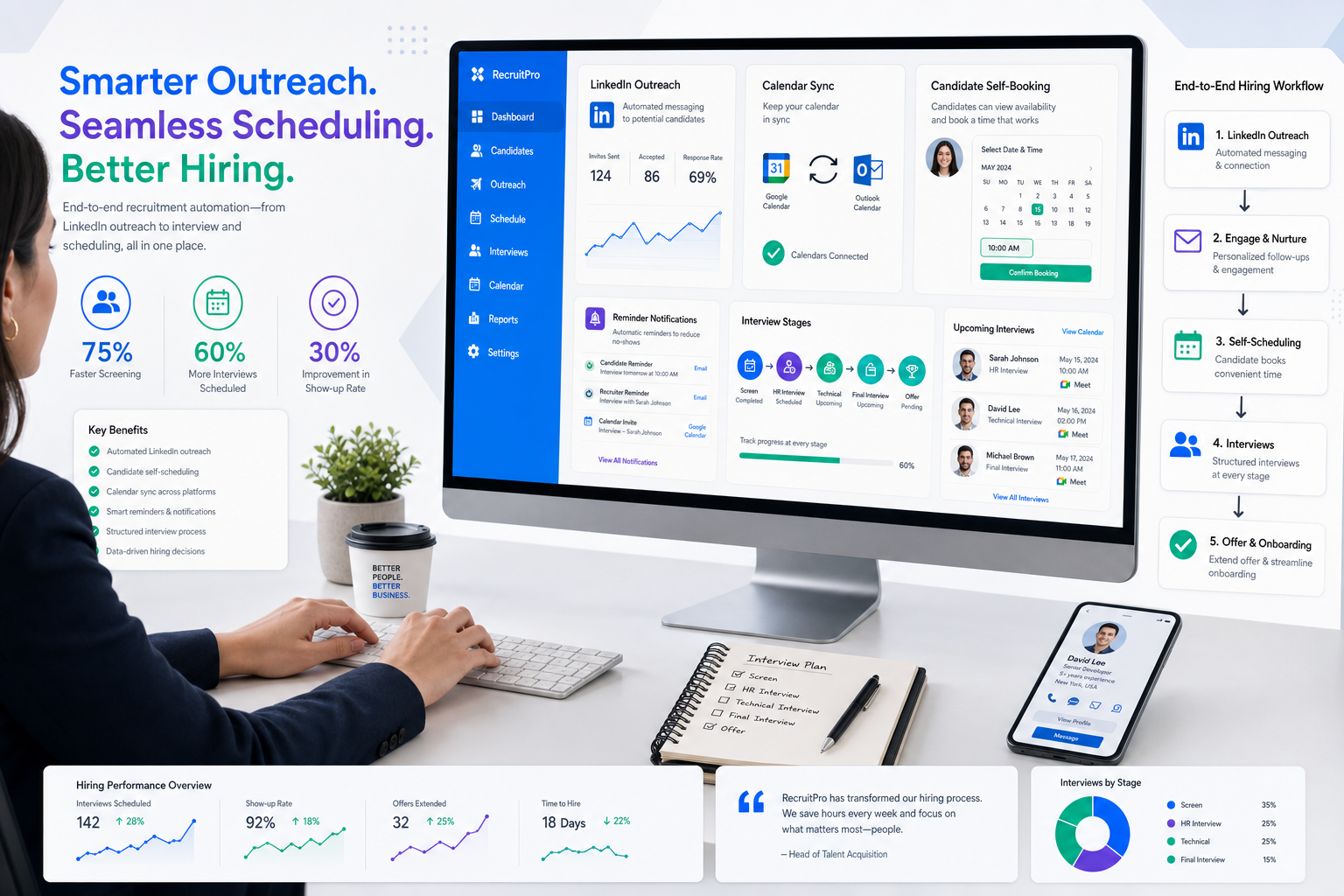
This article helps recruiters judge a hire platform by scheduling fit, workflow clarity, and drop-off risks that cost hires.
That matters because scheduling failure is rarely just an admin nuisance. In a retained search, it can cool candidate interest after a strong first conversation. In an agency desk, it can damage trust with a client who expects momentum. In an in-house team, it can slow hiring manager feedback, create duplicate outreach, and make good applicants feel as if the process is less organized than the role itself.
In my own workflow, tools such as StrategyBrain AI Recruiter have been most useful before the calendar stage, especially when LinkedIn outreach, after-hours replies, and resume collection were creating delays upstream. Its value is practical: it can keep candidate communication moving, answer routine role questions, and collect resumes or contact details from interested people, while the recruiter still makes the final judgment on fit, reviews the resume, and decides who should move into screening or interview scheduling.
That upstream pressure becomes obvious when you think about how senior candidates evaluate opportunities. An executive rarely enters a process with unlimited patience. They are comparing whether the role matches their leadership story, whether the employer understands their track record, and whether the process feels tailored rather than generic. The same way a strong executive resume needs a clear personal brand, role-specific positioning, and proof of impact, the interview process around that candidate also needs to feel intentional from the first invitation.
Once that candidate sees a vague scheduling email, conflicting time options, or an interview flow that does not match the level of the role, confidence starts to drop. Recruiters then spend more time repairing the experience than advancing it. That is why automated interview scheduling is not just a convenience feature. It is a workflow design question inside a broader hire platform, and it should be evaluated alongside interview software and video interview tools that support a coherent candidate journey.
- Why scheduling is a brand signal in hiring
- What automated interview scheduling means in a hire platform
- Seven ways to evaluate scheduling quality
- Who benefits most from automated scheduling
- How automated interview scheduling works operationally
- Core features to look for
- Live video interviews vs asynchronous video interviews
- How scheduling connects with the full hiring workflow
- How to evaluate interview software and video interview tools
- Common mistakes teams make
- FAQ
Why scheduling is a brand signal in hiring
Experienced recruiters know that candidates do not separate process quality from employer quality. They read the process as a signal. If the outreach is personalized, the interview path is clear, and the booking process respects their time, they assume the company is organized. If those pieces are disjointed, they start questioning role clarity, stakeholder alignment, and decision speed.
This is especially true in leadership hiring. The reference point is not just convenience. It is whether the process reflects the same discipline we ask candidates to show in their resume: a clear value proposition, tailored communication, contextual achievements, professional presentation, and attention to detail. Automated interview scheduling should support that standard rather than undermine it.
What automated interview scheduling means in a hire platform
Automated interview scheduling is the use of software to coordinate interview availability, candidate self-booking, calendar synchronization, confirmations, reminders, and rescheduling without repeated manual back-and-forth. In practice, the strongest version is not a standalone scheduler but a hire platform that connects screening, interview stages, video meetings, evaluations, and status updates in one workflow.
That distinction matters because recruiting teams do not work in isolated tasks. Candidate routing, interviewer availability, stage transitions, conferencing links, scorecards, and hiring manager feedback all shape whether an interview is actually completed on time. This is why buyers increasingly review scheduling together with interview software and video interview tools rather than as a separate admin feature.
Seven ways to evaluate scheduling quality
The most useful lesson from executive resume review is that strong outcomes usually come from a small set of disciplined choices rather than a long feature list. The same applies here. When I evaluate automated interview scheduling, I use seven practical standards.
1. Start with process positioning, not just availability
A good system should help the candidate understand what this interview is, who it is with, and why it matters. Booking a slot is easy; setting the right expectations is harder. A strong hire platform treats scheduling as part of candidate communication, not just calendar logistics.
2. Tailor the flow to the role and stage
Senior hiring, agency search, high-volume recruiting, and distributed hiring do not need the same flow. The scheduling process should adapt to role type, interviewer pool, assessment stage, and location. In this sense, the best workflows resemble tailored applications rather than one-size-fits-all templates.
3. Show evidence, not vague status movement
Just as resumes are stronger when they show measurable achievements, interview workflows are stronger when recruiters can see what actually happened. Did the candidate book? Was the reminder delivered? Did the panel receive the right information? Did the feedback form go out immediately after the interview? Good interview software makes these actions visible.
4. Keep online profiles and process records aligned
The hiring equivalent of resume and LinkedIn consistency is alignment across your ATS, calendars, messaging, and interview records. Candidates notice when dates, interviewers, or meeting links change in one place but not another. Recruiters feel the pain later when handoffs become messy. Integrated systems reduce that risk.
5. Support the human side of the process
Automation should not erase judgment. Candidates still need clarity, hiring managers still need context, and recruiters still need room to intervene. The right setup helps with reminders, slot selection, and coordination while preserving human ownership of assessment quality and stakeholder communication.
6. Make the workflow easy to scan
Formatting matters in resumes because decision-makers scan quickly. Scheduling systems work the same way. Recruiters and hiring managers should be able to see stage, owner, status, and next action without digging through multiple tools. A clean interface is not cosmetic; it directly affects execution.
7. Build in precision
Small errors create disproportionate damage. A wrong timezone, duplicate invite, missing conference link, or inconsistent date format can weaken candidate confidence fast. That is why detail control is a real buying criterion, especially when the process involves multiple interviewers or international hiring.
Practical takeaway: the best scheduling automation does not simply fill calendars; it protects candidate confidence through relevance, consistency, and detail accuracy.
Who benefits most from automated scheduling
Automated interview scheduling is useful across recruiting models, but the gains show up differently depending on team structure and hiring pace.
In-house talent acquisition teams
Internal teams usually need consistency, visibility, and stronger collaboration with hiring managers. A connected hire platform helps them move candidates from application review to interview without losing context between stakeholders.
Agency recruiters and headhunters
Agency teams often balance multiple client expectations at once. They need fast handoffs from sourcing to screening to client interviews. This is also where I have found AI Recruiter helpful in practice: when candidate replies arrive late, across regions, or in different languages, keeping that first layer of communication active reduces the lag before scheduling even begins. The recruiter still owns shortlist quality and client presentation, but the workflow becomes less dependent on constant manual follow-up.
High-volume hiring teams
For frontline, seasonal, support, or operations roles, the challenge is scale. Self-scheduling and reminders are often the difference between momentum and admin overload. In these environments, automation matters because repeatability matters.
Hiring managers with limited availability
Many hiring managers do not want more inbox threads. They want a process that protects their calendar, clarifies interview purpose, and makes feedback easy to complete. Good interview software reduces coordination friction without lowering assessment quality.
How automated interview scheduling works operationally
Most systems follow a similar flow, but the details determine whether the experience feels polished or fragile.
- Candidate reaches a trigger point. This may happen after application review, a sourcing response, resume submission, or recruiter screening.
- The system offers available interview options. Availability is pulled from synced calendars for recruiters, coordinators, or hiring managers.
- The candidate self-books or confirms a proposed slot. The process should respect time zones, interviewer rules, and role-specific paths.
- The event is created automatically. Confirmations go out, and live meeting links can be attached where needed.
- Reminders are sent. Email or SMS reminders reduce missed steps and improve clarity.
- Feedback returns to the candidate record. Notes, scorecards, and next-step decisions stay connected to the hiring workflow.
Operationally, the biggest win is usually fewer manual touchpoints. But that only holds if the process handles timezone logic cleanly, protects interviewer constraints, and keeps the team aligned on next steps.
Core features to look for
If you are comparing platforms, focus on the features that affect execution every day.
1. Calendar synchronization
Calendar sync is foundational. Recruiters need confidence that availability is current and conflicts are minimized. For teams evaluating interview software, ask how buffer times, interviewer pools, and panel availability are handled.
2. Candidate self-scheduling
Self-booking reduces email traffic and gives candidates flexibility, especially outside normal office hours. In a strong hire platform, self-scheduling should still follow stage rules and interviewer eligibility.
3. Automated reminders and updates
Reminders improve not just attendance but professionalism. Candidates should know what the interview is for, who they will meet, and how to join. That clarity directly affects candidate trust.
4. Video interview support
Many teams now expect scheduling and interviewing to work together. If you use live virtual interviews, the platform should support simple meeting creation and evaluator workflows. If you use video interview tools for screening, the invitation-to-review flow should be clean and easy to audit.
5. Structured interviewing workflows
Scheduling only creates access. It does not create quality. Recruiters should look for interviewer assignments, scorecards, note capture, and stage-specific guidance that support consistent assessment.
6. Candidate routing and orchestration
Some roles require different paths based on seniority, geography, language, or assessment outcome. Routing rules help automate those paths without forcing recruiters to rebuild every sequence manually.
Live video interviews vs asynchronous video interviews
Not every interview format creates the same scheduling needs, so buyers should treat them differently.
| Format | What it is | Scheduling need | Best use case |
|---|---|---|---|
| Live video interview | Candidate and interviewer meet in real time | High | Manager interviews, panel interviews, final-round discussions |
| Asynchronous video interview | Candidate records responses on demand | Low | Early screening, high-volume hiring, standardized first review |
| On-demand video interviewing | Candidate completes prompts within a time window | Low to medium | Teams needing flexible candidate availability |
Live video interviews still depend heavily on coordinated availability, so scheduling quality matters most here. This is where reminders, conferencing setup, and interviewer readiness can make or break the experience.
Asynchronous video interviews reduce real-time booking pressure, but they do not eliminate process design. Teams still need a clear invitation flow, completion window, reviewer ownership, and a logical handoff to the next step. In other words, good video interview tools reduce one kind of friction, but they still need to fit inside the broader workflow.
How scheduling connects with the full hiring workflow
Scheduling is only one point in the chain. Its value depends on what happens before and after.
Screening
Before a candidate can book an interview, someone has to make contact, answer questions, and confirm interest. In LinkedIn-heavy workflows, that is often where delay starts. I have used StrategyBrain AI Recruiter to keep this stage moving when candidates responded after hours or from different regions. It helped collect resumes and contact details, which made handoff into recruiter screening faster. The key point is that automation supported responsiveness, while I still handled qualification and interview decisions myself.
Evaluation
Interview coordination only matters if evaluators can act on the outcome quickly. Structured scorecards, notes, and decision tracking improve hiring manager response quality and reduce repeated discussions about the same candidate.
Shortlisting
When interview data stays centralized, recruiters can compare candidates more consistently and move stronger profiles forward with less rework. That is one of the clearest operational benefits of connected scheduling.
Recruiter and manager collaboration
Strong workflows reduce handoff confusion. Recruiters should be able to see who booked, who completed, who needs rescheduling, and whose feedback is overdue. Hiring managers should be able to participate without hunting for links or updates.
How to evaluate interview software and video interview tools
If you are choosing technology, do not evaluate scheduling as a narrow feature. Review it in the context of your recruiting model, candidate mix, and stakeholder habits.
Questions to ask vendors or internal stakeholders
- Does the platform support both live interview scheduling and on-demand workflows?
- How does calendar synchronization work across recruiters and hiring managers?
- Can candidates self-schedule within controlled rules?
- How are reminders and reschedules handled?
- Does the workflow support structured interviewing and scorecards?
- How well does it connect to ATS, conferencing, and communication processes?
- Can the system handle timezone differences and distributed teams?
- Does it support candidate routing and interview orchestration?
- What parts of the workflow remain under recruiter control?
These questions help separate basic booking utilities from a more complete hire platform. They also keep the discussion grounded in real operating outcomes rather than feature inflation.
Common mistakes teams make
Treating scheduling as a standalone purchase
Buying a scheduler before mapping the wider interview process usually creates another handoff instead of solving the real issue. The better approach is to evaluate where communication, qualification, scheduling, and feedback actually break.
Ignoring the candidate's standard for professionalism
Strong candidates assess process quality quickly. If the interview invitation feels generic or disorganized, they read that as a signal about the organization itself.
Using video interviews without a clear purpose
Video interview tools are useful when the team knows why a live or asynchronous format belongs at a particular stage. Without that logic, candidates can experience the process as repetitive and impersonal.
Overlooking interviewer behavior
Even strong interview software fails when interviewers do not keep calendars updated or submit feedback promptly. Technology cannot replace discipline.
Forgetting upstream workflow delays
Sometimes scheduling looks like the bottleneck when the real issue is earlier. Slow LinkedIn follow-up, missing resumes, and inconsistent communication can all delay movement into interviews. That is exactly where a support layer like StrategyBrain AI Recruiter can help maintain momentum before the formal scheduling step begins.
FAQ
What is automated interview scheduling?
Automated interview scheduling is software-driven coordination of interview availability, booking, confirmations, reminders, and rescheduling. It works best when it sits inside a broader hire platform rather than as a standalone calendar tool.
How does automated interview scheduling reduce recruiter workload?
It reduces repeated manual tasks such as checking calendars, offering time slots, sending confirmations, creating meeting links, and managing reminders. That gives recruiters more time for qualification, candidate communication, and stakeholder management.
Do asynchronous video interviews require scheduling?
Usually much less than live interviews. Candidates can complete prompts within a set timeframe, so real-time coordination is reduced. But the invitation, review, and next-step process still needs structure.
What is the difference between interview software and video interview tools?
Interview software may include scheduling, workflows, scorecards, and feedback capture. Video interview tools are more focused on live or recorded interview delivery. Many teams now want both capabilities connected in one process.
Can LinkedIn outreach automation replace recruiter judgment?
No. It can support communication, answer routine questions, and collect resumes or contact details, but the recruiter should still decide who is qualified, who moves forward, and how the interview process is structured.
What should buyers look for in a hire platform for interview scheduling?
Look for calendar sync, candidate self-scheduling, reminders, support for live and asynchronous interviews, routing rules, structured evaluation, and workflow visibility. The goal is not just booking meetings but sustaining a credible hiring process from first contact to shortlist.
Conclusion
Automated interview scheduling is most valuable when it protects candidate confidence as much as recruiter time. The deeper lesson is the same one experienced recruiters already know from executive hiring: relevance, clarity, presentation, and follow-through all matter. A modern hire platform should connect those elements instead of treating scheduling as a disconnected utility.
If you are reviewing systems, start with your real workflow. Look at where candidate interest slows, where stakeholders lose context, and where process detail starts to slip. Then evaluate interview software, video interview tools, and any support layer around sourcing or screening based on how well they strengthen that full path, not just the calendar step inside it.














