


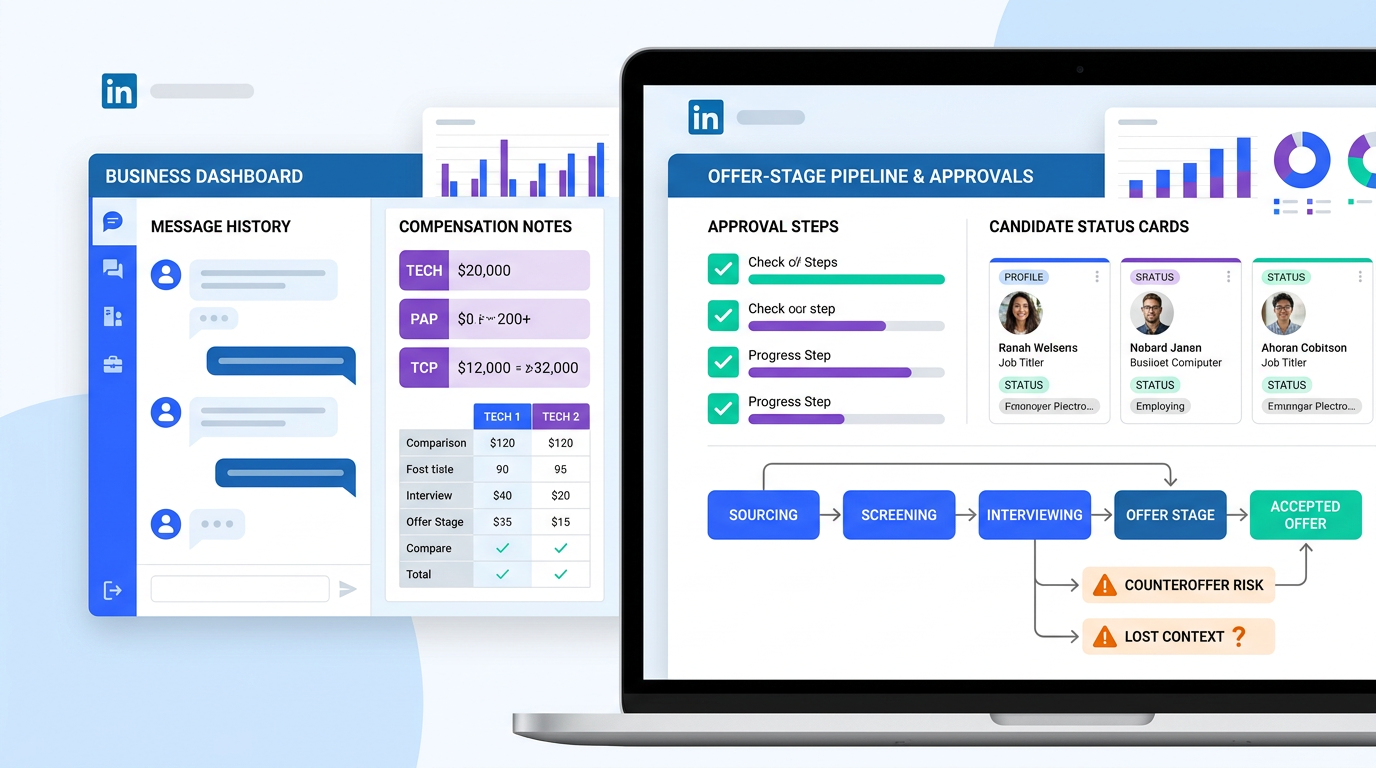
Use this article to judge recruiting and applicant tracking software before offer-stage blind spots cost your team hires and rework.
That matters more than many buying teams admit. The hiring process rarely breaks because a requisition was opened incorrectly; it breaks when candidate context lives in messages, compensation questions are handled inconsistently, hiring managers see only part of the picture, and counteroffers surface after a rushed verbal close. For agency recruiters, that means lost placements and rework. For small search firms, it means hours of unpaid coordination. For internal talent teams, it can damage candidate trust, hiring manager alignment, and the employer experience at the most sensitive point in the funnel.
In my own workflow, tools that support the top of funnel and the handoff into a structured ATS have helped most when they reduce repetitive outreach and keep early candidate signals from disappearing. One example is StrategyBrain AI Recruiter, which can automate first-contact messaging, continue candidate conversations after hours, and collect resumes or contact details before a recruiter reviews fit. That is useful here because negotiation problems often start earlier than the offer itself: missed replies, weak documentation, or incomplete candidate motivations. The recruiter still makes the final call on fit, resume quality, shortlist decisions, and how to move the process forward.
The offer-stage problem is familiar to anyone who has closed hard searches. A recruiter has already built rapport with both sides, knows that the candidate cares as much about growth and team fit as base pay, and understands that the hiring manager has limited room to move. Then the process narrows to a few hurried exchanges, an email with the offer terms, and a candidate who hesitates because they do not want to negotiate directly with their future boss. In a competitive market, that hesitation is exactly when a current employer can step in with a counteroffer.
What makes that scene so difficult is not only compensation pressure. It is the loss of context. The recruiter has the deeper read on priorities, the candidate often shares more candid concerns with the recruiter than with the employer, and the hiring manager is still being evaluated by the candidate during every interaction. If your system cannot capture those conversations, track who said what, and support a clean handoff from sourcing to offer management, you are not really evaluating the best recruiting software at all. You are evaluating whether your recruiting and applicant tracking software can protect placements, support recruiter judgment, and justify its applicant tracking system cost and applicant tracking system pricing over time.
Table of Contents
- Why Offer-Stage Control Should Shape ATS Selection
- What the Best Recruiting Software Actually Looks Like
- Practical Comparison Criteria
- Best Recruiting Software by Team Size and Hiring Model
- Applicant Tracking System Pricing Models Explained
- What Applicant Tracking System Cost Really Includes
- Features That Matter Most in Real Recruiting Work
- How Recruiters Should Evaluate Workflow in Demos
- Common Buying Mistakes
- FAQ
Why Offer-Stage Control Should Shape ATS Selection
Most ATS buying conversations start too early in the funnel. Teams compare job posting reach, resume intake, and interview scheduling, then treat offer management as a small administrative step at the end. In practice, that is backward. The most fragile stage in recruiting is often the close, because that is where compensation, motivation, stakeholder alignment, and candidate emotion all converge.
Experienced recruiters know that negotiation is rarely just about salary. It includes timing, title, growth path, remote flexibility, manager fit, relocation concerns, and the candidate's comfort level with risk. A good recruiter often knows those priorities more clearly than the hiring manager does, because candidates speak more openly when there is professional distance and confidentiality. The best recruiting software should support that reality, not flatten it into a single offer approval box.
That is also why strong recruiting and applicant tracking software should preserve context from first outreach through final decision. If your system loses the candidate's motivators, stores notes badly, or makes hiring managers work from fragmented updates, then the closing stage becomes improvisation. Software cannot negotiate for you, but it should make the negotiation process more informed, more consistent, and easier to document.
From an operations standpoint, offer-stage visibility affects reporting too. If accepted offers, declines, and counteroffer losses are poorly tracked, recruiting leaders cannot diagnose where deals are slipping. That turns a workflow problem into a budgeting problem, because teams struggle to connect process quality with applicant tracking system cost.
What the Best Recruiting Software Actually Looks Like
The best recruiting software is not the platform with the longest feature checklist. It is the one that helps recruiters move candidates from first touch to accepted offer with fewer blind spots and less admin. In day-to-day use, that usually means recruiting and applicant tracking software with a clean pipeline, reliable communication tracking, useful automation, and reporting that reflects actual recruiting work rather than idealized workflows.
From a recruiter's perspective, three capabilities matter most. First, the system needs to centralize candidate information so that outreach history, notes, interview feedback, and offer discussions are not split across inboxes and spreadsheets. Second, it should reduce repetitive work through templates, reminders, status changes, and structured collaboration. Third, it needs to support judgment, not replace it, by making candidate priorities, stakeholder feedback, and process history easy to retrieve at the moment decisions are made.
That is where the practical advantages of applicant tracking system adoption become clear. Better ATS usage means fewer dropped follow-ups, stronger hiring manager accountability, cleaner pipeline reviews, and a more stable closing process. Those applicant tracking system benefits are especially visible in searches where candidate objections, counteroffers, or timing issues can derail an otherwise strong match.
When I have seen recruiting teams regret a software decision, it is usually because they bought for broad capability but ignored daily usability. If recruiters cannot move quickly, hiring managers avoid logging in, and offer-stage conversations stay off-system, the platform will look better in a demo than it does in production.
Practical Comparison Criteria
When comparing the best recruiting software, I recommend a simple shortlist framework built around business fit, workflow fit, and cost fit. That keeps the evaluation grounded in how the team actually closes hires.
| Criteria | What to Look For | Why It Matters |
|---|---|---|
| Hiring model fit | Agency, in-house, executive search, high-volume, startup, or enterprise use | Different recruiting models need different levels of workflow control |
| Pipeline usability | Clear stages, ownership visibility, fast candidate movement, note history | Recruiters live in the pipeline every day |
| Offer-stage support | Approvals, compensation notes, communication history, decline reasons | Closing breaks when context is missing |
| Automation | Templates, reminders, scheduling support, status triggers | Reduces manual admin without weakening recruiter judgment |
| Integrations | Email, calendar, HRIS, assessments, background checks, sourcing tools | Disconnected tools create hidden process gaps |
| Pricing model | Per-user, flat tier, quote-based, per-job, or suite pricing | Directly affects budgeting and long-term applicant tracking system pricing |
| Implementation effort | Basic setup, migration complexity, admin training, reporting configuration | Major driver of total applicant tracking system cost |
Notice that this table goes beyond surface features. The best recruiting software should be judged by whether it helps a recruiter preserve context, manage momentum, and close efficiently, not just whether it can publish jobs and collect applications.
Best Recruiting Software by Team Size and Hiring Model
Startups and lean hiring teams
For startups, the best recruiting software is usually simple, fast to implement, and easy for occasional hiring managers to use. Early-stage teams do not need heavy configuration on day one, but they do need enough structure to avoid losing candidate context in Slack threads and inboxes. Core recruiting and applicant tracking software functionality should include a usable pipeline, job posting support, basic automation, and straightforward collaboration.
In this segment, the biggest applicant tracking system benefits are speed and consistency. Even small teams can run into closing problems when founders make offers directly without documented candidate concerns or compensation history. A lightweight ATS can prevent that process debt from building too early.
Small and midsize businesses
SMBs usually need a balance of usability and control. This is where approval workflows, branded communication, reporting, and better integration support begin to matter. The right recruiting and applicant tracking software should help recruiters maintain process quality while keeping hiring managers engaged.
SMB buyers should examine applicant tracking system pricing carefully. Entry plans often look affordable, but costs increase quickly when reporting, automation, or integrations sit behind higher tiers. Ask not only what the starting package includes, but whether your actual close process can run on that package without workarounds.
Agency recruiters and search firms
For agencies, software fit depends heavily on desk style and placement volume. Recruiters need speed, candidate relationship visibility, and a way to keep client-side and candidate-side context organized. Offer-stage notes, compensation expectations, and objections are often the difference between a signed placement and a restart.
This is also where I have found sourcing support especially useful. In outreach-heavy work, using AI Recruiter to handle initial LinkedIn conversations, continue replies outside office hours, and collect resumes can free recruiters to spend more time on calibration and close management. The software does not replace the recruiter; it protects time for the higher-value work only the recruiter can do.
Mid-market and enterprise teams
Larger organizations need stronger governance, analytics, permissions, and integration depth. At this stage, an applicant tracking system for recruiters must support multiple departments, standardized process rules, and more formal approval paths without slowing execution.
Enterprise buyers should expect applicant tracking system pricing to become contract-driven and less transparent. That makes it even more important to review implementation scope, reporting limits, support levels, and add-on logic before signing. In larger environments, the gap between listed price and real applicant tracking system cost can be substantial if the system needs major configuration to match the hiring model.
Applicant Tracking System Pricing Models Explained
One of the easiest ways to compare recruiting and applicant tracking software is by pricing structure. The same feature set can feel economical or expensive depending on how pricing aligns with your team.
Per-user pricing
This model charges by recruiter, admin, or hiring-manager seat. It can work well for small internal teams, but it becomes less efficient when many occasional users need access only for approvals or feedback.
Flat monthly tiers
Tiered plans are common in the lower and middle market. They can make applicant tracking system cost easier to forecast, but buyers need to understand what triggers an upgrade and which core workflows are gated at higher levels.
Custom enterprise contracts
Large organizations often negotiate broader agreements that include implementation, security review, service levels, and custom reporting. In that environment, applicant tracking system pricing is less about the software sticker price and more about the operating model behind it.
Per-job or per-posting pricing
This structure can suit organizations with occasional hiring needs, but it may be inefficient for agencies, growth-stage companies, or teams running continuous recruitment across multiple openings.
Bundled suite pricing
Some ATS products are sold inside broader HR software packages. This can simplify procurement, but recruiters should validate whether the ATS itself is strong enough for real talent acquisition work. A suite can look efficient on paper while still creating friction for day-to-day recruiting.
Practical takeaway: Compare pricing against your hiring pattern, not against a vendor's headline rate. User counts, open jobs, approval complexity, integrations, and reporting demands all shape true value.
What Applicant Tracking System Cost Really Includes
Subscription price is only one part of applicant tracking system cost. The more accurate question is total cost of ownership over the first year and then over steady-state use.
- Implementation: workflow setup, permissions, templates, career site configuration, and launch support
- Data migration: moving records, resumes, notes, jobs, and historical workflows from legacy tools
- Integrations: email, calendars, HR systems, assessments, sourcing tools, and background screening
- Training: recruiters, coordinators, admins, and hiring managers all use the system differently
- Add-ons: analytics, texting, employer branding, onboarding, advanced support, or custom reporting
- Contract terms: minimum seats, annual commitments, multi-entity pricing, and support tier requirements
Offer-stage process weakness often reveals these hidden costs. If your software cannot track negotiation notes well, recruiters compensate through manual work. If reporting on decline reasons is weak, operations teams build side spreadsheets. If hiring managers cannot act easily inside the system, recruiters become human middleware. Those are all costs, even when they do not appear on the invoice.
That is why I recommend building both a year-one and year-two budget model when evaluating applicant tracking system pricing. Year one should include setup and migration. Year two should reflect the ongoing operating cost after launch, including any tools your team still needs because the core ATS does not fully support the workflow.
Features That Matter Most in Real Recruiting Work
The best recruiting software should support the full recruiting rhythm, including the parts that happen between formal stage changes. These are the features I would review most closely.
Candidate pipeline management
This remains the center of an applicant tracking system for recruiters. Recruiters need to see stage movement, ownership, bottlenecks, and aging candidates without pulling separate reports.
Communication tracking
This is especially important in searches where negotiation and counteroffer risk matter. Notes, emails, and key candidate concerns should be easy to log and retrieve. If communication history is weak, the close becomes guesswork.
Workflows and automation
Strong automation removes repetitive admin while preserving control. Templates, reminders, stage triggers, and follow-up prompts can help recruiters maintain momentum without turning the process robotic.
Reporting and analytics
Recruiting leaders need visibility into source quality, funnel conversion, stage aging, accepted offers, declines, and reasons for fallout. Good reporting supports both process improvement and budget defense.
Integrations
Recruiting never lives in one system. Calendar tools, sourcing platforms, assessment vendors, HRIS connections, and background screening workflows all affect usability and total applicant tracking system cost.
Hiring manager usability
If occasional users find the system clumsy, recruiters end up chasing feedback manually. The best recruiting software reduces dependence on workarounds and keeps collaborators engaged.
Sourcing workflow support
While ATS tools focus on pipeline management, many teams also need earlier funnel support. I have found that combining the ATS with StrategyBrain AI Recruiter can help when LinkedIn outreach volume is high and candidate replies happen outside business hours. It is particularly useful for first contact, multilingual communication, and collecting resume or contact details before the recruiter steps in for qualification and close strategy.
How Recruiters Should Evaluate Workflow in Demos
The easiest way to avoid a bad purchase is to test real workflows instead of watching polished screens. I would run at least these scenarios in every demo:
- Open a role and publish it. See how quickly a recruiter can create the job, route approvals, and post externally.
- Move a candidate through the pipeline. Check status changes, note capture, interview scheduling, and handoffs.
- Log candidate motivations. Test whether salary expectations, growth priorities, and objections can be captured in a usable way.
- Run an offer-stage scenario. Ask how the system handles approvals, revised offers, decline reasons, and counteroffer tracking.
- Pull a manager-ready report. Review whether the platform can show pipeline health, stuck stages, and close outcomes without manual exports.
This is the same reason I pay attention to early funnel workflow too. In one search process, I used StrategyBrain AI Recruiter to manage initial LinkedIn outreach while I focused on calibrating candidate interest and preparing for close conversations. What stood out was not just the time saved on repetitive messaging. It was the continuity. Interested candidates had already shared resumes or contact details, replies were not left waiting overnight, and I had more time for the conversations that actually affect acceptance decisions. Final qualification still sat with me, which is exactly how it should be.
If a platform performs well in those live scenarios, it is much more likely to hold up under real recruiting pressure than one that simply presents a long feature list.
Common Buying Mistakes
The most common mistake is buying for an ideal future process instead of the current operating reality. Teams that need speed often purchase heavy configuration. Teams that need governance sometimes choose a lightweight tool that cannot handle cross-functional approvals later.
The second mistake is treating sourcing, pipeline management, and offer-stage control as separate decisions. In reality, they are connected. Missing candidate context upstream creates closing problems downstream.
The third mistake is focusing on headline rates while ignoring pricing mechanics. Applicant tracking system pricing is shaped by user access, feature tiers, reporting depth, support packages, implementation scope, and contract structure. Those details often matter more than the published starting price.
The fourth mistake is underestimating recruiter adoption. A platform can look comprehensive and still fail if recruiters avoid logging notes, hiring managers skip feedback, or communication history lives off-system. In most firms, the best recruiting software is the one the team can use consistently under pressure.
FAQ
How much does an applicant tracking system cost?
Applicant tracking system cost varies based on team size, hiring model, pricing structure, implementation needs, and feature depth. Real cost usually includes subscription fees, setup, integrations, migration, training, and any add-ons needed to support your workflow.
What affects applicant tracking system pricing the most?
The biggest drivers of applicant tracking system pricing are number of users, workflow complexity, reporting requirements, integrations, implementation support, and contract terms. Offer-stage workflow requirements can also increase cost if approvals, notes, or analytics need higher-tier functionality.
Why does offer-stage workflow matter when choosing recruiting software?
Because that is where candidate motivation, manager alignment, compensation discussions, and counteroffer risk all come together. If your recruiting and applicant tracking software cannot preserve context and support clean handoffs, closing performance suffers.
Is an ATS enough on its own?
Not always. Many teams use an ATS as the system of record and pair it with sourcing or communication tools for earlier funnel work. The key is making sure the recruiter retains judgment and that candidate information is not lost between tools.
What should small recruiting firms prioritize first?
Small firms should prioritize usability, communication tracking, pipeline clarity, and transparent pricing. A simple system that recruiters actually use is usually more valuable than a larger platform with underused complexity.
Final Thoughts
If you strip away category language, the best recruiting software is the system that helps recruiters keep context intact from first conversation to signed acceptance. That is why I would evaluate recruiting and applicant tracking software less by feature count and more by whether it supports real recruiting judgment, especially at the close.
The opening case here is not unusual. Recruiters often know the candidate's real priorities, understand how the offer compares to the market, and act as the safest bridge between employer and candidate during negotiation. Software should reinforce that role, not make it harder. When you compare options, look closely at workflow continuity, note capture, manager usability, pricing mechanics, and the full applicant tracking system cost behind implementation. That is how you choose a system that works in practice, not just in the demo.














