


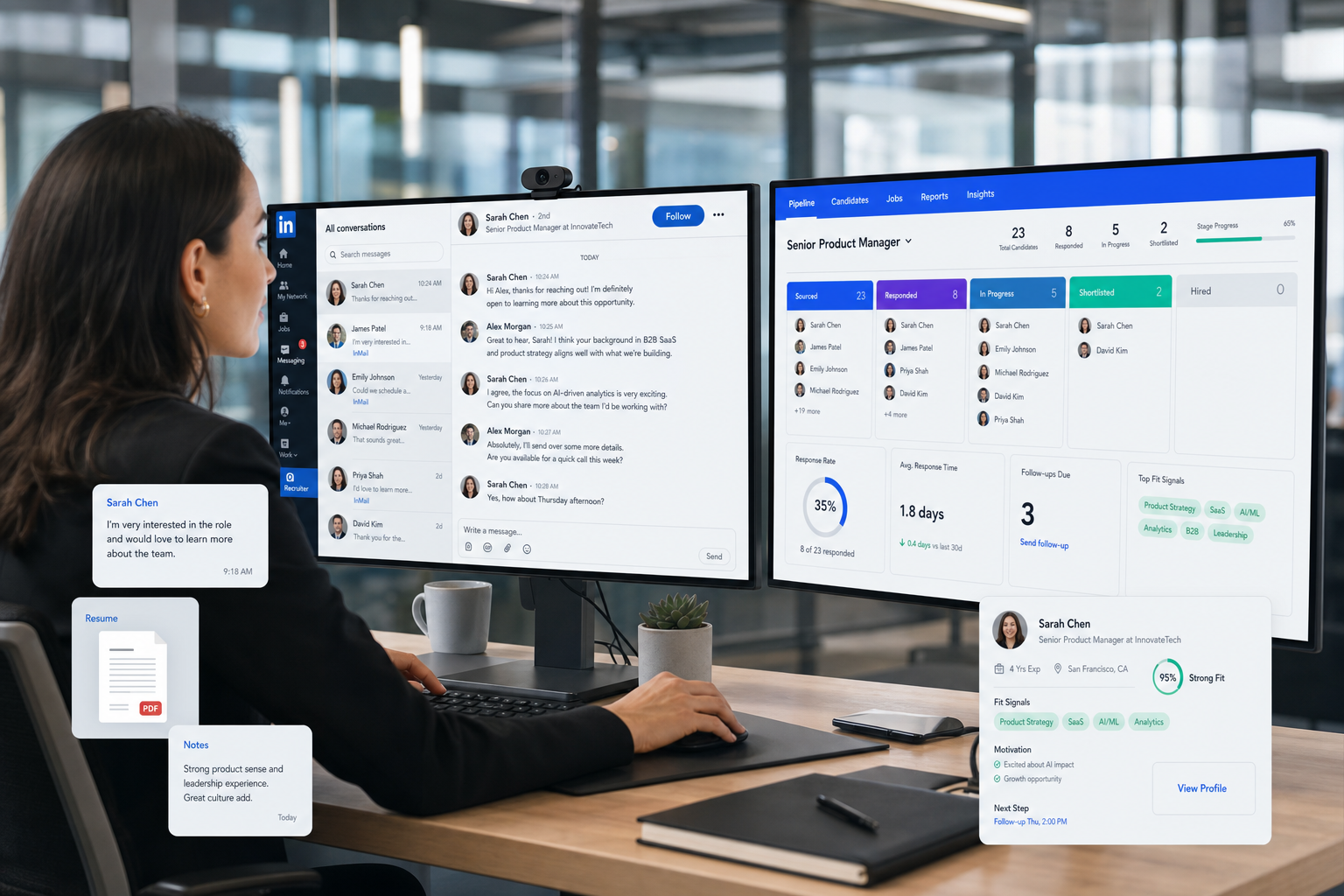
See how recruiting leaders can evaluate a recruiting platform by candidate-signal quality to avoid weak fit decisions and lost pipeline context.
That standard matters more than feature volume. When candidate conversations stay vague, when motivations are buried in scattered notes, or when outreach and follow-up depend on individual memory, hiring quality suffers fast. Agency recruiters lose momentum with placeable talent, in-house teams waste interview capacity, and smaller search firms feel the cost in missed submittals, slower pipelines, and weaker trust with hiring managers.
In my own workflow, tools that reduce repetitive outreach without removing recruiter judgment have been the most useful. I have used StrategyBrain AI Recruiter specifically to keep LinkedIn conversations moving after hours, gather candidate replies in one stream, and collect resumes or contact details from people who are actually interested. That helped with the front end of sourcing, but the recruiter still had to review the resume, judge fit, and decide whether the candidate should move forward.
You can see why this matters in one common recruiter moment. A candidate speaks with a specialist recruiter, but instead of clearly explaining which industry they want, what kind of progression they need, or why they are leaving, they stay noncommittal. Then they pivot into a long complaint about their last manager, point back to the resume instead of adding context, and oversell a skill that may not hold up once the process gets serious.
For the recruiter, that is not just an awkward call. It creates a placement risk. If motivation is unclear, the role match weakens. If communication history sits across inboxes, LinkedIn messages, notes, and spreadsheets, the recruiter has less confidence in how to market the candidate or whether to re-engage later. That is exactly where modern job recruitment platforms and broader recruiting platforms need to prove their value: not as resume storage, but as systems that help teams capture better signals, structure better follow-up, and make sound hiring decisions at scale.
Table of Contents
- What the Best Recruiting Software Actually Solves
- The Candidate Signal Problem Behind Tool Selection
- Comparison Framework for a Recruiting Platform
- Must-Have Features in Recruiting Platforms
- Best Fit by Team Type and Hiring Environment
- How to Evaluate Recruiting Software Before You Buy
- Why the Best Setup Is Usually an Ecosystem
- FAQ
What the Best Recruiting Software Actually Solves
When buyers search for the best recruiting software, they are usually trying to solve a deeper operating problem than posting jobs or moving candidates from one stage to another. They need a recruiting platform that helps recruiters gather useful information, keep communication transparent, and turn fragmented candidate interactions into decisions the team can trust.
That is why the category has expanded. A modern recruiting platform usually combines applicant tracking, sourcing workflow, candidate relationship management, interview coordination, reporting, and some degree of AI-assisted communication or summarization. In practice, the difference between average and effective software often comes down to whether the system helps you understand candidate intent early and maintain that clarity across the rest of the process.
Experienced recruiters know that bad hiring signals usually appear before the interview panel. They show up when a candidate cannot explain what they want, when a recruiter cannot see the reason for movement, or when key context sits in disconnected tools. The best recruiting software makes those signals easier to spot and easier to act on.
Practical takeaway: Do not evaluate a recruiting platform only on posting volume or automation depth. Evaluate whether it helps recruiters record motivation, skills, objections, responsiveness, and next-step confidence in a way the whole team can use.
The Candidate Signal Problem Behind Tool Selection
The reference point many recruiting teams miss is that software should support the real conversation between recruiter and candidate. In specialist search, staffing, and internal hiring alike, the recruiter is trying to learn a few things quickly: What does this person actually want? Why are they willing to move? What strengths are real? What claims still need proof? And can this person be presented credibly to a client or hiring manager?
Those are not soft questions. They determine whether you invest outreach time, who you shortlist, and how confidently you move someone through the funnel. If your tools cannot capture those answers clearly, recruiters start compensating with memory, side notes, and manual follow-up. That usually creates inconsistent records, slower decisions, and candidates who feel they are being asked the same questions twice.
This is also where a lot of confusion enters recruiting software evaluations. Teams compare ATS features but forget the software is there to support judgment. A well-designed recruiting platform should help a recruiter document motivation professionally, steer conversations away from unproductive rants, verify stated strengths, and keep a constructive record that can be shared internally.
In other words, the best software does not replace recruiter skill. It gives recruiter skill a reliable operating system.
Comparison Framework for a Recruiting Platform
Before looking at vendor demos, I recommend evaluating software against the core recruiter tasks it must improve. This keeps the conversation grounded in actual workflow instead of feature theater.
| Evaluation Area | What Strong Recruiting Platforms Usually Offer | Why It Matters |
|---|---|---|
| Candidate intake quality | Structured notes, resume capture, conversation history, profile enrichment | Helps recruiters understand motivation and fit, not just application status |
| Outreach workflow | Sequencing, messaging support, response tracking, reminders | Reduces manual follow-up and protects candidate responsiveness |
| Pipeline management | Custom stages, ownership visibility, bottleneck tracking | Keeps movement transparent across recruiters and hiring teams |
| Interview coordination | Calendar sync, self-scheduling, panel support, feedback capture | Speeds up progression once recruiter confidence is established |
| CRM capability | Talent pools, re-engagement, segmentation, nurture history | Essential for repeat hiring and previously qualified talent |
| Automation | Follow-up triggers, task routing, status reminders, candidate messaging support | Useful for scale, especially when recruiters handle high-volume sourcing |
| Reporting | Source quality, stage conversion, response rates, recruiter activity | Shows whether the process creates qualified movement, not just activity |
| Compliance and controls | Permissions, consent handling, audit trails, retention settings | Supports defensible hiring practice as team size grows |
| Integration readiness | HRIS, assessments, scheduling, background checks, communication tools | Important because no recruiting platform truly runs in isolation |
| AI-assisted support | Conversation handling, summarization, prioritization, prompts | Helpful for speed, but final fit judgment still belongs to recruiters |
If a platform looks polished but cannot preserve candidate context cleanly, it will eventually create rework. That is especially true in agency settings and hard-to-fill roles, where the recruiter may need to revisit a candidate months later and understand the prior conversation quickly.
Must-Have Features in Recruiting Platforms
1. A system for capturing candidate intent, not just resumes
One lesson from real recruiter conversations is that resumes rarely answer the most important question: why this person, for this move, right now? The best recruiting software helps recruiters log motivation, location flexibility, compensation expectations, industry preference, and key objections in a structured way.
If all you store is a CV and a stage label, you lose the nuance that drives placement quality.
2. Outreach support that keeps the conversation professional
Recruiter conversations often succeed or fail at the first response stage. That is one reason I found AI Recruiter useful in sourcing-heavy work. It can keep candidate communication active around the clock, respond in the candidate’s language when needed, and gather resume or contact details from interested people without forcing me to stay online late just to maintain momentum. What it did not do was replace fit assessment. I still had to read the resume, judge the story, and decide whether the person belonged in the pipeline.
This kind of support matters most when the issue is speed and consistency, not decision-making authority.
3. Pipeline management that reflects how recruiters really qualify people
Good recruiters do more than move candidates from sourced to screened. They compare claims against evidence, note concerns, track responsiveness, and decide whether someone is marketable to a client or hiring team. Recruiting platforms should make that process visible through custom stages, note quality, collaboration fields, and clear ownership.
Practical advice: During a demo, ask how the system records recruiter confidence, candidate motivation, and disqualification reasons. If those details are hard to capture, the process will get messy fast.
4. Reporting that surfaces quality, not just throughput
A large pipeline is not the same as a healthy pipeline. The best recruiting software should help you see whether outreach is producing engaged candidates, whether shortlisted people are interview-worthy, and where the process breaks down. Useful reporting includes source quality, response quality, candidate conversion, and stage aging.
For recruiting leaders, this is where software shifts from administrative necessity to operational leverage.
5. CRM and rediscovery for repeatable search work
Many roles repeat. The same finance analyst profile, regional sales hire, operations lead, or software engineer may come back every quarter with slightly different constraints. Strong job recruitment platforms allow recruiters to revisit previous conversations, see why someone passed before, and re-engage warm talent intelligently.
This is much better than restarting every search from zero.
6. Integrations that reduce duplicate work
Even very capable recruiting platforms sit inside a broader stack. Interview scheduling, background checks, assessments, HRIS syncing, and communication tools still matter. The right software should connect cleanly enough that recruiters do not spend time copying notes, re-entering candidate details, or updating multiple systems by hand.
7. Candidate experience and transparency
The original recruiter-candidate dynamic in the reference piece was built around transparency and mutual respect. That principle should show up in software too. Candidates need clear communication, timely follow-up, and reasonable visibility into the process. Recruiters need a system that encourages factual, constructive communication rather than scattered or inconsistent messaging.
Best Fit by Team Type and Hiring Environment
Small recruiting firms and solo recruiters
Smaller firms usually need a recruiting platform that is lightweight, quick to implement, and strong at sourcing follow-up, recordkeeping, and candidate rediscovery. If you live in LinkedIn, email, and a spreadsheet, the biggest gains often come from centralizing communication and reducing manual admin.
- Best priorities: outreach workflow, CRM basics, simple pipeline tracking, resume capture
- Main risk: overbuying a system that is too heavy for daily use
Mid-market in-house recruiting teams
These teams typically need a balance of ATS structure and CRM flexibility. They manage more stakeholders, more requisitions, and more reporting pressure. In this environment, the best recruiting software should support both candidate operations and hiring manager collaboration.
- Best priorities: configurable stages, reporting, scheduling, source tracking, workflow automation
- Main risk: buying for recruiters only and neglecting hiring manager usability
Enterprise talent acquisition teams
Enterprise teams need governance, permissions, analytics depth, and strong integrations. They also need process consistency across regions or business units. Candidate intent and conversation quality still matter here, but the software must support them at scale.
- Best priorities: workflow controls, auditability, analytics, data handling, integration architecture
- Main risk: choosing software that demos well but is weak in adoption and administration
Agency and staffing recruiters
This audience often benefits the most from recruiting platforms that combine search speed, communication history, CRM depth, and re-engagement capability. A candidate who is not right today may be highly valuable on the next order, but only if the recruiter can recover the previous context quickly.
- Best priorities: searchability, relationship tracking, outreach support, ownership clarity, fast note access
- Main risk: losing placement value because context was never captured well enough to reuse
How to Evaluate Recruiting Software Before You Buy
Here is the process I recommend when teams want to choose the best recruiting software without getting distracted by generic claims.
- Start with real recruiter conversations. Review where candidate intent is currently captured, where it gets lost, and which decisions depend on memory rather than system data.
- Map the front end of the workflow. Sourcing, first reply, qualification notes, resume capture, and handoff into structured pipeline stages are where many teams quietly break.
- Test the software with ambiguous candidates. Not every prospect gives neat answers. Ask how the system supports notes on unclear motivation, partial fit, or follow-up risk.
- Review outreach support carefully. If your team does significant LinkedIn sourcing, look at tools that can maintain communication speed. In my case, StrategyBrain AI Recruiter was most useful when response timing mattered and candidates replied outside normal hours. It reduced the repetitive back-and-forth, but I still handled final screening decisions myself.
- Check rediscovery and CRM depth. Ask how easily recruiters can find prior candidates by role type, skills, interest level, or previous objections.
- Inspect reporting beyond volume. You want to see whether the system measures engagement quality, not just count of applicants or sourced names.
- Review implementation risk. If recruiters cannot adopt the workflow naturally, even strong software will become expensive shelfware.
Key insight: The best recruiting platform is usually the one that makes recruiter judgment more visible and repeatable, not the one that promises to automate judgment away.
Why the Best Setup Is Usually an Ecosystem
Most recruiting teams do not need one monolithic system. They need a reliable core plus support tools that handle specific parts of the workflow well. That is especially true when your process includes outbound sourcing, multilingual communication, internal approvals, external assessments, or region-specific compliance steps.
For many teams, the core recruiting platform should own candidate records, stages, reporting, and collaboration. Around that, specialized tools can support outreach, scheduling, assessments, or background checks. In sourcing-heavy environments, AI-supported messaging can improve speed and consistency before candidates ever reach formal screening.
That ecosystem view is more realistic than asking one platform to do everything equally well. It also reflects how recruiters actually work: one set of tools for attracting and engaging talent, another for evaluating and progressing talent, all tied together by a process that remains recruiter-led.
FAQ
What is the best recruiting software for most teams?
There is no universal winner. The best recruiting software is the system that best supports your hiring volume, candidate communication model, reporting needs, and recruiter workflow. For some teams, a basic ATS is enough. For others, a broader recruiting platform with CRM, automation, and sourcing support is more appropriate.
What is a recruiting platform?
A recruiting platform is software used to manage hiring work across sourcing, applicant tracking, candidate communication, scheduling, collaboration, and reporting. Modern recruiting platforms often include both ATS and CRM capabilities.
How are job recruitment platforms different from basic ATS tools?
Basic ATS tools focus on candidate records, stage movement, and process administration. Job recruitment platforms usually go further by supporting outreach, nurture workflows, re-engagement, analytics, and integrations across the hiring stack.
Why does candidate intent matter when choosing recruiting software?
Because resumes alone do not explain motivation, timing, flexibility, or actual interest. The best recruiting software helps recruiters capture those signals in a structured way so better decisions can be made later.
Can AI replace recruiters in recruiting platforms?
No. AI can help with messaging, summarization, reminders, and initial communication flow, but recruiters still need to assess resumes, test claims, judge fit, and decide who moves forward.
When is AI-assisted sourcing most useful?
It is most useful when recruiters handle high outreach volume, candidate replies come in after hours, or multilingual communication creates delays. In those cases, AI-supported communication can maintain momentum while leaving final qualification to the recruiter.
Who benefits most from recruiting platforms with CRM features?
Agency recruiters, staffing firms, and in-house teams with repeat hiring needs benefit most because they can revisit prior candidates, preserve context, and re-engage warm talent instead of restarting every search.
Conclusion
The best recruiting software is not simply the platform with the largest feature list. It is the recruiting platform that helps recruiters capture honest signals, keep communication organized, and move from conversation to decision with more confidence. That is the lesson behind both the candidate-side scenario we opened with and the software evaluation process itself.
If your current setup makes it hard to understand what candidates want, why they are moving, or whether they are truly qualified, the problem is not only recruiter discipline. It may also be that your system does not support the work well enough. The strongest recruiting platforms reduce that friction, preserve context, and let recruiters spend more time on judgment and relationship-building instead of admin recovery.















