


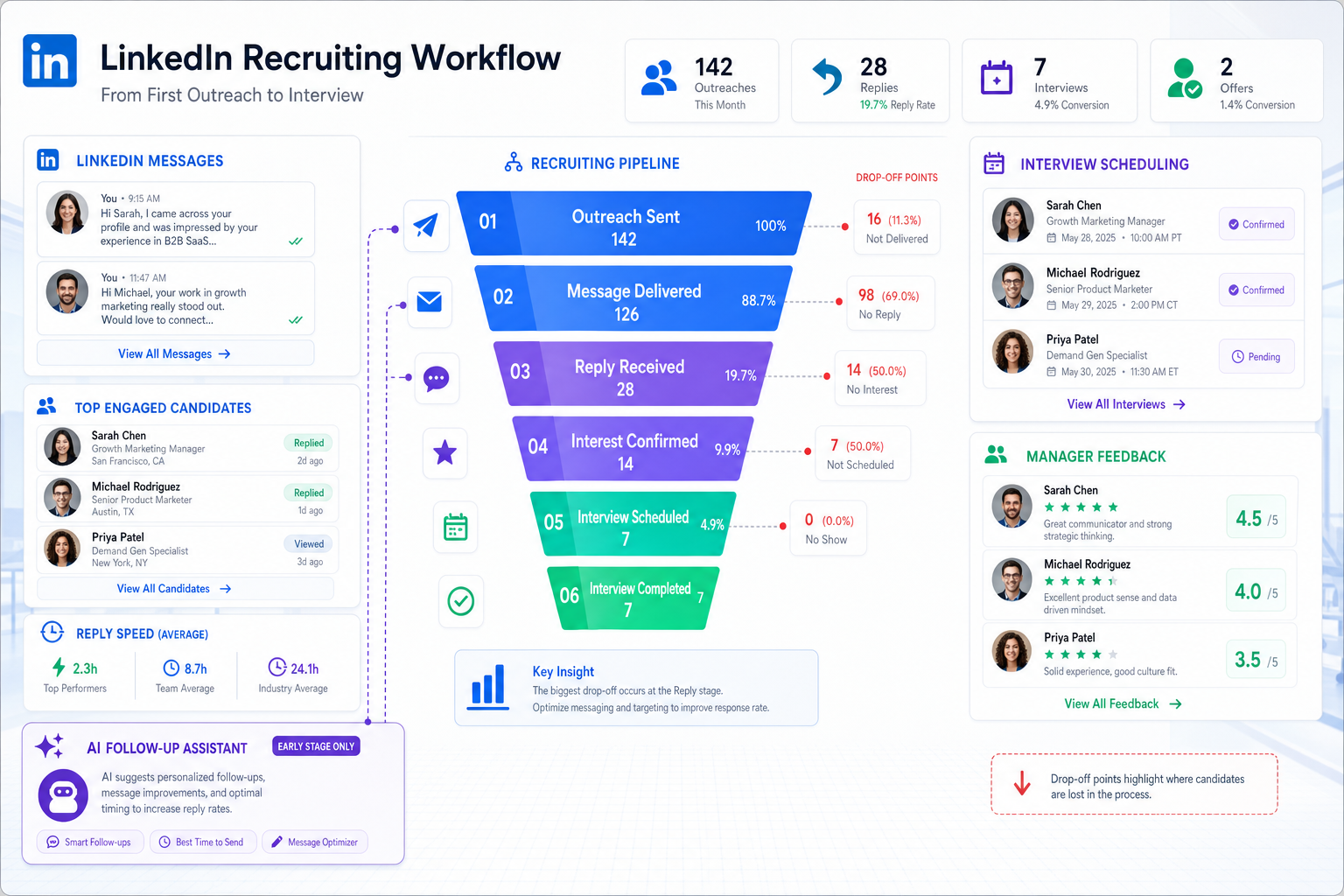
When business recruitment keeps losing candidates early, this article helps small-team recruiters diagnose gaps and choose a steadier process.
That matters most when a lean team is trying to fill roles without dropping conversations. In small company recruitment, the damage rarely comes from one dramatic mistake. It comes from slow replies, scattered notes, uneven manager feedback, and candidate interest cooling off while recruiters juggle sourcing, screening, scheduling, and status updates across too many tools.
In my own workflow, I have found that StrategyBrain AI Recruiter is most useful when the pain point is front-end candidate communication rather than final selection. Its LinkedIn outreach automation, after-hours follow-up, and multilingual messaging can keep conversations moving when recruiters are offline, while the recruiter still owns résumé review, qualification, and interview decisions. That division of labor matters because software should remove repetitive work without replacing recruiting judgment.
You can see the same logic in a familiar candidate-side moment: someone meets a promising contact and has about 20 seconds to explain who they are, what they do, and why the conversation should continue. If that brief introduction is vague, hesitant, or forgettable, the opportunity can fade before a real discussion starts. The strongest elevator pitches work because they lead with something memorable, show what makes the person distinct, and give just enough proof to earn the next question.
Recruiting software faces a similar test in business recruitment. Your team often has one short window to make a candidate engage, reply, and stay interested. That is why the best recruiting software for small company recruitment is not just a database. It is a system that helps you start better conversations, track what happened next, and support a repeatable process for how to recruit employees for small business teams without letting admin work dilute candidate experience.
Table of Contents
- Why first impressions matter in business recruitment
- What recruiting software should actually do
- Core features to prioritize
- How needs change in small company recruitment
- A practical way to compare tools
- How to recruit employees for small business
- Where AI helps and where recruiters still decide
- Common buying mistakes
- FAQ
Why first impressions matter in business recruitment
One of the most useful lessons from candidate elevator pitches is that short early interactions carry outsized weight. A candidate does not need a life story to decide whether to reply. They need a clear reason to keep talking. In hiring, that same principle affects recruiter outreach, job ads, screening emails, and initial scheduling messages.
When those first touches are weak, generic, or delayed, business recruitment becomes harder than it needs to be. Candidates lose confidence, hiring managers blame the market, and recruiters spend more time reviving stalled conversations than progressing qualified people.
For small employers, that first-contact problem is especially important because there is usually less brand pull, less process redundancy, and less room for communication delays. A well-run system protects the opening exchange and then keeps the rest of the process visible.
Practical insight: If your hiring process consistently loses candidates before screening or between first reply and interview, your problem may be workflow design and response speed as much as sourcing volume.
What recruiting software should actually do
In practical terms, the best recruiting software is usually an applicant tracking system, a recruiting platform, or a hiring workflow tool. Whatever the label, its job is simple: help your team attract applicants, manage communication, coordinate evaluation, and move candidates through a clear process.
In real business recruitment, the software should support:
- job posting across relevant channels
- candidate sourcing and outreach tracking
- centralized applicant records
- interview scheduling
- manager feedback collection
- pipeline visibility
- basic reporting
- handoff into onboarding tasks
That matters because once hiring expands beyond a spreadsheet and inbox, visibility drops fast. One person sends outreach, another screens, a hiring manager reviews late, and no one is fully sure which candidate got what message. Good recruiting software reduces that confusion.
For smaller teams, that is often the real value of an ATS. It is not enterprise complexity. It is operational control.
Core features to prioritize
When evaluating recruiting software, I usually advise teams to start with the same standard I would apply to a candidate pitch: is it clear, useful, and likely to move the conversation forward? If a tool cannot improve day-to-day recruiting basics, advanced features will not rescue it.
1. Better first-touch communication
Because early interactions matter, the system should make it easier to send accurate, timely, role-specific messages. Templates can help, but they need to be editable and practical. For teams doing outbound hiring on LinkedIn, I have also seen value in pairing an ATS with AI Recruiter to handle repetitive introductions, candidate replies, and follow-up outside business hours while recruiters step in for résumé review and selection.
2. Structured applicant tracking
This is the foundation. You need clear stages, visible notes, and an easy way to avoid duplicate handling. The best systems make it obvious who is waiting for review, who has been contacted, who is interviewing, and who is no longer active.
3. Job posting and source visibility
For small company recruitment, hiring budgets are often tight. You need to know whether applicants are coming from referrals, job boards, direct outreach, or social channels. A system that posts efficiently but hides source quality only solves half the problem.
4. Scheduling and feedback collection
Interview coordination creates avoidable delay in many businesses. Good recruiting software reduces the back-and-forth and gives hiring managers a consistent way to leave feedback. If managers resist using it, adoption breaks down quickly.
5. Automation that removes admin, not judgment
Automation is useful when it handles reminders, status changes, or repeated first-touch communication. It is less useful when it creates black-box decisions. Recruiters should still control qualification logic, interview progression, and hiring recommendations.
6. Reporting that shows bottlenecks
Even a lean team benefits from basic reports on source performance, pipeline conversion, and time-in-stage. You do not need advanced analytics to spot whether manager review is slow or whether candidates disappear after first contact.
7. Integration with the next step
Business recruitment does not end at offer acceptance. New-hire documents, payroll coordination, and onboarding handoff all matter. The smoother that handoff, the less likely your team is to lose key information after the hire is made.
| Feature Area | Why It Matters | Best Fit for Small Business |
|---|---|---|
| First-touch communication | Improves candidate response and engagement | Editable templates, timely outreach, clear follow-up |
| Applicant tracking | Keeps hiring organized | Simple stages, easy notes, strong visibility |
| Job posting | Expands reach efficiently | Practical multi-channel publishing |
| Scheduling | Reduces coordination delays | Fast setup and manager-friendly workflows |
| Automation | Removes repetitive tasks | Light workflow support with human review |
| Reporting | Shows bottlenecks and source quality | Basic dashboards with clear actions |
| Integrations | Supports onboarding handoff | Email, calendar, HR, and payroll connections |
How needs change in small company recruitment
The right recruiting system depends heavily on hiring maturity. The same software can feel helpful to one team and excessive to another because their process reality is different.
For first hires
If you are hiring your first employees, simplicity matters most. You need role posting, applicant organization, communication, and a clean way to move people to interviews. You do not need a system that assumes a large talent acquisition department.
This is also where the elevator-pitch lesson applies again. Early-stage employers often underestimate how much candidate perception is shaped by the first few interactions. A fast, clear response can outperform a bigger employer with slower process discipline.
For growing teams
Once hiring becomes regular, shared visibility becomes more important. Recruiters, founders, HR, and department heads all need to see the same information. This is when ATS discipline starts producing real gains.
For lean internal teams doing outbound recruiting
Some companies depend on direct outreach because they cannot rely on inbound volume alone. In those cases, the pain often sits in repetitive messaging. I have used StrategyBrain AI Recruiter as a support layer for LinkedIn-heavy work because it keeps candidate communication active, gathers interest signals, and captures résumé or contact details from people who want to continue. The recruiter still has to decide whether the candidate is truly a fit, but it removes hours of repetitive front-end handling.
For high-volume hiring
If your team hires repeatedly for support, operations, field, or seasonal roles, the priority shifts toward speed and consistency. Pipeline management, follow-up automation, and clean status visibility become essential.
A practical way to compare tools
Too many software comparisons start with feature count. A better approach is to start with workflow pressure points.
- Map where candidates stall. Is the issue first reply, résumé review, manager feedback, or scheduling?
- Define your must-have actions. Posting, sourcing, outreach, screening, interviews, offer, and onboarding handoff.
- Separate communication automation from hiring judgment. Decide what can be automated and what must stay manual.
- Check manager adoption risk. If hiring managers will not use it, the system will fail in practice.
- Match complexity to hiring volume. Do not buy enterprise process if you hire occasionally.
- Confirm integrations. Email, calendar, HR, payroll, and document workflows matter.
- Review reporting outputs. Make sure the system reveals bottlenecks clearly.
| Evaluation Factor | Questions to Ask | Advice |
|---|---|---|
| Ease of use | Can recruiters and managers use it quickly? | Adoption is more valuable than feature depth |
| Communication support | Will it improve first response and follow-up? | Protect the earliest candidate moments |
| Workflow fit | Does it match your actual hiring pattern? | Buy for current needs, not imagined scale |
| Automation | What tasks does it remove? | Automate repetition, not core judgment |
| Reporting | Can you see where roles stall? | Simple visibility is often enough |
| Cost alignment | Does pricing fit your hiring frequency? | Avoid overbuying for occasional hiring |
How to recruit employees for small business
Searches around how to recruit employees for small business usually point to a bigger truth: software helps, but only when the underlying hiring process is workable. Here is the operating model I recommend most often.
Step 1: Define the role around outcomes
Do not start with a bloated wish list. Clarify what the person will own, who they report to, what success looks like, and which skills are truly required.
Step 2: Prepare the message candidates will first see
This is where many small businesses underperform. Before you post or source, make sure your opening explanation is clear. Why this role, why now, and why should someone keep talking? The same logic behind a strong elevator pitch applies here: lead with substance, not generic enthusiasm.
Step 3: Choose the right sourcing channels
Use the channels that fit the role: referrals, job boards, niche communities, direct outreach, or local networks. If LinkedIn sourcing is part of the plan, a tool like AI Recruiter can help sustain candidate conversations overnight or across time zones without forcing recruiters to stay online constantly.
Step 4: Track every applicant in one workflow
Whether you use a full ATS or a lighter recruiting platform, centralize records from day one. Notes, résumé status, outreach history, and interview progress should all live in one system.
Step 5: Screen consistently
Create a few clear criteria and apply them the same way across candidates. Document why someone moves forward or exits. That discipline becomes especially valuable when multiple people are involved.
Step 6: Keep the interview process proportional
Small businesses often lose candidates by stretching decisions too long. Use focused interviews, align interviewers early, and avoid unnecessary rounds.
Step 7: Communicate quickly and clearly
Silence damages trust. Candidates do not expect perfection, but they do expect movement. This is one area where recruiting software and AI-supported messaging can materially improve execution.
Step 8: Hand off cleanly to onboarding
Once the hire is made, transition immediately into document collection, payroll setup, start-date coordination, and required forms. A messy handoff can undermine a strong recruiting process.
Practical advice: If your hiring feels harder every quarter, audit your first-contact quality and response speed before assuming the talent market is the only issue.
Where AI helps and where recruiters still decide
AI features are now common in hiring technology, but they are not equally useful. In my experience, the best use case is supporting repetitive communication and administrative movement, especially at the top of the funnel.
That includes:
- drafting or improving role outreach messages
- managing repeated follow-up
- responding to candidate questions after hours
- capturing interest and résumé submissions
- triggering workflow reminders and status changes
It does not remove the need for recruiter judgment. Even when I use AI Recruiter conversation workflows in LinkedIn sourcing, I still review the résumé, assess real fit, and decide who moves into interviews. That is the right balance for business recruitment: automation handles repetition, recruiters handle evaluation.
For global or multilingual hiring, communication support can be especially valuable. Candidates respond when they are available, not when your team happens to be at a desk. Keeping that exchange active can prevent avoidable drop-off.
Common buying mistakes
Across small business hiring teams, the same mistakes show up repeatedly.
- Overbuying complexity. A lean company usually needs workflow discipline before advanced customization.
- Ignoring first-touch quality. Software that stores applicants but does not improve communication may leave the core problem unsolved.
- Assuming automation equals qualification. Interest and fit are not the same thing.
- Forgetting manager behavior. If managers will not leave feedback in the system, the process slows down anyway.
- Treating onboarding as separate. Business recruitment should connect cleanly to employment setup.
- Confusing more features with better outcomes. The goal is a stronger process, not a longer demo.
The experienced view is simple: software should make your hiring process more consistent, more visible, and more responsive. It should not become a substitute for role clarity or recruiter judgment.
FAQ
What is the best recruiting software for a small business?
The best recruiting software for a small business is the one that fits hiring volume, improves candidate communication, organizes applicants clearly, and supports a repeatable workflow without adding unnecessary complexity.
Does a small company really need recruiting software?
Often yes. If multiple people are involved in hiring, roles are posted in more than one place, or candidate follow-up is becoming inconsistent, recruiting software usually pays off through better organization and fewer delays.
How does recruiting software help business recruitment?
It centralizes applicant records, improves visibility, supports scheduling and communication, tracks hiring stages, and helps small teams avoid losing candidates in disconnected email and spreadsheet workflows.
How do I recruit employees for small business growth?
Start with a clear role, create a strong first-contact message, choose relevant sourcing channels, track every applicant in one system, screen consistently, interview efficiently, communicate quickly, and hand off smoothly into onboarding.
Can AI replace recruiters in the hiring process?
No. AI can help with outreach, follow-up, scheduling, and repetitive messaging, but recruiters still need to evaluate résumés, assess fit, and make final progression decisions.
What is the biggest mistake in small company recruitment?
One of the biggest mistakes is underestimating the impact of early communication. Slow, unclear, or generic first contact can reduce candidate engagement long before the interview process begins.
Final thoughts
The best recruiting software does more than organize resumes. It strengthens the first impression, protects follow-up, and gives your team a cleaner process from outreach to onboarding. That is why strong business recruitment is not only about posting jobs faster. It is about creating a system that keeps candidate interest alive while your team makes sound decisions.
For small company recruitment, that usually means choosing tools that are practical, easy to adopt, and disciplined about communication. If you keep that standard in mind, you will be much closer to a repeatable answer for how to recruit employees for small business growth without overcomplicating the work.















