


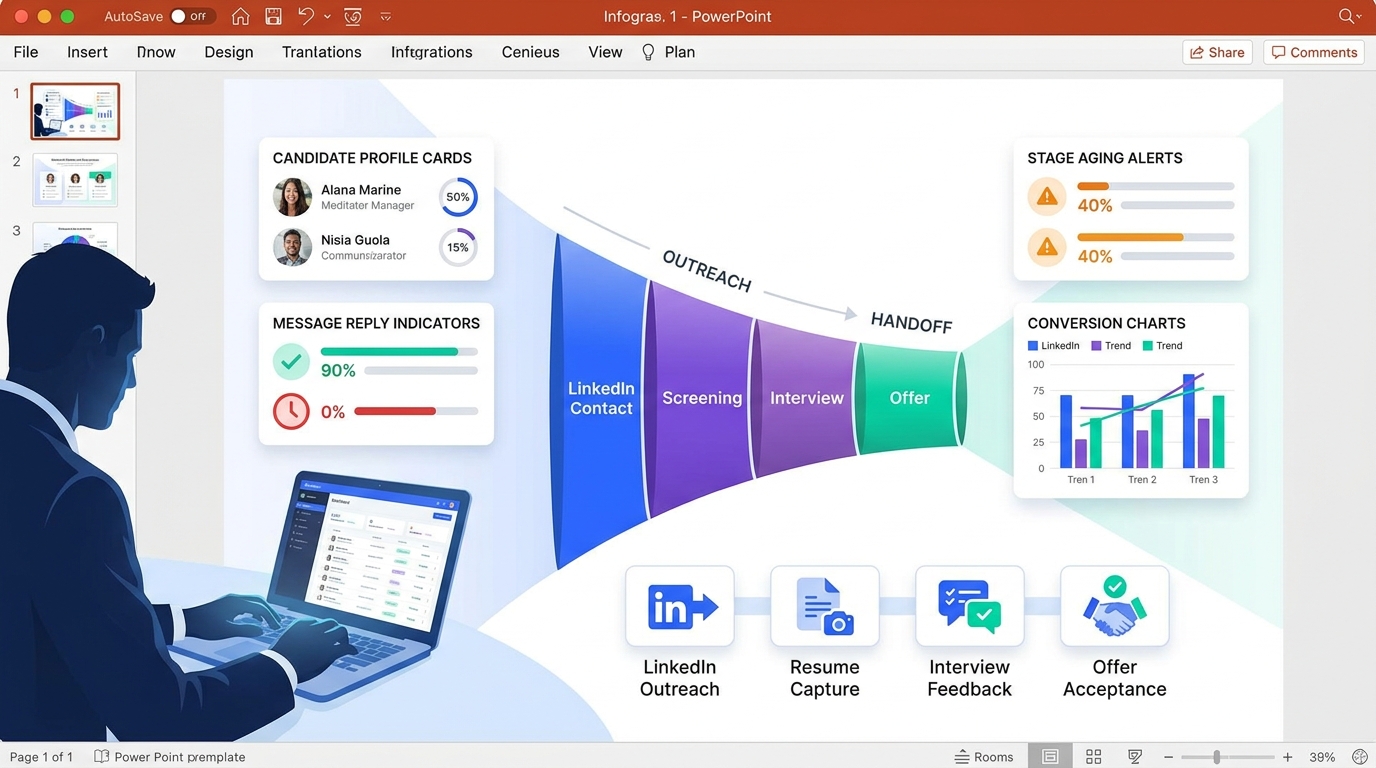
When candidate stories stall between outreach and handoff, this article helps recruiting leaders evaluate recruitment monitoring to spot delays, judge software fit, and avoid metrics that look busy but miss where hiring actually breaks.
Without that discipline, small agencies lose hours to scattered follow-ups, in-house teams let strong candidates cool off, and hiring managers confuse activity with progress. The damage is not only slower hiring. It shows up in missed interviews, weak handoffs, inconsistent candidate communication, higher sourcing waste, and strained employer credibility when nobody can say where a process actually broke down.
That is where tools built for recruiter workflow can help, especially when the bottleneck sits in outbound communication and candidate follow-up. In my own sourcing work, StrategyBrain AI Recruiter has been most useful for three things tied directly to this problem: automating first-touch LinkedIn outreach, keeping candidate conversations moving after hours, and collecting resumes or contact details from interested prospects without forcing recruiters to babysit every message. The recruiter still owns final judgment, resume review, and the decision on who should move to interview.
A good way to see the issue is through a candidate-side moment that every recruiter eventually supports. In the reference scenario behind this article, a high-profile jobseeker has stepped away from a major public role, moved countries, and now needs a credible elevator pitch for interviews and networking meetings. The task is not just self-presentation. It is translating military service, leadership experience, and a mission-driven founder story into language an employer can evaluate quickly.
That pitch includes concrete proof points: nine years in the Army, two Afghanistan deployments, pilot training, and the creation of a global event serving wounded service personnel across 18 countries, with roughly 75,000 attendees, nearly 1,500 volunteers, and a budget approaching $60 million. For a recruiter, the lesson is immediate. If that much context has to be organized before a candidate can even enter the right conversation, the best recruiting software must support much more than applicant storage. It must make recruitment monitoring, recruitment metrics examples, and hiring metrics examples usable at the exact points where candidate messaging, source quality, and stage movement determine whether a promising story becomes a real hire.
- The best recruiting software should support recruitment monitoring across candidate communication, pipeline speed, source quality, and stage accountability.
- A strong recruiting process starts before the interview dashboard. It starts with whether a candidate story is captured, advanced, and measured clearly.
- The most useful recruitment metrics examples are diagnostic, not decorative. They should expose delay, friction, and weak conversion fast enough to change recruiter behavior.
- Recruiters still make the final call. Good software reduces repetitive communication work and improves visibility so judgment can be applied at the right moments.
- Why Candidate Context Matters in Recruitment Monitoring
- How to Choose the Best Recruiting Software
- 3 Recruiting Software Categories to Compare
- 12 Recruitment Metrics That Actually Matter
- Vanity Metrics vs Decision Metrics
- What a Good Recruitment Monitoring Dashboard Should Show
- How to Implement Recruitment Monitoring Without Overcomplicating It
- FAQ
Why Candidate Context Matters in Recruitment Monitoring
That opening case is useful because it shows something recruiting teams often miss: hiring quality starts with how well a candidate story is translated into an employer-ready evaluation. A strong background can still stall if outreach is delayed, if candidate information sits in inboxes, or if recruiters cannot track where interest turns into actual movement.
In other words, recruitment monitoring is not only about counting applicants after they enter an applicant tracking system. It is the ongoing review of how recruiting work converts uncertainty into structured progress. That includes how candidates are sourced, how fast they receive replies, whether key information is captured consistently, how they move stage by stage, and whether the eventual hire reflects the original promise.
This is why experienced recruiters care less about dashboards that look busy and more about systems that preserve context. A candidate with military leadership, nonprofit scale-building experience, and a cross-border relocation story may be highly compelling, but only if the recruiting process records those signals clearly and moves them to the right decision-makers without delay.
Key insight: The best recruiting software is the one that helps recruiters turn candidate context into measurable hiring decisions, not just into stored records.
How to Choose the Best Recruiting Software
When teams search for the best recruiting software, they often compare posting reach, automation, interface quality, and integrations. Those matter, but they should be tested against one practical question: what hiring decisions will this system help us make faster and with more confidence?
From a recruitment monitoring standpoint, I usually evaluate software in five layers.
1. Can it capture candidate context early?
Recruiters need a system that does more than log names. It should preserve source details, communication history, resumes, notes, and the signals that explain why a candidate may fit a role. If the system loses nuance at the top of funnel, downstream metrics become less meaningful.
2. Can it reduce communication lag?
In many teams, the real bottleneck is not sourcing volume but message delay. That is especially true in LinkedIn-heavy workflows. Tools that support continuous outreach, faster replies, and structured handoff into recruiter review are often more valuable than another reporting layer.
3. Can it measure stage movement cleanly?
Good recruiting software should let teams see time to hire, stage conversion, pipeline aging, and feedback delays without manual spreadsheet work. If definitions are inconsistent or timestamps are unreliable, reporting becomes argumentative instead of useful.
4. Can it support different recruiting models?
A solo headhunter, a five-person agency, and an in-house TA team do not use software in exactly the same way. The strongest systems can support high-touch search work, repeatable operational recruiting, and collaborative hiring manager visibility without forcing one narrow workflow.
5. Can it work with recruiter judgment rather than replacing it?
This matters more than many buying committees admit. Software should automate repetitive tasks and surface patterns, but final fit assessment, compensation judgment, and shortlist selection still belong to experienced recruiters and hiring teams.
3 Recruiting Software Categories to Compare
Because this topic is about software selection, it helps to compare three common categories rather than pretend one tool does everything equally well.
1. Applicant Tracking Systems
Best for: structured workflows, compliance, centralized records, reporting across multiple jobs.
Strengths: ATS platforms are usually strongest at requisition control, candidate stage tracking, interview coordination, and standardized reporting. They are often the backbone of recruitment monitoring because they create consistent data definitions.
Weaknesses: Many teams discover that top-of-funnel outreach still happens outside the system, especially on LinkedIn. That can create a visibility gap between sourcing activity and pipeline metrics.
Cost profile: generally better justified for growing in-house teams and agencies with repeatable volume, though setup and admin overhead can be meaningful for smaller shops.
Best fit: in-house talent teams, mid-sized agencies, and organizations that need process discipline more than sourcing experimentation.
How it works with StrategyBrain AI Recruiter: this is often the cleanest pairing. Recruiters can use AI Recruiter to handle repetitive LinkedIn outreach and interest capture, then move qualified respondents into the ATS for human screening, interview management, and full recruitment monitoring.
2. LinkedIn Automation and Outreach Tools
Best for: outbound sourcing, recruiter productivity, message volume, and always-on candidate engagement.
Strengths: These tools help where many ATS tools are weakest: initiating contact, maintaining follow-up, and gathering responses from passive candidates. In practical use, this category is where recruiters can save the most manual time.
Weaknesses: Some tools create activity but weak context, which means recruiters still need a disciplined way to review resumes, evaluate fit, and track downstream outcomes. Not all tools handle multilingual communication or after-hours messaging well.
Cost profile: usually easier to justify for agencies, independent headhunters, and lean in-house teams that live inside LinkedIn.
Best fit: recruiters doing active sourcing, cross-border search, or high-volume outbound on hard-to-fill roles.
How it works with StrategyBrain AI Recruiter: this is where StrategyBrain AI Recruiter stands out in practice. It can connect with targeted candidates, introduce the role, answer common questions, keep conversations moving 24/7, and collect resumes or contact details from interested prospects. I find it most useful when candidate replies arrive outside normal working hours, because momentum is preserved without forcing the recruiter to stay online.
3. CRM-Style Recruiting Platforms
Best for: talent pooling, long-cycle relationship management, and repeat engagement with warm candidates.
Strengths: CRM-style systems are often better than traditional ATS tools at nurturing candidates over time. They help recruiters revisit prior contacts, segment pools, and maintain communication history.
Weaknesses: If the organization is weak on process discipline, CRM data can become messy quickly. Some teams also struggle to connect CRM activity to final hiring outcomes cleanly.
Cost profile: can be worthwhile for executive search, specialist recruitment, and teams with long lead times, but less essential for straightforward transactional hiring.
Best fit: search firms, talent communities, and organizations that reopen similar roles regularly.
How it works with StrategyBrain AI Recruiter: AI-supported LinkedIn conversations can feed warm prospects into CRM nurture sequences. That is particularly useful for recruiters who are not ready to interview a candidate yet but want to preserve intent, timing, and contact history for later follow-up.
What I Look for in LinkedIn-Heavy Recruiting Workflows
Because so much sourcing now starts in LinkedIn rather than in the ATS, I pay special attention to one operational handoff: the moment when interest becomes a trackable recruiting asset. If a candidate responds positively, asks about compensation, shares a resume, or confirms openness to interview, that should not remain buried in direct messages.
In my own workflow, I have used StrategyBrain AI Recruiter for exactly this gap. What I liked most was not the promise of replacing recruiters. It was the reduction in repetitive message management. The system handled first-contact and follow-up exchanges in a way that kept conversations active, then surfaced the candidates who had actually shown intent and shared materials. That made it easier for me to spend my time where it counts: reading resumes, checking role fit, deciding who deserves a live conversation, and correcting for false positives that automation cannot judge alone.
That experience reinforced a broader software lesson. The best recruiting software does not win because it automates everything. It wins because it removes low-value friction while making the recruiter's judgment points more visible and more measurable.
12 Recruitment Metrics Examples and Hiring Metrics Examples That Actually Matter
Below are 12 practical recruitment metrics examples and hiring metrics examples that matter when you want recruitment monitoring to improve decisions instead of decorate reports.
1. Time to Fill
Formula: days from approved requisition to accepted offer.
This shows how long roles stay open. It is useful for workforce planning, but the deeper value is diagnostic. If time to fill rises, the issue may sit in approvals, sourcing mix, hiring manager responsiveness, or offer delays.
2. Time to Hire
Formula: days from first candidate contact or application to accepted offer.
This tracks candidate movement rather than requisition aging. It is especially important for hard-to-find talent because long processes often lose candidates who were interested initially.
3. Cost per Hire
Formula: total recruiting costs divided by number of hires.
Use this carefully. On its own, it can mislead. It becomes far more useful when tied to source quality and conversion performance.
4. Quality of Hire
Formula: a composite using retention, early performance, and hiring manager satisfaction.
Not every team has perfect post-hire data, but even a simple scorecard is better than evaluating software only on speed. A faster process that produces weak hires is not efficient.
5. Source of Hire
Formula: percentage of hires attributed to each sourcing channel.
This helps recruiters distinguish between channels that generate attention and channels that generate actual hires. In LinkedIn-heavy recruiting, that difference matters a lot.
6. Application Completion Rate
Formula: completed applications divided by started applications.
This reveals friction in the application flow. If candidates drop before completion, the issue may be poor mobile usability, a long form, or weak job targeting.
7. Stage-by-Stage Conversion Rate
Formula: candidates advancing divided by candidates entering a stage.
One of the best recruitment metrics examples because it shows where the funnel is actually breaking. Low application-to-screen conversion points to source or targeting issues. Low final-round conversion may point to muddled evaluation criteria.
8. Offer Acceptance Rate
Formula: accepted offers divided by total offers extended.
This helps teams see whether they are closing well. Low acceptance can reflect compensation mismatch, weak candidate communication, or a process that uncovered critical information too late.
9. Time to Feedback
Formula: average time between interview completion and submitted feedback.
This is one of the most useful modern hiring metrics examples because interviewer delay silently damages candidate experience and process speed.
10. Recruiter Response Rate
Formula: candidate messages answered within target window divided by total candidate messages.
For LinkedIn sourcing and agency work, this is often underestimated. Slow responses reduce engagement and waste sourcing effort.
11. Interviewer Consistency
Formula: compare evaluation variance, score use, and feedback completion across interviewers.
This is not always reported as one clean KPI, but it should be part of recruitment monitoring if fairness and predictability matter.
12. Pipeline Aging
Formula: number of candidates or requisitions sitting beyond target days in a stage.
This is one of the best operational metrics because it flags stalls before they become failed searches.
Quick Comparison: Which Metric Solves Which Hiring Problem?
| Metric | What It Measures | Problem It Helps Diagnose |
|---|---|---|
| Time to Fill | Requisition speed | Slow approvals, weak sourcing, long process |
| Time to Hire | Candidate movement speed | Candidate drop-off, decision delays |
| Cost per Hire | Spend efficiency | Overinvestment in weak channels |
| Quality of Hire | Hiring outcome quality | Fast but poor-fit hiring |
| Source of Hire | Winning channels | Bad source mix |
| Application Completion Rate | Funnel friction | Complicated application flow |
| Stage Conversion Rate | Pipeline efficiency | Interview bottlenecks, weak targeting |
| Offer Acceptance Rate | Closing effectiveness | Mismatch, slow process, weak communication |
| Time to Feedback | Interviewer responsiveness | Hidden delays after interviews |
| Recruiter Response Rate | Candidate communication speed | Poor engagement |
| Interviewer Consistency | Evaluation discipline | Bias, inconsistency, weak calibration |
| Pipeline Aging | Stalled records | Unclear ownership, stage stagnation |
Vanity Metrics vs Decision Metrics in Recruitment Monitoring
One lesson from the opening case is that impressive background alone is not enough. The same is true for recruiting dashboards. High application counts, lots of outreach, or full pipelines can look healthy while hiding weak conversion and poor prioritization.
A better standard is simple: if a metric does not help you change a sourcing decision, improve accountability, or remove a delay, it is probably vanity data.
Examples of vanity metrics
- Total applications without quality or conversion context
- Total outreach volume without reply or interview impact
- Total interviews without pass-through analysis
- Dashboard activity that does not surface aging or bottlenecks
Examples of decision-making metrics
- Time to feedback by interviewer or department
- Source of hire compared with cost per hire
- Recruiter response rate by role or search type
- Offer acceptance rate by level or location
- Stage conversion rates by job family
This is where many software evaluations go wrong. Buyers choose a tool because it displays a lot of numbers, not because it helps a recruiter decide what to do next.
What a Good Recruitment Monitoring Dashboard Should Show
A useful dashboard should help a recruiter answer the same kind of question raised by the opening scenario: do we have enough context, momentum, and evidence to move this person forward confidently?
Core dashboard views to prioritize
- Executive view: open roles, time to fill, aging requisitions, offer acceptance rate
- Recruiter operations view: source performance, stage conversion, response rate, stalled candidates
- Hiring manager view: candidate status, pending interviews, delayed feedback
- Outbound sourcing view: first-contact volume, response patterns, interested candidates, resume capture, source-to-screen conversion
If a team relies heavily on LinkedIn, that fourth view matters more than many standard ATS demos suggest. Software should show not just who applied, but who engaged, who replied, and who supplied enough information for a recruiter to make a real screening decision.
How to Implement Recruitment Monitoring Without Overcomplicating It
The most effective teams do not start by tracking everything. They start by identifying where candidate momentum breaks.
Step 1: Define the operating problem
Examples include slow top-of-funnel response, weak source quality, poor offer acceptance, or delayed interviewer feedback.
Step 2: Pick 5 to 7 core metrics
For most teams, a practical starting set is time to hire, source of hire, stage conversion, recruiter response rate, offer acceptance rate, time to feedback, and pipeline aging.
Step 3: Standardize definitions
Agree on when a candidate enters the funnel, how source attribution works, when time to hire begins, and what counts as candidate response or stage advancement.
Step 4: Assign accountability
Recruiters, coordinators, hiring managers, and interviewers should each own behaviors connected to the metrics. Otherwise reporting becomes observation without action.
Step 5: Build one handoff rule for sourced candidates
This is especially important in LinkedIn recruiting. Decide exactly when a sourced lead becomes a reviewed prospect, when a resume must be attached, and who decides whether the candidate enters formal process. That one rule often improves data quality more than adding another dashboard widget.
Practical takeaway: If your sourced-candidate workflow lives partly in LinkedIn, partly in inboxes, and partly in memory, recruitment monitoring will always be weaker than it looks on paper.
How Different Recruiting Teams Use These Metrics
- Independent headhunters need outreach efficiency, reply quality, and fast visibility into who is genuinely open to move.
- Small agencies need to protect recruiter time, reduce missed follow-up, and compare source quality across searches.
- In-house recruiters need stage consistency, hiring manager accountability, and integration between sourcing and interview workflow.
- HR leaders need trend reporting that links recruiter activity to business outcomes rather than raw volume.
The strongest systems create one operational picture across those groups while still respecting that recruiter judgment remains the last filter.
FAQ
What is a good hiring metric?
A good hiring metric helps a team make a better decision, identify a bottleneck, or improve accountability. Time to hire, stage conversion, recruiter response rate, and offer acceptance rate are practical because they lead to action.
Which recruiting KPIs matter most?
The most useful KPIs usually include time to fill, time to hire, source of hire, quality of hire, offer acceptance rate, recruiter response rate, stage conversion, and pipeline aging. The right mix depends on whether your biggest issue is speed, quality, or communication lag.
How do you calculate recruitment metrics?
Most recruitment metrics are ratios, averages, or date-based calculations. The bigger challenge is not the formula. It is getting clean definitions and consistent workflow data.
How does software help with recruitment monitoring?
Software helps by capturing timestamps, candidate movement, source data, message history, interview feedback, and ownership changes in one place. That reduces manual reporting and exposes bottlenecks earlier.
Where does AI-supported outreach fit into the process?
It fits at the top of funnel and in follow-up-heavy stages. Tools such as StrategyBrain AI Recruiter can keep outreach and initial conversations moving, collect resumes and contact details from interested prospects, and reduce response delays. Recruiters still make the final call on fit, shortlist quality, and interview progression.
Conclusion
The best recruiting software should make recruitment monitoring sharper at the exact moments where hiring momentum is won or lost. The opening case of a candidate needing to package complex experience into an employer-ready pitch is a reminder that recruiting success depends on context, speed, and disciplined follow-through.
Use the software evaluation lens in this article to test whether your stack can capture candidate context, keep outreach moving, surface the right recruitment metrics examples, and turn those signals into action. If it can do that, your hiring metrics examples will stop being passive reports and start becoming a working operating system for better hiring.














