


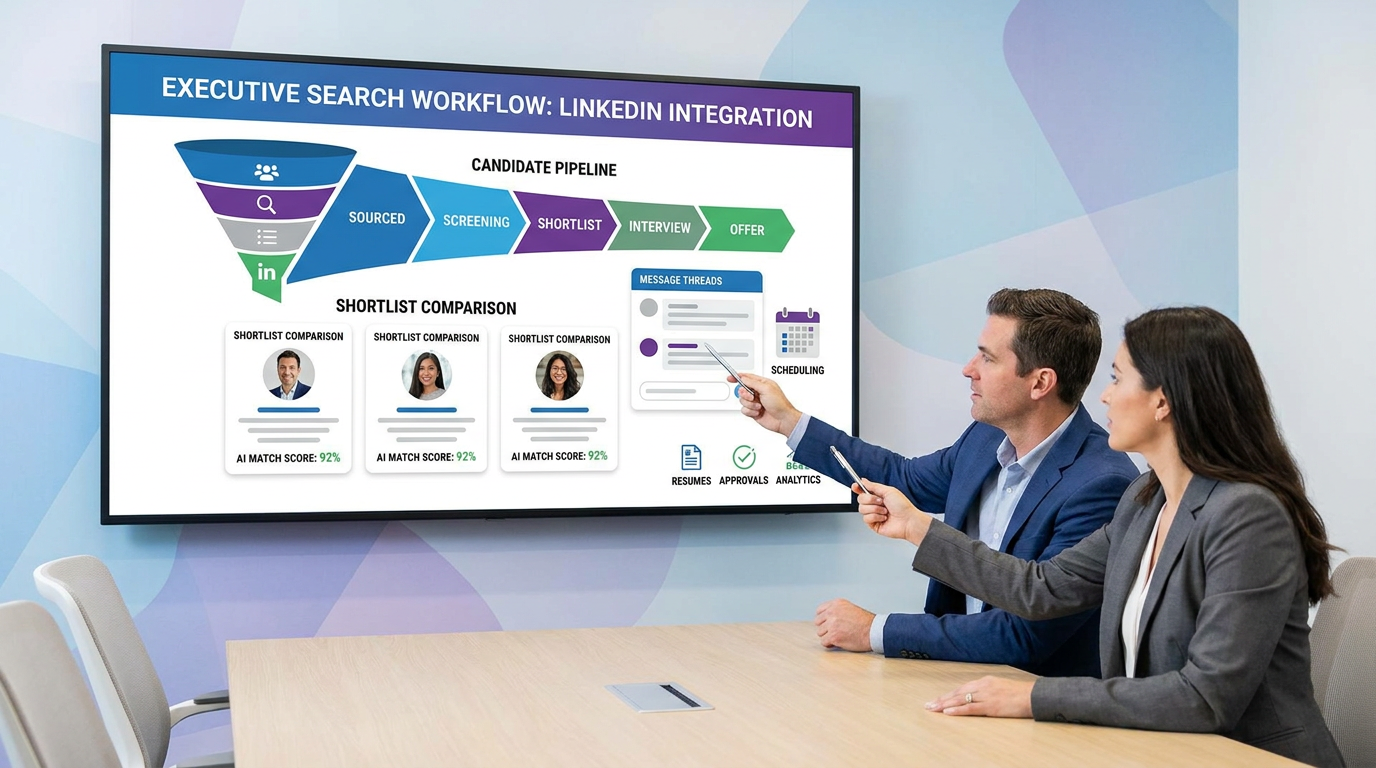
This article helps HR leaders judge recruiting software platforms to avoid stalled searches, lost context, and weak shortlists.
That matters most when the role is hard to fill and the stakes are visible. A delayed shortlist can leave revenue, finance, or operations leadership uncovered for weeks. A messy process creates another kind of damage: hiring managers lose confidence, candidates disengage, and internal recruiters end up chasing updates across inboxes, spreadsheets, calendars, and LinkedIn threads instead of moving the search forward.
That is also where AI-supported workflow can help if it stays in the right lane. In my own process, AI Recruiter is most useful for handling repetitive outreach, after-hours candidate replies, and collecting resumes or contact details from interested prospects, especially on LinkedIn-heavy searches. It can keep communication moving in multiple time zones and reduce dead air between touches, but the recruiter still owns final qualification, resume review, and the decision about who advances.
When a company opens a director or chief-level search, the first real question is rarely software. It is whether the team actually has the time, internal recruiting capacity, and search discipline to run that hire well on its own. In many organizations, especially smaller ones, executive hiring does not happen often enough to build a repeatable process. So the work starts manually: clarifying the brief, mapping the market, reaching out quietly, screening for leadership fit, and trying to keep the search confidential while the rest of the hiring workload continues.
The friction shows up fast in the handoffs. A recruiter sources and messages candidates, a hiring leader refines role expectations mid-search, interview feedback comes back unevenly, and the shortlist has to be compared not only on skills but on motivation, communication style, and organizational fit. That executive-search pattern is exactly why teams evaluating the best recruiting software, hiring software for small business, or the best recruiting software for small business should look beyond feature lists and ask a better question: can this system support a high-stakes search from intake to offer without losing context, confidentiality, or momentum?
Table of Contents
- Why recruiting software selection gets harder on high-stakes roles
- What recruiting software platforms should actually include
- A practical search-process view of recruiting software
- Quick comparison: what small teams should prioritize
- 10 best recruiting software platform fits to consider
- Applicant tracking system benefits that matter in real hiring
- Small-business hiring software vs agency recruiting tools
- How to choose the best recruiting software for small business
- Common selection mistakes
- FAQ
Why recruiting software selection gets harder on high-stakes roles
Not every hiring workflow exposes software weaknesses. Routine recruiting can survive with partial process and a lot of manual effort. Leadership hiring usually cannot. Once the role affects revenue, finance, operations, or team direction, the recruiting process has to hold more context: business goals, reporting lines, culture fit, compensation guardrails, stakeholder alignment, and careful communication with passive candidates.
That is why I often borrow a lesson from executive search when evaluating recruiting software platforms. The best systems are not just places to store applicants. They support a structured search: understanding the role deeply, sourcing against that brief, evaluating consistently, presenting a true shortlist, coordinating interviews, and keeping momentum through offer and transition.
Key takeaway: If a platform cannot support a disciplined search process for a difficult role, it usually will not improve everyday hiring for long either.
What recruiting software platforms should actually include
Recruiting software platforms are systems used to manage hiring from approved opening to signed offer. In most buying conversations, that means an ATS at the center, with additional workflow layers around it: job distribution, candidate communication, interview scheduling, analytics, approvals, and integrations.
A useful distinction is this: the ATS is the system of record, while broader recruiting software is the system that helps your team run the search around that record. For internal recruiters and HR teams, the practical issue is not terminology. It is whether the platform helps you organize the work that makes hiring succeed.
For small companies, the best recruiting software for small business usually combines ATS structure with low-friction setup, clear stages, and enough automation to save time without demanding a dedicated recruiting operations team.
- Core ATS functions: application capture, candidate records, pipeline stages, resume storage
- Workflow support: job posting, interview coordination, scorecards, approvals, offer steps
- Communication tools: templates, reminders, centralized messaging, candidate updates
- Visibility tools: reporting, source tracking, bottleneck analysis, hiring activity logs
- Connected systems: calendar, email, HRIS, onboarding, assessments
A practical search-process view of recruiting software
The reference point I find most useful comes from retained or executive-style hiring. Those searches typically follow a clear sequence: define the need, research and source the market, evaluate candidates against more than a resume, present a narrowed shortlist, run client or stakeholder interviews, then manage offer and onboarding follow-through. That sequence is helpful even for non-executive hiring because it reveals where software either helps or gets in the way.
1. Role definition and search intake
Before sourcing starts, the team needs a complete brief. Not just title and salary band, but reporting structure, business priorities, leadership expectations, and what success should look like in the role. Good software supports intake forms, approvals, and role-specific workflow templates so the search starts with real alignment.
2. Research, sourcing, and outreach
At this stage, speed matters, but so does consistency. Recruiters need a place to track who has been contacted, who replied, and what follow-up is required. On outreach-heavy searches, I have found StrategyBrain AI Recruiter helpful as a layer beside the ATS for repetitive LinkedIn tasks. It can introduce opportunities, keep conversations active outside working hours, and collect resumes from interested prospects, which is especially useful when the search depends on passive talent. The judgment call still belongs to the recruiter after reviewing the actual profile.
3. Candidate evaluation and shortlist quality
Executive-search discipline is useful here too. Shortlisting should not be based only on keyword match. The workflow should capture motivation, relevant experience, leadership style, communication quality, and likely fit with the organization. In software terms, that means structured scorecards, shared notes, and candidate records that preserve context instead of scattering it across messages.
4. Stakeholder interviews and decision-making
The real bottleneck in many teams is not sourcing. It is inconsistent feedback and slow interviewer response. The stronger recruiting software platforms make it easy for hiring managers to review candidates, submit feedback, and compare finalists on common criteria.
5. Offer, transition, and onboarding handoff
Good recruiting systems should keep momentum through offer approval, documentation, and handoff into onboarding. This matters in senior hiring because delays after selection can undo a search that was run well up to that point.
Quick comparison: what small teams should prioritize
When evaluating hiring software for small business, I would prioritize operational fit over feature count. Most small teams do not need enterprise depth everywhere. They need software that keeps a search organized, visible, and usable by people who are not full-time recruiters.
| Evaluation Area | Why It Matters | What SMB Teams Should Look For |
|---|---|---|
| Ease of use | Managers will avoid a system that feels heavy | Clear navigation, simple candidate stages, low training burden |
| Role intake | Bad alignment creates bad shortlists | Structured job kickoff, approval flow, role requirement templates |
| Job board syndication | Reduces manual posting work | Single-post distribution to multiple channels |
| Candidate pipeline | Keeps search activity visible | Custom stages, ownership clarity, drag-and-drop movement |
| Resume handling | Saves admin time | Parsing, searchable profiles, centralized files |
| Interview coordination | Prevents process delay | Calendar sync, reminders, self-scheduling where appropriate |
| Messaging | Improves candidate experience | Templates, activity history, timely updates |
| Analytics | Shows what is slowing the search | Time-to-fill, source tracking, stage conversion reporting |
| Integrations | Prevents duplicate work | HRIS, onboarding, calendar, email, communication tools |
| AI support | Should reduce repetitive work | Outreach, screening support, summaries, scheduling help with reviewable output |
10 best recruiting software platform fits to consider
Instead of ranking unnamed tools by hype, I prefer to organize the best recruiting software conversation around hiring realities. These are the most useful fit categories I see during evaluations.
1. Best for first-time ATS buyers
If the team is moving off spreadsheets or inbox-driven hiring, prioritize a platform that makes job posting, applicant review, and stage movement obvious from day one.
What to look for:
- Guided implementation
- Clean pipeline views
- Basic scorecards
- Reporting that does not need custom setup
2. Best for hiring software for small business with lean HR teams
Small HR teams need coverage across posting, pipeline management, communication, and offers without needing specialist support.
What to look for:
- Simple job distribution
- Resume parsing
- Email templates and reminders
- Offer workflow support
3. Best for founder-led companies hiring managers and leaders
When founders stay close to hiring decisions, software should preserve context and support decision-making, not just track applicants. Intake notes, stakeholder comments, and shortlist comparison tools matter more here than fancy dashboards.
What to look for:
- Structured hiring briefs
- Hiring team visibility
- Candidate comparison tools
- Clear approvals
4. Best for fast-growing companies
Growth adds complexity fast. The right platform should let you run different workflows by department without turning every opening into a custom project.
What to look for:
- Configurable pipelines
- Department-level workflows
- Funnel reporting
- HRIS or onboarding integrations
5. Best for high-volume recruiting
For recurring roles, throughput matters. Automation should move work along without hiding why candidates advanced or were rejected.
What to look for:
- Bulk actions
- Screening questions
- Stage triggers
- Fast scheduling tools
6. Best for collaborative hiring manager workflows
If the process slows down because hiring managers are inconsistent or late with feedback, collaboration design matters as much as ATS functionality.
What to look for:
- Interview kits or scorecards
- Reminder automation
- Shared comments by stage
- Approval flow before offer
7. Best for LinkedIn-heavy sourcing support
Some teams rely heavily on proactive outreach rather than inbound applications. In that case, the ATS alone may not be enough. This is one area where AI Recruiter can work alongside your core system. I have found it most practical when a role needs ongoing candidate contact outside normal hours, multilingual communication, or fast resume capture from interested passive talent. It does not replace recruiter judgment, but it can remove a large amount of repetitive front-end effort.
What to look for:
- Outreach tracking
- Resume collection workflow
- Centralized contact records
- A clean handoff from sourcing conversation to recruiter review
8. Best for candidate experience and employer brand basics
A clean career page, timely updates, and simple applications often matter more than companies expect.
What to look for:
- Branded job pages
- Mobile-friendly applications
- Status updates
- Interview confirmations
9. Best for analytics and process improvement
Reporting becomes useful when it helps the team answer why hiring is slow, not just how many applicants came in.
What to look for:
- Source quality tracking
- Stage conversion reports
- Time-in-stage visibility
- Simple exports for leadership
10. Best for simple, predictable operations
For many SMBs, the right answer is a stable ATS-first platform with a few strong automations and no unnecessary complexity.
What to look for:
- Clear plan structure
- Reliable core workflow
- Essential integrations
- Low admin overhead
Applicant tracking system benefits that matter in real hiring
Because many recruiting software platforms are ATS-led, it helps to be clear about the value. Recruiters do not need an ATS simply to collect applications. They need it to make hiring repeatable.
- Centralized candidate records: resumes, notes, feedback, and communication are kept in one place.
- Faster screening: parsing, filters, and pipeline structure reduce manual sorting.
- Better collaboration: recruiters, hiring managers, and HR share the same status view.
- Cleaner communication: templates, reminders, and activity history reduce candidate drop-off.
- More consistent evaluation: scorecards and stages create better process discipline.
- Stronger reporting: teams can see whether delays happen at sourcing, screening, interviews, or approvals.
These are the applicant tracking system benefits that matter most once hiring becomes more strategic or more frequent. They are also what prevent executive-search-style work from becoming dependent on memory and inbox archaeology.
Small-business hiring software vs agency recruiting tools
Many buyers get this wrong at the start. Internal hiring teams and agencies may both search for recruiting software, but they usually need different systems.
| Use Case | Primary Goal | Best-Fit Workflow |
|---|---|---|
| Small business internal hiring | Fill company roles efficiently | ATS-first process with posting, tracking, interviews, and offers |
| Agency or search recruiting | Manage clients and talent pipelines | Recruiter CRM, business development, multi-client workflow, talent redeployment |
If you are a founder, HR lead, or internal recruiter, avoid buying agency-style complexity unless client management is part of your actual process. The best recruiting software for small business is usually easier to adopt and easier for hiring managers to use well.
How to choose the best recruiting software for small business
My practical shortlist method is simple: choose software that supports the hiring process you really run, especially on hard roles, not the process a vendor demo implies you should run.
1. Map your current workflow from intake to offer
List each step: role approval, intake, sourcing, screening, interview scheduling, feedback collection, decision, offer. Note where confusion or delays actually happen.
2. Define the context needed for a good shortlist
This is the executive-search lesson many teams skip. A system should help you capture more than title and years of experience. It should support role success criteria, stakeholder expectations, communication quality, and fit considerations.
3. Separate must-haves from nice-to-haves
For most SMB teams, the essentials are job posting, candidate tracking, interview coordination, communication, and basic reporting. Everything else should earn its place.
4. Test with recruiters and hiring managers
If the recruiter can use it but the hiring manager avoids it, the process still breaks. Involve both groups in demos and trial tasks.
5. Review AI features skeptically
Useful AI should remove repetitive work, not create new oversight burden. For teams doing a lot of LinkedIn outreach, AI Recruiter conversations are a good example of where automation can help: initial contact, follow-up, and interest capture. The recruiter should still decide who is truly qualified after reviewing the resume and role fit.
6. Check integration and handoff quality
Confirm how the platform connects with your calendars, HRIS, onboarding tools, and communication stack. Weak handoffs create duplicate work and lost context.
7. Compare pricing for long-term predictability
Do not evaluate only the starting plan. Ask what changes as hiring volume, users, workflows, and reporting needs expand.
If you use this framework, you are much more likely to select hiring software for small business that improves recruiter output instead of adding another system to manage.
Common selection mistakes
Most mistakes I see are less about missing features and more about buying without process clarity.
- Buying for edge cases: advanced functionality gets purchased and then ignored.
- Ignoring stakeholder workflow: delayed manager feedback slows hiring more than weak sourcing tools in many teams.
- Confusing ATS needs with CRM needs: internal teams often overbuy.
- Overvaluing AI demos: automation only helps if it saves real recruiter time and keeps review transparent.
- Skipping intake discipline: software cannot fix a vague role definition or shifting stakeholder expectations.
- Forgetting confidentiality needs: some leadership searches require tighter visibility and more careful communication than standard recruiting flows.
In practice, the best recruiting software is rarely the one with the longest feature sheet. It is the one that keeps search quality high while reducing friction across sourcing, screening, interviews, and offers.
FAQ
What is recruiting software?
Recruiting software is technology used to manage hiring workflows, including job posting, applicant tracking, screening, interview scheduling, communication, and offer management. Most recruiting software platforms are built around an ATS and then expanded with workflow and reporting tools.
How is recruiting software different from ATS software?
An ATS is typically the core system for capturing and tracking applicants. Recruiting software is a broader category that may include the ATS plus sourcing, communication, scheduling, analytics, and onboarding connections.
What features matter most in hiring software for small business?
The most important features are ease of use, quick setup, candidate pipeline visibility, resume handling, interview scheduling, communication tools, and basic analytics. For small teams, simplicity and adoption matter more than feature volume.
What are the main applicant tracking system benefits?
The biggest benefits are centralized records, faster screening, better collaboration, cleaner communication, more consistent decision-making, and stronger reporting.
Are AI recruiting features worth it for small businesses?
They can be, if they reduce repetitive work without removing recruiter oversight. AI is most useful for outreach support, screening summaries, candidate matching assistance, and scheduling coordination.
Can AI Recruiter replace a recruiter?
No. Tools like AI Recruiter can automate front-end communication and resume collection in LinkedIn-driven workflows, but final qualification, judgment, and hiring decisions still belong to the recruiter and hiring team.
Which type of platform is easiest to use?
For most SMBs, ATS-first systems with clean pipelines, guided setup, and lightweight automation are easiest to adopt. The best recruiting software for small business is usually the tool your team can use consistently without heavy training.
Final take
If you are comparing recruiting software platforms, start with the process, not the product category. The executive-search lens is useful because it exposes what good software must support: a well-defined role, disciplined sourcing, consistent evaluation, stakeholder alignment, and steady momentum through offer.
For most internal teams, the right choice is not the most elaborate system. It is the platform that helps recruiters, HR, and hiring managers run a better search with less manual chasing and fewer blind spots. That is what usually separates effective hiring software for small business from software that looks impressive in a demo but slows down live hiring.














