


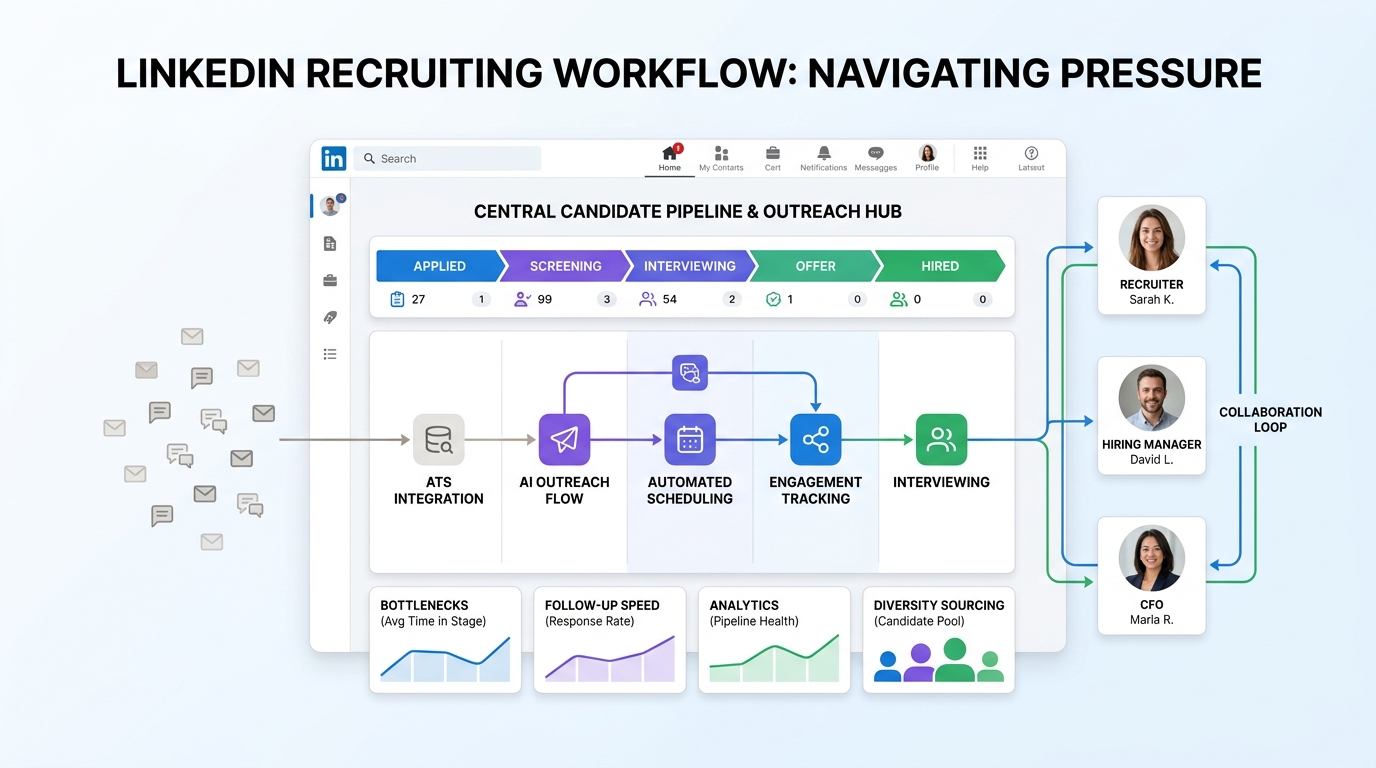
When urgent searches expose workflow gaps, this article helps recruiting leaders judge best recruiting tools by bottleneck fit to avoid slower hiring.
That matters because recruiting teams rarely shop for software in a calm moment. They do it when response times are slipping, candidate conversations are scattered across inboxes, hiring managers want updates that nobody can pull quickly, or a critical search suddenly needs more focus than a part-time workflow can realistically support. For a solo headhunter, that means lost follow-up and weaker candidate trust. For a small agency owner, it means fewer completed searches and more consultant overload. For an in-house recruiting lead, it means slower decisions, inconsistent records, and harder stakeholder alignment.
In my own outbound recruiting work, one of the most useful ways I have reduced that pressure is by pairing core recruiting software with StrategyBrain AI Recruiter for the front end of outreach. It helps handle repetitive LinkedIn connection requests, candidate messaging, and after-hours follow-up in multiple languages, while the recruiter still makes the final call on resume review, qualification, and whether to move a person into interview. That division of labor matters when speed is important but judgment still needs to stay human.
A good example comes from a hiring situation that looks simple on paper but becomes messy fast in practice: choosing the right type of finance leader during a period of pressure. When a business is deciding between an interim CFO and a fractional CFO, the issue is not just title or cost. The team needs someone who can enter the organization quickly, understand the financial problem, work across stakeholders, and start producing direction without a long ramp-up. In that kind of search, the recruiter is not just filling a req. They are tracking urgency, managing conversations with candidates who want different engagement models, logging stakeholder concerns, and keeping the process moving while the company decides what kind of help it actually needs.
If those candidate conversations, status updates, and follow-ups live in separate places, the search slows down at exactly the wrong time. A recruiter may be checking the requisition, replying to a LinkedIn message from one CFO profile, updating another candidate stage by hand, and reminding the client or hiring manager why a dedicated interim leader can solve an immediate problem faster than a part-time advisor. That is why this topic is really about the best recruiting software, not just software in the abstract. When teams search for the best recruiting tools or compare the top 10 recruiting tools, they are often trying to support high-stakes decisions like this with better tracking, better outreach, stronger analytics, and more disciplined diversity sourcing.
- Why Recruiting Software Decisions Usually Start With Urgency
- Recruiting Software vs. ATS: What Actually Changes Day to Day?
- Quick Comparison: Top 10 Recruiting Tools Categories
- Top 10 Recruiting Tools by Hiring Situation
- The Decision Criteria Experienced Recruiters Use
- How to Evaluate Diversity Sourcing in Real Workflows
- My Experience Using AI Recruiter Alongside Core Recruiting Software
- How to Choose by Team Size and Search Complexity
- Common Buying Mistakes That Slow Hiring
- A Practical Buyer Checklist
- FAQ
Why Recruiting Software Decisions Usually Start With Urgency
Most software evaluations in recruiting begin after a process starts breaking under pressure. A confidential executive search, a high-volume hiring push, a hard-to-fill technical role, or a business-critical leadership gap can expose weaknesses that were easy to ignore before. The lesson from the interim-versus-fractional CFO decision is useful here: when the problem is immediate, the team values focus, speed, low ramp time, and clear accountability more than abstract flexibility.
The same logic applies to recruiting software. Buyers often think they are comparing feature sets, but in reality they are asking a more practical question: which system helps the recruiting team move faster with fewer handoff failures? The best recruiting tools are the ones that support immediate execution while still preserving clean records, collaboration, and long-term reporting.
That is why mature teams do not just ask whether a platform is powerful. They ask whether it can support short-term urgency without creating long-term process debt. If your recruiters need to move now, software that demands too much setup, too much switching, or too much manual logging can create the same kind of drag that a lightly committed advisor creates in a business crisis.
Recruiting Software vs. ATS: What Actually Changes Day to Day?
Recruiting software is a broad category that includes sourcing, outreach, applicant tracking, CRM functions, interview workflow, analytics, and onboarding handoff. An ATS is usually the system of record inside that larger stack. It holds candidate data, job records, stages, notes, and collaboration history.
That distinction matters because buyers searching for the best recruiting software are usually not looking for recordkeeping alone. They want a system that supports the whole flow from first outreach to final handoff. In practical terms, the ATS gives you control, visibility, and consistency. The wider recruiting platform adds sourcing reach, automation, communication support, analytics, and coordination.
Experienced recruiters tend to feel this difference most sharply during searches that require strong focus. If a leadership search demands fast outreach and quick alignment, a basic ATS may document the work but not accelerate it. If a sourcing tool drives responses but does not connect well to the underlying process, recruiters still lose time reconciling records. The best recruiting tools close that gap between action and documentation.
Quick Comparison: Top 10 Recruiting Tools Categories
People who search for top 10 recruiting tools are usually trying to reduce market noise. A more useful starting point is to compare categories based on the hiring situation they handle best.
| Rank | Tool Category | Best For | Main Strength | Main Risk |
|---|---|---|---|---|
| 1 | All-in-one recruiting platform | Teams wanting sourcing, ATS, and analytics in one place | End-to-end visibility | Can require more setup and change management |
| 2 | ATS-first platform | Internal teams needing process discipline | Workflow control and auditability | May feel limited for proactive outbound work |
| 3 | Sourcing-focused platform | Headhunters and outbound recruiters | Search depth and outreach efficiency | Usually needs a stronger system of record beside it |
| 4 | AI-supported outreach tool | Lean teams handling repetitive top-of-funnel tasks | Message volume and follow-up continuity | Still requires recruiter review and decision-making |
| 5 | Diversity sourcing platform | Organizations with measurable representation goals | Inclusive outreach and funnel visibility | Can underdeliver if reporting is disconnected from ATS data |
| 6 | Interview workflow tool | Teams losing time after screening | Scheduling and stakeholder coordination | Limited value if used as a stand-alone fix |
| 7 | Recruitment CRM | Pipeline nurturing and candidate rediscovery | Relationship continuity | Depends on recruiter discipline |
| 8 | Analytics-first recruiting suite | Ops-led TA teams | Decision support and reporting | Only as good as data hygiene |
| 9 | Agency recruiting software | Multi-client search firms | Speed across roles and accounts | Internal HR workflows may be weaker |
| 10 | SMB hiring platform | Smaller employers needing simplicity | Faster adoption | May not scale well for complex hiring models |
The practical takeaway is simple: the best recruiting tools are rarely the ones with the most features. They are the ones that fit the urgency, search model, and collaboration pattern of your hiring work.
Top 10 Recruiting Tools by Hiring Situation
Below is a vendor-neutral way to think about the top 10 recruiting tools categories worth shortlisting.
1. All-in-one recruiting platforms for end-to-end control
These are often the best fit when your team wants sourcing, applicant tracking, reporting, and handoff in one environment. They reduce context-switching and make it easier to see where a search is stalling.
2. ATS-led software for structured, compliance-heavy hiring
If your organization needs clean approvals, documented stages, and consistent hiring manager collaboration, ATS-first software can be the operational anchor. This is often where process stability improves first.
3. Sourcing platforms for proactive search work
For headhunters and outbound teams, sourcing software deserves a high place on any best recruiting tools shortlist. The key value is not just finding profiles but managing search logic, outreach cadence, and response flow efficiently.
4. AI-supported recruiting tools for repetitive outreach
This category helps lean teams keep candidate conversations moving when recruiters cannot manually respond around the clock. The strongest use case is top-of-funnel communication support, not blind replacement of recruiter judgment.
5. Diversity sourcing software for measurable pipeline improvement
Diversity sourcing works best when the platform supports structured outreach, visibility into pipeline progression, and practical reporting that leadership can actually use.
6. Interview coordination tools for post-screening speed
Once candidates are interested, scheduling and feedback collection often become the next bottleneck. Strong coordination tools help protect candidate experience and keep internal stakeholders accountable.
7. Recruitment CRM tools for long-cycle relationship building
CRM-style tools are useful when talent communities, silver-medalist pipelines, and repeat searches matter. They help recruiters preserve hard-won sourcing effort.
8. Analytics platforms for bottleneck diagnosis
When leadership asks why searches take too long or which channels convert best, analytics-focused software turns activity into decision support. But it only works with agreed definitions and data discipline.
9. Agency systems for multi-client execution
Agency recruiters typically need fast movement across clients, roles, and candidate submissions. Software in this category should support speed, communication history, and account-level organization.
10. Simpler hiring platforms for small teams
Smaller employers may not need broad complexity. In many cases, a lighter platform with solid workflow basics is a better decision than a feature-heavy system that never gets adopted.
The Decision Criteria Experienced Recruiters Use
The interim-versus-fractional CFO comparison offers a useful editorial frame for software selection because it highlights five criteria that recruiters also use when judging tools: focus, speed to value, objectivity, flexibility, and depth of engagement.
1. How quickly can the tool become useful?
Software should not require a heroic implementation just to support obvious recruiting work. If your team has an urgent search problem, long ramp time is a real cost.
2. Does it support focused execution?
A platform that tries to do everything but handles your current bottleneck poorly can be less valuable than a narrower tool that addresses the exact pressure point.
3. Does it improve decision quality, not just activity volume?
Good tools create cleaner records, better comparisons, more timely follow-up, and more reliable reporting. They should help recruiters and hiring managers make better calls.
4. How adaptable is the engagement model?
Some teams need software for a fast-scaling phase. Others need it for steady-state process control. Buyers should evaluate whether the tool can support the current problem without locking them into unnecessary complexity.
5. What is the cost of weak integration?
A point solution may look efficient until recruiters need to re-enter notes, copy candidate history, or rebuild stage data elsewhere. That hidden friction often decides whether a tool becomes loved or avoided.
Practical takeaway: When a search is urgent, the best recruiting software behaves more like a focused operator than a loosely connected feature library.
How to Evaluate Diversity Sourcing in Real Workflows
Diversity sourcing should be evaluated as an operating capability, not a marketing line. The right platform should help recruiters build broader pipelines, structure outreach consistently, and see where candidates from underrepresented groups are entering, advancing, or dropping out of the funnel.
When reviewing software, ask whether it supports:
- Structured outreach plans instead of ad hoc messaging
- Clear visibility into sourcing channels and conversion stages
- Consistent evaluation steps that reduce avoidable bias
- Reporting that connects sourcing activity to actual funnel movement
- Shared accountability across recruiters, hiring managers, and leadership
In practice, this matters most when hiring decisions are ambiguous. A leadership search, for example, often involves subjective debate about readiness, scope, and fit. Without strong software support, diversity sourcing goals can disappear behind speed pressure and informal communication. The best recruiting tools make that tradeoff more visible and easier to manage.
My Experience Using AI Recruiter Alongside Core Recruiting Software
I would not treat AI-supported outreach as a replacement for a real recruiting process, but I have found it useful when paired with a solid ATS or recruiting platform. In outbound work, the first breakdown often happens before formal screening: candidates reply late, follow-up timing becomes inconsistent, and recruiters lose hours on repetitive LinkedIn communication. Using AI Recruiter helped me keep those early conversations moving without turning every evening into message cleanup.
The parts that mattered most in practice were not broad claims. They were specific workflow benefits: automatic LinkedIn connection and role introduction, 24/7 candidate replies across time zones, and resume or contact capture once a candidate expressed interest. For multilingual or geographically spread searches, that helped reduce lag between outreach and recruiter review. Just as important, it did not remove recruiter accountability. I still reviewed the resume, judged relevance, and decided whether the candidate should move forward.
That makes this kind of tool most useful in scenarios where the bottleneck is response management rather than final assessment. If you want to see how the workflow is framed, the product overview and the public conversation examples are the most relevant starting points. For teams that rely heavily on LinkedIn outreach, it can work as a practical layer inside a broader recruiting stack rather than as a stand-alone replacement for the best recruiting software.
How to Choose by Team Size and Search Complexity
For solo recruiters and small agencies
Keep the stack simple. You need fast setup, strong search organization, dependable follow-up, and enough tracking to avoid losing candidate history. If LinkedIn outreach is central, AI-supported messaging can add leverage without requiring more headcount.
For mid-market in-house teams
Balance control and flexibility. At this stage, you often need more than applicant tracking but not full enterprise complexity. Look for sourcing support, reporting clarity, and easy hiring manager collaboration.
For enterprise talent teams
Governance, integrations, analytics, and role-based workflows matter more. You are not just solving for recruiter productivity; you are standardizing how decisions get made across many stakeholders.
For executive and specialist searches
Weight sourcing depth, CRM continuity, communication records, and stakeholder alignment heavily. These searches often resemble the interim-versus-fractional choice: the client is assessing urgency, scope, and impact at the same time.
For high-volume hiring
Prioritize automation, scheduling, response handling, and stage hygiene. Small improvements in repetitive tasks create the biggest gains here.
Common Buying Mistakes That Slow Hiring
- Buying for the demo, not the daily workflow: Attractive screens do not guarantee recruiter adoption.
- Ignoring ramp time: A powerful system that becomes useful too late can still be the wrong choice.
- Treating sourcing and tracking as separate problems: Fragmentation is one of the biggest hidden costs in recruiting operations.
- Overlooking diversity sourcing execution: If inclusive outreach and reporting are weak, the platform will not support real progress.
- Assuming AI removes the need for judgment: Automation can accelerate communication, but recruiter review still decides quality.
- Skipping stakeholder-fit questions: Hiring managers, recruiters, and ops teams all need the system to work in practice.
The best recruiting tools usually win because they remove friction at the point where a search would otherwise stall. That may be sourcing, response management, interview coordination, or reporting discipline.
A Practical Buyer Checklist
- Identify the real bottleneck. Is the problem outreach, applicant tracking, hiring manager follow-through, analytics, or handoff?
- Separate urgent needs from future-state wants. Buy for the next phase of hiring maturity, not just the next flashy feature.
- Test workflow depth. Can recruiters search, communicate, document, and move candidates without workarounds?
- Review diversity sourcing support. Can the system make inclusive pipeline building measurable and repeatable?
- Check integration effort. What must be duplicated manually if this tool sits beside your ATS or CRM?
- Clarify human decision points. If automation is involved, who still owns qualification, resume review, and final movement?
- Evaluate adoption honestly. The right software is the one your team will use consistently under pressure.
FAQ
What is the best recruiting software for most teams?
There is no single best option for every employer or agency. The best recruiting software depends on where your workflow breaks first. Some teams need stronger ATS control, while others need better sourcing, communication support, analytics, or diversity sourcing visibility.
How is recruiting software different from an ATS?
An ATS is usually the system that tracks candidate records, stages, and hiring activity. Recruiting software is broader and can include sourcing, CRM functions, automation, AI support, interview coordination, and reporting.
Why do people search for top 10 recruiting tools?
Usually because they want to reduce a crowded market quickly. A better approach is to compare the top 10 recruiting tools by hiring situation and workflow fit instead of by feature count alone.
Can AI tools replace recruiters?
No. AI can help with repetitive outreach, response handling, and early workflow support, but recruiters still need to review resumes, assess fit, manage stakeholders, and make final decisions.
What should I look for in diversity sourcing software?
Look for structured outreach, stage-level reporting, visibility into conversion, and workflows that support fairer and more consistent evaluation. Good diversity sourcing support should show up in daily execution, not just in marketing language.
Final Thoughts
The most useful lesson from urgent leadership hiring is that focus often creates more value than loose flexibility. The same is true when evaluating the best recruiting software. If your team is trying to solve a real hiring bottleneck, the winning system is the one that helps recruiters act faster, document better, and keep decisions clear under pressure.
That is why the best recruiting tools are rarely chosen by feature count alone. They are chosen by workflow fit, ramp speed, communication quality, reporting trust, and whether they support practical needs like diversity sourcing and outbound follow-up. If you approach the market that way, a search for the top 10 recruiting tools becomes much more useful and much less noisy.















