


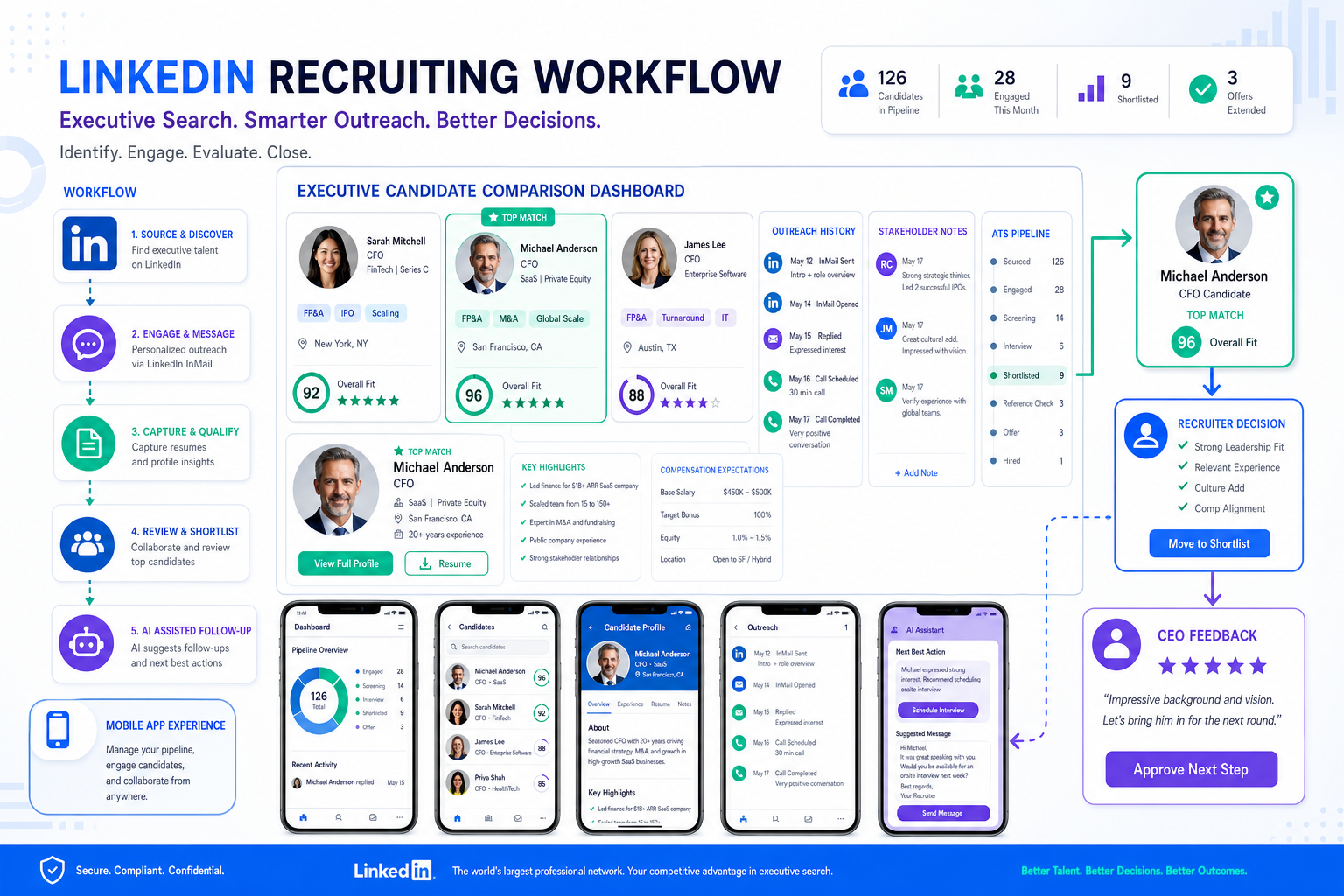
When leadership searches stall, this article helps recruiters compare the best recruitment apps to keep context intact and avoid slower shortlists.
That matters most when the search is not for a generic hire but for a business-critical leader. A retained recruiter working a finance search, a small agency owner covering multiple clients, or an internal talent lead supporting a CEO all run into the same problem: candidate information, stakeholder comments, outreach history, and next-step decisions get scattered. The result is slower shortlists, weaker candidate experience, missed follow-up, and too much time spent reconstructing what happened instead of advancing the search.
In my own workflow, tools that reduced this friction were the ones that handled repetitive LinkedIn outreach and after-hours candidate replies without removing recruiter judgment. StrategyBrain AI Recruiter stood out for three reasons that fit this exact problem: it can automate initial LinkedIn outreach, keep candidate conversations moving across time zones, and collect resumes and contact details from interested prospects. The recruiter still reviews the resume, decides whether the profile really fits the brief, and owns the next step, which is exactly how it should be.
A useful way to see the software question is to start from a familiar executive-search moment. When recruiters assess a CFO candidate, the resume cannot just list responsibilities. It has to show leadership, strategic judgment, stakeholder management, cost discipline, operational improvement, and in many cases enough technology fluency to work across finance and systems. Before a recruiter even presents a profile, they are usually checking whether the candidate’s professional brand matches the role, whether their core strengths are clear, and whether specific achievements actually support the story.
That work quickly turns operational. You review a LinkedIn reply, compare it to the role brief, pull up an older note about capital planning experience, message the candidate for a resume, and then log what the CEO cares about most before sending the profile forward. If those actions live across inboxes, spreadsheets, browser tabs, and memory, the search slows down. That is why choosing the best recruiting software is not really about feature theater. It is about whether the system supports high-judgment recruiting work, especially when you need a strong applicant tracking structure, a usable mobile recruitment app, and a realistic way to compare the top 10 recruiting apps by actual workflow fit.
Table of Contents
- Why the Best Recruitment Apps Need More Than Basic ATS Features
- A Better Evaluation Lens for Recruiting Software
- Quick Comparison Table
- Top 10 Recruiting Apps by Use Case
- What a Mobile Recruitment App Should Actually Let Recruiters Do
- Why ATS Discipline Still Matters
- Using AI Support in a Recruiter-Led LinkedIn Workflow
- How to Choose the Right Platform
- Common Buying Mistakes
- FAQ
- Conclusion
Why the Best Recruitment Apps Need More Than Basic ATS Features
When people search for the best recruitment apps, they often start with a software checklist. In practice, experienced recruiters usually start somewhere else: what kind of judgment does this search require, how many stakeholders are involved, and how easily can the team preserve context while moving quickly?
That distinction matters in senior hiring. A recruiter evaluating a CFO profile is not only asking whether the candidate has managed budgets. They are asking whether the candidate has acted as a strategic advisor, improved operations, managed stakeholders, found savings opportunities, influenced long-term planning, and adapted to wider business or technology responsibilities. The software that supports this work needs to keep evidence, communication, and decision history in one place.
So the best recruiting software is usually the platform that combines workflow control with enough flexibility for nuanced hiring. It should support sourcing, CRM-style relationship management, applicant tracking, interview coordination, internal feedback, and reporting without forcing recruiters to rebuild context from scratch every time a profile moves.
A Better Evaluation Lens for Recruiting Software
The reference point I use is simple: if the software cannot help a recruiter evaluate a high-stakes profile clearly, it will probably underperform on day-to-day hiring as well. That means judging platforms through three practical lenses.
1. Can the system help you assess professional brand, not just keywords?
Strong recruiters do not just match resumes to job titles. They test whether a candidate’s story is credible. In senior finance hiring, for example, that can mean checking whether claims about stakeholder leadership, process standardization, performance management, or cost control are supported by real achievements. The best systems make it easy to keep resumes, outreach, notes, and stakeholder comments connected.
2. Can it preserve areas of expertise and role alignment?
One lesson from executive hiring is that candidates are strongest when their expertise is clearly framed. Recruiters need software that helps them tag strengths, compare profiles against a brief, and document why a candidate is being advanced. If that logic stays trapped in individual recruiter memory, handoffs break down.
3. Can it capture scope, outcomes, and supporting detail fast enough to matter?
The best tools help teams record achievements, feedback, and next steps while work is happening. That is where a strong mobile recruitment app becomes useful. If a recruiter screens a candidate between meetings or after an executive call, they should be able to log a note, update stage, and send a message immediately.
Key insight: Good recruiting software does not replace recruiter judgment; it protects it from getting lost between sourcing, feedback, and follow-up.
Quick Comparison Table
| Category | Best Fit | What to Look For | Why It Matters |
|---|---|---|---|
| Small team recruiting software | Lean internal HR teams or boutique agencies | Fast setup, clear pipeline views, simple notes, scheduling, light automation | Keeps execution tight when the same recruiter handles sourcing, screening, and client updates |
| Agency recruiting software | Contingent and retained search firms | CRM depth, talent pooling, search notes, submittal workflow, LinkedIn support | Helps preserve candidate context across multiple live searches |
| Enterprise recruiting platform | Large TA functions | Approvals, permissions, structured interviews, analytics, audit history | Supports consistency and governance across larger teams |
| Mobile recruitment app | Recruiters working on the go | Native app, messaging, scheduling, note capture, stage updates | Lets recruiters act in real time rather than wait to get back to desktop |
| ATS-first platform | Teams needing process control | Stage management, scorecards, reporting, collaboration history | Delivers the everyday applicant tracking system benefits that keep pipelines reliable |
Top 10 Recruiting Apps by Use Case
If you are comparing the top 10 recruiting apps, it is more useful to rank them by hiring context than to hunt for one universal winner. Here is a recruiter-friendly way to think about the categories.
1. Best for Small Teams
Small teams need low admin overhead and clear visibility. The right tool should make it easy to review candidates, move stages, collect hiring-manager input, and close loops quickly. In this setting, the best recruitment apps are usually the ones with the shortest path between recruiter action and updated records.
2. Best for Agency Recruiters
Agency work depends on relationship memory. Recruiters need a system that remembers prior outreach, candidate interest, role history, and client-side feedback. The strongest platform here blends ATS discipline with CRM-style flexibility.
3. Best for Enterprise Teams
Enterprise hiring needs stronger controls: approvals, permissions, scorecards, and consistent reporting. This is where the advantages of applicant tracking system design become obvious. A visible process reduces drift between business units and stakeholders.
4. Best for Executive and Specialist Hiring
Senior searches demand more context than volume hiring. Recruiters need room to document strategic strengths, leadership themes, stakeholder management capability, and role alignment. If your team works senior finance, operations, or leadership roles, prioritize systems that support nuanced notes and easy profile comparison.
5. Best for High-Volume Hiring
At scale, speed matters on both sides: candidate apply flow and recruiter review flow. The right platform reduces friction for applicants while keeping the recruiter’s screening and scheduling workload manageable.
6. Best for Hiring-Manager Visibility
Some teams mainly need a tool that keeps managers engaged. Structured feedback, accessible candidate summaries, and easy mobile review options matter more than feature depth that managers will never use.
7. Best for Recruiters in the Field
This is where the mobile recruitment app question becomes central. Event recruiters, agency consultants, and internal teams moving between offices need more than mobile notifications. They need to review, message, and update records from a phone.
8. Best for Workflow Automation
Automation helps with reminders, outreach, status changes, and follow-up prompts. The best use of automation is not replacing recruiter judgment. It is clearing repetitive steps so judgment can happen earlier and more consistently.
9. Best for Reporting and Search Reviews
Strong reporting helps recruiters explain progress, spot bottlenecks, and manage stakeholder expectations. For retained or high-stakes searches, the value is often simple: clear visibility into where each candidate stands and what is blocking movement.
10. Best All-Around Choice
The best all-around option usually combines ATS structure, relationship management, mobile usability, and enough flexibility to handle both straightforward roles and nuanced searches. That balance matters more than extreme feature count.
What a Mobile Recruitment App Should Actually Let Recruiters Do
A good mobile recruitment app should support meaningful work, not just passive checking. In recruiter terms, that means the phone experience should handle the actions that otherwise cause delays.
- Open candidate records quickly: resume, profile, notes, and stage history should be easy to review.
- Log screening notes immediately: especially after candidate calls or stakeholder discussions.
- Send or reply to messages: communication should not wait for desktop if the next step is obvious.
- Update stages on the spot: pipeline hygiene matters most when decisions are moving fast.
- Coordinate interviews: recruiters should be able to confirm timing and next steps without extra admin loops.
When I test mobile usability, I use a practical sequence: open a candidate record, compare it with the role brief, leave a note, send a follow-up, and update status. If that workflow feels clumsy, the app is not helping the recruiter do real work.
This matters even more in executive and specialist searches. If you are assessing whether a candidate has the right strategic and functional profile, your note-taking discipline is part of your judgment quality. A weak mobile workflow increases the odds that key details stay in memory too long or never make it into the system.
Why ATS Discipline Still Matters
Even when teams begin by searching for the best recruiting software, the core platform still needs to function as a strong applicant tracking system for recruiters. That is what turns sourcing, screening, and stakeholder feedback into a traceable hiring process.
The most important applicant tracking system benefits are practical:
- Pipeline visibility: everyone can see where candidates stand.
- Process consistency: recruiters and hiring managers work against the same stages and expectations.
- Feedback capture: comments and decisions stay attached to the record instead of disappearing into inboxes.
- Stronger handoffs: searches are less vulnerable when multiple recruiters or stakeholders are involved.
- Better decision memory: useful in long searches, confidential roles, and executive hiring.
These are the everyday advantages of applicant tracking system design that matter far more than marketing claims. In real recruiting teams, software wins by making ordinary actions easier to complete and easier to trust later.
Using AI Support in a Recruiter-Led LinkedIn Workflow
Because many searches begin on LinkedIn, part of the software conversation is really about how much repetitive work should sit with the recruiter and how much can be system-supported. My own view is straightforward: outreach, follow-up, and interest checking can be helped by automation, but shortlist judgment should remain with the recruiter.
That is where I found AI Recruiter useful in a narrow, practical sense. For searches where response timing matters, it helped keep candidate conversations moving after hours, introduced opportunities to prospects who matched the search direction, and captured resumes or contact details from people who wanted to continue. I still had to review every profile myself, especially for roles where leadership brand, stakeholder influence, and scope of achievement mattered more than title similarity.
For agency recruiters and in-house teams using LinkedIn heavily, that kind of support can reduce the dead time between outreach and actual screening. If you want to understand how that workflow is framed, the product pages on StrategyBrain and the detailed recruiter page at this link explain the outreach and resume-collection model clearly. The important operational point is that the recruiter remains the final evaluator of fit.
I would not treat AI support as a replacement for the ATS or for recruiting judgment. I would treat it as a complement to the best recruiting software stack when your team spends too much time on repetitive LinkedIn activity and not enough time on candidate assessment, stakeholder alignment, and shortlist quality.
How to Choose the Right Platform
If you are selecting among the best recruitment apps, use a workflow test rather than a feature checklist.
1. Define the searches you actually run
A tool that works for hourly hiring may not work for executive or specialist roles. Start with your real mix of volume, complexity, and stakeholder involvement.
2. Evaluate how the system handles candidate narrative
Can recruiters record why a candidate looks strong, not just that they applied? This matters in any role where leadership, domain depth, or strategic capability must be proven.
3. Test desktop and mobile together
The right mobile recruitment app should support note-taking, messaging, and stage changes from a phone without slowing the recruiter down.
4. Check collaboration quality
Hiring-manager feedback, internal comments, and search updates should be easy to capture in one place. If the team keeps reverting to email chains, the software is underperforming.
5. Decide where automation belongs
Separate repetitive communication tasks from final evaluation tasks. If your team relies heavily on LinkedIn sourcing, recruiter-led use of AI-supported outreach tools may complement your main ATS workflow.
6. Run a scenario-based demo
Use a realistic case: source a candidate, log why their background aligns with the role, send a follow-up, collect a resume, share the profile internally, and update the next step from mobile. That tells you more than a polished demo ever will.
Common Buying Mistakes
- Confusing candidate mobile apply with recruiter mobile usability
They solve different problems. Test both separately.
- Buying for feature count instead of judgment support
The best platform often has fewer distractions and better workflow continuity.
- Ignoring stakeholder alignment
In senior searches, scattered feedback weakens decision quality.
- Assuming automation can replace recruiter evaluation
Automation may help with outreach and follow-up, but fit assessment still belongs with the recruiter.
- Skipping LinkedIn workflow review
If your team sources heavily on LinkedIn, test how outreach, reply handling, and resume capture fit with the rest of your stack.
FAQ
What is the best recruiting software for executive or specialist roles?
The best fit is usually software that combines ATS structure with strong notes, collaboration, and candidate history. For executive or specialist searches, recruiters need room to document leadership profile, stakeholder skills, business impact, and role alignment, not just resume keywords.
How is a mobile recruitment app different from an ATS?
A mobile recruitment app is the phone-based user experience, while an ATS is the system that tracks candidates through the process. You need both. A strong ATS with weak mobile execution often leads to outdated records and delayed follow-up.
What features matter most in the best recruitment apps?
The most useful features are candidate review, messaging, scheduling, note capture, pipeline updates, feedback collection, and reporting. For many teams, the real value comes from combining those functions into one recruiter-friendly workflow.
Can AI help with LinkedIn recruiting without replacing recruiters?
Yes. AI-supported tools can help automate first-touch outreach, keep candidate communication moving, and collect resumes or contact details from interested prospects. Recruiters should still review resumes and decide who advances.
What are the biggest applicant tracking system benefits?
The biggest benefits are visibility, consistency, cleaner collaboration, and better record-keeping. Those outcomes matter most when hiring involves multiple stakeholders or longer search cycles.
How should I compare the top 10 recruiting apps?
Compare them by use case: small teams, agency work, enterprise hiring, executive search, high-volume hiring, mobile needs, and workflow automation. The best choice depends on how your team actually recruits.
Conclusion
The search for the best recruitment apps is really a search for software that protects recruiter judgment while reducing admin drag. That becomes especially clear in higher-stakes searches, where candidate brand, role alignment, stakeholder feedback, and speed all matter at once.
The best recruiting software should help your team capture context, move candidates forward reliably, and support real work on desktop and mobile. If LinkedIn outreach is a major part of your process, recruiter-led use of tools such as StrategyBrain AI Recruiter can also help by handling repetitive first-touch communication while leaving resume evaluation and final decisions where they belong: with the recruiter.
Choose the platform that fits your workflow, not the one with the loudest demo. In most teams, that means a strong ATS foundation, a practical mobile recruitment app, and a clear understanding of where automation helps and where human judgment must stay in control.















