


This article helps recruiters judge how to find recruiters on LinkedIn with better filters, timing, and fit to avoid wasted outreach.
That matters because weak recruiter search does more than waste a few messages. It creates missed introductions, low-response outreach, duplicate effort across team members, and a poor handoff between sourcing, follow-up, and final screening. For a solo recruiter, that means more manual chasing after hours. For a small agency owner, it means billable time gets buried under admin. For an in-house talent team, it means slower hiring conversations and weaker stakeholder confidence.
In my own LinkedIn-heavy workflows, I have found that StrategyBrain AI Recruiter is most useful when the real problem is not finding names, but keeping conversations moving once the right names are found. Its strongest support in this situation is automated first-touch LinkedIn outreach, 24/7 reply handling across time zones, and résumé/contact capture from interested candidates. The recruiter still makes the final judgment on fit, reviews the résumé, and decides who moves forward, but the repetitive front-end work stops swallowing the day.
The opening problem looks a lot like a promotion conversation. A finance professional starts thinking about next steps when a new season resets goals, routines, and career expectations. They do not simply want a bigger title; they weigh motivation, timing, responsibility, and whether they are actually ready for manager-level work. Before they speak up, they begin doing the groundwork: taking on more responsibility, sharpening the right skills, asking for feedback, and keeping track of measurable wins they can present when the moment comes.
Now place that same judgment on the recruiter's side of LinkedIn. When someone tries to get recruiters LinkedIn users will actually trust and answer, the challenge is not just locating people with "recruiter" in the headline. It is finding the recruiter whose function, geography, timing, and decision scope match the opportunity or candidate in front of you. That is why this article starts with motivation, preparation, and timing before it moves into search filters, outreach discipline, recruiter relevance, and the real ROI behind better LinkedIn recruiter search.
Table of Contents
- Why ROI starts before the search itself
- How to find recruiters on LinkedIn step by step
- What to prepare before you contact a recruiter
- The LinkedIn filters that improve recruiter search
- How to judge whether a recruiter is worth contacting
- Where workflow support and automation improve ROI
- LinkedIn recruiting tools: practical comparison
- Common mistakes that hurt response and ROI
- FAQ
Why ROI starts before the search itself
One of the most useful lessons from promotion planning is that motivation shapes process. The same applies here. Before you ask how to search for recruiters on LinkedIn, decide what outcome you want. Are you a candidate looking for an internal recruiter at a target employer? Are you a recruiter mapping agency contacts in a niche? Are you an HR leader trying to benchmark market coverage or identify specialist search partners?
If you skip that step, LinkedIn search becomes noisy very quickly. You may contact the wrong recruiter type, message people outside the hiring chain, or over-prioritize profile volume over role relevance. In practical recruiting terms, that creates poor response quality, thin trust, and avoidable process drag.
ROI improves when the objective is clear from the start. Just as someone seeking a promotion should know whether they really want higher-level responsibility, a recruiter using LinkedIn should know whether they need direct hiring ownership, market intelligence, referrals, or candidate access. Clarity makes every later choice better: search terms, filters, shortlist quality, follow-up pace, and outreach tone.
Key insight: Better LinkedIn recruiter search is usually the result of better pre-search thinking, not better typing speed.
How to find recruiters on LinkedIn step by step
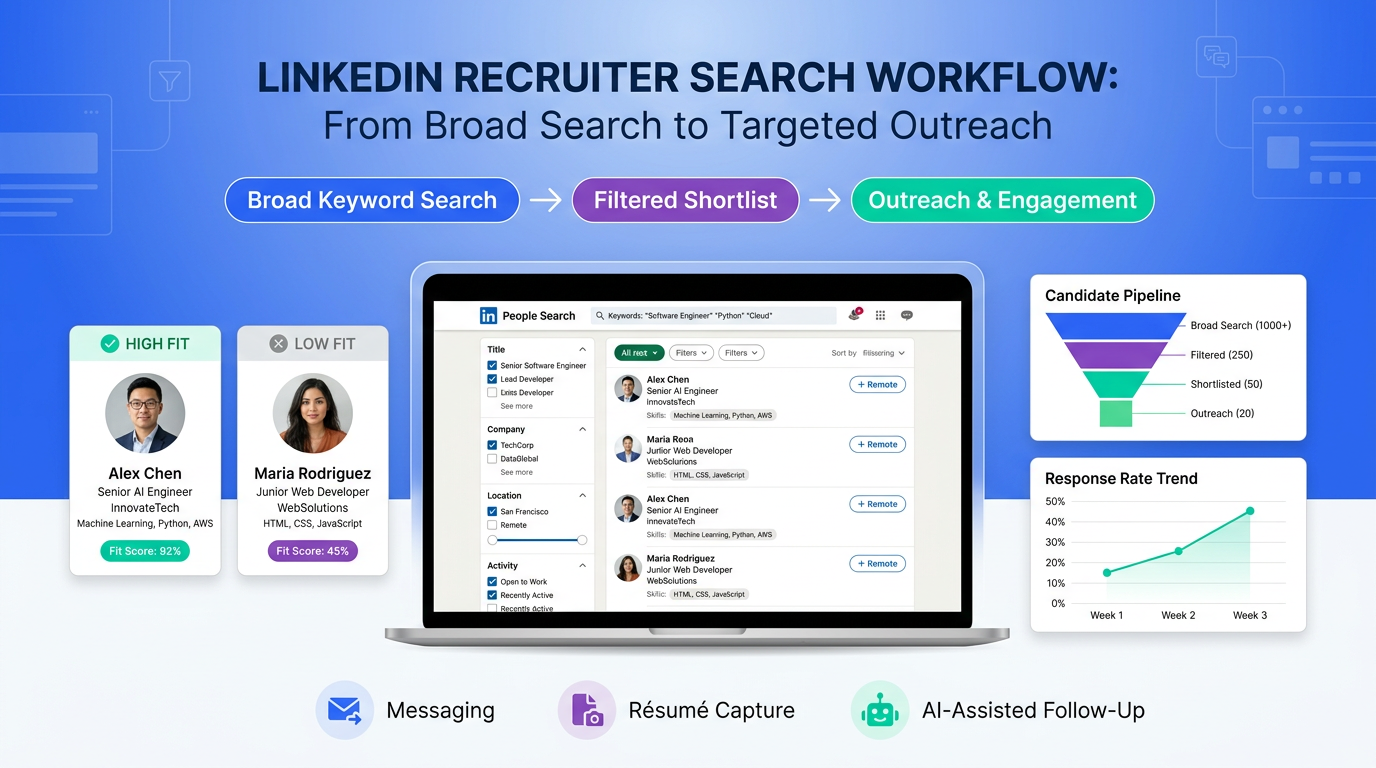
If your main question is how to find recruiters on LinkedIn, use a search workflow that mirrors real recruiting judgment rather than a quick keyword dump.
Start with the broad role family. Search for recruiter, talent acquisition, talent partner, staffing specialist, executive recruiter, technical recruiter, or hiring manager.
Switch to People results. This removes post and company clutter and keeps the search centered on actual contacts.
Add business context. Layer in function, industry, or market terms such as healthcare, SaaS, private equity, manufacturing, GTM, accounting, or cloud.
Narrow by company and location. This is essential when you need an internal recruiter, a recruiter covering a specific territory, or an agency operating in a known market.
Review the headline and About section before saving the profile. The headline often shows whether the recruiter covers the roles you care about.
Shortlist first, message second. Build a smaller qualified list instead of contacting everyone who appears in search.
This is also the most practical answer to how to search for recruiters on LinkedIn. Search quality is not determined by how many names you surface. It is determined by how fast you can remove irrelevant contacts before outreach starts.
When I have used AI Recruiter on LinkedIn workflows, the biggest gain came after this shortlist stage. Once the target criteria were clear, the system could take over repetitive opening exchanges, answer standard role questions, and keep conversations alive while I focused on deciding who actually deserved a serious review.
What to prepare before you contact a recruiter
The promotion reference matters here because it highlights something recruiters see every day: timing alone is never enough. Preparation changes the quality of the conversation.
Before messaging a recruiter on LinkedIn, prepare the equivalent of a promotion case file:
Know your motivation. Are you looking for market insight, a specific role, a future relationship, or immediate hiring help?
Clarify your readiness. Candidates should be clear on target function, level, location, and achievements. Recruiters should be clear on the requisition, hiring scope, and must-have criteria.
Track evidence. Candidates need concrete proof of impact. Recruiters need a clean brief, salary context, and the ability to answer expected questions quickly.
Ask for feedback where appropriate. Mutual contacts, prior applicants, and hiring managers can often tell you whether a recruiter is the right person to approach.
Choose timing intelligently. A recruiter managing layoffs, freezes, or quarter-end pressure may not respond the same way as one actively building teams.
This preparation is one reason response quality varies so much on LinkedIn. Many people blame the platform, but the problem is often that the outreach arrives before the case is ready.
The LinkedIn filters that improve recruiter search
Once your objective is clear, filters do the heavy lifting. If you want to know how to get recruiters LinkedIn users are more likely to answer, these are the filters and profile signals that matter most.
Keywords
Use combinations, not single words. "Recruiter" alone is broad. "Technical recruiter fintech Chicago" or "talent acquisition healthcare operations" gives you a much better starting list.
Current company
This is critical when you are targeting in-house recruiters at specific employers or mapping agencies in a niche. It quickly separates platform noise from people with actual hiring ownership.
Location
Even in remote hiring, geography often reflects market coverage, compensation knowledge, and team alignment. Many bad outreach lists come from skipping this step.
Title variation
Not every useful contact uses the word recruiter. Search for talent acquisition partner, talent lead, people partner, staffing consultant, search consultant, or hiring manager where appropriate.
Activity and recency
A recruiter posting current jobs, sharing hiring updates, or commenting on market changes is often easier to assess than a quiet profile with no visible sign of active hiring work.
Shared network or common context
Mutual connections, alumni overlap, industry association ties, and past employer links can raise trust and improve reply odds.
| Search element | Low-value use | Higher-ROI use |
|---|---|---|
| Keyword | Recruiter | Recruiter + function + market + geography |
| Company filter | Ignored | Used to find actual hiring ownership |
| Location | Broad or absent | Matched to hiring coverage |
| Title review | Only recruiter | Includes TA, staffing, search, hiring manager |
| Profile activity | Not checked | Used to judge current relevance |
How to judge whether a recruiter is worth contacting
In the promotion article, one of the strongest ideas is that aspiration should be tested against responsibility. A similar test works here: just because a profile appears in search does not mean that person should receive your message.
Use these relevance checks before outreach:
Scope clarity: Does the profile clearly show what roles, functions, industries, or regions this recruiter covers?
Decision proximity: Are they likely to own the opening, influence the shortlist, or simply sit adjacent to the process?
Professional detail: Do they provide enough information to understand what they actually recruit for?
Visible market activity: Do they share jobs, updates, or commentary tied to their niche?
Legitimacy signals: Does the employer, career history, and communication style look credible and consistent?
For candidates, the test is simple: would this person plausibly recruit for your role type? For recruiters and HR teams, the test is operational: will this contact improve access, speed, or market coverage?
Where workflow support and automation improve ROI
LinkedIn search by itself does not produce ROI. Follow-up does. That is where many recruiting teams hit the same wall as the promotion-seeker in the reference article: they know what they want, but the preparation and timing around the conversation decide the result.
In practice, I have seen three repetitive tasks consume the most time after the shortlist is built: sending the first message, replying to candidates outside work hours, and collecting résumés or contact details from the people who express interest. Those are exactly the moments where I found StrategyBrain AI Recruiter useful. It can handle initial LinkedIn outreach based on search criteria, continue the conversation naturally, and gather the next-step information from interested candidates without forcing the recruiter to sit in inbox triage all evening.
That support is especially relevant for:
Independent headhunters who need to protect sourcing time.
Agency teams that handle multiple concurrent searches and cannot afford slow first-response cycles.
In-house recruiting teams hiring across time zones or international markets.
Just as important, the tool does not replace final human judgment. It does not decide whether the résumé truly matches the role. The recruiter still reviews, qualifies, and moves the candidate into the next stage. That division of labor matters because it keeps speed high without outsourcing hiring judgment.
If your team struggles with after-hours replies, multilingual candidate outreach, or large LinkedIn outreach volumes, the trial environment for AI Recruiter is worth reviewing simply to understand how much front-end effort can be removed from the recruiter's plate.
LinkedIn recruiting tools: practical comparison
Because this topic touches software-supported LinkedIn recruiting, it helps to compare common options recruiters evaluate alongside their process.
1. LinkedIn Recruiter
Use experience: Strong for search depth, visibility, and recruiter seat workflows, but still requires heavy manual outreach and follow-up discipline.
Effect: Excellent for search coverage and talent mapping; weaker if the bottleneck is message handling volume.
Cost: Typically positioned at the premium end for professional recruiting teams.
Best fit: Mid-sized to large internal teams and established agencies that need robust search infrastructure.
Working with StrategyBrain AI Recruiter: Useful when teams want LinkedIn search strength plus more automated front-end messaging and candidate response handling.
2. SeekOut
Use experience: Strong search and talent intelligence workflow, especially for broader sourcing and enrichment beyond a single platform.
Effect: Good for finding and organizing talent pools, though the recruiter still carries much of the outreach motion.
Cost: Usually suited to teams with a defined sourcing budget.
Best fit: Data-driven talent acquisition teams and sourcing functions.
Working with StrategyBrain AI Recruiter: SeekOut can help define the market; AI Recruiter can reduce manual message handling once LinkedIn conversations begin.
3. hireEZ
Use experience: Built for sourcing scale and workflow efficiency, often appreciated by teams that need broader outbound support.
Effect: Helpful for talent discovery and outbound coordination, though actual recruiter conversation management still requires internal process discipline.
Cost: Often more realistic for teams already committed to sourcing software investment.
Best fit: Corporate recruiting and sourcing teams with recurring high-volume needs.
Working with StrategyBrain AI Recruiter: hireEZ can support top-of-funnel discovery, while AI Recruiter can reduce the friction of LinkedIn response management and résumé capture.
Practical takeaway: If your bottleneck is search depth, start with search software. If your bottleneck is repetitive LinkedIn messaging and follow-up, workflow automation may create faster ROI.
Common mistakes that hurt response and ROI
Most poor LinkedIn recruiter outreach comes from a small set of avoidable mistakes.
Searching before defining the objective. This creates broad, low-fit lists.
Using only one title word. Many relevant contacts sit under adjacent talent titles.
Ignoring timing. A good recruiter contacted at the wrong moment may still look like a poor lead.
Messaging without proof or context. Candidates and recruiters both respond better when the ask is clear and grounded.
Confusing activity with relevance. A visible profile is not automatically the right contact.
Trying to solve a workflow problem with more manual effort. At scale, that usually fails.
The promotion analogy still holds: wanting the outcome is not enough. Preparation, evidence, and timing shape whether the conversation moves forward.
FAQ
How do I find recruiters on LinkedIn quickly?
Use the main search bar, switch to People, and combine recruiter-related titles with industry, company, and location filters. Then review profile scope before messaging.
How do I search for recruiters on LinkedIn more accurately?
Start with your actual goal, not just a keyword. Accuracy improves when you know whether you need an internal recruiter, agency specialist, or hiring manager and filter accordingly.
How can I get recruiters LinkedIn users to respond?
Target relevance first. Contact the recruiter whose function, geography, and hiring ownership match your situation. Better fit usually beats higher message volume.
What makes a recruiter legitimate on LinkedIn?
Look for employer clarity, role detail, visible activity, consistent work history, and a communication style that stays inside normal professional channels.
Where does ROI actually come from in LinkedIn recruiter search?
ROI comes from reducing wasted outreach, improving relevance, shortening time to the right conversation, and managing follow-up without letting manual admin absorb recruiting time.
When does automation help most?
Automation helps most when your shortlist is good but the team is losing time on initial outreach, after-hours replies, and collecting next-step information from interested candidates.
Conclusion
Learning how to find recruiters on LinkedIn is more valuable when you treat it like a preparation-and-timing problem, not just a search-bar problem. The strongest recruiter outreach starts with clear motivation, disciplined filtering, and a realistic test of whether the person you found is actually positioned to help.
That is the real value and ROI case. Better recruiter search reduces wasted effort, improves response quality, and creates cleaner handoffs from search to conversation to shortlist. And when LinkedIn workflow volume becomes the bottleneck, tools such as StrategyBrain AI Recruiter can remove repetitive messaging and follow-up work while leaving final qualification where it belongs: with the recruiter.














