


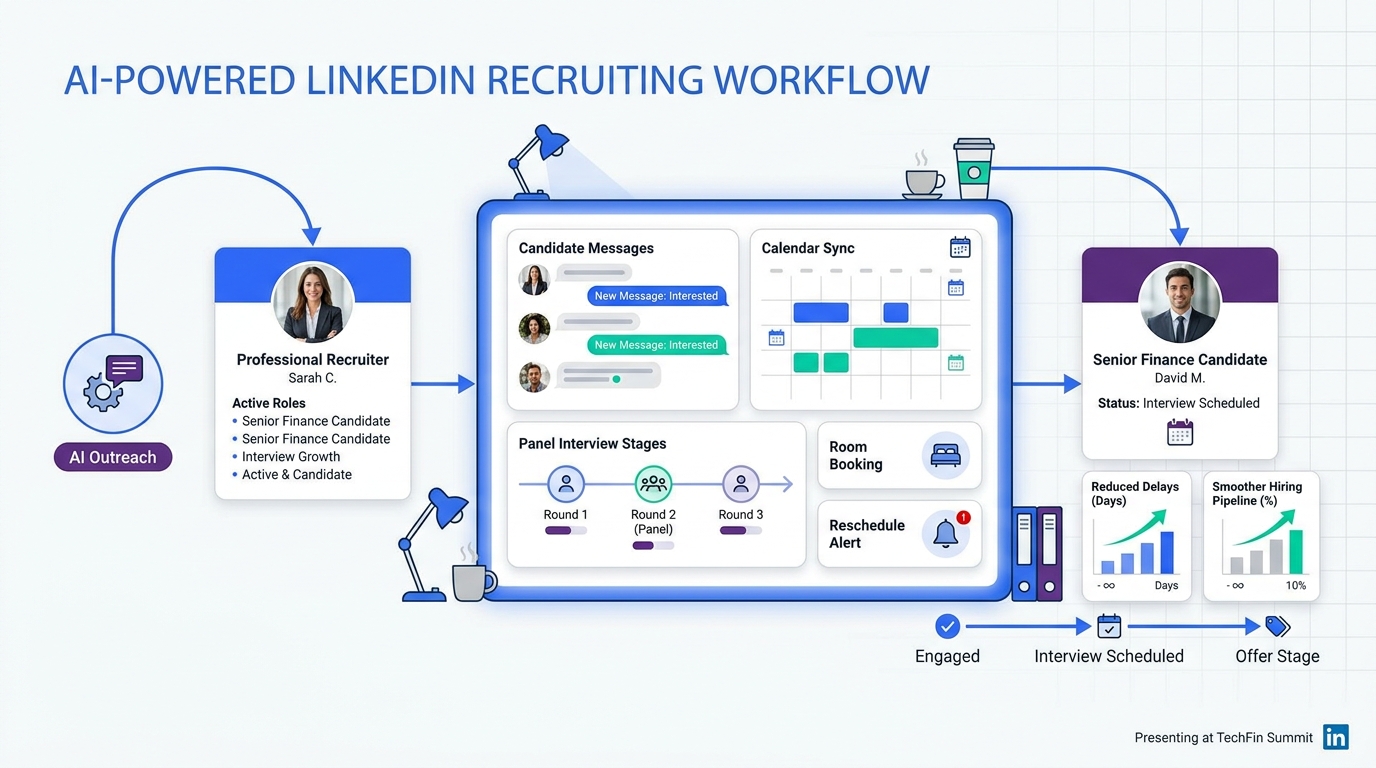
When senior recruiters evaluate an interview scheduling app, this article shows how to avoid credibility-killing delays and choose for control.
That matters because scheduling failure rarely stays administrative for long. A delayed confirmation can cool off a strong candidate, frustrate a hiring manager, waste coordinator time, and make a search firm look disorganized. For in-house teams, the cost shows up as slower pipelines, broken interviewer alignment, and more avoidable reschedules when calendars, rooms, and candidate replies live in separate places.
When I need to reduce that coordination drag, I usually separate sourcing from scheduling. Tools like StrategyBrain AI Recruiter help upstream by automating LinkedIn outreach, handling after-hours candidate replies, and collecting resumes or contact details from interested people, while the recruiter still owns shortlist decisions, resume review, and the final move into interview scheduling. In practice, that means fewer warm candidates sitting idle before a booking step even begins.
A useful way to see the problem is through a career-move scenario. Think about a finance professional aiming for a CFO path, not just any next title. They do not evaluate opportunities casually. They look at whether the role builds the right skills, whether it broadens business exposure beyond technical finance work, and whether the move fits a deliberate long-term plan rather than a random vacancy that simply appeared first.
Now place that judgment into real recruiting operations. A recruiter reaches an interested senior finance candidate, trades messages about scope and timing, collects materials, and starts coordinating conversations with a controller, a finance director, and executive stakeholders. If scheduling is clumsy at that stage, the process undercuts the very signals that matter to this candidate: intentionality, business maturity, and organizational discipline. That is why automated interview scheduling is not just convenience software. It is part of how a company proves it can run a serious hiring process, whether it also depends on free room booking software for onsite steps or borrows the simplicity of an appointment book schedule for candidate self-booking.
Recruiters often describe scheduling as a back-office task, but experienced candidates read it differently. Especially in senior searches, the way a company organizes interview timing, stakeholder access, and follow-up says a lot about decision quality. The candidate who is intentionally managing a CFO-track career is often assessing the employer at the same time the employer is assessing them.
That is the thread running through this article. We will look at automated interview scheduling not only as a time-saving workflow, but as an operational signal. If your process needs to support one-on-one calls, panel interviews, executive calendars, room logistics, and controlled reschedules, choosing an interview scheduling app becomes a hiring-process decision, not a minor calendar purchase.
Table of Contents
- Why scheduling quality matters more in high-stakes hiring
- What automated interview scheduling actually covers
- Manual scheduling vs booking links vs full workflow tools
- How an interview scheduling app works in practice
- Three selection principles borrowed from executive hiring
- Where free room booking software fits into interview operations
- What appointment book schedule logic gets right
- Software options recruiters commonly compare
- Implementation advice from a recruiting operations lens
- Common mistakes to avoid
- FAQ
Why scheduling quality matters more in high-stakes hiring
In executive and specialist hiring, candidates often make judgments from small operational details. If the process feels improvised, they may assume the role definition is fuzzy, stakeholders are misaligned, or decision-making will be slow after they join. That is why scheduling is not separate from candidate experience. It is candidate experience.
The CFO-career logic is a good example. Professionals who want top finance roles are usually intentional about the sequence of moves they accept. They want evidence that the next role expands business acumen, exposes them to broader projects, and is part of a meaningful growth step. A chaotic scheduling process sends the opposite message. It makes the opportunity feel reactive rather than strategic.
Key insight: the more deliberate the candidate’s career decision, the more your scheduling process becomes part of your employer credibility.
That is one reason many recruiters begin by searching for an interview scheduling app and then discover they need more than a calendar link. Once multiple stakeholders are involved, the real issue is not choosing a time. It is preserving momentum while coordinating calendars, expectations, and resources without making the process feel careless.
What automated interview scheduling actually covers
Automated interview scheduling is the use of software to match candidate availability, interviewer calendars, interview-stage rules, time zones, and sometimes room or equipment constraints so interviews can be booked and changed with less manual effort.
In recruiting, good automation should still feel controlled. Recruiters need guardrails around who can be booked, how much buffer exists between interviews, what details appear in invites, and how reschedules are handled. A capable interview scheduling app helps with those operational rules rather than just exposing a blank calendar.
In my own workflow, I treat automation as a handoff tool between stages. I have used AI Recruiter to keep LinkedIn conversations moving when candidates reply outside normal hours, answer initial role questions, and collect CVs or direct contact details from interested prospects. That helps because senior candidates often engage asynchronously. But once interest is real, I still need a separate scheduling layer that can handle executive calendars and structured interviews cleanly.
Manual scheduling vs booking links vs full workflow tools
Not every team needs the same level of scheduling software. The mistake is assuming all tools called scheduling tools solve the same problem.
| Approach | Strength | Weakness | Best fit |
|---|---|---|---|
| Manual coordination | Flexible for unusual or confidential processes | Slow, inconsistent, difficult to scale | Low-volume or highly bespoke hiring |
| Simple booking link | Fast candidate self-scheduling for one interviewer | Weak for panels, executive calendars, and complex reschedules | Phone screens and early-stage calls |
| Full automated workflow | Supports multi-person coordination, invites, reminders, and changes | Needs stronger setup discipline | Structured hiring and multi-stage processes |
If your team hires for senior finance, technical, or leadership roles, basic self-booking often breaks down once multiple decision-makers must be aligned. A candidate may be speaking with a recruiter, then a functional leader, then a panel, then an executive sponsor. Each step adds scheduling dependencies and more risk if the process is handled informally.
That mirrors the lesson from deliberate career planning: do the current step well, but do it with a clear destination in mind. Recruiting teams should evaluate scheduling tools the same way. Do not optimize only the first interview if the real friction lives in later-stage panels and reschedules.
How an interview scheduling app works in practice
A strong interview scheduling app usually follows a repeatable workflow:
- Define the stage: interview length, format, participants, and booking rules
- Sync calendars: use live interviewer availability rather than guessed slots
- Offer approved times: let the candidate book from valid options
- Confirm automatically: create invites, reminders, and meeting details
- Manage changes: support reschedules without rebuilding everything manually
- Reserve resources: account for rooms, video links, or equipment when needed
What matters operationally is how well the workflow holds up under pressure. It is easy to demo self-scheduling for a one-person screen. The harder test is whether the tool can survive a hiring manager conflict, a candidate time-zone change, and an onsite room issue without forcing the coordinator back into email ping-pong.
Core features that matter day to day
- Candidate self-scheduling that only exposes true availability
- Calendar sync to reduce stale slots and double-bookings
- Panel interview coordination for structured, multi-interviewer stages
- Time-zone clarity for distributed teams and international candidates
- Rescheduling controls that preserve process rules
- Consistent invites and reminders so the candidate always knows what happens next
Three selection principles borrowed from executive hiring
The reference career advice around becoming a CFO offers a surprisingly useful framework for evaluating scheduling systems. The language is different, but the underlying discipline translates well.
1. Solve the current job well, not just the next shiny feature
In career development, people do not progress by neglecting the role they already have. In recruiting operations, the same applies to software choice. Start with the real scheduling work your team performs now. If you mainly run hiring manager interviews, panels, and occasional onsite loops, prioritize those realities over future feature wish lists.
2. Be intentional about the process you are building
The original career advice emphasized being deliberate rather than drifting into roles that do not fit the long-term plan. Scheduling software deserves the same discipline. Choose a tool based on the hiring model you want to run: high-volume screens, structured interviewing, executive hiring, or hybrid onsite coordination. Intentional selection beats buying the easiest link generator and hoping it scales.
3. Look at how strong operators actually work
Just as aspiring finance leaders can learn by studying successful CFOs, recruiting teams should study mature scheduling processes before buying software. Map how strong teams handle panel overlap, stakeholder preparation, and late-stage reschedules. Then test whether the tool supports that level of operational maturity.
There is also a fourth lesson hidden in the source logic: broaden business exposure. In scheduling terms, that means your system should connect with the wider hiring environment. It should not behave like an isolated calendar utility if your actual process depends on ATS stages, executive approvals, room access, and candidate communications across channels.
Where free room booking software fits into interview operations
For remote interviews, a calendar slot may be enough. For onsite and hybrid processes, physical logistics become part of scheduling quality. This is where searches for free room booking software start to overlap with recruiting operations.
If an interview is confirmed but no room is available, the workflow has failed. The same is true if a video room is booked without needed equipment, or if two finalist interviews collide in the same space. Good recruiting operations account for both people and place.
Ask these questions if onsite interviews matter to your process:
- Can the scheduling workflow verify room availability before confirmation?
- Can the team avoid duplicate room assignments across interview loops?
- Can coordinators see room, interviewer, and candidate constraints together?
- Can existing free room booking software be aligned with recruiting operations?
This is especially important in senior hiring. When executive candidates come onsite, small logistical failures carry outsized reputational risk. A polished schedule with room accuracy, clean handoffs, and prompt updates signals stronger internal execution.
What appointment book schedule logic gets right
The phrase appointment book schedule is not specific to recruiting, but the interaction model is useful. Candidates want the same basic things any appointment user wants: visible options, quick confirmation, reminders, and a straightforward way to change plans when needed.
What recruiting adds is complexity behind the screen. One appointment may involve a single provider and a single room. One interview may require a candidate, recruiter, hiring manager, trained interviewer pool, and space planning. So the front-end should feel simple even when the back-end rules are not.
The best interview experiences borrow these strengths from an appointment book schedule:
- Clear availability instead of vague suggested windows
- Immediate confirmation once a slot is selected
- Reliable reminders to reduce no-shows and confusion
- Shared visibility so everyone sees the same event details
- Low-friction changes when rescheduling is necessary
That simplicity matters because candidates often compare your process with every other digital booking experience they use. If booking an interview feels harder than booking a routine service, the process is already working against you.
Software options recruiters commonly compare
Because this topic is software-led, it helps to separate different tool categories rather than pretending one platform does everything equally well. Below are three widely known options recruiters often evaluate around scheduling needs, followed by where upstream automation can complement them.
| Software | Use experience | Effectiveness | Cost posture | Best fit | How it can work with AI Recruiter |
|---|---|---|---|---|---|
| Calendly | Very easy for one-to-one booking and candidate self-scheduling | Strong for simple stages, weaker for complex panel orchestration | Usually accessible for small teams, but advanced workflows may require paid tiers | Solo recruiters, early-stage calls, small businesses | Useful after AI Recruiter captures interest and contact details on LinkedIn |
| GoodTime | Built more for recruiting teams and coordinated scheduling flows | Better suited to multi-interviewer and higher-volume recruiting operations | Typically more enterprise-oriented than lightweight booking tools | Mid-market and enterprise hiring teams | Can complement AI-driven sourcing by taking over structured scheduling once prospects are qualified for next steps |
| Microsoft Bookings | Convenient inside organizations already standardized on Microsoft tools | Practical for straightforward internal scheduling, less specialized for advanced recruiting complexity | Often attractive where it is already bundled in the software stack | Internal HR teams with simple to moderate scheduling needs | Works best when AI Recruiter is used separately for LinkedIn outreach and after-hours candidate engagement |
A fair comparison is not about declaring one universal winner. It is about knowing the layer each tool handles well. Lightweight booking platforms reduce friction for simple interview stages. Recruiting-specific scheduling tools do more for panel coordination. Broader office-suite tools fit organizations that value stack consistency. Meanwhile, StrategyBrain AI Recruiter sits earlier in the funnel by helping with repetitive LinkedIn outreach, multilingual communication, and interest capture before scheduling begins.
From my own use, the most practical benefit of AI Recruiter is not that it replaces recruiter judgment. It does not. What it does is keep the top of the funnel moving when I cannot personally respond to every candidate message in real time. For searches involving passive talent on LinkedIn, that reduces the lag between first contact and real scheduling readiness. Once the candidate is genuinely interested, I still want an interview scheduling app that handles the downstream complexity properly.
Implementation advice from a recruiting operations lens
Automation works best when the process is defined before the tool is turned on. Teams usually struggle not because scheduling software is a bad idea, but because interview stages, participants, and rules were never standardized.
Implementation checklist
- Define each stage separately: recruiter screen, hiring manager call, panel, and onsite should not all use the same settings
- Set realistic buffers: avoid back-to-back interviews with no prep or note time
- Clarify candidate messaging: every invite should explain format, timing, and participants
- Plan the reschedule path: changes should not force coordinators back into manual chaos
- Align sourcing and scheduling handoffs: if LinkedIn outreach is active, make sure interested candidates move quickly into the booking flow
- Include room logic early: if onsite interviews matter, room assignment is part of the schedule, not an afterthought
If you are adding AI-supported sourcing to the process, the handoff matters. I have found it useful to let AI Recruiter handle repetitive first-contact communication and candidate replies at scale, especially across time zones. But that only helps if the next step is disciplined. When a candidate says yes, the scheduling side must be ready to move with the same clarity.
Common mistakes to avoid
1. Treating a booking link as a full recruiting system
A simple link is often enough for first-round calls, but not for structured panels, executive calendars, or onsite logistics.
2. Ignoring the candidate’s decision lens
Deliberate candidates evaluate your process as evidence of how the company operates. Scheduling quality affects credibility.
3. Overlooking resource coordination
If interview rooms, video setups, or office access matter, software should reflect that. This is where free room booking software can become part of the broader workflow.
4. Letting sourcing and scheduling operate in silos
Fast outreach with slow booking still creates candidate drop-off. Upstream communication and downstream scheduling need a clean handoff.
5. Making rescheduling harder than initial booking
If one calendar change restarts the entire chain, the process is not truly automated.
FAQ
What is an interview scheduling app?
An interview scheduling app is software that helps recruiters coordinate candidate availability, interviewer calendars, invites, reminders, and reschedules. More advanced options also support panels, time zones, and onsite resources.
How does automated interview scheduling help recruiters?
It reduces manual coordination, shortens booking time, improves consistency, and gives candidates a clearer experience. The main benefit is not just speed; it is cleaner process control.
Can automated scheduling work for executive or specialist hiring?
Yes, and that is where it often matters most. Senior candidates tend to notice operational quality, so polished scheduling can reinforce confidence in the opportunity.
Where does free room booking software fit in?
It becomes relevant when interviews happen onsite or in hybrid settings. If rooms are part of the process, a confirmed time without confirmed space is not a complete booking.
Is an appointment book schedule the same as interview scheduling?
No, but the experience principles overlap. An appointment book schedule emphasizes visible availability, simple booking, and easy changes. Interview scheduling applies that logic to more complex stakeholder coordination.
Does AI Recruiter replace recruiter judgment?
No. It can automate parts of LinkedIn outreach, candidate communication, and information collection, but the recruiter still reviews resumes, judges fit, and decides who moves into interviews.
Conclusion
The best interview scheduling app does more than help people pick a time. It supports the kind of hiring process that deliberate candidates trust: organized, intentional, and able to coordinate real business stakeholders without confusion.
If your hiring includes panels, executive calendars, onsite logistics, or candidates who expect a polished experience, evaluate scheduling software as part of your operating model. Use sourcing automation where it fits, including tools like AI Recruiter for LinkedIn outreach and candidate engagement, but make sure the handoff into interview scheduling is equally strong. In recruiting, process quality is part of employer quality, and candidates can usually tell the difference.














