


Use this interview scheduling app guide to diagnose hiring bottlenecks, compare tool fit, and avoid placement-slowing delays.
In practice, interview delays rarely come from one dramatic breakdown. They come from small coordination failures that stack up: a candidate replies after hours, a hiring manager has limited availability, a recruiter is covering several roles, and nobody has decided which interview types deserve priority. For agency owners, that means slower placements and weaker client confidence. For solo recruiters, it means more admin than recruiting. For in-house talent teams, it means candidate drop-off, internal frustration, and a hiring process that feels less organized than it should.
One reason I now pay closer attention to workflow support before I worry about calendar cosmetics is that tools like StrategyBrain AI Recruiter can reduce the message-chasing that happens before scheduling even starts. In my own recruiting workflow, I have found that always-on candidate communication, multilingual replies, and automatic collection of candidate details help keep interest alive until the interview stage is ready. The recruiter still makes the final judgment on fit, reviews the resume, and decides whether to move a person forward, but the communication gap that usually slows scheduling becomes much easier to manage.
The underlying problem is familiar outside recruiting too. Many experienced professionals know they need to keep learning, but the real difficulty is not agreeing that development matters. It is deciding what to focus on, what budget is realistic, and where time can actually be carved out from an already packed schedule. In hiring, interview coordination works the same way. The team says speed matters, but then the recruiter is left figuring out which stage needs attention first, who must attend, what can be automated, and where the budget or process limits sit.
That is why choosing an interview scheduling app should start with the same discipline used for professional development planning: define the focus, understand the constraints, find the right type of support, and make room for the process in the real schedule. Once you look at scheduling that way, adjacent searches like the best free scheduling app for small business and even international intent such as agenda online gratis make more sense, because buyers are often trying to solve a prioritization problem before they are solving a software problem.
Table of Contents
- Start With Focus, Not Features
- How Automated Interview Scheduling Works
- Budget, Time, and Tool Fit
- General Scheduling Apps vs Recruiting Tools
- Features That Matter Most
- Where Recruiting Workflow Support Changes the Outcome
- What Small Businesses Should Expect From Free Plans
- Why Agenda Online Gratis Still Matters
- Implementation Practices That Hold Up
- Common Mistakes to Avoid
- FAQ
Start With Focus, Not Features
When teams shop for an interview scheduling app, they often begin with surface-level questions: Does it sync with calendars? Does it send reminders? Can candidates self-book? Those are reasonable questions, but they should come after a more practical one: what exactly is breaking in your hiring process?
The best lesson to borrow from professional development planning is that focus comes first. Before someone signs up for a course, they usually need to decide whether they are sharpening an existing skill, closing a gap spotted in a review, or learning a new capability that employers now expect. Interview scheduling deserves the same treatment. Are you trying to reduce recruiter admin? Speed up first-round screens? Coordinate panels better? Lower no-shows? Support cross-time-zone hiring? Different goals lead to different tool choices.
In other words, the right software decision starts with operational diagnosis. A small founder-led business may only need a booking link for screening calls. A retained search firm may need strict control over interviewer combinations, buffers, and candidate communication. A corporate talent team may need scheduling tied closely to hiring stages and reporting. Without that clarity, even a good app creates the illusion of progress while the real bottleneck stays untouched.
How Automated Interview Scheduling Works
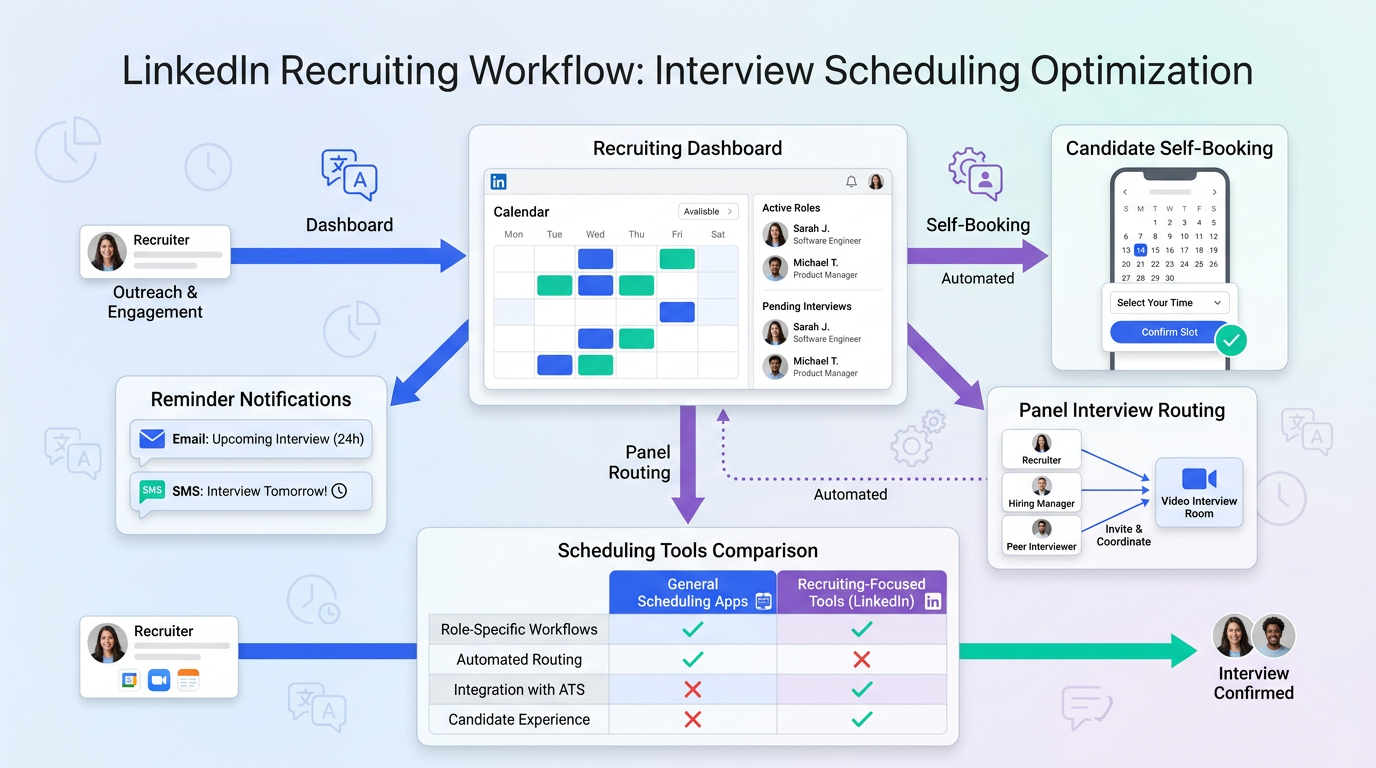
At its best, automated interview scheduling turns a slow coordination task into a rules-based workflow. Instead of the recruiter manually comparing calendars and emailing options back and forth, the system checks availability, offers approved slots, confirms the selection, and updates participants automatically.
- A scheduling trigger appears when a candidate reaches a relevant stage.
- Connected calendars are checked to identify valid openings.
- Rules are applied for duration, buffers, time zones, and participant combinations.
- The candidate self-books through a scheduling page or interview link.
- Reminders and meeting details are sent automatically.
- Rescheduling happens within the same workflow instead of restarting from scratch.
That sounds simple, but the real value is consistency. Automation works best when interview types are already defined and the team agrees on what should happen at each stage. This is another place where the professional development analogy holds up: learning only happens when time is deliberately blocked and protected, not when everyone vaguely intends to get to it later. Scheduling automation also fails when the team has not done the setup work first.
Key insight: The strongest scheduling setups do not just save clicks. They turn a vague intention to “move candidates faster” into a repeatable hiring discipline.
Budget, Time, and Tool Fit
Two constraints usually shape the buying decision more than feature lists: budget and time. In professional development, someone asks what they can spend and whether their employer will support it. In recruiting operations, the equivalent questions are whether the team can justify a dedicated workflow tool and whether there is enough hiring volume to make implementation worthwhile.
If your hiring load is light, a simple scheduler may be enough. If you are running recurring searches, supporting multiple stakeholders, or hiring across geographies, the cost of weak coordination becomes much higher than the cost of better software. Recruiters often notice this only after they spend weeks acting as a manual switchboard between candidates and interviewers.
Time is the other overlooked budget. An app can look inexpensive on paper and still cost the team heavily in workarounds, duplicate updates, and exception handling. That is why experienced recruiters should assess software based on admin reduction and workflow control, not only subscription price.
General Scheduling Apps vs Recruiting Tools
Not every team needs a recruiting-specific system from day one. Some organizations begin in the same buying lane as the best free scheduling app for small business search: they want something easy to launch, affordable, and simple enough for occasional interviews.
That can be a valid starting point. General scheduling tools usually handle one-on-one booking, calendar sync, and basic reminders well enough. But recruiting pressure builds fast. Once you need panel rounds, round-robin screens, stage-specific messaging, or cleaner interviewer coordination, the differences become obvious.
| Criteria | General Scheduling App | Recruiting-Focused Scheduling |
|---|---|---|
| Candidate self-booking | Usually yes | Yes, usually stage-based |
| Calendar sync | Standard | Standard plus workflow rules |
| Panel interviews | Often limited | Better supported |
| Round-robin logic | Sometimes available | Often more useful for recruiting |
| Time zone handling | Common | Common and more candidate-aware |
| Reminder flows | Basic | Often linked to interview stage |
| Hiring workflow context | Minimal | Usually stronger |
| Best fit | Simple hiring | Structured or growing teams |
My advice is straightforward: if your process is still mostly one recruiter, one candidate, one decision-maker, start simple. If your hiring motion already involves multiple stakeholders and repeated interview patterns, evaluate scheduling as part of your recruiting process, not as a stand-alone calendar purchase.
Features That Matter Most
Once your focus is clear, the feature list becomes more useful. These are the capabilities that tend to matter most in real recruiting environments.
1. Candidate self-scheduling
This is the obvious win, but it still matters most. Candidate self-booking shortens response time and keeps momentum from fading between stages.
2. Real-time calendar sync
Calendar integrations are standard now. The real test is whether the tool actually respects availability changes and prevents avoidable conflicts.
3. Panel coordination
Many teams discover too late that what worked for intro calls falls apart for panel interviews. Multi-interviewer logic is where a true recruiting workflow becomes valuable.
4. Time zone clarity
Remote and international hiring make this essential. Candidates should never have to calculate the time difference themselves.
5. Reminder automation
Clear reminders reduce no-shows and save recruiters from repetitive follow-up. The best versions also keep communication aligned with the stage of the process.
6. Rescheduling without restart
Strong scheduling tools treat changes as part of the workflow, not as an exception that sends everyone back to email.
7. Interview-type rules
Different rounds need different durations, participants, and instructions. If the app cannot reflect that, the team will end up compensating manually.
Where Recruiting Workflow Support Changes the Outcome
Scheduling problems often begin before the calendar link is ever sent. Candidates respond late, ask follow-up questions, switch languages, or go quiet while the recruiter is juggling several searches. That is why I see value in pairing scheduling discipline with communication support earlier in the funnel.
In my own workflow, I have used AI Recruiter as a way to keep candidate conversations moving before the interview stage. Its ability to respond around the clock, communicate in the candidate’s language, and gather resumes or contact details helps reduce the dead time that normally appears between outreach and scheduling. I still review the resume myself, decide whether the profile is worth advancing, and control the next step. But using AI Recruiter conversation workflows made one thing very clear to me: when early communication is cleaner, scheduling becomes less reactive and far easier to systematize.
That matters especially for recruiters covering international pipelines or after-hours responses. A scheduling tool organizes calendars. Communication support helps make sure there is still a qualified, interested candidate to schedule when the opening appears.
What Small Businesses Should Expect From Free Plans
For smaller teams, the search for the best free scheduling app for small business is completely rational. When hiring is occasional, free plans can cover a real need. A founder, office manager, or first recruiter may only need a clean booking page and basic automation.
But free plans should be tested against actual hiring tasks, not marketing headlines. Limits usually appear in team routing, reminders, branding, integrations, or advanced scheduling logic. In recruiting, those details matter because simple hiring has a habit of turning complex without much warning.
- Free plans are often enough for: occasional screens, basic self-booking, and one-on-one interviews.
- They often struggle with: panel rounds, layered reminders, shared recruiter ownership, and workflow consistency.
- It may be time to upgrade when: hiring volume grows, multiple stages appear, or coordination starts eating recruiter time.
If your team is genuinely small, start lean. Just be honest about when “free” begins to cost too much in admin effort.
Why Agenda Online Gratis Still Matters
The phrase agenda online gratis reflects a broader search pattern around free online calendars and scheduling tools. Even in an English-language recruiting article, it matters because many buyers are not initially searching for interview software. They are trying to solve a practical scheduling problem quickly and cheaply.
That international search intent also points to two realities in recruiting: candidates book from different devices, and many now move through hiring processes across regions and languages. A useful interview scheduling app should therefore be intuitive even for users who arrive with a general scheduling mindset rather than a recruiting-software mindset.
For cross-border recruiting, this is another place where communication support and scheduling support complement each other. Clear local-language communication can sustain interest, while clear time-zone-aware booking prevents confusion once the interview invite goes out.
Implementation Practices That Hold Up
Software selection matters, but implementation discipline matters more. The following practices consistently make automated interview scheduling work better.
Define what each interview stage is for
Just as professional development starts by identifying the skill gap, scheduling should start by identifying the purpose of each interview. Screening, manager review, panel assessment, and final conversations should not all use the same template.
Set realistic availability rules
Add buffers, blackout periods, and booking windows before launch. Recruiters should not be fixing preventable calendar problems after the system is live.
Match the tool to the real budget
Do not buy advanced workflow logic if your process does not need it yet. Do not stay on a lightweight plan if the team is already outgrowing it every week.
Use candidate-facing instructions
Explain who the candidate will meet, how long the conversation will last, whether video is required, and how rescheduling works.
Protect manual override
Executive hires, urgent searches, and edge cases still need recruiter judgment. Automation should reduce repetitive work, not remove human decision-making.
Connect communication and scheduling where possible
If your workflow includes tools like StrategyBrain AI Recruiter for early outreach and response handling, use that support to keep candidate intent warm until the scheduling stage. It is much easier to automate interviews when the earlier conversation has not gone stale.
Common Mistakes to Avoid
- Starting with features instead of the bottleneck: You need to know what problem the scheduler is solving.
- Assuming free is automatically efficient: A low-cost tool can create expensive recruiter workarounds.
- Ignoring panel complexity: Multi-interviewer scheduling is where weak setups are exposed.
- Forgetting the time budget: Admin hours matter just as much as subscription cost.
- Separating communication from scheduling: A booking page cannot fix candidate silence on its own.
- Automating before standardizing interview types: If the process is unclear, the tool will simply automate confusion.
FAQ
What does an interview scheduling app do?
An interview scheduling app automates the coordination of interview times by checking availability, offering booking slots, sending confirmations, and handling reminders or reschedules.
Is a general scheduling tool enough for hiring?
Sometimes, yes. It can be enough for low-volume, one-on-one interviews. Once you need stage-based workflows, panel coordination, or heavier recruiter collaboration, a more recruiting-oriented setup usually works better.
What should small businesses prioritize first?
They should first define the real hiring need. If the goal is simple interview booking, the best free scheduling app for small business category may be enough. If the problem is broader recruiting coordination, they should assess workflow support as well.
Why mention agenda online gratis in an English article?
Because it reflects related search intent around free online scheduling tools. Some readers arrive looking for general booking help and only later realize they need interview-specific capabilities.
How does communication support help scheduling?
It keeps candidate interest active before the interview invite is sent. For example, multilingual, after-hours response handling and automatic detail collection can reduce delays before the scheduling step begins.
Does automation replace recruiter judgment?
No. Good automation removes repetitive coordination work, but recruiters still decide who moves forward, review resumes, and manage exceptions or sensitive interview situations.
Conclusion
The strongest interview scheduling app decisions start the same way smart professional development decisions do: define the focus, understand the limits, choose the right level of support, and make room for the process to work consistently. Teams that skip those steps usually end up blaming the tool for a workflow problem they never fully clarified.
For some businesses, a lightweight option in the best free scheduling app for small business category will be enough. For others, especially teams juggling multiple searches, interviewers, and time zones, scheduling works best when it is supported by stronger communication and recruiting workflow discipline. And if part of your search starts from broader global terms like agenda online gratis, that is still useful, because it points to the same core need: a booking experience that is clear, fast, and realistic for how people actually hire today.














