


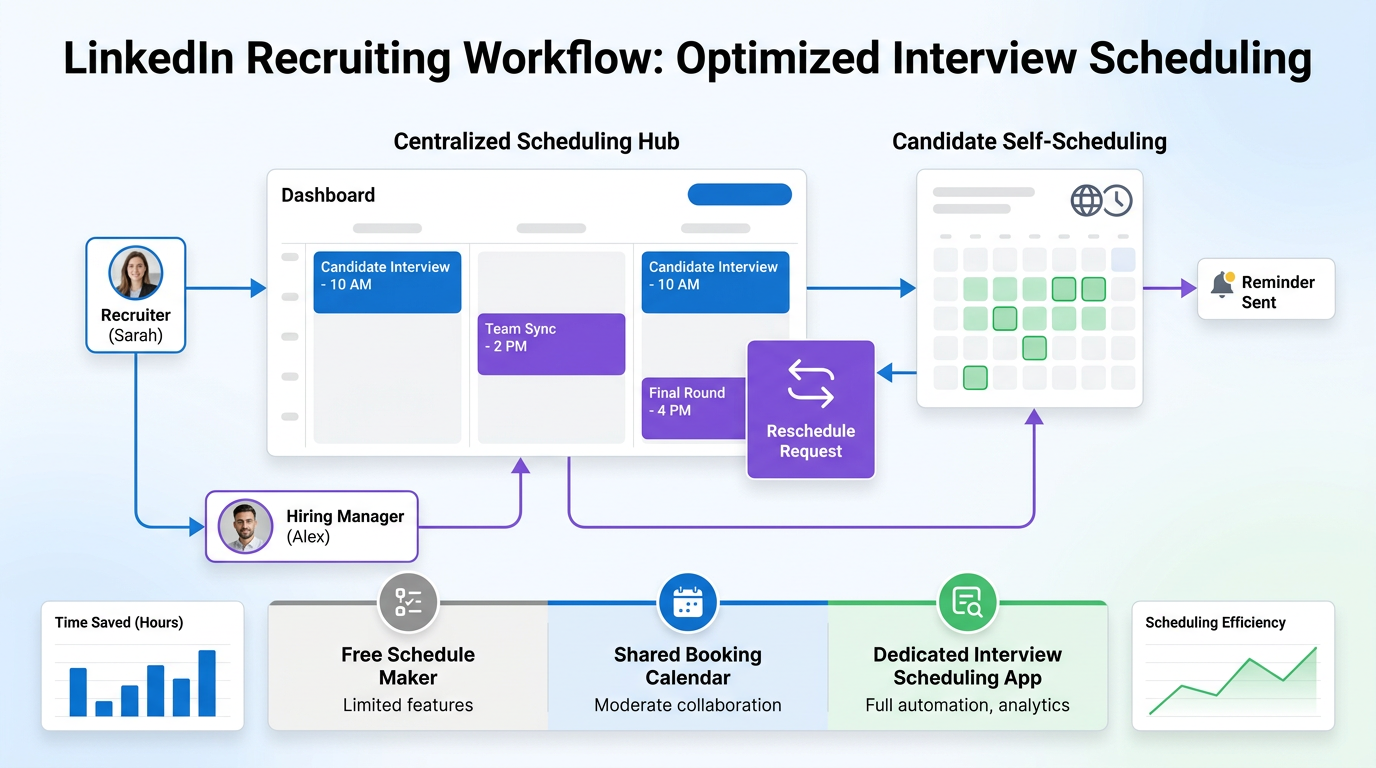
This article helps recruiting teams judge when an interview scheduling app fits their routine to avoid delays and reschedule chaos.
That sounds simple until hiring volume rises and the day starts to look like calendar triage. Recruiters lose time to back-and-forth emails, candidates wait too long for confirmation, hiring managers get pulled into avoidable scheduling threads, and a small agency or in-house team ends up paying for the delay in slower pipelines, weaker candidate trust, and more reschedule friction than the role ever required.
In my own workflow, tools that remove repetitive outreach and coordination pressure make the biggest difference when they stay inside recruiter control. I have found that AI Recruiter is most useful when the hiring team needs 24/7 candidate communication, follow-up across time zones, and automatic collection of candidate details before interviews are arranged; the recruiter still makes the final judgment on fit, resume quality, and who actually moves to the next step.
The reason routine matters here is familiar to anyone who has tried to work through a packed day without structure. In the reference scenario, the starting point was not software hype but a practical daily schedule: block the day, test the rhythm, expect the first version to fail, and adjust until the routine becomes usable. That same pattern shows up in hiring operations when a recruiter is moving from one screening call to the next, checking calendars in half-hour chunks, adding notes from a meeting, and trying to keep enough buffer to avoid one late interview breaking the rest of the day.
Once you see interview scheduling as a routine design problem rather than a calendar-only problem, the software choice becomes clearer. A free online schedule maker can help with simple availability, and a shared booking calendar can help a team cover pooled slots, but a recruiting workflow needs stronger rules around buffers, reschedules, interviewer coordination, and candidate communication. That is where an interview scheduling app earns its place.
- Why hiring teams should design the routine first
- What automated interview scheduling really means
- Why recruiters move beyond manual scheduling
- Features that matter in real recruiting operations
- Build the daily schedule before you automate it
- Free online schedule maker vs recruiting tools
- Use cases for recruiters, HR, and hiring managers
- How to implement without creating confusion
- Common mistakes to avoid
- FAQ
Why Hiring Teams Should Design the Routine First
One of the best lessons from any productivity system is that structure comes before optimization. In hiring, teams often buy scheduling software because inbox volume is painful, but they have not yet agreed on the routine behind it. Who owns first-round booking? Which stages can candidates self-schedule? How much notice do interviewers need? When should panel interviews stay manual?
If those answers are unclear, automation just makes confusion move faster. An interview scheduling app works best when it reflects a documented promise the hiring team can actually keep: certain interviews happen at certain times, under certain rules, with realistic capacity.
That is also why I rarely recommend starting with the most complex setup. The better path is close to the routine logic from the reference material: start with a workable daily schedule, let the first version break, then refine it. In recruiting terms, begin with one interview stage, review the friction, and scale only after the team has learned what really causes delays.
What Automated Interview Scheduling Really Means
Automated interview scheduling is software-assisted booking that handles repetitive coordination steps without removing recruiter oversight. Instead of emailing candidates several time options, waiting for replies, checking multiple calendars, and manually sending invites, the recruiter shares a booking flow based on live availability and preset rules.
In practice, a modern interview scheduling app usually includes candidate self-scheduling, calendar sync, timezone handling, reminders, rescheduling controls, and support for multiple interviewers. That is what separates it from a basic free online schedule maker. A generic tool can help someone choose a slot. A recruiting-specific workflow manages the operational reality behind that slot.
The important shift is to treat scheduling as part of hiring delivery. If your team handles recruiter screens, manager interviews, structured panels, and final rounds, the scheduling process needs to support the whole chain.
Why Recruiters Move Beyond Manual Scheduling
The first reason is obvious: manual scheduling burns time. But the deeper reason is that hiring teams do not just need speed. They need reliability under pressure. Candidates reply after work hours, interviewers block time unevenly, and one delay at the beginning of the process can ripple through the rest of the week.
The second reason is candidate experience. Scheduling is often the first operational proof of whether a company is organized. Clear booking, timezone accuracy, and quick confirmation show respect. Slow email chains and vague reschedule messages do the opposite.
The third reason is protection of recruiter attention. Recruiters should spend more time assessing resumes, preparing candidates, aligning with hiring managers, and making judgment calls. They should spend less time rebuilding meeting threads that software can handle.
That is where support tools outside pure scheduling can still help. In my experience, AI Recruiter is useful before the booking step when candidates are replying late, asking role questions, or sharing resumes across regions. It helps maintain momentum in communication while the recruiter remains responsible for qualification and interview decisions.
Features That Matter in Real Recruiting Operations
Not all scheduling tools solve the same problem. The right evaluation comes from the routine your team is trying to protect.
Candidate Self-Scheduling
This is usually the first high-value feature. It reduces inbox traffic and lets candidates move quickly once they are ready. For most teams, the best practice is to open enough availability to give flexibility without exposing the entire calendar.
Live Calendar Sync
Real-time sync is non-negotiable when recruiters and hiring managers are moving fast. Static slots create stale availability and double-booking risk.
Shared Booking Logic
A shared booking calendar is useful when multiple recruiters or coordinators support the same hiring function. It works well for pooled coverage, but only if ownership behind the scenes stays clear.
Timezone Awareness
Remote and cross-border recruiting make timezone accuracy essential. Candidates should see local times, while interviewers keep their native settings.
Panel Coordination
This is where lightweight tools often struggle. Multi-interviewer rounds need overlap checks, contingency options, and enough guardrails to prevent one busy interviewer from breaking the schedule.
Buffers and Limits
The reference article emphasized realism and margin for error, and that principle fits hiring perfectly. Schedules fail when every slot is treated as equally usable. Buffer times, daily caps, and lead-time rules protect interviewer energy and reduce last-minute reshuffling.
Reminders and Rescheduling
Automation should make changes easier, not colder. Good workflows confirm quickly, remind clearly, and let candidates reschedule without restarting the entire exchange.
Workflow Support Around the Interview
Interview scheduling does not stand alone. Candidate communication, resume collection, and pre-screening context all affect how smoothly booking works. That is why many recruiters combine a scheduling workflow with communication automation such as AI Recruiter for early-stage engagement and after-hours candidate follow-up.
Build the Daily Schedule Before You Automate It
The strongest idea from the reference text is not about working from home specifically. It is the discipline of building a schedule, breaking it, and learning from that failure. Hiring teams should do the same before scaling automation.
Start With a Draft Routine
Map your current interview week in simple blocks. Which stages happen most often? Which ones need recruiter involvement? Which ones depend on manager availability? Keep the first version straightforward. Over-designing the system on day one usually creates more resistance than clarity.
Expect the First Version to Fail
The reference article made an honest point: the initial schedule did not work immediately. Recruiting routines behave the same way. Maybe recruiter screens should be concentrated on two afternoons, not spread across the week. Maybe hiring managers need 48 hours of notice, not 24. Maybe panel rounds should stay coordinator-led even if screening calls are self-scheduled.
Be Realistic About Capacity
Ambition is useful, but unrealistic scheduling logic creates avoidable friction. If interviewers need recovery time between conversations, build it in. If candidates are in multiple time zones, do not pretend one booking pattern fits everyone.
Leave Margin for Error
This is one of the most overlooked recruiting practices. A calendar filled to the edge looks efficient until one meeting runs long. Margin matters because real hiring work includes candidate questions, late interviewer arrivals, and sudden role reprioritization.
Key insight: The best automated scheduling setup is not the one with the most rules. It is the one that mirrors a realistic hiring routine and survives a messy week.
Free Online Schedule Maker vs Recruiting Tools
Many teams begin with lightweight scheduling because it is easy to deploy. That can be the right move, but only for the right use case.
| Option | Best For | Strengths | Limits in Hiring |
|---|---|---|---|
| Free online schedule maker | Occasional interviews and simple one-to-one calls | Fast setup, low cost, basic slot sharing | Limited support for panel rounds, interviewer load balancing, and process rules |
| Shared booking calendar | Teams with pooled recruiter or coordinator coverage | Helpful for shared availability and faster access to open slots | May not support recruiting stages, complex reschedules, or structured ownership |
| Interview scheduling app | Growing and high-volume hiring teams | Automation, candidate self-scheduling, live sync, reminders, and better control | Needs thoughtful setup and process ownership |
The practical takeaway is simple. If your process is light, a free online schedule maker may be enough. If your process is becoming operationally complex, a dedicated interview scheduling app is usually the safer choice.
Use Cases for Recruiters, HR, and Hiring Managers
Recruiter Screens at Scale
When first-round calls pile up, self-scheduling and reminders create immediate relief. This is often the best stage to automate first.
Shared Coverage Across a Recruiting Team
A shared booking calendar can help when several recruiters support one function, but the team still needs a clear owner for templates, timing rules, and exception handling.
Manager Interviews With Limited Availability
Manager schedules are where weak routines usually break. Candidate choice matters, but so does protecting leadership calendars from overexposure.
Panel Interviews
Structured interviews depend on coordination quality. Buffers, overlap logic, and realistic load planning matter more here than raw speed.
Agency and Headhunter Workflows
External recruiters often sit between candidate expectations and client-side calendar constraints. In that environment, an interview scheduling app reduces avoidable admin while preserving the consultative part of the relationship.
Cross-Timezone Hiring
When candidates answer messages late at night or from another region, scheduling pressure starts earlier than the booking link itself. I have used AI Recruiter to keep those candidate conversations moving, answer common role questions, and gather resumes before I decide who should be booked. That keeps communication alive without forcing the recruiter to stay online constantly.
How to Implement Without Creating Confusion
- Define the interview routine first. Decide which stages are self-scheduled, coordinator-led, or manager-approved.
- Pilot one stage. Recruiter screens are usually the easiest place to start.
- Set realistic availability. Protect focus time, interview prep time, and post-interview notes.
- Build margin for error. Use buffers and lead times instead of filling every open slot.
- Clarify ownership. Even with a shared booking calendar, someone should govern the rules.
- Standardize candidate messaging. Confirm clearly, remind politely, and make rescheduling simple.
- Review weekly. Look for where the routine failed, then adjust the system rather than blaming the people using it.
That review habit is where many teams improve fastest. The reference article treated failure as part of routine design, and that mindset is useful in recruiting. If the week exposed broken assumptions, change the schedule logic.
Common Mistakes to Avoid
- Automating before defining the routine. Software cannot fix a process no one has agreed on.
- Making the first setup too detailed. Overly rigid workflows often fail in live hiring conditions.
- Ignoring margin for error. Calendars need breathing room.
- Using a generic free online schedule maker for complex hiring. Lightweight tools are helpful, but they are not built for every interview model.
- Letting shared access replace ownership. A shared booking calendar still needs rules and accountability.
- Forgetting the communication layer. Scheduling works better when candidate questions, follow-ups, and document collection are handled smoothly before booking starts.
FAQ
What is the difference between an interview scheduling app and a regular scheduling tool?
A regular scheduling tool usually focuses on booking a meeting. An interview scheduling app is built for hiring workflows, which often include multiple interview stages, several stakeholders, reminders, reschedules, and candidate-facing communication.
When is a free online schedule maker enough?
A free online schedule maker is often enough for low-volume hiring, simple intro calls, or one-to-one interviews with very few exceptions.
When does a shared booking calendar make sense?
A shared booking calendar is useful when a team needs pooled coverage, such as several recruiters supporting one intake function or one coordinator group handling availability.
How do you keep automated interview scheduling from feeling impersonal?
Use automation for the repeatable steps, but keep recruiter judgment visible where it matters. Confirmation, reminders, and basic rescheduling can be automated, while candidate preparation, exception handling, and fit decisions stay human.
Can communication automation help before interview booking starts?
Yes. In my experience, tools like AI Recruiter are most helpful before scheduling begins, especially when candidates respond after hours, ask early role questions, or need a quick path to share resumes and contact details before the recruiter chooses who to interview.
Conclusion
The best interview scheduling systems are built the same way strong routines are built: start with structure, expect adjustment, stay realistic, and protect room for error. That is the main lesson behind successful automated interview scheduling.
If your hiring process is simple, a free online schedule maker or shared booking calendar may cover the basics. If your team is juggling multiple interview stages, limited interviewer capacity, and candidates across time zones, a dedicated interview scheduling app will usually provide the control and consistency your routine needs.














