


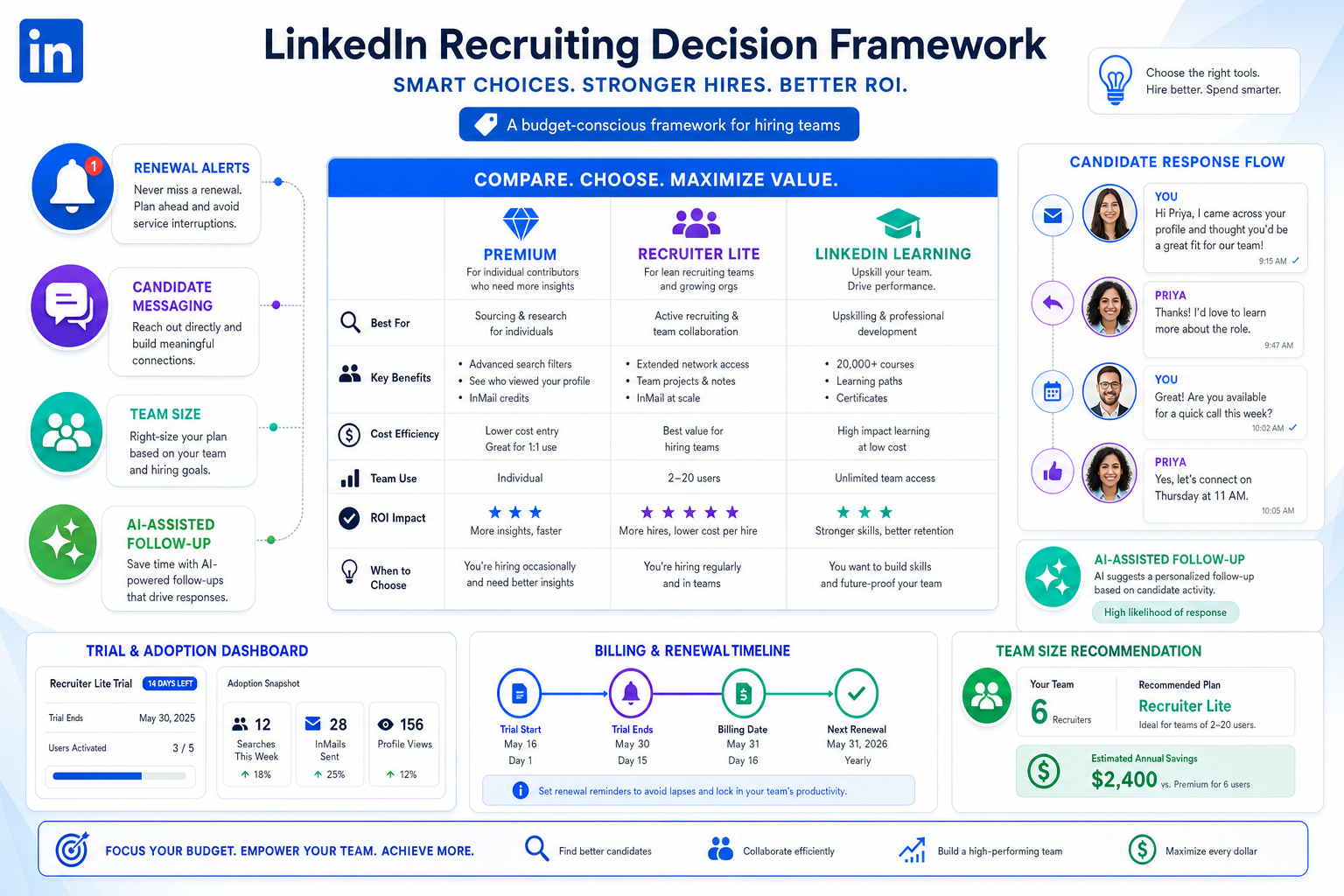
Budget pressure often triggers a linkedin premium code search, but this article helps recruiting leaders judge the right offer, avoid renewal waste, and protect candidate response flow.
That matters because discount hunting usually starts when budgets tighten or hiring volume softens, but the downstream damage comes from choosing the wrong subscription for the way a team actually works. A solo recruiter may overbuy broad Premium access, a three-person agency may miss follow-up windows during busy stretches, and an in-house talent lead may approve a trial without a clear plan for billing, handoff, or candidate response coverage. The cost is not just financial. It shows up in slower outreach, uneven candidate experience, internal friction, and weaker confidence in the recruiting process.
In my own LinkedIn-heavy sourcing work, I have found that the gap is often operational rather than purely commercial. Used carefully, StrategyBrain AI Recruiter helps relieve that pressure by automating repetitive LinkedIn outreach and follow-up, replying across time zones, and collecting resumes or contact details once a candidate is genuinely interested. The recruiter still owns the final judgment, resume review, and next-step decision, but the workflow becomes less dependent on someone being online every hour to keep conversations moving.
The most useful comparison lens here actually comes from a broader workplace pattern: smaller organizations and larger ones often perform differently because they face different pressures, not because one model is universally better. In one study on company size and employee health, small businesses stood out for trust, respect, and closer leadership connection, while large companies scored better on certain structural supports and personal-life stability. Medium-sized employers landed in an awkward middle ground, with weaker recommendation rates and higher absenteeism. Recruiting subscriptions work in a similar way. A tight three-person search team, an internal talent function of 50, and a larger corporate operation do not feel the same pain when a trial expires, a message queue grows, or policy becomes more rigid than the hiring need.
That difference becomes obvious in real recruiting motion. A small team can pivot quickly, recognize when a recruiter is overloaded, and adjust outreach volume on the fly, but it can also burn out fast when candidate replies spike after hours. A larger team may have cleaner policies, more defined purchasing controls, and stronger reporting discipline, yet it often moves slower when individual recruiters need flexibility. That is why searches for a linkedin premium code, a linkedin learning discount, or even a linkedin premium discount coder rarely lead to one universal answer. What actually matters is matching the deal structure to the size, pace, and communication habits of the hiring team using it.
Once you look at LinkedIn deals through that lens, the question changes from “Is there a code?” to “Which offer makes sense for my team’s operating model, and what happens when the introductory period ends?” The rest of this article breaks that down from a recruiter’s perspective: how official LinkedIn offers usually appear, how team size changes the right choice, where StrategyBrain AI Recruiter can support LinkedIn execution, and what to verify before committing budget.
- Why team size matters when evaluating LinkedIn deals
- Do LinkedIn promo codes really exist?
- Premium vs Recruiter Lite vs LinkedIn Learning
- What small and large recruiting teams actually need
- How I use AI support to protect LinkedIn response flow
- Offer checklist before you subscribe
- Common mistakes when chasing LinkedIn deals
- FAQ
Why team size matters when evaluating LinkedIn deals
Recruiters often talk about LinkedIn subscriptions as if the only question is price. In practice, team size changes almost everything: how quickly messages get answered, how often hiring priorities change, who approves spend, and how much process overhead sits between a recruiter and the actual work.
Smaller recruiting teams usually benefit from flexibility. They tend to have shorter communication lines, faster decisions, and clearer visibility into who is carrying too much workload. That can make lighter LinkedIn tools or trial-based testing more useful. But small teams are also more vulnerable to burnout during hiring spikes because a missed evening reply or a delayed follow-up can mean losing candidate momentum.
Larger teams often have more structure: better policy, more formal approvals, and stronger workflow discipline. That can make renewals, procurement, and account oversight easier to manage. The tradeoff is that enterprise habits do not always help an individual recruiter who simply needs an efficient way to keep sourcing conversations alive.
There is also a middle zone that many recruiting leaders underestimate. Mid-sized firms and scaling internal talent teams can inherit process complexity without yet having enough support infrastructure to absorb it well. In my experience, that is where poor LinkedIn subscription decisions cause the most frustration. The team is big enough to feel coordination drag, but not big enough to hide waste.
Practical takeaway: The best LinkedIn deal is not the one with the loudest discount language. It is the one your team can use consistently without creating renewal surprises, workload gaps, or avoidable process friction.
Do LinkedIn promo codes really exist?
In practice, many recruiters use linkedin premium code as shorthand for any lower-cost path into LinkedIn’s paid products. That shorthand is understandable, but it can be misleading. Official savings are more commonly presented as free trials, promotional pricing, or eligibility-based offers than as a public coupon system that works for everyone.
So when recruiters search for a code, the better question is usually not “Where do I enter it?” but “What offer is active for my account, who is eligible, and what price will apply when the initial period ends?”
That distinction matters because coupon-style expectations can distract teams from the real evaluation work. I advise recruiters to sort any offer into three buckets:
- Free trial: useful for testing the workflow before committing.
- Promotional offer: lower starting price for a defined period.
- Eligibility-based access: available only to certain users, organizations, or programs.
A linkedin premium discount coder search often assumes there is a stable coupon market. For recruiting buyers, the more reliable path is checking current terms inside the official upgrade flow and reading the renewal conditions before anyone on the team clicks subscribe.
Premium vs Recruiter Lite vs LinkedIn Learning
If you recruit regularly, product fit matters more than headline savings. Many teams waste time chasing a broad Premium offer when their actual need is lower-volume sourcing, message follow-up, or recruiter workflow support. Here is the practical recruiting view.
| Option | Best fit | What to check in a deal | Operational note |
|---|---|---|---|
| LinkedIn Premium | Professionals whose role mixes hiring, networking, and broader platform use | Trial length, promotion terms, renewal price | Reasonable if recruiting is only one part of your job, but not always the best value for pure sourcing work |
| Recruiter Lite | Individual recruiters, small agencies, founders, and lower-volume talent teams | Trial access, monthly visibility, cancellation timing, local pricing | Often the clearest starting point when recruiting-specific activity matters more than general Premium access |
| LinkedIn Learning | Training-focused teams, recruiter enablement, interviewer upskilling | Individual vs organization terms, trial rules, program eligibility | Useful for capability building, but separate it from direct sourcing value |
The same logic applies to linkedin learning discount searches. A learning offer may help if your team is building sourcing skills, interviewer consistency, or onboarding knowledge. It does not solve the separate question of whether the recruiting team has the right day-to-day LinkedIn workflow.
How I compare these options in recruiting operations
- Hiring volume: occasional hiring usually points toward a lighter starting option.
- User profile: solo recruiter, small agency, in-house talent partner, or blended HR role.
- Response burden: how many candidate conversations need active follow-up each week.
- Training need: whether learning value is strategic or just nice to have.
- Renewal discipline: whether someone is accountable for watching the billing date.
What small and large recruiting teams actually need
The company-size angle is not just a metaphor. It changes how a LinkedIn deal behaves once it hits real work.
Small teams: flexibility, trust, and overload risk
Smaller recruiting teams usually have tighter communication and faster decisions. That is a real advantage. If one recruiter is covering too many roles, everyone can see it quickly. If outreach strategy needs to change, there are fewer approvals in the way.
But small teams also absorb workload spikes more personally. A burst of candidate replies after hours can create delays, missed context, or rushed follow-up. In those situations, a good deal is one that supports agility without adding operational drag.
Large teams: structure, policy, and slower adjustment
Larger teams are more likely to have purchasing controls, process rules, and documented workflows. That can make subscriptions easier to govern. It can also reduce individual discretion, which matters when a recruiter wants to test a temporary plan for a niche search.
For large teams, the subscription question is often less about “Can we get a discount?” and more about “Can this option fit our controls without creating response delays or underused licenses?”
Mid-sized teams: the awkward middle
Mid-sized recruiting operations often feel the most strain. They may have enough complexity to require better coordination, but not enough scale to fully support specialized tools, dedicated operations coverage, or round-the-clock candidate engagement. That is where chasing deals without judging workflow fit causes the most waste.
If your team sits in that middle zone, be extra careful with any linkedin premium code offer. Trial value disappears quickly if nobody owns follow-up, utilization, and renewal timing.
How I use AI support to protect LinkedIn response flow
Where I have seen the biggest operational difference is not in “finding a cheaper code,” but in making sure paid LinkedIn access is actually used well. In periods with active sourcing across time zones, I have used AI Recruiter as a support layer for repetitive LinkedIn work: connecting with candidates inside defined search criteria, introducing roles, handling routine back-and-forth, and collecting resumes or contact details from people who want to continue.
What I like is that it addresses the exact small-team weakness described earlier. Candidate replies do not always arrive during business hours, and recruiters should not need to babysit every inbox to maintain momentum. The multilingual, always-on messaging support reduces that gap, especially when searches cross markets or time zones. It also keeps communication moving without pretending automation can replace recruiter judgment.
That last part matters. I still review the resumes, judge fit, and decide who advances. The system helps with continuity and reach; it does not make the final hiring call. For teams that want to see how that setup works in practice, the setup overview and the broader LinkedIn sourcing notes are useful starting points.
For agencies or in-house teams that already have LinkedIn access but struggle to convert that access into consistent candidate flow, this kind of support can matter more than a small headline discount. A cheaper subscription that sits underused is not a savings strategy.
Offer checklist before you subscribe
Whenever someone asks me to find a linkedin premium code, I turn it into an operating checklist. The right evaluation is less about promo hunting and more about subscription control.
- Check eligibility first. Some offers apply only to new users or specific account situations.
- Verify the product match. Confirm whether Premium, Recruiter Lite, or Learning fits the actual use case.
- Review the billing date. A trial is only valuable if someone tracks when it becomes paid.
- Read the renewal terms. Introductory pricing may end quickly.
- Confirm regional pricing. The displayed amount can vary by market.
- Check cancellation and refund language. Do not assume post-billing flexibility.
- Plan usage before activation. Decide who will use the subscription, for what reqs, and how results will be reviewed.
This is also where team size matters again. In a small firm, the owner or lead recruiter may be close enough to the work to manage all of this personally. In a larger function, accountability needs to be assigned more formally or the subscription drifts into waste.
Common mistakes when chasing LinkedIn deals
The biggest mistakes I see are not technical. They are judgment errors tied to fit, process, and workload.
- Treating a trial like a long-term savings plan: a free start is not a durable cost strategy.
- Buying for the label, not the workflow: Premium is not automatically better than Recruiter Lite.
- Ignoring team size: the same offer behaves differently in a solo desk, a three-person agency, and a larger TA team.
- Confusing learning value with sourcing value: a linkedin learning discount may help training but not immediate hiring throughput.
- Assuming coupon sites are authoritative: official account terms are more reliable than recycled code lists.
- Overlooking execution support: a subscription only pays off if recruiters can keep candidate conversations moving.
If you recruit on LinkedIn every week, the operational mistakes usually cost more than the pricing mistakes. Missed replies, weak handoffs, unclear ownership, and rushed renewals create more waste than most teams expect.
FAQ
Does LinkedIn have a universal public discount code?
Usually no. Most official savings appear as trials, promotions, or eligibility-based offers rather than a universal public code. If you are searching for a linkedin premium code, verify what appears in the official upgrade flow for your account.
Is Recruiter Lite better for smaller recruiting teams?
Often yes, especially for individual recruiters, founders, solo agency desks, and smaller talent teams with lower hiring volume. The best choice still depends on how much of your role is true recruiting work versus general networking or learning.
Are LinkedIn Learning discounts handled the same way as recruiter tools?
Not always. A linkedin learning discount may follow different terms from sourcing-oriented subscriptions, and organization-level arrangements can differ from individual access. Check whether the purchase is personal, team-based, or program-based.
What should mid-sized teams watch most carefully?
Ownership and utilization. Mid-sized teams often feel the most friction because they have growing process needs but not always enough structure to manage subscriptions tightly. That makes renewal timing and usage planning especially important.
Can AI support replace recruiter judgment on LinkedIn?
No. Tools such as StrategyBrain AI Recruiter can help with outreach, follow-up, multilingual messaging, and collecting resumes or contact details, but recruiters should still make the final fit judgment and next-step decision.
What happens after a promotional price ends?
The subscription typically shifts to the current standard billing terms shown in the account flow or renewal notice. That is why any deal should be evaluated against expected longer-term cost, not just the intro period.
Final takeaway
If you are searching for a linkedin premium code, the most useful mindset is not coupon hunting but fit analysis. Small teams, large teams, and mid-sized recruiting functions do not get value from LinkedIn in the same way. The right deal depends on communication load, workflow shape, training needs, and renewal discipline.
And if your team’s real problem is not just subscription cost but keeping LinkedIn recruiting active without burning people out, supporting that workflow with tools like AI Recruiter can be more meaningful than shaving a small amount off the starting price. Recruiters still own judgment. The smarter system simply gives that judgment a better operating environment.















