


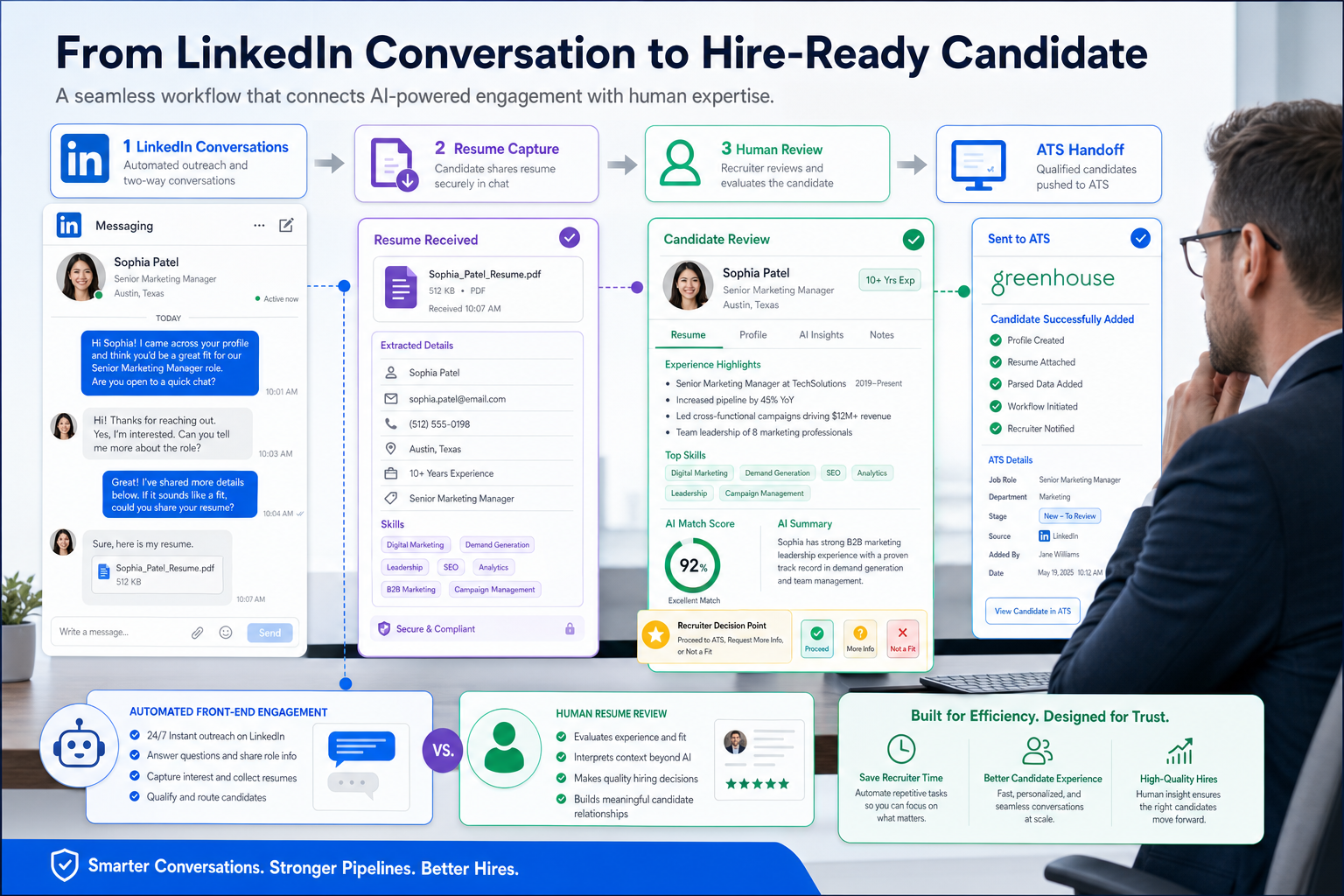
When linkedin recruiting automation blurs context and handoffs, this article helps recruiters judge safer workflows that protect trust and fit.
That distinction matters in day-to-day recruiting. Small agency owners feel it when consultants chase volume but lose track of who replied, where a resume landed, or which hiring manager still needs context. Solo recruiters feel it when after-hours candidate replies pile up and promising conversations stall before a real screen. In-house teams feel it when outreach, resume collection, and ATS updates live in different places, creating missed follow-up, weak candidate experience, and reporting gaps that become expensive later.
One way I have seen teams reduce that friction is by using StrategyBrain AI Recruiter to handle the repetitive front end of LinkedIn communication: introducing roles, replying across time zones, and collecting resumes or contact details from interested candidates. What made it useful in practice was not replacing recruiter judgment. The recruiter still reviewed resumes, decided whether the profile really matched, and chose the next step. In my own testing, the best fit was high-volume sourcing where response timing and message continuity mattered more than trying to automate final assessment.
The logic is similar to what makes a strong cover letter stand out. The memorable example is not the one that repeats a resume line by line. It is the one that shows research, selects a few relevant achievements, and presents them in a clean format that reflects the candidate's professional brand. In recruiting, we create the mirror image of that process. We have to spot relevance quickly, preserve context, and move from first contact to structured review without flattening people into generic outreach.
That is where many LinkedIn workflows break down. A recruiter sends messages, checks for replies, asks for a resume, copies notes into an ATS, and then tries to remember why this person mattered to the role in the first place. If those handoffs are messy, the team loses the same things the cover-letter example got right: research signal, clarity, and fit. So when people search for a linkedin connection automation tool or compare linkedin marketing software with recruiting systems, the real question is not how to automate more clicks. It is how to preserve context, trust, and decision quality while reducing repetitive work.
Table of Contents
- What LinkedIn Recruiting Automation Should Actually Do
- The Three Tests: Research, Clarity, and Brand Fit
- The Recruiting Automation Stack in Real Hiring Teams
- Where AI Recruiter Workflow Support Helps Most
- LinkedIn Recruiting Automation vs a LinkedIn Connection Automation Tool
- Where LinkedIn Marketing Software Fits and Where It Does Not
- Core Features to Evaluate Before You Buy
- Comparison of Common Automation Approaches
- How to Implement a Safer LinkedIn Workflow
- Common Mistakes Recruiting Teams Make
- FAQ
What LinkedIn Recruiting Automation Should Actually Do
In practical recruiting operations, linkedin recruiting automation should mean workflow automation rather than profile-action automation. The real value usually comes from moving candidate information cleanly between LinkedIn, an ATS, and a CRM; reducing manual re-entry; supporting resume capture; and keeping recruiters disciplined on follow-up and stage management.
That matters because most recruiting bottlenecks are not caused by a lack of message volume. They come from broken handoffs. A candidate replies after work hours, but no one updates the record. A sourcer gathers interest, but the resume sits in email. A hiring manager wants to know why a candidate was approached, but the original reasoning is buried in chat history. Good automation fixes those operational gaps.
So the first reframing is simple: if a tool helps you preserve candidate context, capture data accurately, and keep the hiring workflow moving, it supports recruiting. If it mainly promises scaled social actions, it may not solve the problem that experienced recruiters actually have.
The Three Tests: Research, Clarity, and Brand Fit
The strongest lesson from the cover-letter example is that quality is easier to spot when three things are present: research, clear presentation, and a convincing professional brand. Those same three ideas are useful for evaluating recruiting automation.
1. Research signal
The standout cover letter selected a few achievements that matched what the employer was trying to accomplish. Recruiting workflows need a version of that same discipline. Automation should help recruiters retain why a profile was chosen for a role, what problem the role is solving, and which parts of the candidate's background are actually relevant.
If your workflow strips all that context away and reduces outreach to generic volume, recruiters later have to rebuild the case from scratch. That is wasted time and usually leads to weaker conversations with both candidates and hiring managers.
2. Clarity of format
The reference example also worked because it was concise, readable, and easy to review. In recruiting operations, format becomes workflow structure. Candidate records should be clean, resumes easy to find, notes in one place, and ownership obvious. Automation earns its keep when it reduces clutter rather than multiplying disconnected touchpoints.
3. Professional brand and fit
The winning letter reflected the candidate's professional brand and matched the culture of the organization. Recruiters face a parallel challenge. Outreach has to feel aligned with the role, the employer, and the tone of the search. Candidate communication cannot be treated exactly like lead generation. That is one reason many assumptions borrowed from linkedin marketing software do not transfer cleanly into hiring.
Practical takeaway: evaluate recruiting automation the same way you would evaluate a persuasive cover letter: does it show relevance, keep the message clear, and preserve the human signal that helps someone say yes to the next step?
The Recruiting Automation Stack in Real Hiring Teams
Many teams use the term linkedin recruiting automation too broadly. In practice, it helps to break the stack into the actual work recruiters do.
Sourcing
LinkedIn is often the discovery layer. Recruiters identify profiles, shortlist likely fits, and prioritize outreach. But discovery is only useful if there is a reliable path into the internal workflow. Otherwise, promising candidates get stranded between sourcing and formal review.
Outreach and response handling
This is where recruiters often feel the strongest pressure to automate. Candidates reply at uneven hours, some ask basic role questions, some want compensation detail, and others will share contact information only after a few exchanges. The need here is not just message volume. It is continuity.
Resume and contact capture
Once interest is confirmed, recruiters need an orderly way to collect resumes and contact information. That sounds simple, but it becomes messy fast when replies happen across multiple accounts, time zones, or consultants.
Applicant tracking
An ATS remains the operating system for structured hiring. It stores candidate records, interview stages, ownership, feedback, and reporting fields. If the workflow never lands there cleanly, the team loses visibility.
CRM and longer-cycle pipeline building
Not every engaged candidate is an active applicant today. A recruiting CRM helps teams nurture talent pools, re-engage past finalists, and keep warm leads from disappearing.
Job distribution and system sync
Automated job posting and system-connected workflows reduce repetitive publishing and help keep requisition data aligned across systems. This is less glamorous than outreach automation, but often more important operationally.
Where AI Recruiter Workflow Support Helps Most
My own view is that AI support is most useful when it handles the repetitive parts of LinkedIn recruiting that do not require final human judgment. That includes first-touch introductions, timely follow-up, multilingual reply handling, and collecting resumes or direct contact information from interested candidates.
In that lane, AI Recruiter can be helpful for agencies, independent headhunters, and in-house teams that struggle with after-hours responses or international searches. I found the strongest use case was keeping candidate conversations alive while I focused on actual assessment. If a candidate asked basic role questions late at night or from another region, the workflow did not simply die until the next business day. That alone reduced a lot of avoidable drop-off.
Another practical advantage is multilingual communication. For firms sourcing across borders, native-language replies can reduce friction at the exact point where many recruiters lose momentum. It is also useful that interested candidates can be guided toward sharing a resume and contact details without the recruiter manually chasing every thread. But the boundary matters: resume match, shortlist quality, and interview decisions still belong with the recruiter.
For teams curious about setup options, the product tutorial and conversation examples are useful starting points: implementation overview and conversation cases. I would still advise piloting it on one search pattern first rather than trying to automate every desk or market at once.
LinkedIn Recruiting Automation vs a LinkedIn Connection Automation Tool
This is a critical distinction. A linkedin connection automation tool typically aims to scale connection requests or similar social actions. By contrast, healthy linkedin recruiting automation supports workflow continuity: message handling, candidate-interest capture, resume collection, ATS updates, and better handoffs.
From a recruiter's perspective, the second category is usually more sustainable. Connection behavior sits close to trust and platform risk. Workflow support sits closer to real operational pain. If your current process suffers because candidate replies are missed, resumes are scattered, or consultants spend hours repeating the same introductory exchange, workflow automation can help. If the goal is simply to imitate relationship-building at scale, the quality usually drops.
Experienced headhunters know this instinctively. The recruiting edge rarely comes from sending the most invitations. It comes from noticing who is relevant, responding at the right moment, and carrying context from first touch to shortlist.
Where LinkedIn Marketing Software Fits and Where It Does Not
Linkedin marketing software enters the conversation because some of its mechanics look familiar: campaigns, segmentation, messaging sequences, and CRM logic. But recruiting is not sales prospecting in a different costume.
Marketing workflows are designed for audience nurturing and commercial conversion. Recruiting workflows must handle resumes, job fit, candidate trust, hiring stages, and collaboration with hiring managers. The overlap is real at the data and sequencing level, but the purpose is different.
That is why a recruiting team should be cautious about copying volume-first assumptions from linkedin marketing software. Candidates need enough context to judge the opportunity, just as a hiring team needs enough context to judge the candidate. The opening cover-letter lesson applies again here: relevance beats noise.
Core Features to Evaluate Before You Buy
If you are evaluating linkedin recruiting automation, focus on features that improve operating quality rather than surface activity.
1. Continuous candidate messaging
Can the workflow manage replies outside business hours and across regions without breaking the conversation? This matters most for busy agency recruiters and global in-house teams.
2. Resume and contact capture
Look for a clean way to collect resumes and contact details from interested candidates. If recruiters still have to chase attachments across inboxes and chats, the workflow is incomplete.
3. ATS or CRM handoff
Even if LinkedIn communication is supported well, the recruiting system still needs a source of truth. Ask exactly how records are created, updated, or reviewed after candidate interest is confirmed.
4. Multilingual support
For international sourcing, language support can be more than a convenience. It can be the difference between a live conversation and a stalled one.
5. Recruiter control over final assessment
This is a non-negotiable evaluation point. A useful system can assist with communication and data collection, but recruiters should remain responsible for resume review, shortlist decisions, and candidate qualification.
6. Operational visibility
You should be able to answer simple management questions: Who replied? Who shared a resume? Who needs follow-up? Which searches are moving? If the workflow makes those answers harder to find, it is adding friction, not removing it.
Comparison of Common Automation Approaches
| Approach | Primary Use | Best Fit | Main Benefit | Main Limitation |
|---|---|---|---|---|
| Workflow-first LinkedIn recruiting automation | Handle conversations, capture interest, collect resumes, support handoffs | Agencies, headhunters, in-house TA teams | Better continuity and less manual repetition | Still needs recruiter review and process discipline |
| LinkedIn connection automation tool | Scale invitations or profile actions | Limited recruiting use | Perceived outreach speed | Trust, quality, and policy concerns |
| ATS-centered recruiting automation | Move candidate and job data through structured hiring workflows | Recruiting ops and larger teams | Visibility and reporting consistency | Can feel rigid without strong sourcing flow |
| CRM-based talent pipeline automation | Nurture long-term candidate pools | Strategic hiring teams and agencies | Re-engagement over time | Needs careful segmentation |
| LinkedIn marketing software | Lead generation and campaign orchestration | Marketing and revenue teams | Audience sequencing | Not designed around resumes, hiring stages, or recruiter judgment |
For most recruiting organizations, the strongest setup is not one giant automation layer. It is a practical mix: workflow support for LinkedIn communication, structured systems for ATS or CRM management, and clear human ownership over qualification.
How to Implement a Safer LinkedIn Workflow
Implementation usually fails when teams start with features instead of process. A better order looks like this:
- Map the conversation path. Document how a sourced prospect becomes an engaged candidate, where resumes are collected, and when a formal record is created.
- Define the recruiter handoff point. Decide exactly when automation stops and human review begins. For many teams, that point is candidate interest plus resume receipt.
- Pilot one search type first. Start with a role family or geography where after-hours messaging and repetitive first-touch questions are common.
- Set record rules. Clarify where contact details, resumes, notes, and status updates must live.
- Train consultants and hiring stakeholders. Everyone should understand that speed is not the only goal; preserving context is equally important.
- Measure operational outcomes. Look at conversation continuity, resume capture rate, response handling, admin time, and data completeness rather than inflated claims about volume alone.
That process is what separates useful automation from cosmetic automation. In my experience, recruiters adopt new workflow support faster when they can see one immediate relief point, such as not losing late-night candidate replies or not having to repeat the same introductory explanation dozens of times.
Common Mistakes Recruiting Teams Make
Confusing faster outreach with better recruiting
Speed matters, but quality breaks when recruiters cannot carry forward the reason a candidate was contacted in the first place.
Letting resumes and notes scatter
If candidate materials live across chats, inboxes, and private recruiter habits, automation has not solved the real problem.
Borrowing too much from linkedin marketing software
Campaign logic can help with sequencing, but candidate relationships are more sensitive than standard outbound prospecting.
Treating a linkedin connection automation tool as a full recruiting workflow
Connection activity is only a small piece of the process. It does not replace screening, record creation, resume review, or stakeholder coordination.
Skipping human checkpoints
No matter how good the communication layer becomes, recruiters still need to make the call on fit, shortlist quality, and interview readiness.
FAQ
What is linkedin recruiting automation in practical terms?
It is the use of automation to support LinkedIn-based recruiting workflows such as message handling, candidate-interest capture, resume collection, and cleaner handoff into ATS or CRM processes. It is more useful when focused on workflow than on social-action scaling.
Is a linkedin connection automation tool the same thing?
No. A linkedin connection automation tool generally focuses on connection behavior or similar profile actions. That is different from workflow automation that helps recruiters manage communication, resumes, and follow-up.
Can linkedin marketing software replace recruiting software?
Usually not. Linkedin marketing software may support segmentation and campaign logic, but recruiting needs role context, resume handling, candidate qualification, and hiring-stage management.
Where does AI support help most in LinkedIn recruiting?
It helps most in repetitive front-end work: introducing roles, answering common questions, maintaining timely communication, and collecting resumes or contact details from interested candidates. Recruiters should still own final evaluation.
Who benefits most from this type of workflow?
Agency recruiters, independent headhunters, and in-house teams with high sourcing volume, cross-border hiring, or after-hours candidate response patterns usually benefit the most.
What should recruiters measure after implementation?
Look at response continuity, time spent on repetitive messaging, resume collection reliability, record completeness, and how smoothly candidates move from LinkedIn conversation to structured review.
Conclusion
The best use of linkedin recruiting automation is not to imitate recruiter relationships at scale. It is to protect the parts of the process that make good judgment possible: context, timely response, clean records, and a smooth path from interest to review.
If you remember the opening cover-letter lesson, the standard becomes clearer. Strong recruiting workflows, like strong cover letters, show relevance, stay clear, and preserve the human signal that helps a decision get made. That is the benchmark worth using whether you are evaluating a workflow assistant, a linkedin connection automation tool, or broader linkedin marketing software in a hiring environment.














