


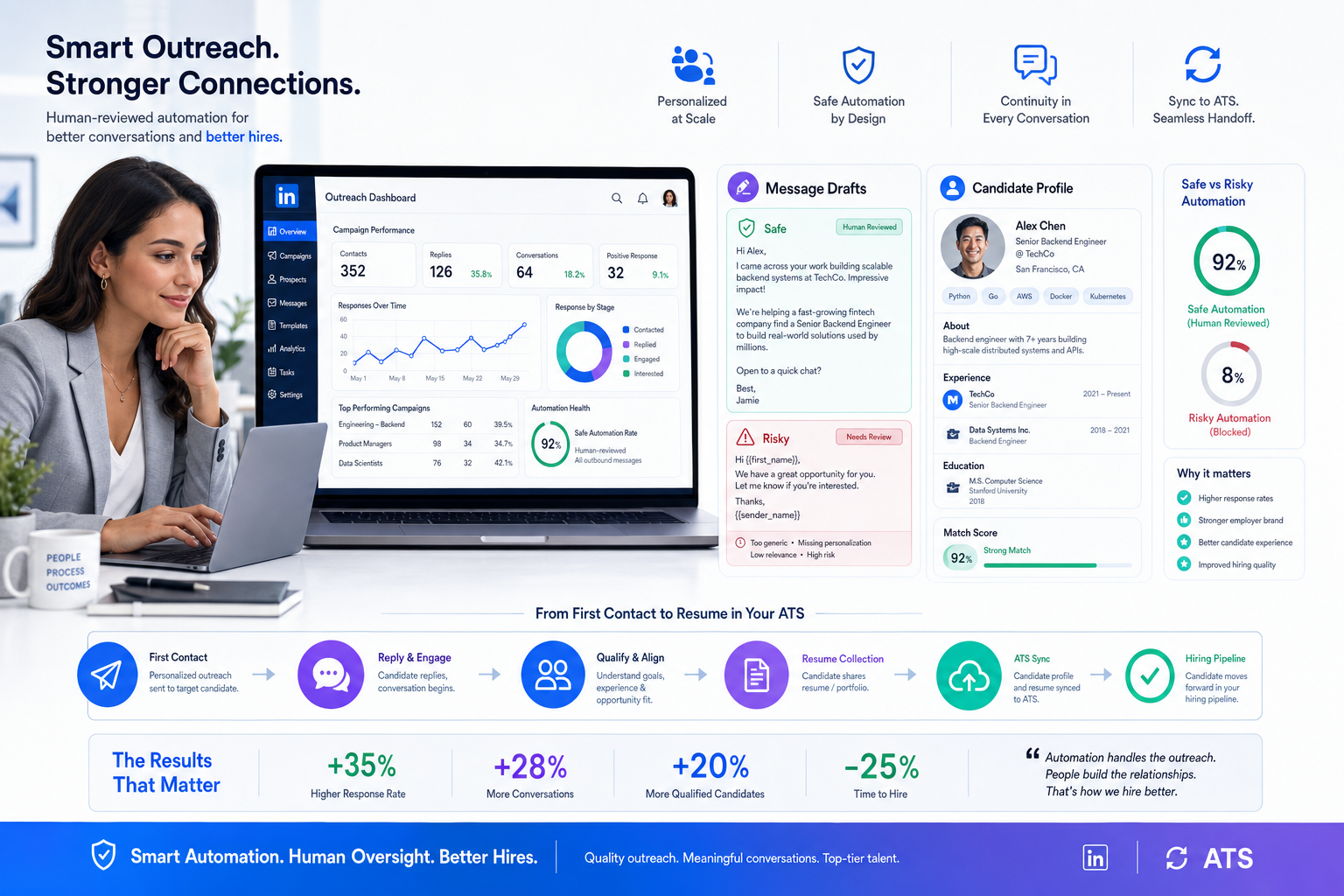
Headhunters can use this linkedin recruiting automation guide to spot risky workflows, protect trust, and improve reply quality.
That sounds obvious, but in day-to-day recruiting it is where many teams slip. The pressure to fill more roles, reply faster, and keep LinkedIn activity moving can turn careful outreach into semi-generic volume. The cost is not just lower response rates. You also get confused ownership, duplicate follow-up, weaker employer perception, and more time spent cleaning up candidate records than actually speaking with qualified people.
That is why I have become selective about where automation belongs. Used well, StrategyBrain AI Recruiter can take repetitive front-end work off a recruiter’s plate by handling candidate introductions, after-hours replies, and résumé or contact collection from interested prospects, while the recruiter still owns shortlist decisions, résumé review, and whether the conversation should move forward. In my own testing, that kind of support helped most when the real bottleneck was not sourcing itself, but keeping timely, human-sounding outreach moving across multiple open searches.
You can see the same logic in a different recruiting situation: cover letters. Many recruiters will tell candidates the resume matters more, but they still notice when a letter is generic, addressed to the wrong company, or clearly sent in bulk. A candidate who does no research, uses one version for every role, and skips personalization signals low intent before the resume is even discussed.
That candidate-side lesson maps directly to LinkedIn outreach. If a recruiter wants to automatiser linkedin activity and every message feels like a volume application in reverse, the process stops looking targeted and starts looking careless. The real question is not whether automation exists, but how to use linkedin recruiting automation and even selective linkedin marketing software-style workflow logic without losing the research, structure, and personalization that make candidates respond.
Table of Contents
- Why personalization still matters in automated recruiting
- What LinkedIn recruiting automation actually means
- Safe automation vs risky automation
- Best use cases for recruiters and search firms
- How I use AI-supported workflow without giving up control
- Software categories recruiters compare
- A practical implementation framework
- Common mistakes to avoid
- FAQ
Why Personalization Still Matters in Automated Recruiting
One of the most useful recruiting truths has nothing to do with automation at all: generic communication usually signals weak intent. That is why experienced recruiters dislike copy-paste cover letters. They may not rely on them heavily, but they immediately notice when the candidate did not research the company, did not tailor the message, and did not even address the right person.
The same standard applies when recruiters contact candidates on LinkedIn. If the outreach reads like it could have gone to anyone, the candidate assumes one of two things: either the recruiter has not done the work, or the recruiter is optimizing for volume over fit. Neither impression helps.
In practice, the strongest automated recruiting workflows borrow three principles from good cover-letter advice:
- Research before contact. Outreach should reflect the company, role, and candidate background.
- Address the individual when possible. Even at scale, there should be a specific reason this person is being contacted.
- Keep the message structured and brief. A clear opening, relevant middle, and simple next step outperform long generic templates.
That is why I tend to frame linkedin recruiting automation as a quality-control challenge, not a send-more challenge.
What LinkedIn Recruiting Automation Actually Means
LinkedIn recruiting automation is the use of platform-compatible tools, AI assistance, and connected recruiting systems to reduce repetitive manual work around sourcing and follow-up. It can include search monitoring, first-draft message creation, after-hours response handling, candidate interest capture, résumé collection, and syncing activity into recruiting workflows.
What it should not mean is turning candidate outreach into untargeted bulk messaging. Recruiters sometimes borrow tactics from sales stacks or broader linkedin marketing software categories, but recruiting is judged differently. Relevance matters more than volume, and credibility matters more than campaign scale.
Key Insight: The safest way to automatiser LinkedIn recruiting is to automate the workflow around the conversation, while keeping the decision-making inside the conversation human.
That distinction becomes more important as teams juggle multiple openings across time zones and seniority levels. Automation should reduce admin drag, preserve response quality, and make sure a good candidate does not sit unanswered because the recruiter is offline or buried in parallel searches.
Safe Automation vs Risky Automation
Not all automation creates the same risk profile. Recruiters need to separate operational support from behavior that starts to resemble spam, impersonation, or low-quality prospecting.
| Automation Type | How Recruiters Use It | Risk Level | My View |
|---|---|---|---|
| Search alerts and monitoring | Track newly relevant profiles for priority roles | Low | Useful and efficient |
| AI-assisted outreach drafting | Create a first message draft faster | Low | Good if always edited |
| After-hours candidate replies | Keep momentum when candidates answer late | Medium | Helpful with guardrails |
| Interest capture and résumé collection | Move willing candidates into review faster | Medium | Practical if recruiter reviews next steps |
| ATS or CRM syncing | Reduce copy-paste and stage confusion | Low | Often the highest ROI |
| Mass connection or engagement bots | Scale behavior mechanically | High | Not worth the tradeoff |
| Untargeted bulk messaging | Push volume over fit | High | Damages trust quickly |
The practical dividing line is familiar to any recruiter who has screened weak cover letters. If the communication shows no sign of research or fit, automation is amplifying the wrong thing.
Best Use Cases for Recruiters and Search Firms
The best use cases are the ones that help recruiters stay responsive without pretending every step should be delegated.
1. Candidate discovery for niche and repeat searches
Search monitoring is still one of the easiest wins. If you recruit repeatedly for the same function, location, or language combination, alerts reduce wasted time and stop recruiters from rebuilding the same searches every few days.
2. Structured first-touch support
When several roles are open at once, a drafting layer can help create a clean opening note. The recruiter should still tailor it to the candidate, just as a serious job seeker tailors a cover letter to the company. The draft is support; the relevance is still human work.
3. After-hours conversation continuity
Candidates often reply outside business hours. That is especially true in cross-border hiring. If nobody responds until the next day or later, interest cools. Limited AI-supported replies can keep the conversation alive, answer standard role questions, and confirm whether the candidate wants to continue.
4. Interest qualification before manual review
Some candidates want more details; others are ready to send a resume immediately. Capturing that signal early helps recruiters prioritize their time. It does not replace final qualification. It simply tells you who is willing to engage.
5. Résumé and contact collection
This is one of the most practical workflow improvements. If an interested candidate sends a resume or shares contact details, those materials should be captured cleanly so the recruiter can move directly into evaluation instead of chasing files across inboxes and chat threads.
How I Use AI-Supported Workflow Without Giving Up Control
I have found the most credible use of AI support is not trying to replace recruiter judgment, but keeping early outreach moving when recruiter time is fragmented. That is where AI Recruiter stands out as a workflow layer rather than a sourcing fantasy. It can automatically introduce opportunities, continue candidate conversations around the clock, and collect resumes or contact details from interested people, but it does not make the hiring decision for you.
In my own workflow, that matters most on searches where candidates reply late, ask predictable first-round questions, or need a nudge before they send a resume. Instead of losing those conversations overnight, I can use conversation-supported automation to keep the exchange active, then come back to a clearer set of interested profiles. The real time savings are not magical. They come from fewer stalled threads, less admin follow-up, and better continuity across time zones.
I would still not hand over final screening. The recruiter needs to judge whether the resume really matches the brief, whether compensation alignment is realistic, and whether the candidate should be introduced to the client or hiring manager. That final layer remains a human responsibility.
Software Categories Recruiters Usually Compare
When teams research linkedin recruiting automation, they often compare tools that are built for very different jobs. That confusion leads to poor buying decisions.
| Category | Typical Strengths | Weaknesses for Recruiting | Best Fit | How It Can Work with AI Recruiter |
|---|---|---|---|---|
| LinkedIn-native recruiter tools | Strong search environment, familiar workflow, direct platform context | More manual effort in follow-up and off-hours continuity | Internal TA and executive search teams that want platform-first sourcing | Use AI support to continue early conversations and collect resumes after initial outreach |
| Applicant tracking systems | Stage tracking, collaboration, reporting, compliance structure | Often weak at first-touch candidate engagement on LinkedIn | Growing companies and agencies managing multiple requisitions | Use AI-supported LinkedIn conversations to feed cleaner candidate intake into ATS workflows |
| General linkedin marketing software | Campaign logic, sequencing, outreach operations | Often built for sales rather than recruiting nuance, fit, or recruiter credibility | Outbound teams, not candidate-centric recruiting functions | Borrow operational discipline only; avoid treating candidates like marketing leads |
This is also where the phrase automatiser linkedin can become misleading. In marketing, automation often aims to expand reach. In recruiting, the more useful goal is to keep good candidate conversations from dropping because the recruiter is overloaded.
A Practical Implementation Framework
If you want automation without quality loss, build it in the same disciplined way you would advise a candidate to write a strong cover letter: know the audience, tailor the message, keep the structure clear, and avoid sloppy errors.
Step 1: Define what should stay human
Role fit judgment, shortlist quality, compensation realism, and client or hiring-manager calibration should stay with the recruiter.
Step 2: Automate repeatable front-end tasks
Focus on search monitoring, first-touch support, after-hours replies, and capturing resumes or contact details from interested prospects.
Step 3: Create message standards
Every automated or AI-assisted message should show evidence of role relevance. If it reads like it could have gone to anyone, it is not ready.
Step 4: Review candidate-facing details carefully
Just as a cover letter with the wrong company name hurts a candidate, outreach with the wrong role, region, or hiring context hurts the recruiter. Quality checks matter.
Step 5: Connect downstream workflow
Once interest is confirmed, make sure candidate information is easy to review, route, and document. Admin friction is where a lot of promised automation value disappears.
Step 6: Measure response quality, not just output
Track replies, meaningful conversations, resume submissions, and actual screening conversions. Bigger send counts are not a useful success metric on their own.
Common Mistakes to Avoid
Treating candidate outreach like mass promotion
If your process starts to look like a broad linkedin marketing software campaign, you are probably drifting away from good recruiting practice.
Using one message for every role
This is the recruiter version of sending one generic cover letter everywhere. Candidates notice immediately.
Skipping recruiter review after candidate interest is captured
Interest is not qualification. A willing candidate still needs proper evaluation.
Letting automation hide poor search discipline
If targeting is weak, automation just spreads irrelevance faster.
Ignoring cross-time-zone responsiveness
Some of the best candidates respond when the recruiter is offline. If your workflow cannot handle that, good conversations stall for no good reason.
FAQ
What is linkedin recruiting automation?
It is the use of workflow tools, AI support, and platform-compatible systems to reduce repetitive LinkedIn recruiting tasks such as search monitoring, message support, candidate interest capture, and resume collection.
Is it safe to automatiser LinkedIn for recruiting?
It can be, if the automation supports workflow efficiency rather than untargeted message volume. The safest model keeps final judgment and fit assessment with the recruiter.
How is recruiting automation different from linkedin marketing software?
Marketing tools usually optimize for campaign scale and audience reach. Recruiting should optimize for relevance, timing, and candidate trust.
Can AI handle the full recruiting process on LinkedIn?
No serious team should assume that. AI can support introductions, ongoing replies, and information capture, but recruiters still need to review resumes, judge fit, and decide whether to move candidates forward.
Where does StrategyBrain AI Recruiter fit best?
It fits best in repetitive, early-stage LinkedIn work: introducing roles, answering routine questions, staying responsive after hours, and collecting candidate materials so the recruiter can focus on evaluation and next-step decisions.
Conclusion
The cover-letter lesson is simple and useful: generic communication signals weak intent, while tailored communication earns attention. LinkedIn recruiting automation works under the same rule. If automation helps you research better, respond faster, and keep candidate conversations organized, it is valuable. If it pushes you toward broad, careless messaging, it becomes a liability.
For recruiters, agency owners, and in-house talent teams, the winning setup is usually not the most aggressive one. It is the one that protects relevance, keeps recruiter judgment in place, and uses tools like StrategyBrain AI Recruiter where they genuinely reduce friction: early introductions, off-hours continuity, and clean capture of candidate interest. That is how to save time without making outreach feel automated in the worst sense of the word.















