


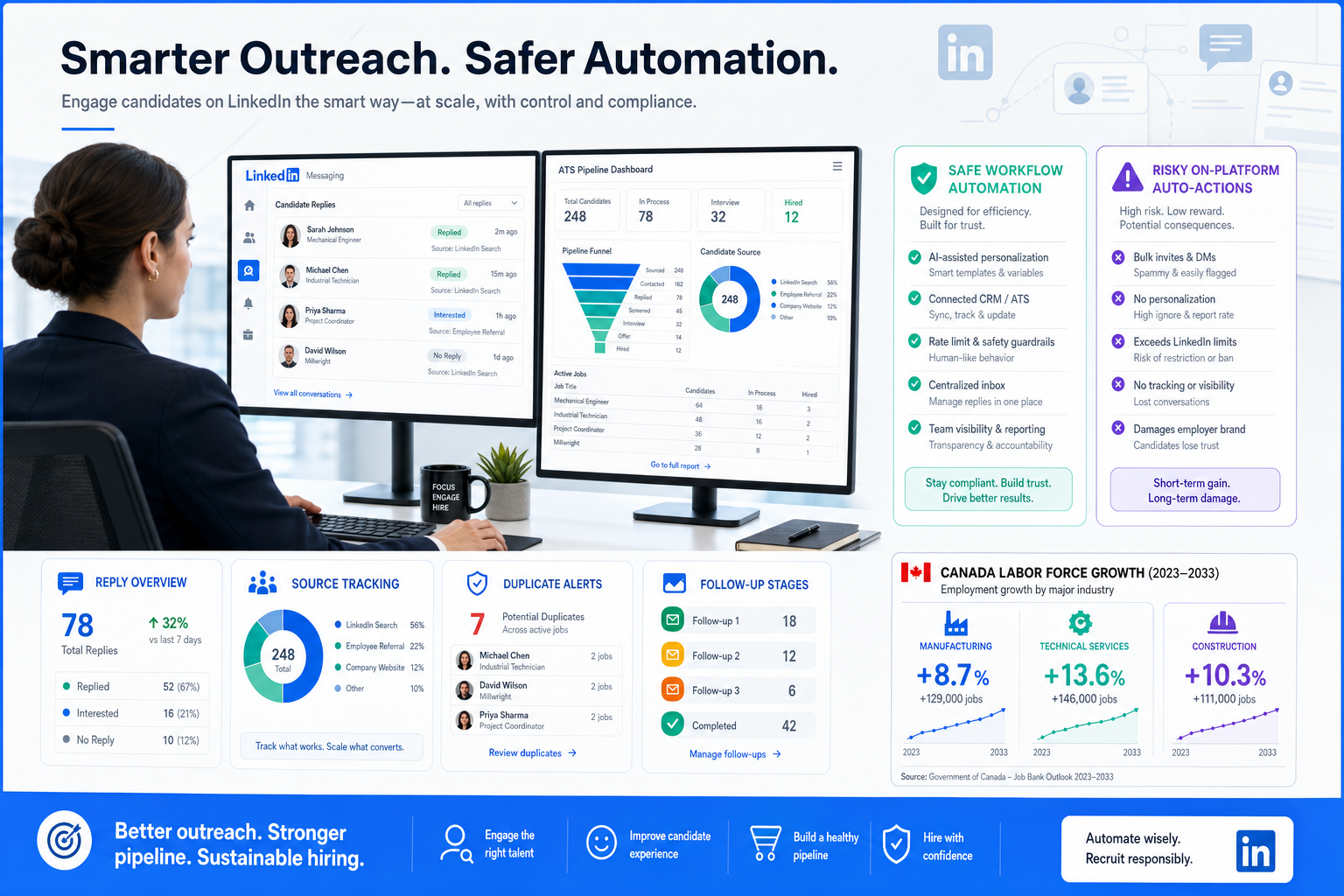
This article shows recruiters how to judge linkedin recruiting automation safely and avoid lost replies, ATS drift, and follow-up gaps.
That distinction matters more in a market where hiring demand can rise even while confidence stays uneven. In Canada's January 2025 labour data, employment grew by 76,000, manufacturing added 33,000 roles, professional and technical services added 22,000, and construction added 19,000. When those sectors move at once, recruiters do not just face more requisitions; they face more live conversations, more counteroffers, more aging specialist pipelines, and more risk that a promising reply on LinkedIn gets lost between outreach, ATS updates, and hiring-manager follow-up.
In my own workflow, tools that help outside the inbox have been more useful than anything that tries to act like a recruiter on-platform. StrategyBrain AI Recruiter is relevant here because it can support repetitive LinkedIn communication, keep after-hours replies moving, and collect candidate details when interest is real, while the recruiter still owns fit assessment, resume review, and the decision about who moves to interview. For teams handling multilingual searches or cross-time-zone response gaps, that support can reduce drop-off without handing judgment to software.
The pressure shows up in very practical moments. After the January labour update, a recruiter working industrial and engineering desks may open a requisition list and realize that manufacturing demand is strengthening while experienced engineers are getting harder to move. Then the next two actions happen fast: they check which LinkedIn prospects replied overnight, and they try to match those replies back to ATS stages before sending hiring managers an update on priority searches.
Now add the market friction described by recruiters on the ground: some employers hesitate because of tariff uncertainty, but replacement hiring does not stop, and intermediate or senior engineering talent can still reject offers after strong counteroffers. In that setting, the problem is not a lack of outreach volume. It is workflow control. That is the real reason linkedin recruiting automation matters, why recruiters compare different linkedin tools, and why it helps to separate recruiting workflows from linkedin marketing automation before choosing any system.
Quick answer: The safest form of LinkedIn recruiting automation supports sourcing organization, ATS sync, job distribution, candidate handoff, and recruiter-reviewed communication. The risky category is software that scrapes profiles or performs member actions automatically inside LinkedIn.
Table of Contents
- Why automation matters in a faster but uneven hiring market
- What linkedin recruiting automation actually means
- Safe workflows vs risky on-platform automation
- Where automation helps recruiters most
- ATS visibility, source tracking, and recruiter control
- Automated job posting and job feed management
- What candidate communication should stay human
- How to evaluate linkedin tools
- Recruiting automation vs linkedin marketing automation
- How to implement automation without losing judgment
- FAQ
Why automation matters in a faster but uneven hiring market
Recruiting teams often feel the strain of market shifts before leadership labels them as a trend. January 2025 is a good example. Canada posted three straight months of job growth, with 215,000 jobs added across that period, and much of the momentum sat in sectors that typically generate urgent recruiter activity: manufacturing, professional services, construction, hospitality, and logistics.
That does not mean every employer suddenly hires with confidence. The same market update pointed to uncertainty around tariffs and slower expansion decisions. Recruiters know what that combination creates: replacement hiring stays active, niche talent remains hard to replace, and the workload becomes spiky rather than steady. One day you are chasing project managers and site supervisors; the next day you are backfilling an engineer, a sales leader, or a senior accountant who cannot be left open for long.
In that environment, manual LinkedIn work breaks down in predictable ways:
- Replies arrive after hours and sit too long
- Candidate notes stay trapped in personal inboxes
- ATS stages fall behind actual conversations
- Source attribution becomes unreliable
- Hiring managers get updates without enough context
So when recruiters search for linkedin recruiting automation, they are usually not asking for a robot recruiter. They are asking how to protect throughput when the market gets busy and uneven at the same time.
What linkedin recruiting automation actually means
LinkedIn recruiting automation is the use of native features, approved integrations, workflow rules, and recruiter-assisted AI to reduce repetitive hiring work. In practice, that usually means automating the process around LinkedIn rather than automating member behavior inside LinkedIn.
That difference gets lost because buyers often search broadly for linkedin tools. Some tools are built for recruiter efficiency. Some are built for data movement between systems. Others belong more to paid campaigns and employer brand operations, which puts them closer to linkedin marketing automation than recruiting operations.
For most talent teams, useful automation falls into a few grounded categories:
- Sourcing support: prioritize likely-fit profiles, organize outreach status, and reduce duplicate work
- ATS synchronization: keep candidate records, source labels, and job data aligned
- Job distribution: publish and update openings with less manual posting
- Stage-based communication: send operational updates tied to real hiring stages
- Recruiter assistance: draft messages, summarize requirements, and capture details for review
The key is that the recruiter still decides who is a fit, which response deserves follow-up, and when a candidate should move forward.
Safe workflows vs risky on-platform automation
The cleanest way to evaluate linkedin recruiting automation is to split it into workflow automation and account-action automation.
| Automation Type | Typical Use | Recruiter Value | Risk Profile |
|---|---|---|---|
| Native or approved workflow automation | ATS sync, job posting, source tracking, drafting support | Improves consistency and speed | Lower |
| Recruiter-reviewed communication support | Helps manage conversations and collect next-step info | Reduces admin and reply lag | Moderate if governed well |
| Third-party scraping or auto-actions on LinkedIn | Profile extraction, auto-visits, auto-messaging, auto-click behavior | Often promises scale over control | Higher |
If a tool's core claim is that it can behave like a user account at volume, that should trigger caution. If its value comes from syncing data, reducing duplication, improving visibility, or supporting recruiter-reviewed follow-up, the workflow is easier to defend.
Practical takeaway: Automate the recruiting process around LinkedIn, not the identity and behavior of the recruiter inside LinkedIn.
Where automation helps recruiters most
1. Managing surge periods in technical hiring
The labour-force context matters here. When manufacturing and engineering demand rises while senior talent stays scarce, recruiters need tighter response handling more than louder outreach. The winning move is often better sequencing: capture replies quickly, log them consistently, and move qualified interest into the ATS before a counteroffer or another recruiter gets there first.
In those moments, I have found it more valuable to use AI Recruiter as a support layer for repetitive candidate exchanges than to rely on disconnected inbox work. It helps keep conversations moving when replies come late or across time zones, and it can gather resumes or contact details from interested prospects, but I still review the record myself before deciding whether the profile is interview-worthy.
2. Cleaning up sourcing operations
Good sourcing automation is usually about order, not volume. Recruiters benefit when the workflow helps with:
- Deduplication between LinkedIn and the ATS
- Consistent source labeling
- Visibility into prior applications or outreach history
- Recruiter notes tied to the right requisition
- Prioritization of active, replied, and stalled prospects
These are the kinds of improvements that compound across desks, especially in agency environments where multiple recruiters may touch similar talent pools.
3. Keeping replacement hiring moving
One useful insight from the labour-market reference is that uncertain expansion does not eliminate hiring needs. If a senior accountant retires or a sales manager leaves, the search still opens. Automation helps most when it shortens administrative lag around these must-fill roles rather than trying to manufacture demand through more activity.
ATS visibility, source tracking, and recruiter control
For most experienced recruiters, the real operating system is the ATS. LinkedIn is where attention starts; the ATS is where process quality is proven. That is why visibility between systems matters so much in linkedin recruiting automation.
When candidate replies live in one place, resumes in another, and hiring-manager updates in a third, recruiters end up doing clerical repair work instead of recruiting. Better integration reduces that drag through:
- Shared candidate context: recruiters and hiring managers see the same status logic
- Cleaner source data: channel performance becomes more trustworthy
- Less duplicate entry: fewer fragmented records across tools
- Faster handoffs: less copying and pasting between systems
A simple control checklist
- Standardize requisition and stage names. If your stages are inconsistent, automation will only spread confusion faster.
- Map source labels deliberately. A clean source taxonomy matters more than teams expect.
- Decide who owns the sync. Recruiting ops, HRIS, or TA systems should have clear accountability.
- Audit duplicates monthly. Even good automations drift over time.
- Review hiring-manager visibility. Updates should show context, not just status codes.
If your recruiters are struggling with late-stage chaos, the fix is often not more outbound. It is better data hygiene and better recruiter control.
Automated job posting and job feed management
Job posting automation is one of the most defensible forms of linkedin recruiting automation because it handles job data, not member actions. Whether teams call it job wrapping, feed-based posting, or automated distribution, the goal is straightforward: keep openings accurate and current across systems.
This is especially useful in the kind of market described in the January labour update, where hiring may concentrate in certain sectors or provinces and recruiters need to adjust open roles quickly. If Ontario and British Columbia are driving a larger share of new hiring activity, stale postings create both reporting noise and candidate confusion.
Strong automated posting workflows help with:
- Publishing approved requisitions faster
- Pausing or closing jobs when ATS status changes
- Reducing duplicate postings
- Improving applicant source reporting
- Keeping location and job-title data consistent
In practical terms, that gives recruiters one less operational leak to manage during busy search periods.
What candidate communication should stay human
Candidate communication is where teams are most tempted to over-automate. Some parts are safe and useful. Others quickly damage trust.
Sensible automation includes:
- Application confirmations
- Interview scheduling handoffs
- Stage-based rejection messages
- Recruiter-assisted outreach drafting
- Collection of resumes and basic follow-up details after clear interest
What should stay human:
- Fit judgment on nuanced or senior roles
- Relationship-building with passive candidates
- Offer-risk conversations
- Counteroffer handling
- Final messaging tone on sensitive searches
This is where my own experience with StrategyBrain AI Recruiter has been useful but bounded. It can keep communication from stalling, particularly when candidates answer after work hours or in another language, and it can help collect the next piece of information needed to continue the process. But I do not treat that as qualification. I still read the resume myself, assess relevance, and decide whether the candidate deserves a call, a shortlist spot, or a polite close.
How to evaluate linkedin tools
When recruiters compare linkedin tools, the safest buying questions are operational, not promotional.
| Question | Why It Matters |
|---|---|
| Does it improve recruiter workflow or just increase action volume? | Volume without control usually creates cleanup work. |
| Does it sync cleanly with the ATS? | Disconnected tools weaken reporting and handoffs. |
| Can it support source tracking and deduplication? | Messy source data makes optimization impossible. |
| Does recruiter judgment stay in the loop? | Important for trust, tone, and fit assessment. |
| Can the team explain the compliance logic in plain English? | If not, the workflow probably needs review. |
A market with stronger hiring in manufacturing, construction, and technical services is a good stress test. If your workflow cannot handle a surge in specialist conversations without losing context, the problem is not simply headcount. It is tool design and process ownership.
Recruiting automation vs linkedin marketing automation
This distinction matters because teams often use the same platform for very different goals. LinkedIn recruiting automation is tied to jobs, applicants, candidate records, recruiter activity, and hiring decisions. LinkedIn marketing automation is tied to campaigns, audiences, ads, and performance workflows.
| Area | Recruiting Automation | LinkedIn Marketing Automation |
|---|---|---|
| Main objective | Move hiring work forward accurately | Run and optimize campaigns |
| Primary records | Jobs, candidates, applications | Ads, audiences, creatives |
| Main users | Recruiters, TA ops, hiring managers | Marketing ops, employer brand, demand gen |
| Success measure | Cleaner pipeline and better hires | Reach, engagement, conversion |
If employer brand and TA both use LinkedIn, document where the handoff starts and stops. That avoids mixing ad logic with candidate workflow logic, which is a common cause of bad software evaluation.
How to implement automation without losing judgment
Start with process friction, not feature lists
Map where recruiters lose time today: after-hours replies, duplicate records, source confusion, posting lag, or weak hiring-manager updates. Those are better automation targets than generic promises about AI productivity.
Choose synchronization before aggressive action
The most durable gains usually come from job sync, ATS visibility, source tracking, and candidate record consistency. These improve every search, including the hard replacement searches that continue even in uncertain markets.
Keep final decisions with recruiters
Especially for senior, technical, or niche hiring, recruiters still need to evaluate resume quality, timing, compensation risk, and counteroffer exposure. Automation should support judgment, not simulate it.
Write clear internal guardrails
Your team should be able to explain what is approved, what requires extra review, and what is off-limits. If a workflow depends on scraping or impersonating normal member actions at scale, treat that as a red flag.
Measure process quality
Useful measures include time-to-post, duplicate reduction, source accuracy, recruiter workload, response lag, and hiring-manager visibility. Those indicators tell you whether the workflow actually improved.
Common mistakes recruiters make with automation
Confusing speed with more outreach
In tight markets, quality follow-up often beats higher output. This is especially true when candidates have alternatives or may receive counteroffers.
Ignoring the market context behind the workflow
The January 2025 labour snapshot shows how mixed conditions create mixed recruiting pressure. Demand can grow in some sectors while employer confidence stays cautious. Automation should be built for that unevenness.
Letting notes and replies stay outside the system
If key candidate activity lives only in LinkedIn messages, the recruiter who owns the conversation becomes the bottleneck.
Using the same evaluation lens for recruiting and marketing
LinkedIn marketing automation is not the same operating problem as recruiting. Keep the ownership and tooling separate.
FAQ
What is LinkedIn recruiting automation?
It is the use of approved workflow rules, integrations, and recruiter-assisted AI to reduce manual work in sourcing, job posting, candidate tracking, and communication support. The safest forms improve process efficiency rather than automating user behavior on LinkedIn.
Is linkedin recruiting automation allowed?
Some forms are. Native features, integrations, ATS sync, job posting automation, and recruiter-reviewed support workflows are generally more defensible. Tools that scrape data or automatically perform member actions carry more risk.
How are linkedin tools different from recruiting software more broadly?
LinkedIn tools may support sourcing, communication, posting, or reporting, but recruiters still need to evaluate how those functions connect to the ATS and hiring workflow. A useful tool should improve visibility and control, not just add activity.
How is linkedin marketing automation different?
LinkedIn marketing automation is designed for campaign and audience operations. Recruiting automation is designed for jobs, applications, candidate movement, and recruiter workflow.
What should recruiters automate first?
Start with ATS sync, source tracking, job posting accuracy, duplicate control, and stage-based operational messages. Those are usually the safest and most valuable improvements.
Can AI support LinkedIn recruiting without replacing the recruiter?
Yes. In practice, the best support usually helps with repetitive communication, time-zone coverage, drafting, and information capture while the recruiter still reviews resumes, assesses fit, and makes next-step decisions.
Conclusion
LinkedIn recruiting automation is most useful when it solves the real problem recruiters face in live markets: not a lack of activity, but a lack of control when demand shifts quickly. The January 2025 labour picture makes that easy to see. Hiring can expand in manufacturing, construction, logistics, and technical services while uncertainty, replacement hiring, and counteroffers make each search harder to manage.
That is why the best automation strategy usually starts with safe workflow design: cleaner ATS visibility, better source tracking, more reliable posting, and recruiter-supported communication that does not pretend to replace recruiter judgment. If you are evaluating linkedin tools, keep linkedin marketing automation separate from hiring operations, fix the process leaks first, and choose systems that help recruiters respond faster without surrendering control.















