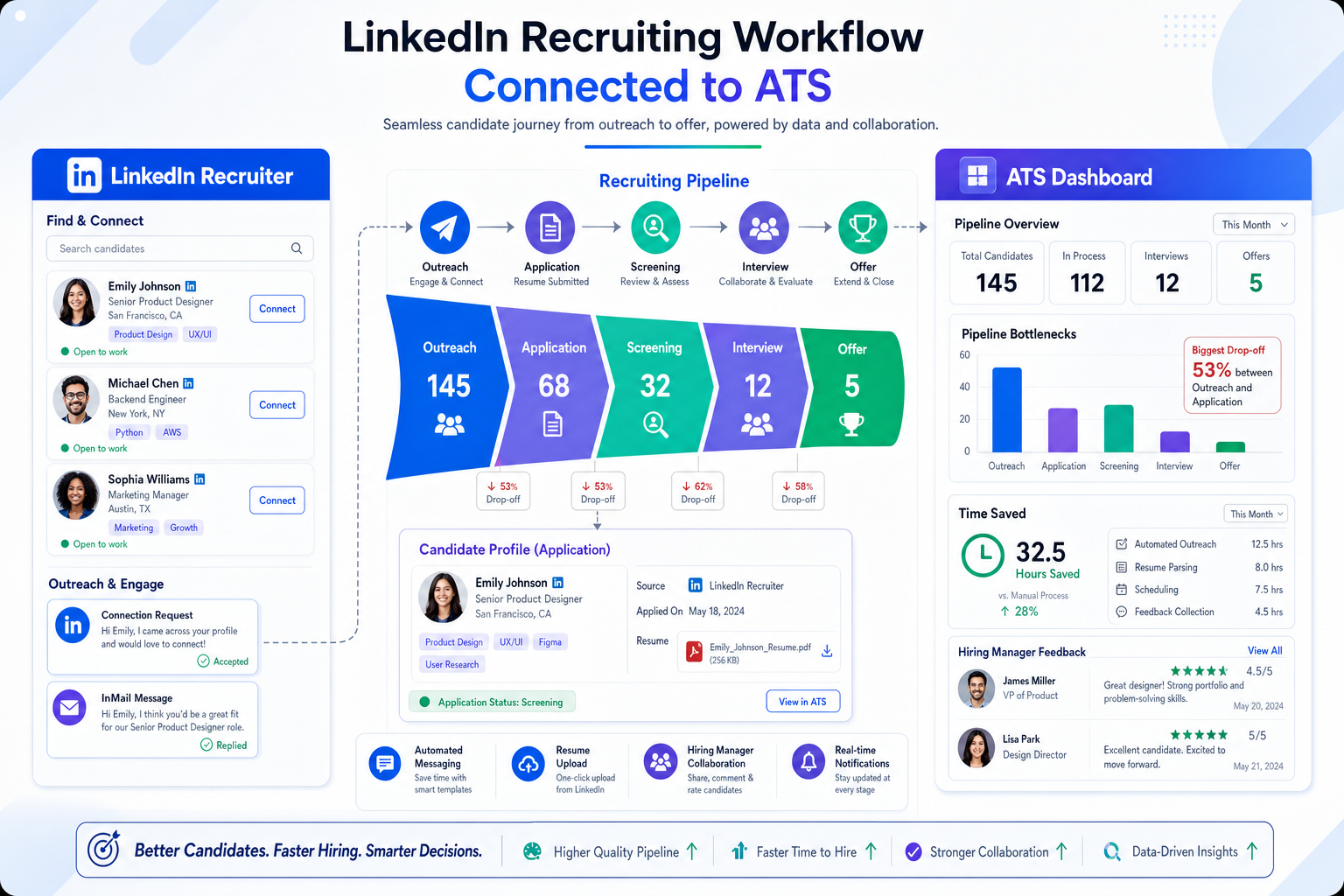
When hiring across channels, this article helps recruiters judge recruiting and applicant tracking software to avoid stalled pipelines.
That matters most when a team is hiring across multiple channels and stakeholder groups at once. Without a reliable workflow, recruiters lose time to duplicate data entry, missed follow-ups, delayed hiring manager feedback, and inconsistent candidate communication. For agency recruiters and lean in-house teams, the damage is not abstract. It shows up as slower shortlists, weaker candidate experience, less confidence in pipeline priorities, and more time spent reconstructing what happened after the fact.
In my own workflow, I have found that automation helps most when it removes repetitive communication and handoff friction without taking final decisions away from the recruiter. Tools such as StrategyBrain AI Recruiter are useful here because they can keep candidate conversations moving, collect resumes and contact details from interested prospects, and respond across time zones or after hours when manual follow-up usually stalls. What still stays with the recruiter is the part that should stay human: reviewing the resume, deciding whether the profile fits the role, and choosing the next step in the process.
A good example comes from a different but familiar talent problem: students cannot pursue career paths they never clearly see. In the source material behind this article, lawmakers in Colorado required school counselors to present trades and military options by the ninth grade, while Canadian commentary questioned whether young people were hearing about all viable paths early enough. The underlying issue was not only awareness. It was whether the right people received the right guidance before disengagement set in.
That same logic shows up in recruiting operations. When hiring teams want stronger pipelines for hard-to-fill roles, they still have to surface opportunities early, route communication consistently, and keep records clear across the people involved. If that foundation is weak, the question quickly becomes not only what is ATS but also why recruiting and applicant tracking software is the workflow layer that keeps outreach, applications, stage movement, and recruiter judgment connected.
Table of Contents
- Why recruitment automation matters before applications pile up
- What is ATS in plain English
- How does an applicant tracking system work
- Where recruitment automation tools add real value
- Practical benefits for recruiters and hiring teams
- ATS vs recruiting CRM
- How to choose the right software
- Common implementation mistakes
- FAQ
Why Recruitment Automation Matters Before Applications Pile Up
One useful lesson from school-to-work debates is that timing shapes outcomes. If trades, military service, or technical paths are introduced too late, students may disengage before they understand what those options offer. Recruiting has a similar timing problem. Teams often wait until applications become unmanageable before fixing the process, but by then the damage is already visible in response delays, weak candidate experience, and inconsistent screening.
For recruiters, the real value of automation starts earlier. It begins when you need to present openings consistently, capture incoming interest cleanly, and keep communication moving before a live req turns messy. That is why experienced teams do not treat automation as a resume filter first. They treat it as an operating structure.
In practical terms, recruiting and applicant tracking software gives hiring teams a single process for job posting, application intake, candidate review, collaboration, and reporting. Broader automation then supports the repetitive parts around that core. If a role requires proactive outreach, after-hours replies, or multilingual communication, I have seen recruiters use AI Recruiter as a supporting layer while the ATS remains the source of truth for pipeline decisions. That combination works best when each part is clear: automation handles repetitive touchpoints, and the recruiter makes the hiring call.
What Is ATS? A Practical Definition for Recruiters and Hiring Teams
What is ATS? ATS stands for applicant tracking system. In simple terms, it is the system employers use to organize hiring in one place. Instead of keeping candidate information spread across inboxes, spreadsheets, notes, and job board accounts, the ATS centralizes the process.
From a recruiter's perspective, this is less about software theory and more about workflow control. A good ATS helps you open a requisition, publish the role, gather applications, review candidates, move people through stages, collect feedback, and maintain a record of decisions. For hiring managers and HR partners, it creates visibility and consistency across the same process.
That broader definition matters because many people still think an ATS exists mainly to sort resumes. In real hiring environments, it is closer to a structured operating system for the recruiting team.
What an applicant tracking system typically manages
- Requisitions: job approvals, ownership, department, location, and headcount details
- Career page publishing: showing approved jobs on the company site
- Job distribution: pushing roles to relevant channels
- Applications and profiles: resumes, contact data, source history, notes, and activity
- Resume parsing: turning resume content into searchable profile fields
- Screening workflows: application questions, review queues, and stage progression
- Interview coordination: scheduling support, feedback collection, and scorecards
- Candidate communication: acknowledgments, reminders, status updates, and offer steps
- Reporting: source quality, bottlenecks, drop-off points, and process health
If your hiring process involves multiple stakeholders, repeated manual follow-up, or volume across several roles at once, an ATS usually stops being optional. It becomes the difference between a controlled process and a reactive one.
How Does an Applicant Tracking System Work?
If you have asked how does an applicant tracking system work, the easiest answer is to follow the hiring flow from role approval to hire. Most systems differ in depth, but the core sequence is broadly similar.
- A requisition is created.
The process starts with role intake. Recruiters or HR partners document the job title, team, manager, location, and approval status. Strong systems make this step structured enough that every search does not begin from scratch.
- The job is published.
Once approved, the role is posted to the career page and shared to external channels. This is one of the first places where automation saves time because teams can distribute from one workflow instead of re-entering the same information repeatedly.
- Applications are collected in one system.
Instead of landing in separate inboxes or disconnected spreadsheets, applications feed into one pipeline tied to the role. That shared view is what lets recruiters and hiring managers work from the same record.
- Candidate data is structured.
Resume parsing turns raw documents into searchable information. Recruiters can then review by experience, skills, location, or answers to screening questions instead of manually opening every file first.
- Screening begins.
Candidates are reviewed using filters, questions, notes, and stage logic. This is where many ATS myths start. Strong systems support structured review, but they do not replace recruiter judgment.
- Candidates move through pipeline stages.
As the process advances, candidates move from applied to screened, interviewed, assessed, shortlisted, offered, or declined. A visible pipeline is what helps recruiters spot stuck roles and helps managers see where decisions are waiting.
- Collaboration happens inside the workflow.
Interviewers submit feedback and scorecards in the system. This matters because off-platform comments quickly create confusion, especially when several people are touching the same hire.
- Communication is managed.
Recruiters can send updates, reminders, and scheduling prompts inside the process. In some teams, this is also where outreach tools or conversational automation support the front end. In my experience, that works best when the outreach layer captures candidate interest and resume handoff cleanly, then the ATS carries the formal process from there.
- The offer stage is completed.
Depending on the setup, the system may support offer approvals, document handoff, or final status closure before onboarding moves elsewhere.
- Reporting closes the loop.
Once activity is visible, the team can review source performance, stage conversion, and recurring delays. This is the part many teams underestimate. Without reporting, process problems stay anecdotal.
Practical insight: The best ATS is not the one with the most features on a sales slide. It is the one your recruiters and hiring managers can actually use to keep decisions moving.
Where Recruitment Automation Tools Add Real Value
The strongest recruitment automation tools reduce repetitive work that slows down recruiters before, during, and after candidate review. They are most useful when they remove friction without blurring accountability.
Common automation use cases around the ATS
- Job posting workflows: distributing approved openings consistently
- Application routing: sending candidates to the right owner or requisition
- Inbox relief: reducing manual candidate status replies and reminders
- Scheduling assistance: cutting back-and-forth with candidates and interviewers
- Early outreach support: maintaining candidate conversations outside business hours
- Resume and contact capture: collecting basic handoff data before formal screening
- Spam and synthetic application handling: helping recruiters spot low-quality submissions faster
This is also where many teams now layer in AI. Used responsibly, AI can support drafting, prioritization, communication, and workflow continuity. It should not be treated as a substitute for final fit assessment.
One area where I have seen that distinction matter is high-volume outreach. When recruiters are working LinkedIn-heavy searches across time zones, StrategyBrain AI Recruiter can keep conversations active, answer basic role questions, and collect resumes from interested candidates while the recruiter is offline. That saves follow-up time, but the qualification decision still belongs to the recruiter after reviewing the profile. That is exactly the right division of labor.
Practical Benefits for Recruiters, HR, and Hiring Managers
The benefits of recruiting and applicant tracking software become clearer when you look at what each group needs from the process. The recruiter needs workflow control. The hiring manager needs visibility. HR needs consistency and documentation.
| Team | Typical Problem | How the Software Helps |
|---|---|---|
| Recruiters | Too much manual coordination | Centralizes pipeline work, communication, and status updates |
| Hiring managers | Limited visibility into progress | Shows candidate stages, feedback, and pending actions |
| HR operations | Scattered records and inconsistent process | Standardizes workflows and stores decision history in one place |
| Interview teams | Late or off-channel feedback | Uses scorecards and shared evaluation records |
What these benefits look like in practice
- Better organization: every application, note, stage, and status in one system
- More consistent communication: fewer candidates left waiting without updates
- Stronger hiring discipline: structured stages and clearer ownership
- Faster collaboration: less chasing people across email and chat
- Better reporting: real visibility into source quality and process delays
- Scalability: easier to manage higher volume without rebuilding process every quarter
The school-and-career example from the opening is still useful here. When information is not delivered clearly or early enough, people disengage. In hiring, that same pattern appears when candidate outreach, application intake, and stage updates are inconsistent. Good process design keeps the opportunity visible and the next step clear.
Applicant Tracking System vs Recruiting CRM
Many software evaluations go sideways because teams mix up ATS and CRM capabilities. They are related, but they are built for different parts of the hiring lifecycle.
An applicant tracking system manages active hiring for open roles. A recruiting CRM focuses more on building relationships with prospects before they formally apply.
| Category | Applicant Tracking System | Recruiting CRM |
|---|---|---|
| Primary focus | Managing active applicants for live jobs | Building and nurturing prospect relationships |
| Main workflow | Applications, interviews, feedback, offers | Sourcing, outreach, nurture, re-engagement |
| Best for | Process control and hiring execution | Pipeline building before application |
| Core record view | Candidate tied to a requisition | Candidate tied to a pool or campaign |
In practice, many recruiters need both. If your work depends heavily on active sourcing, conversational automation can support the CRM side by maintaining early engagement and collecting basic candidate information. But once someone enters a formal process, the ATS should own the record and workflow.
How to Choose the Right Recruiting Software
There is no universal best system. The right choice depends on your hiring volume, team structure, sourcing model, and process maturity. The better question is whether the software fits how your team actually hires.
Questions experienced teams should ask
- How easy is requisition setup? If role creation is clumsy, adoption will suffer.
- How strong is publishing and distribution? Jobs should move from approval to visibility without extra admin work.
- How usable is candidate review? Parsing, filters, and stage movement should make review easier, not heavier.
- Can hiring managers use it without training fatigue? Manager adoption often decides whether the system succeeds.
- Does the communication layer reduce delays? Status updates and reminders should be practical, not ornamental.
- What happens before a candidate formally applies? If sourcing is central to your model, look closely at CRM and outreach support.
- How does AI fit? Favor systems or companion tools that assist repetitive work while keeping decision logic visible.
- Can reporting show real bottlenecks? Dashboards are not enough if they do not help you fix stalled stages.
One practical lesson from using automation alongside traditional ATS workflows is that flashy capability matters less than handoff clarity. I care less about whether a tool can do everything and more about whether it can keep early candidate engagement moving, pass resumes and contact details cleanly, and avoid creating another disconnected data island. That is where I found StrategyBrain AI Recruiter useful as a support layer rather than a replacement for the ATS. It helped with repetitive LinkedIn communication and after-hours replies, while the core applicant tracking system remained the place where screening decisions and stage movement were managed.
Who should be involved in the evaluation
- Recruiters who will use the system daily
- Hiring managers who need to review candidates and submit feedback
- HR or operations stakeholders responsible for consistency
- Anyone responsible for implementation, reporting, or compliance
That cross-functional input helps prevent a common failure: selecting software that looks efficient in a demo but creates resistance in real usage.
Common Mistakes Teams Make With Recruitment Automation Tools
Most implementation failures do not happen because the software is inherently weak. They happen because teams misunderstand what automation should solve.
1. Treating the ATS as passive storage
If the platform is used only as a filing cabinet for resumes, most of its value is lost. The ATS should be where the process is run, not merely archived.
2. Waiting too late to fix process visibility
Just as career paths become harder to influence when students have already disengaged, recruiting workflows become harder to repair once stakeholders stop trusting the pipeline. Set structure early.
3. Assuming automation should replace screening judgment
It should not. Automation can support intake, communication, and prioritization, but recruiters still need to evaluate fit.
4. Ignoring hiring manager behavior
If managers do not review, comment, or move inside the system, recruiters end up duplicating work off-platform.
5. Over-automating candidate communication
Fast replies help, but poor wording damages trust. Message templates and AI-assisted replies need tone control and escalation points.
6. Buying software before defining the real bottleneck
Some teams need better application handling. Others need stronger sourcing support. Others mainly need manager accountability. Without naming the problem first, software selection turns into feature shopping.
FAQ
What does ATS stand for in recruiting?
ATS stands for applicant tracking system. It is software used to manage job openings, applications, candidate records, stages, and hiring team collaboration.
What is ATS in simple terms?
In simple terms, an ATS is the central system a company uses to keep hiring organized from job posting to offer decision.
How does an applicant tracking system work?
It works by structuring the hiring process into steps such as requisition creation, job posting, application collection, candidate review, interview coordination, feedback, and reporting.
Does an ATS only reject resumes by keywords?
No. That is one of the most common misconceptions. Modern ATS platforms manage the overall workflow and support structured review, but they do not remove the need for recruiter judgment.
What is the difference between ATS and recruiting CRM?
An ATS manages active applicants for open roles. A recruiting CRM focuses on sourcing relationships and nurturing prospects before they formally apply.
Where do recruitment automation tools fit in?
They usually support repetitive tasks around the core hiring workflow, such as posting, routing, reminders, scheduling, outreach continuity, and candidate communication.
Can AI tools work alongside an ATS?
Yes. Many teams use AI-supported tools to keep outreach and communication moving, then rely on the ATS as the formal record for screening, stage progression, and hiring decisions.
Conclusion
The opening example about school career guidance highlights a simple truth: opportunities have to be presented clearly, early, and consistently or people disengage. Recruiting has the same operational challenge. If your process cannot keep opportunities visible, communication organized, and decisions traceable, hiring quality drops long before anyone blames the software.
That is why recruiting and applicant tracking software matters. It gives hiring teams a system for running the process instead of improvising it role by role. If you started with questions like what is ATS or how does an applicant tracking system work, the practical answer is this: it is the foundation that connects applications, candidate records, stage movement, collaboration, and reporting into one workable process. Automation tools can then strengthen the repetitive edges of that workflow, but the recruiter still owns the judgment that turns process into a hire.