


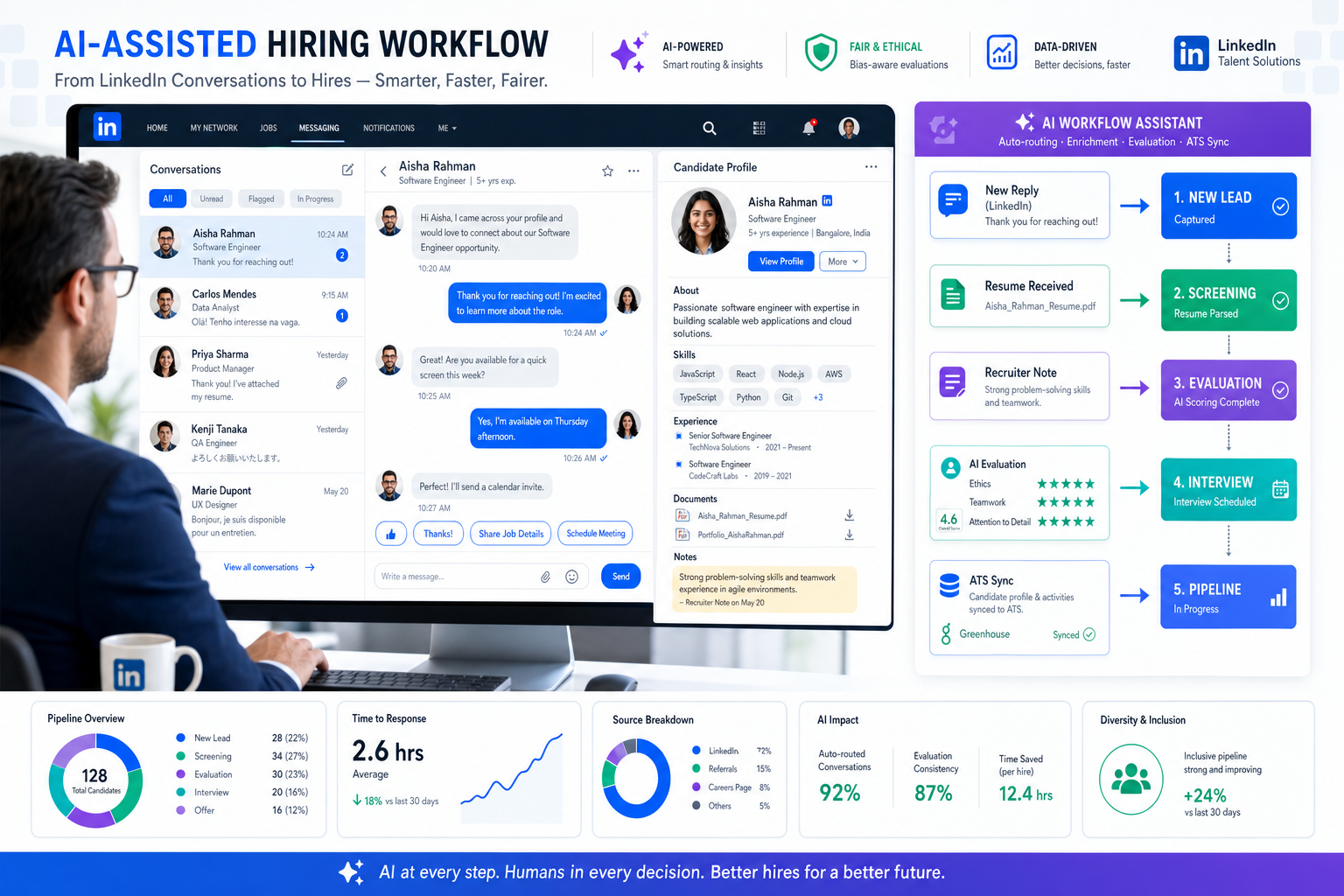
When reply gaps and lost context hurt hiring, this article helps recruiters judge linkedin recruiting automation by workflow fit to avoid missed candidates and weak handoffs.
That distinction matters more than most teams admit. When sourcing gets busy, the real damage rarely comes from a lack of messages sent. It comes from missed replies, weak handoffs, inconsistent notes, and the slow drift between what a recruiter promised a candidate on LinkedIn and what the hiring team can actually deliver. For solo recruiters, small search firms, and in-house talent teams, that gap creates lost candidates, frustrated clients, and a reputation problem that no dashboard can hide.
In my own workflow, tools only started helping once they reduced the repetitive parts without removing recruiter control. One example is StrategyBrain AI Recruiter, which can keep candidate conversations moving, answer routine role questions, and collect resumes or contact details from interested people while the recruiter still handles final judgment, resume review, and the next real hiring decision. In practice, that kind of support is most useful when reply timing, multilingual communication, or after-hours follow-up is the actual bottleneck rather than top-of-funnel search alone.
A good way to see the issue is to borrow the hiring logic behind strong accounting searches. The best accountants are not just technically capable; they are trusted because they combine ethics, teamwork, dedication, initiative, problem-solving, and attention to detail. When a recruiter is hiring for that kind of role, the process breaks down if LinkedIn activity is treated like simple volume outreach. You are not just finding profiles. You are evaluating whether someone can handle financial truth, work across teams, keep standards high under pressure, and take on more responsibility over time.
That is why linkedin recruiting automation should be evaluated as a decision-support workflow, not as a shortcut. The real question is which linkedin tools help recruiters surface those deeper traits consistently, where an ATS connection prevents lost context, and when buyers accidentally compare recruiting systems with linkedin marketing software that was built for a very different job.
- What LinkedIn Recruiting Automation Really Means
- Why Role Traits Should Shape Automation
- The Four Recruiting Workflows Worth Automating
- Core Features Hiring Teams Should Evaluate
- A Recruiter Experience With AI-Supported Follow-Up
- How ATS Integration Changes Recruiting Operations
- Recruiting Automation vs Other LinkedIn Categories
- Best Practices for Safe, Effective Use
- Common Mistakes to Avoid
- FAQ
What LinkedIn Recruiting Automation Really Means
LinkedIn recruiting automation is the structured use of LinkedIn-based recruiting workflows and approved system support to reduce repetitive work in sourcing, outreach management, candidate organization, job distribution, and reporting. At its best, it helps recruiters work with more consistency. At its worst, it is misunderstood as bulk outreach with no attention to fit, timing, or process control.
Experienced recruiters usually learn this quickly. A good LinkedIn workflow is not just about sending more messages. It is about preserving context. If a recruiter is trying to hire an accountant, controller, finance manager, or other detail-sensitive professional, the work includes reading between the lines of a profile, tracking response quality, documenting concerns, and aligning internal stakeholders around what the role actually requires.
That is also where many buyers get confused when they search for linkedin tools. They often lump recruiting, selling, social outreach, and linkedin marketing software into one category. But hiring workflows operate under different standards. Talent acquisition depends on candidate trust, role accuracy, data handling, and process continuity, not campaign engagement alone.
Why Role Traits Should Shape Automation
The reference point from strong accounting hiring is useful because it reminds us that the best candidates are rarely defined by one skill alone. In accounting, employers look for ethical judgment, team fit, commitment to development, readiness for greater responsibility, a proactive mindset, a solutions-first attitude, and serious attention to detail. Those are not marketing traits. They are hiring signals that require structured review.
That same logic applies more broadly. Whether you are recruiting for finance, operations, compliance, or another trust-heavy role, automation should help you identify patterns that matter to the job. If the process pushes recruiters toward speed while stripping away context, it can make a sensitive search worse.
So before choosing software, ask a practical question: what is the recruiter trying to judge? In some roles, the key issue is technical depth. In others, it is collaboration, ethics, long-term progression, or the ability to solve business problems under constraint. Good automation supports those judgments by improving search relevance, preserving conversation history, and making follow-up more dependable.
Key insight: The more nuanced the role, the less useful generic automation becomes. LinkedIn recruiting automation creates value when it protects context around candidate quality.
The Four Recruiting Workflows Worth Automating
Most useful buying discussions become clearer when you separate linkedin recruiting automation into four workflows. Recruiters often mix these together, but each one solves a different operational problem.
1. Sourcing automation
Sourcing automation helps recruiters identify relevant people faster through search refinement, filtering, intent-based discovery, and saved project workflows. This is where automation should narrow the field, not make the decision for you. For roles that demand integrity, detail, or leadership potential, the recruiter still needs to verify the human story behind the profile.
2. Outreach and response management
This area is often oversimplified. The best use case is not uncontrolled messaging. It is making sure replies are handled, role questions are answered, and interested candidates are not lost because the recruiter was in interviews all day. This is especially important for agency recruiters and lean in-house teams working across time zones.
3. Job distribution automation
Recruiting teams also use LinkedIn as a job distribution channel, not just a sourcing channel. Automated posting, refresh workflows, and career-site or ATS-based publishing can reduce duplicate work and lower the risk of outdated job listings.
4. Hiring workflow automation
This includes candidate organization, collaboration, notes, handoffs, reporting, and system sync. If the recruiter cannot move information cleanly from LinkedIn into the broader hiring workflow, automation simply relocates the admin burden.
Core Features Hiring Teams Should Evaluate
When comparing linkedin tools, evaluate them by workflow strength rather than headline claims. A practical recruiting setup should help teams move from search to conversation to review without losing information.
| Feature Area | What It Should Improve | Why It Matters |
|---|---|---|
| Search assistance | Role-relevant discovery and better filtering | Helps recruiters find candidates who match more than keywords |
| Conversation support | Reply handling and follow-up continuity | Prevents interested candidates from going cold |
| Candidate organization | Notes, stages, and collaboration records | Supports cleaner recruiter and hiring manager handoffs |
| Resume and contact capture | Collection of candidate materials after interest is confirmed | Reduces manual chasing and scattered records |
| ATS connectivity | Record sync and process continuity | Avoids duplicate entry and fragmented reporting |
| Job posting support | Publishing and updating roles efficiently | Keeps listings accurate across systems |
| Analytics | Visibility into pipeline activity and outcomes | Lets leaders judge process quality, not just volume |
Useful evaluation questions include:
- Does the system help recruiters judge candidate fit more clearly, or just increase activity?
- Can the team preserve conversation context from LinkedIn into the formal hiring process?
- Is follow-up support actually useful for hard-to-staff roles or multilingual hiring situations?
- Can the recruiter remain responsible for final screening and decision quality?
- Is the product truly recruiting-focused, or is it closer to linkedin marketing software with a hiring label added on top?
A Recruiter Experience With AI-Supported Follow-Up
One of the more practical lessons I learned with LinkedIn-heavy recruiting was that speed problems often show up after the first candidate reply, not before it. Search was usually manageable. The real backlog started when candidates asked about compensation, reporting lines, timing, location flexibility, or whether the role was worth discussing at all. When several of those conversations came in overnight, it became easy to miss the strongest person simply because the response queue got messy.
That is where I found AI Recruiter useful as a support layer rather than a replacement for recruiting judgment. It can continue role-related conversations, respond in the candidate's language, and gather resumes or contact details from interested people, which is especially helpful when working across regions or outside standard recruiter hours. I still want the final qualification step in my hands, especially for roles where ethics, problem-solving, and attention to detail matter as much as the title itself. But having routine communication handled consistently can prevent drop-off before the real assessment begins.
For recruiters exploring whether that workflow fits their process, the official three-step setup overview and the broader LinkedIn recruiting tutorial notes are closer to how practitioners evaluate this category: not by hype, but by whether follow-up, resume collection, and after-hours continuity become easier to manage.
How ATS Integration Changes Recruiting Operations
ATS integration is what turns linkedin recruiting automation from a useful front-end habit into an operational system. Without it, recruiters may still find good candidates faster, but notes, resumes, stage changes, and source tracking remain scattered.
For roles where nuanced judgment matters, that fragmentation is expensive. Imagine identifying a finance candidate who appears technically strong, collaborative, and ready for more responsibility, then losing the thread because the resume arrived in one channel, the compensation question was answered in another, and the hiring manager only sees part of the conversation. That is not an automation win.
A practical applicant tracking setup should support:
- Clean transfer of candidate details into the hiring pipeline
- Resume and contact capture without manual copy-paste work
- Shared visibility for recruiters, coordinators, and hiring managers
- Job publishing and update consistency across systems
- Reporting that connects LinkedIn activity to actual hiring progress
In other words, the best recruiting workflow is not the one with the most flashy automation. It is the one that protects process memory.
Recruiting Automation vs Other LinkedIn Categories
Because search intent is mixed, it helps to separate recruiting software from adjacent categories.
| Category | Primary Goal | Typical Use | Best Fit |
|---|---|---|---|
| LinkedIn recruiting automation | Support hiring workflows | Sourcing, follow-up, candidate management, job distribution | Recruiters, search firms, HR teams |
| General linkedin tools | Improve platform productivity | Search support, outreach utilities, workflow add-ons | Mixed professional users |
| LinkedIn marketing software | Audience growth and campaign management | Content promotion, lead workflows, social engagement | Marketing and demand generation teams |
This distinction matters because recruitment quality depends on role fit, documentation, candidate experience, and internal alignment. A system built for campaign throughput may not be designed for those requirements.
Best Practices for Safe, Effective Use
- Start with the role, not the tool. If the position depends on ethics, collaboration, progression potential, or precision, define how those traits will be assessed before automating any part of the workflow.
- Automate repeatable communication, not final judgment. Follow-up, routine answers, and resume collection are very different from deciding who advances.
- Keep one process backbone. LinkedIn activity should feed the hiring system, not compete with it.
- Use automation to reduce delay. The most defensible value is often better continuity, especially across time zones or after hours.
- Separate recruiting use cases from marketing use cases. If a platform is really built as linkedin marketing software, make sure it can support recruiting controls before treating it as a talent tool.
- Review privacy and communication standards. Candidate trust is part of recruiting performance, not a side issue.
Common Mistakes to Avoid
Treating all automation as messaging volume
That misses the real value. Good recruiting automation is usually about preserving response quality and process continuity.
Ignoring role-specific evaluation criteria
If you are hiring for positions like accounting, finance, compliance, or operations leadership, you need a workflow that helps surface trust, initiative, and detail orientation, not just response rate.
Buying without checking workflow fit
A tool can look impressive in a demo and still fail because it does not connect to the ATS, support recruiter handoff, or capture candidate materials cleanly.
Using marketing logic to judge hiring software
Recruiters should be careful not to borrow success metrics from linkedin marketing software. Hiring outcomes require different standards.
FAQ
How does linkedin recruiting automation work?
It automates repeatable LinkedIn recruiting tasks such as search support, follow-up handling, candidate organization, resume collection, job posting support, and system synchronization, while recruiters still manage evaluation and final decisions.
What parts of LinkedIn recruiting are safest to automate?
Search assistance, candidate organization, routine follow-up, multilingual communication support, and resume or contact capture are generally more practical than trying to automate final qualification.
Are linkedin tools and linkedin recruiting automation the same thing?
No. Linkedin tools is a broader phrase that can include many categories. LinkedIn recruiting automation is specifically about hiring workflows.
How is linkedin recruiting automation different from linkedin marketing software?
Recruiting automation focuses on sourcing, candidate communication, job distribution, and hiring workflow control. LinkedIn marketing software is designed for campaign, audience, and engagement goals.
Can automation help with hard-to-fill professional roles?
Yes, especially when the problem is slow follow-up, inconsistent communication, or poor process visibility. But recruiter judgment remains essential for high-trust roles.
What should recruiters look for first?
Start by checking whether the workflow improves candidate handling, preserves context, and fits the broader hiring process rather than just increasing activity volume.
Conclusion
The best use of linkedin recruiting automation is not replacing recruiter judgment. It is protecting it. When workflows are built around search quality, reliable follow-up, role-specific evaluation, and clean system handoff, recruiters can move faster without becoming careless.
That is especially true for roles where the strongest candidates are defined by more than hard skills alone. If your process needs to identify ethics, teamwork, dedication, progression potential, initiative, problem-solving, and attention to detail, then the right automation should help you preserve those signals, not bury them under noise. That is the standard worth using when you compare linkedin tools and decide whether a recruiting workflow is truly better than adjacent linkedin marketing software categories.














