When fee pressure exposes weak workflows, this article helps headhunters evaluate business recruitment systems to avoid missed follow-up, lost candidates, and slower fills.
That matters more in today’s market than many teams admit. Recent results across major recruitment businesses show a mixed picture: some firms are still growing, but permanent hiring has softened in several regions, temp performance is uneven, and revenue pressure is exposing every weak workflow inside sourcing, follow-up, scheduling, and client communication. When a desk is already working harder for each shortlist, manual process gaps stop being annoying and start becoming expensive.
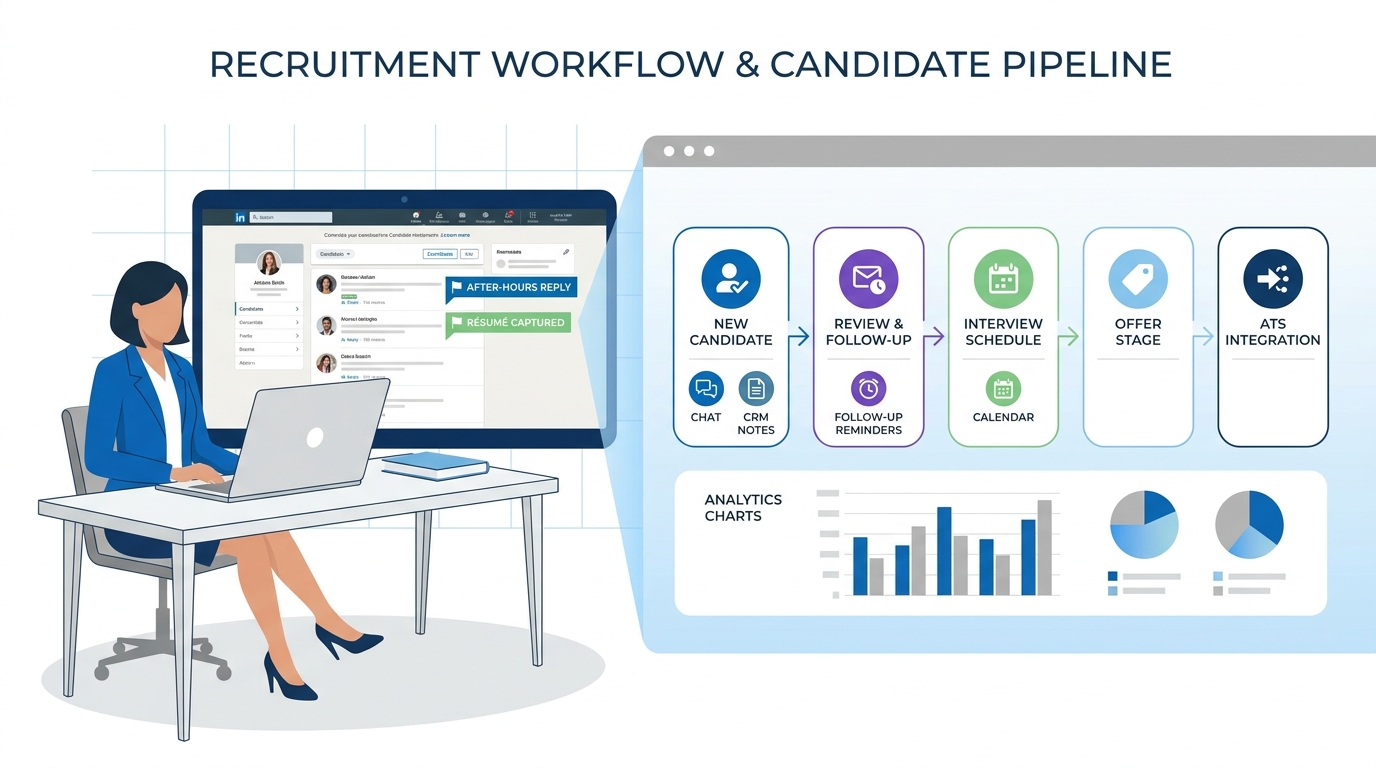
In that environment, I have found that tools like AI Recruiter are most useful when they handle the repetitive top-of-funnel work recruiters often drop during busy periods: LinkedIn outreach, after-hours candidate replies, and résumé or contact capture. What I like in practice is not the idea of replacing recruiters. It is that the system can keep conversations moving 24/7, support multilingual messaging when searches cross borders, and return interested profiles for human review. The recruiter still decides fit, reads the résumé, and takes the next step.
The pressure behind that need is visible in the market itself. One large staffing group posted second-quarter revenue of €5.77 billion with temp and contract activity still inching up while permanent placement income fell. Another global search firm reported stronger quarter-on-quarter momentum, with executive search in Europe especially strong. Elsewhere, a major recruitment brand saw first-half revenue fall and net fee income contract sharply, while another staffing giant reported its staffing division down year over year even as group profitability held up. For anyone running a desk, those numbers translate into a very familiar scene: you open the live jobs list, check which searches still need candidate flow, then jump into LinkedIn replies, old CRM notes, and interview updates because every delayed touch now has more commercial weight.
That is the point where recruitment automation stops being a software trend and becomes an operating discipline. In mixed hiring conditions, recruiters cannot afford to lose candidates because nobody answered after hours, fail to re-contact a prospect who finally replied, or separate delivery data from client development signals. The lesson for business recruitment is straightforward: if workflow discipline is weak, both candidate experience and business development recruitment suffer. That is why the rest of this article focuses on how to evaluate recruitment automation tools, how they support business development in recruitment industry workflows, and where experienced recruiters should still keep the final decision firmly human.
Table of Contents
- Why Market Pressure Is Raising the Bar on Automation
- What Recruitment Automation Tools Actually Do
- The Core Stack for Business Recruitment
- LinkedIn Workflows, Human Judgment, and Practical Use
- In-House vs Agency Use Cases
- How Automation Supports Business Development in Recruitment Industry
- How to Choose the Right Recruiting Software
- Implementation Mistakes to Avoid
- KPIs to Track After Rollout
- FAQ
Why Market Pressure Is Raising the Bar on Automation
Recruitment leaders do not buy automation because the category sounds modern. They buy it because hiring conditions have become less forgiving. The recent trading updates from large recruitment businesses tell a useful story for smaller firms and internal teams alike.
- Adecco reported Q2 revenue of €5.77 billion, with temp and contract revenue up 1% but permanent placement income down 6%.
- Heidrick & Struggles reported Q2 2025 net revenue growth of 13.9%, with growth across executive search, on-demand talent, and consulting.
- Recruit Holdings reported staffing revenue down 3.4% year over year in its fiscal first quarter.
- Robert Walters reported first-half revenue of £402.8 million, down 10% in constant currency, with net fee income down 14%.
- LinkedIn still grew revenue 8% year over year in constant currency and continues to show strong member and engagement growth.
The takeaway is not that one model is winning and another is failing. The takeaway is that recruiter execution now matters more. In a softer permanent market, each reply, shortlist, and client follow-up carries more weight. In a stronger search segment, speed and precision still decide whether a firm captures the opportunity. In both cases, workflow quality becomes part of commercial performance.
Key insight: Mixed market conditions make bad process more visible. Recruitment automation helps most when it protects response speed, follow-up discipline, and pipeline visibility.
What Recruitment Automation Tools Actually Do
At a practical level, recruitment automation tools reduce repetitive manual work across the hiring cycle. That can include job posting, candidate capture, screening questions, reminder emails, interview scheduling, stage updates, source attribution, and recruiter alerts.
For business recruitment, the value is not just time saved. It is process consistency. A recruiter can still make smart calls and build strong relationships, but if communication history is scattered, stage movement is unreliable, or candidate interest is not captured quickly, good judgment gets trapped inside weak operations.
This is why an applicant tracking system remains the operational center of most hiring stacks. The ATS is where status, notes, approvals, and reporting should stay anchored. Around that core, automation tools can extend sourcing, CRM, outreach, scheduling, and analytics.
What usually gets automated first
- Sourcing and prospect capture: moving prospects into talent pools and assigning follow-up actions
- Screening: routing applicants based on knockout questions or role criteria
- Messaging: reminders, nurture flows, status updates, and re-engagement
- Scheduling: interview coordination and calendar-based self-booking
- Pipeline control: stage movement, task prompts, and ownership alerts
- Reporting: source tracking, funnel conversion, and recruiter activity visibility
Used well, these automations do not replace recruiter craft. They create the conditions for it.
The Core Stack for Business Recruitment
Most teams do not solve hiring friction with one platform alone. They solve it by making each system serve a clear part of the workflow.
| Stack Layer | Primary Purpose | Why It Matters |
|---|---|---|
| ATS | Tracks candidates, stages, and decisions | Provides structure, audit trail, and shared visibility |
| CRM | Manages prospects, talent pools, and client contacts | Supports nurture, re-engagement, and desk discipline |
| Sourcing tools | Finds and captures candidate leads | Improves top-of-funnel consistency |
| Screening tools | Routes and filters applicants | Reduces admin and standardizes early review |
| Scheduling tools | Coordinates interviews automatically | Reduces delays and candidate drop-off |
| Analytics | Measures pipeline and source performance | Improves decisions on time, spend, and recruiter focus |
If you are comparing recruitment automation tools, do not ask only which platform has the longest feature list. Ask which one reduces the most costly friction in your actual process.
LinkedIn Workflows, Human Judgment, and Practical Use
Because LinkedIn remains a core sourcing and outreach channel for many recruiters, automation decisions often show up there first. The real question is not whether a recruiter should automate every message. The better question is which parts of the workflow are repetitive enough to delegate without harming judgment or candidate trust.
In my own experience, the best use of AI Recruiter has been in the first layer of contact management. When a search is active across multiple geographies or candidates reply outside office hours, it is genuinely helpful to have a system that can introduce the role, ask whether a candidate is open to moving, answer common questions, and collect contact information or a résumé from interested people. I still review the profile myself, decide whether the background fits the brief, and choose who moves to interview.
That distinction matters. Recruiters should not outsource final qualification to a messaging workflow. But they can absolutely use automation to prevent avoidable silence, missed replies, and lost momentum. For teams that rely heavily on LinkedIn sourcing, this kind of support is often where productivity gains become tangible.
Where LinkedIn-focused automation helps most
- Keeping candidate conversations moving after business hours
- Supporting multilingual communication on international searches
- Capturing résumés and contact details when interest is confirmed
- Reducing the manual burden of first-touch outreach
- Helping solo consultants or lean teams cover more live searches
For recruiters who want to understand the workflow in more detail, the setup approach described here is useful because it shows how top-of-funnel automation can sit alongside normal recruiter review rather than replacing it.
In-House vs Agency Use Cases
Recruitment automation should not be evaluated the same way by every team. Internal talent acquisition teams and agency desks solve related problems, but they do not buy software for identical reasons.
In-house team priorities
- Approval and requisition control
- Consistent screening and interview coordination
- Hiring manager visibility
- Compliance-friendly records and process traceability
- Reduced scheduling burden across multiple stakeholders
For internal teams, automation should improve governance and speed without making the process feel impersonal.
Agency and search priorities
- Fast prospect capture and re-engagement
- Strong recruiter desk discipline
- Candidate reuse across multiple searches
- CRM support for clients and prospects
- A link between delivery activity and commercial activity
In agency environments, business development recruitment is often tied directly to candidate workflow quality. If your delivery side is messy, your client development side usually becomes reactive too.
How Automation Supports Business Development in Recruitment Industry
This is where many general hiring articles fall short. In agency life, business development in recruitment industry work is not separate from recruiting operations. The same recruiter who is chasing CV feedback may also be logging prospect calls, tracking hiring signals, following up on old client conversations, and trying to convert market intelligence into new job orders.
Good automation supports that reality in a few specific ways.
1. It connects hiring signals with outreach timing
If candidate flow shows repeated demand in one niche, or if a client market starts moving again, recruiters should be able to act on that signal quickly rather than leaving it buried in inboxes and notes.
2. It creates follow-up discipline
Outbound business development often fails because no one remembers when to re-contact a prospect. Automation helps keep sequences, reminders, and notes visible across the desk.
3. It reduces the admin tax on revenue work
When recruiters spend less time on repeated coordination, they have more time for calls, qualification, briefing, and relationship building.
4. It allows candidate and client intelligence to inform each other
Patterns in candidate conversations can shape who a recruiter targets on the client side. This is one of the most underused benefits of better workflow design.
That is the commercial side of business recruitment many software comparisons overlook. For a full-desk recruiter, a disconnected system usually means disconnected results.
How to Choose the Right Recruiting Software
When recruiters look for the right platform, they often compare features before defining the process they actually need to improve. That usually leads to poor adoption or expensive workarounds.
A practical evaluation framework
- Map your daily recruiter friction. Identify where time is really lost: sourcing, first response, scheduling, reporting, or follow-up.
- Separate human decisions from repeatable tasks. Outreach and reminders may be automatable; fit assessment and offer-stage judgment usually are not.
- Choose the operational core first. In most teams, that is still the ATS.
- Add supporting layers only where they solve a real bottleneck. CRM, LinkedIn messaging support, screening, or analytics should each have a clear job.
- Test for recruiter adoption, not just admin satisfaction. If recruiters avoid the system, the design has failed.
Questions worth asking
- Will this improve speed-to-contact in a measurable way?
- Can the team trace every meaningful candidate interaction?
- Does it support both active hiring and longer-term pipeline building?
- Can it help with business development recruitment if the desk is commercial as well as delivery-focused?
- Will it keep human accountability visible rather than burying it under automation?
Feature-to-benefit comparison
| Feature | Operational Benefit | Best Fit |
|---|---|---|
| Automated outreach support | Reduces first-touch admin and improves responsiveness | Agency desks, sourcing-heavy teams |
| Résumé/contact capture | Prevents interested prospects from getting lost | Search firms, lean in-house teams |
| Self-scheduling | Shortens time to interview | Internal TA, high-volume teams |
| CRM workflows | Supports nurture and repeat follow-up | Staffing firms and full-desk recruiters |
| Analytics dashboards | Shows funnel and source performance clearly | Recruitment leaders and ops teams |
Implementation Mistakes to Avoid
Most automation failures come from process design problems rather than software problems.
Mistake 1: Automating an unclear workflow
If ownership, stage definitions, or communication rules are inconsistent, automation will simply spread the confusion faster.
Mistake 2: Letting messaging run without recruiter oversight
Candidate trust drops quickly when automated communication is left unmanaged. Recruiters should still own tone, escalation, and final qualification.
Mistake 3: Treating LinkedIn activity as separate from the main system
If sourcing conversations live outside your real workflow, replies get missed and market intelligence never reaches the rest of the desk.
Mistake 4: Ignoring business development in recruitment industry needs
For agencies, a delivery-only toolset often leaves a major operational gap. Client development, follow-up timing, and desk-level visibility need support too.
Mistake 5: Measuring activity but not outcomes
More messages do not automatically mean better hiring. Watch shortlist quality, response speed, interview conversion, and client pipeline movement instead.
KPIs to Track After Rollout
Once automation is live, keep the measurement practical and tied to recruiter behavior.
- Speed-to-contact: time from application or reply to first meaningful response
- Speed-to-interview: time from interest to booked interview
- Stage conversion: progression rates through the funnel
- Source quality: which channels produce viable candidates
- Recruiter capacity: number of searches and candidate conversations handled well
- Scheduling efficiency: reduced back-and-forth for interviews
- BD progression: client meetings, job intake, and prospect movement for agency desks
These metrics matter because they connect software decisions back to the same market pressure discussed at the start of this article. In a mixed hiring environment, disciplined execution is often the edge.
FAQ
What do recruitment automation tools actually automate?
They usually automate repeatable parts of hiring such as candidate capture, outreach, screening questions, reminders, scheduling, stage updates, and reporting. More advanced setups can also support sourcing and CRM-style follow-up.
Do recruitment automation tools replace recruiters?
No. The best systems remove repetitive coordination and keep communication moving, but recruiters still need to assess fit, manage stakeholders, and make final decisions.
Why does business recruitment need automation now?
Because mixed market conditions make slow follow-up and weak process more costly. When permanent hiring softens or search competition rises, workflow discipline directly affects outcomes.
How does automation help business development recruitment?
It supports better timing, cleaner follow-up, stronger visibility across the desk, and a better connection between candidate activity and client opportunity.
Is LinkedIn automation useful for recruiters?
Yes, when used carefully. It can help with first-touch outreach, after-hours replies, multilingual communication, and capturing interested candidate details. Recruiters should still own fit review and next-step decisions.
What should recruiters watch for when evaluating tools?
Focus on response speed, adoption, workflow clarity, reporting, and whether the tool improves real recruiter execution rather than just adding more visible activity.
Conclusion
The strongest case for recruitment automation tools is not theoretical. It comes from the daily reality of recruiters working in a market where some segments are growing, some are tightening, and every missed follow-up has more impact.
For business recruitment, that means building systems that support speed, visibility, and process discipline without weakening recruiter judgment. For agencies, it also means recognizing that delivery and business development recruitment are connected. And for leaders focused on business development in recruitment industry performance, better workflow is often one of the simplest ways to protect both candidate experience and commercial results.
The right setup is not the one with the most automation. It is the one that keeps recruiters responsive, organized, and free to spend more time on the conversations that actually move searches forward.