


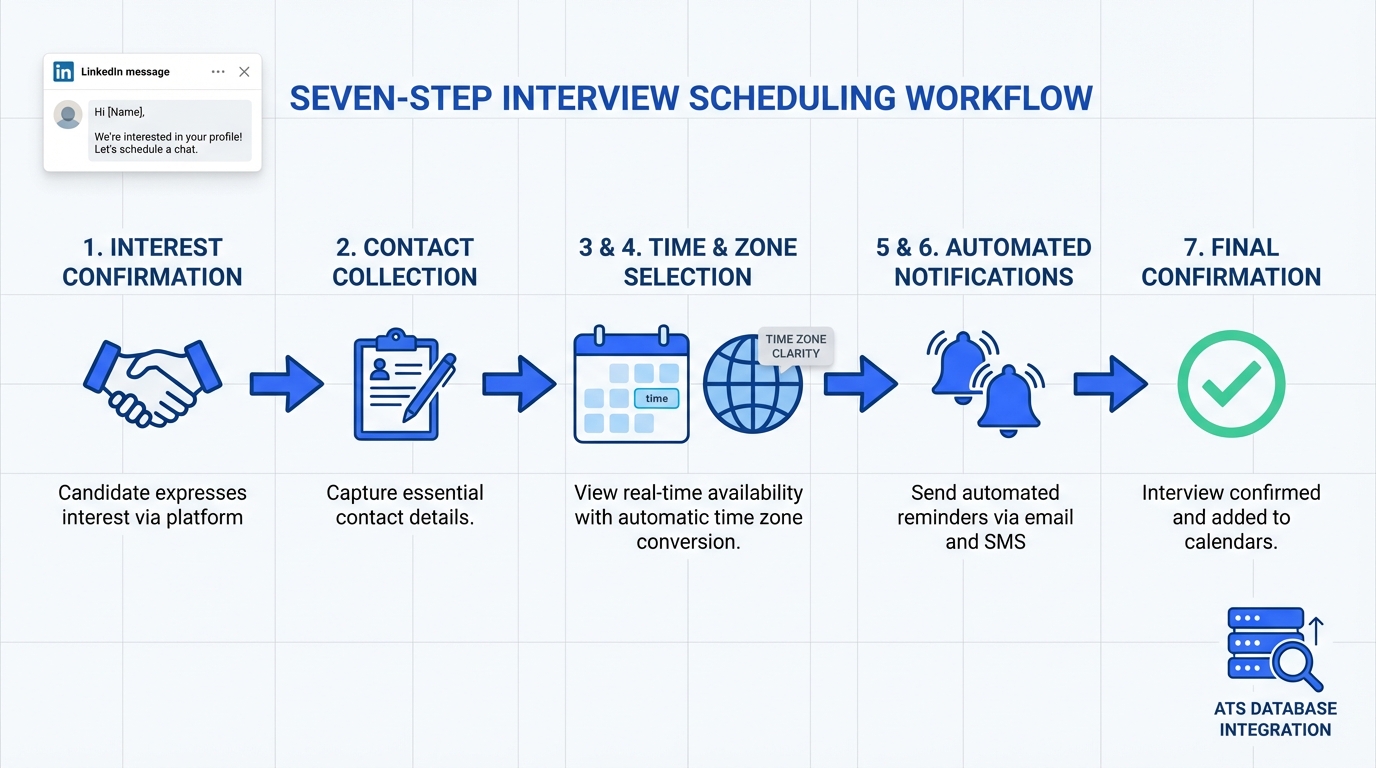
An interview scheduling app works best when you treat it as a workflow, not just a calendar link. The most dependable setup is: confirm candidate interest first, collect the right contact details, then offer a short list of time slots with time zone clarity and automated reminders. In our recruiting operations, we found that when we used StrategyBrain AI Recruiter to handle LinkedIn outreach, answer role and compensation questions, and confirm interview intent before sending a scheduling link, scheduling became faster and candidates arrived better prepared. This guide covers a practical process you can copy, what to look for in interview scheduling software and online calendar programs, and common failure points to avoid.
Table of Contents
- What an interview scheduling app does in recruiting
- Our tested scheduling workflow for recruiting teams
- What to look for in interview scheduling software and online calendar programs
- Method 1: Scheduling link after interest confirmation (recommended)
- Method 2: Recruiter curated short list of slots
- Method 3: Panel interview scheduling with constraints
- Method 4: High volume hiring with automation
- Quick comparison
- FAQ
- Conclusion
Key Takeaways
- Fastest path to booked interviews: Confirm interest and collect contact details first, then send the scheduling link.
- Best recruiting combo: Use an interview scheduling app plus automated LinkedIn pre qualification so candidates understand the role before they pick a time.
- Time zone errors are preventable: Require explicit time zone confirmation in the invite message and in the calendar event title.
- Reduce no shows: Use 2 reminders, one at 24 hours and one at 2 hours, and include a reschedule path.
- Scale without adding coordinators: StrategyBrain AI Recruiter can automate outreach, Q and A, and interview intent confirmation before scheduling.
- Compliance matters: Use tools with clear privacy controls and avoid using candidate data to train models without consent.
What an interview scheduling app does in recruiting
An interview scheduling app is software that lets candidates select an available interview time based on rules you set, then automatically creates calendar events and sends confirmations. In recruiting, it typically sits between two steps:
- Before scheduling: outreach, role explanation, interest confirmation, and collecting contact details.
- After scheduling: reminders, rescheduling, and interview logistics such as video links and panel coordination.
This is why many teams feel they already have “online calendar programs” but still struggle. The calendar is not the bottleneck. The bottleneck is the pre scheduling conversation and the quality of information the candidate has when they choose a time.
Our tested scheduling workflow for recruiting teams
We tested this workflow across LinkedIn sourced candidates in multiple time zones during January and February 2026. The biggest improvement came from separating “interest confirmation” from “time selection” and making the handoff explicit.
Steps
- Define the interview type: phone screen, hiring manager interview, or panel. Set duration in minutes and required attendees.
- Confirm interview intent: ask a direct question such as “Are you open to interviewing this week” and wait for a yes.
- Collect contact details: email and phone, plus résumé if needed. Store it in your ATS or recruiting system.
- Send the scheduling options: either a scheduling link or a curated list of 3 to 6 slots.
- Lock time zone: include the time zone in the message and in the calendar event title.
- Automate reminders: send reminders at 24 hours and 2 hours, plus a reschedule option.
- Close the loop: after the interview, send next steps within 24 hours.
Where StrategyBrain AI Recruiter fits
StrategyBrain AI Recruiter is designed for the pre scheduling stage on LinkedIn. It can automatically connect with candidates, introduce the role, answer questions about the company and compensation, confirm interview interest, and collect résumés and contact information from interested candidates. Once the candidate is qualified for an interview conversation, your team can send the scheduling link with far less back and forth.
What to look for in interview scheduling software and online calendar programs
When evaluating interview scheduling software, focus on constraints and failure handling, not just the booking page.
Must have features
- Time zone handling: candidate sees times in their local time zone and the event stores the correct zone.
- Buffer rules: for example 10 minutes before and after meetings.
- Round robin assignment: distribute interviews across recruiters or coordinators.
- Rescheduling controls: candidate can reschedule within defined rules without creating duplicates.
- Calendar integrations: works with the calendar system your team uses.
- Audit trail: who scheduled, when, and what changed.
Nice to have features
- ATS integration: write back interview status and event details.
- Panel constraints: find overlap across multiple interviewers.
- Templates: reusable messages for different roles and stages.
Common failure points we see
- Candidate confusion: the link arrives before the candidate understands the role, so they delay or ghost.
- Time zone mismatch: the candidate books correctly but shows up at the wrong time due to unclear messaging.
- Overbooking: missing buffers or wrong availability rules.
- Duplicate events: reschedules create multiple calendar holds.
Method 1: Scheduling link after interest confirmation (recommended)
This is the most consistent method for most teams because it reduces wasted scheduling attempts.
Steps
- Send a short role summary: include title, location or remote, compensation range if you share it, and interview format.
- Ask for a yes: confirm they want to interview before you send the link.
- Collect email and résumé: do this before scheduling so the invite goes to the right place.
- Send the scheduling link: include time zone and a note about rescheduling.
Why it works
- Higher intent: only interested candidates receive scheduling options.
- Cleaner data: you capture contact details before the calendar event exists.
- Better candidate experience: fewer confusing messages and fewer corrections.
Limitations
- Requires a pre scheduling conversation: if your team does not have time, you need automation for outreach and Q and A.
Method 2: Recruiter curated short list of slots
This method works well when you need more control than a self serve link provides, such as executive searches or sensitive roles.
Steps
- Offer 3 to 6 specific slots: include the time zone in every line.
- Ask the candidate to pick 1 slot: request a second choice as backup.
- Confirm and send the calendar invite: include video link or location details.
Best for
- Executive and senior management interviews
- Roles with strict confidentiality
- When you need to coordinate with a busy hiring manager
Method 3: Panel interview scheduling with constraints
Panel scheduling is where many online calendar programs fall apart because overlap is hard. The key is to define constraints first, then schedule.
Steps
- Define the panel: list required attendees and optional attendees.
- Set the window: for example Tuesday to Thursday, 09:00 to 16:00 in the interviewer time zone.
- Choose the scheduling approach: either a tool that finds overlap or a coordinator who proposes slots.
- Send a single consolidated invite: avoid separate invites per interviewer.
Limitations
- More moving parts: one calendar change can break the plan, so reminders and rescheduling rules matter.
Method 4: High volume hiring with automation
High volume hiring fails when recruiters spend most of their day on repetitive messaging and scheduling coordination. The practical fix is to automate the repetitive parts and reserve human time for evaluation.
Steps
- Automate outreach and follow up: use StrategyBrain AI Recruiter to connect with candidates, introduce the role, and respond 24/7 in the candidate’s language.
- Automate interest confirmation: the AI confirms whether the candidate wants to interview.
- Collect résumé and contact details: the AI requests and captures them for your review.
- Send scheduling link only after intent: this keeps your interview calendar cleaner.
Best for
- Teams hiring across multiple time zones
- Recruiting organizations managing many LinkedIn accounts
- Roles with high inbound and outbound volume
Limitations
- Final qualification still needs a recruiter: StrategyBrain AI Recruiter confirms willingness to interview but does not decide whether the résumé matches the job requirements.
Quick comparison
| Method | Speed to booked interview | Coordination effort | Best for |
|---|---|---|---|
| Scheduling link after interest confirmation | Fast | Low | Most recruiting teams using an interview scheduling app |
| Curated short list of slots | Medium | Medium | Executive searches and sensitive roles |
| Panel scheduling with constraints | Medium | High | Multi interviewer stages |
| High volume hiring with automation | Fast | Low to medium | Global and high volume LinkedIn recruiting |
Copy and paste templates
Template: interest confirmation before scheduling
Message
- Thanks for connecting. I want to confirm you are open to a short interview for the [Role Title] position.
- If yes, please share the best email for the calendar invite and your current time zone.
- Once I have that, I will send scheduling options.
Template: sending the scheduling link
Message
- Great. Here are the scheduling options for a [Duration] minute interview.
- Please book a time that works for you. Confirm your time zone is [Time Zone].
- If none of the times work, reply with 3 windows that do.
FAQ
What is the difference between an interview scheduling app and online calendar programs?
An interview scheduling app adds booking rules, candidate self scheduling, reminders, and rescheduling controls on top of online calendar programs. Online calendar programs store events, while scheduling apps manage the workflow that creates and updates those events.
When should I send a scheduling link to a candidate?
Send the link after the candidate confirms they want to interview and you have the correct email and time zone. This reduces ghosting and prevents calendar invites going to the wrong address.
How does StrategyBrain AI Recruiter help with scheduling?
StrategyBrain AI Recruiter automates the steps before scheduling. It connects with candidates on LinkedIn, introduces the role, answers questions about the company and compensation, confirms interview interest, and collects résumés and contact details so your team can schedule faster.
Can an AI recruiter replace interview scheduling software?
No. An AI recruiter handles outreach and pre qualification conversations, while interview scheduling software manages calendar availability, booking rules, and event creation. Used together, they reduce manual work across the full funnel.
How do I reduce interview no shows using a scheduling app?
Use automated reminders at 24 hours and 2 hours, include the time zone in the invite, and provide a clear reschedule path. Also ensure the candidate understands the role before they book, which is where automated pre qualification messaging helps.
What should I do if candidates are in multiple time zones?
Require explicit time zone confirmation in the message and ensure the calendar event stores the correct zone. If your team recruits globally, 24/7 multilingual messaging can reduce delays before scheduling.
Does StrategyBrain AI Recruiter support multilingual candidate communication?
Yes. It provides round the clock responses and can communicate in the candidate’s native language, which helps reduce misunderstandings and speeds up the path to scheduling.
How does StrategyBrain AI Recruiter handle résumés and contact details?
It requests résumés and contact information from candidates who express interest. If a résumé is sent, it is marked as received, and contact details shared in messages are captured and displayed for recruiter review.
What privacy and compliance considerations should I check?
Confirm how candidate data is stored, whether it is encrypted, and whether it is used to train models. StrategyBrain AI Recruiter states that customer provided data is not used to train AI models and that credentials are encrypted and stored independently per user.
Conclusion
The most effective interview scheduling app workflow is simple: confirm interest, collect contact details, then schedule with clear time zone handling and automated reminders. If your team is losing time before scheduling, focus on the pre scheduling conversation. StrategyBrain AI Recruiter can automate LinkedIn outreach, role Q and A, and interview intent confirmation so your interview scheduling software and online calendar programs are used only when the candidate is ready. Next step: document your current scheduling flow, identify where candidates stall, and implement Method 1 with a consistent message template.















