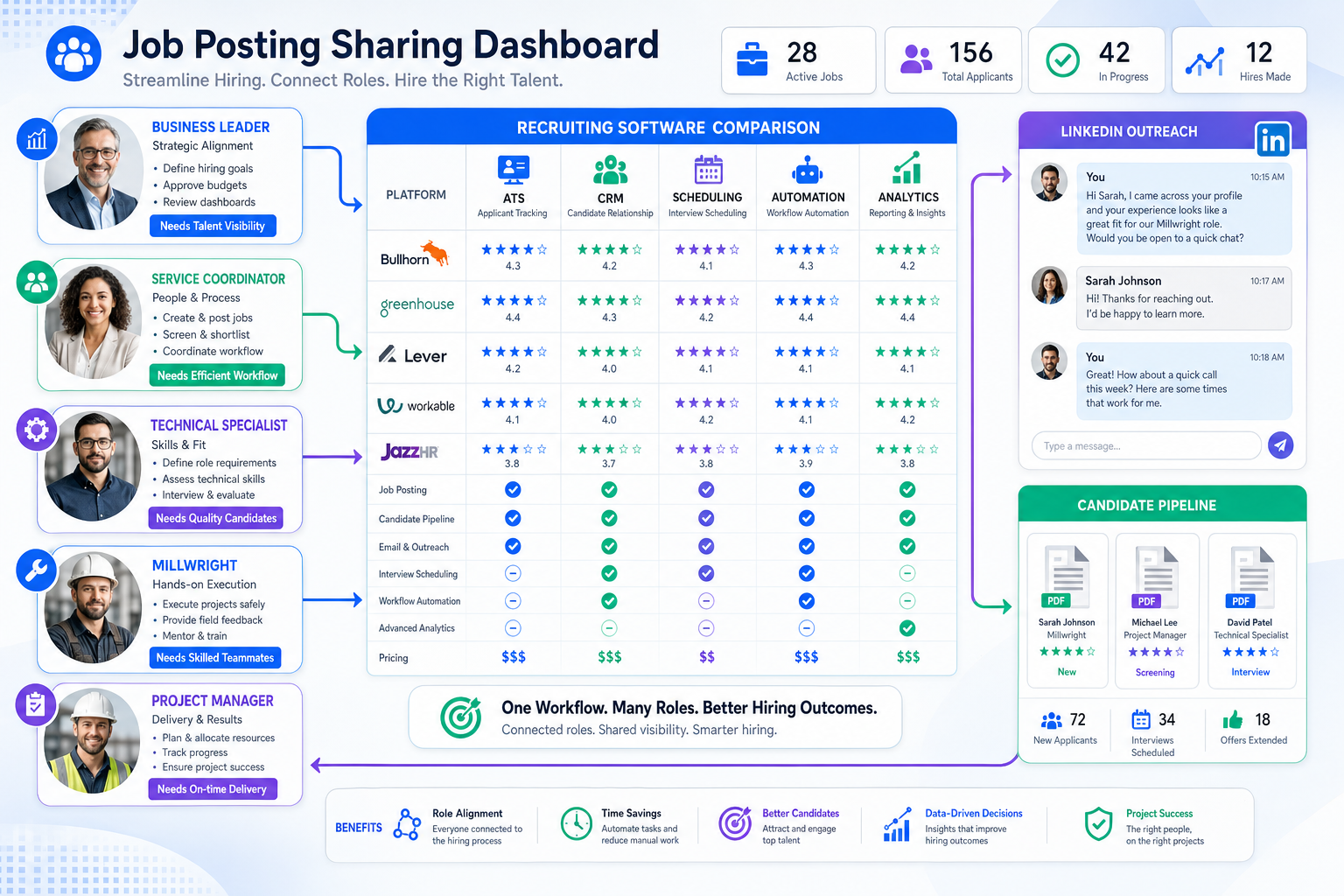
See how recruiting leaders compare best recruiting tools for mixed-role hiring to avoid follow-up gaps and bad software buys.
That sounds obvious until your desk looks like a mixed December job board: a territory business leader in Oregon, a service coordinator in Surrey, a crushing specialist in Sudbury, a millwright in Scarborough, and project managers in New York all moving at different speeds. In that environment, recruiters lose time in the same places over and over: inbox follow-up, candidate status tracking, interview coordination, resume handoff, and deciding which requisitions need attention first. The cost is not just slower hiring. It is missed replies after hours, stale candidate interest, frustrated hiring managers, and preventable revenue leakage for agencies and lean internal teams.
One workflow change that helped me in outbound-heavy recruiting was using StrategyBrain AI Recruiter for the repetitive front end of candidate outreach on LinkedIn. I did not use it to replace recruiter judgment, and that distinction matters. What it handled well was the part that often breaks first in a busy search cycle: initial connection requests, real-time candidate conversation across time zones, and collecting resumes or contact details from people who were actually interested. I still reviewed the resume, decided who belonged in process, and owned the next move with the client or hiring manager.
A monthly top-jobs list is a useful reality check because it shows how uneven recruiting demand really is. One opening may be a rare owner-operator style general manager opportunity with independence and territory control. Another may depend on an organized service coordinator who keeps customers and field technicians aligned. Another may require a technical specialist who can train users, support product lines, and manage commercial details. When a recruiter is working that kind of spread, the day is not spent on one neat hiring funnel. It is spent switching between outreach, qualification, scheduling, notes, and stakeholder updates while every role has a different urgency and candidate psychology.
The software question appears right there in the middle of the work. If your team is juggling a broad requisition mix like that, the best recruiting software is rarely a single magic platform. It is usually a well-chosen system or stack that separates active applicant control from passive candidate nurture, keeps communication from slipping, and gives recruiters a reliable way to manage the top 10 recruiting tools categories without drowning in admin. That is why this article focuses on how experienced teams compare the best recruiting tools, where the best hiring tools actually help, and how to choose software based on hiring context rather than feature theater.
Table of Contents
- Why Hiring Context Matters More Than Feature Count
- What Recruiting Software Really Covers
- ATS vs Recruiting CRM
- Quick Comparison of Recruiting Software Categories
- How to Evaluate the Best Recruiting Tools
- Top 10 Recruiting Tools Categories to Review
- Best Recruiting Software by Hiring Use Case
- Where AI-Supported Recruiting Workflows Help Most
- Pricing, Implementation, and Total Cost
- Common Buying Mistakes
- FAQ
Why Hiring Context Matters More Than Feature Count
Recruiters do not buy software in a vacuum. They buy it because the current workflow is breaking under real requisition pressure. A mixed hiring slate like the one in that December jobs snapshot creates a specific type of operational strain: different job families, different candidate motivations, different response times, and different hiring stakeholders all competing for attention at once.
That is why the search for the best recruiting software should start with context. Are you handling technical manufacturing searches, field service coordination roles, operations leaders, and project positions at the same time? Are you mostly living in inbound applicants, or are you doing active outreach? Are you running a small desk where one recruiter does everything, or a larger team with sourcers, recruiters, coordinators, and hiring managers all touching the process?
Once you answer those questions, the market becomes easier to understand. The best recruiting tools are usually grouped into practical categories such as applicant tracking systems, recruiting CRM platforms, sourcing tools, interview scheduling tools, analytics layers, and recruiting automation software. Treating them as interchangeable is one of the fastest ways to buy the wrong system.
Practical takeaway: Teams hiring across varied roles need software that supports switching costs between searches, not just deep features for one idealized workflow.
What Recruiting Software Really Covers
Recruiting software is the broader set of digital systems used to attract candidates, organize recruiting work, move applicants through stages, communicate with stakeholders, and report on outcomes. In mature teams, it also supports automation, candidate relationship management, and workflow visibility.
In other words, most buyers are not really searching for one tool. They are trying to solve a chain of problems:
- How to centralize open roles and candidate records
- How to reduce repetitive work like outreach, status updates, and scheduling
- How to keep hiring managers aligned across multiple searches
- How to maintain a decent candidate experience while moving fast
- How to understand what is stuck and why
For recruiters, one of the most durable applicant tracking system benefits is simply operational clarity. You know where the role sits, who is waiting on feedback, which candidate has gone quiet, and what needs action next. Without that visibility, even strong recruiters end up rebuilding the workflow from inboxes, spreadsheets, and memory.
ATS vs Recruiting CRM
One of the most common buying mistakes is assuming an ATS and a recruiting CRM solve the same problem. They do not.
What an ATS does
An applicant tracking system for recruiters is designed to manage active applicants and structured hiring steps. It usually includes requisition control, candidate stages, interview coordination, evaluations, approvals, and reporting.
This is the system that matters when your challenge looks like a live jobs board with multiple open roles, multiple stakeholders, and candidates already in motion. The advantages of applicant tracking system software are most visible when workflow discipline matters.
- Best for active applicants and open requisitions
- Strong for stage control, notes, feedback, and reporting
- Useful when hiring managers need structured participation
- Often the system of record for auditability and process consistency
What a recruiting CRM does
A recruiting CRM is designed for people who are not active applicants yet, or who may need long-term nurture. It supports segmented outreach, talent pools, rediscovery of prior candidates, and passive candidate relationship management.
This becomes critical when you are trying to fill harder roles, where the right candidate is not waiting in your ATS. Think of roles like senior technical specialists, niche manufacturing talent, or business leaders evaluating a move for reasons beyond pay alone. In those cases, the best hiring tools often include CRM capability because response timing and relationship continuity matter.
- Best for passive, silver-medalist, and future-fit candidates
- Strong for campaigns, outreach, and long-cycle relationship management
- Useful when your team depends on outbound recruiting
- Improves follow-up consistency over time
For many teams, the best recruiting software is either an integrated suite or a connected stack where ATS, CRM, sourcing, scheduling, and automation each do their own job well.
Quick Comparison of Recruiting Software Categories
Before discussing the top 10 recruiting tools categories in detail, it helps to connect each software type to the problem it is actually meant to solve.
| Category | Primary Purpose | Best For | Where It Helps Most |
|---|---|---|---|
| Applicant Tracking System | Manage applicants and hiring workflow | In-house TA teams, structured agency workflows | Pipeline control, approvals, reporting, compliance |
| Recruiting CRM | Nurture passive and past candidates | Outbound recruiting, hard-to-fill roles | Campaigns, talent pools, follow-up discipline |
| Sourcing Tool | Find potential candidates | Search firms, sourcers, niche recruiting | Search, shortlist creation, profile review |
| Interview Scheduling Tool | Coordinate calendars and interviews | Busy recruiters and coordinators | Speed to schedule, fewer back-and-forth emails |
| Recruiting Automation Tool | Reduce repetitive steps | Lean teams, high-volume hiring | Reminders, outreach, routing, status updates |
| Analytics Layer | Measure funnel performance | Talent leaders and recruiting ops | Bottlenecks, source quality, time-to-fill |
If you are comparing the best hiring tools, use this as a filter. Do not ask a scheduling tool to solve talent nurture, and do not expect an ATS alone to fix outbound recruiting discipline.
How to Evaluate the Best Recruiting Tools
In my experience, teams make better software decisions when they score platforms against the work they already know is painful. If your recruiters are covering everything from operations leadership to technical manufacturing roles, the decision criteria need to reflect that reality.
1. Workflow fit
Map the software to your actual recruiting motion. A small agency desk managing diverse searches may need speed and flexibility. A corporate TA team may need process controls and reporting. The best recruiting software reduces friction in the way your team already works well.
2. Requisition switching and prioritization
This is under-discussed but important. In a mixed job environment, recruiters switch contexts constantly. Good systems make it easy to see which roles are aging, which candidates are waiting, and where next action belongs.
3. Integrations
Look closely at email, calendars, HR systems, assessments, communication tools, and reporting connections. Weak integrations create duplicate entry and eventually drive recruiters back into spreadsheets.
4. Candidate experience
The best hiring tools help teams respond faster, schedule interviews cleanly, and keep applicants informed. Candidates do not care that your stack is complicated. They feel the delay, the silence, and the confusion.
5. Automation that removes admin
Automation is useful when it clears repetitive work, not when it adds a second workflow to supervise. That includes outreach support, reminders, scheduling, message handling, and resume collection in the earliest stage of engagement.
6. Collaboration and customization
Recruiting usually breaks at handoffs. Make sure scorecards, visibility, approvals, and feedback collection fit your team. Also confirm whether stages and reports can be adjusted without heavy support.
7. Reporting and visibility
One of the core advantages of applicant tracking system software is seeing where the process is stuck. Leadership will ask what is slowing down fill rates, which searches need support, and where candidate drop-off is occurring. Your software should answer that without manual reconstruction.
Top 10 Recruiting Tools Categories to Review
Rather than ranking brand names, a better buyer approach is to review the ten categories most likely to matter when building a modern recruiting stack.
1. Core ATS platforms
Still the backbone for active applicant management, hiring stages, approvals, and reporting.
2. Recruiting CRM platforms
Essential when pipeline building and passive nurture are strategic, not optional.
3. AI-assisted sourcing tools
Useful for candidate discovery and initial matching in hard-to-fill searches.
4. Resume screening and matching tools
Helpful when applicant volume is high and consistency matters.
5. Outreach and engagement tools
Designed for messaging workflows, follow-up cadence, and talent re-engagement.
6. Interview scheduling tools
Often one of the fastest ways to improve recruiter efficiency and candidate experience.
7. Recruiting automation tools
Support repetitive tasks such as routing, reminders, stage movement, and communication triggers.
8. Assessment and evaluation workflow tools
Help standardize candidate review and improve decision consistency across hiring managers.
9. Recruiting analytics platforms
Important when teams need funnel insight beyond what their ATS shows natively.
10. All-in-one recruiting suites
Appealing for teams that want fewer systems, though buyers should still test depth by use case.
The practical lesson is simple: the top 10 recruiting tools conversation should begin with operating gaps, not logos.
Best Recruiting Software by Hiring Use Case
Small business hiring teams
Small teams usually need clean ATS basics, good usability, and simple reporting. Prioritize adoption and speed over a massive feature list.
- Choose intuitive workflows
- Make sure hiring managers can actually use it
- Focus on communication and scheduling basics
In-house talent acquisition teams
Internal teams often need a balance of ATS structure, reporting, collaboration, and some CRM or automation depth.
- Prioritize applicant tracking system benefits tied to visibility
- Look for stakeholder-friendly feedback workflows
- Check HR system integrations early
Staffing agencies and search firms
Agencies usually care more about speed, searchability, candidate rediscovery, and outreach efficiency across multiple active requisitions.
- Strong CRM and sourcing workflows matter
- Search and tagging quality matter
- Fast movement between roles matters
Enterprise and high-volume teams
Large organizations need governance, permissions, analytics, and reliable automation. This is where process consistency becomes more valuable than isolated recruiter hacks.
- Advanced approvals and role-based access
- Cross-team analytics
- Automation that reduces coordinator workload
- Reliable integration architecture
Where AI-Supported Recruiting Workflows Help Most
AI in recruiting is useful when it supports recruiter throughput without pretending to replace recruiter judgment. The most practical use cases are repetitive, time-sensitive, and communication-heavy.
In my own workflow, StrategyBrain was most helpful when LinkedIn conversations started happening outside normal work hours or across regions. Using AI Recruiter, I could let the system handle initial role introductions, answer common candidate questions, and collect resumes or contact details from people who were open to talking. That mattered most on searches where response timing affected conversion, especially when I was balancing several live roles and could not manually keep every message thread warm. The recruiter still has to decide whether the resume actually fits the brief, whether the person should be shortlisted, and what the next conversation should be.
That experience also sharpened my software filter. I am skeptical of tools that promise autonomy but create more hidden work. What I want from the best recruiting tools is clear: remove repetitive LinkedIn outreach tasks, maintain continuity when candidates reply late, and make sure contact details and resumes are captured cleanly for the recruiter to review. When a tool does that, it supports the workflow exposed by that mixed December jobs scenario rather than just adding another dashboard.
If your team depends on proactive search, useful AI-supported areas include:
- Initial outbound candidate messaging
- After-hours response continuity
- Resume and contact detail capture
- Basic candidate interest confirmation
- Recruiter productivity support during multi-role searches
Key insight: Good AI recruiting support removes front-end repetition, but final qualification and hiring decisions should stay with the recruiter.
Pricing, Implementation, and Total Cost
Price matters, but subscription cost is only one part of the decision. Teams should evaluate total cost of ownership with the same realism they use when managing difficult searches.
What to include
- Base subscription or seat pricing
- Implementation and onboarding effort
- Migration from spreadsheets or older systems
- Integration setup and maintenance
- Admin ownership and reporting upkeep
- Training for recruiters and hiring managers
- Optional modules for CRM, automation, or analytics
The cheapest option can become expensive quickly if recruiters still manage candidate communication manually, rebuild notes in multiple systems, or chase feedback through side channels. One of the real applicant tracking system benefits is reducing hidden operational cost through cleaner handoffs and fewer missed steps.
Common Buying Mistakes
Buying for feature lists instead of live workflow problems
Start with the bottleneck you already feel: sourcing, applicant flow, scheduling, pipeline visibility, or hiring manager lag.
Confusing ATS needs with CRM needs
If your issue is passive candidate engagement, a stronger ATS alone may not solve it. If your issue is messy applicant handling, CRM alone will not create process control.
Ignoring requisition diversity
A tool that feels great in a demo for one job family may fall apart when recruiters are covering managers, coordinators, specialists, trades, and project roles all at once.
Overvaluing automation without reviewability
Automation should make the work clearer and faster, not more opaque.
Underestimating implementation discipline
Even strong platforms disappoint when teams do not define ownership, migration rules, permissions, and reporting expectations up front.
FAQ
What is the best recruiting software for small teams?
For small teams, the best recruiting software is usually a simple ATS with strong usability, scheduling support, and enough reporting to keep open roles organized. Adoption matters more than feature sprawl.
What is the difference between an ATS and a recruiting CRM?
An ATS manages active applicants and structured hiring workflows. A recruiting CRM supports passive candidate nurture, outreach, and long-term relationship management.
What are the main advantages of applicant tracking system software?
The main advantages of applicant tracking system software include centralized candidate records, clearer stages, stronger hiring manager collaboration, better reporting, and more consistent process execution.
How should recruiters evaluate AI-assisted hiring tools?
Recruiters should evaluate AI-assisted hiring tools by asking whether they remove repetitive work without weakening recruiter control. Outreach support, candidate messaging continuity, resume capture, and scheduling help are usually stronger use cases than full automation claims.
How many tools does a recruiting team really need?
That depends on hiring complexity. A small team may only need an ATS and scheduling support. A proactive agency or enterprise team may need an ATS, CRM, sourcing support, automation, and analytics.
Conclusion
The search for the best recruiting software gets easier when you stop treating recruiting as one uniform workflow. A recruiter handling a broad mix of roles, like the kind you see on a monthly top-jobs board, needs systems that support fast switching, better follow-up, clearer prioritization, and stronger handoffs.
That is the real lens for evaluating the best recruiting tools, the best hiring tools, and even the broader conversation around the top 10 recruiting tools. Start with your operating reality. Decide whether your main need is applicant control, passive talent nurture, outreach support, interview coordination, or automation. Then choose software that strengthens those exact motions without burying recruiters in extra admin.
When teams do that well, software stops being a feature catalog and starts becoming what it should be: a practical hiring system that keeps good searches moving.