


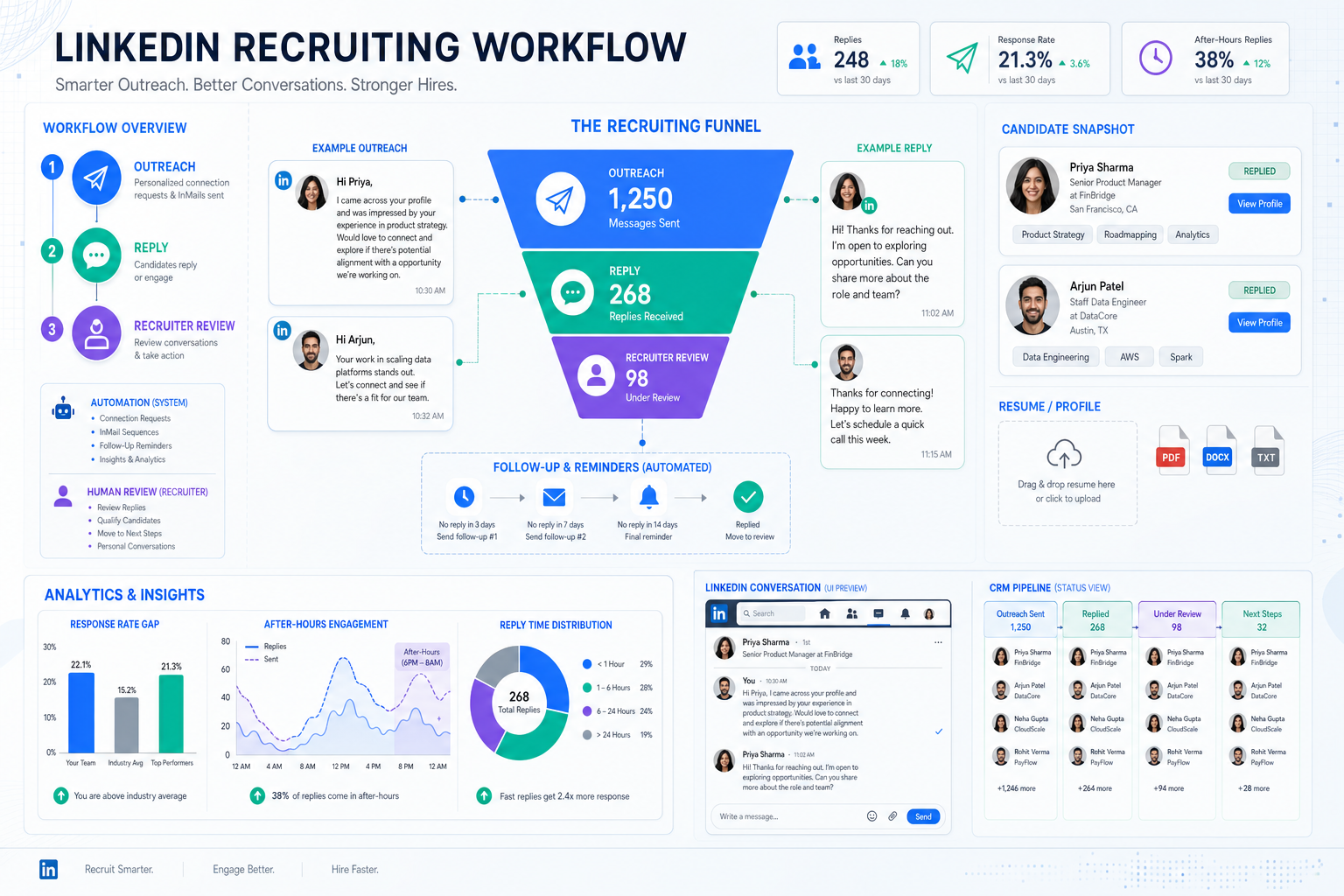
When recruiting leaders assess an ai recruiting tool, this article shows how to fix follow-up gaps and avoid buying AI that adds noise.
That sounds obvious until a real desk gets busy. A boutique search owner loses hours to LinkedIn outreach that must be sent, answered, and logged one by one. An in-house recruiter sees qualified people go cold because follow-up happens after work hours or not at all. A TA leader pays for more sourcing effort, yet the actual problem is broken response handling, inconsistent nurturing, and weak visibility into who was contacted, who replied, and who is ready for recruiter review.
One workflow that helped me reduce that drag was pairing core recruiting operations with AI Recruiter for the repetitive front end of candidate communication. In practice, I found the most useful capabilities were automated outreach on LinkedIn, always-on message handling across time zones, and structured collection of resumes or contact details from interested people. What mattered most was not replacing recruiters, but letting the system handle the repetitive opening exchange while the recruiter still made the final call on resume quality, fit, and next steps.
A useful way to understand why this matters comes from a different HR habit entirely: gamification. Years ago, a simple classroom exercise turned routine learning into an action people actually wanted to complete. HR teams later borrowed the same idea for training, collaboration, paperwork completion, and even early recruiting interaction. The lesson was not that games are magic. It was that when you make a repetitive action easier to enter, clearer to complete, and more rewarding to continue, participation rises and the process produces better data.
That is exactly the hiring operations issue many teams miss when they evaluate software. Candidate outreach, rediscovery, screening prep, and follow-up are full of low-energy tasks that stall unless the system makes action easy and visible. So when employers compare an ai recruiting tool, recruitment automation software, or a talent acquisition crm, the real question is not who claims the most AI. It is which workflow design gets recruiters and candidates to keep moving without losing control, context, or accountability.
Table of Contents
- Why Workflow Design Matters More Than AI Claims
- What Is an AI Recruiting Tool?
- How ATS, CRM, and Automation Work Together
- Features That Actually Change Recruiter Behavior
- Automation vs AI: What Should Stay Human
- LinkedIn Outreach and Response Workflows
- How to Evaluate Platforms Without Getting Distracted
- Implementation, Governance, and Data Risk
- Common Buying Mistakes
- FAQ
Why Workflow Design Matters More Than AI Claims
Recruiting teams rarely fail because they lack effort. More often, they fail because the process asks people to do too many small things manually and too consistently. That is why the gamification lesson is relevant here. In HR, engagement rises when the desired action is easy to start, easy to repeat, and connected to visible progress. Recruiting technology should be judged the same way.
If a recruiter has to remember every follow-up, switch between systems to find conversation history, manually chase late-night replies, and re-enter notes into the system of record, the process degrades fast. The cost is not only time. It is missed replies, stale talent pools, inconsistent candidate experience, and weaker confidence in the data your team uses to make hiring decisions.
Good recruiting systems create momentum. They make the next action obvious. They surface prior candidates worth re-engaging. They reduce the friction between sourcing, conversation, qualification, and handoff. That is why the strongest buying conversations now sit at the overlap of ai recruiting tool, recruitment automation software, and talent acquisition crm categories rather than inside one old label.
What Is an AI Recruiting Tool?
An ai recruiting tool is software that helps recruiting teams automate repetitive work and support judgment across sourcing, outreach, screening, scheduling, rediscovery, and reporting. Depending on the platform, it may include candidate search, profile parsing, ranking, message generation, chatbot conversations, interview coordination, and analytics.
In day-to-day recruiting, it helps to separate two ideas that marketing often blends together:
- Automation handles rules-based actions such as sending follow-ups, assigning tasks, moving stages, or prompting reminders.
- AI-assisted functionality helps with search, matching, summarization, candidate rediscovery, and prioritization.
This distinction matters because the best use of AI in recruiting is usually not to replace recruiter judgment. It is to remove repetitive effort at the top of the funnel and help recruiters focus attention where it matters. That is especially true in LinkedIn-heavy workflows, where message timing, response handling, and resume collection often create more drag than sourcing itself.
From experience, one reason some teams get value from AI Recruiter is that it stays narrow in a practical way. It automates the repetitive opening work on LinkedIn, keeps communication moving across hours and languages, and hands the recruiter a clearer set of interested profiles to review. That is a very different use case from software that tries to turn final hiring decisions into a black box.
How ATS, CRM, and Automation Work Together
One of the most common buying mistakes is assuming these categories are interchangeable. They are connected, but they solve different operating problems.
Applicant tracking system for recruiters
An applicant tracking system for recruiters is usually the formal record of jobs, applications, stages, interview activity, and compliance history. The traditional applicant tracking system benefits are real: standardized workflow, cleaner records, easier collaboration, and clearer reporting discipline.
But a basic ATS often works best once someone has already applied or entered the formal process. It is usually less effective at long-term candidate relationships, re-engagement, and proactive pipeline building.
Talent acquisition CRM
A talent acquisition crm is built for relationship management before or between applications. It supports talent pools, nurture campaigns, segmentation, event follow-up, silver medalist rediscovery, and ongoing communication. If an ATS answers, “What stage is this applicant in?” a CRM answers, “How do we keep relevant people warm until timing matches opportunity?”
This is especially important for recruiters, headhunters, and lean TA teams that hire for recurring roles. If you restart sourcing from zero every time, your database is not an asset. It is just storage.
Recruitment automation software
Recruitment automation software helps reduce manual work across both systems. That can include sequenced outreach, scheduling, reminders, chatbot intake, status updates, task creation, and reporting triggers.
In many organizations, the practical stack becomes:
- ATS for process control and records
- CRM for relationship management
- Automation for repetitive workflow execution
- AI for search, summarization, and prioritization
If you are evaluating options, decide whether you need a stronger ATS, a separate CRM layer, an all-in-one platform, or a point solution that fixes a high-friction part of the funnel such as LinkedIn outreach and candidate response handling.
Features That Actually Change Recruiter Behavior
Long feature lists are less useful than behavior change. A recruiting system earns its place when it changes what recruiters can do consistently under pressure.
| Feature Area | What It Does | Why It Matters |
|---|---|---|
| Candidate sourcing | Finds prospects across channels or internal records | Speeds top-of-funnel pipeline creation |
| Resume parsing | Turns profile data into searchable records | Reduces admin and improves database usefulness |
| Candidate rediscovery | Surfaces prior applicants or leads | Prevents wasted sourcing and improves CRM value |
| Ranking or matching | Highlights relevant profiles using set criteria | Helps triage large candidate volumes |
| Outreach automation | Sends sequenced messages and reminders | Keeps follow-up consistent without extra recruiter effort |
| Interview scheduling | Coordinates calendars and confirmations | Removes repetitive back-and-forth |
| Chat or intake handling | Manages initial questions and captures interest | Improves response speed and candidate convenience |
| Analytics | Tracks funnel health, activity, and source quality | Supports better process management |
| ATS or HCM integrations | Connects recruiting with core HR systems | Reduces duplicate entry and broken reporting |
The reference lesson from gamification applies here too: if the system makes the next action clearer and easier, people do it more consistently. That is why features such as rediscovery, follow-up automation, response capture, and visible communication history often create more value than a flashy scoring model nobody trusts.
Automation vs AI: What Should Stay Human
Not every recruiting task needs AI. In fact, many of the best productivity gains come from plain rules-based automation.
Rules-based automation
This covers predictable actions. A candidate replies, the system flags it. A prospect reaches a stage, the recruiter gets a task. A reminder goes out, a status changes, a message sequence pauses. These are often the fastest wins because they remove repetitive work without changing decision ownership.
AI-assisted support
AI becomes more useful when the task involves searching large talent pools, summarizing profiles, handling first-response questions, or helping recruiters identify who is worth reviewing next. In these areas, an ai recruiting tool can improve speed and focus, but it should still be transparent about what the system is doing and where a recruiter remains responsible.
Key insight: If a platform cannot clearly show which steps are automated, which are AI-assisted, and where human review happens, adoption usually becomes harder than the demo suggests.
That is also why I tend to prefer practical boundaries in recruiter-facing tools. In LinkedIn workflows, for example, I want the software to handle connection attempts, routine role introductions, after-hours replies, and interest capture. I do not want it making the final decision on fit. That division of labor is much easier to govern and much easier to explain to hiring stakeholders.
LinkedIn Outreach and Response Workflows
For many search teams and in-house recruiters, LinkedIn is where the biggest hidden workload sits. The sourcing list is only the start. The real drag comes from initiating contact, replying quickly enough, handling candidate questions, keeping notes organized, and collecting the resume or contact details needed for proper review.
This is where a narrow automation layer can be genuinely useful. In my own testing, AI Recruiter worked best as a front-end assistant for LinkedIn-heavy outreach. It could keep candidate conversations moving outside recruiter working hours, communicate across languages when needed, and capture resumes or contact details from interested candidates. That meant fewer promising replies sitting idle overnight and less manual chasing the next day.
Just as importantly, the system did not remove recruiter accountability. I still reviewed the background, judged relevance against the brief, and decided who moved forward. That is the operating model many teams should aim for: let software maintain momentum, and let recruiters own evaluation.
For agencies, that can reduce one of the classic desk problems: spending premium recruiter time on repetitive opening exchanges. For corporate teams, it can help with global hiring, response speed, and candidate experience when the recruiting team cannot staff every time zone.
How to Evaluate Platforms Without Getting Distracted
When comparing recruitment automation software or an ai recruiting tool, keep the evaluation tied to workflow outcomes rather than category language.
1. Identify the real point of friction
Is your issue sourcing volume, follow-up discipline, rediscovery, slow scheduling, weak reporting, poor search, or late response handling on LinkedIn? Start there. Otherwise you will buy broad functionality to solve a narrow bottleneck.
2. Test whether the system creates action momentum
This is the best lesson to borrow from the gamification example. Does the workflow make the desired recruiter action obvious? Does it prompt the next step? Does it make communication easier to continue? Technology adoption rises when the system removes friction from repetitive behavior.
3. Separate engagement mechanics from actual hiring value
In gamification, badges and points only matter if they drive useful behavior. Recruiting software is similar. Nice interfaces and AI language are not enough. Ask whether the feature improves response rates, shortens admin time, increases rediscovery, or gives recruiters cleaner handoffs. If not, it may only decorate the process.
4. Check CRM depth and rediscovery quality
A true talent acquisition crm should help you segment talent pools, revisit prior candidates, and build relationship history over time. If rediscovery is weak, your team will keep buying fresh sourcing effort instead of using what it already has.
5. Verify ATS integration details
If your ATS remains the system of record, confirm how candidate notes, communication history, stage changes, and profile data move between systems. Weak integrations cancel many applicant tracking system benefits because recruiters end up maintaining duplicate records.
6. Review communication controls carefully
Outreach automation is only valuable if recruiters can edit messages, pause sequences, see history, and decide when a human should step in. This matters even more in LinkedIn workflows, where tone and timing affect response quality.
7. Ask implementation questions early
Who will configure it? How much workflow rebuilding is needed? How quickly can recruiters use the core functions well? A good demo can hide a poor operating fit.
Implementation, Governance, and Data Risk
The more software touches candidate communication and prioritization, the more governance matters.
Bias and oversight
If an ai recruiting tool ranks, recommends, or prioritizes candidates, ask how those outputs are reviewed. Recruiters and HR leaders should understand whether the system is merely organizing information or materially influencing evaluation.
Consent and communication rules
For messaging automation, establish rules for frequency, opt-out handling, timing, and retention. A strong talent acquisition crm should support that discipline rather than create compliance risk.
Data protection
Candidate resumes, contact details, and conversation history are sensitive data. Buyers should review storage, access control, encryption, and model training practices carefully. If you are considering tools for direct candidate messaging, especially across regions, these questions belong in evaluation from the start.
Human decision ownership
One standard I recommend is simple: software can accelerate contact, organization, and first-response handling, but final fit judgment should remain visible and owned by the recruiter or hiring team. That balance tends to improve adoption and reduce internal resistance.
Common Buying Mistakes
- Buying the broadest platform instead of fixing the hardest bottleneck
Teams often need one high-friction workflow solved first, not an entire new architecture.
- Confusing AI language with operational value
An ai recruiting tool should be judged on control, clarity, and recruiter usability.
- Assuming ATS equals CRM
Applicant tracking system benefits are real, but they do not automatically cover long-term relationship management.
- Ignoring top-of-funnel admin
Many recruiting delays happen before formal screening begins, especially in LinkedIn outreach and candidate follow-up.
- Skipping the recruiter adoption question
If recruiters will not trust or use the workflow under pressure, the software will not deliver sustained value.
- Underestimating after-hours response handling
In global or passive-candidate hiring, delayed replies can quietly reduce conversions.
FAQ
What is the difference between an AI recruiting tool and recruitment automation software?
An ai recruiting tool usually includes functions like matching, summarization, search, or conversational support. Recruitment automation software often focuses on rules-based tasks such as reminders, outreach sequences, stage changes, and scheduling. Many platforms combine both.
Does a talent acquisition CRM replace an ATS?
Usually no. A talent acquisition crm is stronger for relationship management, nurturing, segmentation, and rediscovery. An ATS remains important for jobs, applications, stages, and formal hiring records.
What are the main applicant tracking system benefits?
The main applicant tracking system benefits include centralized records, stage visibility, workflow consistency, easier collaboration, and better reporting discipline. They become even more useful when paired with strong automation and CRM capabilities.
Can LinkedIn recruiting be automated without removing the recruiter?
Yes. That is one of the most practical use cases. Software can handle repetitive front-end tasks such as connection attempts, role introductions, candidate replies, and resume collection, while recruiters still evaluate fit and decide who advances.
Who benefits most from this kind of workflow?
Headhunters, agency recruiters, in-house sourcing teams, and TA leaders managing cross-time-zone hiring usually benefit most. These teams often lose the most time to repetitive outreach and delayed response handling.
How should recruiters judge a platform quickly?
Test whether it reduces a real bottleneck, improves response handling, makes rediscovery easier, integrates with your ATS, and preserves human control over candidate evaluation.
Conclusion
The best buying decision in this market usually comes from a simple operating insight: repetitive recruiting work needs momentum, not just intelligence. The old gamification lesson still holds. When a system makes the right action easier to start and easier to continue, participation improves and the underlying data gets better.
That is why teams evaluating an ai recruiting tool, recruitment automation software, or a talent acquisition crm should look past branding and focus on workflow design. Ask where recruiters lose time, where candidates go cold, and where your current process stops creating useful movement. Then choose technology that supports consistent action, clearer records, and stronger recruiter judgment instead of trying to replace it.














