


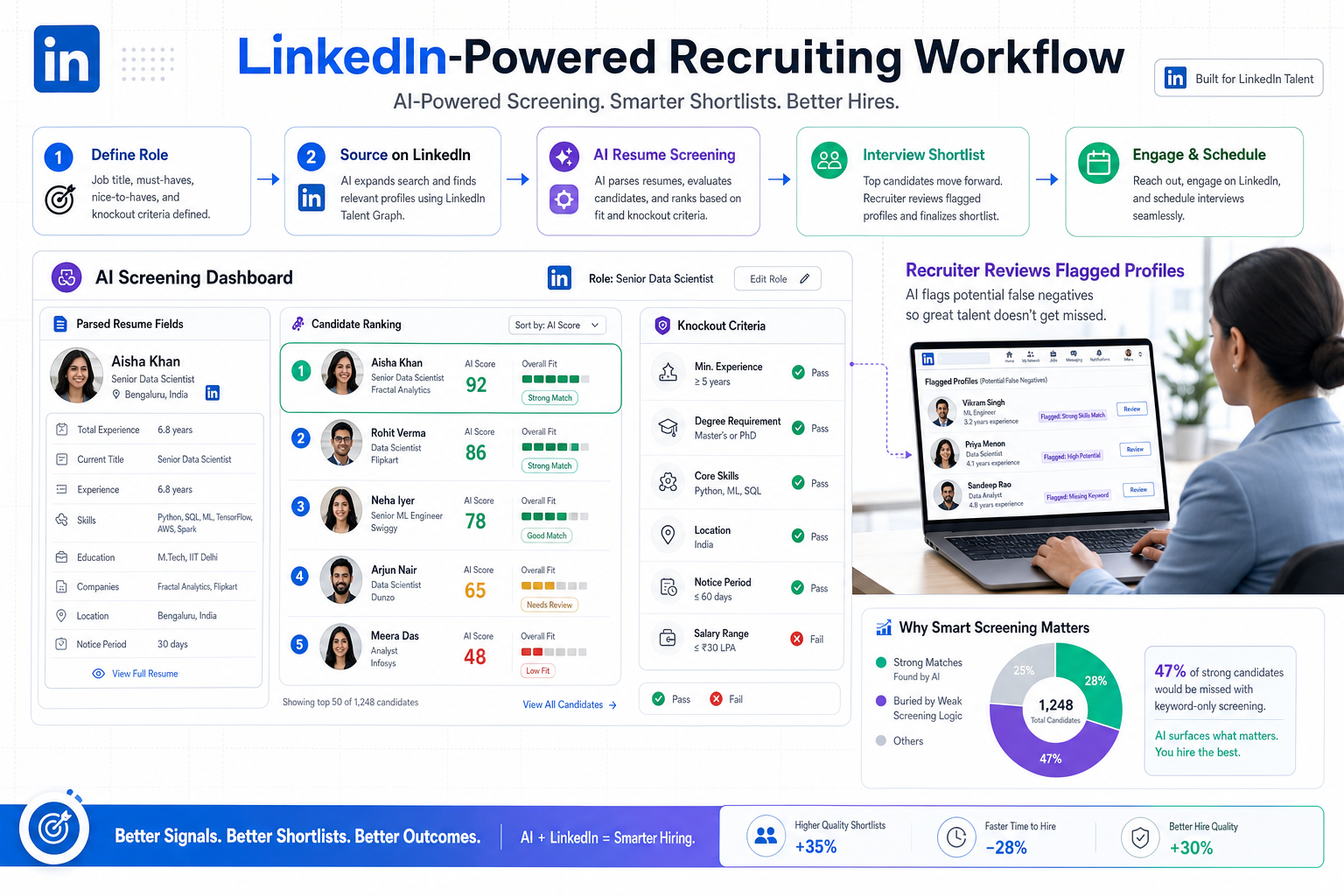
Misaligned ai resume screening tools can bury qualified candidates, and this article helps recruiters diagnose weak screening logic before shortlist quality breaks down.
When that alignment is missing, the damage shows up quickly: qualified people disappear in parsing errors, recruiters waste time reopening weak applications, hiring managers lose confidence in the shortlist, and candidates experience a process that feels random rather than professional. For smaller agencies and lean in-house teams, those mistakes are not abstract process issues. They mean slower placements, more back-and-forth with stakeholders, and a weaker employer reputation in a market where strong candidates notice every delay.
That is where a supported workflow can help. In my own recruiting operations work, I have seen StrategyBrain AI Recruiter reduce the manual drag around first-contact messaging, candidate follow-up, and resume collection on LinkedIn, especially when reply timing and multilingual communication start breaking consistency. What it did not replace was recruiter judgment. I still had to review each resume, decide whether the profile truly matched the role, and move the person into the right next step.
The bigger lesson came from the interview side of hiring. A screening conversation may confirm availability, compensation range, and general fit, but that is only one stage in a longer sequence that should move from role definition to resume screening, then into structured interviews, stakeholder evaluation, final validation, and offer decisions. When those stages are loosely designed, interviews start carrying too much weight because the early screening stage did not do its job cleanly enough.
Picture the moment a recruiter has just finished an initial screen, updated the candidate stage, and sent notes to the hiring manager before a first-round interview is scheduled. If the resume was parsed poorly, the knockout answers were not surfaced clearly, or the ranking logic overvalued the wrong terms, the team enters the interview with the wrong assumptions. That is exactly why candidates keep asking what makes an ai readable resume and employers keep reevaluating how to pass better information from application to interview without letting software distort the decision.
AI candidate screening makes the most sense when you stop viewing it as a black box and start viewing it as one stage in a structured hiring process. The same discipline that improves interviews—clear criteria, consistent stages, and defined decision points—also improves resume screening. In the sections below, I will break down how ai resume screening tools fit into the broader hiring workflow, what an ai readable resume really looks like, and the honest answer to how to pass ai resume screening without resorting to gimmicks.
Where AI Screening Fits in the Hiring Process
One of the most useful ways to understand AI candidate screening is to place it in the full hiring chain rather than treating it as a standalone technology decision. In a typical workflow, the sequence looks something like this:
- Role definition
- Sourcing and attraction
- Resume screening
- Interviewing
- Reference checks or final validation
- Offer and onboarding
That sequence matters. If role scope is vague, success criteria are unclear, or hiring managers have not separated must-haves from nice-to-haves, then even the best ai resume screening tools will produce noisy results. The software can only prioritize against the signals it is given.
Key insight: Screening quality and interview quality rise together. When the early filter is weak, interviews become less structured and more biased because the team is evaluating the wrong pool or entering conversations with incomplete context.
That is why experienced recruiters do not ask only whether screening software is fast. They ask whether it supports fair comparison, preserves candidate context, and hands the interview team a reliable starting point.
ATS Screening vs AI Screening
Candidates often use ATS and AI interchangeably, but in practice they are not the same thing.
| Function | What It Does | Candidate Impact | Recruiter Consideration |
|---|---|---|---|
| Applicant Tracking System | Collects, stores, and routes applications | Your file must enter the system cleanly | Controls workflow, visibility, and audit trail |
| Resume Parsing | Extracts titles, dates, skills, education, and other fields | Formatting can help or hurt before review starts | Bad extraction can hide good applicants |
| AI Screening | Supports filtering, ranking, matching, or flagging | Relevant language and experience matter | Needs calibration against actual job criteria |
| Interview Workflow | Moves shortlisted candidates through evaluation stages | Application quality shapes later assumptions | Requires structured decision-making, not gut feel |
The ATS manages the process. AI adds a layer of interpretation or prioritization inside that process. In other words, the ATS is the container; AI is part of the screening logic. Confusing the two leads to poor candidate advice and poor software decisions.
How AI Resume Screening Tools Actually Work
Most ai resume screening tools follow a workflow that is more ordinary than candidates expect. The mystery usually disappears once you break it into stages.
1. The application is captured
The candidate submits a resume through a job portal, careers page, email path, or recruiter workflow. In LinkedIn-heavy recruiting, I have also used AI Recruiter to keep after-hours conversations moving, collect resumes from interested candidates, and centralize the handoff so the recruiter can review actual profiles rather than chase missing documents.
2. The resume is parsed
The system reads the file and tries to identify sections such as experience, skills, education, certifications, employers, and dates. This is where formatting problems often begin. If the document uses graphics, text boxes, sidebars, or unusual reading order, the parser may place information in the wrong field or miss it entirely.
3. Rules and knockout criteria are applied
Some screening is not AI at all. Work authorization, location, licensing, shift availability, and required credentials are often rules-based checks inside the ATS. These filters can eliminate clear mismatches before deeper review.
4. Matching or ranking logic is applied
After extraction, the system may compare the profile with the job criteria. It may look for required skills, related titles, industry terms, years of experience, education signals, and other role-relevant patterns. Some systems rank candidates or assign a match indicator to guide recruiter review order.
5. A human reviews the output
This is the stage candidates should remember. In most real recruiting environments, software narrows and organizes. Recruiters still inspect the resume, compare it against the hiring brief, and decide whether to move the person into a screening call or a structured interview stage.
That human checkpoint is also where workflow support matters. In my experience, tools like StrategyBrain AI Recruiter are most useful before and around screening, not as a substitute for selection. They keep outreach, candidate replies, and resume gathering from becoming the bottleneck, while the recruiter remains accountable for fit, judgment, and progression to interview.
What Makes an AI Readable Resume
An ai readable resume is simply a resume that software can extract accurately and that a recruiter can review without reconstruction. It does not need to be ugly. It needs to be clear.
Practical formatting rules
- Use a single-column layout. This preserves reading order.
- Choose standard headings. Use Experience, Education, Skills, and Certifications instead of creative labels.
- Avoid text boxes, charts, and decorative sidebars. They often break parsing.
- Keep dates obvious. Employers and systems both rely on chronology.
- Use selectable text. A scanned image PDF is risky.
- List role-specific skills in context. Do not hide them in a visual design element.
From the recruiter side, this matters because parsed fields often shape the first review screen. If titles land in the wrong place or dates disappear, a qualified candidate can look weaker than they are. By the time the interview team sees the application, the damage may already be done.
A simple before-and-after example
If someone puts “Career Snapshot” in a colored sidebar, buries job titles in a table, and shows skills as icons, the parser may struggle to know what belongs in experience versus skills. If the same person uses standard section names and plain text, the system can usually extract the same information much more reliably.
That is the real purpose of an ai readable resume: not gaming software, but making sure the candidate’s actual background survives the trip from application to recruiter screen to interview panel.
How to Pass AI Resume Screening
The honest answer to how to pass ai resume screening is not to outsmart the system. It is to improve clarity, relevance, and evidence.
Start with the job description
Mirror the employer’s language where it truthfully matches your background. If the role asks for stakeholder management, applicant tracking systems, Boolean sourcing, or compensation benchmarking, use those terms if you have done that work. Do not rely on vague claims like “people-oriented professional” when the role requires specific recruiting tasks.
Use exact terminology naturally
Systems often recognize exact matches more easily than loose synonyms. If a posting says “talent acquisition,” it can help to include that phrase alongside related language you genuinely use. The same applies to acronyms and spelled-out versions.
Make the document parseable first
Keyword quality does not matter much if the resume fails basic extraction. Build the ai readable resume foundation before you optimize wording.
Show evidence, not just terms
Recruiters still review chronology, scope, and consistency. If your resume names a skill but never shows where you used it, the application weakens at the human review stage.
Answer knockout questions carefully
Some applications never reach deeper ranking because a gating response blocks them first. Work authorization, location, travel, schedule, and license questions often matter before the resume is reviewed in context.
Do not stuff keywords
Repeating the same phrase unnaturally can hurt readability and signal low-quality tailoring. A better approach is to align your language with the role and explain your experience in clean, role-specific terms.
If you are still wondering how to pass ai resume screening, the shortest answer is this: make your qualifications easier to understand than the next person’s. That is what both systems and recruiters reward.
How Recruiters Should Structure Screening and Interviews
The interview-process perspective matters here because screening quality affects every stage that follows. A structured hiring process is not only about interview questions. It starts earlier.
Define the role before you automate the screen
Separate must-have requirements from trainable preferences. If everything is marked essential, matching quality suffers and good candidates are buried.
Use screening to support, not replace, judgment
Ranking signals should guide review order, not finalize decisions. This is especially important for nontraditional candidates, career changers, and applicants with transferable experience.
Connect screening notes to interview design
If the first-stage screen highlights an unclear career transition, a stakeholder-management question, or a missing credential detail, that should inform the structured interview stage. Screening and interviewing should work as one system, not as disconnected checkpoints.
Keep the process efficient
One mistake many hiring teams make is adding interview rounds to compensate for weak screening. That usually creates candidate fatigue without improving quality. Strong screening should reduce unnecessary interviews, not multiply them.
Audit the workflow regularly
Review how resumes parse, which knockout rules create friction, and whether the shortlist quality matches downstream interview outcomes. If hiring managers repeatedly reject highly ranked candidates for predictable reasons, the screen needs recalibration.
Use automation where communication, not judgment, is the bottleneck
This is where I found StrategyBrain AI Recruiter genuinely useful. In LinkedIn recruiting, candidate replies often arrive after hours, across time zones, or in multiple languages. The tool helped maintain reply speed, introduce opportunities, and collect resumes and contact details without forcing a recruiter to be online constantly. But once resumes arrived, the decision still returned to me: who matched the brief, who advanced to screening, and who belonged in a structured first interview.
Common Mistakes and Myths
Mistake: Treating all screening as AI
Some of what candidates experience is simple workflow logic, not machine learning. If a knockout response disqualifies an application, that may be a rules-based screen rather than an AI decision.
Mistake: Letting interviews compensate for bad screening
When early filtering is weak, teams often add more interviews. That rarely fixes the core issue. It usually just delays the decision.
Mistake: Optimizing resumes for aesthetics only
A visually polished file is not automatically an ai readable resume. Readability for software and readability for recruiters are both essential.
Myth: AI always rejects nontraditional candidates
Poorly designed workflows can do that, but the real issue is usually weak criteria or overreliance on rigid filters. Human review remains the safeguard.
Myth: Software makes the final hiring call
In most professional recruiting settings, it does not. It organizes and prioritizes information. The recruiter and hiring team still make the decision.
FAQ
Do AI resume screening tools replace recruiters?
No. They help sort, extract, rank, and flag information. Recruiters still review resumes, conduct screening calls, and decide who advances.
What file format is best for AI screening?
A clean PDF or Word document usually works well if the text is selectable and the layout is simple. Avoid image-based resumes and highly designed templates.
Are two-column resumes bad for screening?
They are risky. A single-column resume is usually safer if you want an ai readable resume that preserves the right reading order.
How do recruiters actually use screening outputs?
They often see parsed fields, application status, knockout answers, and match indicators inside the ATS. That summary can shape who gets deeper review first.
What is the safest strategy for how to pass ai resume screening?
Use role-relevant language accurately, keep the format machine-readable, answer application questions carefully, and support each claim with real experience.
Can LinkedIn recruiting automation help before screening starts?
Yes. In workflows where outreach, response timing, and resume collection are slowing the funnel, tools such as AI Recruiter can help maintain communication and gather candidate information so recruiters can focus on evaluation rather than repetitive follow-up.
Conclusion
The most useful way to think about ai resume screening tools is as one stage in a structured hiring system. Resume screening, initial screening calls, first-round interviews, stakeholder interviews, and final validation all depend on one another. When the front end is messy, the rest of the process becomes less fair and less efficient.
For candidates, the practical takeaway is simple: create an ai readable resume, align your wording with the actual role, and focus on the real answer to how to pass ai resume screening—clarity over tricks. For recruiters, the takeaway is equally practical: use automation to remove communication bottlenecks, keep screening criteria tied to the job, and make sure human judgment stays central from first resume to final interview decision.














