


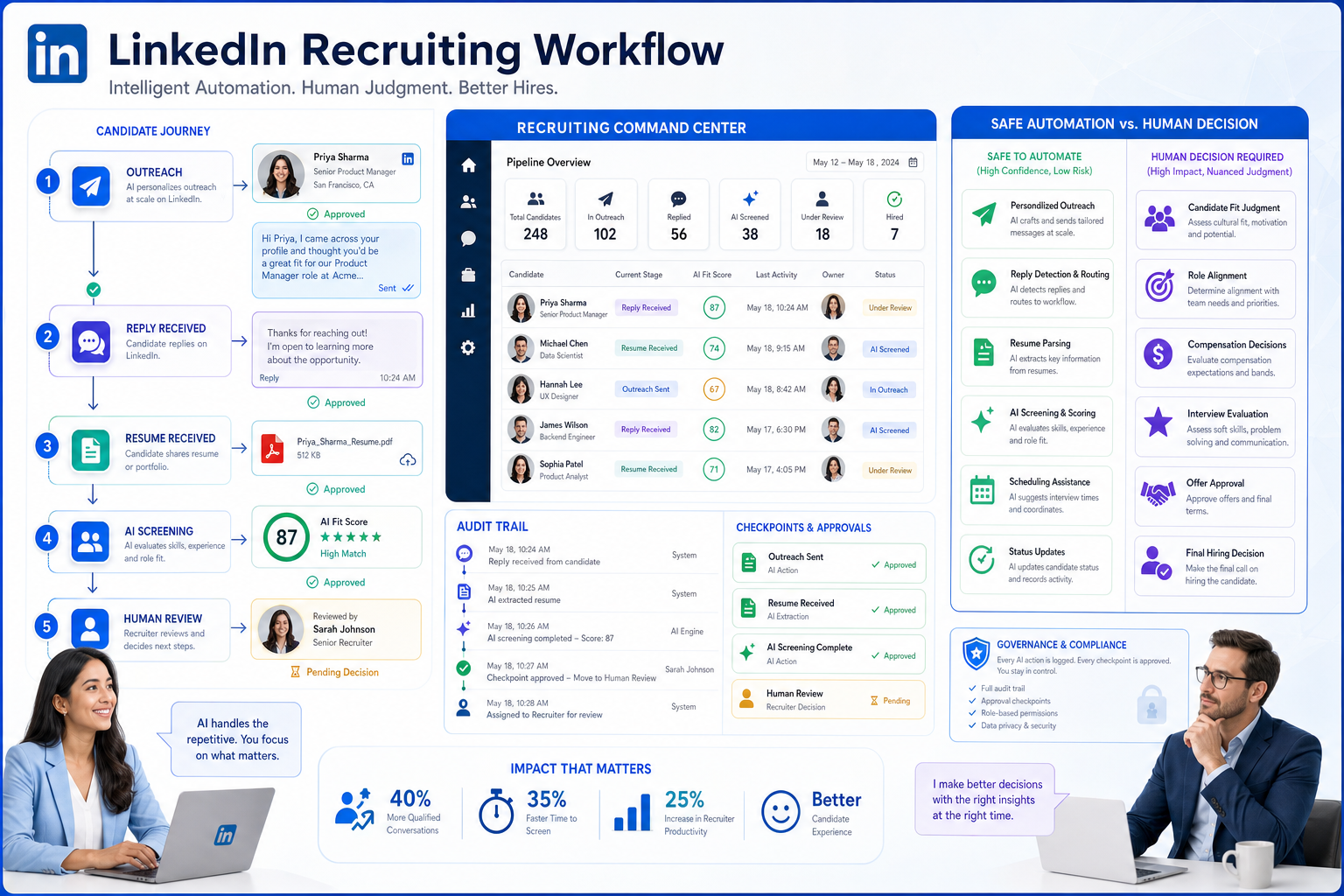
Automatiser LinkedIn decisions become safer when recruiters use this article to judge what to automate, where review must stay human, and how to avoid black-box outreach.
That conclusion matters because most recruiting friction does not start with search volume alone. It starts when outreach, candidate replies, hiring-manager expectations, and interview handoffs all move at different speeds. Smaller agencies feel it as missed response windows and consultant overload. In-house TA teams feel it as slower shortlists, patchy records, and a candidate experience that starts to look transactional. Individual recruiters feel it personally when evenings disappear into follow-ups, resume chasing, and status updates that should already have been captured somewhere.
In my own LinkedIn-heavy sourcing work, I found that StrategyBrain AI Recruiter was most useful not as a replacement for recruiter judgment, but as support for the repetitive layer that causes that drift. Its always-on candidate messaging, LinkedIn outreach handling, and resume/contact capture can keep conversations moving when recruiters are offline, while the recruiter still decides who is genuinely worth screening, how resumes should be assessed, and which candidates move forward.
The deeper issue is cultural as much as operational. In recruiting teams, workflow becomes the personality of the hiring function: what gets documented, what gets ignored, how quickly people respond, whether autonomy is real or just claimed, and whether the stated priority of candidate care actually shows up in day-to-day behavior. I have seen teams say they want a more open, responsive sourcing model, then punish deviations, hide information in inboxes, and leave recruiters to improvise follow-up rules one message at a time.
That is exactly why the decision to automatiser linkedin should not be treated as a simple messaging upgrade. It exposes bigger questions about how your recruiting culture works, what your team rewards, where accountability sits, and whether your tools behave more like recruiting infrastructure or like automated lead generation software built to automate sales. The rest of this article focuses on those decision points so recruiters can automate the right tasks without turning candidate outreach into a black box.
- Why recruitment automation is about operating culture, not just speed
- Which LinkedIn recruiting tasks are safe to automate
- How workflow design shapes recruiter control
- Three software approaches recruiters compare in practice
- Recruitment automation vs automated lead generation software
- How to evaluate recruitment automation tools
- A practical rollout plan for agencies and TA teams
- FAQ
Why Recruitment Automation Is About Operating Culture, Not Just Speed
When teams talk about recruitment automation tools, they often focus first on throughput: more searches, more outreach, more replies, more pipeline activity. But experienced recruiters know the better question is how automation changes behavior. Does it create clarity or hide responsibility? Does it support recruiter autonomy or make people dependent on a tool they cannot audit? Does it align with what the company says it values in hiring?
This is where the workplace-culture lens is useful. Every hiring function develops a recognizable operating style. Some teams run on clear protocol, strong documentation, and visible ownership. Others are looser, faster, and more improvisational. Neither model is automatically right or wrong. What matters is whether the chosen automation setup matches the team’s actual environment.
If your organization values accountability, then LinkedIn automation needs visible approvals, reliable records, and clean ATS history. If your team depends on recruiter creativity and rapid market response, the tooling still needs guardrails, but it should not force every action through rigid manual bottlenecks. In both cases, the best outcome is not full autonomy by software. It is software that reinforces the kind of recruiting behavior your team wants to scale.
Key insight: In hiring, automation becomes part of culture. It influences communication style, record quality, responsiveness, and how seriously candidate experience is treated.
That is also why leadership behavior matters. In the same way management sets tone in workplace culture, recruiting leaders set the tone for automation. If leaders say recruiters should personalize outreach but measure only message volume, the process will drift toward low-quality sequencing. If they say they want better collaboration but leave notes scattered across inboxes and browser tabs, no sourcing tool will fix that contradiction on its own.
Which LinkedIn Recruiting Tasks Are Safe to Automate
If you want to automatiser linkedin responsibly, start with tasks that are repeatable, reviewable, and low-risk when monitored by a recruiter.
1. Candidate discovery support
Saved searches, profile alerts, recommendation layers, and search organization are generally safe places to begin. They reduce admin without deciding who gets hired. Recruiters still need to define the target profile clearly, especially around must-have experience, geography, compensation reality, and likely candidate motivation.
2. Initial outreach and follow-up continuity
This is the area where I found AI Recruiter genuinely useful. In live sourcing, candidates often reply outside working hours, ask basic role questions, or signal interest before you are back at your desk. A system that can continue the first layer of conversation, confirm interest, and collect contact details keeps momentum alive. The recruiter should still review the exchange, decide whether the profile fits, and take over once resume review or qualification becomes substantive.
3. Resume and contact collection
One of the more practical automation gains is removing the manual chase for documents and details after a candidate says they are interested. If the workflow captures resumes and contact information consistently, recruiters spend less time doing clerical recovery work and more time evaluating fit.
4. Scheduling and status updates
Interview coordination, reminders, and internal status notifications are classic automation wins. They improve consistency and reduce the “who owns the next step?” problem that frustrates both candidates and hiring managers.
5. Reporting and audit trails
Automated reporting matters because activity without interpretation is not useful. Track sourcing response patterns, stage movement, source quality, and recruiter workload. If your reporting cannot show whether automation improved hiring outcomes, you are only measuring motion.
How Workflow Design Shapes Recruiter Control
One lesson from organizational culture applies directly here: unwritten rules eventually define real behavior. In recruiting, that means your actual process is not what is written in a slide deck. It is what recruiters do when they are busy, what managers review, and what the tools make easy or difficult.
Before adding any LinkedIn automation, map four things:
- Who sets the outreach standard and who can edit it
- Where conversation history lives and whether it is visible to the team
- When a human review is mandatory before a candidate moves forward
- How exceptions are handled when a high-value profile needs a different approach
That exercise usually reveals whether the team really wants flexibility, strict process, or a hybrid model. It also shows whether your toolset supports your stated values. A team that claims to care about recruiter judgment but routes everything through opaque automation is sending a conflicting signal. A team that claims to value consistency but lets every consultant run their own unmanaged cadence has the opposite problem.
In practical terms, automation should make your communication norms more visible. The original culture article emphasized that software, messaging style, management availability, and alignment between policy and behavior all shape workplace culture. In recruiting, the same is true of sequencing rules, note-taking discipline, hiring-manager access, and whether candidate interaction is treated as a relationship or just a funnel event.
Three Software Approaches Recruiters Compare in Practice
Because this topic is about software use as much as process, recruiters usually compare three broad categories before deciding how to automatiser linkedin.
1. Native ATS automation suites
Strengths: best for governance, stage tracking, auditability, hiring-manager collaboration, and reporting continuity.
Weaknesses: often slower or less flexible at the top of funnel, especially for proactive LinkedIn sourcing.
Cost profile: usually justified for teams that need process depth across many requisitions, but can feel heavy for solo recruiters or small agencies.
Best fit: mid-sized to large in-house TA teams, compliance-sensitive organizations, and hiring environments where visibility matters more than raw outreach speed.
Working with StrategyBrain AI Recruiter: this setup works best when LinkedIn conversation momentum is handled externally while the ATS remains the system of record for review and final movement.
2. Sales-style sequencing platforms
Strengths: strong cadence logic, list handling, and volume-based outreach execution.
Weaknesses: often built around prospect logic rather than candidate nuance; can feel impersonal; weaker on hiring-stage context and recruiter collaboration.
Cost profile: attractive for teams chasing outreach scale, but indirect costs rise if candidate experience drops or records need manual repair.
Best fit: outbound-heavy teams that already understand the limits and are willing to add recruiting-specific controls around usage.
Working with StrategyBrain AI Recruiter: recruiters who need LinkedIn-specific recruiting conversations usually benefit more from purpose-built recruiting logic than from adapting a system designed mainly to automate sales.
3. LinkedIn-focused recruiting automation
Strengths: closer to the actual sourcing environment recruiters work in every day; useful for handling first-touch messaging, after-hours replies, multilingual communication, and resume capture.
Weaknesses: still needs strong human review and good downstream process design; if disconnected from ATS or CRM habits, it can create fragmented oversight.
Cost profile: often easier to justify for search firms, lean TA teams, and recruiters whose bottleneck is manual LinkedIn conversation handling rather than enterprise workflow design.
Best fit: headhunters, agencies, growth-stage internal teams, and international hiring functions that need more top-of-funnel capacity without losing recruiter control.
Working with StrategyBrain AI Recruiter: from my perspective, the strongest use case is straightforward. I can let StrategyBrain AI Recruiter keep candidate communication moving, answer routine role questions, and collect resumes while I retain the decisive work: reading the CV, judging relevance, calibrating with the hiring manager, and deciding who belongs in interview.
Recruitment Automation vs Automated Lead Generation Software
This distinction deserves its own section because many buyers arrive through overlapping LinkedIn searches. The language can sound similar, but the operating model is not.
Automated lead generation software is meant to identify prospects, enrich contact data, and move them through sequences toward meetings or opportunities. It is optimized for revenue conversion and helps teams automate sales.
Recruitment automation tools, by contrast, should support candidate discovery, role explanation, resume collection, stage visibility, and recruiter-led qualification. The record is different, the relationship is different, and the risk of getting the tone wrong is much higher.
| Area | Recruitment Automation | Lead Gen / Sales Automation |
|---|---|---|
| Primary goal | Move qualified candidates into a hiring process | Create and convert commercial opportunities |
| Main relationship | Candidate to employer | Prospect to seller |
| Critical judgment | Fit, readiness, fairness, role alignment | Need, budget, timing, deal progression |
| Key workflow risk | Damaging candidate trust or losing context | Low-quality pipeline or poor conversion efficiency |
| Best human owner | Recruiter and hiring stakeholders | Sales and revenue teams |
If a platform feels brilliant at sequence volume but weak at recruiting nuance, that is a warning sign. Candidates are not leads in a generic funnel. The most successful recruiting teams borrow discipline from outbound sales only where it improves responsiveness and process clarity without flattening the human relationship.
How to Evaluate Recruitment Automation Tools
Once you frame automation as both a workflow and culture decision, the buying criteria become clearer.
1. Can recruiters inspect and override the automation?
If the answer is no, trust will erode. Every serious recruiting workflow needs visible logic, editable messaging, and a clear handoff point back to the recruiter.
2. Does it reinforce your team’s real communication style?
Some teams operate within strict protocol. Others need a more open, adaptive sourcing model. The tool should support the environment you actually run, not the one you imagine in presentations.
3. Does it improve documentation instead of scattering it?
Look at where replies, notes, resumes, and stage movement end up. Good automation centralizes. Bad automation creates one more shadow process.
4. Does it handle the top-of-funnel work recruiters truly lose time to?
For many teams, that means after-hours replies, repetitive role explanations, and document collection. In those cases, a LinkedIn-focused tool such as StrategyBrain AI Recruiter may solve a more immediate operational problem than a broader but less responsive platform.
5. Does it support diversity without forcing sameness?
The culture reference was right to stress that hiring for fit should not mean hiring for sameness. Automation should help recruiters find and engage relevant talent more consistently, not narrow the funnel into a homogeneous profile because the search model is too rigid.
6. Can leadership explain why this workflow is fair and useful?
If managers cannot explain the logic to recruiters, hiring managers, or candidates, implementation will become fragile. Auditability is not just a compliance issue. It is an adoption issue.
A Practical Rollout Plan for Agencies and TA Teams
The cleanest rollout is phased, measurable, and explicit about recruiter ownership.
- Define the behavior you want to improve. Faster first response, cleaner documentation, better shortlist speed, stronger candidate follow-up, or less consultant overtime.
- Map your current communication culture. Who replies, who documents, who approves, and where conversations disappear today.
- Automate one LinkedIn layer first. Start with outreach continuity, resume capture, or candidate interest confirmation rather than full end-to-end automation.
- Keep a recruiter review checkpoint. Human assessment should remain mandatory before interview advancement or rejection.
- Measure outcomes, not activity alone. Watch time to hire, response quality, interview conversion, source quality, and recruiter workload.
- Refine based on live usage. In my experience, the practical value of AI Recruiter conversation patterns becomes clearer after recruiters review real exchanges and adjust role messaging to reflect their own standards.
The important point is that shaping a recruiting process is ongoing. Just as company culture is never really “finished,” recruitment automation is not a one-time setup. It needs adjustment as role types, candidate expectations, manager behavior, and sourcing markets change.
FAQ
What does automatiser linkedin mean for recruiters?
In recruiting, it usually means using software to support sourcing, first-touch messaging, follow-up continuity, resume collection, and workflow tracking while leaving final decisions to recruiters and hiring managers.
Can LinkedIn recruitment automation replace recruiters?
No. It can remove repetitive communication and admin, but recruiters still need to evaluate resumes, judge relevance, manage stakeholder alignment, and protect candidate experience.
How is recruitment automation different from automated lead generation software?
Recruitment automation is designed for candidate relationships and hiring outcomes. Automated lead generation software is designed for prospect conversion and revenue workflows. The overlap is mostly at the level of search and sequencing mechanics.
Is it safe to use tools that automate sales-style outreach for hiring?
Only with caution. Sales-oriented logic can help with cadence discipline, but if it dominates the workflow, outreach may become too aggressive or too generic for candidate engagement.
What is the best first use case for a LinkedIn-heavy recruiting team?
Usually the best starting point is automating repetitive top-of-funnel work such as initial outreach support, after-hours response handling, and resume or contact capture, while keeping recruiter review in place.
Where does StrategyBrain AI Recruiter fit best?
It fits best for teams and recruiters whose bottleneck is manual LinkedIn communication volume. It is particularly useful when candidate replies arrive outside work hours or when recruiters need help maintaining sourcing momentum without giving up final screening control.
Conclusion
If your team wants to automatiser linkedin, the smartest approach is not to chase maximum automation. It is to build a recruiting workflow that reflects the way you want your hiring function to behave. That means responsiveness without chaos, scale without generic messaging, and efficiency without surrendering recruiter judgment.
The strongest recruitment automation tools are the ones that support your actual operating culture. They make communication clearer, preserve accountability, and help recruiters spend more time on qualification and less on clerical repetition. That is also how you separate true recruiting automation from automated lead generation software that was built mainly to automate sales.
For agencies, headhunters, and internal TA teams working heavily through LinkedIn, the practical win is simple: keep the machine on the repetitive work, keep the recruiter on the meaningful decisions, and make sure the workflow remains visible enough to trust.














