


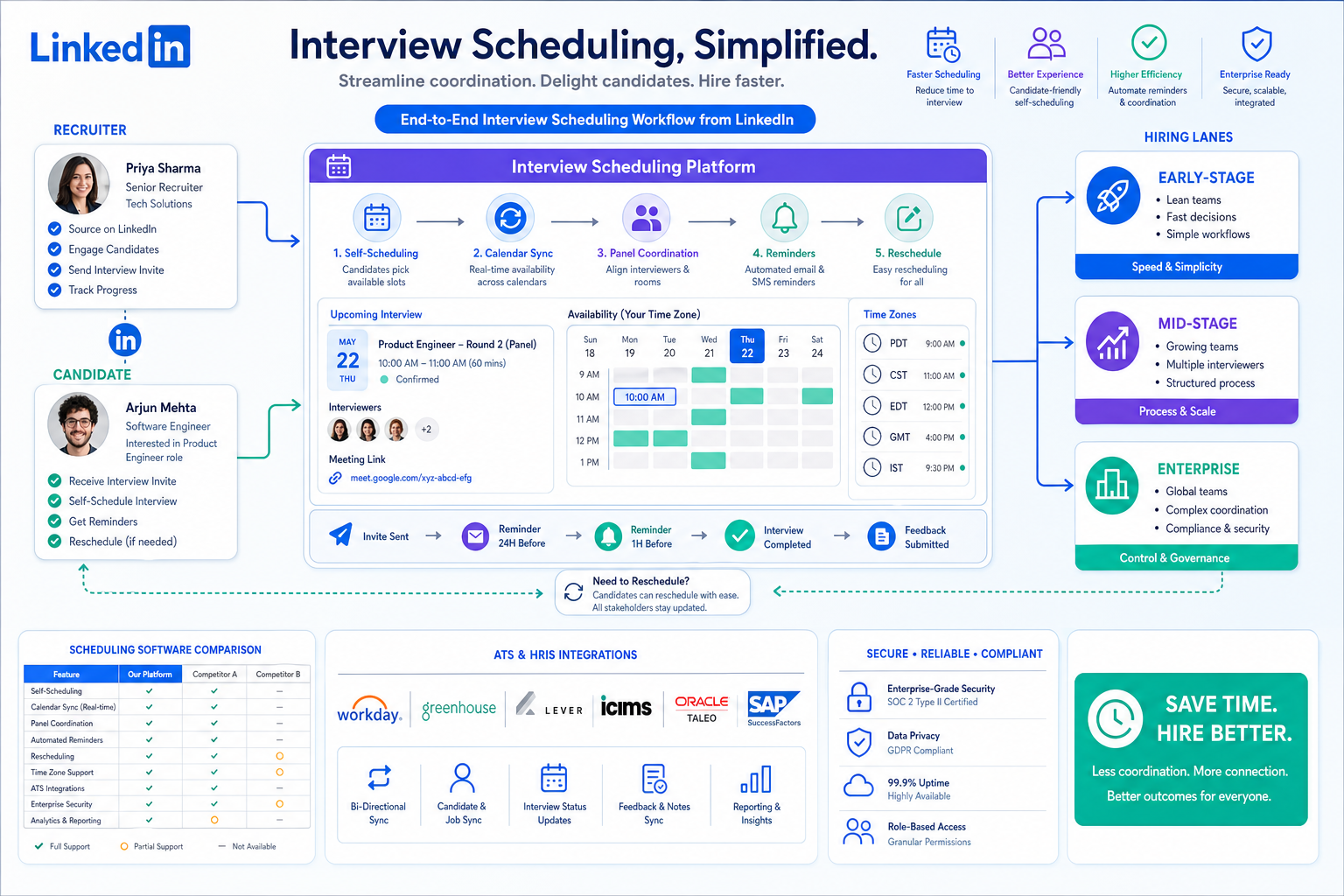
When scheduling starts creating no-shows and process risk, headhunters can use this article to judge which best interview scheduling software fits their hiring stage.
That sounds obvious until a search gets busy. A solo recruiter can still patch things together with calendar checks and email threads, but once a client search adds cross-time-zone interviews, partner input, candidate follow-ups, and last-minute moves, scheduling turns into operating risk. The loss is not only time. You lose candidate momentum, annoy hiring managers, create avoidable no-shows, and make your process look less controlled than it really is.
In my own workflow, tools like StrategyBrain AI Recruiter have helped upstream of scheduling by handling repetitive outreach, after-hours candidate replies, and multilingual follow-up so only genuinely interested people reach the interview stage. That matters because cleaner top-of-funnel conversations make scheduling interviews for candidates much easier to manage. The recruiter still makes the final call on résumé review, fit, and next steps, but using AI Recruiter conversation workflows to collect contact details and maintain response continuity reduces the admin pile that usually spills into interview coordination.
A useful way to think about scheduling maturity actually comes from how teams grow in another function. In finance, early-stage companies often run lean with one to three generalists, then add specialists as revenue moves past $10 million, $50 million, $100 million, and beyond. Recruiting operations follow a similar pattern. At low volume, one person can own outreach, coordination, and reminders. At mid-stage growth, the team starts adding specialists, more structured reporting lines, and external support. At enterprise scale, the process needs layers, rules, and dependable systems because too many stakeholders are involved for ad hoc coordination to hold.
Once you see scheduling through that growth-stage lens, the buying question changes. The best interview scheduling software is not simply the flashiest booking tool. It is the system that matches your current hiring complexity, supports the way your team is staffed, and prevents coordination from breaking as interview volume grows. That is why this article focuses on best interview scheduling software through team stage, process maturity, and real-world scheduling interviews for candidates.
Table of Contents
- Why hiring stage should shape scheduling software choices
- What interview scheduling software actually does
- Why recruiting teams invest in automation
- Features that matter most in practice
- The right setup by recruiting team size and hiring volume
- Basic automation vs AI-assisted coordination
- A practical evaluation framework
- Common mistakes when buying scheduling tools
- FAQ
Why hiring stage should shape scheduling software choices
Most software comparisons flatten the market into feature lists. In real recruiting, that is rarely how buying decisions work. What matters is whether the system fits the stage your hiring team is in.
That same growth logic shows up in finance team planning: lean early teams rely on generalists, mid-stage teams bring in more specialized support, and large organizations need deeper structure and governance. Interview scheduling follows the same arc. A small search firm or internal team may need speed and simplicity. A scaling business needs stronger coordination and workflow continuity. An enterprise needs panel control, permissions, integrations, and reliable rescheduling under pressure.
Using a growth-stage lens also keeps teams from overbuying or underbuying. A basic self-scheduling tool may be enough for a lean team running first-round calls. It will not be enough for a multi-stage process with executive panels, distributed interviewers, or hiring managers who expect visibility without hand-holding.
Practical takeaway: Before comparing vendors, define your hiring stage the way an operations leader would define team maturity: who owns the process, how many handoffs exist, how many specialists are involved, and what breaks when volume rises.
What interview scheduling software actually does
Interview scheduling software coordinates availability between candidates and internal stakeholders without forcing recruiters to manually compare calendars and rewrite invitation emails. In most cases, it pulls availability, offers valid time slots, sends invitations, triggers reminders, and supports rescheduling when plans change.
In practice, the best interview scheduling software does more than place a meeting on a calendar. It supports scheduling interviews for candidates across different stages, time zones, and participant groups. That includes recruiter screens, hiring manager interviews, technical panels, multi-step loops, and follow-up updates that keep everyone aligned.
For teams already using an ATS, scheduling is not a side task. It sits inside a larger hiring workflow that includes screening, stage movement, interviewer preparation, and feedback collection. That is why mature buyers compare scheduling tools not only on booking convenience, but also on how cleanly they fit into recruiting operations as a whole.
Why recruiting teams invest in automation
The main reason teams adopt automated interview scheduling is not to add another tool. It is to remove friction that delays hiring. Candidates should not wait while a recruiter checks three hiring manager calendars, confirms panel availability, and manually chases interviewers for responses.
Experienced recruiting teams usually feel the problem in four places:
- Speed: too much back-and-forth before a slot is confirmed
- Coordination: more stakeholders create more calendar conflicts
- Candidate experience: slow, confusing, or inconsistent communication
- Control: weak visibility into what was booked, changed, or missed
I have also found that upstream communication quality changes scheduling outcomes more than many teams expect. When candidate replies arrive overnight, in different languages, or through fragmented message threads, recruiters start the scheduling phase already behind. Using StrategyBrain AI Recruiter to keep LinkedIn outreach moving, answer routine questions, and collect contact details before handoff made interview coordination cleaner in my experience because fewer half-interested conversations reached the booking stage. It did not replace recruiter judgment, but it reduced the noise that usually clogs the process.
Features that matter most in practice
Not every team needs the same depth, but several capabilities deserve close review if you are comparing the best interview scheduling software.
1. Candidate self-scheduling
Self-serve booking lets candidates choose from approved slots without waiting for a recruiter to send options manually. This is one of the fastest ways to improve scheduling interviews for candidates, especially in distributed or high-volume environments.
2. Reliable calendar syncing
Good syncing should reflect actual availability, not just open-looking blocks. It should account for working hours, existing meetings, travel buffers, and blackout windows.
3. Multi-person time-slot matching
The software should not simply show open slots. It should identify realistic options across several interviewers and formats. This becomes essential once panel interviews enter the process.
4. Rescheduling workflows
Rescheduling is a daily recruiting reality, not an edge case. Strong tools let candidates and internal teams recover quickly without restarting the process or losing context.
5. Automated reminders
Reminder workflows help reduce missed interviews and keep internal interviewers prepared. For many teams, this is now a core requirement rather than a bonus feature.
6. Multi-stage and panel coordination
Simple one-to-one screens are not the hard part. The real test is whether the software can support structured interview loops, interview dependencies, and stakeholder-heavy final rounds.
7. ATS connectivity
Integration matters because scheduling becomes more valuable when it is part of the hiring workflow instead of a disconnected calendar exercise.
8. Communication templates
Templates improve consistency and save recruiters from rewriting the same logistics over and over. They also improve candidate experience by making instructions clearer.
The right setup by recruiting team size and hiring volume
One of the most useful ways to evaluate software is to borrow the growth-stage model often used in team design. Instead of asking for a universal winner, ask what kind of scheduling system matches your stage.
Early-stage hiring teams: lean structure, light volume
Comparable to a business operating with one to three finance generalists, early recruiting teams often have one recruiter or coordinator covering everything. At this stage, ease of use matters more than heavy configuration.
- Typical environment: startup hiring, boutique search work, founder-led recruiting support
- Best-fit capabilities: self-scheduling, basic reminders, clean calendar syncing, simple templates
- Main risk: buying enterprise complexity before the process is stable
If that is your stage, the best interview scheduling software is usually the one that cuts manual admin fastest without forcing a rigid process too early.
Mid-stage recruiting teams: growth creates specialization
As organizations move into a more structured phase, the staffing pattern starts to resemble a company in the $10 million to $100 million range: more specialists, more recurring processes, and more pressure on reporting and control. In recruiting, this often means coordinators, recruiters, hiring managers, and department leaders all touching the same workflow.
- Typical environment: Series A/B growth, expanding internal teams, agency desks handling more concurrent searches
- Best-fit capabilities: panel scheduling, stronger reminders, faster rescheduling, stage-based templates, ATS integration
- Main risk: relying on a basic booking tool after stakeholder complexity has already increased
This is often the point where scheduling starts to expose operational weaknesses that were invisible at lower volume.
Growth-stage and enterprise teams: layers, governance, and scale
Once hiring volume rises sharply, the model starts to resemble larger organizations with eight, ten, or more specialized finance roles. Recruiting teams at this stage need systems that can handle structured loops, executive schedules, interviewer pools, compliance expectations, and process visibility across business units.
- Typical environment: enterprise recruiting operations, multi-region hiring, formal interview programs
- Best-fit capabilities: advanced panel coordination, permissions, deep integrations, workflow controls, reliable reporting visibility
- Main risk: using a lightweight scheduler where governance and consistency are now required
At this level, the best interview scheduling software acts less like a booking link and more like coordination infrastructure.
Where external or fractional support fits
The finance growth model also highlights another useful point: not every capability has to be built with full-time internal resources from day one. Some hiring teams combine lean internal staffing with outside support, recruiting coordinators, or consultants. If that is your setup, choose software that is easy for occasional collaborators to use without constant training.
Basic automation vs AI-assisted coordination
This distinction matters more as hiring complexity rises. Basic interview scheduling software automates repetitive booking tasks. AI-assisted coordination can go further by helping match interviewers, prioritize better slots, or regenerate options when plans change.
| Capability Area | Basic Automation | AI-Assisted Coordination |
|---|---|---|
| Candidate booking | Shows approved open slots | Can prioritize stronger slot options based on workflow logic |
| Interviewer matching | Uses fixed rules and availability | Can help identify more workable combinations |
| Rescheduling | Reopens options manually or by preset rules | Can surface new combinations faster when calendars change |
| Multi-stage workflow | Schedules stage by stage | Can better support coordination across several stages |
| Recruiter workload | Reduces admin | Reduces admin plus some coordination effort |
Not every team needs advanced logic. But if your process already involves many moving parts, chasing only a simple booking interface may leave the real coordination problem unsolved.
There is also a practical split between top-of-funnel AI and interview-stage automation. In my own use, StrategyBrain AI Recruiter was most helpful before interviews were booked: it handled LinkedIn outreach, candidate Q&A, and contact collection around the clock, including multilingual conversations. That meant fewer dead-end threads reached the scheduling stage. The recruiter still reviewed résumés and decided who advanced, but the handoff into scheduling was cleaner and faster.
A practical evaluation framework
When teams ask me how to evaluate the best interview scheduling software, I suggest using a stage-based scorecard rather than a generic feature checklist.
- Define your current hiring stage. Are you operating like a lean one-person desk, a specialized mid-stage team, or an enterprise function with layers?
- Map interview types. List screens, hiring manager rounds, panels, and final-stage sessions.
- Count coordination points. Note how many people need to align at each stage.
- Locate the real delay. Is the bottleneck candidate response, interviewer availability, rescheduling, or internal handoff?
- Test workflow recovery. Ask what happens when someone cancels close to interview time.
- Check communication quality. Review invitations, reminders, templates, and instructions.
- Evaluate upstream handoff. If outreach and pre-screen communication are messy, consider whether tools like AI Recruiter can reduce the scheduling burden before booking even starts.
- Confirm stakeholder usability. Recruiters, coordinators, hiring managers, and occasional collaborators should all be able to use the system without friction.
A simple comparison table can help:
| Evaluation Area | What to Check | Why It Matters |
|---|---|---|
| Stage fit | Match between tool depth and hiring complexity | Prevents overbuying or underbuying |
| Candidate booking | Ease of self-scheduling | Improves speed and candidate experience |
| Calendar accuracy | Real-time sync and conflict handling | Reduces manual repairs |
| Panel support | Multi-person coordination | Essential for structured hiring |
| Rescheduling | Fast recovery workflow | Protects recruiter productivity |
| Reminders | Automated prompts for all participants | Reduces avoidable misses |
| Integration | ATS and workflow connectivity | Keeps hiring data aligned |
| Upstream support | Quality of candidate handoff into scheduling | Improves scheduling efficiency before booking begins |
Common mistakes when buying scheduling tools
Choosing for the demo instead of the operating model
A polished demo often centers on a simple interview. Real hiring includes calendar changes, interviewer drop-offs, candidate delays, and stage-specific communication needs.
Ignoring stage fit
A lean team can drown in enterprise configuration. A complex team can outgrow a lightweight scheduler in months. The problem is not the software category alone; it is the mismatch between team maturity and tool design.
Underestimating panel complexity
Many teams buy around first-round speed and only later discover that final-round coordination is where the operational pain actually sits.
Treating reminders as optional
Reminder automation is now part of baseline scheduling quality. Without it, no-shows and avoidable confusion remain too common.
Separating outreach problems from scheduling problems
If recruiter time is already being consumed by fragmented candidate messaging, scheduling will suffer downstream. In practice, a cleaner front end often improves booking performance. That is one reason I view tools like StrategyBrain AI Recruiter as complementary rather than unrelated. It can reduce repetitive LinkedIn outreach and after-hours follow-up so recruiters spend more time on actual interview decisions and coordination.
Practical advice: During evaluation, test three live scenarios: a simple screen, a panel interview, and a same-day reschedule. Then ask whether the system still works when your current hiring stage changes one level up.
FAQ
What is the best interview scheduling software for most recruiting teams?
The best interview scheduling software is the one that matches your hiring stage, stakeholder load, and workflow complexity. For some teams, that means simple self-scheduling. For others, it means stronger panel coordination and integration.
How does interview scheduling software improve candidate experience?
It reduces waiting time, cuts down on back-and-forth emails, and makes interview logistics clearer. Faster booking and easier rescheduling make scheduling interviews for candidates feel more organized and respectful.
Should small recruiting teams buy advanced scheduling software?
Not always. Early-stage teams often get better results from simple, reliable tools. Advanced logic becomes more valuable when interview volume and stakeholder complexity rise.
What matters most in high-volume hiring?
Candidate self-scheduling, accurate calendar syncing, reminders, rescheduling, and strong panel support usually matter most. These features help recruiters move faster without losing control.
How does AI help with interview scheduling?
AI can support better matching, faster rescheduling, and more efficient coordination in complex environments. It can also help before scheduling begins by managing candidate communication and handoff quality.
Where does StrategyBrain AI Recruiter fit if it is not a scheduling tool?
It fits upstream in the recruiting workflow. It can automate LinkedIn outreach, candidate Q&A, multilingual communication, and contact collection so recruiters enter the interview stage with cleaner candidate intent and less manual message handling. The recruiter still reviews résumés and decides who moves forward.
Final thoughts
The strongest way to compare the best interview scheduling software is to stop treating every hiring team like it has the same operating model. A lean desk, a scaling recruiting function, and an enterprise interview program do not need the same kind of scheduling system.
If you use a growth-stage lens, the market becomes easier to read. You can choose for real complexity, not vendor noise. And if you also improve upstream communication with tools such as StrategyBrain AI Recruiter, you give scheduling a better starting point instead of asking it to fix a messy pipeline on its own.














