


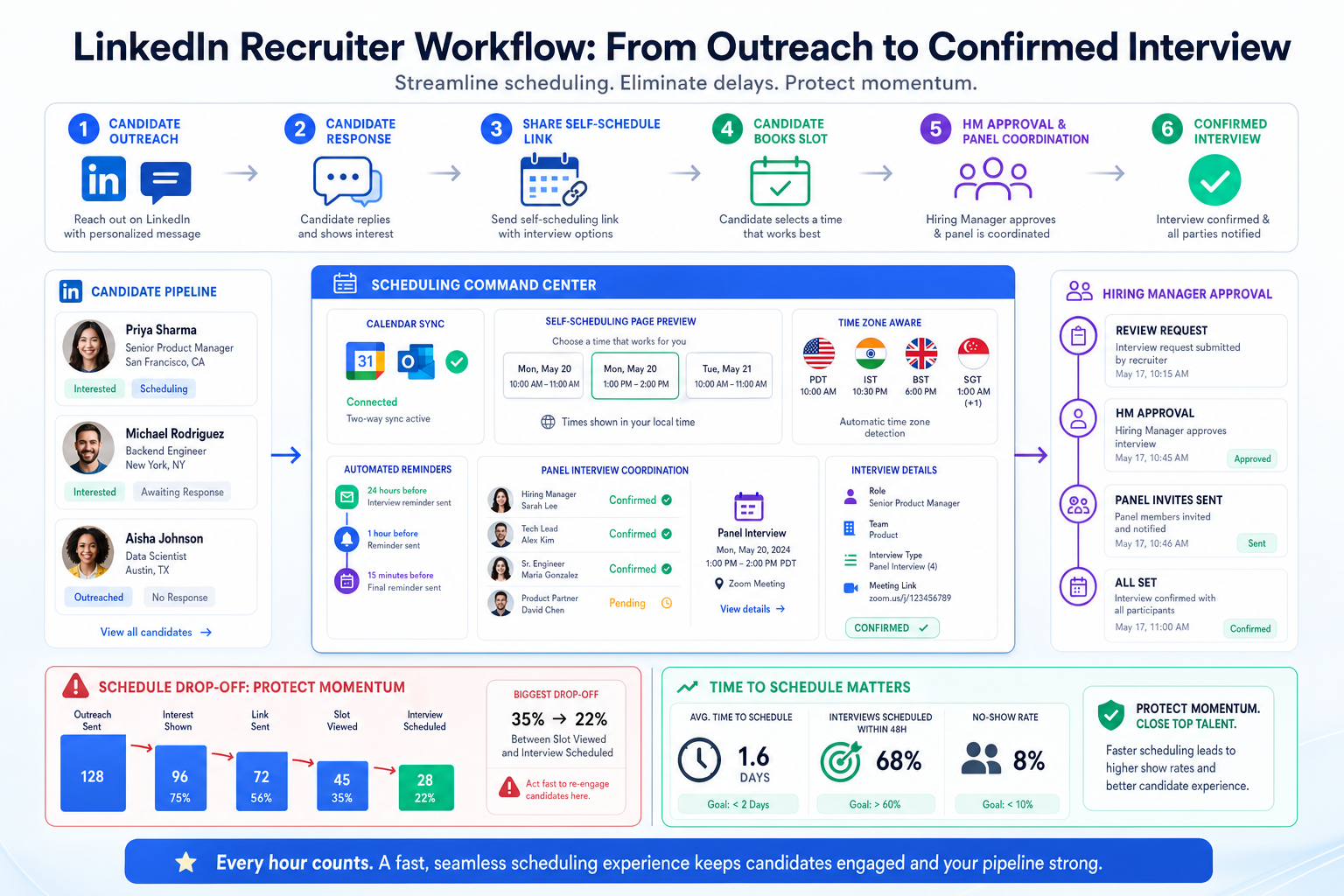
This guide helps recruiters judge the best interview scheduling software to protect candidate momentum and avoid drop-off from delays.
That matters more than most teams admit. When scheduling breaks down, the damage is not limited to a few messy calendar invites. Agency recruiters lose response momentum they worked hard to create, in-house teams frustrate hiring managers with avoidable delays, and smaller firms absorb hidden costs in coordinator time, reschedules, and candidate drop-off. The practical risk is simple: interested people do not stay interested forever, even when they like the role, the team, or the employer.
In my own workflow, I have seen how support tools can relieve that pressure before interview scheduling even starts. Used carefully, AI Recruiter helps by keeping candidate conversations active after hours, responding across time zones, and collecting resume or contact details when someone is genuinely open to a next step. That does not replace recruiter judgment. I still review the profile, decide whether the fit is real, and control who moves into screening and interview stages, but it reduces the lag that often causes promising interest to cool off before scheduling happens.
A useful way to frame the problem comes from a Mercer survey discussed in a Canadian workforce infographic: many workers reported being happy at work while still considering a move, with as many as 59 percent described as satisfied yet still looking toward the exit. In recruiting terms, that is the candidate-side version of a familiar paradox. A person can be positive about their current situation, reply politely, ask good questions, and even share a resume, then disappear if the next step becomes slow or awkward.
You can see that play out in real recruiting actions. A recruiter opens a requisition, checks the last candidate reply, sends a screening note, waits for a hiring manager to confirm availability, updates the candidate stage, and then loses a full day to calendar friction. By the time interview slots are finally offered, the candidate may have committed attention elsewhere. That is why evaluating the best interview scheduling software and the best interview scheduling tools is really about protecting momentum in a market where interest is often genuine but fragile.
- Why scheduling speed matters in an engagement paradox
- What is interview scheduling software?
- What makes the best interview scheduling software?
- Standalone scheduling tools vs ATS scheduling
- Best interview scheduling tools by use case
- Interview scheduling software comparison table
- How recruiters should choose the right tool
- Common evaluation mistakes
- FAQ
Why Scheduling Speed Matters in an Engagement Paradox
Recruiters often assume interview scheduling is an administrative task that happens after the important work. In practice, it is part of persuasion. When workers are reasonably content in their current role yet still open to hearing about something better, every delay increases the odds that curiosity fades. The lesson from the engagement paradox is not just that talent is mobile. It is that openness does not last on your timeline.
That is why the best interview scheduling software should be judged less like a convenience feature and more like a conversion layer in the hiring process. If your team cannot move a qualified and interested candidate from conversation to confirmed interview without friction, the problem is not only operational. It affects response rates, employer perception, and recruiter credibility.
For firms doing outreach on LinkedIn or managing passive talent pipelines, this is where I have found AI Recruiter especially useful alongside scheduling tools. It keeps candidate communication active outside business hours, handles multilingual replies when needed, and captures resumes from interested contacts so the recruiter has less dead time between first interest and scheduling. The software does not decide who gets interviewed. It keeps the door open long enough for the recruiter to make that decision quickly.
What Is Interview Scheduling Software?
Interview scheduling software automates the work of booking interviews between candidates and hiring teams. In recruiting, that usually includes candidate self-scheduling, calendar synchronization, confirmations, reminders, rescheduling, and visibility into interviewer availability.
The distinction between a generic meeting scheduler and recruiting-focused scheduling software matters. A simple booking app may work for one interviewer sharing open times, but recruiting teams often need stage-based scheduling, panel coordination, interviewer conflict checks, timezone accuracy, and a clear audit trail tied to the hiring process.
For teams already working inside an applicant tracking system, scheduling should not sit off to the side. It should support candidate stage movement, recruiter ownership, and hiring manager visibility. Otherwise, you create the exact delay that the opening case exposed: interest arrives, but operational friction slows the next step.
What Makes the Best Interview Scheduling Software?
When recruiters search for the best interview scheduling software, they are usually trying to solve three problems at once: speed, consistency, and control. The strongest tools reduce repetitive coordination while preserving enough structure for real hiring workflows.
In my experience, the best interview scheduling tools usually stand out in these areas:
- Candidate self-scheduling: Candidates can pick from approved slots without long email threads.
- Real calendar sync: Google and Microsoft integrations need to be dependable enough to avoid double-booking.
- Reminders and confirmations: Automated communication reduces no-shows and confusion.
- Rescheduling workflows: Changes should not force recruiters to rebuild the entire interview loop.
- Timezone handling: Distributed hiring makes this non-negotiable.
- Panel coordination: Multi-interviewer scheduling is where weak tools break down.
- Conflict detection: Recruiters need to know when interviewers are unavailable or overcommitted.
- Reporting: Visibility into time-to-schedule and delay patterns helps teams improve.
- ATS alignment: Scheduling should fit naturally into the broader hiring workflow.
The real test is whether the tool helps you protect candidate momentum without creating more admin work. In markets where many candidates are open but not desperate to move, speed with structure matters more than feature count.
Standalone Scheduling Tools vs ATS Scheduling
One of the most important decisions is whether you need a standalone scheduler or scheduling built into your ATS. Neither approach is universally better. The right answer depends on hiring volume, interview complexity, and how your team already works.
When standalone tools make sense
Standalone scheduling tools can work well for smaller teams, search firms, and organizations that need faster deployment without changing their entire recruiting system.
- Useful for lower-volume or simpler interview workflows
- Often easier to roll out quickly
- Good fit when one recruiter coordinates a limited set of interviewers
- Helpful for teams that want automation without a larger systems project
When ATS-native scheduling makes more sense
If your recruiting operations are already centered in an ATS, built-in scheduling usually offers better long-term control. This is especially true for stage-based interviews, panel loops, and teams that need shared visibility across recruiters, coordinators, and hiring managers.
- Better for high-volume and multi-stage hiring
- Stronger process consistency
- More useful for panel interviews and structured workflows
- Improves reporting by keeping scheduling data close to candidate stage data
Practical takeaway: A standalone tool may be enough if your process is simple. If your team regularly coordinates complex interview loops, ATS-connected scheduling is usually safer and easier to scale.
Best Interview Scheduling Tools by Use Case
The phrase best interview scheduling software sounds like there should be one universal winner, but recruiting teams buy for very different conditions. A more practical approach is to define what the best interview scheduling tools look like for each hiring environment.
For startup hiring
Startups usually need speed and simplicity. The right fit often includes self-scheduling, calendar sync, and easy rescheduling without heavy setup.
Prioritize: simple implementation, reminders, and lightweight workflow support.
For enterprise recruiting
Enterprise teams need process control, analytics, and strong multi-interviewer coordination. In this environment, the best interview scheduling software usually supports approvals, substitute interviewer planning, timezone management, and deep ATS alignment.
Prioritize: orchestration, reporting, conflict detection, and governance.
For high-volume hourly hiring
These teams care most about speed and candidate responsiveness. Mobile-friendly scheduling, reminders, and fast rescheduling often matter more than elegant interface design.
Prioritize: self-service booking, bulk scheduling support, and communication speed.
For agency recruiting and headhunters
Agency teams often face a double-timing problem: they must keep candidates warm while also managing client-side interviewer availability. The best interview scheduling tools for this environment should reduce handoff delays and preserve recruiter ownership. This is also where outreach support can help. In my own experience, using AI Recruiter before the scheduling stage made a measurable practical difference in workflow discipline because candidate replies, resumes, and contact details were collected while interest was active, leaving less manual chasing before the interview invite went out.
Prioritize: recruiter control, client coordination, candidate responsiveness, and a clean handoff from sourcing to scheduling.
For panel interview coordination
Panel interviews create the most strain because they combine several calendars, shifting availability, and last-minute substitutions. Weak tools turn this into a coordinator bottleneck.
Prioritize: overlap detection, substitute coverage, and stage-aware scheduling logic.
Interview Scheduling Software Comparison Table
Use this framework before demos or procurement review.
| Evaluation Area | Basic Scheduler | Recruiting-Focused Scheduler | ATS-Built-In Scheduling |
|---|---|---|---|
| Candidate self-scheduling | Usually yes | Yes | Yes, often by stage |
| Calendar sync | Usually yes | Yes | Yes |
| Panel interview support | Limited | Strong | Usually strongest |
| Timezone handling | Basic | Strong | Strong |
| Interviewer conflict detection | Limited | Yes | Yes |
| Rescheduling workflows | Basic | Advanced | Advanced and stage-aware |
| Substitute interviewer options | Rare | Sometimes | More likely |
| SMS scheduling support | Rare | Sometimes | Varies |
| Reporting on bottlenecks | Minimal | Moderate to strong | Strongest when tied to ATS data |
| Best fit | Simple hiring needs | Growing recruiting teams | Complex or high-volume hiring |
The point of this comparison is not just product fit. It is process fit. If your candidates are the kind who may be content where they are yet still open to a move, every unnecessary delay in this table becomes a conversion risk.
How Recruiters Should Choose the Right Tool
Recruiters usually make better decisions when they define the operating model first and compare features second.
- Map your hiring volume. Count interviews per week and note how many require multiple interviewers.
- Measure time-to-schedule. If candidates wait too long for confirmed times, you have a process problem before you have a software problem.
- Review candidate behavior. Look at how often interested candidates slow down, reschedule, or disappear between first response and first interview.
- Define workflow complexity. A recruiter screen is very different from a five-person panel loop.
- Check ATS dependency. If your team lives inside an ATS, prioritize tools that support stage-based workflow.
- Test calendar reliability. Real-time sync is essential.
- Assess timezone accuracy. Distributed teams cannot tolerate avoidable timing errors.
- Evaluate interviewer coordination. Conflict detection and substitute workflows separate average tools from strong ones.
- Look at reporting. You should be able to see where scheduling delays actually happen.
I would also add one practical step from modern sourcing workflows: review what happens before the scheduling request is sent. If candidate interest is being created through outbound outreach, tools like AI Recruiter can help maintain conversation continuity, especially across geographies and after-hours replies. The scheduler then performs better because it receives warmer, better-documented candidates rather than cold or half-qualified handoffs.
Common Evaluation Mistakes
Choosing a generic booking app for a complex recruiting workflow
A clean booking page can look good in a demo but fail in real recruiting once panel coordination, approvals, or rescheduling pressure appear.
Ignoring the candidate-side attention window
The opening case matters here. Candidates do not need to hate their current job to stop engaging with yours. They just need a reason to delay. Slow scheduling provides that reason.
Waiting too long to think about ATS fit
If integration is treated as an implementation detail, recruiters often end up with duplicate records, manual updates, and fragmented communication.
Optimizing only for the first booking
Rescheduling is not an edge case. It is part of normal recruiting operations, especially in competitive markets.
Forgetting recruiter workflow before the interview stage
Scheduling software is stronger when the candidate arrives with clean notes, confirmed interest, and captured contact information. That is one reason I see value in pairing scheduling processes with tools like AI Recruiter for outreach-heavy teams. It supports the repetitive front-end messaging, while the recruiter keeps control of fit assessment and interview decisions.
FAQ
Does an ATS already include interview scheduling?
Sometimes, but the depth varies. The useful question is whether it supports self-scheduling, calendar sync, panel coordination, reminders, rescheduling, and reporting well enough for your workflow.
Can candidates reschedule interviews themselves?
Many modern tools allow self-rescheduling within approved rules. That is important because it reduces recruiter effort and preserves candidate momentum.
How do the best interview scheduling tools handle panel interviews?
The strongest platforms identify overlapping availability, account for time zones, flag conflicts, and support interviewer substitutions.
What works best for agency recruiters?
Agency teams usually need fast handoffs, client-side coordination, candidate responsiveness, and clear ownership. A strong scheduling platform works best when paired with disciplined sourcing and follow-up workflows.
How can recruiters reduce delay before scheduling starts?
Keep candidate communication active and organized. For outreach-led teams, tools such as AI Recruiter can help manage initial LinkedIn conversations, collect resumes, and maintain after-hours responsiveness, while the recruiter still decides who is worth advancing.
What should recruiters measure after implementation?
Start with time-to-schedule, reschedule frequency, no-show rate, and the drop-off rate between first candidate interest and confirmed interview.
Conclusion
The best interview scheduling software is not the one with the longest feature list. It is the one that protects candidate momentum, fits your workflow, and gives recruiters enough control to move quickly without creating chaos.
If there is one lesson from the engagement paradox, it is that interest and commitment are not the same thing. Candidates can be satisfied where they are and still open to you, but that window closes fast when coordination gets clumsy. That is why the best interview scheduling tools should be evaluated as part of the full recruiting journey, from first reply through confirmed interview, not as a standalone calendar utility.














